
Yoast SEO vs All in One SEO: Features, Price, and Which to Pick
Yoast SEO vs All in One SEO gets decided on a price that stopped being true. Yoast SEO Premium is $118.80 a year for 1 site, and it now bundles Local SEO, News SEO, and Video SEO instead of selling them separately. AIOSEO’s headline $99 is its stripped Basic tier. The AIOSEO most people actually picture, the one with internal link suggestions and 404 logs, is $399. Match the feature sets honestly and Yoast is the cheaper single-site license, not the expensive one.
Two camps get this wrong in opposite directions. The first installs Yoast because it’s the name everybody knows, then pays a yearly subscription to unlock a redirect manager that a free competitor has shipped for years. The second reads a feature grid, picks AIOSEO for the schema, and finds out at renewal that the tier carrying the features they read about costs 4 times what they budgeted.
The tier you need is never the tier in the headline.
Yoast SEO vs All in One SEO at a Glance
Both plugins do the same core job: title tags, meta descriptions, XML sitemaps, canonical URLs, structured data, and social meta. Neither has a feature the other lacks entirely. The differences that matter are which tier gates which feature, and how much that tier costs in year 2.
Here’s the ranking on the things people actually choose on:
- Single-site paid license: Yoast. $118.80 buys the redirect manager, internal linking suggestions, orphaned content reports, 5 keyphrases per page, and the Local, News, and Video modules. The equivalent AIOSEO bundle is the $399 Pro tier.
- Free tier: a tie, and both lose. Neither Yoast Free nor AIOSEO Lite includes a redirect manager or a 404 monitor.
- Writer training: Yoast. The content and readability checks explain why a check failed, not just that it did.
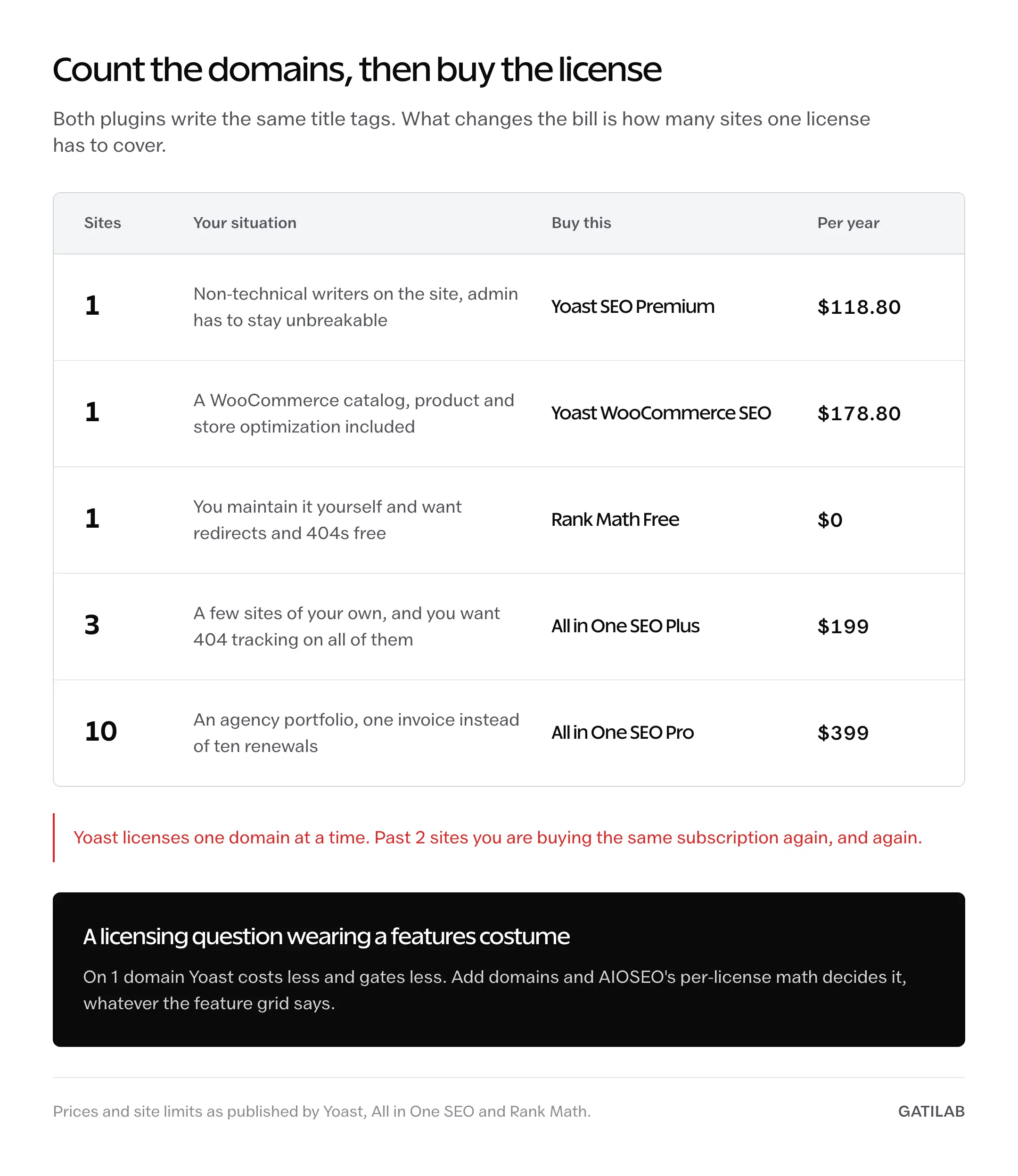
- Multi-site agencies: AIOSEO. Yoast sells per domain, so 10 client sites means 10 subscriptions. AIOSEO Pro covers 10 sites in one.
- Ecommerce: Yoast WooCommerce SEO at $178.80 includes everything in Premium. AIOSEO puts WooCommerce SEO in Basic at $99, which is the one place its cheap tier genuinely wins.
One correction worth making before anything else, because it appears in most comparisons including older ones on this topic. Yoast is not the original WordPress SEO plugin. All in One SEO’s own plugin directory listing describes it as “the original WordPress SEO plugin, founded in 2007,” and Yoast SEO’s directory entry dates to 2010. Yoast is the bigger one, at 10 million-plus active installs against AIOSEO’s 3 million-plus. Bigger, not older.
What the Licenses Actually Cost
The “both are about $99” line survives because it compares Yoast’s only single-site tier against AIOSEO’s cheapest one, which is not the same product. AIOSEO sells 4 paid tiers, and the features that show up in its marketing are spread across 3 of them.
| License | Per year | Sites | What the tier unlocks |
|---|---|---|---|
| Yoast SEO Free | $0 | Unlimited | Titles, meta, sitemaps, base schema, content and readability analysis, 1 keyphrase |
| Yoast SEO Premium | $118.80 ex VAT | 1 | Redirects, internal linking suggestions, orphaned content, 5 keyphrases, Local + News + Video SEO, Google Docs seat, 24/7 support |
| Yoast WooCommerce SEO | $178.80 | 1 | Everything in Premium plus product and store optimization |
| AIOSEO Lite | $0 | Unlimited | Titles, meta, sitemaps, base schema, TruSEO analysis, breadcrumbs, social meta |
| AIOSEO Basic | $99 | 1 | Redirects, WooCommerce SEO, IndexNow. No 404 tracking, no Local SEO, no Link Assistant |
| AIOSEO Plus | $199 | 3 | Adds 404 tracking, full site redirects, Local SEO, Author SEO, 15 SEO revisions |
| AIOSEO Pro | $399 | 10 | Adds Link Assistant, orphaned post reports, 30 SEO revisions |
| AIOSEO Elite | $599 | 100 | Adds multi-site and client management features |
Prices are from Yoast’s plugin page and AIOSEO’s pricing page. Read the second one carefully: AIOSEO runs a 50% first-year discount that puts Pro at $199.50, and its own page states renewals are at full price. Budget against $399, not $199.50, or you’ll be having an unpleasant conversation with yourself in 11 months.
What most comparisons put side by side:
Yoast Premium $99/year vs AIOSEO Pro $99/year. Functionally identical pricing.
What the current price lists say:
Yoast Premium $118.80/year for 1 site, redirects and internal linking included, vs AIOSEO $399/year for the tier that has both.
Same 2 plugins, same features requested, and the gap goes from zero to roughly 3.4 times. The parity claim was true when AIOSEO’s Pro tier was priced differently and Yoast’s Local, News, and Video modules were separate purchases. Both of those things changed, and the comparison never got re-priced.
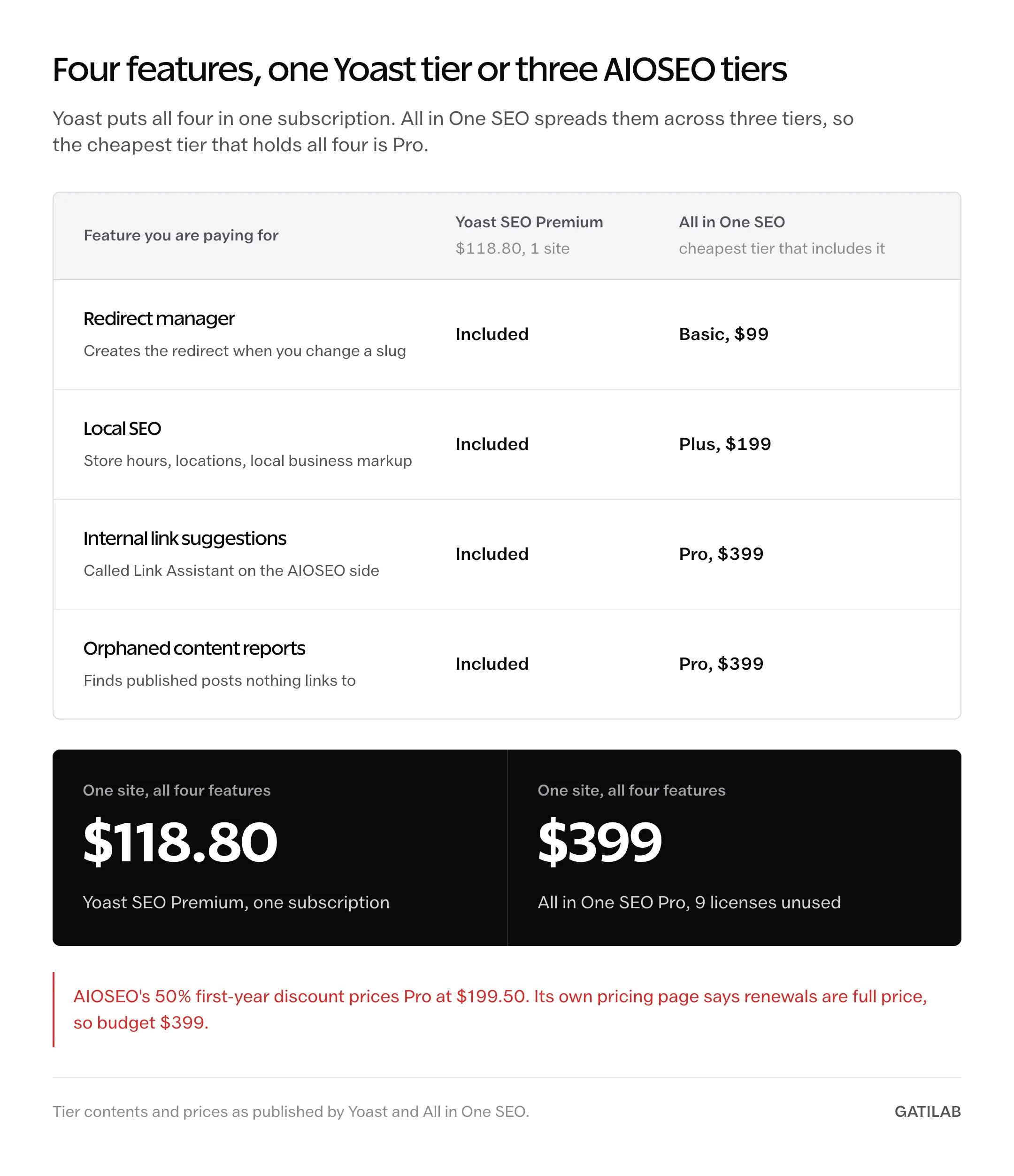
That flips the usual advice. If you run 1 site, Yoast is now the value pick.
How the Free Versions Compare
Yoast Free and AIOSEO Lite are closer to each other than either is to what a WordPress site actually needs. Both handle titles, meta, sitemaps, and article-level schema. Neither ships a redirect manager, which is the single feature a growing site needs first and the one both companies use as the paywall.
| Free tier | Yoast SEO Free | AIOSEO Lite | Rank Math Free |
|---|---|---|---|
| Titles, meta descriptions, XML sitemaps | Yes | Yes | Yes |
| On-page content analysis | Yes | Yes (TruSEO) | Yes |
| Readability analysis | Yes | Basic | Yes |
| Focus keyphrases per post | 1 | 1 | Unlimited |
| Redirect manager | No | No | Yes (301, 302, 307, 410, 451, regex) |
| 404 monitor | No | No | Yes |
| Internal linking suggestions | No | No | Yes |
| Schema beyond Article and WebPage | No | No | 18 predefined types plus 6 extra |
| Breadcrumbs with schema | Yes | Yes | Yes |
The third column is the reason this article can’t end at 2 plugins. Rank Math’s free tier gives away 4 of the features both competitors charge for, and the free-versus-paid split is published on Rank Math’s own comparison page. On free tiers alone, this is not a close call.
Schema Coverage
Structured data is where the tier map bites hardest, because the schema type you need is rarely in the tier you bought. AIOSEO’s advanced types, including Product, Recipe, Event, Course, Software, and Book, are paid features. Yoast handles Article, WebPage, and FAQ in Premium, moves Local and Video into the same $118.80 subscription, and puts product schema in the $178.80 WooCommerce tier.
Rank Math Free ships 18 predefined schema types plus 6 more, no license required.
Before you pick on schema, though, check whether you need the plugin to generate it at all. A single recipe page or 1 product template is often better served by hand-written JSON-LD you control, and the tradeoffs are covered in our guide to WordPress schema markup. Plugin-generated schema is convenient at scale and clumsy at 3 pages.
Buy for the type you publish weekly, not the type you published once.
Redirects and 404 Monitoring
Yoast’s redirect manager is Premium-only, and it does the important thing well: when you change a slug, it offers to create the redirect right there in the editor. That prompt catches the mistake at the moment it’s made, which is worth more than any bulk import screen.
AIOSEO splits redirects across tiers in a way that trips people up. Basic at $99 gets the redirection manager and automatic redirects. 404 error tracking, fast server redirects, full site redirects, and site aliases start at Plus, $199 for 3 sites. So the $99 tier will create redirects but won’t tell you which URLs are 404ing in the first place.
That gap matters most during a rebuild, when slugs change in bulk and broken URLs pile up faster than anyone notices. The sequence for protecting rankings through that kind of change is in our walkthrough on redesigning a WordPress site without losing SEO, and if you’re already cleaning up after one, the triage order is in our guide to fixing 404 errors in Google Search Console.
A redirect you create 2 weeks late has already cost you the link equity it was supposed to save. Monitoring is the feature. Redirecting is the easy part.
Content Scoring and Readability
Yoast’s content analysis is the better teaching tool, and it isn’t close. When a check fails, Yoast explains the reasoning in plain language: why subheading distribution matters, what passive voice costs a reader, why the meta description length is capped where it is. AIOSEO’s TruSEO tells you what to fix and less often tells you why.
For a team of non-technical writers, that explanation is the whole product. It turns the sidebar into training that runs while the work happens, which is cheaper than a course and stickier than a style guide.
Now the honest limit on both. These scores measure surface features of a draft: keyphrase placement, link counts, alt text presence, sentence length. They cannot measure whether the page answers the query better than the 9 results above it. A page can pass every check in either plugin and still lose, and the failure usually shows up as a ranking with no clicks, which is a different problem with a different fix.
Treat the green light as a proofreading pass, not a publish gate.
Why Rank Math Undercuts Both
Rank Math’s free tier includes the redirect manager, the 404 monitor, internal linking suggestions, unlimited focus keywords, 24 schema types, and Google Analytics 4 plus Search Console reporting inside wp-admin. Those are, almost exactly, the features Yoast gates behind $118.80 and AIOSEO spreads across $99, $199, and $399.
Rank Math PRO exists at €7.99 a month billed annually, about €95.88 a year for unlimited personal sites, and its main addition is a keyword rank tracker covering 500 keywords. Most site owners never need it, because a rank tracker is a reporting tool, not an optimization one.
The honest case against Rank Math is not capability. It’s the settings surface: the onboarding wizard pushes modules and upsells hard, the options screen has more toggles than either competitor, and a non-technical client left alone in there will turn something on that shouldn’t be. Yoast’s smaller settings surface is a real advantage when someone else maintains the site.
Our recommendation for a new WordPress build is Rank Math Free, on the paywall map above rather than on brand preference. If a client needs a locked-down admin they won’t break, Yoast Premium buys that for $118.80 and it’s a defensible spend.
When to Pick Yoast SEO
Pick Yoast when the site has 1 domain, a paid license is already approved, and non-technical people write on it. At $118.80 for a single site you get redirects, internal linking suggestions, orphaned content detection, and the Local, News, and Video modules that used to be separate purchases. Yoast also advertises 24/7 support on Premium, which is the kind of thing you don’t value until a canonical tag breaks on a Sunday.
Pick Yoast for a WooCommerce store too, at $178.80 for the WooCommerce tier that includes everything in Premium. Product SEO on a real catalog is fiddly, and paying once for a bundle beats assembling it.
Skip Yoast if you run more than 2 sites. Per-domain licensing turns a reasonable price into an unreasonable one fast.
When to Pick All in One SEO
Pick AIOSEO when you manage several sites under one license. Plus covers 3 sites at $199, Pro covers 10 at $399, and Elite covers 100 at $599. For an agency running 10 client sites, $399 against 10 separate Yoast subscriptions is not a close comparison.
Pick AIOSEO Basic specifically if you need WooCommerce SEO on a tight budget, since it lands in the $99 tier rather than a $178.80 one.
Skip AIOSEO on a single site, unless one of its tier-specific features is the reason you’re buying. On 1 domain you’re paying more for less, and the first-year discount hides that until renewal.
Switching Without Losing Rankings
All 3 plugins ship import tools that read each other’s post meta. They work on standard fields. They’re less reliable on custom fields, theme-injected meta, and anything a previous developer wired by hand, which is exactly where a silent failure costs you a title tag on your best-converting page.
The sequence that keeps a switch boring:
- Take a full database backup, not just a plugin settings export
- Record the current XML sitemap URL and its total URL count
- Install the new plugin without deactivating the old one
- Run the new plugin’s import tool
- Spot-check 20 posts across post types for title, meta description, canonical URL, and noindex state
- Confirm the new sitemap URL count matches the old one
- Deactivate the old plugin, then re-check 5 of the same 20 posts
- Watch Search Console coverage for 14 days before deleting anything
Step 7 is the one people skip, and it’s the one that catches the most damage. Deactivating the old plugin is when its filters stop running, so meta that looked fine 5 minutes earlier can vanish.
Plan on an afternoon for a site under 500 posts and a full day past 2,000.
The Limits
Changing SEO plugins produces no ranking lift on its own. If the import carries your titles and descriptions across unchanged, Google sees identical output from a different generator, so the correct expectation is nothing happening. Any lift comes later, from the redirects and 404s you can finally see.
What none of these 3 will do for you:
- Fix a thin page. Schema on a 300-word page is structured data about nothing.
- Tell you whether the query you’re targeting is worth targeting. That’s keyword research, and it lives in a different tool.
- Track rankings on a free tier. Rank Math puts its keyword tracker in PRO, and Yoast and AIOSEO both gate theirs too.
- Make Yoast’s bundled Local, News, and Video modules useful if you don’t publish local, news, or video pages. Bundled is not the same as needed.
- Speed up a slow site. The measurable cost of any SEO plugin sits in wp-admin during real-time analysis, not in front-end rendering, where the output is a few head tags and a JSON-LD block. Speed is decided by your theme, hosting, and asset load, not your SEO plugin.
The plugin manages metadata. It does not manage demand.
What Quietly Ruins a Plugin Switch
Running 2 SEO plugins at once “just during the migration.” It feels safe, and it produces duplicate title tags, competing canonical URLs, and 2 sitemaps fighting over the same URLs. Search engines pick one arbitrarily and you find out weeks later.
Buying the tier by price instead of by the one feature you came for. AIOSEO Basic looks like the sensible middle until the day you need 404 tracking and learn it starts 1 tier up. Read the comparison table for the row you care about, not the price header.
Budgeting against the first-year discount. A 50% introductory price sets an expectation that renewal quietly doubles, and by then the plugin is embedded in every post’s meta and switching costs an afternoon you didn’t plan.
Letting the plugin auto-generate every meta description. Templated descriptions pass the character-count check and read like a database record, so they win the ranking and lose the click. Writing them by hand is 30 seconds a page.
Chasing green lights on old posts. Rewriting a 2-year-old article to satisfy a keyphrase-density check usually makes it worse for readers while changing nothing Google measures. Update the post because the facts moved, not because the sidebar is orange.
Treating the SEO plugin as the SEO plan. It’s plumbing. Plumbing has never made anyone want the water.
FAQs on Yoast SEO vs All in One SEO
Can you run Yoast SEO and All in One SEO at the same time?
No. Both write title tags, canonical URLs, Open Graph meta, and JSON-LD into the same page head, so running them together produces duplicates and conflicting signals. Install the new one, run its import tool, verify the results, then deactivate the old one.
Is All in One SEO still actively maintained?
Yes. Its plugin directory listing shows recent updates and 3 million-plus active installations, and the company ships across 4 paid tiers. Maintenance is not the reason to pick one of these over the other.
Which free SEO plugin is best for WordPress?
Rank Math Free, by a clear margin. It includes the redirect manager, 404 monitor, internal linking suggestions, unlimited focus keywords, and 24 schema types, all of which Yoast and AIOSEO put behind a license. Between the other 2 free tiers, Yoast Free has the better readability analysis and AIOSEO Lite has slightly broader social meta control.
Does switching SEO plugins hurt rankings?
Not if the metadata survives the move intact. The damage comes from a broken import nobody checked: a missing canonical, an accidental noindex, or a sitemap that lost a post type. Spot-check 20 posts after the import and again after deactivating the old plugin.
Final Remarks
The Yoast versus AIOSEO argument is really an argument about how many sites you run. On 1 domain, Yoast now costs less and gates less. Past 3 domains, AIOSEO’s per-license math wins and nothing else in the comparison matters much. That’s a licensing question wearing a features costume, which is why the feature grids never settle it.
The honest trade is this: paying for either one buys you a redirect manager, a support contract, and a settings screen a client can’t wreck. Rank Math gives you the first for free and charges you the other 2 in configuration risk. Both are real costs. Only one shows up on an invoice.
And whatever you save here is worth more spent on the thing the plugin can’t do. A year of Yoast Premium is roughly a month of a decent keyword tool, and where that budget goes changes results more than which plugin writes your title tags.
Count your domains, then buy the license that matches.
Tell Google you want more of this.
Add Gatilab as a preferred sourceOne tap, and this site shows up more often in your own Top Stories, AI Overviews and AI Mode. Remove it any time.