
Content Brief Template for SEO Teams
A writer can do a lot with a clear assignment. Hand them only a title and a keyword, though, and they have to guess who the reader is, what the article should help that reader do and where it should stop. Those guesses come back later as revisions, because the editor had a different article in mind all along.
A good content brief template settles those decisions before anyone writes a word. I recommend a short brief built around one reader outcome, with enough evidence and scope for the writer to deliver it properly. The free download below has a blank brief and 2 filled examples, one for a new article and one for a refresh.
What a Content Brief Should Contain
A useful brief gives the writer a decision to work from. “Write about email deliverability” is a topic. “Help a small-business owner work out why their newsletter isn’t reaching subscribers” is a problem the writer can actually solve, and the editor can actually review.
Noel Ceta, who says he bootstrapped an SEO agency to more than 300 clients, uses the same contrast. His example of a weak brief is a word count stuck onto a topic:
Weak brief:
“Write 2,000 words about email marketing tips”
Briefs determine quality.
Noel Ceta on X, May 18, 2026
The fields that earn a place in every brief are these:
- Reader and situation: who arrives at the article and what brought them there.
- Reader outcome: the action or decision they should be able to take afterward.
- Primary query and need: the search phrase and the actual need behind it.
- Scope and ownership: what this page covers and which existing page owns the adjacent material.
- Evidence and access: the sources, examples or specialist input the writer needs, and who supplies them.
- Delivery and review: the deliverable, the reviewer and the deadline with a time zone.
- Acceptance checks: the conditions the draft must meet before review is complete.
Some assignments need one or two extra fields. A price comparison may need a currency and plan boundary, and a tutorial may need an account requirement or a known failure case. Add those when they change the work. A brief becomes harder to use when every article inherits every possible field.
How to Fill Out the Content Brief Template
You should start with the reader’s task and only then pick the supporting keywords. That order keeps the article from turning into a collection of loosely related search phrases.
Reader and Outcome
Describe a specific reader without writing a biography. “A marketer at a small B2B service company who needs to follow up with people who downloaded a resource” is enough to shape the examples. The outcome for that reader could be “adapt a nurture email and decide when the sequence should stop.”
The outcome has to be something the article can deliver. A guide can help someone choose a workflow. It can’t promise more revenue just because someone read it.
Tim Soulo, CMO at Ahrefs, collects the reader’s questions before the brief even exists. His team tests an idea as a LinkedIn post first and lets the replies shape the article:
If the post resonates, turn it into a full article. Use the comments as your brief. People literally tell you what’s missing, what’s confusing, what they want more of.
Tim Soulo on X, April 10, 2026
Query and Page Ownership
Record the primary query, then write one sentence about the need behind it. Someone searching for a content brief template almost certainly wants a document they can use, so a long definition before the download only delays that.
You should also name the existing page that owns the neighboring material. An article about thank-you pages starts after a form is submitted successfully, while a form optimization guide owns field design and abandonment before that point. The writer can link to the wider guide without repeating it.
Secondary queries belong in the brief as questions to consider. They don’t create an obligation to repeat every phrase or add a section for every variant. A section should earn its place through the reader’s problem.
Some SEOs build the outline the other way round. Charles Floate, a British SEO with more than a decade in digital marketing, pastes the top 5 ranking pages into an AI model and asks for every H2 and H3 they use, the entities most of them mention and the questions they answer:
What you get back is a consensus based content brief that reverse engineers EXACTLY what Google is rewarding for that keyword.
Charles Floate on X, March 1, 2026
A consensus outline is useful for seeing what searchers already expect to find. I would still treat its headings as questions to check against the reader’s task, because a page that repeats the top 5 results gives the reader no reason to choose it.
Evidence and Access
The writer should know which claims need a source and who will supply it. A product feature needs current documentation. A claim about a client’s results needs the actual record and permission to use it. A hypothetical example needs to be labeled as one.
Check access before assigning the work:
- Can the writer open every source document?
- Are the examples approved for the intended audience?
- Does the required screenshot exist, or does someone need to capture it?
- Who answers a technical question the public documentation doesn’t resolve?
“Add a case study” is an incomplete instruction when the writer has no case-study material. It is better to narrow the assignment than to leave the writer to invent the proof.
Scope and Acceptance
An outline can help, but the acceptance checks matter more than a list of headings. For an email-workflow guide, the checks might require a clear entry event and an explanation of what happens after a reply. A draft can contain every proposed H2 and still fail both.
I would keep the acceptance list short enough for the reviewer to use in a single read. Anything that belongs to your general style guide should live there, with one link from the brief.
Content Brief Examples
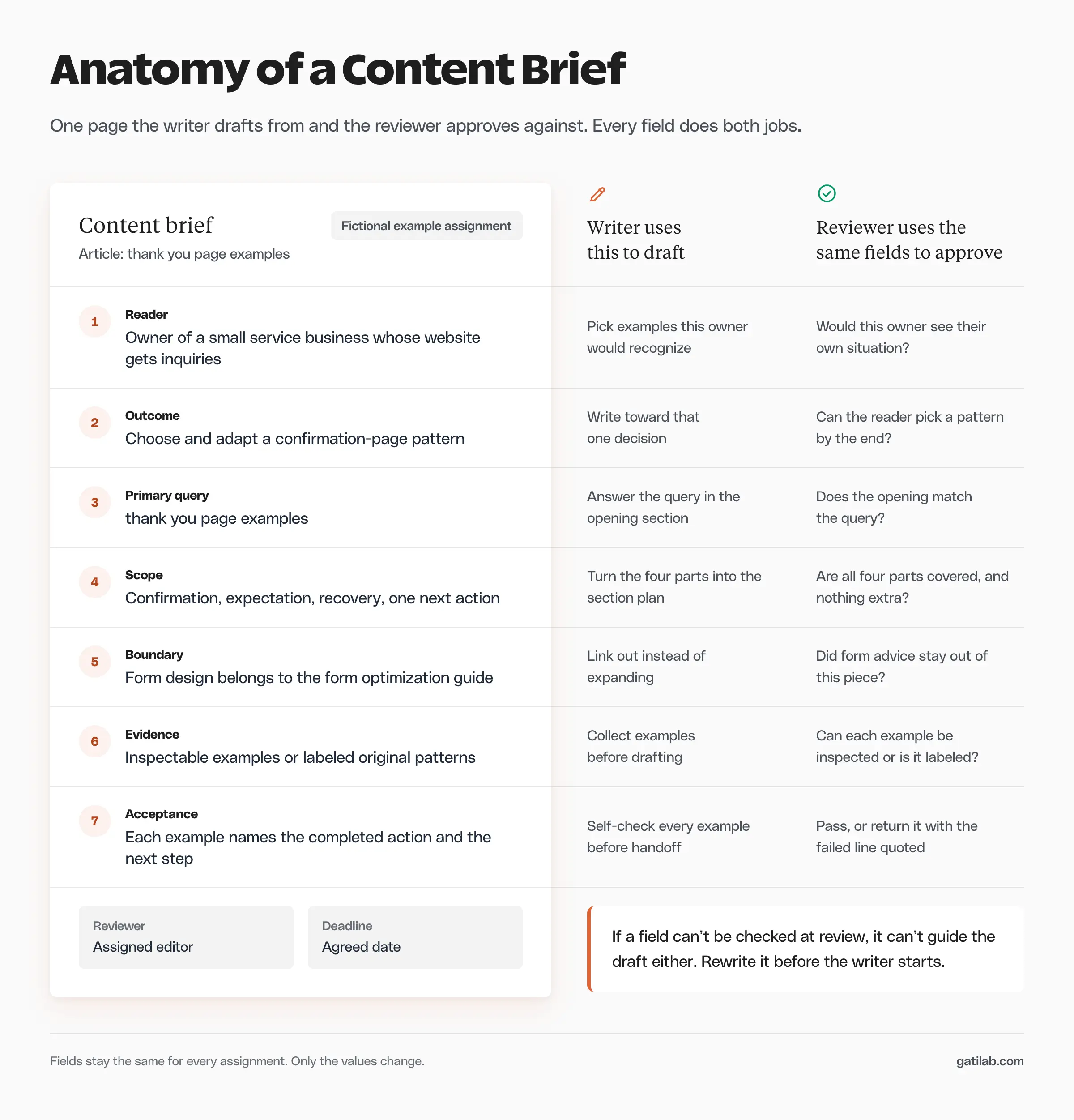
The download includes 2 fictional assignments so you can see the same brief handle new work and a refresh. Treat them as starting points and replace the topic and evidence with your own.
New Article
The first example assigns a thank-you page guide for a small service business.
- Reader problem: the visitor submits an inquiry and doesn’t know when anyone will respond.
- Outcome: choose and adapt a confirmation-page pattern.
- Primary query: thank you page examples.
- Scope: confirmation, expectation, recovery and one relevant next action.
- Evidence: inspectable examples or clearly labeled original patterns.
- Boundary: the article doesn’t repeat the general form-design guide.
- Acceptance: each example names the completed action and explains what the visitor can do next.
That is specific enough to guide the writer while leaving room to choose the best explanation. A fixed word count wouldn’t have answered any of these questions.
Article Refresh
The refresh example concerns an existing UTM tracking guide whose basic explanation still works but whose reporting instruction needs updating.
- Preserve the working definition, valid links and useful examples.
- Identify the exact instruction that changed.
- Check the current documentation and supply a replacement walkthrough.
- Keep the existing URL and the page’s primary task.
- Record any screenshot or download that repeats the same instruction.
A refresh brief should separate what stays from what changes. “Modernize this article” gives an editor too much freedom to remove sound prose and too little direction about the actual defect.
Review the Brief Before Writing Starts
A brief is ready when the writer has enough to produce a good first draft. These checks take a few minutes before the handoff:
- Read the outcome without looking at the title. It should describe a useful action or decision.
- Open every evidence link and confirm access.
- Compare the assignment with pages already published on your site.
- Confirm the reviewer and the deadline.
- Read the acceptance checks as if you were reviewing the finished draft.
If the brief asks for a download, the download needs an owner. If it asks for a measured result, someone needs to supply the measurement. The brief should expose missing material while the assignment is still cheap to change.
Once the brief is approved, the content calendar template can track when the piece moves. The calendar says when work happens; the brief says what should be delivered and how it will be reviewed. When the article later needs a review, the content audit template records that decision in the same spirit.
FAQs on Content Briefs
An outline helps when the subject has a necessary order or the writer needs technical boundaries. A short assignment may only need the reader outcome, the scope and the evidence. The outline should reduce uncertainty without forcing a section order that doesn’t suit the material.
Long enough to complete and review the assignment, and no longer. A straightforward article may fit on one page, while a technical tutorial may need supporting notes. Length becomes a problem when the writer has to dig through unrelated instructions to find the task.
Yes. A refresh brief should name the existing URL and separate the required correction from the material that should stay. The second example in the download shows that split for a tracking guide.
A content calendar tracks when each piece moves and who owns the next step. A content brief explains what one piece must deliver and how the reviewer will judge it. Most teams need both, linked by the same working title.
The person who owns the outcome, usually an editor or SEO lead. The writer can suggest changes, but the brief should exist before writing starts so both people review the draft against the same standard.
Final Remarks
Pick your next assignment, fill in the reader outcome first and check whether the evidence actually exists. That one check prevents a lot of avoidable rework, because a missing source is cheaper to fix in the brief than in the draft. You’ll find more planning sheets like this on the free SEO templates page.
Tell Google you want more of this.
Add Gatilab as a preferred sourceOne tap, and this site shows up more often in your own Top Stories, AI Overviews and AI Mode. Remove it any time.