
Fastest WordPress Theme: 7 Lean Picks and What Decides Speed
You have six theme tabs open and every one of them claims to be the fastest WordPress theme. The demos load before your finger leaves the trackpad. None of those demos are running your forms, your analytics, your three font families, or the 40-block homepage a client will ask for on Friday.
Two mistakes show up on repeat. One buyer picks the theme with the biggest template library, imports a demo, and then spends months prying out icon packs and animation libraries that arrived with a design nobody kept. The other treats theme choice as the whole performance project, switches to something famously lean, and watches the field data barely move.
A theme sets your floor. Everything you add after it sets the number.
The Fastest WordPress Theme Depends on the Build
Seven themes hold up as lean starting points: GeneratePress, Blocksy, Astra, Kadence, Neve, Hello Elementor, and Twenty Twenty-Five. On an empty install they all win a synthetic test, so the useful question is which one stays out of the way of the site you’re actually shipping.
Active install counts below come from the WordPress.org theme directory. They tell you about support depth, tutorial coverage, and plugin compatibility. They tell you nothing about speed.
| Theme | Active installs | Best fit | The catch |
|---|---|---|---|
| GeneratePress | 500,000+ | Content sites, publishers, lean business sites | Small template library out of the box |
| Blocksy | 300,000+ | Block-first builds and WooCommerce stores | Enough controls to talk you into enabling all of them |
| Astra | 1 million+ | Beginners who want templates and wide plugin support | Imported starter demos undo the lean base |
| Kadence | 500,000+ | Business sites, course sites, design-forward builds | Global styles and third-party block packs add up |
| Neve | 200,000+ | Small business sites and simple stores | Smallest community of the 7, so fewer worked examples |
| Hello Elementor | 1 million+ | Elementor-first workflows | Elementor output decides the payload |
| Twenty Twenty-Five | 1 million+ | Staying close to core WordPress | Slower to design in than a commercial theme |
Read the last column first.
Every theme here is light enough to disappear into the noise of a real page, so what separates them is what each one tempts you into adding afterward.
Theme Speed Claims Need a Test Boundary
A theme does not have one universal load time. The result belongs to a specific page fixture, host, font stack, image set, plugin set, cache state, browser, device profile, and test location.
| Evidence | What it can prove | What it cannot prove |
|---|---|---|
| 5 repeated cold-cache lab runs | Median behavior under a fixed synthetic setup | How every production site will perform |
| 5 repeated warm-cache lab runs | Cached delivery and front-end payload differences | Uncached application performance |
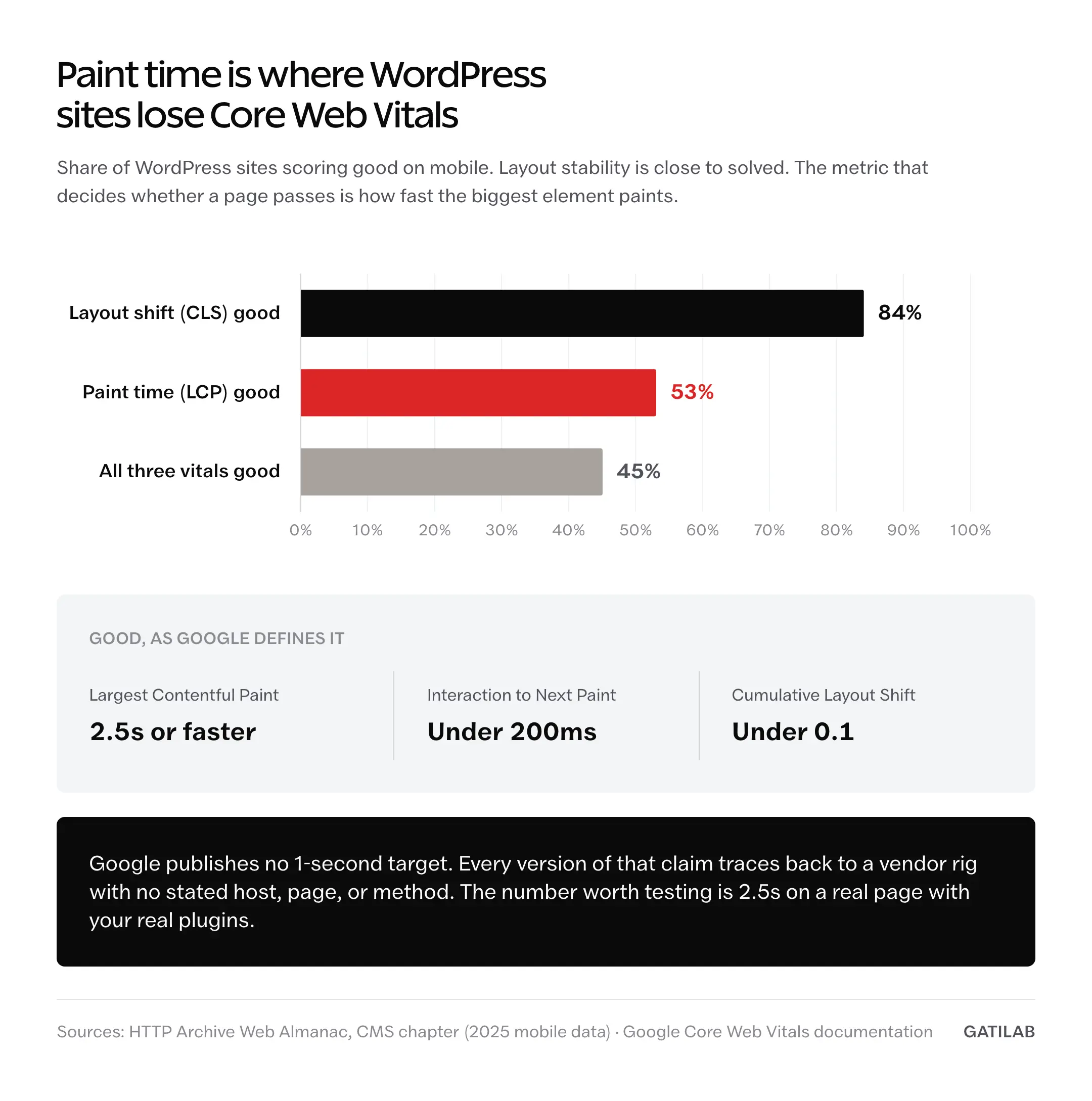
| CrUX at the 75th percentile | Eligible real-user experience over a rolling 28-day window | The theme’s isolated contribution |
| HTML, CSS, JS, request, and font counts | Payload and execution differences | Conversion, accessibility, or maintainability |
CrUX is aggregated field data rather than a theme benchmark. Google documents the eligibility and aggregation limits. That is why a controlled fixture must come before any ‘fastest WordPress theme’ winner.
Use the same measurement stack from the WordPress speed optimization guide so the theme comparison and the broader site audit share one method.
What Separates a Lean Theme From a Light-Looking One
Every lightweight WordPress theme advertises its blank-install weight, and that number is easy to game, because a theme can ship almost nothing by default and then load a stack of assets the moment you enable a header layout.
The traits below hold up after configuration, which is the only place they matter.
- A small front-end payload by default, measured in the CSS and JavaScript that reach the browser rather than the size of the theme ZIP
- Conditional asset loading, so a feature you never turn on never ships a file
- Shallow templates that don’t wrap every section in 4 nested containers
- Native block support that works without a companion plugin for basic layouts
- A changelog that tracks WordPress and PHP releases, since an abandoned theme becomes a security problem before it becomes a speed problem
Only the last one is a hard filter.
The other four are tradeoffs you can manage with discipline. An unmaintained theme isn’t something discipline fixes.
Each Theme’s Real Tradeoff
GeneratePress
The safest speed-first default when the site is content-led. Its WordPress.org directory listing describes a fresh install as adding less than 10kb gzipped to page size, and the vendor breaks that down as a 5.2kb stylesheet plus 2.3kb of JavaScript across 2 HTTP requests. One qualifier matters there: that’s GeneratePress describing its own theme in copy it wrote, not an independent measurement by WordPress.org.
It also breaks the maintenance rule listed above, and the honest move is to say so rather than hope nobody checks. GeneratePress has gone longer between directory releases than anything else here, with the current listing dated December 2025. A theme carrying 7.5kb of surface area has far less to patch than one shipping a builder, a block library, and a demo importer, so the gap is defensible. Read the changelog before you commit anyway.
The real limitation is that it hands you a blank room and a good toolbox.
If you wanted a furnished apartment, look at Astra or Kadence instead.
Blocksy
The pick when someone wants a modern-feeling site without giving up the lean base. Header and footer controls are genuinely good, block editor support is native rather than bolted on, and the WooCommerce side is more complete than most themes at this weight.
Its catch is the catch of every feature-rich theme: the controls are pleasant enough that you keep switching them on. A sticky header, a mega menu, and a set of entrance animations each cost something small. Small things stack.
Blocksy also ships releases more often than anything else on this list, which is a point in its favor on the one criterion discipline can’t rescue.
Astra
The broadest ecosystem of the 7, at more than 1 million active installs, and that matters more than it sounds. When a plugin conflict surfaces at 11pm, the odds someone has already written up your exact problem are higher here than anywhere else on this list.
The base theme is light. The starter templates are where the advantage evaporates.
Import a demo and you can inherit a slider, an animation library, 3 font families, and a page builder dependency in one click, and every one of those was free to add and slow to remove.
Build it yourself. Treat the template library as reference and start the page from a blank canvas.
Kadence
Strong for business sites, course sites, and builds where the owner wants layout control without committing to a page builder. Headers, hooks, block patterns, and conditional layout controls are the draw, and the theme stays reasonable under all of it.
Watch the global styles panel and the third-party block packs.
Design freedom converts into performance debt quietly, because nothing feels heavy at the moment you add it. Test a real article page rather than the homepage demo and you’ll catch the accumulation early enough to reverse it.
Neve
A practical option for small business sites and simple stores where the owner wants a lean result without wiring a design system from scratch. Setup is gentler than GeneratePress, and it doesn’t assume you enjoy hooks.
Its boundary is community size.
At more than 200,000 active installs it’s the smallest of the 7, so third-party tutorials, compatibility reports, and forum answers are thinner. That’s a support cost that only bites when something breaks, and it says nothing about page weight.
Hello Elementor
The special case here, because it’s barely a theme. Elementor’s own Hello theme page describes it as under 30KB, and that’s close to the whole story: a blank canvas that exists so Elementor can decide everything else. The Almanac’s page-builder finding lands hardest on this pairing, since builder output is exactly what it measures.
A blank theme wrapped around a heavy builder page loads at the speed of the builder page.
Hello’s 30KB is a rounding error against what a stacked Elementor layout emits.
The market is moving underneath this choice too. The Almanac has Elementor falling from 56% to 43% of builder-using sites while native block editor use climbed to 18%, which is worth knowing if you’re picking a stack you’ll maintain for 5 years. If you can build without a page builder, the practical guide to WordPress block themes covers what the native route gives you instead.
Twenty Twenty-Five
The control sample, and the reason it belongs in a paid-theme comparison. If a commercial theme can’t clearly beat WordPress’s own bundled default on your build, it has to justify itself on workflow, templates, commerce features, or support rather than on weight.
It’s also going to hold the default slot longer than usual. There is no Twenty Twenty-Six: per Make WordPress Core, the decision was made to skip a default theme for WordPress 6.9, so Twenty Twenty-Five stays the newest bundled theme until Twenty Twenty-Seven ships alongside WordPress 7.2 in early December 2026. As a baseline to test against, it’s stable for a while.
The limitation is design speed.
Site Editor work takes more patience than a Kadence or Blocksy customizer session, and a blog in particular usually wants more layout scaffolding than core provides. The roundup of WordPress themes for blogging covers that end of the tradeoff.
One more for stores. These 7 are general-purpose themes, and when the site is mainly a WooCommerce store I’d also look at the free Stackless theme, which I built for that job. It uses system fonts, inline SVG icons and one small script, so a page loads about 100 KB of theme CSS and no web font, and the Stackless theme review here measures that against the 222 KB of stylesheets Storefront loads. Design changes happen in its stylesheet rather than the Customizer, which keeps the theme small.
Theme Demos Are Sales Pages, Not Benchmarks
A demo runs on the vendor’s own tuned server, with hand-picked images, a handful of pages, and a plugin stack the vendor chose. Your site will carry analytics, a form handler, comments, a consent banner, an email capture, and whatever marketing tag someone adds next quarter.
Testing the demo tells you what the theme does under laboratory conditions and nothing about what it does under yours.
The replacement test fits on one line.
Install the theme on staging with your real plugin list, build one real article page, and measure that.
One page exposes the pattern, because whatever ships on that page ships on every other page built the same way. Expand it once the first page passes:
- Install the theme on staging with the plugins the live site will actually run
- Build 4 real pages: homepage, article, archive, and one conversion page
- Configure caching first, then run Lighthouse or PageSpeed Insights, since an uncached measurement grades your host instead of your theme
- Check the LCP element, render-blocking CSS, unused JavaScript, font loading strategy, and image dimensions
- Remove anything that doesn’t serve the reader or the conversion path, then measure again
Step 3 is where most theme comparisons go wrong, and it’s the cheapest one to fix. The gap between a cached and an uncached measurement is usually wider than the gap between any 2 themes on this page. Pair the test with a caching plugin matched to your server type before you draw conclusions about the theme.
What a Lean Theme Will Not Fix
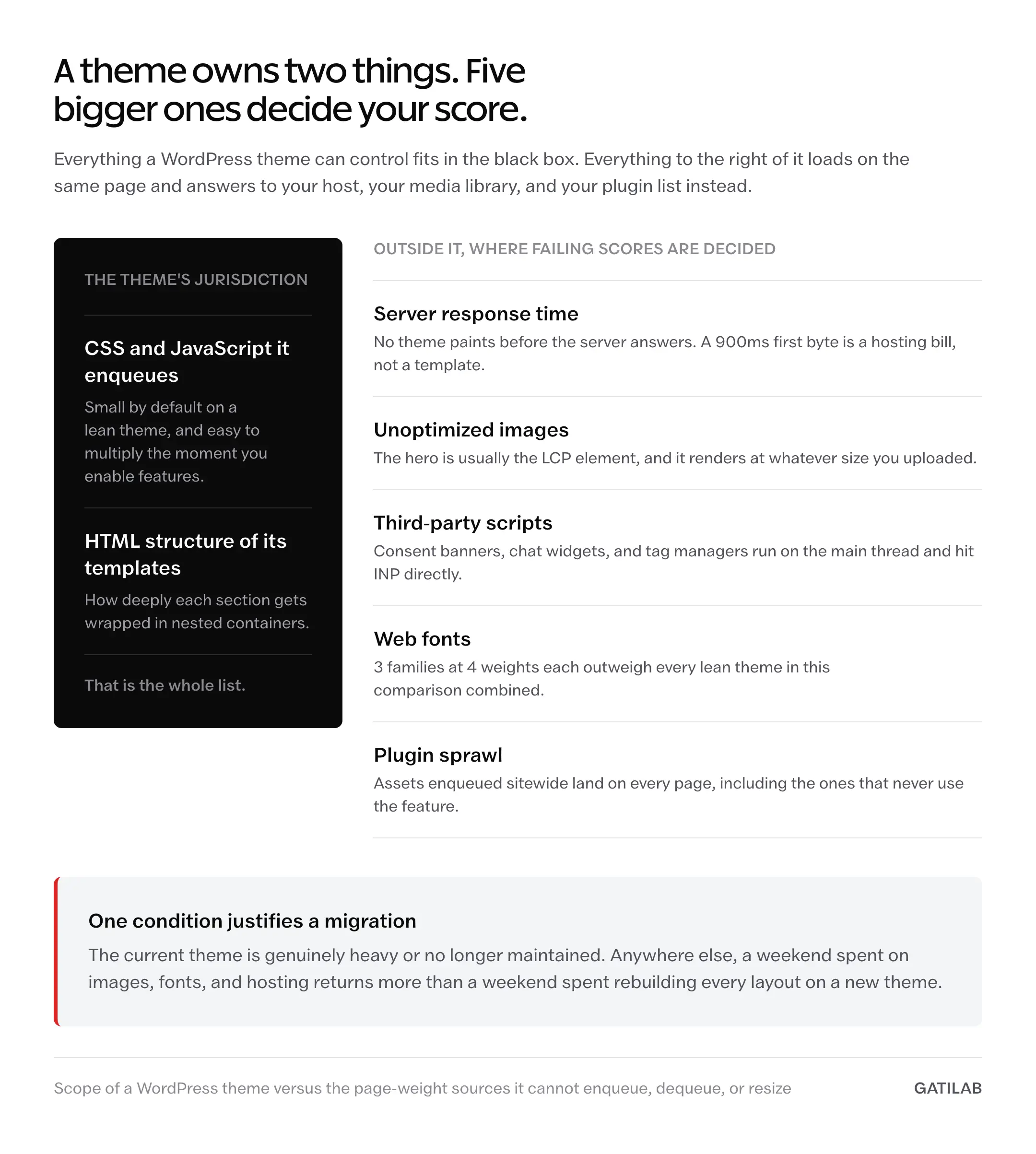
A theme controls the CSS and JavaScript it enqueues and the HTML structure of its templates. That’s the jurisdiction.
Everything below sits outside it, and this is where most failing scores are actually decided:
- Server response time. If time to first byte is 900ms, that’s a hosting problem, and no theme can paint before the server answers.
- Unoptimized images. The hero image is usually the LCP element, and the theme renders whatever you uploaded at whatever size you uploaded it.
- Third-party scripts. Consent banners, chat widgets, tag managers, and session recorders run on the main thread and hurt INP directly.
- Web fonts. 3 families at 4 weights each will outweigh every theme on this list combined.
- Plugin sprawl. Each plugin that enqueues assets sitewide adds payload to pages that never use the feature.
Which leaves exactly one situation where a theme switch is the right first move: the current theme is genuinely heavy or unmaintained. Anywhere else, the same effort spent on images, fonts, and hosting returns more. When hosting is the bottleneck, managed WordPress hosting compared by provider is a better place to spend a week than a theme migration.
What Quietly Ruins a Fast Build
None of these look like mistakes at the moment you make them, which is why they survive so long.
You import the starter demo to save setup time. It does save a day, and it also installs a slider, an animation library, and an icon font you’ll never fully identify, because they arrived as part of a design you’ve since replaced. Removing them later means auditing a page you didn’t build.
You test the homepage and stop there. The homepage is the page you tuned, so it passes, while the article template that serves most of your traffic quietly ships a comment system and 2 extra font weights nobody measured.
You add a plugin for one feature on one page. It enqueues its CSS and JavaScript sitewide because that’s the default behavior, and the cost never shows up on the page where you’d think to look for it.
You judge on lab scores alone. A Lighthouse run on your laptop over fiber says a lot about your laptop, and field data from real visitors on real phones routinely tells a different story about the same page.
You switch themes to fix a speed problem you never diagnosed. Migration costs a weekend and breaks layouts across old posts, and if the bottleneck was time to first byte or a 4MB hero image, you’ll rebuild the whole site and land on the same number.
Speed Is a Habit, Not a Purchase
Nobody’s site got slow because they picked the wrong theme. It got slow one plugin, one font family, one tracking pixel, one hero slider at a time, with every single addition looking reasonable in isolation. That’s a maintenance problem wearing a theme problem’s clothes, and swapping themes treats the symptom while the habit keeps running.
The honest trade is that any of these 7 starts you light enough, so the fastest WordPress theme for your site is whichever one you can stay disciplined inside. GeneratePress and Twenty Twenty-Five start lightest and ask the most from you in setup time. Astra and Kadence start heavier and give you the most back in speed of building. No version of this exists where the theme keeps the site fast on its own.
Pick the one that fits how you’ll actually build, then spend the saved argument on your images and your host.
Tell Google you want more of this.
Add Gatilab as a preferred sourceOne tap, and this site shows up more often in your own Top Stories, AI Overviews and AI Mode. Remove it any time.