
Roofing SEO: How Roofing Companies Get Found on Google
Roofing SEO is how a roofing company shows up when a homeowner searches for a roofer, and because one roof is a big job, even a few extra calls a month from Google add up quickly. So if you run a roofing business, or market one, and want more of those calls to come from search instead of paid leads, this guide will walk you through it.
Local SEO for service businesses is a big part of our work at Gatilab.
Every market is different, and a roofer in a small town has a very different job ahead than one in a big metro. But most of roofing SEO comes down to two places, your Google Business Profile and your website, and I will cover both properly here.
I have also put together a roofing local SEO plan, free in PDF and Word, that you can hand to whoever runs your marketing. If you would rather have us handle it, we are happy to talk. The best place to begin is the search results page itself.
Where Roofers Show Up on Google
Search for roof repair near me and Google usually shows three different kinds of results, and each one is won in a different way:
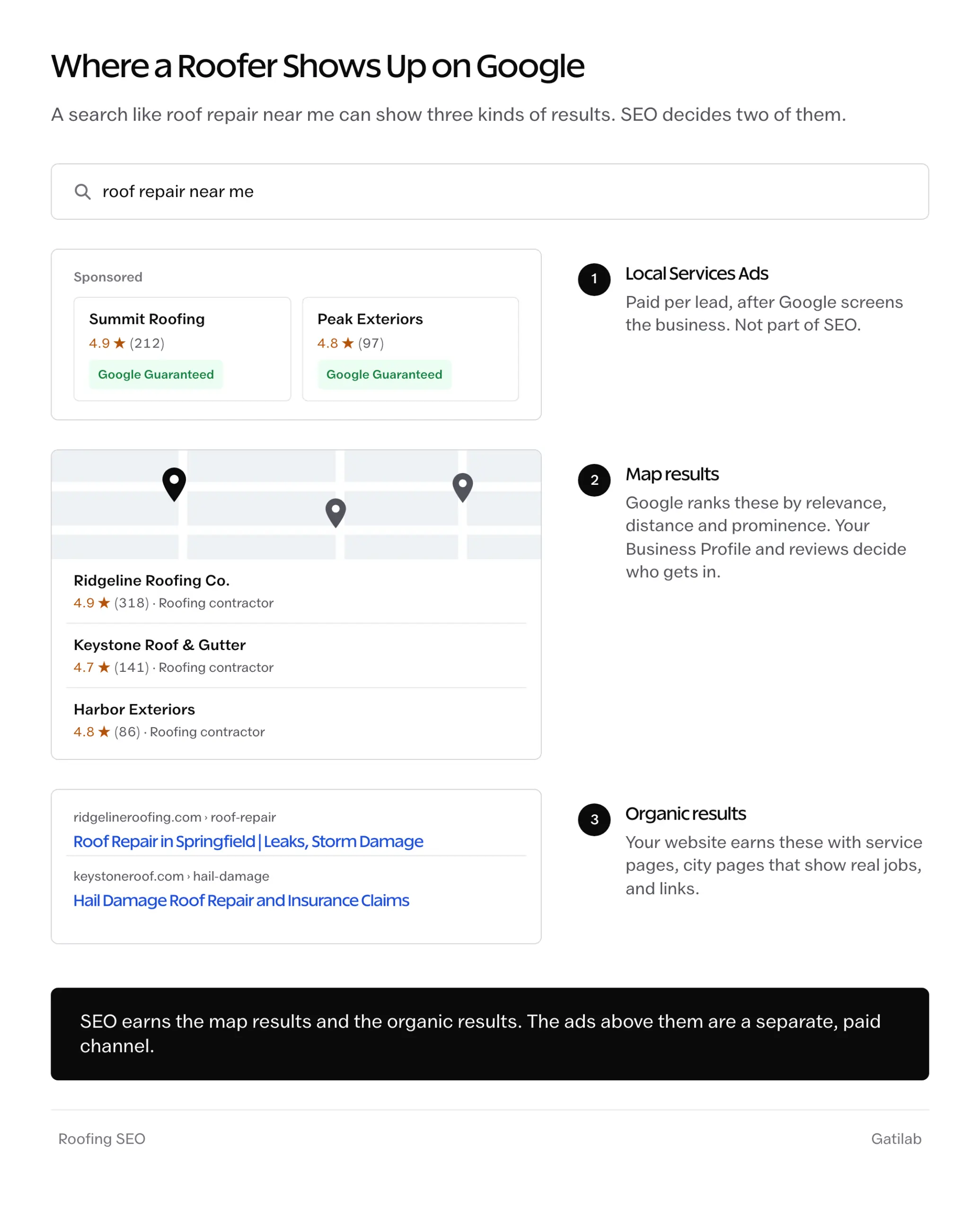
- Local Services Ads sit at the top of many home service searches. They are paid per lead, and Google screens the business before they show. That is advertising, and our guide to Google Local Services Ads covers it.
- The map results, often called the map pack, come from Google Business Profiles. Google says it ranks them by relevance, distance and prominence, and that there is no way to pay for a higher spot.
- The organic results below them come from websites, and your service pages, city pages and links decide where you land.
SEO for roofers is the work on the second and third blocks. The ads are worth running alongside it for some roofers, but they stop the moment the budget does.
Roofing Keywords Worth Targeting
Before building anything, it helps to know how homeowners phrase the search, because they don’t talk the way the trade does:
- “roofers near me” and “roofing companies near me” are each searched about four times as often as “roofing contractors near me”, so the everyday words deserve a place on your pages
- “roof repair near me” is searched more than plain “roof repair”, which tells you people want someone close and soon
- “roof leak repair” and “roof inspection” are large searches in their own right, and each deserves its own page
- storm searches like “hail damage roof” and “storm damage roof repair” are smaller, but the people behind them usually need a roofer this week and often have an insurance claim open
- material searches like “metal roofing” are large but mixed, with plenty of research and do-it-yourself interest, so they suit a guide better than a sales page
The searches with near me or a problem in them are the ones closest to a phone call, so those pages come first.
Set Up Your Google Business Profile for Roofing
The Business Profile decides the map results, so it is the first thing to get right. Google’s guidelines are specific about what a roofer can and can’t do with it:
- Name: the real business name, exactly as it appears on your trucks and paperwork. Adding “Best Roof Repair Springfield” to it breaks the guidelines and can get the profile suspended.
- Categories: Roofing contractor as the primary category, and secondary categories only for other work you earn money from, like Siding contractor or Gutter cleaning service.
- Address and service area: most roofers work at the customer’s home, which makes them a service-area business. Google’s guidelines say to hide the address in that case and set a service area, which shouldn’t reach beyond about 2 hours’ drive from your base.
- Services: each service you offer, listed with a short description.
- Photos: job photos taken on site and added every few weeks. Stock images of roofs do nothing for you.
The full walkthrough is in our Google Business Profile playbook, and if a profile ever gets suspended, the recovery guide covers the appeal.
A profile set up this way doesn’t need tricks. It needs to be complete and accurate, and kept busy with photos and reviews.
Build a Page for Every Roofing Service
Google can only rank a page for roof repair if you have one. A single Services page with a list of bullet points gives it very little to work with.
A roofing site should generally have its own page for each of these, where you offer them:
- roof repair, including leaks and emergency repairs
- roof replacement
- roof inspections
- storm and hail damage, with how insurance claims work
- each roofing material you install, like asphalt shingles or metal
- commercial roofing, if you do it
Each page should answer the questions a homeowner has before they call:
- what the job costs, even as a range, and what changes the price
- how long it takes and what happens on the day
- warranties, and which manufacturer certifications you hold
- photos of finished jobs, with the area named
- a phone number and a short form that are easy to reach on a phone
A page that answers the cost question plainly is the one homeowners read to the end, because so many roofing sites leave it out.
The site should also carry RoofingContractor markup, a schema.org type built on LocalBusiness, so search engines can read your business details in a structured way. A minimal version looks like this:
{
  "@context": "https://schema.org",
  "@type": "RoofingContractor",
  "name": "Ridgeline Roofing Co.",
  "url": "https://www.example.com/",
  "telephone": "+1-555-010-0199",
  "areaServed": ["Springfield", "Chatham", "Rochester"],
  "address": {
    "@type": "PostalAddress",
    "addressLocality": "Springfield",
    "addressRegion": "IL",
    "addressCountry": "US"
  }
}
Every value in it should match the Business Profile exactly, since the point is to confirm the same business in two places. Our local business schema guide covers the other properties worth adding.
City Pages Without Doorway Pages
Roofers often serve a dozen towns, and it is tempting to create a page for each one with only the city name changed. Google’s spam policies call that doorway abuse, and pages aimed at specific cities that all funnel visitors to one page are one of the examples they give.
There are broadly three ways roofers handle the towns they serve.
You can build a page for every town with the same text and a new city name. That was common for years, and it is exactly the pattern the doorway policy describes, so those pages tend to get ignored or become a liability.
Or, you can skip city pages entirely and lean on the Business Profile. That is safe, but it leaves the organic results in nearby towns to competitors who do have a page there.
The sensible middle is to build a city page only where you have something real to show, for example:
- finished jobs in that town
- photos taken there
- reviews from customers who live there
- details specific to the area, like the permit process or the weather the roofs have to handle
Towns without that go on one service area page until they earn their own. For businesses with more than one office, SEO for multiple locations goes further.
Reviews That Keep Coming
Reviews feed prominence, one of the three things Google says it ranks local results by, and homeowners read them closely before letting anyone on their roof.
Google’s review rules are short and strict:
- no discounts, gifts or payment in exchange for a review
- no asking only the customers you expect to be happy
- no discouraging or blocking negative reviews
Within those rules, the roofers with the most reviews generally just ask every customer, the same day, with a direct link. A text message sent while the crew is packing up catches the homeowner while the new roof is still on their mind:
Hi Sarah, thanks for choosing Ridgeline Roofing. If you have a minute, a Google review helps other homeowners find us: [review link]. Thank you.
It is short, it names the business and it goes to everyone, which keeps it inside Google’s rules.
Replies matter too. Google’s own tips mention responding to reviews, and a calm, specific reply to a bad review shows the next homeowner how you handle problems.
Links and Citations for Roofers
Prominence also covers how many websites link to your business. For roofers, the most useful links and listings are the ones homeowners already use:
- manufacturer contractor finders from GAF, Owens Corning and CertainTeed, for roofers who hold their certifications
- Bing Places and Apple Business Connect, which feed search and maps outside Google
- Better Business Bureau, Angi, Houzz, Nextdoor and Yelp
- local suppliers, trade associations and the chamber of commerce
- local news and community sites, when a roofer’s advice after a storm is useful to readers
The details should match everywhere, down to the phone number and the exact business name. A handful of trusted listings with matching details does more than hundreds of low-quality directories, and our roundup of local SEO tools covers the ones that keep citations in check.
What Roofing SEO Costs
Most local SEO retainers for a single-location business sit between $500 and $3,000 a month, and roofing usually lands in the upper half of that range, since the jobs are large and plenty of competitors want the same searches. Our breakdown of SEO agency pricing explains what each price level buys.
Doing some of it in-house is realistic. The profile work and the review requests mostly need consistency, which is easy to keep up yourself, while the website pages and the links are where outside help usually earns its fee.
The timeline is months rather than weeks. Profile and review work can show up in the map results sooner, while organic rankings for competitive searches generally take several months of steady work.
Roofing Local SEO Plan (PDF and Word)
A plan you can hand to whoever runs the marketing, with the pieces that decide whether homeowners find you and a sheet to check the results every month.
- A Business Profile setup checklist for roofers, covering categories and the service area
- A service and city page planner, with the proof each page needs
- Review request templates for text and email that stay within Google’s rules
- A job photo checklist and a directory list that includes manufacturer finders
- A monthly tracking sheet for calls, forms, reviews and booked jobs
Free to use for your own roofing business or for clients.
The Limits
SEO can’t put you in front of homeowners far outside your service area. Distance is one of Google’s three local ranking factors, and a roofer 40 miles away rarely makes the map results for someone’s street, however good the profile is.
It can’t replace the phone either. A homeowner who calls three roofers after a storm often books whoever answers first, and no ranking makes up for a missed call.
And organic rankings take time. For work you need this month, Local Services Ads or Google Ads fill the gap while the SEO builds.
Mistakes That Cost Roofers Rankings
Stuffing the business name with keywords. “Ridgeline Roofing – Best Roof Repair Springfield” might rank for a while, and it is also the quickest way to get the profile suspended.
Copying one city page into twenty towns. The pages look busy in the site map and then sit there doing nothing, or worse.
Using stock photos of roofs. Homeowners notice, and a photo of your own crew on a roof in their area builds more trust than any stock image.
Asking only the happy customers for reviews. It breaks Google’s policy, and a profile with nothing but five-star reviews looks less believable to the next homeowner.
Adding categories for work you rarely do. Every extra category muddies what Google thinks the business is.
Letting the profile go quiet. A profile with no new photos or reviews for months slowly loses ground to the roofer down the road who posts every job.
FAQs on Roofing SEO
How much does roofing SEO cost?
Most local SEO retainers for a single-location business cost between $500 and $3,000 a month, and roofing usually sits in the upper half because the market is competitive. Handling the Business Profile and review requests yourself brings the cost down.
How long does roofing SEO take to work?
Business Profile and review work can start showing in the map results within weeks. Organic rankings for competitive searches, like roof repair in a city, generally take several months of steady work.
Should roofers use Local Services Ads or SEO?
Many roofers use both. Local Services Ads bring leads quickly and stop when the budget stops, while SEO takes longer and keeps working, so running ads while the SEO builds is a sensible mix.
Do roofers need a separate page for each city?
Only for cities where you have something specific to show, like finished jobs, photos or reviews from customers there. Pages that only swap the city name count as doorway pages under Google’s spam policies.
What is the best Google Business Profile category for a roofer?
Roofing contractor, as the primary category. Secondary categories should cover only other work you earn money from, such as siding or gutter services.
Can a roofer show up in the map results without an office address?
Yes. Roofers who work at customers’ homes can hide their address and set a service area instead, which is what Google’s guidelines ask service-area businesses to do.
Does roofing SEO work for commercial roofing too?
Yes, but the searches are fewer and the buyers are property managers and facility teams, so commercial roofing needs its own pages with project examples and the certifications those buyers look for.
Final Remarks
If you have worked through this, you know which parts of Google your roofing business can win and what each one takes. The one idea to keep is that roofing SEO rewards proof, so every job you finish is material for both your profile and your pages.
The roofing local SEO plan above turns this into a monthly routine you can keep up. If you would like us to take it on, our local SEO team works with service businesses, and Business Profile optimization can be handled on its own.
I hope the calls start coming your way soon.
Tell Google you want more of this.
Add Gatilab as a preferred sourceOne tap, and this site shows up more often in your own Top Stories, AI Overviews and AI Mode. Remove it any time.