
Content Audit Template for SEO Teams
A spreadsheet of URLs gets hard to use when every row ends with “update.” The team still doesn’t know what’s wrong with each page, what evidence supports a change or who should do the next piece of work.
A content audit template should turn that inventory into specific editorial decisions. I recommend recording the reader’s task next to the evidence and choosing one bounded next action for every page. The free workbook below has a blank audit and fictional examples that show a decision can stay useful even when the traffic data is incomplete.
What the Content Audit Template Records
The sheet starts with the page and the job it should do. Search data adds context, but it doesn’t replace reading the content.
Each row records:
- Page URL.
- Reader task.
- Primary query.
- Impressions and clicks for one comparison window.
- CTR, calculated by the sheet.
- Qualified actions, where you measure them.
- Editorial decision.
- Reason for that decision.
- Evidence link.
- Owner.
- Next action.
The Audit sheet is blank. The Example sheet uses fictional URLs and numbers, so keep it separate from your site’s records.
CTR is clicks divided by impressions, shown only when both numbers exist and impressions are above zero. Missing data stays marked as unavailable, and a page with 0 impressions shows n.a. rather than a 0% CTR that looks comparable to a page that actually appeared in search.
Define the Scope Before Collecting Data
A focused audit is easier to finish and act on. Start with one topic cluster or a set of pages affected by a known change.
Good starting groups:
- Tutorials whose product instructions changed.
- Service articles that share a reader task.
- Pages with a similar drop in search performance.
- Content linked from an important conversion path.
- Articles that promise a download or example that no longer works.
The scope should explain why those pages belong together. Auditing the whole site just because the URL export exists usually creates a huge backlog with no clear first action.
A comprehensive website audit covers the broader technical review. This sheet owns the editorial decision about a page’s task and content. When you spot a technical problem, note it here and route it to the right review instead of turning every row into a full technical audit.
Gather Comparable Evidence
Use the same reporting settings before you compare pages or periods. A US-only web-search report and an unfiltered all-countries report don’t measure the same audience.
Write the comparison settings next to your working copy:
- Date range.
- Search type.
- Country and device filters, if any.
- Where qualified-action numbers come from.
- Any tracking change that affects the comparison.
When you report CTR for a group of pages, calculate it from the group’s combined clicks and impressions. Averaging each row’s percentage gives a tiny page the same weight as a large one.
A decline needs context too. Seasonality, tracking changes and new search features can all move the numbers without anything being wrong with the article.
For the reader task, open the page and check:
- Does the introduction answer the actual need?
- Are the instructions and claims still correct?
- Does the promised download or example still work?
- Is there a distinct reason for this page to exist?
- Does another article on the site already do the same job?
Google’s people-first content guidance asks whether content offers original value and satisfies the people it’s meant for. Those questions are a far better basis for a decision than changing the date so a page looks newer.
Aleyda Solis, sharing takeaways from Nacho Mascort’s breakdown of Google’s quality guidance, offers a quick test for the “distinct reason” question:
A practical question to ask: If you replaced your brand with a competitor’s, would the content still be just as useful? What makes your version worth choosing?
Aleyda Solis on X, October 5, 2026
Choose an Editorial Decision
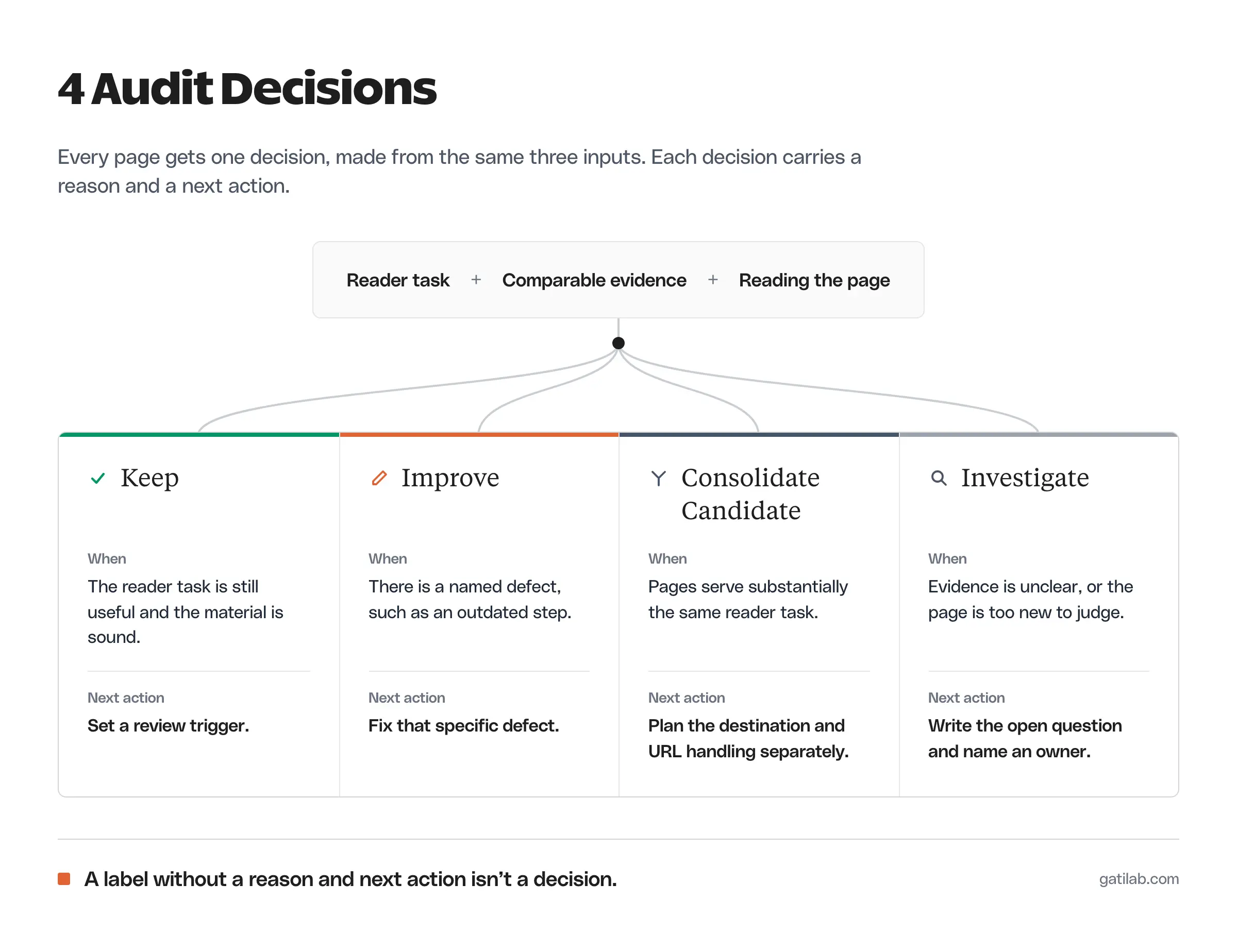
The workbook gives you 4 decision labels. Each one needs a reason and a next action, because the label alone doesn’t tell an editor what to change.
Other frameworks go further. Jake Ward, who works on B2B growth through SEO, assigns 5 actions, including delete:
Audit each blog post and assign actions:
– Leave: Content that’s reached its full potential
– Merge: Cannibalising or extremely similar content
– Delete: Content that no longer offers value to users
– Update: Small changes to improve the performance
– Rewrite: Large changes to improve the performance
Jake Ward on X, December 1, 2025
His Merge and Delete labels are final actions. This template deliberately stops one step earlier with “Consolidate candidate,” because a merge or a removal needs its own destination and URL plan.
Keep
Keep fits when the page’s task is still useful and its material is sound. The next action can be a specific review trigger, such as a change in the product the page explains.
A keep decision means the current evidence doesn’t justify a rewrite, and good prose shouldn’t be replaced just because the audit reached that row.
Improve
Improve has to name the defect. “Replace the outdated account-setup step” is far more useful than “refresh for SEO.”
The change might involve:
- An incorrect instruction.
- A missing condition that changes the recommendation.
- A broken resource.
- An example that no longer supports the point.
- A section that delays the reader’s answer.
Keep the material that still works. If a screenshot or a companion download repeats the changed instruction, the correction has to cover them too.
Consolidate Candidate
A consolidation candidate needs evidence that 2 pages serve substantially the same task. Shared vocabulary isn’t enough.
One article may explain a general model while another solves a narrower implementation problem, and both can deserve to exist. The content gap analysis guide helps identify the missing or duplicated job.
If a merge is justified, the final destination and URL handling need a separate plan. Marking a row as a candidate doesn’t authorize deleting a page or adding a redirect.
Glenn Gabe, an SEO consultant who focuses on algorithm-update recovery, has warned against removing pages just because they’re old:
Just wanted to clarify before site owners take that reply and start nuking old content b/c it’s old. They really should NOT do that.
Glenn Gabe on X, April 3, 2026
Investigate
Investigate fits when the evidence doesn’t support a clear change yet. A new page may have too little search data, and an older one may have a measurement problem or an unclear task.
Write the open question explicitly. “Check whether the target query is reaching a different page” gives an owner something to finish. “Monitor” with no question or review date can leave the row open forever.
Content Audit Examples
The workbook’s 3 examples separate an editorial decision from a reaction to numbers.
| Page | Evidence | Decision | Next action |
|---|---|---|---|
| Service guide | 1,000 impressions, 50 clicks (5% CTR), 3 qualified actions, instructions current | Keep | Review when the instructions change |
| Old tutorial | 400 impressions, 12 clicks (3% CTR), 1 required step changed | Improve | Check and replace the changed step |
| New guide | 0 impressions, 0 clicks, CTR n.a. | Investigate | Check indexing and audience relevance |
These rows demonstrate the sheet. They don’t mean those numbers always lead to those decisions; the written reason is what matters.
Turn Decisions Into Assigned Work
An audit becomes useful when someone can pick up the next action. Every actionable row needs an owner and enough evidence to understand the assignment.
Move approved updates into your content calendar once the scope is clear, and keep the audit reason attached so the writer doesn’t have to rediscover it. For a bigger rewrite, the content brief template has a refresh example built for exactly this handoff.
A good handoff states:
- The existing URL.
- The specific issue.
- The evidence for the correction.
- The material that should stay.
- The acceptance condition.
The workbook is a record the team can review and act on. It doesn’t import analytics or publish anything.
FAQs on Content Audits
A content audit is a review of existing pages that records what each page is for, how it performs and what should happen to it next. The useful output is a list of decisions with owners.
Run a focused audit whenever something changes a group of pages, such as a product update or a ranking drop, and a broader review once or twice a year. Small, scoped audits get finished; whole-site audits often stall.
At minimum, impressions and clicks from Google Search Console for one consistent date range, plus a qualified-action count if you track one. The page itself matters just as much, so read it before deciding anything.
Not because it’s old. Delete or merge only when a page no longer serves a distinct reader task and you have a plan for its URL. Most outdated pages need a specific correction, not removal.
A content audit reviews pages you already have. A content gap analysis looks for reader tasks your site doesn’t cover yet. Audits tell you what to fix; gap analysis tells you what to create.
Final Remarks
Before you close the audit, make sure you can explain why each proposed change is needed. A decision with no reason belongs back in Investigate. Check that the comparisons use the intended period, that unknown figures weren’t replaced with zeros and that every update has a bounded task, then start with the first correction whose evidence is complete.
Tell Google you want more of this.
Add Gatilab as a preferred sourceOne tap, and this site shows up more often in your own Top Stories, AI Overviews and AI Mode. Remove it any time.