
How to Renew an SSL Certificate on cPanel, NGINX, and Managed Hosts
A properly configured server will renew SSL certificates without you. AutoSSL on cPanel, certbot on a VPS, or a managed host’s built-in issuer does the work on a timer. Doing it by hand is a 5 to 15 minute job, and it only comes up when the automation broke, when you bought a certificate no machine can fetch on its own, or when the thing already expired and every visitor is looking at a full page browser warning.
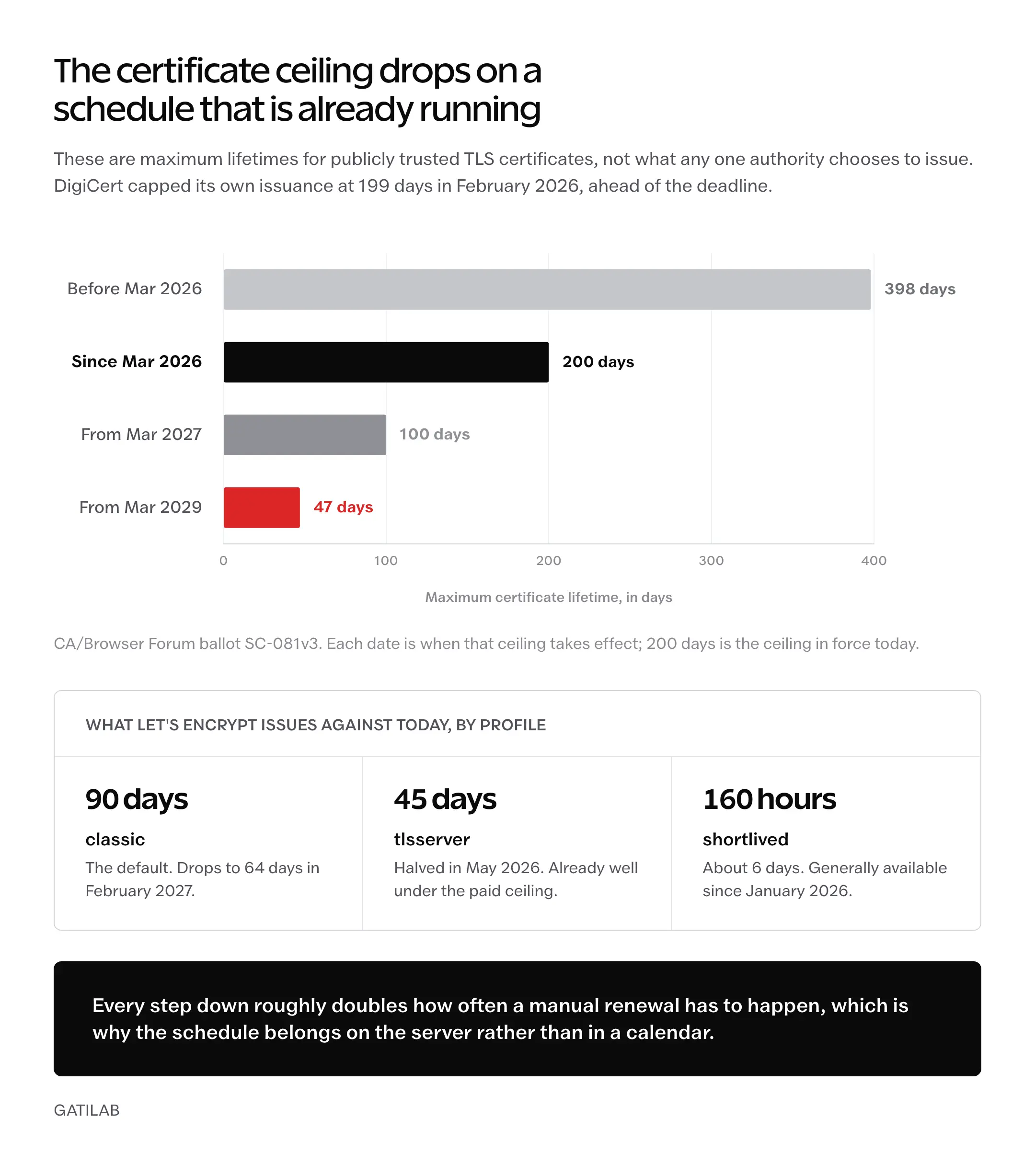
What changed is the clock. Since March 15, 2026, the CA/Browser Forum caps publicly trusted TLS certificates at 200 days, down from the 398 day ceiling that held from 2020. That cap drops to 100 days on March 15, 2027, and to 47 days on March 15, 2029. DigiCert began issuing at a 199 day maximum on February 24, 2026. The annual certificate you used to book into a calendar no longer exists.
Two groups get burned by that. The first still treats SSL as a yearly chore, and gets caught mid-year with a dead certificate and no reminder. The second automated it once, never checked whether the automation still fires, and finds out from a customer’s screenshot that it stopped months ago.
Both failures have the same root: nothing is watching the expiry date.
How to Check When Your Certificate Expires
Confirm you actually need to renew before touching anything. Three checks, in rising order of detail.
- Browser. Click the lock icon in Chrome, then “Connection is secure,” then “Certificate is valid.” The expiry date sits near the top.
- Qualys SSL Labs. Run the domain through its server test for the full chain, protocol support, and a letter grade.
- Command line. One openssl call, no login required, works against any host you can reach.
echo | openssl s_client -servername yourdomain.com -connect yourdomain.com:443 2>/dev/null | openssl x509 -noout -datesThe notAfter line is your deadline.
Everything below is about making that date move without you.
How much runway you need depends on your client version, and the number most guides quote is out of date. Certbot changed its rule in 4.0.0: it renews when less than a third of the certificate’s lifetime remains, or less than half for lifetimes of 10 days and under. On a 90 day certificate that lands around 30 days out. On the newer 45 day certificates it lands around 15. Certbot also honors ACME Renewal Information, which lets the issuing CA override the client’s own window and pull a renewal forward.
The fixed 30 day threshold is pre-4.0 behavior. Stop quoting it.
How Long SSL Certificates Last Now
Renewal cadence is the part of this topic that went stale fastest, so it’s worth putting the current numbers in one place before any commands. The maximum lifetime is set by the CA/Browser Forum ballot that scheduled the reductions, and Let’s Encrypt publishes its own shorter schedule on top of it.
| Certificate | Lifetime today | What changes next |
|---|---|---|
| Public TLS, maximum allowed | 200 days | 100 days on March 15, 2027; 47 days on March 15, 2029 |
| DigiCert public TLS | 199 days maximum | Capped since February 24, 2026 |
Let’s Encrypt classic profile (default) | 90 days | 64 days on February 10, 2027; 45 days on February 16, 2028 |
Let’s Encrypt tlsserver profile | 45 days | Moved down from 90 days on May 13, 2026 |
Let’s Encrypt shortlived profile | About 6 days (160 hours) | Generally available since January 15, 2026 |
Read the right column as a chore schedule. Twice a year today, quarterly from 2027, and roughly every 6 weeks from 2029, which is a long way of saying that manual renewal has an expiry date of its own.
One number worth retiring while you’re here: the 60 days people quote for Let’s Encrypt. That was never a property of the certificate. It was certbot’s old renewal threshold on a 90 day certificate, and both halves of that sentence have since changed. The certificate profile you request now decides the lifetime, and the client decides when to ask.
Renew an SSL Certificate in cPanel
cPanel renews through AutoSSL. Its Manage AutoSSL documentation states that the system uses the Let’s Encrypt provider by default and that a cPanel license includes that free provider. Worth knowing, though: AutoSSL is a pluggable framework rather than a Let’s Encrypt feature. Sectigo was the historical default, deprecated in cPanel and WHM v118 and removed in v120, so a server that hasn’t been updated in a while may still be issuing from Sectigo.
- Log into cPanel and open Security → SSL/TLS Status.
- Read the domain list. A green lock is valid, a red warning is not.
- Select the domain and click Run AutoSSL.
- Wait 2 to 5 minutes, then reload the page.
That is the entire renewal on a cPanel host.
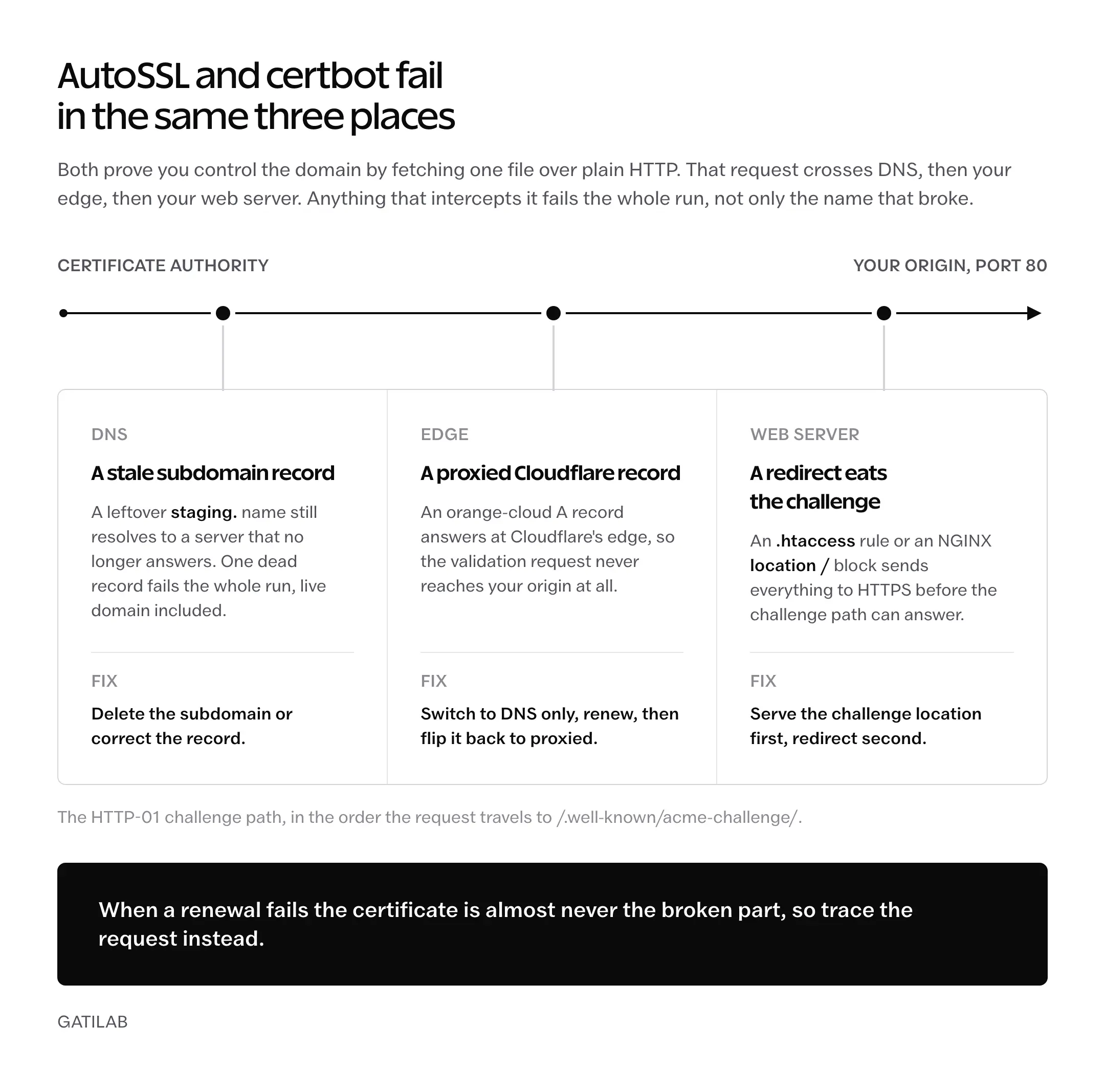
When it fails, the certificate is rarely the problem. Validation is. Three causes account for most of it.
- A DNS record for a stale subdomain points at a server that no longer answers, and AutoSSL refuses to issue for the whole set.
- An
.htaccessrule blocks/.well-known/acme-challenge, usually a security plugin’s doing. - A Cloudflare proxy answers the HTTP-01 request before it ever reaches your origin.
For the Cloudflare case, set the A record to DNS-only (grey cloud), run AutoSSL, then flip it back to proxied. Two minutes of unproxied traffic is cheaper than an afternoon reading validation logs.
Which Hosts Actually Run cPanel
This matters more than it used to, because a lot of the hosts still described as cPanel hosts left years ago.
- Bluehost shared plans run cPanel. Bluehost Cloud does not.
- SiteGround has not shipped cPanel on any plan since its Site Tools migration finished in 2020. It issues Let’s Encrypt certificates through Site Tools instead.
- Hostinger uses hPanel. The menu paths above do not apply, and neither does AutoSSL. The plan-by-plan comparison of Hostinger against GoDaddy covers where each control panel actually lands.
- Namecheap shared hosting runs cPanel but not AutoSSL. Namecheap’s knowledgebase states AutoSSL is unavailable on its shared servers; it auto-issues free PositiveSSL certificates through its own cPanel SSL plugin instead, covering up to 50 domains and subdomains per account.
Different mechanism, different failure modes. If your host is on that list, the Run AutoSSL button you were told to click may not exist on your account at all.
Renew a Let’s Encrypt Certificate With Certbot
On a VPS or cloud server, renewal is yours. That’s the trade you accepted when you picked the box over shared hosting, and it’s worth reading the difference between dedicated and VPS hosting if you inherited the server rather than choosing it. Start by asking certbot whether renewal already works.
sudo certbot renew --dry-run“Congratulations, all simulated renewals succeeded” means the timer is firing and the challenge path works. Nothing else to do.
Anything else is a validation failure, and it takes one of two shapes.
HTTP-01 Challenge Failures
Certbot cannot reach /.well-known/acme-challenge/ on your domain. Two questions answer most of these: is the site reachable on port 80 as well as 443, and does the HTTP server block redirect everything to HTTPS before the challenge can be served? Fix the second by carving the challenge path out of the redirect.
server {
    listen 80;
    server_name yourdomain.com;

    location /.well-known/acme-challenge/ {
        root /var/www/certbot;
    }

    location / {
        return 301 https://$host$request_uri;
    }
}
Order matters in that block: the specific location wins over the catch-all, so the challenge is served and everything else still redirects. Reload with sudo systemctl reload nginx, then run the dry run again.
DNS-01 and Wildcard Certificates
Wildcards (*.yourdomain.com) require DNS-01 validation. Certbot writes a TXT record, Let’s Encrypt reads it, then the record is removed.
If your DNS provider has no certbot plugin, that loop can’t close.
This is where a lot of copied command lines break. Passing --dns-cloudflare to certbot renew does nothing useful, because the Certbot user guide is explicit that the same plugin and options used when a certificate was originally issued get reused for the renewal attempt. The plugin belongs on certbot certonly at issuance, or written into that certificate’s file under /etc/letsencrypt/renewal/.
sudo apt install python3-certbot-dns-cloudflare
echo 'dns_cloudflare_api_token = your_token_here' | sudo tee /root/.cloudflare.ini
sudo chmod 600 /root/.cloudflare.ini
sudo certbot certonly --dns-cloudflare \
  --dns-cloudflare-credentials /root/.cloudflare.ini \
  -d yourdomain.com -d '*.yourdomain.com'
Issue it once with the plugin attached and every later certbot renew picks the plugin up on its own. Create the Cloudflare API token with Zone.DNS Edit permission scoped to that one zone, not to your whole account.
One more trap sits in the same command. Options you pass to certbot renew apply to every certificate on the machine, not just the one you had in mind.
Renewing a Single Certificate
sudo certbot renew --cert-name yourdomain.com
sudo systemctl reload nginx
Add --force-renewal only when you’re testing or replacing a compromised key. Let’s Encrypt documents a weekly issuance limit per registered domain and a separate Duplicate Certificate limit, and repeated force renewals are the precise thing those limits exist to stop.
Set Up Auto-Renewal That Actually Fires
On cPanel, AutoSSL runs on its own schedule; confirm it’s enabled under WHM → SSL/TLS → Manage AutoSSL, which needs root, or ask the host to confirm. On Ubuntu and Debian, modern certbot installs a systemd timer during setup.
sudo systemctl list-timers | grep certbotYou want certbot.timer with a Next run inside the following 12 hours. If it isn’t there, sudo systemctl enable --now certbot.timer creates it. On CentOS, RHEL, and Rocky, use root’s crontab instead.
0 3 * * * /usr/bin/certbot renew --quiet --post-hook "systemctl reload nginx"Certbot’s own timer runs twice a day rather than once, which is worth copying now that lifetimes are shrinking: a second entry gives a failed attempt somewhere to retry.
The post-hook is the part people leave off, and it’s the part that matters. A renewed certificate sitting on disk that the web server never reloaded is still an expired certificate to every visitor.
Reload it.
Renewing a Paid SSL Certificate
Paid renewal is a different workflow because no machine can fetch it for you. The sequence is the same across DigiCert, Sectigo, GlobalSign, and resellers.
- Generate a new Certificate Signing Request on your server.
- Submit the CSR to the certificate provider.
- Complete domain control validation by email, DNS record, or file upload.
- Download the issued bundle: the certificate plus its intermediate chain.
- Install the certificate, the private key, and the CA bundle on the server.
openssl req -new -newkey rsa:2048 -nodes -keyout yourdomain.key -out yourdomain.csrCommon Name is your exact hostname, with no http:// and no www unless the certificate is meant for the www hostname. Get that field wrong and validation passes while browsers still reject the result.
In cPanel, the install lives at Security → SSL/TLS → Install and Manage SSL for your site: paste the certificate, the private key, and the CA bundle your provider sent, then click Install Certificate. On NGINX, replace the files and point the config at them.
sudo cp yourdomain.crt /etc/ssl/certs/yourdomain.crt
sudo cp yourdomain.key /etc/ssl/private/yourdomain.key
sudo nginx -t && sudo systemctl reload nginx
The nginx -t in front is not optional politeness.
A bad path in ssl_certificate takes the whole server down on reload, and you find out about it with the site already dark.
For an ordinary WordPress site, paid SSL now buys close to nothing. Let’s Encrypt certificates are trusted by every current browser, cost nothing, and renew themselves. Extended Validation was the last real differentiator and browsers stopped surfacing it years ago: Chrome 77 moved EV details out of the URL bar into the Page Info dialog in September 2019, Firefox 70 followed in October 2019, and Safari had already dropped the indicator in iOS 12 and macOS Mojave. The 200 day ceiling applies to paid certificates too, so buying one now means doing this by hand twice a year instead of once.
Skip it.
Emergency Recovery After Expiration
The certificate is already dead, Chrome is showing an interstitial, and forms have stopped submitting. Most of these are recoverable inside 20 minutes.
- If Cloudflare is in front, switch the orange cloud to grey so the edge stops serving the expired certificate and validation can reach your origin.
- Force the renewal: Run AutoSSL on cPanel, or
sudo certbot renew --force-renewal --cert-name yourdomain.comfollowed by a reload on a VPS. - Verify with the
openssl s_clientcommand from earlier and read the newnotAfterdate. - Flip the cloud back to orange, then purge the Cloudflare cache.
- Test in an incognito window, because your own browser has cached the certificate error and will keep showing it.
Post-expiry renewal is not a special case, whatever the panic suggests. ACME has no separate path for it: issuance is issuance, and the new certificate’s validity runs from the date it’s issued rather than from the old expiry.
The one situation that turns ugly is HSTS with a long max-age. Browsers that have seen the header refuse to fall back to HTTP even while your certificate is dead, so there is no temporary workaround and no partial service.
Fix the certificate, and HSTS stops mattering the moment you do.
What Actually Breaks When SSL Expires
Triage is easier when you know which symptoms cost money and which ones only look alarming.
| Symptom | Severity | Fix window |
|---|---|---|
| Payment processors reject transactions | Critical | Immediate |
| Chrome and Firefox block the site behind an interstitial | Critical | Immediate |
| WordPress admin unreachable over HTTPS | Critical | Immediate |
| HTTPS redirects turn into a loop | Critical | Immediate |
| Browser shows a “Not Secure” label | High | Immediate |
| Forms fail on mixed content | High | Within 1 hour |
| Google stops preferring the HTTPS URL for indexing | Medium | Same day |
| Transactional email from the site fails | Low to medium | Within 4 hours |
That last search row is the one people inflate. Google’s own position on HTTPS as a ranking signal is that it’s a very lightweight signal affecting fewer than 1% of global queries and carrying less weight than high-quality content. The mechanism that actually costs you is separate and documented: a valid TLS certificate is one of the criteria Google uses when choosing to index the HTTPS version of a URL rather than the HTTP one, and an expired certificate forfeits that preference.
No percentage attaches to that, and anyone quoting one is guessing.
To see the real damage on your own property, the Search Console audit workflow shows which URLs actually dropped out, rather than which ones a blog post predicted would.
SSL Renewal on Managed WordPress Hosts
Managed hosts all automate the free certificate and diverge sharply on what happens when you bring your own. The differences below come from each vendor’s own documentation.
- Kinsta. Free certificates come from Kinsta’s Cloudflare integration, not from Let’s Encrypt. Renewal needs an
_acme-challengeCNAME at whatever DNS provider you use; Kinsta DNS is not a requirement. Wildcards are included on managed WordPress plans. Custom certificates go in at MyKinsta → Sites → your site → Domains → the three-dot menu beside the domain → Add custom SSL certificate. - WP Engine. Free Let’s Encrypt certificates renew automatically. Third-party import is self-service in the User Portal using a PEM formatted
.pem,.crt, or.cerfile plus the key, and there’s an API endpoint for it. The catch nobody mentions: imported third-party certificates do not auto-renew, so you re-import every cycle. - Cloudways. One-click Let’s Encrypt per domain, with auto-renewal selected by default at install and renewal firing 30 days before expiry. Custom SSL upload is supported. Manual on-demand renewal is capped at 5 times per day.
- Rocket.net. Bundles Cloudflare Enterprise on all plans and states that SSL is free, auto-installed, and auto-renewed at the edge. That is the vendor’s description of its own product, not an independent measurement.
- SiteGround. Let’s Encrypt through Site Tools, not cPanel AutoSSL. Any guide that sends you to SSL/TLS Status is describing a panel SiteGround retired in 2020.
- Hostinger. Free SSL in hPanel with automatic renewal. Custom certificates import at Security → SSL → Import SSL, where you paste the certificate, private key, and CA bundle. No support ticket needed. Custom SSL is unsupported on Hostinger Website Builder sites.
- Pressable. Let’s Encrypt auto-renewal is included, and custom certificates are not permitted at all. Pressable’s knowledgebase suggests managing a custom certificate at Cloudflare and says that route is unsupported.
Two patterns are worth carrying away from that list. Free certificates are handled for you almost everywhere, and the certificates that break are the ones you brought yourself: on WP Engine they never auto-renew, and on Pressable they can’t be installed at any price.
Bring your own, own the calendar.
If your host still expects you to install a free certificate manually in the first place, treat that as data about the host. It belongs on the same list as the other warning signs worth checking before you renew a hosting plan.
The WordPress Loose Ends
A valid certificate and a working site are two different achievements. Five things sit between them, and they’re best handled in the same sitting as the renewal.
Mixed content. Pages served over HTTPS that pull images, scripts, or iframes over HTTP. Really Simple Security, which was renamed from Really Simple SSL in 2024 and still sits on the really-simple-ssl slug with more than 3 million active installations, rewrites them without touching the database. The permanent fix is a database rewrite instead, and the WP-CLI search-replace guide covers the dry run you should never skip before running it across all tables.
WordPress Address and Site URL. Settings → General, both fields on https://. Leaving them on http:// after installing a certificate produces redirect loops that read like certificate failures and aren’t.
HSTS max-age. Strict-Transport-Security: max-age=31536000 is exactly 365 days, and MDN’s reference for the header confirms a browser that receives it will upgrade every request to HTTPS for a full year. Preload list submission also requires a max-age of at least 31536000 plus includeSubDomains. Start at max-age=300 while you’re still testing, then raise it once renewal has proven itself through a cycle.
Cloudflare encryption mode. Flexible encrypts the visitor-to-Cloudflare hop and leaves Cloudflare-to-origin unencrypted, which is where most WordPress redirect loops come from. Cloudflare’s SSL/TLS encryption modes documentation recommends Full or Full (strict) where possible, to prevent malicious connections to the origin.
Multisite coverage. Subdomain networks need every hostname covered. A wildcard works, and so does a SAN certificate listing each subdomain explicitly, which is what certbot produces when you pass multiple -d flags. Wildcard is the practical choice only when subdomain registration is open and you can’t enumerate the names in advance, a distinction the multisite network setup guide works through in more detail.
These are the issues that make SSL technically fine and the site quietly broken, which is the version nobody notices until a customer does.
Set Up Expiry Alerts
One fact makes this section the most useful part of the article. Let’s Encrypt stopped sending certificate expiration notification emails on June 4, 2025, announced the previous January. The safety net most site owners still assume they have was switched off over a year ago.
Nobody emails you.
- UptimeRobot checks certificates once every 24 hours with default reminders at 30, 14, 7, and 0 days. Paid plans only: its help center states the SSL check toggle isn’t available on the Free plan, so HTTPS monitors there are not checked for certificate problems at all.
- Cloudflare includes Universal SSL alerts on every plan, but they are not automatic. You create the notification yourself under Notifications, and it covers validation, issuance, renewal, and expiration of Cloudflare’s own edge certificates rather than the certificate on your origin. The CA behind those edge certificates may be Let’s Encrypt, Google Trust Services, or SSL.com depending on plan and configuration.
- A cron job running the
openssl s_clientone-liner from the top of this article costs nothing, needs no account, and watches the exact certificate your server is handing to visitors rather than one an edge network is presenting on its behalf.
Pick one and set it up today.
The 20 minutes it costs is the difference between finding out from a dashboard on Tuesday and finding out from a customer on Saturday.
The Limits
Automated renewal covers the ordinary public web certificate and stops cleanly at the edges of it.
It does nothing for client certificates, mutual TLS, or anything issued by a private CA, because ACME validation proves control of a public domain name and those certificates aren’t validated that way. You install and rotate them by hand, on your own schedule.
It doesn’t survive a DNS handoff. Move registrars or nameservers without carrying the _acme-challenge record or the API token across, and renewal fails silently at the next cycle, with a browser warning as the first symptom weeks later.
It can’t rescue a third-party certificate on a managed host. WP Engine imports don’t auto-renew, and Pressable doesn’t accept them, so those two stay a diary entry no matter what you automate elsewhere.
And it never confirms the certificate reached a visitor. Certbot’s job ends when the file lands on disk, so the reload, the edge cache purge, and the check from outside your own network are all still yours to arrange.
What Quietly Ruins SSL Renewal
Force-renewing on a schedule. It feels like insurance against forgetting. Let’s Encrypt enforces a weekly issuance limit per registered domain plus a separate Duplicate Certificate limit, and a nightly --force-renewal walks into both, so the one night you genuinely need a new certificate is the night you’re rate limited out.
Leaving Cloudflare orange-clouded while validation runs. The proxy answers the HTTP-01 challenge instead of your origin, the challenge fails, and the log reports the domain as unreachable, which sends people debugging a firewall rule that was never involved.
Renewing without a reload hook. The certificate is new on disk and every visitor is still being handed the old one, so the fix looks finished in your terminal and stays broken in a browser until someone tells you otherwise.
Copying a DNS plugin flag onto certbot renew. Certbot reuses the plugin stored in the renewal config, so your flag is either ignored or applied to every certificate on the machine, and the second outcome breaks things you weren’t touching.
Setting HSTS to a year on day one. A long max-age means browsers refuse to fall back to HTTP even when the certificate is dead, so a 20 minute outage becomes an outage with no route around it for anyone who has visited before.
FAQs on SSL Renewal
Can I renew an SSL certificate that has already expired?
Yes, and the process is identical to a normal renewal. ACME has no separate post-expiry path, so issuance is issuance, and the new certificate’s validity runs from the date it is issued rather than from the old expiry date. The only thing you lose is the time visitors spent looking at a warning.
How often do I need to renew an SSL certificate now?
Twice a year at the outside, and more often soon. Publicly trusted TLS certificates have been capped at 200 days since March 15, 2026, with the cap dropping to 100 days in 2027 and 47 days in 2029. Let’s Encrypt’s default profile issues 90 day certificates today and moves to 64 days in February 2027.
Is SSL renewal free with Let’s Encrypt?
Yes. The certificates cost nothing and renew on their own once certbot or your host’s issuer is configured. cPanel AutoSSL, Cloudways, Kinsta, and Rocket.net all bundle free certificate issuance with no configuration on your side, though Kinsta’s certificates are issued through its Cloudflare integration rather than by Let’s Encrypt directly.
Why did my certificate renew but the site still shows an error?
Almost always because the web server was never reloaded, or because an edge cache is still serving the old certificate. Reload NGINX or Apache, purge the CDN, then verify with the openssl s_client command rather than a browser tab that has cached the error. If the error survives all three, the problem is the intermediate chain rather than the certificate itself.
Final Remarks
Renewal was a calendar problem while certificates lasted a year. At 200 days it’s a process problem. At 47 days it becomes a monitoring problem, because no human schedule survives a 6 week cycle across a portfolio of sites, and 2029 is closer than the next redesign.
The honest trade is that automation moves the failure rather than deleting it. You stop forgetting a date and start depending on a timer, a DNS record, and a reload hook you configured once and have not looked at since. That is a much better bet, but only while something is watching it.
Set the alert before you close this tab.
Tell Google you want more of this.
Add Gatilab as a preferred sourceOne tap, and this site shows up more often in your own Top Stories, AI Overviews and AI Mode. Remove it any time.