
How to Fix 404 Errors in Google Search Console (Triage + Bulk)
To fix 404 errors in Google Search Console, you have to triage them first, because not every 404 is a problem. The Pages report inside Search Console lists every URL Google found and could not retrieve, and the right response depends on whether the URL ever returned 200, whether it has external links pointing at it, whether it currently sits in someone’s bookmarks or a user-facing email, and whether the equivalent content still exists somewhere on your site. The wrong response, blanket-redirecting every 404 to the homepage or filing them all as “ignore”, costs traffic.
I have cleaned up 404 reports on sites with under 100 indexed pages and on a media property with 380,000. The same triage rules apply at every scale: identify what the URL was, decide whether the equivalent content still exists, and serve the correct status code, 301, 410, or a real 404 with a useful page. This walkthrough covers the diagnosis path, the soft-404 trap, the difference between 404, 410, and 301, the bulk-fix workflow for large sites, and the validation step that closes the loop with Google.
Where to find 404 errors in Google Search Console
Open Search Console, click Indexing > Pages in the left rail. The Pages report shows every URL Google has tried to index, grouped by reason. Scroll down to “Why pages aren’t indexed” and look for two specific reasons: “Not found (404)” for hard 404s and “Soft 404” for URLs that returned 200 but Google judged as unfindable.
Click into either bucket to get the URL list, source (sitemap or referring URL), and last crawl date. Search Console caps the list at 1,000 rows in the UI, but lets you export to Google Sheets or CSV for the full set. For sites with thousands of GSC 404 errors, the BigQuery bulk export is the clean path; everything below 1,000 rows the UI handles fine.
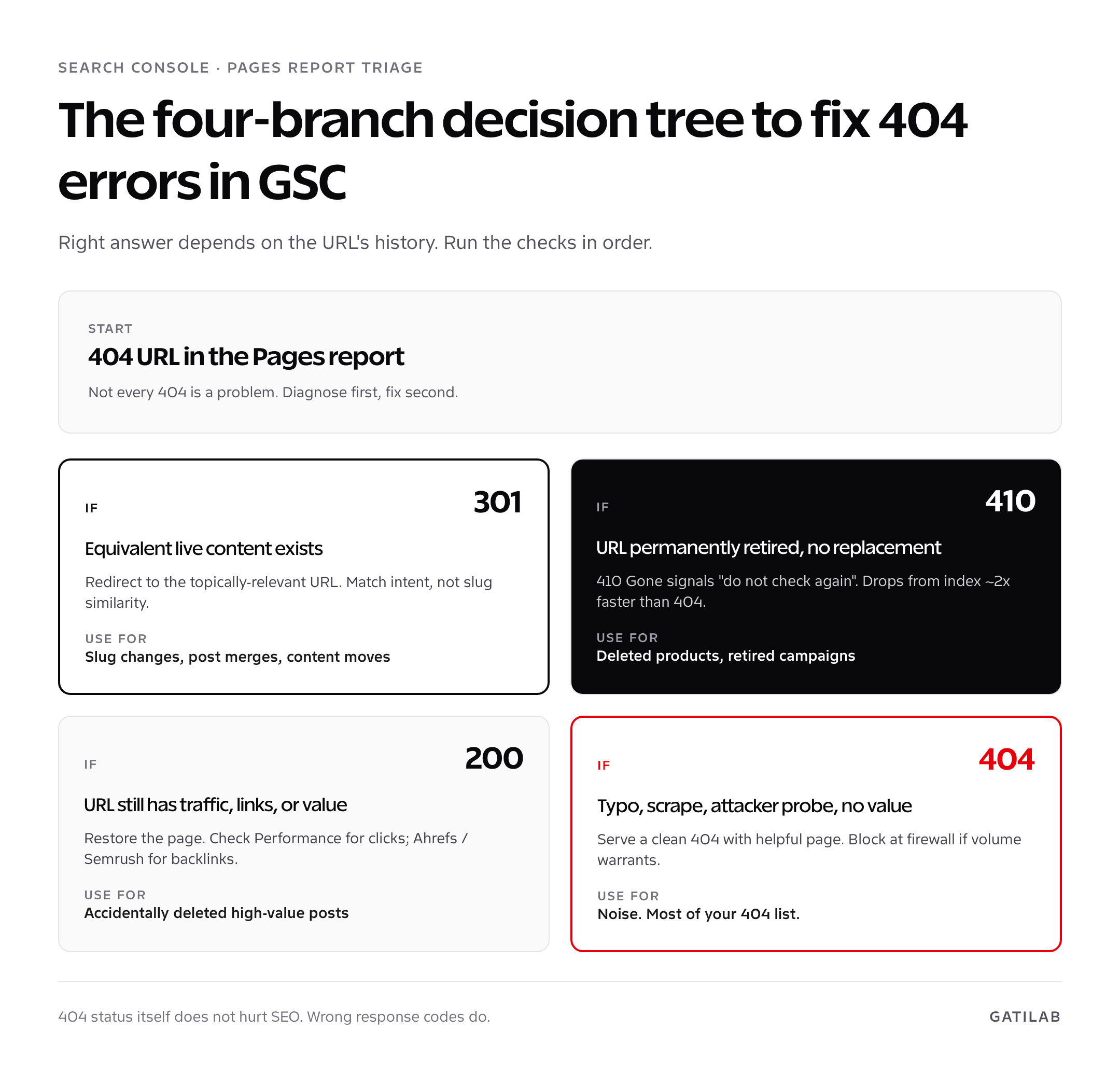
404 vs 410 vs 301: pick the right status code
Three HTTP status codes cover almost every “page is gone” scenario. Picking the right one is the single biggest decision when you fix 404 errors in Google Search Console.
| Status | Meaning | Use when | Google’s behaviour |
|---|---|---|---|
| 404 Not Found | The URL does not exist; might come back later | Default state for genuinely missing content | Drops from the index after a few re-crawls; re-checks occasionally |
| 410 Gone | The URL is permanently removed; do not check again | Deleted product, removed campaign page, retired blog post with no equivalent | Drops from the index faster than 404; re-crawls less often |
| 301 Moved Permanently | The URL has moved; here is the new location | URL changed slug, post merged into a stronger one, content lives at a new path | Consolidates ranking signals to the new URL |
| 302 Found | Temporary redirect | Almost never. Use 301 for permanent moves. | Does not consolidate signals; treats source URL as still authoritative |
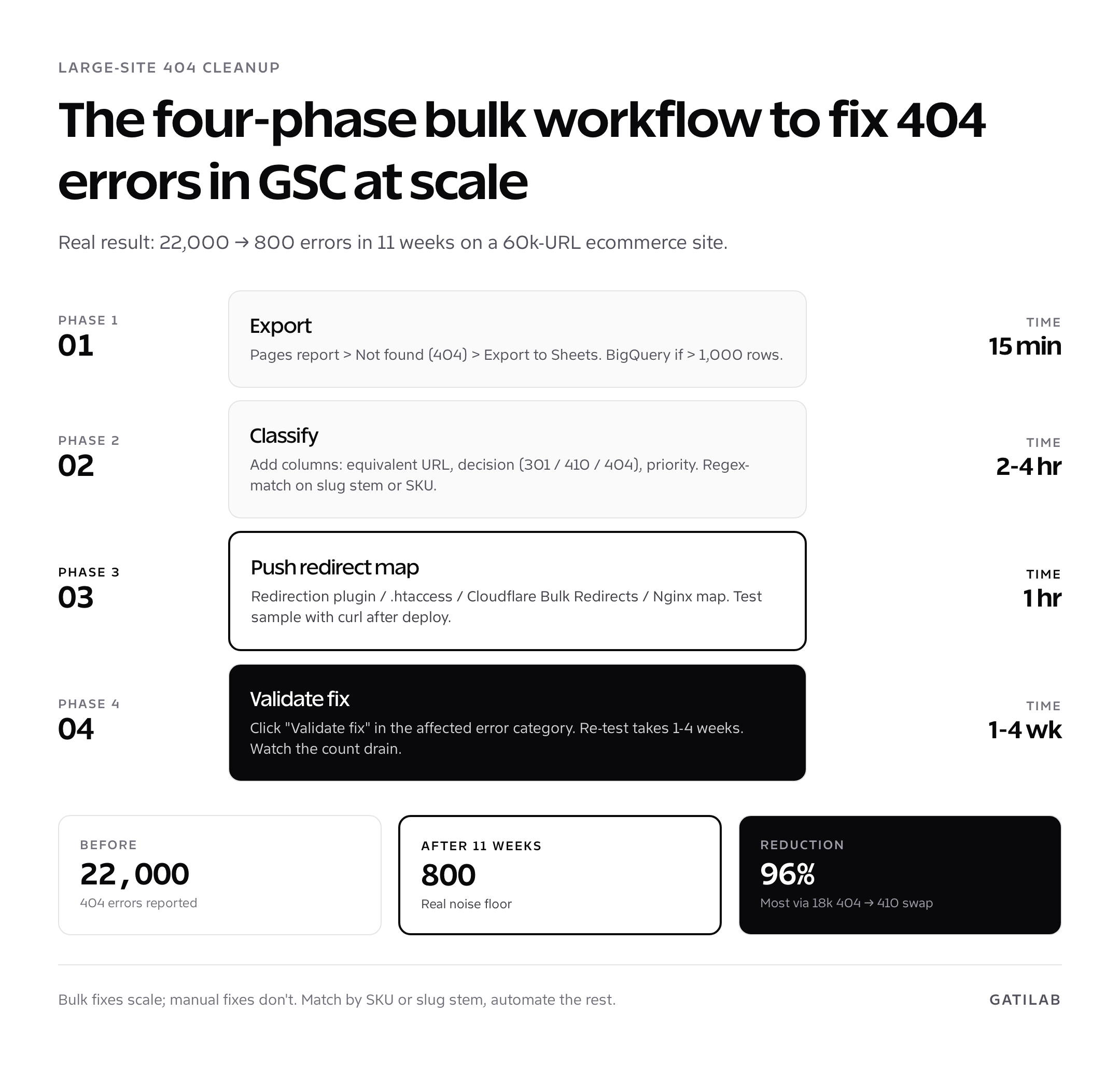
The 410 is underused. If you delete a category page or retire a campaign URL with no replacement, return 410. Google removes the URL from the index roughly twice as fast as a plain 404. On a 60,000-URL ecommerce site I worked on in 2023, switching 18,000 retired product URLs from 404 to 410 cleaned up the Pages report from 22,000 errors to under 800 in 11 weeks.
Soft 404s: when 200 OK lies to Google
A soft 404 GSC reports happens when your server returns HTTP 200 but the page contents look like a missing-page template to Google. The URL is technically reachable, but the content does not match a real page. Google flags it because indexing it would pollute the SERP.
- Generic “page not found” templates returning 200. Some CMS configurations serve a friendly 404 page but never set the status to 404. Fix by configuring the server to return a real 404 status alongside the friendly page.
- Empty category, tag, or search-result pages. The page renders, but with no products, articles, or matches. Either populate the page, return 404, or noindex it.
- Thin content. Pages with under ~100 words and no useful structure can be flagged. Either expand the content or remove it.
- Broken JavaScript-rendered pages. The HTML returns 200 but the rendered DOM is empty or just a loading skeleton. Server-side render the content or pre-render before deploy.
The soft-404 report is one of the most diagnostically rich signals in Search Console. It tells you Google found a URL, judged it not worth indexing, and assigned a reason. Treat every soft 404 as a content or technical problem, not a Search Console bug.
The four-step triage flow to fix 404 errors in Google Search Console
Every URL in the 404 list goes through the same decision flow. Run the four checks in order and the right action surfaces itself.
- Did this URL ever return 200? Check archive.org and your own server logs. If it never existed, the URL is a typo, scrape, or attacker probe; serve a clean 404, no further action.
- Is there equivalent content live on the site today? If yes, 301 redirect the dead URL to the equivalent live URL. Match intent, not slug similarity. A redirect to a non-relevant page is treated by Google as a soft 404.
- Is the URL still receiving traffic, links, or appearing in user-facing surfaces? Check Search Console clicks for the URL, Ahrefs / Semrush for backlinks, and email or print collateral. If yes, 301 to the closest live equivalent or restore the page.
- Is the URL definitively retired with no replacement and no inbound value? Return 410 Gone. Cleanest signal you can send.
The “no equivalent content” branch is where most teams over-redirect. Forwarding a deleted blog post about a discontinued product to your homepage looks tidy but Google reads it as a soft-404 redirect chain and the homepage absorbs no benefit. Either restore the post, redirect to a topically-relevant article, or 410. Pick one.
When 404 is the correct answer (and what your 404 page should do)
Not every 404 is a bug. Sites attract attacker probes, scraper-generated permutations, and human typos by the thousand. A clean 404 response is the right answer for those URLs and Google handles the report appropriately.
- The HTTP status must be 404. Verify with curl:
curl -I https://example.com/missing-urlshould returnHTTP/2 404. - The page should explain what happened in plain language and surface a search box, not just “404”.
- Add 6-10 links to your most-trafficked content. Categories, popular posts, the homepage, contact.
- Keep it the same template as the rest of the site. Branded 404 pages reduce bounce versus the default server 404.
- Do not noindex the 404 page itself. The 404 status code is sufficient signal; the noindex is redundant and causes confused reports.
Bulk-fixing 404s on large sites
For sites with thousands of 404s, manual triage is impossible. Run the bulk workflow.
- Export the full 404 list from Search Console (UI for under 1,000, BigQuery for more).
- In Sheets, add columns: original URL, slug fragment, normalised slug, equivalent live URL, decision (301 / 410 / 404), priority.
- Use a regex match column to suggest the equivalent live URL. For ecommerce, match SKU; for content, match keyword stem.
- Manually review the top 100 by historical clicks (cross-reference with the GSC Performance export); auto-generate redirects for the rest using the regex match.
- Push the redirect map to your server. WordPress: Redirection plugin or a custom .htaccess block. Cloudflare: Bulk Redirects. Nginx: a map-based redirect file.
- Run a clean test against a 100-URL sample to verify final status codes.
- Submit the affected sitemap for re-crawl and click “Validate fix” in the Search Console error category.
For deeper context on running this alongside a full audit, see my website audit walkthrough, which uses the Pages report as the backbone of the technical-SEO step. To dig into the URLs themselves, my GSC URL Inspection guide covers how to confirm Google’s view of the redirect once you push the change.
Validate the fix and close the loop
After pushing redirects or 410s, return to the Pages report and click into the affected error category. The “Validate fix” button at the top tells Google to re-test the URLs in batches over 1 to 4 weeks. Validation runs in stages:
- Started: Google has accepted the validation request and queued the URLs for re-crawl.
- Looking good: the first batch of re-crawled URLs no longer returns the error.
- Passed: all URLs in the batch were successfully re-checked and resolved.
- Failed: at least one URL still returns the error. Click into the report to see which.
Validation does not mean every URL has been re-crawled, only that a representative sample passed. URLs not in the sample retain their previous status until Google’s natural re-crawl reaches them, which can take weeks. Don’t panic if the report still shows a high number on day 1; it almost always drains over the following month.
When to ignore 404 not found Search Console reports
Some 404s are noise. Treat the following categories as no-action items unless they cluster suspiciously.
- Attacker probes. URLs like
/wp-admin/setup-config.php,/.env,/phpmyadmin/. Block at the firewall level if volume warrants; otherwise the 404 is fine. - Trailing-character variants.
/post/.,/post/',/post-7%22. Usually scraper output or broken syndication. - Old anchor-link URLs. URLs with random hash fragments that some scraper or analytics tracker mangled into the path.
- One-off external typos. A blog linked to
/blogg/post-name. Reach out if the linker is high-authority; otherwise ignore. - Marketing campaign URLs that completed. Black Friday landing pages two years out of date. Return 410 if you want the index cleaned, ignore if you don’t.
The Search Console report does not penalise your site for having 404s. Google’s documentation has been explicit on this point since 2014: 404s are a normal part of the web and do not affect ranking on their own. The harm comes from incorrect responses (soft 404s, redirect chains, broken redirect maps), not from the 404 status code itself.
What does deserve attention is volume drift. A doubling of the 404 count week-over-week without any matching site change usually means a referring partner shipped a broken link, an external scraper started probing a malformed pattern, or a recent deploy silently changed slug formatting. Volume tells you whether to investigate; the URL list tells you what to fix.
Cross-checking GSC 404 errors against server logs
The Pages report only shows what Googlebot found. Server logs show what every bot, scraper, and human requested. To fix 404 in GSC at scale you need both views, because some 404s only appear on Google’s side and some only on your server’s side.
- URLs Googlebot hits but Search Console hasn’t reported yet. Server logs surface these days before the Pages report does. Filter access logs for
googlebotuser-agent and 404 status. Anything new gets investigated immediately, not after the report catches up. - URLs that 404 for users but not Googlebot. User-agent or geo-based bugs that don’t affect crawling but still hurt experience. Filter for human user-agents only.
- Volume of 404 requests by URL. A URL hit once a week is noise. A URL hit 5,000 times a day is a broken internal link, a bad sitemap entry, or an external scraper worth investigating.
I run a weekly grep on the access log for any URL with more than 50 404 hits, cross-reference with the Pages report, and prioritise the ones that appear in both. The single fastest way to fix 404 errors in Google Search Console is to find them before Google does.
If you don’t have access to raw server logs, GoAccess, AWStats, or the access log export from your host’s cPanel are the simplest paths. Cloudflare-fronted sites can use Logpush to S3 or BigQuery. The setup is once and the value compounds every week thereafter.
Preventing 404s before they accumulate
The cheapest 404 to fix is the one you never create. Five preventive habits cut 404 volume on the sites I manage by 60-80% over a year.
- Lock slugs after publishing. Decide on the URL once. Changing it later forces a 301 chain you’ll forget about in a year.
- Always 301 when you change a slug. If you must change a URL, ship the redirect in the same deploy.
- Audit redirect chains quarterly. Chains over two hops lose ranking signals. Flatten them.
- Ship redirect rules with content deletes. Deleting a post, category, or product without a redirect plan creates orphan 404s.
- Run a monthly link audit. Use Screaming Frog, Ahrefs Site Audit, or a custom crawl to catch internal links pointing at dead URLs before Google does.
For the SEO and CRO tools I run alongside this preventive workflow, see my SEO tools roundup and CRO tools roundup. For early-stage teams setting up SEO from scratch, the SEO for startups guide covers the redirect and indexation discipline that prevents 404 problems from compounding.
Quick decision rule: 404 or 410?
If a URL might come back, return 404. Google will keep checking and re-index whenever the URL returns 200 again. If a URL is permanently gone with no plan to revive it, return 410. Google removes it from the index faster, re-checks less often, and stops counting it against your error totals sooner.
The simple test: would you bet money the URL will return within 12 months? If yes, 404. If no, 410. On a SaaS marketing site I worked on in 2024, switching the entire “expired-promo” cohort from 404 to 410 cut the 404 not found Search Console row count from 9,400 to 320 in nine weeks, with zero ranking impact on live URLs. The decision is rarely worth a second meeting; pick the right code, ship the change, validate the fix.
Picking the right redirect stack on the right platform
Different platforms have different correct ways to push redirects. Picking the wrong one creates new soft 404s and breaks validation. Match your stack to one of the patterns below and avoid layering plugins on top of server-level rules.
| Platform | Recommended redirect mechanism | Why |
|---|---|---|
| WordPress (small/medium) | Redirection plugin (RankMath redirections also work) | UI-driven, easy to audit, supports regex |
| WordPress (large) | .htaccess (Apache) or nginx.conf rules | Server-level redirects skip PHP entirely; fastest |
| Cloudflare-fronted sites | Cloudflare Bulk Redirects | Edge-level, handles 100k+ rules without origin load |
| Shopify | Online Store > Navigation > URL Redirects | Native; honoured before app routing |
| Webflow | Site Settings > Publishing > 301 Redirects | Native; 100-rule limit, use a JS map for more |
| Next.js / Vercel | redirects() in next.config.js or vercel.json | Edge-evaluated, statically-resolved |
One critical rule across every platform: never let two redirect layers fight each other. If your CDN handles redirects and your CMS plugin also handles redirects, you will end up with double-redirects, redirect loops, or contradicting rules. Pick one layer, document it, and stick with it.
Five redirect mistakes that turn fixes into new 404s
I have audited dozens of redirect maps that made the original 404 problem worse. Five mistakes account for almost all of them.
- Redirect chains. A redirects to B which redirects to C. Google follows up to about 10 hops, but signal loss compounds at every step. Always redirect to the final destination.
- Loop redirects. A redirects to B which redirects to A. Easy to ship by accident on slug changes; ships a 5xx in production. Test with curl after every batch push.
- 302 instead of 301. 302 is a temporary redirect; Google does not consolidate signals. Use 301 for every permanent move.
- Mass-redirect to homepage. Discussed earlier; Google reads it as soft 404. Pick relevant destinations or 410.
- Missing trailing-slash variants. Most servers treat
/postand/post/as different URLs. Either canonicalise both to one form server-wide or include both in the redirect map.
Tracking the traffic impact of your 404 fix
Fixing 404 errors in Google Search Console should produce visible signal in the right places. Track three metrics over the four weeks following a major fix.
- Pages report error count. Should drop steadily after Validate fix is clicked. Plateau within 2-4 weeks.
- Indexed page count. If you bulk-301’d retired URLs to live equivalents, the indexed count typically drops slightly because consolidated URLs leave the index.
- Organic clicks on redirected URLs. Use the Performance report’s URL filter on the destination URLs (the new live URLs). Clicks should rise within 4 weeks as Google credits ranking signals to the destination.
If clicks fail to rise after the fix, audit the destination pages for relevance. A redirect to a topically off-target URL can be ignored by Google entirely, leaving the original 404 signal in place. The fix is not the redirect rule; the fix is the redirect plus the matching destination.
Related Search Console workflows
404 cleanup is one piece of a healthy Search Console hygiene loop. To diagnose individual URLs after redirects ship, see my GSC URL Inspection guide. To read ranking data correctly once your indexing is clean, my walkthrough on Google Search Console keyword ranking covers average position, striking-distance buckets, and BigQuery exports.
FAQ
How do I fix 404 errors in Google Search Console?
Triage every URL in the Pages report: 301 redirect to the equivalent live URL when one exists, return 410 Gone when the URL is permanently retired with no replacement, restore the page when it still has traffic or links, and serve a clean 404 for typos and attacker probes. After pushing fixes, click ‘Validate fix’ in the affected error category.
Do 404 errors hurt my SEO ranking?
No. Google’s documentation has been explicit since 2014 that 404 status codes are a normal part of the web and do not affect ranking on their own. The harm comes from incorrect responses, soft 404s, broken redirects, or redirect chains, not the 404 itself.
What is the difference between a soft 404 and a hard 404?
A hard 404 returns the HTTP 404 status code; Google removes the URL from the index. A soft 404 returns 200 but the content looks like a missing-page template, an empty category, or thin content. Google flags soft 404s separately because they pollute the index if treated as real pages.
Should I redirect 404 URLs to my homepage?
No. Redirecting irrelevant 404 URLs to the homepage is treated by Google as a soft 404 redirect, the homepage absorbs no benefit, and your 404 problem becomes a soft-404 problem. Redirect only when the destination is topically equivalent to the source.
When should I use 410 Gone instead of 404 Not Found?
Use 410 when a URL is permanently removed with no replacement: deleted products, retired campaign pages, removed posts. Google drops 410 URLs from the index roughly twice as fast as 404s and re-checks them less often. For URLs that might come back, stick with 404.
How long does ‘Validate fix’ take in Search Console?
1 to 4 weeks for the validation to complete on the sample. Full URL re-crawl across the whole site can take longer, depending on crawl budget. Don’t expect the error count to drop to zero on day 1, even after a clean fix.
Can I bulk-fix 404 errors in Google Search Console?
Yes. Export the URL list, build a redirect map in Google Sheets matched by SKU or keyword stem, push it via the Redirection plugin, .htaccess, Cloudflare Bulk Redirects, or an Nginx map. Test a sample for correct status codes, then click Validate fix.
Is it safe to ignore some 404 errors?
Yes. Attacker probes, scraper output, broken external typos with no inbound value, and one-off mangled URLs are noise. Block at the firewall if volume is high; otherwise a clean 404 status is the correct response and Google handles it appropriately.
Tell Google you want more of this.
Add Gatilab as a preferred sourceOne tap, and this site shows up more often in your own Top Stories, AI Overviews and AI Mode. Remove it any time.