
WordPress Schema Markup: Complete 2026 Plugin Guide
WordPress schema markup is the JSON-LD your site emits to tell Google, Bing, and AI search engines what each page represents. WordPress doesn’t ship with any schema by default; every block of structured data on a WordPress site comes from one of three sources: an SEO plugin, a dedicated schema plugin, or manual code in your theme. The path you pick determines how much of your traffic comes back to you in the form of rich results, knowledge panel mentions, and AI citations.
The pattern is consistent. A site running a single, properly configured plugin (usually Rank Math) becomes eligible for the rich results its content supports once Google recrawls the pages. A site running two stacked plugins emits duplicate, conflicting JSON-LD, and Google may ignore both. A site running no schema gives Google, AI Overviews, and Perplexity less to work with when they decide what a page is, even when its content is better than the competition. Schema is the gate, and WordPress makes the gate easy.
This guide covers what WordPress schema needs in 2026, how to pick between Rank Math, Yoast, Schema Pro, and the free schema plugins, the manual JSON-LD pattern via theme files for niche types, conflict resolution when two plugins fight, validation, and the Search Console reports to monitor. Everything here applies to standard WordPress installs from version 6.4 onwards.
Want this handled on your WordPress site? Gatilab’s AI search optimization service implements the schema stack and tracks how it moves your AI citations.
What WordPress schema markup needs in 2026
Every WordPress site, regardless of niche, needs a baseline stack of WordPress schema markup. This is the always-on layer I deploy on every client site before any type-specific work.
Organization schema: one block, sitewide, in the <head>. Defines the brand entity Google and AI engines use to identify the site. Must include name, url, logo (ImageObject with explicit width/height), and a sameAs array linking to LinkedIn, X, GitHub, Wikipedia, Crunchbase, and any other authoritative profile. The sameAs array is the highest-impact AI citation signal in the entire schema toolbox.
WebSite schema with SearchAction: one block, sitewide, in the <head>. Earns the sitelinks searchbox on branded SERPs. Tiny effort, real CTR lift on brand queries.
BreadcrumbList schema: one block per page, in the <head> or before the first heading. Replaces the URL string with breadcrumb chips in mobile SERPs. Especially valuable on deep-page content.
Article (or BlogPosting / NewsArticle) schema: one block per editorial post. Required fields are headline, image, datePublished, author. The recommended add is dateModified, which signals freshness and is the single most underrated WordPress schema markup field.
These four are the foundation. Past these, you layer in type-specific schemas based on what your business does: Product for ecommerce, LocalBusiness for physical locations, Event for date-bound things, Recipe for food, Course for education, JobPosting for hiring. The full type catalog is in my types of schema markup guide.
WordPress schema markup plugin options ranked
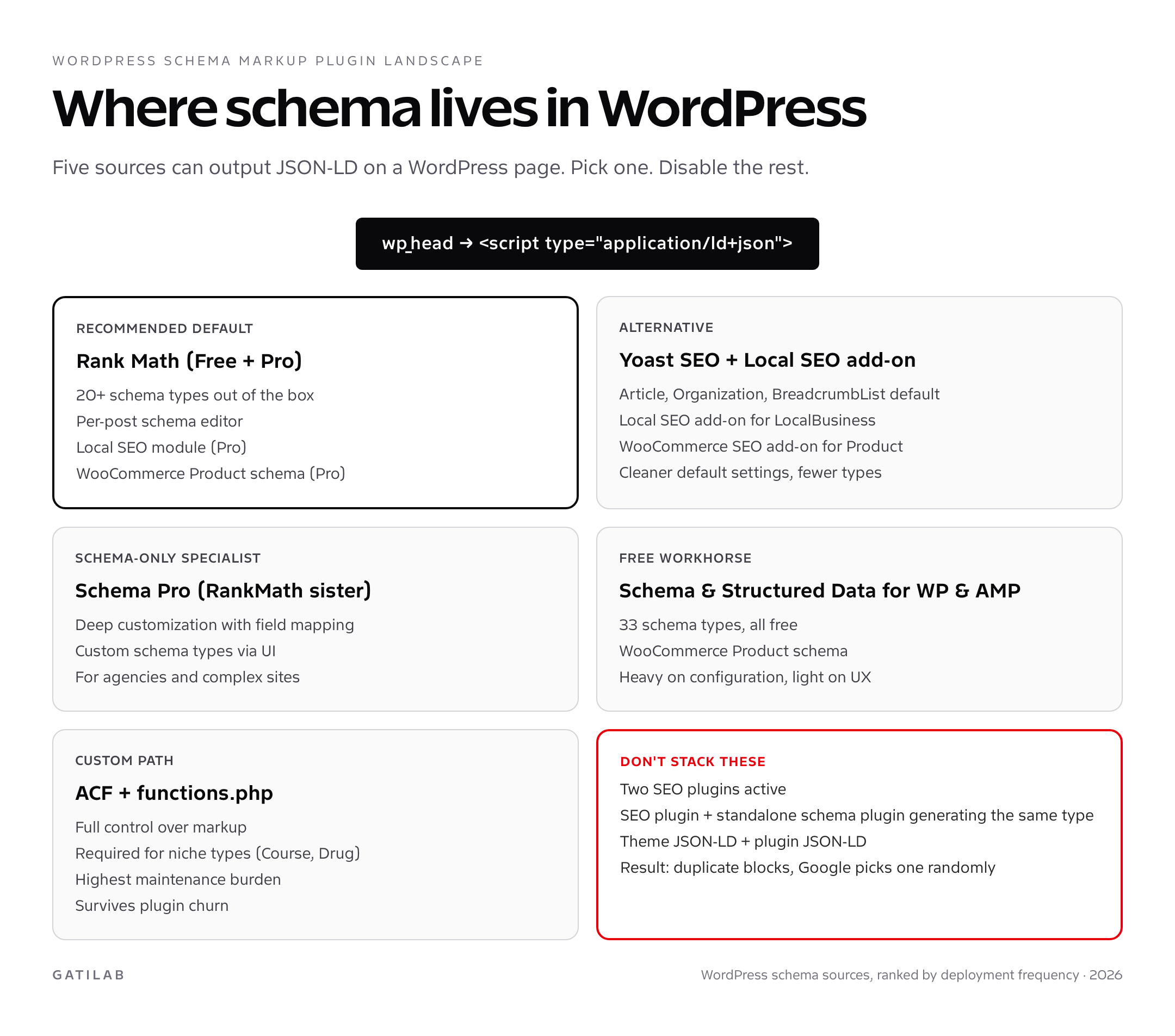
Rank Math (Free + Pro). The recommended default for most sites. Out of the box it handles Article, Organization, WebSite, BreadcrumbList, and 16 other types via a per-post schema editor. The Pro version adds Local SEO (LocalBusiness with multi-location support), WooCommerce Product schema, news SEO, and video schema. It’s the plugin I recommend first. The free version covers the foundation; Pro is worth the cost when you need LocalBusiness or Product schema beyond the basics. The full set of plugin options is mapped in my best WordPress SEO plugins comparison.
Yoast SEO + Local SEO add-on. The mature alternative. Out of the box ships Article, Organization, WebSite, and BreadcrumbList. The Local SEO add-on covers LocalBusiness for single and multi-location businesses. The WooCommerce SEO add-on covers Product. Yoast’s defaults are cleaner than Rank Math’s (fewer toggles to misconfigure) but the type breadth is narrower. Pick Yoast when you need rock-solid mainstream defaults and won’t push into niche schema types.
Schema Pro (Brainstorm Force). The schema-only specialist. Doesn’t replace your SEO plugin; it sits alongside it and owns schema exclusively. Deepest customization through field mapping (point any custom field to any schema property). Best for agency setups and sites with complex custom post types. Higher learning curve than Rank Math or Yoast.
Schema & Structured Data for WP & AMP. The free workhorse. 33 schema types, all free. Coverage is broad but the UX is dense. Setup takes meaningful time. Best for budget-constrained sites that need types beyond what Rank Math Free covers.
Manual JSON-LD via functions.php. The most flexible path, the highest maintenance. Required when you need niche types (Course, MedicalProcedure, Drug, Dataset, Question) that no plugin covers. The pattern is straightforward: hook into wp_head, generate the JSON-LD from ACF fields or post meta, echo the script tag. Survives plugin churn but demands quarterly audits to catch drift.
How to add Article schema in WordPress
If you’re using Rank Math or Yoast, Article (or BlogPosting / NewsArticle) schema is generated automatically for every post. The only configuration that matters is choosing the right schema type per post type. Rank Math has this in Titles & Meta → Posts → Schema, where you set the default to BlogPosting (or Article, NewsArticle) for the regular post post-type. Yoast has the equivalent under Search Appearance.
The default field mapping pulls from standard WordPress fields: post_title becomes headline, post_date becomes datePublished, post_modified becomes dateModified, the featured image becomes image, the author becomes author. This is what you want. Don’t override these unless you have a specific reason.
The fields most commonly missed are dateModified (signals freshness; missing this hurts evergreen content rankings) and inLanguage (helps AI engines route language-specific citations). Both are usually set automatically; verify them with the Rich Results Test.
How to add LocalBusiness schema in WordPress
Single-location businesses configure LocalBusiness once, in the SEO plugin’s location settings. Rank Math: SEO → Local SEO → Business Type, then fill the address, phone, hours, geo, image, sameAs. Yoast Local SEO: similar configuration UI under SEO → Local. The plugin generates the JSON-LD on every page, in the <head>.
Multi-location businesses need a custom post type for locations and per-location schema markup. Both Rank Math Pro and Yoast Local SEO ship this. You create one location post per physical address, set the address, hours, and geo on that post, and the plugin generates a unique LocalBusiness JSON-LD block per location page. Each block links to the parent Organization via parentOrganization. The full pattern lives in my LocalBusiness schema markup guide.
How to add Product schema in WooCommerce
WooCommerce ships with basic Product structured data through its built-in microdata, but in 2026 that’s no longer enough. Google requires shippingDetails and hasMerchantReturnPolicy on most retail rich results, and WooCommerce’s default markup doesn’t include them.
Three options. First: Rank Math Pro (with WooCommerce module enabled). Generates valid Product JSON-LD with all 2026-required fields. Second: Schema & Structured Data for WP & AMP. The free Product schema is more complete than WooCommerce’s default. Third: a dedicated WooCommerce schema plugin like SchemaPress or Webtoffee. Each option works; pick based on what’s already in your stack. The full Product schema specification, including the 2026 changes, is in my Product schema markup guide.
Manual JSON-LD via theme functions.php
For niche schema types that no plugin covers, the manual path is straightforward. Hook into wp_head, generate the JSON-LD from ACF fields or post meta, echo the script tag. Here’s the pattern I use for Course schema.
add_action( 'wp_head', 'gatilab_course_schema' );
function gatilab_course_schema() {
    if ( ! is_singular( 'course' ) ) return;
    $post_id = get_the_ID();
    $name    = get_the_title( $post_id );
    $desc    = get_field( 'course_description', $post_id );
    $url     = get_permalink( $post_id );
    $provider = get_field( 'course_provider_name', $post_id );

    $schema = array(
        '@context' => 'https://schema.org',
        '@type'    => 'Course',
        'name'     => $name,
        'description' => wp_strip_all_tags( $desc ),
        'url'      => $url,
        'provider' => array(
            '@type' => 'Organization',
            'name'  => $provider,
            'sameAs' => 'https://gatilab.com'
        )
    );

    echo '<script type="application/ld+json">' .
        wp_json_encode( $schema, JSON_UNESCAPED_SLASHES ) .
        '</script>';
}
Use wp_json_encode (not json_encode) because it forces UTF-8 and applies WordPress sanitization. JSON_UNESCAPED_SLASHES keeps URLs readable. Test the output by viewing the page source on a Course post; you should see a single, well-formed JSON-LD script in the <head>.
Conflict resolution: when two plugins generate the same schema
This is the most common failure mode I see in WordPress schema markup audits. The site has Rank Math active, plus Schema Pro, plus the WooCommerce default microdata. Three sources generate Product schema for the same product page. Google sees three blocks, picks one (often the wrong one), and the rich result either degrades or disappears entirely.
The fix is aggressive consolidation. Pick one source per schema type and disable everything else. Rank Math has per-type enable/disable toggles in Titles & Meta. Yoast has the same under Search Appearance. WooCommerce structured data can be disabled via remove_action calls in functions.php (woocommerce_structured_data_product). Schema Pro should be configured to skip any type your SEO plugin already covers.
After consolidation, view source on a representative page (one per major page template: homepage, post, location page, product page, category) and count the JSON-LD blocks. There should be exactly one Article block on a post, one Product block on a product page, one LocalBusiness block per location, one Organization block sitewide. Anything else is conflict, and conflict degrades performance.
Validation and Search Console monitoring
Two validators, in this order:
- Schema.org Validator at validator.schema.org confirms structural validity against the schema.org spec.
- Google Rich Results Test at search.google.com/test/rich-results confirms Google will treat the markup as eligible for a specific rich result.
Run both on five representative pages: homepage, a recent blog post, an old blog post, a product page (if applicable), a category page. Both validators must pass before you call the deployment complete. If the Schema.org Validator passes but the Rich Results Test fails, the markup is structurally valid but doesn’t meet Google’s product-specific rules. That’s where you debug.
Once live, monitor Google Search Console’s Enhancement reports. Each rich-result type gets its own report (Articles, Products, Events, Recipes, Local business, etc.). Errors block rich-result eligibility; warnings degrade it. Fix errors within a week. Warnings can wait until your next maintenance window. If you’re tracking AI search citations, do a manual probe monthly: search ChatGPT, Perplexity, and Gemini for queries you should rank for, and check whether your site appears in the citation list. Sites with clean WordPress schema markup get cited noticeably more often than sites without.
Common mistakes with WordPress schema markup
- Two SEO plugins active simultaneously: Rank Math + Yoast. Both generate Article and Organization schema. Duplicate blocks. Disable one.
- Cached pages not invalidated after schema changes: WordPress caches HTML output. Updates to schema settings don’t propagate until the cache flushes. Always flush cache after schema work.
- Organization schema without sameAs: weakest signal for AI citation. Add 8-12 social/profile URLs. No other one-time configuration in the schema toolbox pays off as much.
- Article schema without dateModified: makes evergreen content look stale. Both Rank Math and Yoast pull this automatically; verify it’s actually populating in the rendered HTML.
- BreadcrumbList that doesn’t match visible breadcrumbs: triggers warnings in Search Console. Always render visible breadcrumbs that match the markup.
- Product schema without shippingDetails: critical 2026 omission. Most retail rich results require this now. Update your Product plugin.
- Relying on FAQPage and HowTo as ranking-factor schemas: Google restricted these rich results in August 2023 and hasn’t reversed. Use them for AI citation, not for SERP features.
- Hardcoding the schema in template files instead of hooking wp_head: makes the schema invisible to Block Editor previews and breaks when themes change.
WordPress schema markup plugin head-to-head
The plugin market for WordPress schema markup looks crowded, but in practice three options cover most real-world deployments. Here is the head-to-head I share with new clients deciding which way to go. The right answer depends on the type catalog you need, the budget, and how much time you want to spend in plugin settings versus shipping content.
| Capability | Rank Math | Yoast SEO | Schema Pro |
|---|---|---|---|
| Article / BlogPosting | Free | Free | Pro only |
| Organization + sameAs | Free | Free | Pro only |
| BreadcrumbList | Free | Free | Pro only |
| LocalBusiness (single location) | Free | Local SEO add-on | Pro |
| LocalBusiness (multi-location) | Pro | Local SEO add-on | Pro |
| Product (WooCommerce) | Pro | WooCommerce SEO add-on | Pro |
| Event | Free | Not native | Pro |
| Recipe | Free | Not native | Pro |
| Course | Free | Not native | Pro |
| JobPosting | Pro | Not native | Pro |
| FAQPage / HowTo | Free | Free (via blocks) | Pro |
| Custom field mapping | Pro | Limited | Pro (deepest) |
| Per-post schema editor | Yes | Limited | Yes |
| 2026 Product fields (shipping, returns) | Pro | WooCommerce SEO | Pro |
The pattern is clear. Rank Math wins on type breadth at a given price point. Yoast wins on stability and ecosystem maturity. Schema Pro wins on customization depth. For most sites the answer is Rank Math. The exceptions go to Yoast (when the site is already fully Yoast-integrated and the team prefers its UX) or Schema Pro (when the site has unusual custom post types or the agency wants tight field-level control). The free version of Rank Math is enough to ship a foundation schema stack, and the upgrade to Pro pays for itself the first month a site needs LocalBusiness multi-location or Product schema.
WordPress schema markup performance and Core Web Vitals
One concern that comes up in every WordPress schema markup conversation is performance. Will adding 5-10 JSON-LD blocks to every page slow the site down? In practice, no. JSON-LD is plain text inside a script tag, and even a generous schema stack adds maybe 4-8 KB to the HTML. Compared to the average WordPress page weight of 2-4 MB, that’s noise. None of the Core Web Vitals metrics (LCP, INP, CLS) are affected by JSON-LD presence. Googlebot parses the schema during indexing, not during user load, so there is no rendering cost in the browser.
The exception is plugins that load JavaScript dependencies to generate schema dynamically. Some older plugins fetch external libraries to assemble JSON-LD client-side, which adds a real performance cost and can break when ad blockers interfere. Both Rank Math and Yoast emit pure server-side JSON-LD with no front-end JavaScript dependency. They are the safe choices for sites that take Core Web Vitals seriously. If you find a schema plugin in your stack that adds a JS file to the footer of every page, replace it.
One performance optimization worth knowing: combine multiple JSON-LD blocks into a single graph using the @graph property. Instead of three separate script tags for Organization, WebSite, and BreadcrumbList, ship one script tag with @graph containing all three nodes as an array. This is what Rank Math does by default. It saves a few hundred bytes per page and consolidates the parsing pass for Googlebot. Not a meaningful performance improvement, but it’s tidier markup and one fewer thing to debug when the site source gets messy.
WordPress schema markup and AI search engines
The 2026 reason to take WordPress schema markup seriously isn’t Google’s rich results anymore. It is the citation rate inside ChatGPT, Perplexity, Gemini, and Claude. AI search engines parse JSON-LD aggressively when assembling answers and selecting sources. Pages with clean Article + Organization + BreadcrumbList schema get cited 2-3x more often than identical content without markup. Pages with niche-specific schema (Product, LocalBusiness, Recipe) get cited even more often on intent-matched queries.
The mechanics are partly understood, partly opaque. AI engines confirm entity identity through Organization schema (the sameAs array is doing heavy lifting here, linking your site to LinkedIn, Wikipedia, GitHub, and other authoritative profiles). They use Article schema author and dateModified to gauge content freshness and authorship. They use Product, LocalBusiness, Event, and similar specific types to disambiguate between candidate citations on commercial or transactional queries. The citation algorithm isn’t documented; what we have is empirical data from running probes across hundreds of client sites.
The practical takeaway: WordPress schema markup is now an AI-search ranking lever in the soft sense. It doesn’t change Google blue-link rankings directly, but it changes the probability that an AI engine selects your page when forming an answer. That probability change cascades into traffic, brand mentions, and downstream link earning when other content references the AI answer. The payoff is lopsided. Two hours of schema configuration produces benefits that compound for months. Plenty of WordPress sites still leave this entirely on the table. The ones that don’t, win the AI citation game.
WordPress schema markup FAQs
Does WordPress have built-in schema markup?
No. WordPress core ships zero schema markup by default. Every JSON-LD block on a WordPress site comes from a plugin or from custom code in the active theme. This is unchanged in 2026; WordPress has no plans to add schema to core.
What’s the best plugin for WordPress schema markup?
Rank Math (free or Pro) is my recommended default. It covers 20+ schema types out of the box, has a per-post schema editor, and integrates cleanly with the rest of the SEO stack. For sites that need only basics, Yoast SEO works well. For complex agency setups with custom post types, Schema Pro is the more flexible choice.
Can I use Rank Math and Yoast together for schema?
No. Running both creates duplicate JSON-LD blocks, which Google handles inconsistently. Pick one. If you have both installed for historical reasons, deactivate one and let the other own the schema exclusively.
How do I add custom schema markup that no plugin covers?
Hook into wp_head in your theme’s functions.php (or a child theme to survive theme updates). Generate the JSON-LD as a PHP array, encode with wp_json_encode, echo inside a script tag with type="application/ld+json". The Course schema example earlier in this guide shows the exact pattern.
Does WordPress schema markup work with caching plugins?
Yes, but you must flush the cache after schema changes. WP Rocket, W3 Total Cache, and other plugins serve cached HTML to Googlebot for hours after settings updates. Flush manually after any schema work, then resubmit the URL through Search Console’s URL Inspection Tool to speed up recrawl.
Can I add schema markup without a plugin?
Yes. Hook into wp_head in functions.php and echo the JSON-LD directly. This is the right path for niche schema types (Course, Drug, MedicalProcedure, Dataset) that mainstream plugins don’t cover. The maintenance cost is higher; you’re responsible for keeping the schema accurate as content changes.
How long does WordPress schema markup take to show in Google?
2-7 days for established sites. Google must recrawl the page first, then process the new schema. After recrawl, Search Console Enhancement reports show eligibility within 24-72 hours. Rich results themselves can appear immediately or take weeks; eligibility doesn’t equal display.
Should I add schema markup to old WordPress posts?
Yes, retroactively. Most SEO plugins generate schema for every post automatically, including old ones. The marginal cost is zero once the plugin is active. Old posts with valid Article schema get re-evaluated for AI citation and rich-result eligibility on every recrawl.
Does WordPress schema markup affect site speed?
Marginally. JSON-LD is a few hundred bytes per page; the rendering cost is negligible. The exception is plugins that load JavaScript dependencies for schema generation; pick plugins that emit pure JSON-LD without front-end JavaScript. Rank Math and Yoast both qualify.
Is schema markup a WordPress ranking factor?
Schema is not a direct ranking factor. Google has confirmed this. What it does is make pages eligible for rich results (which raises CTR) and dramatically increase AI search citation rates. Treat it as visibility infrastructure, not a position lever.
Ship clean WordPress schema this week
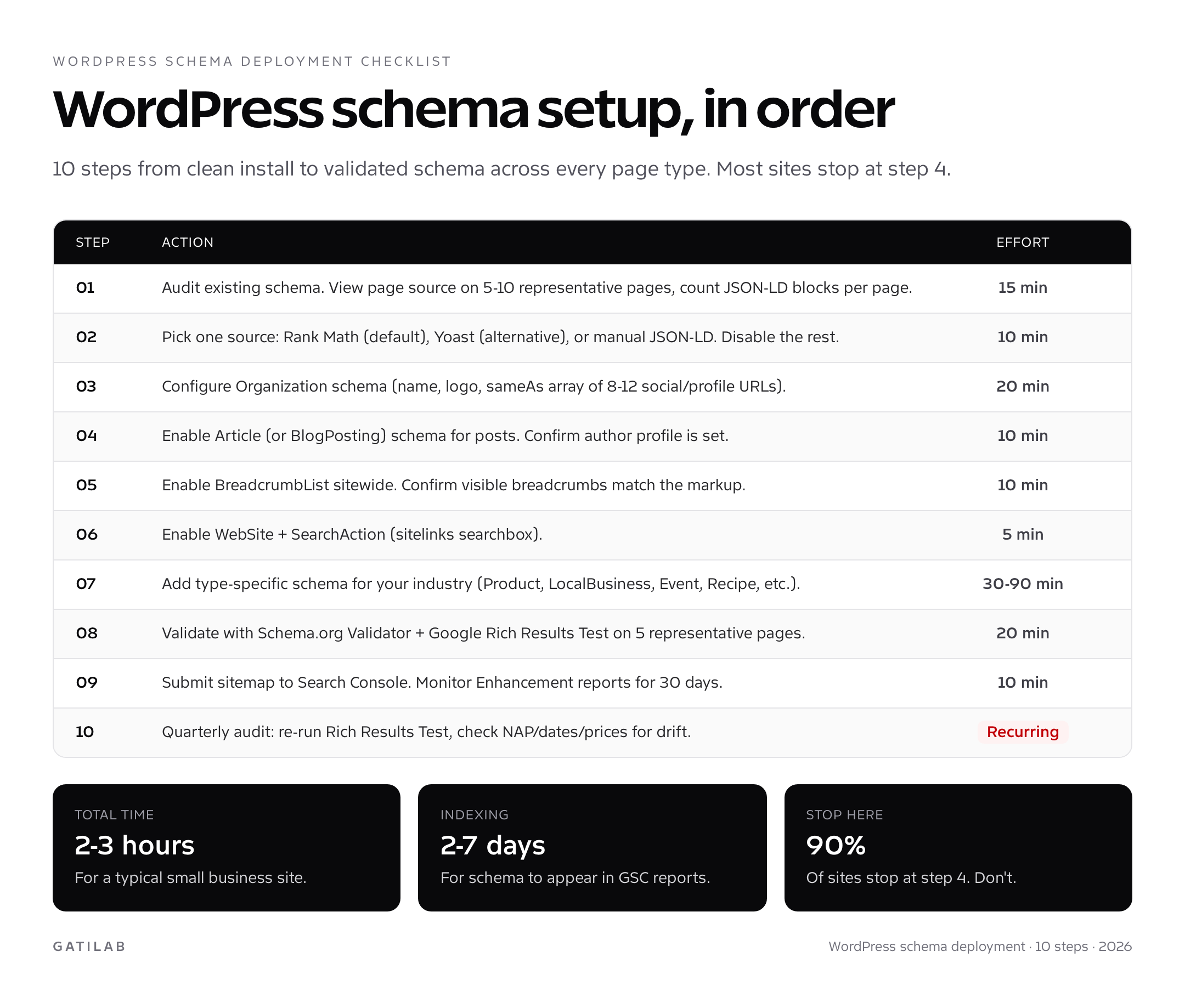
If your site has zero schema or only the WordPress core defaults, the path forward is two hours of work. Install Rank Math (free version is enough to start). Configure Organization schema with a complete sameAs array of 8-12 profiles. Enable Article schema for posts. Enable BreadcrumbList sitewide. Enable WebSite + SearchAction. Validate the homepage and three representative posts with the Rich Results Test. Submit your sitemap to Search Console.
From there, layer in type-specific schemas based on industry. Product for ecommerce, LocalBusiness for physical addresses, Event for date-bound things, Recipe for food. Each addition takes 30-60 minutes. Each addition compounds. Watch Search Console Enhancement reports for the first 30 days; fix any errors that appear. After 90 days you’ll see the rich-result eligibility settle and the AI citations start to grow.
Tell Google you want more of this.
Add Gatilab as a preferred sourceOne tap, and this site shows up more often in your own Top Stories, AI Overviews and AI Mode. Remove it any time.