
WordPress Certification: Is It Worth the Time and Money?
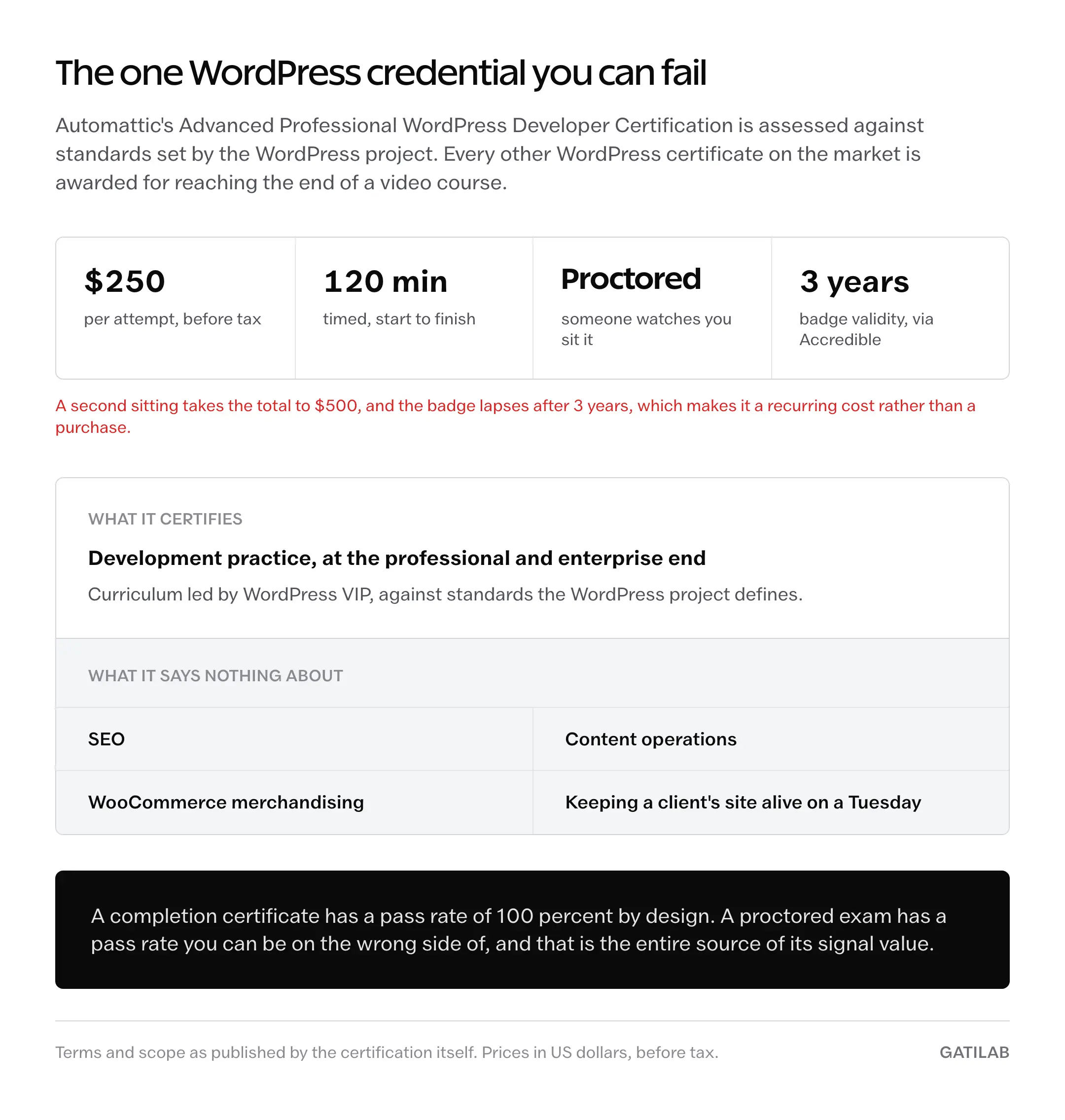
Until February 2026, there was no official WordPress certification. Automattic changed that with the Advanced Professional WordPress Developer Certification: a 120-minute proctored exam, $250 per attempt, and a badge that expires after 3 years. Everything else sold as a WordPress certification is still a course-completion badge from an education vendor, and those run from free to about $250.
There are 2 ways to get this wrong, and they point in opposite directions. One is buying a credential and waiting for it to open doors that only a portfolio opens. The other is deciding every paid course is a scam, then spending 18 months assembling a curriculum out of video tutorials, forum threads, and whatever the last guide assumed you already knew.
The credential and the education are 2 separate purchases, and almost nobody prices them separately.
What Counts as a WordPress Certification Now
The category split cleanly this year. One credential is assessed against standards defined by the WordPress project. Everything else certifies that you reached the end of a video course.
- Advanced Professional WordPress Developer Certification: 120-minute proctored exam, $250 per attempt, badge issued through Accredible and valid for 3 years
- Its curriculum is led by WordPress VIP, Automattic’s enterprise division, against standards set by the WordPress project itself
- Vendor certificates from Yoast, LinkedIn Learning, Udemy, Coursera, OSTraining and WP101 are awarded on completion, not on a scored exam
- Free official training lives at learn.wordpress.org, run by the WordPress Training team, with completion tracking but no proctored credential
- No outside accreditation body sits over the category, so what “certified” means still depends entirely on who issued it
One of those is an exam you can fail.
The rest are attendance records.
The Official WordPress Certification
The exam went live in mid-February 2026. WordPress.com’s education page calls it “the official, standardized credential” for professional and enterprise-level WordPress development. That is the first time anyone could write that sentence about WordPress and have it be true.
The mechanics matter more than the wording. It’s proctored, which means someone watches you take it. It’s timed at 120 minutes. It costs $250 every time you sit it, so a second attempt puts you at $500 with nothing yet to show. And it lapses after 3 years, which turns it into a recurring cost rather than a one-time purchase.
That combination is what separates it from every other item on this page. A completion certificate has a pass rate of 100 percent by design. A proctored exam has a pass rate you can be on the wrong side of, and that is the entire source of its signal value.
It’s narrow.
This is a developer credential aimed at the professional and enterprise end. It says nothing about SEO, content operations, WooCommerce merchandising, or keeping a client’s site alive on a Tuesday.
Free Official Training Comes First
Before paying anyone, work through Learn WordPress, the free platform run by the WordPress Training team. Courses run roughly 4 to 10 hours with completion tracking, organized into pathways such as Beginner WordPress User and Intermediate Theme Developer. A Block Theme Development cohort ran from April to June 2026.
That last detail is the one paid providers quietly compete with. Block themes, theme.json and full site editing are exactly the material a 2018-vintage paid course will teach you wrong.
Check the free curriculum against the paid one before you pay.
Often it’s the same syllabus.
WordPress Certification Providers
These are the paid platforms whose certificates show up on WordPress resumes, with what they actually cost and what the certificate is worth once it’s on a profile.
Yoast SEO Academy
The best-known SEO training in the WordPress world, and the one most often misquoted on price. There is no standalone academy subscription. Academy access ships bundled with Yoast SEO Premium at $118.80 a year excluding VAT for a single site.
But 5 of the 17 courses are free to everyone, certificates included, among them WordPress for Beginners, SEO for Beginners, and Yoast SEO for WordPress Plugin Training. The paid catalogue adds Keyword Research and a technical track split across Hosting and Server Configuration plus Crawlability and Indexability.
2 corrections worth carrying into any comparison you read elsewhere. Yoast SEO passed 10 million active installs on WordPress.org, not 5 million. And it was not the first SEO plugin for WordPress: All in One SEO Pack shipped on 30 March 2007, while Yoast SEO’s first release was 11 October 2010.
Start with the free 5 at Yoast SEO Academy. Paying $118.80 for a plugin license to reach the rest only makes sense if you wanted the plugin anyway, and half the plugin-specific workflow content won’t transfer if you run Rank Math or All in One SEO.
LinkedIn Learning
The visibility play. The certificate lands on your LinkedIn profile with the skill badges attached, which is where recruiters filtering candidates will actually encounter it.
The catalogue is smaller and shorter than the marketing suggests. The WordPress topic page lists 26 courses, and the durations cluster low: WordPress Essential Training runs 2 hours 4 minutes, PHP for WordPress 2 hours 25 minutes, Mastering Full Site Editing 1 hour 31 minutes, and Staging a Site 48 minutes. Most sit between 1 and 3 hours. Only the Elementor courses pass 4.
Pricing is about $40 a month at list and roughly half that on the annual plan, and it’s included at no extra cost with every LinkedIn Premium tier. LinkedIn doesn’t publish those figures on an open page, so treat them as approximate rather than exact. If you already pay for Premium, the courses are already yours.
Morten Rand-Hendriksen has taught WordPress there since the Lynda.com days in 2010 and has more than 60 published courses, which is the reason the quality floor is higher than a marketplace. 90 minutes of video still buys you vocabulary and workflows, not architecture.
Udemy
The biggest marketplace, with the widest quality spread and the weakest certificate. List prices for WordPress courses run about $60 to $120, and sales routinely drop them to $10 to $20.
The instructor names that get recycled across roundups are often wrong, so check them yourself on Udemy’s WordPress topic page. Brad Schiff’s WordPress course is called Become a WordPress Developer: Unlocking Power With Code, it lists at $119.99, sells around $12.99, and it is a developer course rather than a beginner course. The beginner franchise belongs to Andrew Williams, who has 32 courses, more than 212,000 students, and the WordPress for Beginners book series behind him.
Buy the knowledge. Ignore the certificate.
Coursera
Worth naming mostly to correct a claim that gets copied between articles. The WordPress material on Coursera does not come from a university. It comes from Packt, whose Intro to WordPress Development Specialization is the main option, and from LearnKartS.
Web Design for Everybody, the specialization usually cited as the university-branded WordPress route, is offered by the University of Michigan and taught by Charles Severance and Colleen van Lent. It covers HTML5, CSS3, JavaScript, responsive design and a capstone. WordPress appears nowhere in it.
Coursera Plus, the subscription that opens certificates across the catalogue, is $59 a month or $399 a year in the US, and financial aid is available. If a university name on the resume is the goal, you’re buying web fundamentals, not WordPress.
Different product.
OSTraining
The cheapest structured route with a current catalogue. 3 tiers: OSTribe at no cost, VIP at $59 a year against a $175 list price, and OSTeam at $79 a year per seat against $195.
The library is being maintained, which is not true of every platform in this list. Current WordPress titles include WordPress Block Patterns and WP-CLI for Beginners, both of which sit in the gap between beginner tutorials and the official developer docs.
At $59 a year it costs less than a quarter of the official exam, and it teaches.
That’s a different job, done well.
WP101
If you went looking for a platform called LearnWP, this is where you landed: learnwp.com now redirects to WP101, a short-form video library run by Syed Balkhi. Pricing is $12 a month, $48 a year, or $96 once for lifetime access.
The price tells you the audience. $96 once is a client-training budget, the kind of thing an agency buys so it can hand a site over without booking another call. It isn’t a developer credential and doesn’t pretend to be.
Worth saying plainly because the confusion is common: the free official platform with the similar name is learn.wordpress.org, and they are unrelated.
Quick Comparisons
Prices below are list prices at the time of writing, in US dollars, before tax. Read the Credential column first, because it’s the one that decides whether a line on a resume means anything.
| Provider | Price | Format | Credential |
|---|---|---|---|
| Advanced Professional WordPress Developer Certification | $250 per attempt | 120-minute proctored exam | Badge valid 3 years |
| Learn WordPress | Free | 4 to 10 hour courses and cohorts | Completion tracking, no exam |
| Yoast SEO Academy | 5 courses free; rest bundled with Yoast SEO Premium at $118.80/yr ex VAT | Video courses with end-of-course tests | Course certificate |
| LinkedIn Learning | About $40/mo list, roughly half annually, free with LinkedIn Premium | 26 WordPress courses, mostly 1 to 3 hours | Certificate on LinkedIn profile |
| Udemy | $60 to $120 list, $10 to $20 on sale | Self-paced video, lifetime access | Completion certificate |
| Coursera | Coursera Plus $59/mo or $399/yr | Specializations from Packt and LearnKartS | Specialization certificate |
| OSTraining | Free, $59/yr, or $79/yr per seat | Maintained video course library | Course certificate |
| WP101 | $12/mo, $48/yr, or $96 lifetime | Short how-to video library | Completion certificate |
Only the first row can be failed.
That’s the whole difference, sitting in one column.
One more correction for anyone comparing tables across sites: WooCommerce has no certification program. Its official learning hub at woocommerce.com/learn publishes free how-to videos and courses such as Build your store with WooCommerce, and it issues no certificate at all. Any comparison table listing a WooCommerce credential is describing something that doesn’t exist.
What Hiring Managers Weigh Instead
A WordPress hiring conversation runs on things a stranger can open in a browser. A certificate is a claim about you. A repository, a live site and a merged pull request are claims someone else can verify in 5 minutes without asking you a single question.
- Public code: a plugin or theme repository with real commit history, an issue log, and a readme someone can follow
- Live sites, 3 to 5 of them, where a reviewer can view source, open the network tab, and see the decisions you made under load
- Merged contributions to WordPress core, a plugin, or a theme, however small the patch
- Written explanations of a specific problem you solved, such as a migration that went sideways or a REST API integration that had to survive pagination and auth
- Case studies with a before and after number attached to them
- References from people who paid you
- Certifications
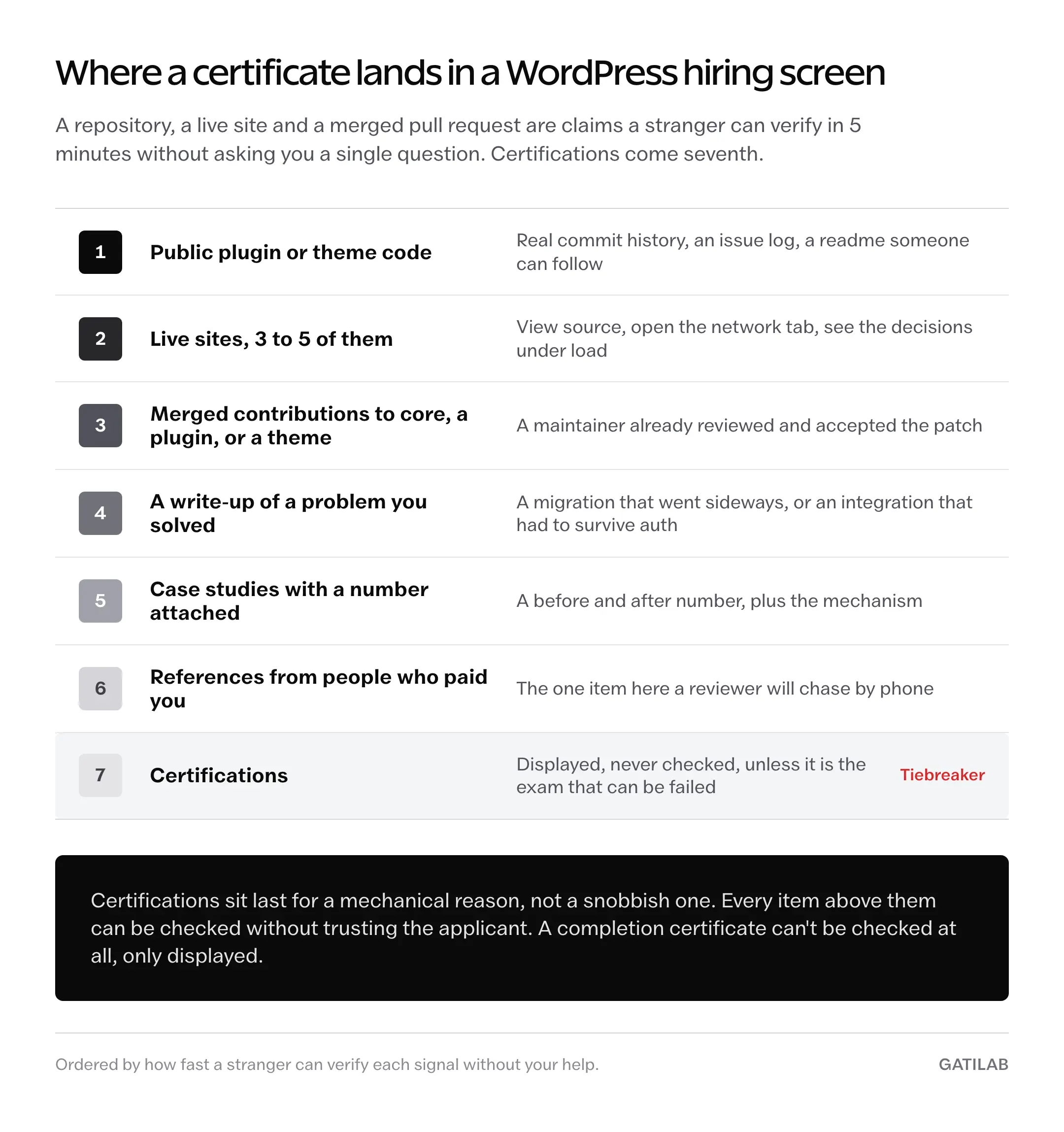
Certifications sit last for a mechanical reason, not a snobbish one. Every item above them can be checked without trusting the applicant. A completion certificate can’t be checked at all, only displayed.
Verifiable beats displayed.
When a WordPress Certification Is Worth Paying For
4 situations where the money comes back, and they are narrower than the sales pages suggest.
You’re aiming at enterprise WordPress work. The Automattic exam is the only credential in this category that an enterprise hiring process can map to a published standard, because the standards come from the WordPress project rather than the course vendor. Against the salary band those roles sit in, $250 and 2 hours is a small filter to clear.
Someone else is paying. Employer reimbursement changes the arithmetic completely, because the only real cost left is your time and you were going to spend that learning anyway. OSTraining at $59 a year and LinkedIn Learning through an existing Premium seat are the easiest approvals to get.
You’re pivoting in with nothing to show. Coming from marketing, design or support with no WordPress work in public, a structured curriculum beats scattered tutorials, mostly because it tells you what you don’t know yet. Start free on learn.wordpress.org and pay only at the point you stall. The same logic runs through content marketing courses and certifications and through the question of whether an intensive SEO bootcamp earns back its price.
A job listing names one. Rare, but it happens, and when it does the listing is telling you exactly what the screening filter is. Match it and move on.
Outside those 4, you’re buying reassurance.
What to Do With $250 and 100 Hours Instead
Every alternative below produces something a stranger can inspect, which is the property a certificate lacks. Costs are honest, including the ones the usual version of this advice leaves out.
Build 5 sites in 5 different shapes. A store, a membership site, an LMS, a portfolio and a publication all break in different places, and that’s the point. The real budget is bigger than most articles admit: 5 domains alone run roughly $60 to $75 a year at normal registration pricing, and the shared-hosting headline rates assume a long prepay. Hostinger’s Premium tier is $2.99 a month only on a 48-month term, which is $143.52 charged once, and it renews at $10.99 a month. The renewal pricing on cheap hosting plans is where that math usually goes wrong.
Ship a small plugin. One narrow problem, solved properly, with a readme and a version history teaches more about WordPress internals than any course module on hooks. It also becomes an asset rather than an expense, which is the argument behind building and selling WordPress plugins as a revenue stream.
Send a pull request to a project that accepts them. Check the license before you spend a weekend on a patch. GiveWP is GPL, has a CONTRIBUTING.md, and takes outside contributions. Gravity Forms does not: it’s commercial and closed-source, and its GitHub mirror states plainly that it doesn’t accept pull requests.
Write up what you learned while you learn it. 1 post a week for 6 months produces 26 pieces of evidence that you can explain your own work, which is the skill most hiring conversations are actually testing. It costs a domain and hosting, and the writing is the hard part, not the publishing.
All 4 produce artifacts.
That’s the difference.
The Limits
None of this is free of trade-offs, and the honest ones cut against the portfolio advice as often as against the certificates.
- The official exam is priced per attempt, so a second sitting takes you to $500, and the badge lapses after 3 years, which makes it a recurring cost rather than a purchase
- It certifies development practice only, so it says nothing about SEO, content operations, WooCommerce merchandising, or maintaining a site for a client who calls on weekends
- The self-directed portfolio route has no feedback loop, so 5 sites built alone can be 5 repetitions of the same mistake with nobody to name it
- Vendor certificates are unaudited, because no accreditation body reviews the curriculum or the assessment, and a reviewer who knows that discounts them accordingly
- None of it proves you can work with a client, scope a project, or say no to a bad requirement, and that is what most WordPress work fails on
Pick the route whose limit you can live with, not the one whose brochure you liked.
What Quietly Ruins It
The failures here are rarely dramatic. They look like reasonable decisions that cost money slowly.
Buying an annual subscription to reach a single course. Yoast’s paid catalogue arrives attached to a plugin license, and LinkedIn Learning’s monthly rate assumes you’ll finish more than one thing. Most people finish one and pay for the other 11 months anyway.
Collecting starts instead of finishes. 3 half-completed courses read exactly like zero on a profile, and the sunk hours are gone either way.
Filing a completion certificate under a heading called Certifications. A reviewer who knows this market reads a marketplace badge in that slot as padding, which leaves a worse impression than having no such section.
Following a course whose curriculum predates block themes. Classic-theme tutorials still rank well, and a course built around functions.php templating will train habits you’ll spend a month unlearning against theme.json.
Treating the free official courses as a trimmed sample of something better. They’re the finished material, not a lead magnet with the useful parts removed, and skipping them on principle means paying for content you could have had.
Booking the proctored exam to force yourself to study. A professional-level exam rewards people who have already shipped, and at $250 a sitting, using it as a deadline is an expensive way to discover what you don’t know.
FAQs on WordPress Certification
Is there an official WordPress certification? Yes, since February 2026. Automattic’s Advanced Professional WordPress Developer Certification is a 120-minute proctored exam at $250 per attempt, with standards defined by the WordPress project and curriculum led by WordPress VIP. The badge is issued through Accredible and stays valid for 3 years. Every other WordPress certification on the market is a course-completion certificate from an education vendor.
How much does a WordPress certification cost? Free to $250. The official exam is $250 per attempt. Learn WordPress is free, and 5 of Yoast Academy’s 17 courses are free with certificates included. OSTraining runs $59 or $79 a year, WP101 is $48 a year or $96 for lifetime access, and Udemy WordPress courses list at $60 to $120 and sell for $10 to $20 during sales. Figures above $250 that circulate in comparison posts don’t trace to any provider’s own pricing page.
Do WordPress certifications help you get a job? Unevenly. A completion certificate is a tiebreaker at best, because it certifies attendance and can’t be verified by the person reading it. The Automattic exam is different in kind, since it can be failed, which is what makes passing it mean something. For everything else, public code and live sites outrank the badge.
What’s the best free WordPress certification? Learn WordPress, at learn.wordpress.org, run by the WordPress project’s own Training team. Courses run about 4 to 10 hours with completion tracking, arranged into pathways including Beginner WordPress User and Intermediate Theme Developer, and the curriculum covers block themes rather than classic-era templating. Yoast’s 5 free courses are the next stop if SEO is the goal.
Is LearnWP a real WordPress certification platform? Not as described anywhere online. learnwp.com redirects to wp101.com, a short-form video library run by Syed Balkhi at $12 a month, $48 a year, or $96 for lifetime access. The paid membership tiers that circulate in roundups under the LearnWP name don’t exist on either site. The free official platform with the similar-sounding name is learn.wordpress.org.
Can you become a WordPress developer without a certification? Yes, and most working WordPress developers did. The route is the developer documentation, real builds, and merged contributions to plugins or core. A repository with WordPress plugin or theme code carries more weight in a hiring conversation than any completion certificate, because a stranger can read it without taking your word for anything.
Final Remarks
The question was never whether a WordPress certification is worth the money. It’s which of 2 products you’re being sold, because a proctored exam and a video library share a word and very little else. One is a filter somebody else applies to you. The other is a curriculum you apply to yourself, and it happens to print a certificate on the way out.
Buy the curriculum when you need structure and can’t build one. Buy the exam when the roles you want use it as a gate. Buy neither on the theory that a badge stands in for work a stranger can inspect.
Decide which door you’re trying to open, then pay for the key that fits it.
Tell Google you want more of this.
Add Gatilab as a preferred sourceOne tap, and this site shows up more often in your own Top Stories, AI Overviews and AI Mode. Remove it any time.