
WordPress Hooks Tutorial: Actions and Filters Explained 2026
WordPress hooks are the extensibility system that lets your plugin or theme code run at specific moments inside WordPress core, or modify the data that core passes around. Hooks are why WordPress dominates the CMS market: every WooCommerce plugin, every page builder, every SEO tool, every membership system, every multilingual addon plugs into core through hooks rather than editing core files. Once you understand WordPress hooks, you understand why a site running 47 plugins still works and how to extend WordPress without touching a single core file.
This tutorial covers what WordPress hooks actually are, the hard distinction between actions and filters, the request lifecycle from index.php through the_content, the 12 most-used core hooks every developer should memorize, how to register your own custom hooks, priority and accepted arguments, the do_action and apply_filters internals, and the debugging tools that show you exactly which hooks fire on a given page. By the end you’ll write hook-based code with the confidence of a 15-year WordPress developer.
What WordPress hooks are
A WordPress hook is a named anchor point inside core code where your plugin or theme can attach a function. When WordPress reaches that anchor at runtime, every attached function fires in priority order. The mechanism is simple but powerful: WordPress core fires roughly 800 hooks during a typical page load, each one is a chance for your code to extend or modify behavior, and core itself uses the same hook system internally. There’s no privileged “core code” path; everything is hooks.
Two kinds of WordPress hooks exist: actions and filters. Actions let your function run at a specific moment without modifying any data (send an email when a post is saved, log an event when a user logs in). Filters let your function modify data that WordPress passes through (change the post title before display, add a paragraph to the_content, append fields to the user profile form). The same plumbing powers both; the difference is whether your callback returns a value (filters) or runs for side effects (actions).
Actions vs filters: the only distinction that matters
The difference between actions and filters is the single most-asked WordPress hooks question. The rule is simple: if your callback returns a value, it’s a filter; if it doesn’t, it’s an action.
| Aspect | Action | Filter |
|---|---|---|
| Purpose | Do something at a specific moment | Modify data passing through |
| Register with | add_action() | add_filter() |
| Trigger with | do_action() | apply_filters() |
| Callback returns | Nothing (return value ignored) | The (possibly modified) value |
| First argument | Whatever core passes (or nothing) | The value to filter |
| Example | save_post, wp_login, init | the_content, the_title, excerpt_length |
// ACTION: send a Slack alert when a post is published
add_action('publish_post', 'gl_alert_on_publish', 10, 2);
function gl_alert_on_publish($post_id, $post) {
    wp_remote_post('https://hooks.slack.com/services/...', [
        'body' => json_encode(['text' => "New post: {$post->post_title}"]),
    ]);
    // No return needed. WordPress doesn't read the return value.
}

// FILTER: append a CTA paragraph to every post body
add_filter('the_content', 'gl_append_cta', 10, 1);
function gl_append_cta($content) {
    if (is_single() && in_the_loop()) {
        $content .= '<p class="cta">Subscribe for weekly WP tips.</p>';
    }
    return $content; // The return value REPLACES what WordPress was going to use.
}
Forgetting to return the value in a filter is the #1 WordPress hooks bug. If your filter callback returns nothing (PHP returns null implicitly), WordPress treats null as the new value and your post titles, post content, or whatever you filtered will appear blank. Every filter callback ends with return $value, even if you didn’t modify it.
The WordPress hooks lifecycle on a typical request
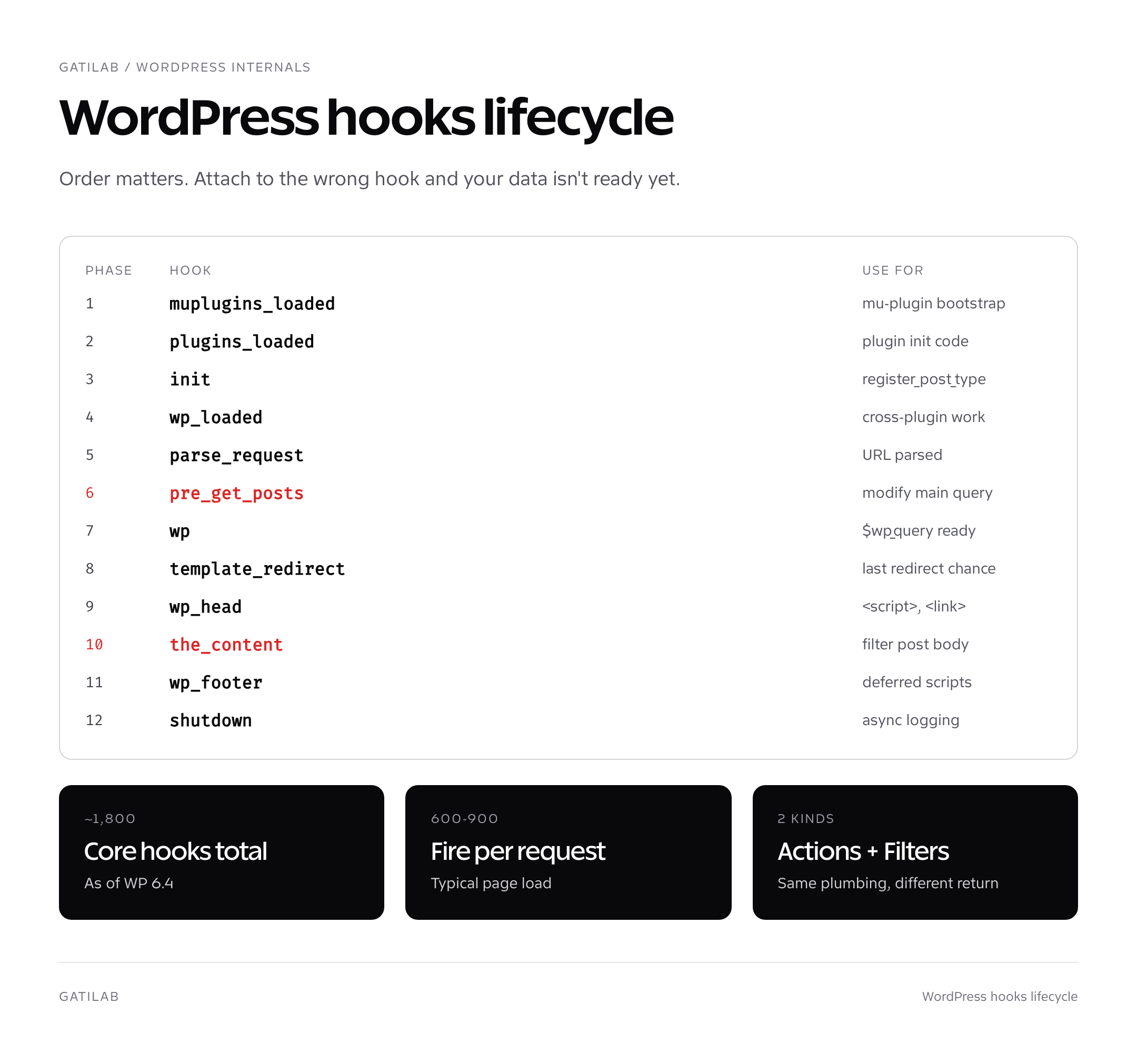
When a visitor hits a WordPress page, hooks fire in a predictable order. Understanding the order is what separates “hook works” from “hook fires too late and the data isn’t ready yet.” The 12 hooks below are the milestones every WordPress developer should know.
- muplugins_loaded: every must-use plugin file has been included.
- plugins_loaded: every active plugin has been included. Most plugin bootstrap code runs here.
- init: WordPress core is ready, post types and taxonomies should be registered now.
- wp_loaded: every plugin and theme has loaded. Use this for code that depends on other plugins existing.
- parse_request: WordPress has parsed the URL and is about to query the database.
- pre_get_posts (filter on the WP_Query object): modify the main query before the database hit.
- wp: the main query has run, $wp_query is populated, redirects haven’t happened yet.
- template_redirect: WordPress is about to load a template file. Last chance to redirect or wp_die().
- get_header, wp_head: header template is loading; wp_head is where most plugins emit <script> and <link> tags.
- the_content (filter): every post’s body content runs through this filter before display. Most “modify post body” hooks attach here.
- get_footer, wp_footer: footer template loading; wp_footer is where deferred <script> tags go.
- shutdown: request is finishing, output has been sent. Use for logging or async work that should not delay the response.
For admin and AJAX requests, the lifecycle differs slightly. Admin pages fire admin_init after init and admin_menu for menu registration. AJAX requests fire wp_ajax_{action} for logged-in users and wp_ajax_nopriv_{action} for guests. REST API requests fire rest_api_init for endpoint registration.
Common WordPress hooks every developer uses
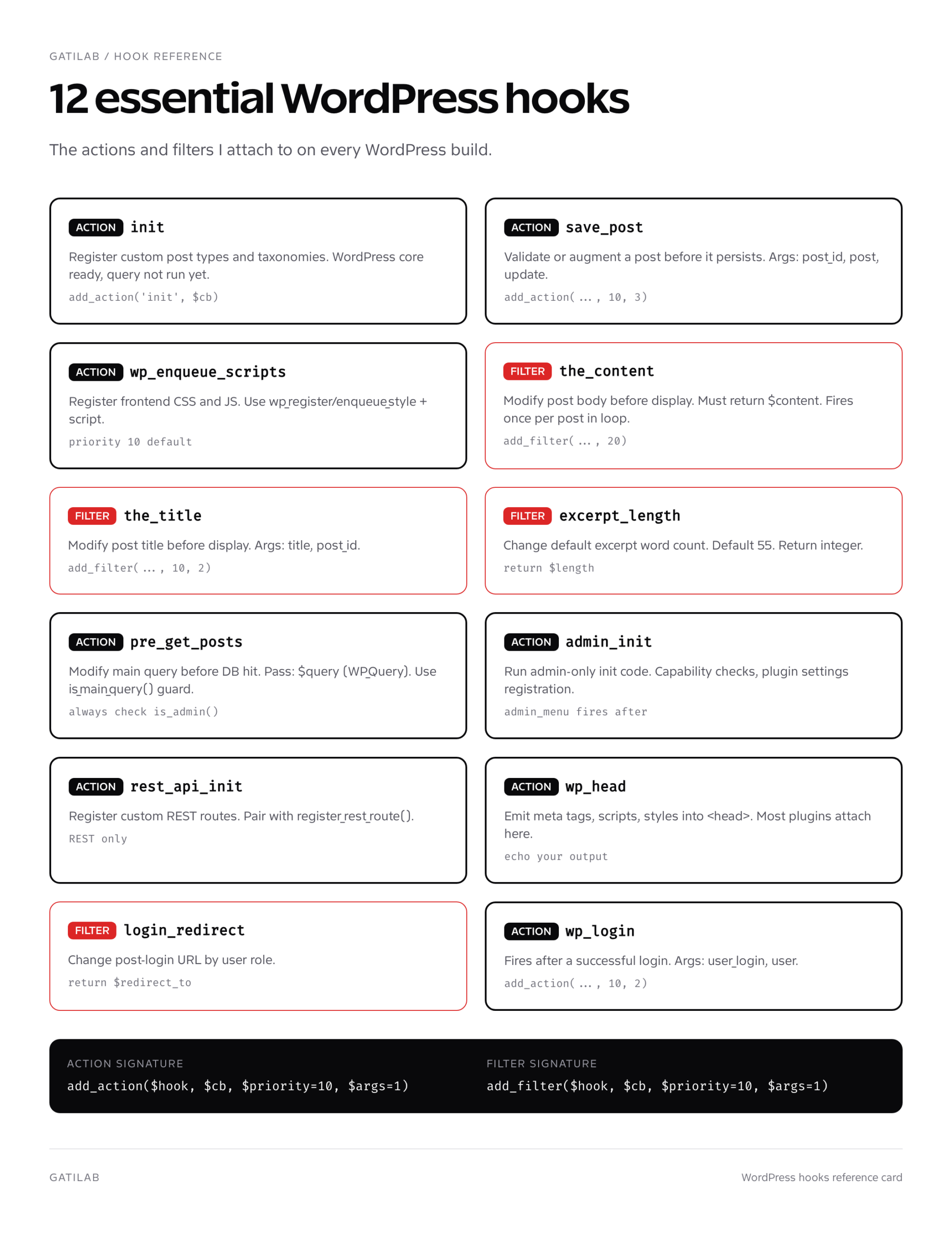
Beyond the 12 lifecycle hooks above, these are the ones I attach to on most projects. Memorize the names and the order they fire.
// init: register custom post types and taxonomies
add_action('init', function () {
    register_post_type('book', [
        'public'      => true,
        'has_archive' => true,
        'supports'    => ['title', 'editor', 'thumbnail'],
        'show_in_rest' => true,
    ]);
});

// save_post: validate or augment a post before it persists
add_action('save_post', function ($post_id, $post, $update) {
    if (wp_is_post_revision($post_id)) return;
    if ($post->post_type !== 'book') return;
    if (!metadata_exists('post', $post_id, 'isbn')) {
        update_post_meta($post_id, 'isbn', 'pending');
    }
}, 10, 3);

// wp_enqueue_scripts: register frontend CSS/JS
add_action('wp_enqueue_scripts', function () {
    wp_enqueue_style('gl-app', get_stylesheet_directory_uri() . '/app.css', [], '1.0.0');
    wp_enqueue_script('gl-app', get_stylesheet_directory_uri() . '/app.js', ['jquery'], '1.0.0', true);
});

// admin_init: gate plugin features behind a capability check
add_action('admin_init', function () {
    if (!current_user_can('manage_options')) {
        remove_menu_page('tools.php');
    }
});

// pre_get_posts: hide private posts from a custom archive
add_action('pre_get_posts', function ($query) {
    if (!is_admin() && $query->is_main_query() && is_post_type_archive('book')) {
        $query->set('meta_key', 'is_featured');
        $query->set('orderby', 'meta_value');
    }
});

// the_content: append a related-posts list under post body
add_filter('the_content', function ($content) {
    if (is_singular('post') && in_the_loop() && is_main_query()) {
        $content .= gl_render_related_posts(get_the_ID());
    }
    return $content;
}, 20);

// the_title: prepend a category icon to titles in the loop
add_filter('the_title', function ($title, $post_id) {
    $cats = wp_get_post_categories($post_id);
    if ($cats && in_array(5, $cats)) {
        $title = '🔥 ' . $title;
    }
    return $title;
}, 10, 2);

// excerpt_length: change default excerpt word count
add_filter('excerpt_length', function ($length) {
    return 30;
});

// wp_head: emit custom meta tags
add_action('wp_head', function () {
    echo '<meta name="theme-color" content="#0a0a0a">' . "\n";
});
Anonymous functions (closures) are fine in modern WordPress. PHP 8.1+ supports first-class callable syntax (add_action('init', myFunction(...))) but anonymous functions remain the most readable for short callbacks. Reserve named functions for callbacks you want to reference elsewhere or remove later with remove_action().
Priority and accepted arguments explained
The full add_action() signature is add_action($hook_name, $callback, $priority = 10, $accepted_args = 1). Two parameters trip up most developers.
Priority controls the order callbacks fire when multiple are attached to the same hook. Lower priority runs earlier. Default is 10. If you want your callback to run before everything else, use 1. If you want it to run after every other plugin’s modification, use 99 or 999. Most plugins use the default 10, so 11+ runs after them and 9 runs before them.
Accepted args tells WordPress how many arguments to pass to your callback. Default is 1. If your callback needs more (like the second $post argument on save_post, or the third $update argument), you must declare the count. WordPress will call your callback with up to that many arguments. Forgetting this is the second-most-common WordPress hooks bug: you write function my_cb($post_id, $post) but accept_args is still 1, so $post arrives as null.
// CORRECT: explicitly declares accepted_args = 3
add_action('save_post', 'gl_validate_post', 10, 3);
function gl_validate_post($post_id, $post, $update) { ... }

// BUG: accepted_args defaults to 1, $post and $update will be null
add_action('save_post', 'gl_validate_post');
function gl_validate_post($post_id, $post, $update) { ... }
Custom WordPress hooks for your own plugin
Every plugin should expose its own hooks so other developers can extend it. The pattern is the same one core uses.
// Inside your plugin
function gl_send_invoice($order_id, $amount) {
    // Fire an action so other code can hook in BEFORE
    do_action('gl_invoice_before_send', $order_id, $amount);

    $template = '<h1>Invoice #' . $order_id . '</h1><p>$' . $amount . '</p>';

    // Fire a filter so other code can MODIFY the template
    $template = apply_filters('gl_invoice_template', $template, $order_id, $amount);

    wp_mail(get_user_email_for_order($order_id), 'Your invoice', $template);

    // Fire an action AFTER so other code knows the invoice was sent
    do_action('gl_invoice_after_send', $order_id, $amount);
}

// Now another plugin or your theme can extend the invoice flow
add_filter('gl_invoice_template', function ($html, $order_id, $amount) {
    $html .= '<p>Thanks for your business!</p>';
    return $html;
}, 10, 3);

add_action('gl_invoice_after_send', function ($order_id, $amount) {
    error_log("Invoice {$order_id} sent for {$amount}");
}, 10, 2);
Three rules for naming your custom WordPress hooks: prefix every hook name with your plugin’s slug (gl_, woocommerce_, gtm_) to avoid collisions; use snake_case to match core conventions; and document the arguments you pass with a docblock. Plugin developers grep for hook names; if your hooks are findable and well-documented, your plugin gets adopted faster.
do_action and apply_filters internals
Both functions live in wp-includes/plugin.php and operate on the global $wp_filter array. do_action() looks up every registered callback for the named hook, sorts by priority, and calls each one with the supplied arguments. apply_filters() does the same but threads the value through each callback: callback 1’s return value becomes callback 2’s first argument, and so on.
// Simplified internals (real code in wp-includes/class-wp-hook.php)
function apply_filters($hook_name, $value, ...$args) {
    global $wp_filter;
    if (!isset($wp_filter[$hook_name])) return $value;
    $callbacks = $wp_filter[$hook_name]->callbacks; // sorted by priority
    foreach ($callbacks as $priority => $cbs) {
        foreach ($cbs as $cb) {
            $value = call_user_func_array($cb['function'], array_slice([$value, ...$args], 0, $cb['accepted_args']));
        }
    }
    return $value;
}
Knowing this internals helps you debug. If your filter callback isn’t running, the hook name is probably misspelled (typos in hook names fail silently). If your callback runs at the wrong time, the priority is wrong. If your callback receives null for the second argument, accepted_args is wrong.
Removing and inspecting WordPress hooks
Sometimes another plugin attaches a callback you don’t want. remove_action() and remove_filter() detach it. The catch: you need to know the exact callback function name and priority that was used to register it.
// Remove a known callback by name
remove_action('wp_head', 'wp_generator');

// Remove a class method
remove_action('wp_head', ['SomeClass', 'method_name'], 10);

// Remove an instance method (only works if you have the same instance)
remove_action('init', [$instance, 'method_name']);

// Inspect every callback registered to a hook
global $wp_filter;
print_r($wp_filter['the_content']);
Anonymous functions are nearly impossible to remove because you don’t have a reference to them. If you want a callback to be removable later, register it with a named function or store the closure in a variable: $cb = function() { ... }; add_action('init', $cb); ... remove_action('init', $cb);.
Debugging WordPress hooks
Three tools answer 90% of “why isn’t my hook firing” questions.
- Query Monitor plugin: adds a “Hooks & Actions” panel showing every hook fired on the current request, in order, with timing. Free, open-source, by Human Made. The fastest way to see what’s actually happening.
- did_action(‘hook_name’): returns the number of times an action has fired so far.
if (did_action('init') === 0) { error_log('init has not fired yet'); }tells you if your code runs before or after a known milestone. - doing_action() / current_filter(): return the name of the currently-firing hook (or false). Useful inside callbacks that are attached to multiple hooks.
For deeper debugging, the all hook fires for every action and filter on a request. Attaching add_action('all', function ($hook) { error_log($hook); }) dumps every fired hook to debug.log. Disable it after debugging because it adds significant overhead. Pair this with the WP-CLI commands approach for setting WP_DEBUG: wp config set WP_DEBUG true --raw && wp config set WP_DEBUG_LOG true --raw.
WordPress hooks for the REST API and Block Editor
Modern WordPress has two areas with their own hook conventions. The REST API uses rest_api_init for endpoint registration and rest_pre_dispatch, rest_request_after_callbacks for request-level extension. The full register_rest_route pattern is covered in our WordPress REST API guide.
The Block Editor (Gutenberg) fires enqueue_block_editor_assets for editor-only scripts and enqueue_block_assets for both editor and frontend. JavaScript hooks (via @wordpress/hooks) mirror the PHP hook system in the editor: wp.hooks.addFilter, wp.hooks.addAction, and wp.hooks.applyFilters. Block-specific filters like blocks.registerBlockType and editor.BlockEdit live in JavaScript and let you extend block behavior without forking blocks.
For deeper context, the headless WordPress guide, WordPress custom post types tutorial, and WordPress block themes guide all use WordPress hooks as their core extension model. If you’re choosing a host where your hook-heavy plugins won’t time out, the best managed WordPress hosting roundup covers the options.
FAQs about WordPress hooks
What’s the difference between WordPress hooks and WordPress filters?
WordPress filters are a type of WordPress hook. Hooks is the umbrella term for both actions and filters. Actions fire at a moment and don’t return values. Filters modify data and must return the (possibly modified) value. Both use the same internal plumbing in wp-includes/plugin.php and wp-includes/class-wp-hook.php.
Where should I put my add_action and add_filter calls?
For theme-level hooks: in functions.php (or files included from functions.php). For plugin-level hooks: in your plugin’s main file or files included from it. The key rule is that add_action() and add_filter() calls themselves must run before the target hook fires. Calling add_action(‘init’, …) inside a callback for the wp_loaded hook is too late: init already fired.
How many WordPress hooks does WordPress core have?
WordPress core registers around 1,800 hooks across its codebase as of 6.4. A typical page load triggers 600 to 900 of them. The Hooks API documentation at developer.wordpress.org lists every public hook with its arguments. The Query Monitor plugin shows you which hooks actually fire on the current request, which is the more useful number day to day.
Can WordPress hooks slow down my site?
Yes, if you write inefficient callbacks. The hook system itself is fast (microseconds per fire), but a slow callback attached to a frequently-fired hook compounds the cost. The_content fires once per post in the loop. Init fires once per request. Save_post fires on every post save. Profile slow callbacks with Query Monitor’s hook timing panel before optimizing.
What’s the right priority for my add_action call?
10 is the default and what 95% of plugins use. Use a lower number (5, 1) if you must run before other plugins; use a higher number (20, 99, 999) if you must run after them. The exact value rarely matters as long as the relative order is correct. Test with Query Monitor to see the actual order callbacks fire on your hook.
How do I find which WordPress hook to use for X?
Three resources: developer.wordpress.org/reference/hooks lists every documented core hook. Adam Brown’s WordPress Hooks Database (adambrown.info/p/wp_hooks) is the historical map of when hooks were added. The Query Monitor Hooks panel shows you what’s actually firing on the page you’re trying to extend. Combine all three to find the right hook in under 5 minutes.
Should I create custom WordPress hooks in my plugin?
Yes, if you want other developers to extend your plugin. Fire do_action() at decision points and apply_filters() over data your plugin generates. Prefix every hook name with your plugin slug (gl_, woocommerce_, etc.) to avoid collisions. Document each hook’s arguments in a docblock so plugin authors don’t have to read your source.
What’s the difference between PHP hooks and JavaScript hooks in WordPress?
PHP hooks (add_action/add_filter) fire during server-side rendering and modify data WordPress is about to output. JavaScript hooks (wp.hooks.addAction, wp.hooks.addFilter from @wordpress/hooks) fire in the Block Editor and modify the editor UI or block behavior. The APIs mirror each other deliberately. Use PHP hooks for server-rendered output, JS hooks for editor extensions.
WordPress hooks footguns to avoid
Five mistakes account for the majority of “my hook isn’t working” support tickets. The list below is what I check first whenever a junior developer asks me to debug their callback.
- Filter callback returns nothing. The filter system uses your return value. Returning null wipes the data. Always end with
return $value. - accepted_args mismatch. Declaring three parameters on a callback but registering with the default 1 means the second and third args arrive as null. Set the count explicitly.
- Hook fires before your add_action runs. If you attach to
plugins_loadedfrom inside aninitcallback, you missed the train. Register hooks at file-load time, not inside other callbacks. - Modifying the main query without an is_main_query() guard. A pre_get_posts callback that doesn’t check is_main_query and is_admin will wreck wp-admin list tables. Always guard.
- Using anonymous functions then trying to remove them. Closures cannot be removed unless you stored a reference. Use a named function for any callback you might need to detach later.
Bonus footgun: attaching to a hook that doesn’t exist (typo). WordPress fails silently because the internal lookup just doesn’t find a match. has_action('hook_name') returns the priority of the first matching callback or false. Use it as a sanity check during development.
Bottom line on WordPress hooks
WordPress hooks are how you extend WordPress without forking core. Master add_action and add_filter, remember to return values from filter callbacks, declare accepted_args correctly, and prefix your custom hooks with a slug. Install Query Monitor on every dev environment so you can see what’s firing in real time. Once these patterns are second nature, every WordPress problem becomes a question of “which hook do I attach to” rather than “how do I modify core.”
Tell Google you want more of this.
Add Gatilab as a preferred sourceOne tap, and this site shows up more often in your own Top Stories, AI Overviews and AI Mode. Remove it any time.