
Headless WordPress: 2026 Architecture Guide
Headless WordPress is the architecture pattern where you keep WordPress as the content backend (admin, posts, custom post types, ACF fields, users, media library) and replace its theme layer with a separate frontend, usually built in Next.js, Astro, Nuxt, or SvelteKit. The frontend pulls data from WordPress through the REST API or WPGraphQL, then renders pages on its own infrastructure (Vercel, Netlify, Cloudflare Pages). I’ve shipped three headless WordPress builds for SaaS clients in the past 18 months and audited a dozen more. The architecture is powerful, expensive, and not the right call for most projects.
This guide is the working playbook I use when a founder asks if headless WordPress is the right call for their site. We’ll cover when going headless is justified, the architecture options, WPGraphQL versus REST, the four real frontend choices in 2026, hosting splits between WordPress backend and modern frontend, SEO considerations that catch most teams flat-footed, and a real cost analysis. By the end you’ll know if your project belongs on headless or on a tuned classic WordPress stack.
Want this built rather than researched? Gatilab ships Next.js and React front ends and Astro content platforms, with draft preview wired in so your editors keep the interface they already know.
What headless WordPress actually means
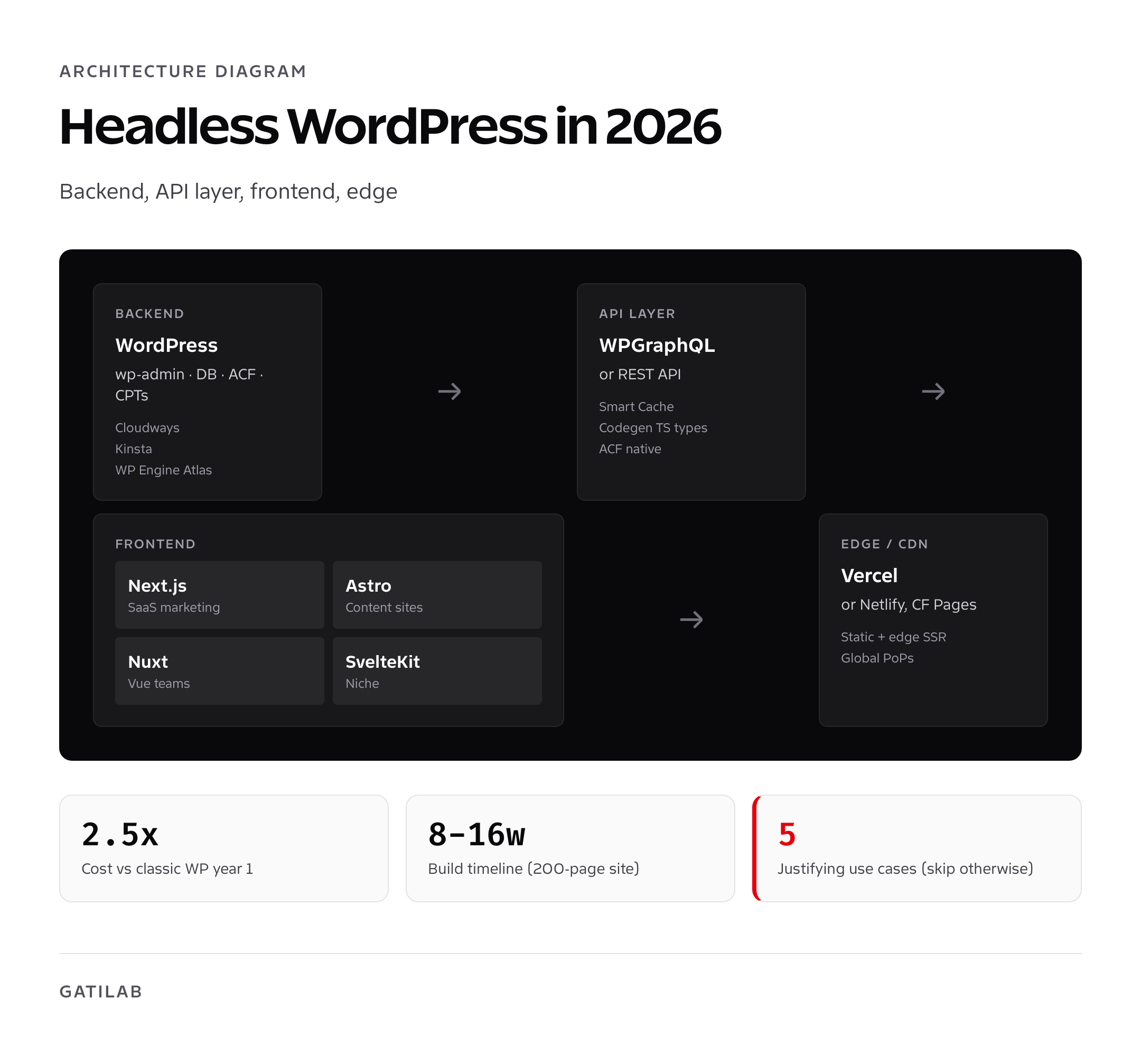
In a traditional WordPress site, the same software handles content management and rendering. You write a post in wp-admin, the WordPress theme renders it as HTML, and visitors see the page. Headless WordPress splits those two responsibilities. WordPress keeps the admin and the database. The frontend, built in a JavaScript framework, fetches the content via API and renders pages independently, often as static HTML at build time or as edge-rendered pages at request time.
The result is a site that looks like a modern JavaScript app to visitors, with WordPress’s editorial UX behind the scenes. You keep the Block Editor, ACF fields, custom post types, and user roles your team already knows. You gain build-time rendering, edge caching, modern image pipelines, and the developer ergonomics of React or Vue. You also take on a second hosting bill, a build pipeline, an API layer, and the operational complexity that goes with running two systems.
When headless WordPress is the right call
Headless WordPress earns its complexity in five specific scenarios. Outside these, a tuned classic WordPress stack is faster to build and cheaper to run.
- You’re building a SaaS product where the marketing site shares a design system and components with the app, and the team wants one frontend codebase
- You need extreme performance (sub-200ms TTFB at scale) that even tuned WordPress can’t deliver consistently
- You’re powering multiple frontends (web, mobile app, kiosk, in-store display) from one content source
- Your editorial team loves WordPress but your engineering team wants modern frontend tooling
- You’re running programmatic SEO at 50,000+ pages and need build-time generation across CDN edge nodes
If none of those apply, classic WordPress is the right call. I’ve seen teams spend $30K and 4 months going headless to ship a 20-page marketing site that would have taken a Bricks Builder developer 2 weeks and run on $40/month hosting. Don’t be that team.
Headless adds 2 to 4x the engineering cost of a comparable classic WordPress build. If you don’t have at least one front-end developer comfortable with Next.js or Astro on the team, the architecture becomes a hire-and-maintain liability.
WPGraphQL vs REST: which API to query
WordPress exposes content through two API surfaces: the built-in REST API and the WPGraphQL plugin. Both work for headless. They have different strengths.
| Aspect | WP REST API | WPGraphQL |
|---|---|---|
| Built-in | Yes (WP core) | No (plugin required) |
| Query language | REST endpoints | GraphQL queries |
| Over/under-fetching | Common, returns full payloads | Request only the fields you need |
| Performance per query | Lower for nested data | Higher for complex relationships |
| Caching | Standard HTTP caching | Per-query caching with WPGraphQL Smart Cache |
| ACF support | Manual via filter or ACF to REST API plugin | Native via WPGraphQL for ACF |
| Schema introspection | None | Full GraphQL schema explorer |
| TypeScript codegen | Manual | Native via graphql-codegen |
I default to WPGraphQL for any new headless build. The TypeScript codegen alone (auto-generating types for every query in your frontend) saves more developer hours than the plugin overhead costs. WPGraphQL Smart Cache by WP Engine adds per-query caching that makes builds and incremental rebuilds dramatically faster on large sites. The REST API is the right choice when you’re not running ACF, when you don’t have GraphQL experience on the team, or when you’re integrating with non-JS clients (mobile apps, IoT devices) that don’t care about over-fetching.
Frontend choices: Next.js, Astro, Nuxt, SvelteKit
Four frontends matter for headless WordPress in 2026. Each has a sweet spot.
Next.js: the default for SaaS-adjacent builds
Next.js is the most-used React framework for headless WordPress. The App Router (since Next 13) supports static, server-rendered, and edge-rendered pages from the same codebase. Vercel’s hosting integrates so tightly that builds, previews, and production deploys all “just work.” Faust.js (now archived but still functional) and the newer headless-wordpress starter kits give you a production setup in a day. WP Engine’s Atlas product is built for Next.js + WordPress specifically.
Pick Next.js when your team writes React, you want a single framework for marketing site and product, or you need to ship interactive features (filters, search, dashboards) on the frontend. The downside is JavaScript bundle size: Next.js apps ship 80 to 200KB of framework JS even on a static page. Astro ships 0KB by default.
Astro: the choice for content sites
Astro is what I recommend for content-first headless WordPress. The framework’s “islands architecture” ships zero JavaScript by default and only hydrates the components that actually need interactivity. The result is sites that score 99 on Lighthouse without optimization work. Astro 5+ has solid WPGraphQL integration via the Astro WordPress starter, and the Content Layer API makes incremental builds painless.
Pick Astro when your headless WordPress build is a blog, magazine, documentation site, marketing site, or anything that’s mostly content with occasional interactivity. I’ve shipped a 10,000-page programmatic SEO site on Astro + WPGraphQL and the builds are 10 to 12 minutes for a full rebuild and under 30 seconds for incremental.
Nuxt: the Vue alternative
Nuxt 3 (now stable Nuxt 4 in 2026) is the Vue equivalent of Next.js. The DX is comparable, the ecosystem is smaller, and the hosting story (Vercel, Netlify, Cloudflare Pages) is the same. Pick Nuxt only if your team already writes Vue. Otherwise Next.js or Astro will give you a deeper community and more starter kits.
SvelteKit: niche but elegant
SvelteKit is a real option for small teams who want minimal bundle size and a compiler-led approach. The headless WordPress integration is less mature than Next.js or Astro. Pick it if you have Svelte expertise and a small project; avoid it for production work without strong front-end leadership.
Hosting split: WordPress backend + modern frontend
Headless WordPress has two hosting bills. The WordPress backend handles admin, the database, file uploads, and the API. The frontend handles rendering, caching, and edge delivery. Each side has clear best-fit hosts.
WordPress backend hosting
- WP Engine Atlas: $58 to $193 a month, optimized for headless workloads, includes WPGraphQL Smart Cache
- Kinsta: $35 to $115 a month, fast, redis included, great staging
- Cloudways (Vultr High Frequency): $14 to $42 a month, best price-performance for small teams
- RunCloud + Hetzner: $8 to $20 a month, DIY option for teams with DevOps capacity
- Pressable: $25 to $90 a month, Automattic infrastructure, good for managed WP
Frontend hosting
- Vercel: free Hobby for solo, $20+/seat for Pro, the default for Next.js
- Netlify: free Starter, $19+/seat for Pro, polished CI/build experience
- Cloudflare Pages: free for most projects, scales to enterprise on Workers, cheapest at high traffic
- WP Engine Atlas: bundles frontend + backend hosting, simplest single-vendor option
The split I run for clients is Cloudways (WordPress) + Vercel (Next.js) for SaaS marketing sites, and Kinsta (WordPress) + Cloudflare Pages (Astro) for content sites. The Cloudflare Pages option is the cheapest at scale: a 100K-pageviews-a-day Astro site stays inside Cloudflare’s free tier indefinitely. Vercel hits paid usage above ~100GB monthly bandwidth.
SEO for headless WordPress: what most teams get wrong
SEO breaks for headless WordPress in three predictable ways. Knowing them up front saves you a 6-month traffic recovery later.
- Sitemap and robots.txt: Yoast and Rank Math sitemaps live on the WordPress URL by default. You need to either rewrite them under your frontend domain or generate sitemaps in the frontend at build time. Yoast SEO Headless and Rank Math both have headless-friendly settings now, but you must configure them.
- Schema markup: Schema generated by your SEO plugin runs on the WordPress side. If you’re rendering pages on the frontend, you need to fetch the schema JSON and inject it into the rendered HTML. WPGraphQL exposes Yoast and Rank Math schema as queryable fields. Don’t skip this.
- Redirects: 301 redirects in WordPress (via Redirection plugin or Rank Math) only fire on WordPress URLs. The frontend serves a different URL space. You need redirects mirrored on the frontend (vercel.json, _redirects on Netlify, or middleware in Astro).
Add to that the ranking-impact considerations: AI search engines (ChatGPT, Perplexity, AI Overviews) crawl rendered HTML and prefer answer-first structure with clean schema. Headless WordPress that ships clean static HTML actually has an SEO advantage if you configure it right, because edge caching makes pages faster than a typical WordPress site and the build process can enforce structure. The risk is the configuration step. Skip it and you’ll lose rankings.
For SEO plugins that work cleanly in headless contexts, see my best SEO plugins for WordPress roundup. Rank Math has the strongest WPGraphQL integration today.
Real cost analysis: what headless WordPress actually costs
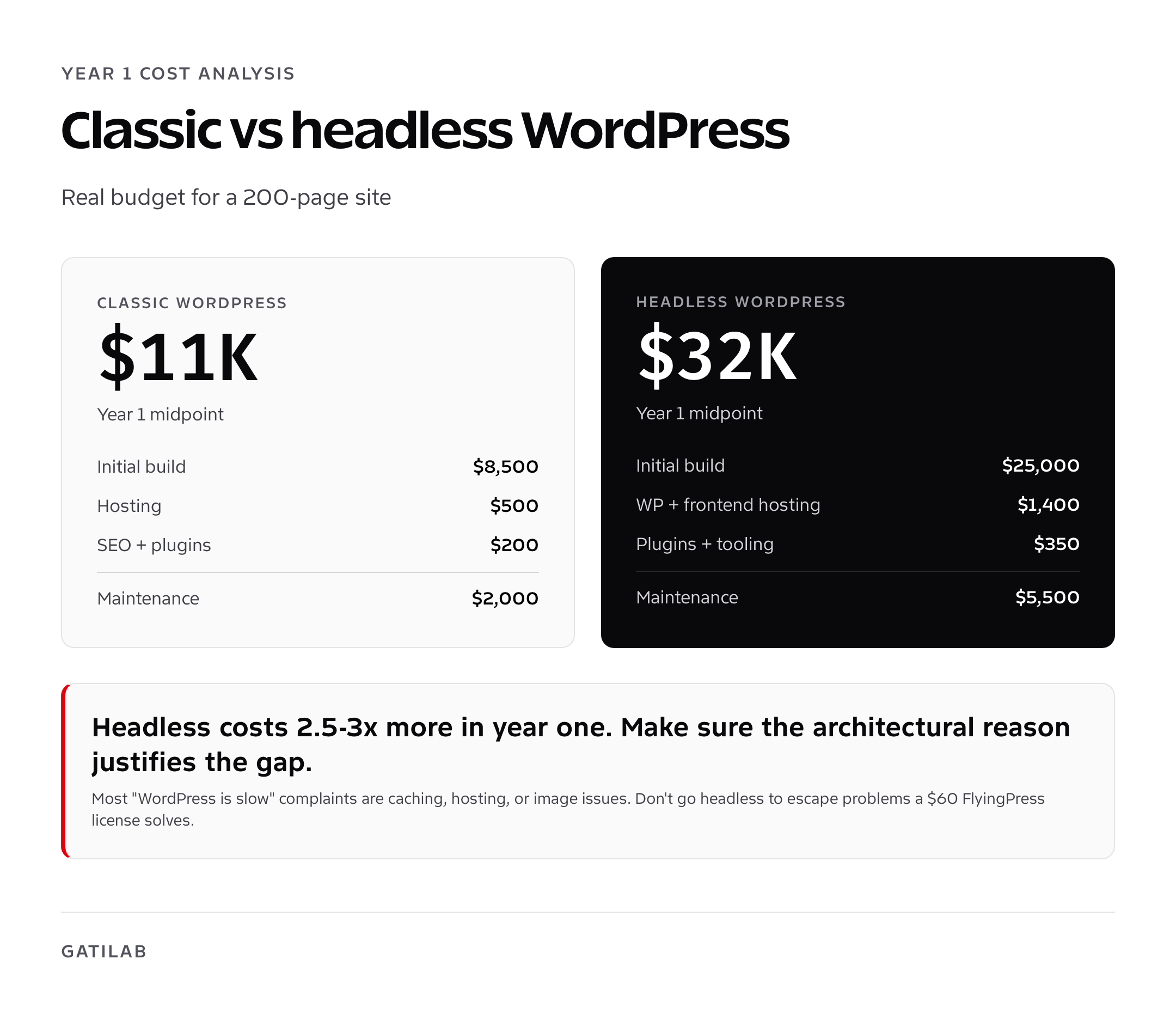
Here’s a realistic 2026 budget for a 200-page headless WordPress build, compared with a tuned classic WordPress equivalent. Numbers are based on three projects I shipped in the past 12 months.
| Cost line | Classic WordPress | Headless WordPress |
|---|---|---|
| Initial build (developer time) | $5,000 to $12,000 | $15,000 to $40,000 |
| WordPress hosting (year 1) | $300 to $700 | $300 to $1,400 |
| Frontend hosting (year 1) | $0 | $0 to $1,200 |
| WPGraphQL plugins / licensing | $0 | $0 to $300 |
| SEO plugins | $59 to $199 | $59 to $199 |
| Build tooling / CI | $0 | $0 to $250 |
| Maintenance (year 1) | $1,000 to $3,000 | $3,000 to $8,000 |
| Year 1 total | $6,400 to $16,200 | $18,400 to $51,400 |
The cost gap is real. Headless WordPress is 2.5 to 3x more expensive in year one and 1.5 to 2x more expensive in steady state. If you don’t have a clear architectural reason to go headless (one of the five listed above), the math doesn’t work. If you do have a reason, the gap is justified by the gains.
Trade-offs: what you give up going headless
- Live preview becomes harder. WordPress previews show the classic theme; you need a custom preview pipeline for the frontend.
- Plugin compatibility shrinks. Anything that injects HTML into the WordPress theme (popups, live chat widgets, opt-in forms) won’t render on the frontend without manual integration.
- Forms break by default. Contact Form 7, Gravity Forms, FluentForms, and WPForms all need API submission flows or you switch to a frontend form library.
- Comments stop working out of the box. Most headless setups disable native WordPress comments and replace with Disqus, Giscus, or a custom solution.
- Block-based content (Gutenberg) requires a renderer on the frontend. Libraries like @wordpress/block-serialization-default-parser or wp-block-to-html exist but add complexity.
- The editorial team has to learn that “saving” doesn’t immediately update the live site. Builds can take 1 to 15 minutes depending on size and incremental support.
None of these are blockers. All of them are surprises if you discover them in production instead of during planning. For an honest checklist of what to evaluate before committing, run a comprehensive website audit on your current site first. The audit usually reveals whether the problems you want headless to solve are actually problems headless solves.
My final take on headless WordPress
Headless WordPress is the right architecture for a small slice of WordPress projects: high-traffic SaaS marketing sites with shared product design systems, programmatic SEO at scale, multi-frontend content hubs, and teams that genuinely need React or Astro on the frontend for product reasons. For everything else, a tuned classic WordPress stack with Bricks Builder, FlyingPress, and Cloudflare CDN delivers 90% of the performance for 25% of the cost.
If you’re considering headless because someone said WordPress is “slow,” fix the WordPress performance first. Most “WordPress is slow” complaints are caching, image optimization, or hosting decisions that have nothing to do with the rendering layer. Going headless to escape problems you can solve with a $30/month FlyingPress license is the most expensive caching plugin you’ll ever buy. For agency-level operations and how the cost-vs-control tradeoff plays at scale, see my WordPress agency operations breakdown.
Frequently asked questions
What is headless WordPress?
Headless WordPress is an architecture where WordPress handles content management and the database while a separate frontend (Next.js, Astro, Nuxt, SvelteKit) handles rendering. The frontend pulls content via the WordPress REST API or WPGraphQL and renders pages independently, typically as static HTML at build time or edge-rendered at request time.
When should I use headless WordPress?
Use it when your marketing site shares a design system with a SaaS product, when you need extreme performance at global scale, when you power multiple frontends from one content source, when you run programmatic SEO at 50,000+ pages, or when your engineering team strongly prefers modern frontend tooling. Outside these cases, classic WordPress is faster to build and cheaper to run.
WPGraphQL vs REST API: which should I use?
WPGraphQL is the better default for new headless builds. It returns only the fields you request, supports per-query caching via WPGraphQL Smart Cache, and has native ACF integration plus TypeScript codegen. The REST API is the right choice when you don’t run ACF, when your team has no GraphQL experience, or when integrating with non-JS clients like mobile apps.
How much does headless WordPress cost to build?
Realistic budget for a 200-page headless WordPress build is $18,000 to $51,000 in year one (developer time, hosting both layers, plugins, build tooling, maintenance). The same site built classic-WordPress style with Bricks Builder runs $6,400 to $16,200. Headless costs 2.5 to 3x more in year one and 1.5 to 2x more in steady state.
Is Next.js better than Astro for headless WordPress?
Next.js is better for SaaS-style sites with shared design systems and interactive features. Astro is better for content-first sites because its islands architecture ships zero JavaScript by default and routinely scores 99 on Lighthouse. For a blog, magazine, documentation site, or programmatic SEO build, default to Astro. For interactive product marketing or shared components with a React app, default to Next.js.
Does headless WordPress hurt SEO?
Not inherently, but it breaks SEO in three predictable ways if you don’t configure correctly: sitemaps and robots.txt need to live on the frontend domain, schema markup must be fetched via API and injected into rendered HTML, and 301 redirects must be mirrored on the frontend (vercel.json, _redirects on Netlify, Astro middleware). Configure all three and headless can rank as well or better than classic WordPress.
Can I keep using my WordPress plugins with headless?
Some yes, some no. Plugins that store and expose data via the API (ACF, Yoast, Rank Math, custom post type plugins) work fine. Plugins that inject HTML into the WordPress theme (popups, live chat widgets, opt-in forms) won’t render on the frontend without manual integration. Form plugins need API-based submission flows. Comment plugins typically get replaced with Disqus or Giscus.
Where should I host headless WordPress?
Split the hosting: WordPress backend on WP Engine Atlas, Kinsta, Cloudways, or Pressable. Frontend on Vercel (for Next.js), Netlify, or Cloudflare Pages (cheapest at scale, especially for Astro). My typical stack is Cloudways + Vercel for SaaS marketing sites and Kinsta + Cloudflare Pages for content sites.
Is headless WordPress worth it for a small site?
No. For sites under 100 pages with no special architectural requirement (shared product design system, multi-frontend, programmatic SEO at scale), classic WordPress with a tuned cache and CDN delivers 90% of the performance for 25% of the cost. The complexity of headless is justified at scale, not at small-site level.
How long does a headless WordPress build take?
Realistic timeline for a 200-page headless WordPress site is 8 to 16 weeks of full-time engineering work, plus design and content. The classic-WordPress equivalent runs 3 to 6 weeks. Most of the headless overhead goes into the frontend rendering, build pipeline, schema injection, and the inevitable plugin compatibility surprises.
Tell Google you want more of this.
Add Gatilab as a preferred sourceOne tap, and this site shows up more often in your own Top Stories, AI Overviews and AI Mode. Remove it any time.