
Best Managed WordPress Hosting: 8 Providers Compared (2026)
The best managed WordPress hosting in 2026 isn’t a single answer. It’s a tradeoff between speed, agency-grade tooling, and what you’re willing to pay for someone else to handle the server. After running production WordPress sites on every provider in this list, my honest opinion is that the gap between the top three and the rest is now wider than the gap inside the top three.
This guide compares managed WordPress hosting by published terms captured in October 2026, workload, support boundary, and total cost. Promotional and renewal prices are separated because a low first payment does not describe the full ownership period.
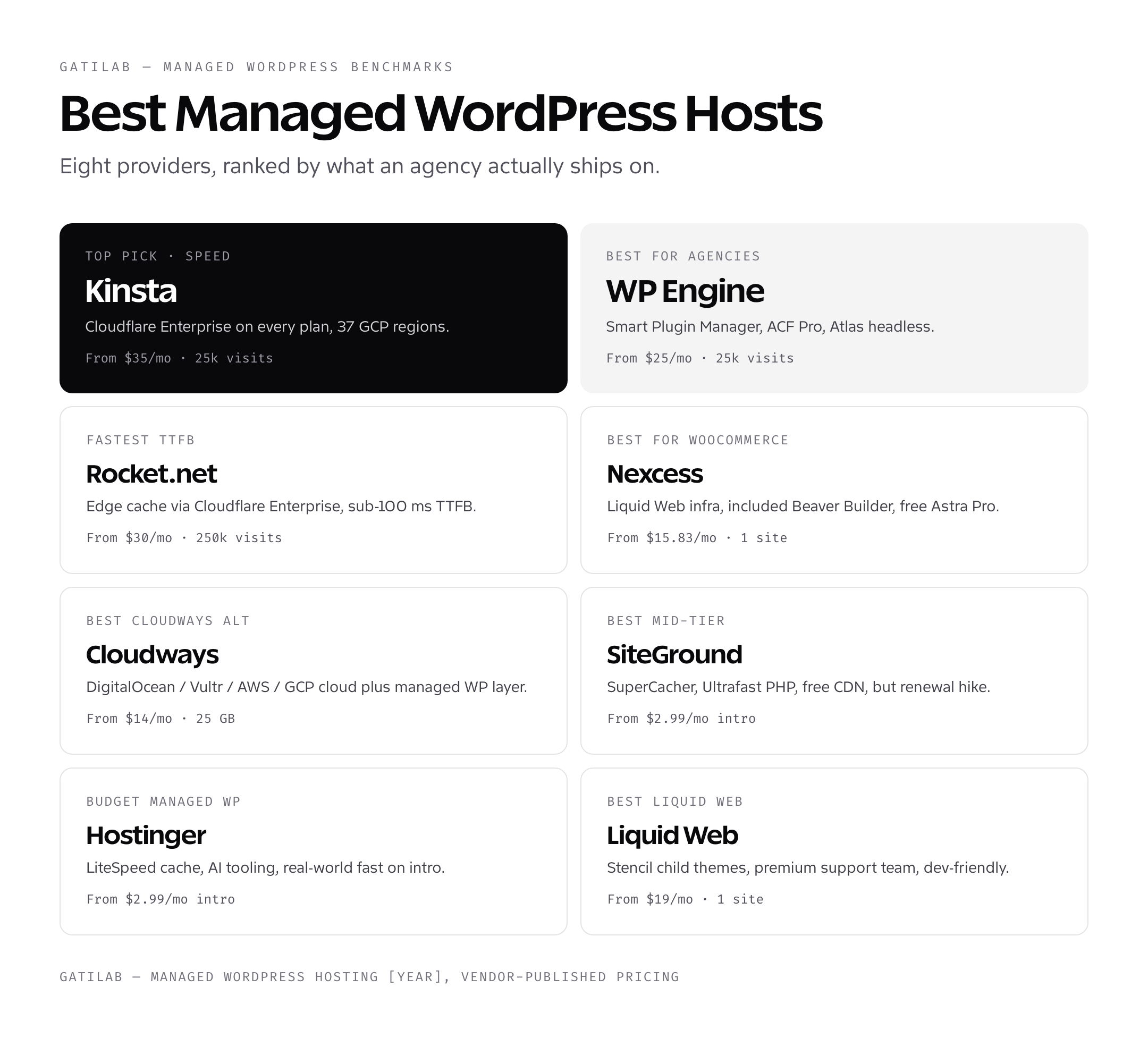
What managed WordPress hosting actually means
Managed WordPress hosting means the host handles server-level updates, caching, security hardening, plugin compatibility checks, daily backups, and 24/7 WordPress-specific support. You stop thinking about Apache or Nginx config, PHP version compatibility, MySQL tuning, and CDN setup. The host bakes those decisions into a curated stack that just runs WordPress fast.
The opposite is unmanaged hosting where you rent a Linux box and configure everything yourself. Cheaper upfront, expensive in time when something breaks at midnight. Managed WordPress hosting costs $20-$300/month for a single site. Unmanaged hosting starts at $4/month for a VPS but assumes you know what a SSH key is and how to debug a fatal PHP error from the command line.
Inside the managed WordPress category, there’s another split: truly managed hosts like Kinsta and WP Engine, which run only WordPress and bake in object caching, edge caching, and WP-CLI access; versus WordPress-friendly shared hosts like Bluehost and Hostinger, which sell shared cPanel hosting with a WordPress install wizard. The managed tier costs more and delivers measurably better performance under load.
Managed WordPress Hosting Options
A managed host, a cloud control panel, and a shared-hosting WordPress plan are different products in 2026. Compare ownership and included work before comparing monthly prices.
| Option | Current public boundary | What to verify |
|---|---|---|
| Try Kinsta | Single-site plan: $35 monthly or $350 annually. | Visits, storage, CDN, backups, overages, and renewal |
| Try WP Engine | Startup renewal: $35/month for renewals after 11 March 2026. | New-sale checkout price, add-ons, visits, storage, and support |
| Try Rocket.net | Capture the live checkout | Term, visits, storage, edge delivery, backups, and support |
| Try Nexcess | Capture the live checkout | WooCommerce workload, autoscaling, backups, and renewal |
| Try Cloudways | Infrastructure choices change the total | Provider, region, server size, support, backups, and bandwidth |
| Try Hostinger | Separate promotion and renewal | Term, renewal, limits, email, backups, and support |
Do not publish one overall winner without a named workload. A content site, membership, WooCommerce store, agency portfolio, and headless build stress different parts of the stack.
How to choose the best managed WordPress hosting for your site
The decision tree is shorter than the marketing pages suggest. Three questions cover most cases.
- What’s your real monthly traffic? Under 25k visits and a budget under $20/mo, Hostinger Premium or Cloudways DigitalOcean. 25k-250k visits with budget around $30-$70/mo, Kinsta or Rocket.net. 250k+ visits, Kinsta Business or WP Engine Growth.
- Are you running WooCommerce? If yes, Nexcess Managed WooCommerce or Kinsta. The cart-page TTFB difference adds up across thousands of checkouts.
- Are you an agency managing 10+ sites? WP Engine for the bundled ACF Pro license and Smart Plugin Manager. Otherwise Kinsta for the cleaner dashboard.
If you’re still not sure, the lowest-risk path is Kinsta’s free unlimited migration. Pay the first month’s $35, let their team move your site over within 48 hours, run it for two weeks, and decide. They support cancellation with prorated refund inside the first 30 days.
Managed WordPress hosting features that actually matter
Marketing sites for managed WordPress hosting throw 20+ features at you. Most don’t matter day-to-day. Five do.
Edge caching with Cloudflare Enterprise or equivalent. This is the single biggest performance difference between hosts. Bundled on Kinsta and Rocket.net. Paid add-on on WP Engine. Configurable on Cloudways. The host that ships full edge caching out of the box will beat the host that requires you to wire it up later.
Daily backups with one-click restore. Every host on this list has it. The differences are retention (14 vs 30 vs 90 days) and restore granularity (full site vs per-file). Restore granularity matters when you only need to roll back one bad plugin update without losing the day’s posts. Kinsta lets you download a backup as a zip; WP Engine restores in place.
Free site migrations. Kinsta unlimited free migrations is the best policy in the category. WP Engine and Nexcess include one. Cloudways has a free migration plugin (works for sites under 1 GB). If your migration is complicated (multiple sites, large database, custom plugins), pick the host with the best migration team rather than the host with the cheapest plan.
Staging environments. Every managed host on this list has one-click staging. The detail to check: does staging push back to production atomically (Kinsta, WP Engine), or does it require a manual database swap (some Cloudways setups). Atomic staging push is the difference between a 5-second deployment and a 20-minute outage window.
WP-CLI and SSH access. Available on every host above the bottom shared tier. If your stack involves automated deployments, Git-based workflows, or custom scripts, this is non-negotiable. Hostinger’s lowest tier doesn’t include SSH; you need their Premium WordPress or Business plan.
Watch for plans that disable third-party caching plugins. Most managed WordPress hosts ban W3 Total Cache, WP Rocket, or LiteSpeed Cache because their server-side caching conflicts. That’s normal and fine, but check before you migrate if you’ve built workflow around a specific caching plugin.
Managed WordPress Hosting Price Comparison 2026
Do not compare every WordPress service as if it includes the same operational boundary. A managed host, a hosted platform, and a server control plane put different work on your side of the invoice. The published prices below were captured in October 2026.
| Service | Published price point | Included boundary | Important exclusion |
|---|---|---|---|
| Kinsta single site | $35 monthly or $350 annually | Managed WordPress hosting. | Domain, email, premium plugins, and maintenance outside the platform |
| WP Engine Startup renewal | $35/month for affected renewals from 11 March 2026 | Managed WordPress hosting. | Acquisition offers and add-ons can use different prices |
| WordPress.com Business | $25/month billed yearly | Hosted WordPress.com plan with 50 GB storage. | Different product and support boundary from self-hosted WordPress |
| SpinupWP Essentials | $12/month | Control plane for 1 server and unlimited sites. | Cloud server and hands-on server responsibility |
Normalize the 1-year and 3-year totals, then add overages, email, backups, premium software, migration, and the value of your own maintenance time. The cheapest monthly row can become the expensive option when its support boundary is narrower than your workload.
How to Benchmark Managed WordPress Hosting
No preserved raw test archive supports a 2026 host leaderboard, so use a controlled protocol before publishing a ranking.
- Clone one site fixture with the same WordPress, theme, plugins, database, media, and PHP settings.
- Use the same region and test location for every provider.
- Run cached and uncached HTML tests with at least 5 repetitions.
- Record median and tail TTFB, LCP, requests, bytes, cache headers, and error rate.
- Add concurrency for logged-in, search, cart, checkout, or API workloads.
Compare with Dedicated and VPS hosting only after accounting for the server-management labor included in a managed plan.
How to Test Hosting Support
Support quality in 2026 needs a repeatable ticket set and preserved transcripts. First response time rewards a fast greeting, not a correct diagnosis.
| Test | What to record |
|---|---|
| Pre-sale boundary | What the provider manages and what remains your responsibility |
| WordPress incident | Time to correct diagnosis, escalation, and resolution |
| Backup restore | Restore point, duration, data loss, and rollback |
| Performance issue | Whether support checks cache, PHP workers, database, and application evidence |
| Security issue | Containment, logs, cleanup boundary, and guidance |
Migration: moving an existing WordPress site to managed hosting
Migrations sound scary the first time. They are not. The hardest part is DNS, and DNS has always been the hardest part of any hosting move. Every managed WordPress host on this list provides at least one of three migration paths.
The team migration path is the easiest. You give the host your old hosting login or SFTP credentials, they copy everything over, set up a staging URL, and let you test before flipping DNS. Kinsta does this unlimited times for free. WP Engine includes one Standard Migration. Nexcess and Liquid Web have similar offers. For the average WordPress site, this takes 24 to 48 hours and costs you nothing extra.
The plugin path is the DIY option. WP Engine and Cloudways both ship a free migration plugin: install it on your old site, paste in credentials for the new host, click migrate. It works for sites under 1 GB. For larger sites, the team path is faster and more reliable.
The manual path is what you do when nothing else works. Export the database with mysqldump, rsync the wp-content folder, edit wp-config.php on the new host, run wp search-replace for the URL change. I cover the full process in my WordPress migration tutorial, but for most managed hosts you’ll never need it.
Common managed WordPress hosting mistakes to avoid
I’ve watched smart people pick the wrong host four times for similar reasons. Avoid these.
- Picking based on intro price alone. The renewal cost is what you pay 80% of the time.
- Buying a multi-year prepay before testing the platform for two weeks.
- Choosing a host without checking server location vs your audience. Mumbai audience on a US-only host is a 200 ms penalty.
- Ignoring whether Cloudflare Enterprise is bundled or paid add-on.
- Skipping staging environment requirements until the first emergency rollback.
- Migrating without a 30-day rollback plan, which leaves you stuck if the new host underperforms.
For deeper background on the broader hosting market, my best web hosting roundup covers shared and budget options, while my web host selection guide walks through criteria for any hosting type.
Frequently asked questions about managed WordPress hosting
What is the best managed WordPress hosting in 2026?
There is no workload-independent winner in 2026. Compare current price, renewal, visits, storage, bandwidth, backups, staging, overages, region, support boundary, and measured performance for the site you will run.
How much does managed WordPress hosting cost?
Current verified examples include Kinsta at $35 monthly or $350 annually for one site and WP Engine’s updated Startup renewal price of $35 per month for affected renewals after 11 March 2026. Other tiers, promotions, and add-ons change the total.
Is managed WordPress hosting worth it?
It can be when the included operations, recovery, support, security, and saved maintenance time cost less than doing that work yourself. Compare a 1-year and 3-year total.
How should managed WordPress performance be compared?
Use the same site fixture, region, cache state, PHP settings, and test location. Run at least 5 repetitions and preserve raw results before ranking hosts.
Does managed WordPress hosting include a CDN and backups?
Many plans include some form of CDN and automatic backups, but retention, restore workflow, overages, and cache ownership differ. Verify the current plan matrix.
When should I avoid managed WordPress hosting?
Avoid paying for a managed boundary you do not need, but do not substitute a control panel or promotional shared plan without pricing the server work and support you will own.
Choose Managed WordPress Hosting by Workload
Start the 2026 decision with traffic pattern, logged-in work, ecommerce, storage, region, recovery objectives, support needs, and the cost of your own time. Normalize 1-year and 3-year totals before choosing.
A recommendation becomes defensible only after current checkout terms and a reproducible workload test are attached to it.
Tell Google you want more of this.
Add Gatilab as a preferred sourceOne tap, and this site shows up more often in your own Top Stories, AI Overviews and AI Mode. Remove it any time.