
WordPress Custom Post Types: A Developer Tutorial (2026)
WordPress custom post types are the difference between hacking blog Posts into a real content model and shipping a CMS that fits the data. Reviews, products, properties, courses, recipes, team members, case studies, podcasts. None of those are blog posts. They have their own fields, their own templates, their own admin lists, their own URL patterns. WordPress has supported register_post_type since version 3.0 in 2010, and 15 years later, knowing how to use it well is still the line between WordPress developers who can ship a custom site and those who can’t.
This is the working tutorial I wish I’d had when I started building WordPress custom post types in 2014. It covers the register_post_type code with every argument that matters, plugin alternatives (CPT UI, ACF, MetaBox) for non-coders, the template hierarchy for single-{cpt}.php and archive-{cpt}.php, REST API exposure and Gutenberg editor support, custom fields and meta boxes, and a real working example: a Reviews CPT with custom fields, a custom taxonomy, and templates ready to ship.
What WordPress custom post types are and when to use them
A WordPress custom post type is a content type registered alongside the built-in Posts and Pages, with its own admin menu, its own database rows (still in wp_posts, distinguished by the post_type column), its own URL slug, and its own taxonomy and meta field set. WordPress ships with five default post types: post, page, attachment, revision, and nav_menu_item. Custom post types add domain-specific ones: review, product, course, property, recipe, member, event, testimonial.
Use a custom post type when the content has a different data model than blog posts: different fields, different categories or tags, a different URL pattern, a different display template, or a different editor experience. Don’t use one when the content is just a category of blog posts (use a category), when it’s truly one-off (use a page), or when it’s a shopping product (use WooCommerce, which registers product as a CPT for you).
The fastest test: if you would ever want to show a list page of all entries, with their own URL like /reviews/ or /properties/, you need a CPT. If they belong inside another content type, use custom fields and a taxonomy.
Registering WordPress custom post types in code
Custom post types register through register_post_type() called on the init action. The function accepts a slug (the post type name, max 20 chars, lowercase, no spaces) and an args array. You can put this in a plugin (the right place, so the data survives a theme switch) or in a theme’s functions.php (acceptable for theme-specific types).
<?php
add_action( 'init', 'gatilab_register_review_cpt' );

function gatilab_register_review_cpt() {
    $labels = array(
        'name'                  => _x( 'Reviews', 'post type general name', 'gatilab' ),
        'singular_name'         => _x( 'Review', 'post type singular name', 'gatilab' ),
        'menu_name'             => _x( 'Reviews', 'admin menu', 'gatilab' ),
        'name_admin_bar'        => _x( 'Review', 'add new on admin bar', 'gatilab' ),
        'add_new'               => __( 'Add New', 'gatilab' ),
        'add_new_item'          => __( 'Add New Review', 'gatilab' ),
        'new_item'              => __( 'New Review', 'gatilab' ),
        'edit_item'             => __( 'Edit Review', 'gatilab' ),
        'view_item'             => __( 'View Review', 'gatilab' ),
        'all_items'             => __( 'All Reviews', 'gatilab' ),
        'search_items'          => __( 'Search Reviews', 'gatilab' ),
        'not_found'             => __( 'No reviews found.', 'gatilab' ),
    );

    $args = array(
        'labels'             => $labels,
        'public'             => true,
        'publicly_queryable' => true,
        'show_ui'            => true,
        'show_in_menu'       => true,
        'show_in_rest'       => true,        // Gutenberg + REST API
        'rest_base'          => 'reviews',
        'menu_icon'          => 'dashicons-star-filled',
        'menu_position'      => 20,
        'query_var'          => true,
        'rewrite'            => array( 'slug' => 'reviews', 'with_front' => false ),
        'capability_type'    => 'post',
        'has_archive'        => true,
        'hierarchical'       => false,
        'supports'           => array( 'title', 'editor', 'thumbnail', 'excerpt', 'author', 'custom-fields', 'revisions' ),
        'taxonomies'         => array( 'review_category' ),
        'template'           => array(
            array( 'core/heading', array( 'level' => 2, 'placeholder' => 'Review summary' ) ),
            array( 'core/paragraph', array( 'placeholder' => 'Verdict in 2-3 sentences' ) ),
        ),
    );

    register_post_type( 'review', $args );
}
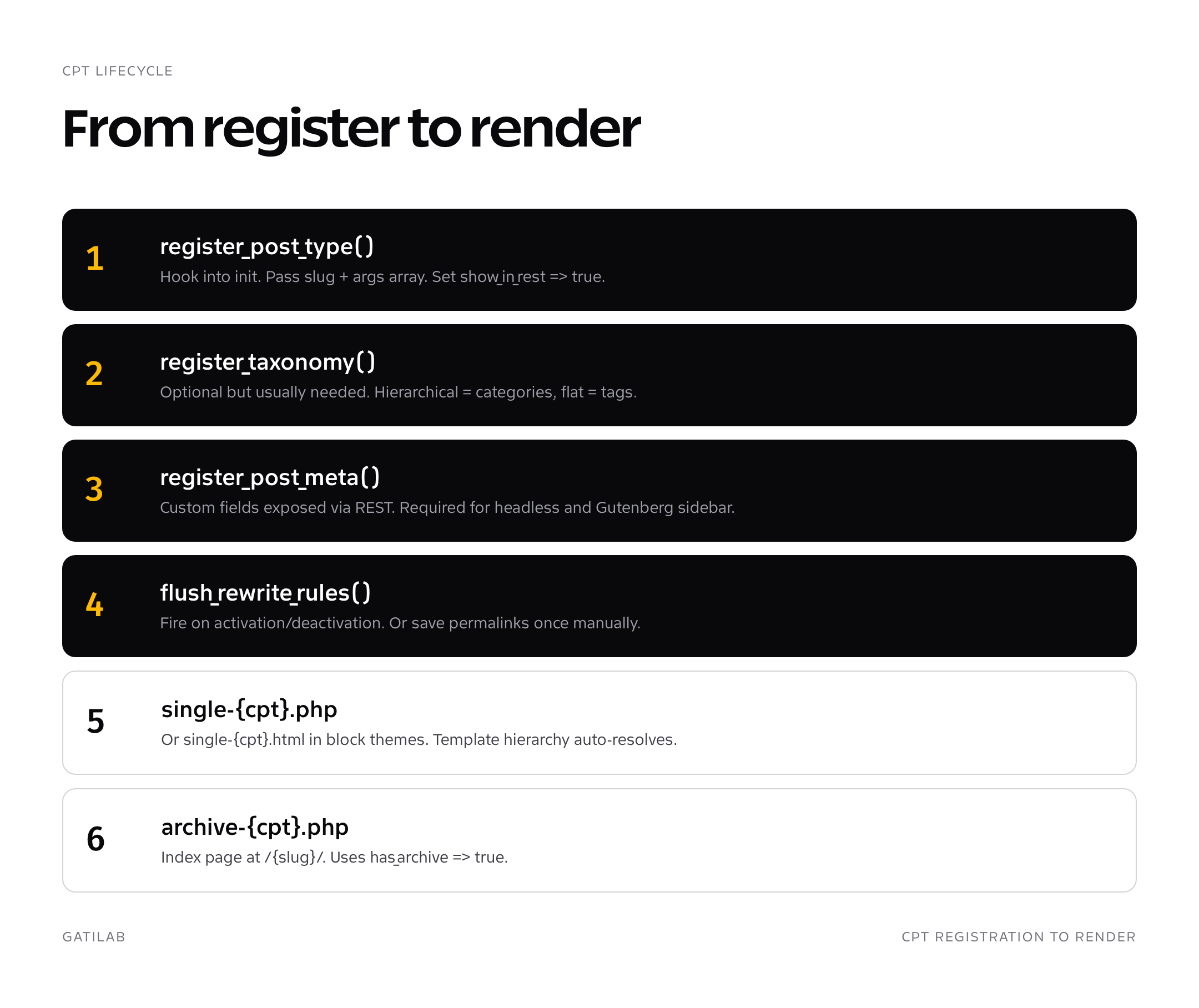
Eight arguments do most of the work. public exposes the type to the front end and search. show_in_rest set to true is non-negotiable in 2026: it enables both the block editor (Gutenberg) and REST API access. has_archive creates the /reviews/ archive page automatically. rewrite sets the URL pattern so single reviews live at /reviews/{slug}/. supports declares which editor features to show (title, editor, featured image, excerpt, custom fields). taxonomies attaches existing taxonomies to the type. menu_icon sets the dashicon shown in the admin sidebar.
Registering a custom taxonomy alongside your CPT
Most WordPress custom post types need their own taxonomies. A Reviews CPT shouldn’t share categories with blog posts, and a Properties CPT needs Property Type, Neighborhood, Status as separate taxonomies. The function is register_taxonomy(), called on the same init action.
add_action( 'init', 'gatilab_register_review_taxonomies' );

function gatilab_register_review_taxonomies() {
    register_taxonomy( 'review_category', 'review', array(
        'labels' => array(
            'name'          => __( 'Review Categories', 'gatilab' ),
            'singular_name' => __( 'Review Category', 'gatilab' ),
            'menu_name'     => __( 'Categories', 'gatilab' ),
        ),
        'public'             => true,
        'show_in_rest'       => true,
        'show_admin_column'  => true,
        'hierarchical'       => true,
        'rewrite'            => array( 'slug' => 'reviews/category' ),
    ) );

    register_taxonomy( 'review_brand', 'review', array(
        'labels' => array(
            'name'          => __( 'Brands', 'gatilab' ),
            'singular_name' => __( 'Brand', 'gatilab' ),
        ),
        'public'             => true,
        'show_in_rest'       => true,
        'hierarchical'       => false, // tag-style
        'rewrite'            => array( 'slug' => 'brand' ),
    ) );
}
One trap: after registering a new CPT or taxonomy, visit /wp-admin/options-permalink.php and click Save once. WordPress flushes its rewrite rules on that visit, and your new URLs (/reviews/, /reviews/category/cameras/) start resolving. Without that flush you’ll get 404s on the new archives until you save permalinks.
Plugin alternatives: CPT UI, ACF, MetaBox
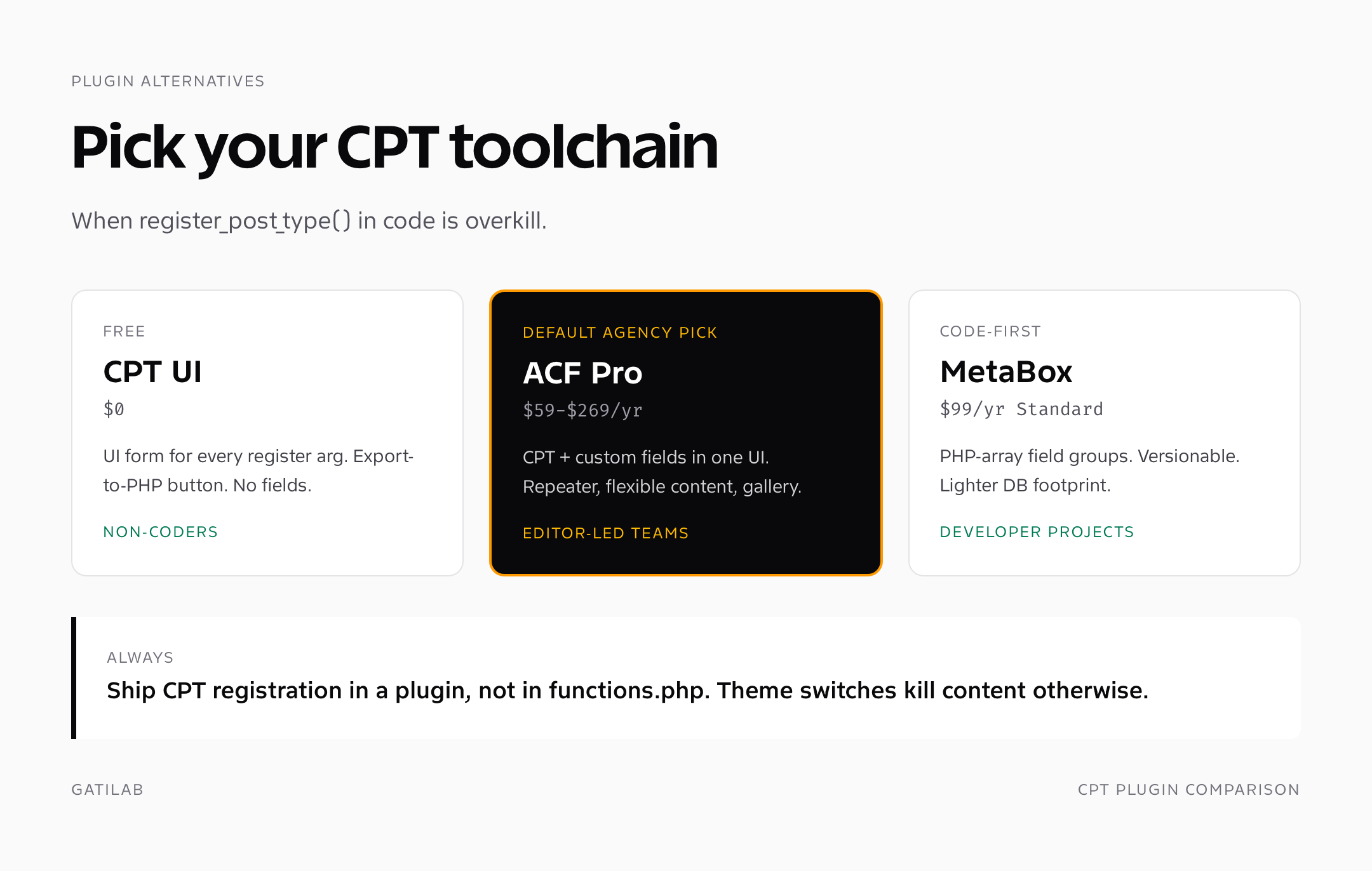
Plenty of WordPress sites need custom post types and don’t have a developer on call. Three plugins do the job well in 2026, each with its own trade-off.
Custom Post Type UI (CPT UI)
WebDevStudios’ free plugin, the standard pick for non-coders. CPT UI exposes every register_post_type argument as a form field, registers the type on save, and offers an export-to-PHP button so you can move the registration into a plugin once you outgrow the UI. Free, with a paid Extras add-on for $29 that adds layouts and shortcodes. Limitations: it doesn’t add custom fields. Pair with ACF or MetaBox for that.
Advanced Custom Fields (ACF)
ACF is the dominant custom-fields plugin and added CPT registration in version 6.1. From the ACF UI you can register both custom post types and custom taxonomies, then attach field groups to them in the same place. Free version handles CPTs and basic field types. ACF Pro at $59/year for 1 site, $159 for 10 sites, $269 for unlimited adds repeater fields, flexible content, gallery, clone, and the options page. For most agency work in 2026, ACF Pro is the default. The field UI is rock solid, the documentation is comprehensive, and the developer ergonomics (get_field, the_field) are clean.
MetaBox
MetaBox is the developer-focused alternative to ACF. Free core, with a $99/year Standard bundle that adds the CPT extension, repeater, gallery, columns, and 40+ other extensions. The MB Custom Post Types & Custom Taxonomies extension handles registration. Where MetaBox beats ACF: code-first workflow with PHP arrays defining field groups (versionable in git), faster page loads on field-heavy edit screens, and lighter database footprint because meta storage is more efficient. Where ACF wins: easier UI, larger community, more tutorials.
- CPT UI for non-coders or one-off CPTs without custom fields
- ACF Pro for agency client work where the team uses the editor UI
- MetaBox for developer-led projects where field groups live in code
- register_post_type() in a plugin for everything else and for shipping reusable code
Template hierarchy for custom post types
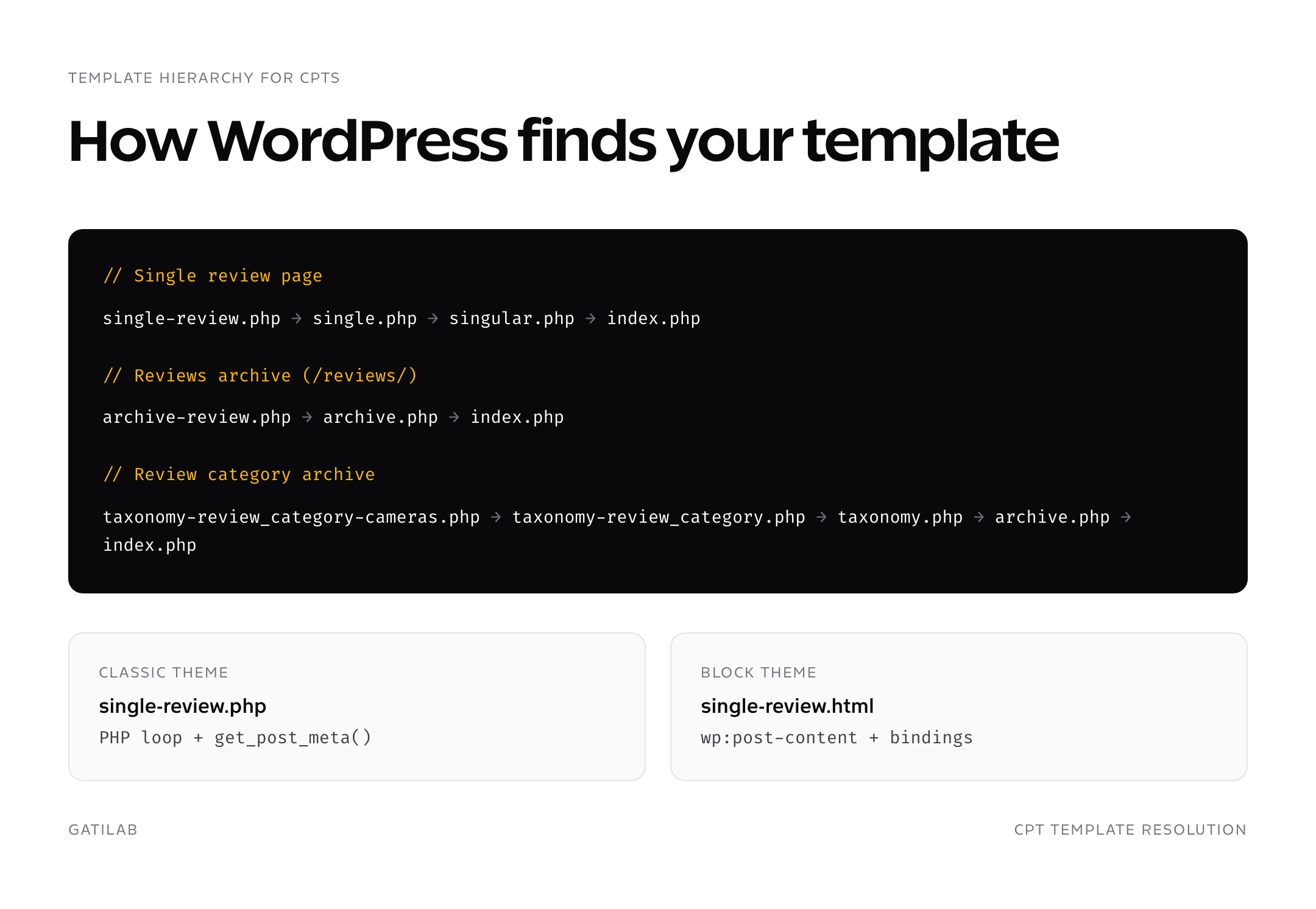
WordPress’s template hierarchy automatically picks up custom post types. For a CPT with slug “review”, WordPress looks for these templates in this order, falling back to the next one if the previous doesn’t exist:
// Single review page
single-review.php  →  single.php  →  singular.php  →  index.php

// Reviews archive (/reviews/)
archive-review.php  →  archive.php  →  index.php

// Review category archive (/reviews/category/cameras/)
taxonomy-review_category-cameras.php  →
  taxonomy-review_category.php  →
  taxonomy.php  →
  archive.php  →
  index.php
The same logic applies for block themes in /templates/, with .html files instead of .php. A block theme registers single-review.html and archive-review.html as block templates, and they get picked up automatically. The templates can be edited in the Site Editor without touching code, which is one of the genuine wins of FSE for custom post types.
A working single-review.php template
Here’s a real classic-theme single template for the Reviews CPT, with three custom fields (review_score, review_pros, review_cons) read via get_post_meta. This pattern works whether you’re storing fields with ACF, MetaBox, or raw post meta.
<?php get_header(); ?>

<main class="site-main">
  <?php while ( have_posts() ) : the_post(); ?>

    <article id="review-<?php the_ID(); ?>" class="review">

      <header class="review-header">
        <h1><?php the_title(); ?></h1>
        <?php
        $score = get_post_meta( get_the_ID(), 'review_score', true );
        if ( $score ) : ?>
          <p class="score"><?php echo esc_html( $score ); ?>/10</p>
        <?php endif; ?>
        <?php the_post_thumbnail( 'large' ); ?>
      </header>

      <div class="review-content">
        <?php the_content(); ?>
      </div>

      <?php
      $pros = get_post_meta( get_the_ID(), 'review_pros', true );
      $cons = get_post_meta( get_the_ID(), 'review_cons', true );
      if ( $pros || $cons ) : ?>
        <aside class="review-summary">
          <?php if ( $pros ) : ?><div class="pros"><h3>Pros</h3><?php echo wp_kses_post( wpautop( $pros ) ); ?></div><?php endif; ?>
          <?php if ( $cons ) : ?><div class="cons"><h3>Cons</h3><?php echo wp_kses_post( wpautop( $cons ) ); ?></div><?php endif; ?>
        </aside>
      <?php endif; ?>

    </article>

  <?php endwhile; ?>
</main>

<?php get_footer(); ?>
REST API exposure and Gutenberg support
In 2026, every CPT should set show_in_rest to true. That single argument enables three things at once: the block editor (Gutenberg) loads on edit screens for the CPT, REST endpoints become available at /wp-json/wp/v2/{rest_base}, and headless WordPress consumers (Next.js, Astro, mobile apps) can read and write the type. Without show_in_rest, your CPT is locked into the classic editor and unreachable via REST.
If you want custom fields on the CPT to be exposed via REST, register them with register_post_meta() and set show_in_rest. ACF Pro can expose fields via REST through a one-click setting per field. MetaBox does the same through the MB REST API extension. For raw post_meta, you must register each meta key explicitly.
add_action( 'init', function() {
    register_post_meta( 'review', 'review_score', array(
        'type'         => 'number',
        'single'       => true,
        'show_in_rest' => true,
        'auth_callback' => function() { return current_user_can( 'edit_posts' ); }
    ) );
} );
That meta field now appears in the REST response at /wp-json/wp/v2/reviews/{id}, can be filtered by GET requests, and can be written by authenticated PUT requests. Headless WordPress builds depend on this pattern.
Custom fields and meta boxes for CPTs
Once your CPT exists, you’ll want fields beyond title and editor content. Three patterns in 2026, in order of how I use them on real projects.
- ACF or MetaBox for editor-facing fields. Field group attached to the CPT, fields render in the edit screen, get_field() reads them in templates. 90% of agency client work falls here.
- register_post_meta() for headless or REST-driven sites. Skip the UI plugins, register fields in code, expose via REST, build the editor UI in your headless front end.
- Block editor sidebar panels via PluginDocumentSettingPanel. For sites where the block editor is the primary surface, register a React sidebar panel that reads/writes post meta directly. Cleanest UX, hardest to implement.
A real Reviews CPT example, end to end
Here’s the complete shipping example I use to onboard new developers at Gatilab. It registers a Reviews CPT with two custom taxonomies (review_category, review_brand), two custom meta fields (review_score, review_url), exposes everything via REST, and uses a single-review.php template that reads the meta fields. Drop this into a plugin file (mu-plugins is fine for theme-agnostic code).
<?php
/**
 * Plugin Name: Gatilab Reviews CPT
 * Description: Reviews custom post type with brand taxonomy and meta fields
 * Version: 1.0.0
 */

add_action( 'init', function() {

    register_post_type( 'review', array(
        'label'        => 'Reviews',
        'public'       => true,
        'show_in_rest' => true,
        'rest_base'    => 'reviews',
        'has_archive'  => true,
        'menu_icon'    => 'dashicons-star-filled',
        'rewrite'      => array( 'slug' => 'reviews' ),
        'supports'     => array( 'title', 'editor', 'thumbnail', 'excerpt' ),
        'taxonomies'   => array( 'review_category', 'review_brand' ),
    ) );

    register_taxonomy( 'review_category', 'review', array(
        'label' => 'Categories', 'public' => true, 'hierarchical' => true,
        'show_in_rest' => true,
    ) );

    register_taxonomy( 'review_brand', 'review', array(
        'label' => 'Brands', 'public' => true, 'hierarchical' => false,
        'show_in_rest' => true,
    ) );

    register_post_meta( 'review', 'review_score', array(
        'type' => 'number', 'single' => true, 'show_in_rest' => true,
        'auth_callback' => function() { return current_user_can( 'edit_posts' ); }
    ) );

    register_post_meta( 'review', 'review_url', array(
        'type' => 'string', 'single' => true, 'show_in_rest' => true,
        'auth_callback' => function() { return current_user_can( 'edit_posts' ); }
    ) );

} );

register_activation_hook( __FILE__, 'flush_rewrite_rules' );
register_deactivation_hook( __FILE__, 'flush_rewrite_rules' );
Activate the plugin, visit /wp-admin/options-permalink.php and save once, and you have a Reviews CPT live at /reviews/, single review pages at /reviews/{slug}/, REST endpoints at /wp-json/wp/v2/reviews, taxonomy term archives at /reviews/category/cameras/, and meta fields editable in Gutenberg or via REST PUT.
Common gotchas and how to avoid them
Five mistakes I see in WordPress custom post types code reviews, in rough order of frequency.
- Forgetting to flush rewrite rules. New CPTs and taxonomies 404 until you save permalinks once. Wire flush_rewrite_rules() into activation and deactivation hooks.
- Slug conflict with an existing page. If you register a CPT with slug “team” and have a page at /team/, the page wins or the CPT wins depending on order. Don’t reuse slugs.
- show_in_rest set to false. Disables Gutenberg, blocks REST consumers, breaks block editor sidebar panels. Default it to true.
- Custom fields not registered for REST. Without register_post_meta + show_in_rest, your fields are invisible to headless consumers and Gutenberg sidebar panels.
- Registering CPT in functions.php instead of a plugin. Theme switch deletes the registration. Posts remain in the database but become inaccessible. Always ship CPTs in plugins.
The single rule that prevents 80% of CPT bugs: ship registration in a plugin, not a theme. Every theme switch is a content disaster waiting to happen otherwise.
Bringing it together
WordPress custom post types are 15-year-old technology that still defines the line between WordPress sites and WordPress applications. Master register_post_type with the eight arguments above, pair it with ACF or MetaBox for fields, ship it in a plugin, expose it via REST, and you can build any content model WordPress is capable of hosting.
If you’re shipping CPTs into a block theme, my WordPress block themes guide covers the template-side. The hosting and performance layers underneath any custom-field-heavy site matter; see best web hosting services and WordPress caching plugins for both. CPTs paired with proper backups (every meta field is data you can’t recover from a hosting snapshot, see WordPress backup plugins) round out a production stack. For agency-level CPT work and how to bill it, the framework is in WordPress agency operations, and a regular comprehensive website audit catches CPT-related URL issues before they hurt rankings.
Querying custom post types in templates and the loop
Once your CPT exists and has content, you’ll want to query it: feature 6 latest reviews on the homepage, list reviews by brand on a single brand page, paginate the archive. Three patterns cover 95% of CPT query work in 2026.
// 1. Custom WP_Query in a template (classic theme)
$reviews = new WP_Query( array(
    'post_type'      => 'review',
    'posts_per_page' => 6,
    'orderby'        => 'date',
    'order'          => 'DESC',
    'meta_key'       => 'review_score',
    'orderby'        => 'meta_value_num',
) );

if ( $reviews->have_posts() ) {
    while ( $reviews->have_posts() ) {
        $reviews->the_post();
        // template tags work the same as the main loop
        the_title( '<h3>', '</h3>' );
        the_excerpt();
    }
    wp_reset_postdata();
}

// 2. Modify the main query to include CPTs on category archives
add_action( 'pre_get_posts', function( $query ) {
    if ( ! is_admin() && $query->is_main_query() && $query->is_category() ) {
        $query->set( 'post_type', array( 'post', 'review' ) );
    }
} );
Pattern 3 is block themes’ Query Loop block, which replaces both of the above for most front-end queries. Set “Post type” to your CPT slug in the block sidebar, configure ordering and per-page, and the loop renders inside the template without PHP. Query Loop is the right choice for any new CPT-driven layout in 2026.
Performance considerations for CPT-heavy sites
Two CPT performance traps to know about. First, slow archive queries on sites with 10,000+ CPT entries: WordPress’s default ordering by post_date with paginated results scans the wp_posts index efficiently, but adding a meta_query (ordering by review_score, filtering by review_status) forces a JOIN against wp_postmeta which is expensive. The fix is either a custom database table for that meta field or a caching layer (Redis Object Cache via Till Krüss’s plugin) that memoizes the query result.
Second, the autoload trap on registered options: register_setting with autoload set to true stores the option in WordPress’s autoload cache, which gets loaded on every request. For a settings page tied to your CPT, register options as autoload false unless they’re truly needed on every front-end request. A single 2 MB autoloaded option can add 100-300ms to every uncached page load.
Frequently asked questions
What are WordPress custom post types?
WordPress custom post types are content types registered alongside the built-in Posts and Pages, with their own admin menu, URL slug, taxonomies, and meta fields. They share the wp_posts database table but get distinguished by the post_type column. Common examples: reviews, products, properties, courses, recipes.
How do I create a WordPress custom post type without coding?
Install Custom Post Type UI (free) for the registration UI, or ACF Pro ($59/year) if you also need custom fields. CPT UI exposes every register_post_type argument as a form field and exports the configuration to PHP when you outgrow the UI. ACF Pro adds CPT registration plus a complete custom-fields editor.
What’s the difference between a custom post type and a custom field?
A custom post type is a whole content type (Reviews, Properties, Recipes) with its own URL, admin menu, and templates. A custom field is a piece of data attached to a post (review_score, property_price, recipe_servings). You typically use both: a CPT for the content type, custom fields for the structured data.
Should I register CPTs in functions.php or a plugin?
Always in a plugin (or mu-plugin). When you switch themes, functions.php-registered CPTs vanish from the admin and your content becomes inaccessible. The data stays in the database but you lose the URL routing and the edit screen. Plugins survive theme switches.
How do I expose a custom post type to the REST API?
Set show_in_rest to true in your register_post_type args array. This single argument enables both the block editor (Gutenberg) on edit screens and REST endpoints at /wp-json/wp/v2/{rest_base}. Without it, your CPT is locked into the classic editor.
What is the template hierarchy for custom post types?
single-{cpt}.php for single posts (falls back to single.php, then index.php). archive-{cpt}.php for the archive page (falls back to archive.php). taxonomy-{taxonomy}-{term}.php for term archives (falls back through taxonomy.php and archive.php). Same logic in block themes with .html files.
How do I flush rewrite rules after registering a CPT?
Visit /wp-admin/options-permalink.php and click Save. WordPress flushes rewrite rules on that visit. For automation, hook flush_rewrite_rules() into register_activation_hook and register_deactivation_hook in your plugin so the flush happens automatically when the plugin activates or deactivates.
ACF vs MetaBox vs CPT UI: which should I pick?
CPT UI for non-coders or one-off CPTs without custom fields. ACF Pro for agency client work where the team uses the editor UI day to day. MetaBox for developer-led projects where field groups should live in version-controlled PHP arrays.
Can custom post types have their own taxonomies?
Yes. Use register_taxonomy() with the CPT slug in the second argument. Set hierarchical to true for category-style taxonomies, false for tag-style. Most CPTs benefit from at least one custom taxonomy: Reviews has Categories and Brands, Properties has Type and Neighborhood.
How do I show custom post types on the homepage?
Use a custom WP_Query with post_type set to your CPT slug, or set ‘post_type’ in pre_get_posts to add the CPT to the main loop. In block themes, use the Query Loop block with a custom post_type binding. WordPress doesn’t include CPTs in the default home query unless you tell it to.
Tell Google you want more of this.
Add Gatilab as a preferred sourceOne tap, and this site shows up more often in your own Top Stories, AI Overviews and AI Mode. Remove it any time.