
Google Local Services Ads: Cost, Setup and the Move Into Google Ads
Google Local Services Ads are the pay-per-lead ads at the top of the results for service searches, above the regular ads and the map pack. You pay when a customer calls, messages or books, not when they click, and SearchLight’s February 2026 benchmark across 888 home-service contractors put the average at $53 a lead with 43.9% of leads turning into booked jobs. Two things changed recently that most guides haven’t caught up with: the Google Guaranteed and Google Screened badges became one Google Verified badge in October 2025, and since August 2026 Google has been moving Local Services Ads into Google Ads as Performance Max campaigns.
A guide written before those changes will have you budgeting by the week, bidding by hand and chasing a badge that no longer exists, and the account you set up from it will need redoing within months.
What Local Services Ads Are
A Local Services Ad has no keywords and no landing page. Google builds it from your Local Services profile: business name, photo, star rating and review count from your Google Business Profile, the services you offer, your service area and the Google Verified badge once you pass screening. It shows on Search and Maps when someone nearby searches for a service you’ve listed, and Google charges you for each valid lead that results.
The badge is the part people know the old names for. Google Guaranteed, Google Screened and License Verified by Google were retired in October 2025 in favor of a single Google Verified badge, and the money-back guarantee that came with Google Guaranteed ended at the same time. The screening behind the badge is unchanged and is covered below.
Local Services Ads vs Google Ads
For a service business in a covered category, Local Services Ads usually produce a cheaper lead than Search ads because you pay for a contact rather than a click. Google Ads still wins when your category isn’t covered, when you need traffic to a website rather than phone calls, and when you want control over keywords and copy. Many accounts run both, with Local Services as the first channel and Search ads filling the volume it can’t reach.
| Factor | Local Services Ads | Google Ads (Search) |
|---|---|---|
| What you pay for | A valid lead: call, message or booking | A click |
| Position on the results page | Top of the page for covered queries, above Search ads and the map pack | Below Local Services Ads when both show |
| Landing page | Not needed; the ad uses your Local Services profile | Required, and it decides your conversion rate |
| Time to launch | About 3 to 4 weeks for screening; pre-badge ads can run sooner in most categories | Same day |
| Targeting | Service categories, job types and service area; no keywords | Keywords, audiences, locations, schedules |
| Bad leads | Invalid leads are assessed before charging and credited later if found low quality; manual disputes within 30 days in the US and Canada | No credits for clicks that don’t convert |
| Budget | Weekly budget in the Local Services dashboard; daily budget once moved into Google Ads | Daily budget, 30.4x monthly cap |
| Screening | Background checks, license and insurance as applicable | None |
The Google Ads cost guide has the cost per click and cost per lead benchmarks for Search if you want to compare them with the lead prices below.
What Local Services Ads Cost
There’s no fee for the account, the screening or the badge. Google states that businesses aren’t charged for background checks. The whole cost is the leads, and the price of a lead comes from your bid, your category, your area and how many competitors want the same customer.
SearchLight’s February 2026 home-services benchmark, built from 888 contractors and $6.72 million of spend, is the most specific public data I’ve found. The averages it reports:
- $53 average cost per lead across home services, with a 43.9% booking rate and about $233 per paying customer
- Plumbing $35 to $65 a lead
- HVAC $30 to $70
- Electrical $40 to $75
- Roofing $55 to $90
- Garage doors $25 to $40
LocaliQ’s figure for the same period is about $60 a lead, against $66.69 for a Search ad lead across all industries and $90.92 in home improvement, which is the comparison that makes Local Services attractive to a contractor. Legal and other professional categories run higher than any of the trade ranges above, and a lead in a dense city costs more than the same lead in a suburb.
The budget needs to buy enough leads to judge the account. At $53 a lead and a 44% booking rate, 20 leads cost about $1,060 and produce roughly 9 jobs, which is the smallest sample that tells you anything about your real cost per job. Cost per job, with your own booking rate in the formula, is the number to manage; cost per lead on its own flatters cheap categories where the jobs are small.
Who Can Run Local Services Ads
Local Services Ads run in the United States and Canada and in a group of European countries including the United Kingdom, Ireland, France, Germany, Spain, Italy, the Netherlands, Belgium, Austria and Switzerland. They are not offered in India, where the Google Business Profile, location-targeted Google Ads and local SEO cover the same searches.
Google’s eligible list now runs to several hundred service types, from the original home trades through lawyers, financial planners, real estate, health and wellness, education, pet care and storefront categories. Three limits are worth knowing before you plan around the badge:
- The Google Verified badge is currently unavailable in the auto, beauty and dining categories; those businesses can advertise but won’t show the checkmark.
- Pre-badge ads, which let you run while verification finishes, are not available for garage door services, health care or locksmiths.
- Availability is by category and country, so a trade that’s live in the US may not be in Ireland yet. Google’s sign-up flow checks your category and postcode before you commit.
The Screening Process
Google says screening takes 3 to 4 weeks on average after you submit the documents, and the requirements depend on the category. The common set:
- A public, verified Google Business Profile. Local Services pulls the rating and review count from it, so a thin profile hurts the ad before the ad exists. The Google Business Profile optimization guide is the place to start.
- Background checks on every owner and on every employee, contractor or temporary worker who performs the core service. Google’s partners check identity and criminal history, including the national sex offender, terrorist and sanctions registries in the US, plus civil judgments and liens at company level. No credit check, and no charge to the business.
- Licenses at state or provincial level where the trade requires them, in the exact business name on the account.
- Insurance by category: general liability for most trades, professional liability or malpractice cover for some professional and health categories, and specialized cover such as garage keepers liability where Google lists it.
- Reviews in some categories, and headshots for professional verticals.
The field-worker background checks are the usual bottleneck, because every worker completes their own form and consents separately, and the account waits for the slowest one. Sending the invitations on day 1, alongside the license and insurance upload rather than after it, is the single biggest time saver in the process. In eligible categories Google also offers accelerated verification, which shows the badge quickly and gives you 14 days to finish the rest before the ads stop serving.
How to Set Up Local Services Ads
The sign-up is guided, but a few of the early choices decide lead quality for the life of the account, so they deserve more thought than the form suggests.
- Start from Google’s Local Services Ads page (reached from the Google Ads site), enter your business category and postcode, and confirm the category is live in your area before you do anything else.
- Create the Local Services profile and connect it to your verified Google Business Profile. Add the business name exactly as it appears on your license, your service area, hours and languages.
- Choose job types deliberately. Under each category Google lists the jobs it will send leads for. Tick only the ones you want and can do profitably; every unticked job type is a lead you won’t be charged for.
- Set the service area by postcode rather than radius where the interface allows it, so you don’t pay for leads from areas where the drive time eats the margin.
- Upload the license and insurance documents as clear PDFs, and invite every owner and field worker to the background check the same day.
- Set the budget and bid. Accounts still in the Local Services dashboard set a weekly budget and a maximum per-lead bid; accounts moved into Google Ads set a daily budget and a campaign-level target cost per lead. Start with enough to buy 20 or more leads in the first month.
- Turn on message and booking leads as well as calls. Google counts the number of ways a customer can reach you as a ranking factor.
- Go live, and expect the first week or two to run below the eventual lead volume while Google’s ranking settles.
How Google Ranks Local Services Ads
There are usually more verified advertisers than slots, and Google publishes the factors it uses to decide who shows. None of them come with numeric thresholds, so treat any article quoting a 30-second rule or a 4.2-star cutoff as a guess.
- Your bid: the most you’ll pay for a lead; you may pay less.
- Lead likelihood: how responsive you are to inquiries, with missed calls counted against you; how well your services match the search, including timing and location; and whether you accept messages and bookings as well as calls.
- Profile quality: your rating, number of reviews, average response time, use of good photos and the verification checks you’ve completed.
- Ecosystem health: Google says it also ranks for the diversity of the results and gives every provider some opportunity, so the top slot rotates more than a pure auction would.
Responsiveness is the factor a business controls fastest. A line that rings to whoever is free, a text-back when nobody picks up and a weekly look at the average response time in the account will do more for position than raising the bid. If one business has several locations serving the same area, Google shows only the highest-ranking ad, so duplicate profiles don’t buy extra slots.
Lead Credits and Disputes
You pay only for leads Google judges valid, and since mid-2024 most of that judgment is automatic. Google assesses each lead when the customer first makes contact and doesn’t charge for leads it finds invalid or low quality. Charged leads are reassessed by Google’s models over time, and credits are issued automatically when a lead later looks low quality, usually within 30 days. The original charge stays on the invoice with the credit applied against the balance.
Manual disputes still exist for the leads the models miss. From the lead inbox you select the lead, choose Dispute and pick the reason: outside your service area, a job type you don’t offer, spam or solicitation, a wrong number, or a cancellation before anything was scheduled. The window is 30 days from the lead, Google processes disputes within a week, and credits for approved ones land within about 40 days. Disputes are available in the US and Canada only, and lead credits of any kind are not offered for health care categories, tax specialists or advertisers in Europe. Review the inbox weekly; a dispute filed on day 31 is simply ignored.
The Move Into Google Ads
On July 20, 2026 Google announced that Local Services Ads are moving out of their own dashboard and into Google Ads as Performance Max campaigns with a pay-per-lead goal. The migration started in August 2026 with a limited group of US advertisers in pet care, home services, wellness, education and some storefront categories, expands to more US accounts later in 2026, and reaches non-US accounts and the remaining categories in 2027. Google emails affected accounts 14 days before the move and again 7 days before.
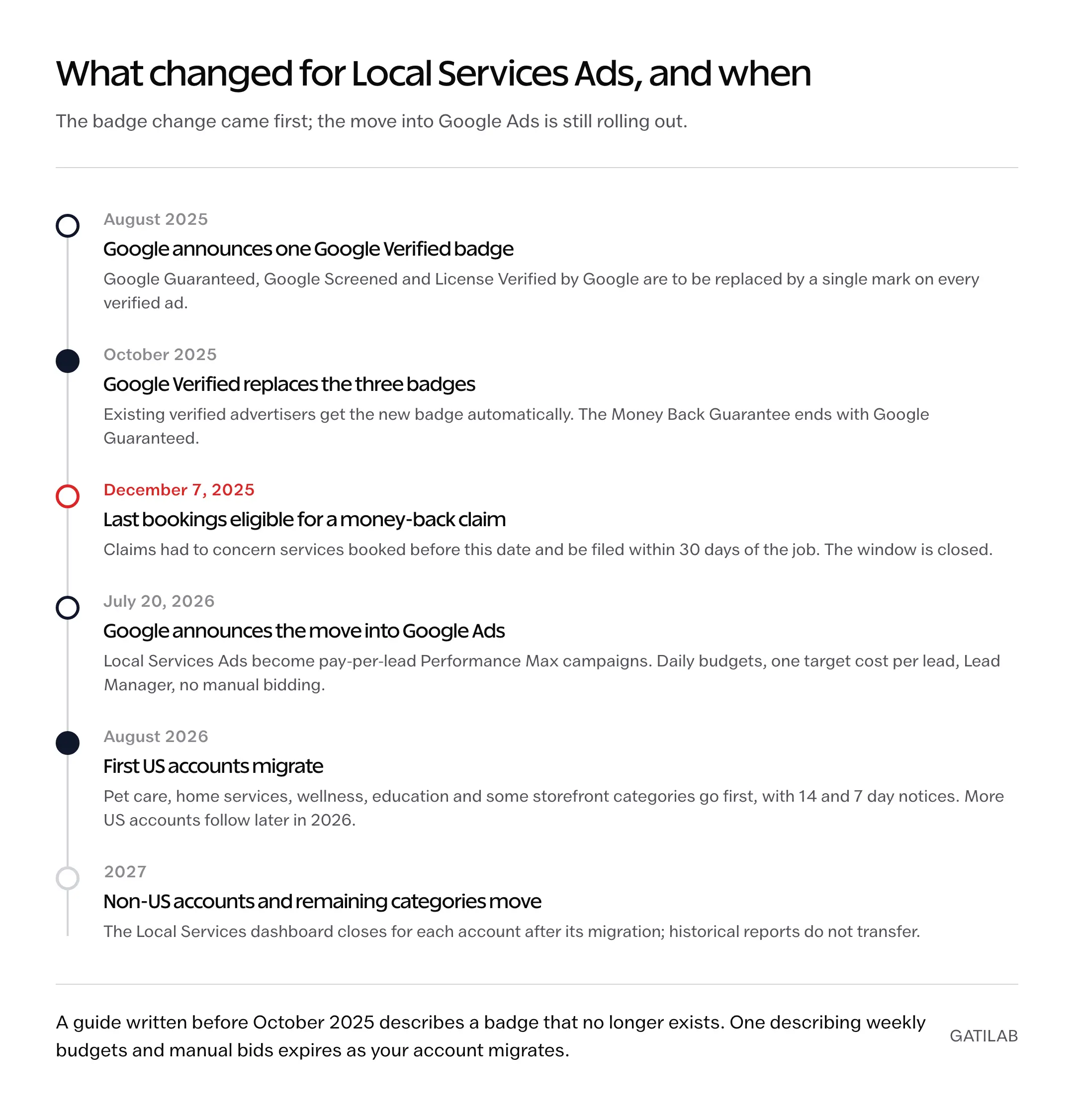
What stays the same: you still pay per lead for calls, messages and bookings, the campaign is still keywordless and still shows only on Search and Maps, the Google Verified badge still applies, and your lead history moves across. What changes:
- Daily budgets replace weekly budgets, with Google Ads’ usual monthly cap of 30.4 times the daily figure.
- Manual bidding is gone. Google sets one campaign-level target cost per lead across all your categories; the per-category target is retired.
- Lead Manager inside Google Ads replaces the Local Services inbox.
- Reports don’t transfer. Historical reports stay in the Local Services dashboard until your access to it ends after migration, so export what you need before the move.
- BBB callouts are no longer supported; Google suggests choosing at least 6 other callouts for the ad.
For an owner who has never opened Google Ads, the practical change is that the Local Services campaign now sits next to any Search campaigns in one account, with one billing setup and one set of conversion data. The Google Ads management service handles both in the same account for businesses that would rather not learn the new interface mid-migration.
Common Local Services Ads Mistakes
Most wasted Local Services budget traces back to one of 4 decisions, and all 4 are reversible from the account settings.
- Ticking every job type to get more leads. The extra leads are for jobs you decline or lose money on, and each one is charged unless Google’s models catch it.
- Letting calls go to voicemail. Missed calls count against responsiveness in Google’s ranking, so the account loses position as well as the lead.
- Never opening the lead inbox. Automatic credits catch some bad leads; the 30-day dispute window catches the rest only if someone looks.
- Running ads on a weak Google Business Profile. The rating and review count in the ad come from the profile, and a 4.1 with 14 reviews next to a 4.8 with 180 loses the comparison before price enters it.
Treat the first month as the test: set a budget that buys 20 or more leads, track cost per booked job rather than cost per lead, answer the phone, and decide at the end of it whether the channel owns your market or fills a part of the pipeline. For a covered trade in a covered city, it’s usually one of the two.
FAQs on Google Local Services Ads
How much do Google Local Services Ads cost per lead?
It depends on the category, the area and competition. SearchLight’s February 2026 benchmark across 888 home-service contractors put the average at $53 a lead, with plumbing at $35 to $65, HVAC $30 to $70, electrical $40 to $75, roofing $55 to $90 and garage doors $25 to $40. Legal and other professional categories run higher. You set the maximum you’ll pay and often pay less.
How long does it take to get approved for Local Services Ads?
Google says screening takes 3 to 4 weeks on average after you submit your documents. Background checks on field workers are usually the slowest step because each worker completes their own form. Most categories can run pre-badge ads while verification finishes, and some categories qualify for accelerated verification with 14 days to complete the remaining steps.
What badge do Local Services Ads show now?
The Google Verified badge. In October 2025 it replaced Google Guaranteed, Google Screened and License Verified by Google, and the money-back guarantee attached to Google Guaranteed ended. The badge is currently unavailable in the auto, beauty and dining categories.
Can I dispute bad leads on Local Services Ads?
Yes, in the US and Canada. Google assesses leads before charging and automatically credits charged leads it later judges low quality, usually within 30 days. For leads it misses, open the lead in your inbox, choose Dispute and give the reason within 30 days of the lead. Google processes disputes within a week and applies approved credits within about 40 days. Lead credits are not offered for health care categories, tax specialists or advertisers in Europe.
Does response time affect Local Services Ads ranking?
Yes. Google lists responsiveness to customer inquiries, with missed calls counting against you, as part of how likely you are to get the lead, and lists average response time under profile quality. Google publishes no specific cutoff in seconds or minutes, so treat any article quoting one as a guess.
How do I set up Google Local Services Ads?
Confirm your category is available in your area on Google’s Local Services Ads page, create the Local Services profile linked to your verified Google Business Profile, tick only the job types you want leads for, set the service area, upload your license and insurance, send every owner and field worker the background check, set a budget and bid, and go live. Budget for 20 or more leads in the first month so you can judge cost per job.
Are Local Services Ads better than Google Ads?
For a service business in a covered category and country, usually yes for lead generation: you pay per call, message or booking rather than per click, the ad sits above Search ads, and no landing page is needed. Google Ads wins when your category is not covered, when you need website traffic, or when you want keyword-level control. Many businesses run both.
What happens when my Local Services account moves into Google Ads?
Your ads become a pay-per-lead Performance Max campaign inside Google Ads. You still pay per lead and keep the Google Verified badge, but budgets switch from weekly to daily, manual bidding ends in favor of one campaign-level target cost per lead, the lead inbox becomes Lead Manager, and historical reports stay behind in the old dashboard. US accounts began migrating in August 2026; non-US accounts follow in 2027.
Tell Google you want more of this.
Add Gatilab as a preferred sourceOne tap, and this site shows up more often in your own Top Stories, AI Overviews and AI Mode. Remove it any time.