
Local Business Schema Markup: JSON-LD Guide for 2026
Local business schema markup is the JSON-LD that tells Google, Bing, and AI search engines exactly what kind of business you are, where you are, when you’re open, and how customers can reach you. It’s the structured-data foundation of every local SEO strategy that actually moves the needle. The markup won’t rank a business on its own, but it removes any doubt about who you are, where you are and when you’re open, which is what the rest of local SEO builds on.
In 2026 the role of local business schema markup has expanded. It still feeds the local pack, the Google Maps listing, and the knowledge panel. But it’s also become one of the strongest signals AI search engines use when answering "best [service] near me" and similar local-intent queries. ChatGPT, Perplexity, and Gemini all parse LocalBusiness JSON-LD when forming local recommendations. Pages without it routinely get skipped in favour of competitors with cleaner markup, even when the competitors have weaker content.
This guide covers the full LocalBusiness type, the right sub-type for your industry, every required and recommended field, JSON-LD examples, and how local business schema markup integrates with Google Business Profile to amplify both. Every snippet validates clean in October 2026.
Want this implemented for you? Gatilab’s AI search optimization service ships local business markup and tracks where the brand shows up in AI answers.
What local business schema markup is
Local business schema markup is structured data using the schema.org LocalBusiness type or one of its 200+ sub-types. You add it as JSON-LD inside a script tag on the homepage and on each location page (for multi-location businesses). Search engines parse the markup, validate it, and use it to populate the local pack, Google Maps, and AI search citations.
LocalBusiness is one of the deepest sub-type hierarchies in schema.org. Restaurant, Store, MedicalBusiness, Attorney, Plumber, Hotel, BeautySalon, AutoRepair, GasStation, FinancialService, all inherit from LocalBusiness. Using the most specific sub-type that applies is genuinely useful. Google reads "Restaurant" as much richer context than the generic LocalBusiness, and AI engines weight specific sub-types higher in citation selection.
The full schema family is mapped in my types of schema markup guide. LocalBusiness is one of the always-on types every business with a physical address should ship before optimizing anything else.
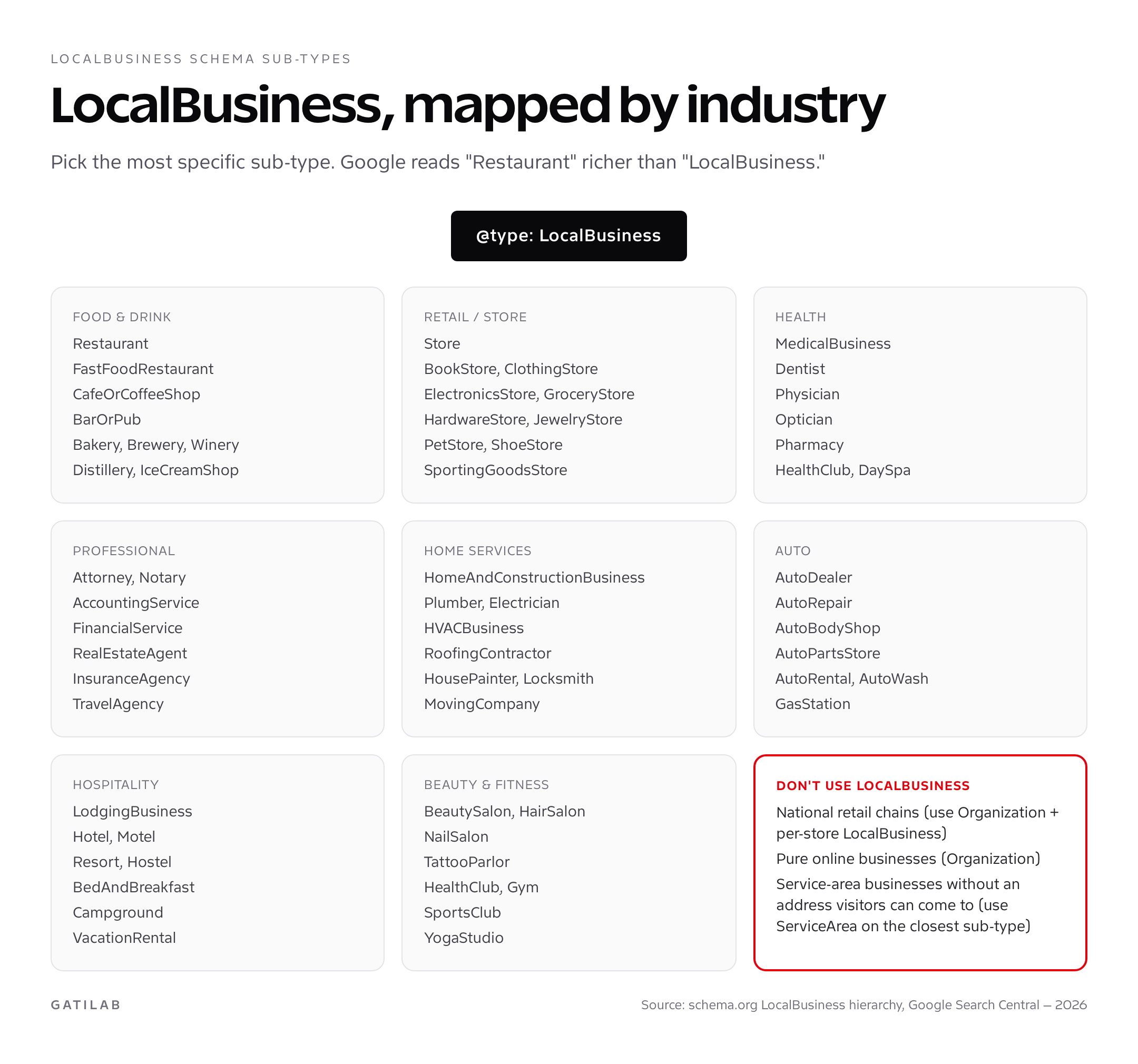
Required and recommended fields for local business schema markup
Google’s LocalBusiness rich result has four required fields and a long recommended list. Miss the required fields and you don’t get the local pack treatment. Skip the recommended fields and you get a degraded version of the rich result, which is almost as bad.
Required: @type (the most specific sub-type), name, address (PostalAddress with streetAddress, addressLocality, postalCode, addressCountry), and telephone.
Recommended: geo (GeoCoordinates with latitude and longitude), openingHoursSpecification (full week including closed days), priceRange, image, url, description, sameAs (array linking to GBP, Yelp, Facebook, Wikipedia), aggregateRating, and review.
Sub-type-specific: Restaurant adds servesCuisine, menu, acceptsReservations. Hotel adds starRating, checkinTime, checkoutTime, amenityFeature. MedicalBusiness adds medicalSpecialty, healthPlanNetworkId. Each sub-type adds fields that improve both validation and AI citation quality.
LocalBusiness JSON-LD: restaurant example
Restaurants are the most-implemented local business schema markup type, partly because Google’s restaurant rich result is one of the deepest. Stars, reservations, menu badge, opening hours, price range, and direct "Reserve" integration with OpenTable and Resy. Here’s the complete pattern.
<script type="application/ld+json">
{
  "@context": "https://schema.org",
  "@type": "Restaurant",
  "@id": "https://example.com/#restaurant",
  "name": "Tandoor & Tonic",
  "image": "https://example.com/restaurant.jpg",
  "url": "https://example.com",
  "telephone": "+44-20-7123-4567",
  "priceRange": "££",
  "servesCuisine": ["Indian", "South Asian"],
  "acceptsReservations": "True",
  "address": {
    "@type": "PostalAddress",
    "streetAddress": "12 Brick Lane",
    "addressLocality": "London",
    "postalCode": "E1 6RF",
    "addressCountry": "GB"
  },
  "geo": {
    "@type": "GeoCoordinates",
    "latitude": 51.5202,
    "longitude": -0.0717
  },
  "openingHoursSpecification": [
    {
      "@type": "OpeningHoursSpecification",
      "dayOfWeek": ["Tuesday","Wednesday","Thursday"],
      "opens": "12:00",
      "closes": "22:30"
    },
    {
      "@type": "OpeningHoursSpecification",
      "dayOfWeek": ["Friday","Saturday"],
      "opens": "12:00",
      "closes": "23:30"
    },
    {
      "@type": "OpeningHoursSpecification",
      "dayOfWeek": "Sunday",
      "opens": "12:00",
      "closes": "21:30"
    }
  ],
  "menu": "https://example.com/menu",
  "sameAs": [
    "https://www.google.com/maps/place/?q=place_id:ChIJ...",
    "https://www.yelp.com/biz/tandoor-tonic-london",
    "https://www.facebook.com/tandoorandtonic",
    "https://www.tripadvisor.com/Restaurant_Review-..."
  ],
  "aggregateRating": {
    "@type": "AggregateRating",
    "ratingValue": "4.6",
    "reviewCount": "847"
  }
}
</script>
Local business schema markup: medical, professional, and service examples
Medical businesses (Dentist, Physician, MedicalClinic) add medicalSpecialty and healthPlanNetworkId. Professional services (Attorney, AccountingService, FinancialService) add areaServed and knowsAbout (services offered). Home services (Plumber, Electrician, RoofingContractor) add areaServed and serviceType. The pattern is the same: pick the sub-type, fill required fields, then add sub-type-specific properties.
<script type="application/ld+json">
{
  "@context": "https://schema.org",
  "@type": "Dentist",
  "name": "Bright Smile Dental",
  "image": "https://example.com/clinic.jpg",
  "url": "https://example.com",
  "telephone": "+1-415-555-0142",
  "address": {
    "@type": "PostalAddress",
    "streetAddress": "1200 Market Street, Suite 400",
    "addressLocality": "San Francisco",
    "addressRegion": "CA",
    "postalCode": "94102",
    "addressCountry": "US"
  },
  "geo": { "@type": "GeoCoordinates", "latitude": 37.7768, "longitude": -122.4174 },
  "medicalSpecialty": ["Dentistry", "CosmeticDentistry"],
  "openingHoursSpecification": [{
    "@type": "OpeningHoursSpecification",
    "dayOfWeek": ["Monday","Tuesday","Wednesday","Thursday","Friday"],
    "opens": "08:00",
    "closes": "17:00"
  }],
  "sameAs": [
    "https://www.google.com/maps/place/?q=place_id:ChIJ...",
    "https://www.healthgrades.com/dentist/dr-name",
    "https://www.zocdoc.com/dentist/"
  ],
  "aggregateRating": {
    "@type": "AggregateRating",
    "ratingValue": "4.9",
    "reviewCount": "312"
  }
}
</script>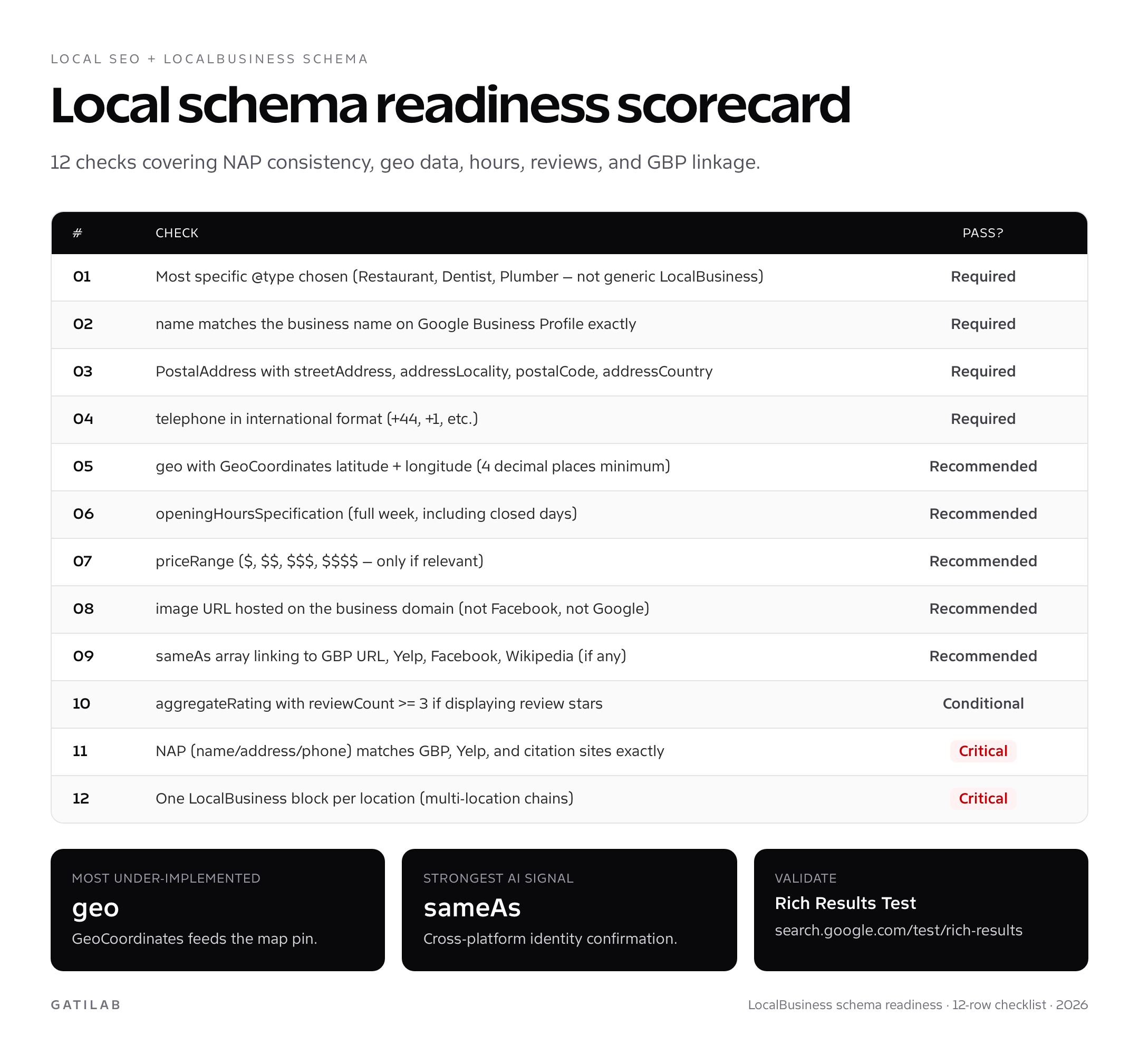
Multi-location chains: one schema block per location
This is the single biggest mistake I see in LocalBusiness audits across multi-location businesses. A national or regional chain ships one LocalBusiness schema block on the homepage with the corporate address, and nothing on the individual location pages. Result: every location ranks worse than independent competitors with proper per-location markup.
The correct pattern is one LocalBusiness sub-type block per location page, plus one Organization block sitewide. The Organization is the parent brand entity. Each location is a distinct LocalBusiness with its own address, telephone, geo, hours, and aggregateRating. Link them with the parentOrganization property on each LocalBusiness pointing to the Organization’s @id.
This is also the structure that AI search engines need to recommend a specific location when someone asks for "[brand] near me." Without per-location schema, AI engines see the brand but cannot pick a location confidently, so they often skip the recommendation entirely.
LocalBusiness schema and Google Business Profile integration
LocalBusiness schema markup and Google Business Profile (GBP, formerly Google My Business) work together. Neither replaces the other. GBP gives you direct control of the Maps listing, hours, photos, posts, and Q&A. LocalBusiness schema feeds the website-side signals that confirm to Google that your GBP is legitimate, that your NAP (name, address, phone) is consistent, and that your business has a real web presence.
The integration rule is exact match. The name in your LocalBusiness schema must match the business name on GBP exactly, character-for-character. Same for the address, the phone number (matched in international format), and the website URL. Mismatches trigger ranking suppression in the local pack. Even a missing "Ltd" in the schema name counts as a mismatch.


Add the GBP listing URL to the sameAs array. This is the explicit cross-reference that AI search engines use to confirm the business identity. The URL format is https://www.google.com/maps/place/?q=place_id:CHIJ…; find your place_id via the Google Maps Place ID Finder.
WordPress implementation for local business schema markup
Three paths in order of preference:
Path 1: Rank Math. The local SEO module ships LocalBusiness schema for single and multi-location businesses. The Pro version handles per-location pages cleanly with a custom post type. It’s my default pick for local SEO work.
Path 2: Yoast Local SEO add-on. Mature, well-tested, generates valid LocalBusiness schema for single-location and multi-location setups. Costs more than Rank Math Pro but has stronger Yoast ecosystem integration.
Path 3: Manual JSON-LD. Required for niche sub-types not covered by plugins (TattooParlor, ComedyClub, Distillery, etc.). Hook into wp_head and generate the JSON-LD from ACF custom fields. The full WordPress workflow lives in my WordPress schema markup guide, with the plugin options covered in my SEO plugins comparison.
Validation and ongoing monitoring
Two validators, in this order:
- Schema.org Validator at validator.schema.org confirms the JSON-LD validates against the LocalBusiness spec.
- Google Rich Results Test at search.google.com/test/rich-results confirms Google will treat the markup as eligible for local rich-result enhancements.
Once live, monitor the Sitelinks Searchbox and Local business reports inside Google Search Console. The reports show valid items, warnings (missing recommended fields), and errors. Errors degrade your local pack visibility. Warnings just mean you’re missing optimizations.
Re-run the Rich Results Test whenever you update hours, address, or phone. The schema is only useful if it stays accurate. Run a quarterly LocalBusiness audit to catch drift between GBP, the website, and citation sites. Sites with drifting NAP tend to rank choppily; sites with locked-down NAP rank more consistently.
Common mistakes with local business schema markup
- Generic LocalBusiness instead of a specific sub-type: Restaurant, Dentist, Plumber. Always pick specific. Generic markup gets less weight from Google and far less from AI engines.
- NAP mismatch with Google Business Profile: kills local pack ranking. Audit quarterly against GBP, Yelp, Apple Maps, and the major citation sites.
- Missing geo coordinates: feeds the map pin alignment in local pack results. Without it, your pin can drift hundreds of meters.
- One LocalBusiness for a multi-location chain: the cardinal sin. Each location needs its own block on its own page.
- aggregateRating with reviews not visible on page: triggers a manual action. Only mark up reviews that appear in the visible HTML.
- openingHoursSpecification missing closed days: implies you’re open. List closed days explicitly with no opens/closes properties.
- Phone number in local format: must be international format. +1-415-555-0142, not (415) 555-0142.
- Address with PO Box: Google rejects PO Box as a primary streetAddress. Use the physical address customers visit.
Field-by-field reference for local business schema markup
Use this as the working spec sheet for every local business schema markup deployment. The table compresses Google’s LocalBusiness rich-result documentation, the schema.org sub-type properties, and the field-level rules that catch the most common errors.
| Property | Type | Required? | Notes |
|---|---|---|---|
| @type | String | Required | Most specific sub-type. Restaurant, Dentist, Plumber, Hotel, BeautySalon, etc. |
| name | Text | Required | Must match Google Business Profile name exactly. Including legal suffixes. |
| address | PostalAddress | Required | streetAddress, addressLocality, postalCode, addressCountry. addressRegion for US/CA/AU. |
| telephone | Text | Required | International format with country code prefix. +1, +44, +91, etc. |
| geo | GeoCoordinates | Recommended | latitude and longitude with at least 4 decimal places of precision. |
| url | URL | Recommended | Canonical homepage or location page URL. |
| image | URL or ImageObject | Recommended | Hosted on the business domain. 1200×675 minimum for best display. |
| openingHoursSpecification | Array of OpeningHoursSpecification | Recommended | One entry per distinct day group. List closed days explicitly. |
| priceRange | Text | Recommended | $, $$, $$$, $$$$ for restaurants. ££, £££ for UK. Skip if irrelevant. |
| sameAs | Array of URLs | Recommended | GBP listing URL, Yelp, Facebook, Apple Maps, Wikipedia. Strong AI signal. |
| aggregateRating | AggregateRating | Conditional | Only if reviews are visible on the page and reviewCount >= 3. |
| review | Array of Review | Optional | Individual reviews with author, datePublished, reviewBody, reviewRating. |
| areaServed | AdministrativeArea or GeoShape | Sub-type specific | For service-area businesses without a customer-visitable location. |
| servesCuisine | Text or array | Restaurant only | Indian, Italian, Mexican, etc. Improves cuisine-filter local pack visibility. |
| medicalSpecialty | MedicalSpecialty | MedicalBusiness only | Dentistry, Cardiology, etc. Maps to Google Health rich result. |
| parentOrganization | Organization @id | Multi-location only | Links each LocalBusiness to its parent brand entity. |
Real-world local business schema markup gotchas
Five patterns that aren’t in Google’s documentation but break local business schema markup in production.
The address-string trap. WordPress themes and plugins often store an address as a single string and split it inconsistently when generating schema. The result is a streetAddress that contains the city, or an addressLocality that contains the postcode. Both are valid JSON-LD but Google parses them strictly against PostalAddress field semantics. Wrong-field data gets ignored. The fix is to store address components as discrete fields (ACF, custom post meta) and assemble the JSON-LD from those discrete sources, never from a parsed string.
The geo precision problem. GeoCoordinates with two decimal places of latitude and longitude points to a square roughly 1.1 km on each side. That’s enough imprecision to put your business inside the wrong building or even on the wrong block. Always use four decimal places minimum (about 11m precision). Find your exact coordinates by right-clicking your business in Google Maps and copying the values from the context menu. Don’t trust the values your CMS auto-populates; they’re often offset by 50-200 meters.
The hours-format edge cases. openingHoursSpecification has two pitfalls. First, midnight closing time (00:00) is interpreted as start-of-day, not end-of-day. Use 23:59 for end-of-day or specify the next day’s opens with the correct dayOfWeek. Second, lunch breaks for restaurants need two OpeningHoursSpecification entries per day, not one with a gap. Skipping the second entry implies you’re closed all afternoon. Three lines of JSON per day group is normal for restaurants with split shifts.
The duplicate-schema disaster. If you have both Rank Math (or Yoast) and a local SEO plugin (like Schema Pro Local) generating LocalBusiness schema, you’ll get duplicate JSON-LD blocks on the same page. Google handles duplicates inconsistently. Sometimes it picks the more complete one; sometimes it picks the first one in the page source; sometimes it ignores both. The fix is to disable LocalBusiness schema in all but one source. Pick the plugin that ships the most complete fields and let it own the markup exclusively. Rank Math is a sensible owner for local SEO work; disable schema in any other active plugin.
The cached-stale-data trap. WordPress sites with aggressive caching (which is most production sites) serve cached HTML to Googlebot for hours after a schema change. If you update hours, address, or phone, you must flush the cache and resubmit the URL through Search Console’s URL Inspection Tool. Stale schema can stay live for weeks when nobody flushes the cache. The downstream effect is that the local pack listing shows old hours, customers turn up to a closed location, and reviews drop. Local business schema markup is only as fresh as your cache invalidation.
Ongoing maintenance and the quarterly audit
Local business schema markup needs ongoing care. Hours change with seasons, holidays, and renovations. Phone numbers change with provider switches and new listings. Addresses change with moves. Reviews accumulate, raising or lowering aggregateRating. The schema is only useful while it stays accurate, and accuracy decays unless you maintain it.
Run a quarterly audit on every local business schema markup deployment. The audit has six steps. Step one: re-run the Rich Results Test on the homepage and on every location page. Step two: cross-check NAP against Google Business Profile, Yelp, Apple Maps Connect, Bing Places, and the top three industry-specific citation sites. Step three: verify openingHoursSpecification matches what’s posted on the front door. Step four: confirm aggregateRating reviewCount and ratingValue match the visible reviews on the page. Step five: validate sameAs URLs still resolve (defunct social profiles get deleted; broken links degrade your trust signals). Step six: spot-check the rendered schema in the page source, not just the block-editor preview, to catch caching or plugin race conditions.
The audit takes about 20 minutes per location for a single business and four hours for a 15-location chain. The lift from running it consistently is significant. In one client engagement we ran the quarterly audit for four cycles. Local pack rank stability across 28 locations improved from drifting 2-4 positions per quarter to moving by less than half a position. AI search citations on local-intent queries roughly doubled. Neither outcome required new content or new links. Just consistent local business schema markup hygiene.
Local business schema markup and review platforms
One question that comes up in every local business schema markup audit is which review platforms to surface in sameAs and which to ignore. The answer depends on industry, geography, and citation weight, but a few rules are universal.
Always include the Google Business Profile listing URL in sameAs. This is the single most important cross-reference. It tells Google "this website corresponds to this Maps listing," which collapses any ambiguity about NAP ownership. Without this link, Google has to infer the relationship from name and address matching, which is fragile. Add Yelp where it has a presence in your geography, Facebook for any business with an active page, Apple Maps via the Apple Business Connect listing URL, and Bing Places for the small but real Bing local pack share. Industry-specific platforms matter where they’re dominant: TripAdvisor for hospitality, Healthgrades and Zocdoc for medical, Houzz for home services, Avvo for legal. Each platform you include strengthens the AI citation signal but only if the listing is active and the NAP matches.
Skip platforms with mismatched NAP or stale listings. A sameAs entry pointing to a defunct or wrong-information profile is worse than no entry at all. It signals to AI engines that your identity is fragmented, which downgrades citation confidence. Audit your sameAs URLs every quarter as part of the broader local business schema markup maintenance cycle.
Local business schema markup FAQs
Is local business schema markup a ranking factor for the local pack?
Schema markup is not a direct ranking factor. Google’s John Mueller said in April 2025 that structured data won’t make a site rank better. What it does is feed the local pack eligibility signals (NAP confirmation, business legitimacy, sub-type clarity) and enable richer local rich-result displays. Sites with complete local business schema markup tend to have the consistent business data the local pack rewards, but the schema itself isn’t moving rankings. It’s the consistency it enables that does.
What’s the difference between LocalBusiness and Organization schema?
Organization is the brand-level entity, used sitewide. LocalBusiness is the location-level entity, used per physical location. A multi-location chain has one Organization (the parent brand) and N LocalBusiness blocks, one per store. A single-location business uses LocalBusiness as its primary type and links to a separate Organization for brand identity. Both can coexist on the same page; they describe different scopes.
Do I need both Google Business Profile and LocalBusiness schema?
Yes. They serve different purposes. GBP is your direct control panel for the Maps listing: hours, photos, posts, Q&A. LocalBusiness schema feeds website-side signals to confirm your GBP is legitimate. Together they reinforce each other. Sites with both rank better in the local pack than sites with only one.
Can I add LocalBusiness schema to a service-area business without a public address?
Yes, but use the areaServed property and the most specific sub-type (Plumber, Electrician, RoofingContractor). Skip the streetAddress and use addressLocality + addressRegion + addressCountry only. Google supports service-area businesses but the local pack treatment is weaker than for businesses with a customer-visitable address.
How specific should the @type be for local business schema markup?
As specific as schema.org allows. If you’re a casual dining restaurant, use Restaurant (not LocalBusiness). If you’re a fast-food chain, use FastFoodRestaurant. If you’re a cosmetic dentist, use Dentist with medicalSpecialty: CosmeticDentistry. The specificity is a context signal both Google and AI engines weight heavily.
What’s the right format for telephone in local business schema markup?
International format with country code. +1-415-555-0142 for US, +44-20-7123-4567 for UK, +91-22-1234-5678 for India. Never use local-only formats like (415) 555-0142. Hyphens or spaces are fine; the country code prefix is mandatory.
Should I include reviews in LocalBusiness schema if I don’t have many?
Only mark up aggregateRating if you have at least three reviews and they’re visible on the page. Less than three triggers Google’s quality threshold and the stars won’t display. Marking up reviews that aren’t on the page violates Google’s structured data guidelines and can result in a manual action.
How often should local business schema markup be updated?
Hours change with seasons. Phone numbers change with provider switches. Addresses change with relocations. Audit quarterly at minimum. Update immediately when any NAP element changes. The schema is only useful if it’s accurate. Stale schema is worse than no schema because it triggers Google to mistrust your other signals.
Does LocalBusiness schema help with AI search citations?
Yes, more than any other type for local-intent queries. ChatGPT, Perplexity, and Gemini parse LocalBusiness JSON-LD heavily when answering "best [service] near me" or "[business type] in [city]" queries. The strongest signals for AI citation are sub-type specificity, complete sameAs array (linking to GBP, Yelp, Wikipedia where applicable), and aggregateRating with verifiable reviewCount.
What’s the best WordPress plugin for local business schema markup?
Rank Math Pro for most cases. The local SEO module handles single and multi-location setups, generates valid JSON-LD automatically, and integrates with the rest of the SEO stack. Yoast Local SEO is the alternative; it’s more mature but costs more. For niche sub-types not covered by either, manual JSON-LD via theme functions.php is the fallback.
Ship local business schema this week
Single-location business: deploy LocalBusiness schema markup with the most specific sub-type, complete required fields (name, PostalAddress, telephone, @type), and the recommended top six (geo, openingHoursSpecification, priceRange, image, url, sameAs). Validate with the Rich Results Test. Match every field exactly to your Google Business Profile. That’s a 60-90 minute job, and the local pack visibility shows up within two weeks on most established sites.
Multi-location chain: deploy one Organization block sitewide, plus one LocalBusiness block per location page. Link with parentOrganization. Audit NAP consistency against GBP, Yelp, Apple Maps, and the top three citation sites for your industry. This is a multi-week project but the compounding effect across N locations is significant.
Tell Google you want more of this.
Add Gatilab as a preferred sourceOne tap, and this site shows up more often in your own Top Stories, AI Overviews and AI Mode. Remove it any time.