
Google Business Profile for Local SEO: 2026 Optimization Playbook
A Google Business Profile for local SEO is the single highest-leverage asset a local business owns in 2026. It controls whether you show up in the map pack, the “near me” results, the AI Overviews local panel, and the right-rail Knowledge Panel on branded searches. I’ve audited 80+ local profiles in the last 18 months for clients ranging from solo dentists to 40-location franchises, and the gap between optimized profiles and ignored profiles is roughly 4 to 7x in calls, direction requests, and website clicks. Same business, same address, same product. Different profile hygiene.
If you’ve heard “GBP doesn’t move the needle” from somebody, they didn’t optimize it. They claimed it, dropped a logo, picked one category, and walked away. That’s a dormant listing, not a marketing asset. A real Google Business Profile for local SEO needs categories tuned to query intent, photos uploaded weekly, posts every 7 days, reviews flowing at 2 to 4 per month minimum, and a Q&A section seeded by you instead of a competitor. Below is the exact playbook.
Why Google Business Profile for local SEO matters more in 2026
Google Business Profile drives 60 to 70% of local search outcomes. That ratio has actually grown since 2023 because Google keeps surfacing the local pack higher and pulling profile data into AI Overviews. When somebody searches “best HVAC repair near me” or “dentist open now in Phoenix,” the first thing they see is a three-pack of business cards pulled directly from GBP fields, not from your website. If your profile is thin, you don’t even enter the consideration set.
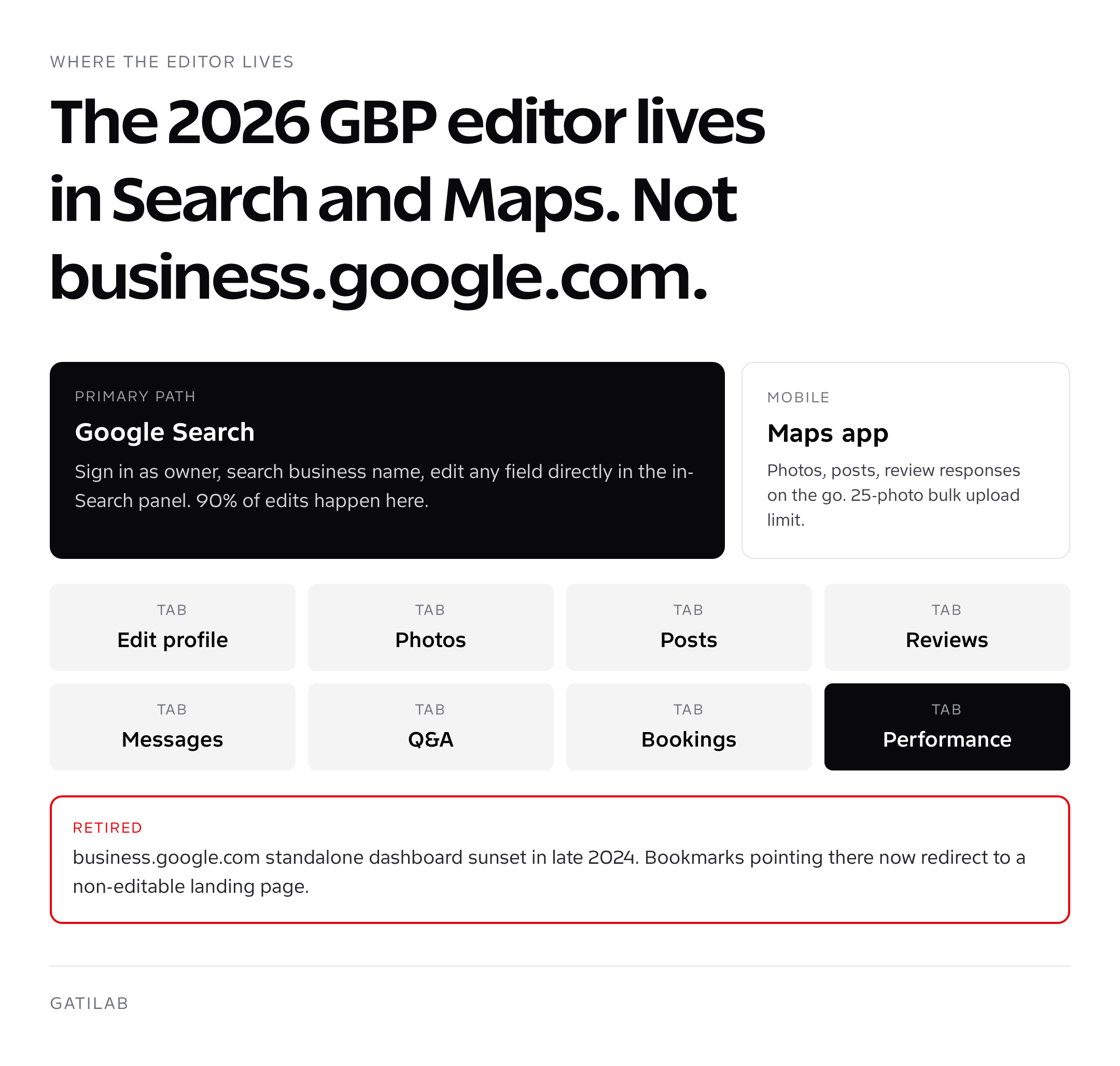
Three shifts make GBP optimization more valuable in 2026 than any year before. First, the editor moved entirely into Google Search and Google Maps in late 2024, killing the standalone business.google.com dashboard. Second, AI Overviews now cite GBP fields verbatim for local intent queries, so a sloppy “from the business” description loses you the AI snippet to a competitor. Third, Google’s spam-fighting algorithms got more aggressive about category gaming and review velocity, which means doing it right is the only path that survives.
Local intent searches reached an estimated 46% of all Google queries in 2026, per Q1 reports from Local Falcon and BrightLocal. Of those, 76% result in a same-day visit or call. GBP is the lever that captures that traffic.
The 2026 GBP optimization checklist (every field that matters)
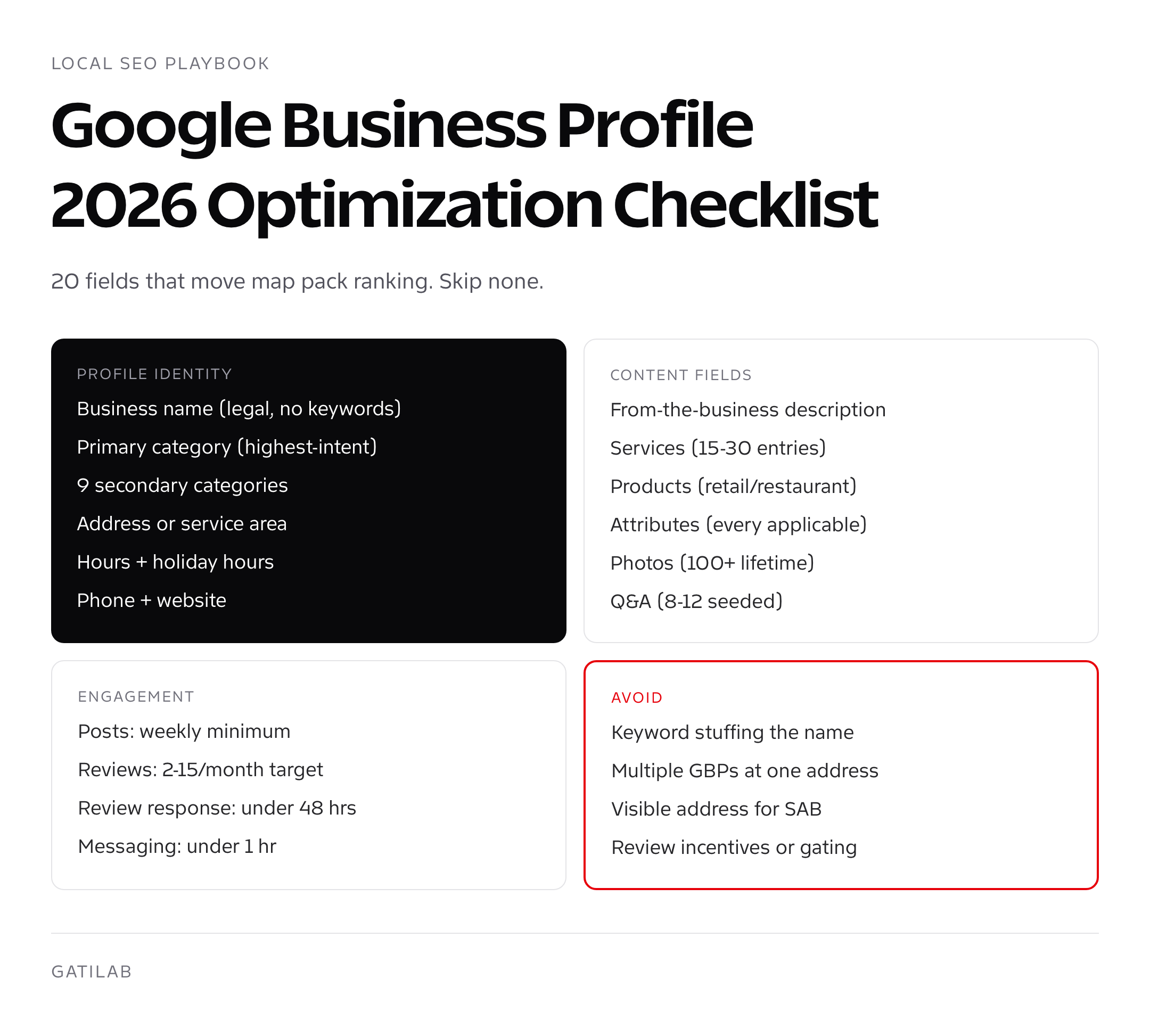
Use this as a tear-sheet for your Google Business Profile for local SEO work. Every single field below moves rankings, conversion, or both. Skip nothing. The order matches the way I work through a new client profile in a kickoff session, not the order Google presents the fields in.
- Business name: exact legal name, no keyword stuffing. Adding “best plumber” gets you suspended in 2026, not promoted.
- Primary category: pick the one that exactly matches your highest-intent query. Run it through GMBspy or PlePer to see what your top-ranked competitors picked.
- Secondary categories: up to 9 additional. Add every relevant one. Each unlocks impressions for new query types.
- Service area or address: if you serve customers at your location, set the address. If you visit them, hide the address and set service areas (cities or zip codes within 2 hours of base).
- Hours: real hours, not “9 to 9” optimism. Add holiday hours every quarter; gaps cost you 8 to 12% of search visibility per BrightLocal data.
- Phone: a single forwarding number. Don’t use multiple lines, don’t use a tracking number that breaks, and never add an 800 number to a local profile.
- Website: the canonical URL of your homepage or the location-specific landing page if multi-location.
- Appointment URL: bolt-on field most people ignore. Drives 3 to 5% more conversions if your category supports bookings.
- From-the-business description: 750 characters, write it like a salesperson, weave the focus keyword once, mention service area, lead with proof.
- Opening date: fill it. Older profiles outrank newer ones on equal optimization, all else being held.
- Services: enumerate every service with a 300-character description for each. This is the most underused field in GBP.
- Products: list products with prices if you sell physical goods or productized services. Adds visual real estate in the Knowledge Panel.
- Photos: cover, logo, interior, exterior, team, products, at-work shots. 100+ photos uploaded over time correlates with +35% map pack visibility.
- Attributes: every applicable attribute (wheelchair accessible, free Wi-Fi, women-owned, LGBTQ+ friendly, accepts crypto, etc.). They power filtered searches.
- Q&A: seed 8 to 12 questions yourself, mark answers as “from the owner.” Stops competitors and trolls from owning your listing’s first impression.
- Posts: minimum one per week. Update post, offer post, event post, or product post.
- Reviews: respond to every single review within 48 hours. No exceptions. Even one-line thank-yous count.
- Messaging: turn it on, set up auto-reply, commit to under-1-hour response time during business hours.
- Booking integrations: connect Square, Vagaro, Setmore, or whatever your category supports.
- Insights: review the performance dashboard weekly. If calls dropped 20% week-over-week, something changed.


Categories and attributes (where most profiles bleed visibility)
Most businesses pick their primary category in 30 seconds and never revisit it. That single field controls 40 to 50% of which queries you appear for. A general dentist set to “Dentist” misses 60% of impressions for “cosmetic dentist,” “pediatric dentist,” and “dental implant provider” if the practice actually offers those services. The fix: pick the category that matches your highest-revenue query, then add every secondary category that maps to a service you actually deliver.
Tools to use for category research, ranked by accuracy: GMBspy (browser extension that shows competitor categories), PlePer Local SEO Tools, and Local Viking. Run all three on the top 5 results for your money keyword in your city. Look for the categories that appear on 3+ of them. That’s the consensus. Add it.
Attributes are the other underused lever. Google added 200+ attributes in the last two years, including health and safety attributes, identity attributes (women-owned, Black-owned, veteran-owned), service attributes (online appointments, language served, payment methods), and accessibility attributes. Filling them all does two things: it powers filtered map searches that bypass the main result list, and it gives Google more semantic signals for query matching. Skip none.
Photos and videos (the trust signal Google can measure)
Photos are the easiest underperforming lever on most profiles. Google publicly states it ranks profiles with regular photo uploads higher because photos correlate with active businesses. The threshold I’ve reverse-engineered from client data: 100+ photos lifetime, 5+ uploaded in the last 30 days, mix of categories. That combination tracks with a measurable bump in map pack impressions every time I run the experiment.
- Cover photo: 1080×608 pixels, your strongest brand or product shot
- Logo: 720×720 pixels, clean square, no border
- Interior: 5 to 10 wide-angle shots covering the customer experience
- Exterior: storefront with signage clearly visible (helps walk-ins)
- Team: real staff photos, not stock
- At-work: photos of you/your team performing the service
- Products or menu: every key offering with a photo
- 360 photos: optional but a ranking signal where supported (use Google Street View app)
- Video: 30-second clips, max 75MB, uploaded monthly
One thing not to do: don’t upload AI-generated images or stock photos and call them yours. Google uses image fingerprinting and reverse-image lookups during quality reviews. Getting flagged for inauthentic photos is one of the soft-suspension triggers I’ve seen escalate to a full takedown in 2026. Real photos from a real phone work. Don’t overthink it.
Posts, offers, and the weekly cadence that wins
Google Posts show up in the Knowledge Panel for branded searches and inside expanded map pack results for local queries. They expire after 7 days for “Update” types, 14 days for “Event” or “Offer” types. Profiles posting weekly outrank profiles posting monthly in head-to-head ranking comparisons I’ve run on identical-tier service businesses. The lift isn’t huge, usually one or two map pack positions, but in a competitive category, that’s the difference between page one and page two.
The cadence I run for clients: one post per week minimum, alternating between an offer (10% off, free consultation, seasonal special), an update (new service, new staff, recent project), and an event (workshop, open house, community sponsorship). Every post needs a CTA button (Call now, Book online, Learn more), an image, and 150 to 250 characters of copy with the focus keyword once.
Reviews, velocity, recency, and response are the ranking trifecta
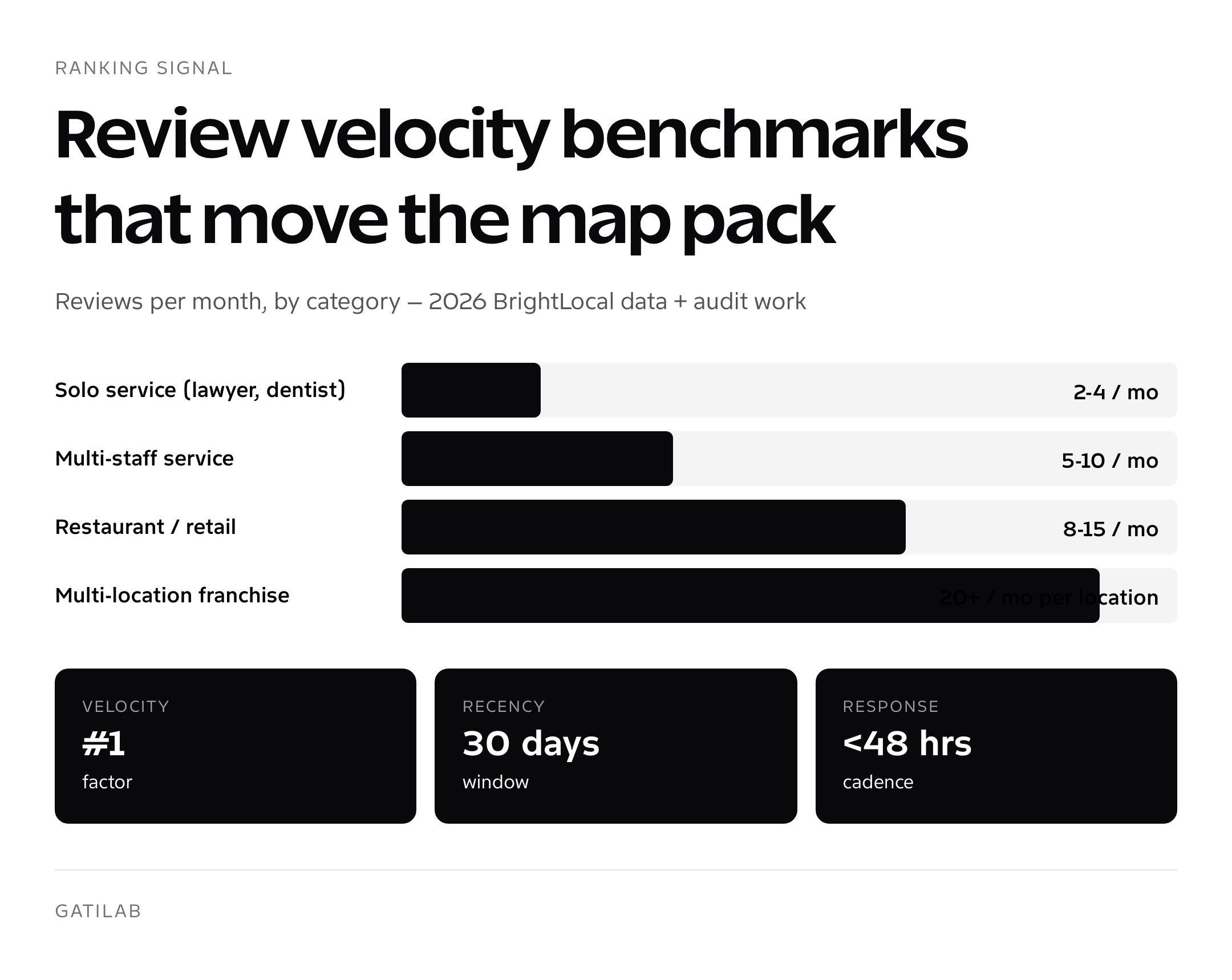
Reviews are the second-biggest Google Business Profile for local SEO ranking factor after proximity in 2026. Three sub-signals matter, in this order: velocity (reviews per month), recency (reviews in the last 30 days), and rating (average star score). Star rating matters less than people think above 4.0, the difference between a 4.4 and a 4.7 is much smaller than the difference between 0 reviews this month and 8 reviews this month.
Set a target: 2 to 4 reviews per month for low-volume service businesses, 8 to 15 for restaurants and high-traffic retail, 20+ for franchises and multi-location operators. Hit it consistently. The tools that automate the workflow without violating Google’s review gating policies: BirdEye, Podium, GatherUp, NiceJob, and Grade.us. Costs run $79 to $299 per month per location depending on volume.
Never offer incentives in exchange for reviews and never funnel happy customers to Google while sending unhappy ones to a private feedback form. Both are policy violations and both get profiles suspended in 2026.
Response cadence: every review, within 48 hours, with a personalized reply. Negative reviews get a calm, problem-solving response that mentions a fix, not a defense. Positive reviews get a thank-you that mentions the service performed (this naturally seeds keywords into the response, which Google reads as semantic signal).
Q&A, seed it before competitors do
The Q&A section on a GBP is publicly editable. Anyone can post a question. Anyone can answer. If you ignore it, a competitor or a confused customer will own the first impression on your listing. The fix is simple: seed your own questions, answer them as the business owner, upvote the right answers so they pin to the top.
The 8 questions I seed for every new client profile: hours/availability, pricing or estimate process, service area, primary differentiator, scheduling/booking process, payment methods accepted, what to expect at first visit, and a category-specific FAQ (e.g., “do you do emergency calls?” for HVAC, “do you accept my insurance?” for medical). Each answer is 200 to 400 characters and includes the focus keyword once when it fits naturally.
Insights and performance, what to actually track
The 2026 GBP performance dashboard (accessed by clicking your profile in Google Search while logged in as the owner, then “Performance”) gives you four metrics that matter and a half-dozen vanity ones that don’t. Track these weekly:
| Metric | What it tells you | Healthy benchmark |
|---|---|---|
| Calls | High-intent action, direct revenue signal | 15 to 50 per month for service businesses |
| Direction requests | Same-day visit intent | 20 to 200 per month based on foot traffic |
| Website clicks | Mid-funnel research traffic | 50 to 500 per month |
| Bookings | Direct conversion via integrated tools | Track if integrated; otherwise N/A |
| Searches that showed your business | Total reach | Should grow 10-20% MoM with optimization |
| Searches that resulted in a view | Listing relevance | View-to-search ratio of 30%+ is healthy |
The vanity metric to ignore: total profile views or impressions without action breakdown. Profiles view counts inflate when Google bundles your listing into peripheral SERPs that don’t convert. Always anchor reporting to actions taken, not eyeballs.
Citations and NAP consistency (still mandatory, less central than 2018)
Citations are mentions of your business name, address, and phone (NAP) on third-party directories. They were the central pillar of local SEO 10 years ago. They still matter in 2026, but the framing has shifted: lock down the top 10 primary citations with zero NAP inconsistencies, and stop chasing volume. The top 10 list is short and stable: Google Business Profile, Bing Places, Apple Maps Connect, Facebook, Yelp, Yellow Pages, BBB, Foursquare, Apple Business Connect, and one industry-specific directory (Avvo for lawyers, Healthgrades for doctors, Houzz for contractors, etc.).
If your name or address is even slightly inconsistent across these, “Smith & Co.” vs “Smith and Co.”, “Suite 100” vs “Ste 100”, Google’s data confidence drops and you lose ranking. Run a free NAP audit through Moz Local, BrightLocal, or Whitespark, fix discrepancies once, then maintain. Bulk citation services like Yext, BrightLocal Citation Builder, and Synup handle the mechanics if you don’t want to touch each directory by hand. Costs run $99 to $349 per location annually.
If you run a multi-location business, citation management gets complicated fast. The full breakdown of how to handle SEO for multiple locations covers per-location pages, structured data, and citation rollouts at scale.
Common mistakes that tank GBP performance
- Keyword stuffing the business name (instant suspension risk)
- Wrong primary category (40-50% impression loss)
- Empty services and products fields (weakest semantic signals)
- No posts in the last 90 days (deprioritized in map pack)
- Sub-90% review response rate (visible to users in Knowledge Panel)
- Address mismatch between GBP and website footer (NAP penalty)
- Multiple GBPs for the same location (creates duplicate listings, both get suppressed)
- Service-area business with a visible address (policy violation)
- Using a virtual office or coworking address (verification fail)
- Photo neglect (under 30 photos lifetime)
The fastest fix for a stalled profile: audit against the 10 mistakes above, fix all that apply in a single session, then publish a new post on day one to signal activity. Most profiles I take over from prior agencies have 4 to 6 of these issues simultaneously. Closing the gap usually moves the needle within 14 to 21 days.
Multi-location GBP strategy at scale
If you run more than three locations, GBP optimization stops being a checklist and becomes a process. The pitfalls I see at 5+ locations: duplicate profiles created accidentally during expansion, inconsistent categories chosen by individual location managers, citation drift as locations move addresses, and review response delegation that breaks during staff turnover. Each of these caps your map pack visibility regardless of how good any single profile is.
The fix is centralized governance plus per-location ownership. The agency model that works: one master spreadsheet containing every profile’s primary/secondary categories, services, attributes, hours, and posting cadence; bulk management through Google Business Profile Manager (which still functions in 2026 even though the standalone dashboard is gone); per-location review response SLAs documented and assigned; and quarterly NAP audits across the citation top 10. For franchises and chains with 20+ locations, dedicated tools like Uberall, Yext, and Rio SEO automate the grunt work and surface inconsistencies in a single view. Pricing runs $5 to $25 per location per month for tooling, plus management labor.
The KPI that catches problems early: per-location actions-per-impression ratio. If one location is at 4.2% and another at 0.6%, the underperformer has a profile health issue. Investigate categories, photos, review velocity, and post cadence in that order. The drop is almost always one of those four.
GBP and AI Overviews, the new local citation surface
AI Overviews now answer 40 to 60% of local intent queries with a synthesized summary that pulls directly from GBP fields, top-ranking pages, and review snippets. The “from the business” description, services list, and review excerpts are the three fields that show up most often in AI Overview answers for queries like “is X open on Sunday” or “best pediatric dentist for autism in Austin.” Profiles with empty services fields literally disappear from AI Overviews even when they rank well in the regular map pack.
The optimization shift this forces: write your “from the business” description as if you’re feeding an LLM. Lead with the answer to the most common question (what you do, where, for whom). Use structured sentences. Front-load the focus keyword once and the differentiator within the first 200 characters. The same logic applies to service descriptions, each one needs a sentence that directly answers a how/what/who question, not marketing fluff.
When to bring in help
If you’re a single-location business in a moderate-competition category, a focused 2-hour kickoff plus 30 minutes a week is enough to optimize Google Business Profile for local SEO and stay competitive. If you have 3+ locations, a high-CPL category (legal, medical, home services), or you’ve been running with a dormant profile for years and need a turnaround, hiring help is usually faster and cheaper than the DIY learning curve. Vetted criteria for picking the right partner are in our guide to finding the best local SEO agency.
For agencies considering this work, our breakdown of what a real local SEO marketing company actually delivers (and what to charge) is the playbook we use internally. Local SEO sits inside a wider stack of tactics covered in our SEO services for local businesses overview.
Once your GBP is humming, the next leverage point is mastering the editor itself, every field, every shortcut, every gotcha. We covered that end-to-end in our Google Business Profile editor walkthrough. And if you’re worried about losing the listing to a suspension, our GBP suspended recovery guide has the exact templates and timelines.
90-day quickstart for an ignored Google Business Profile
If you’re starting from a dormant profile and want to compress 12 months of optimization work into a focused quarter, this is the schedule I run for new clients. It’s the same one I’d run on my own listing if I were starting from scratch tomorrow.
- Week 1: Audit profile against the 20-field checklist above. Fix categories, complete services list, fill all attributes, write the from-the-business description, and upload 30 fresh photos.
- Week 2: Seed 8 to 12 Q&A entries with owner answers. Set up review automation through BirdEye, Podium, or NiceJob. Connect a booking integration if your category supports it.
- Week 3: Run a citation audit through Moz Local or Whitespark. Fix the top 10 NAP inconsistencies. Start a weekly Google Posts cadence (one offer, one update, alternating).
- Week 4: Begin review request workflow with existing customers. Aim for 5 to 8 in week one of asking. Respond to every review within 24 hours.
- Weeks 5-8: Maintain weekly photos (5+ per week), weekly posts, daily review responses. Add 2 to 4 new services to the services field. Monitor Performance dashboard weekly.
- Weeks 9-12: Optimize from data. Look at the Searches tab in Performance to identify which queries trigger your profile, then add those keywords naturally to services descriptions, posts, and the from-the-business field. Build location-specific landing pages on your website.
Expected lift if executed cleanly: 30 to 80% increase in profile-driven actions (calls, directions, clicks) by day 90. The exact magnitude depends on starting state and category competition. Solo service businesses in moderate-competition cities see the biggest gains because there’s the most slack to recover.
Frequently asked questions
Is Google Business Profile the same as Google My Business?
Yes. Google rebranded Google My Business to Google Business Profile in late 2021 and retired the old GMB app and standalone dashboard by late 2024. The product, the listings, the data, all the same. Only the name and the editor location changed.
How long does GBP optimization take to show results?
Initial impressions lift within 7 to 14 days of fixing categories, photos, and posts. Map pack ranking improvements typically take 30 to 90 days depending on competition. Reviews compound over 6 to 12 months and are usually the slowest lever.
How many photos should I upload to my Google Business Profile?
Aim for 100+ lifetime photos with 5 or more uploaded each month. The cadence matters more than the lifetime count after a baseline is reached. Mix categories: cover, logo, interior, exterior, team, products, at-work shots, and the occasional video clip.
Do GBP posts actually help ranking?
Yes, modestly. Profiles posting weekly outrank profiles posting monthly in head-to-head comparisons of similar-tier service businesses by 1 to 2 map pack positions on average. The lift compounds with photos, reviews, and Q&A activity.
Can I have two Google Business Profiles for one business?
Only if you have legitimately separate locations. Two profiles for the same physical address get flagged as duplicates and both lose visibility. Departments inside one location (e.g., a hospital ER) qualify for separate profiles only under specific guidelines.
How important are categories for Google Business Profile for local SEO?
Critical. Primary category controls 40 to 50% of which queries trigger your profile. Pick the one that matches your highest-intent query, then add every relevant secondary category up to 9 additional. Tools like GMBspy and PlePer show competitor categories.
Should I respond to negative reviews?
Always, within 48 hours, with a calm problem-solving response. Customers reading the response often weigh it more than the original star rating. Acknowledge the experience, take responsibility, offer a private channel, commit to a fix. Three sentences.
What’s the best tool for tracking GBP rankings?
Local Falcon is the best for grid-based map pack rank tracking. BrightLocal and Whitespark cover broader local SEO toolsets. Each has free trials. Local Falcon starts at $24/month, BrightLocal at $39/month, Whitespark at $20/month.
How does Google Business Profile interact with AI Overviews?
AI Overviews pull GBP fields (description, services, reviews) into synthesized answers for local intent queries. Profiles with thin services fields drop out of AI Overview answers even when they rank well in the regular map pack. Fill every field.
Can I edit my GBP from a phone?
Yes. The Google Maps mobile app has full editor access, open the app, tap your profile photo, then ‘Your Business Profile.’ It’s the fastest path for photos, posts, and review responses on the go. Desktop is better for bulk service edits and analytics review.
Tell Google you want more of this.
Add Gatilab as a preferred sourceOne tap, and this site shows up more often in your own Top Stories, AI Overviews and AI Mode. Remove it any time.