
Google Business Profile Suspended? 2026 Recovery Guide With Templates
Getting a Google Business Profile suspended is the closest thing local businesses have to a heart attack. One day your phone rings 12 times. The next day it rings zero. The notification email is generic (“Your business is suspended”), the appeal flow is opaque, and Google’s response time runs anywhere from 3 days to 6 weeks depending on suspension type. I’ve handled 30+ Google Business Profile suspended cases in the last 24 months, and 80% of them resolved within 14 days when documentation was assembled correctly the first time.
This guide walks through every step from the moment you spot the suspension banner through full reinstatement, including the exact language to use in your appeal, the documents Google actually wants, and the gotchas that get appeals rejected. Templates included. Treat suspension like a fire drill, not a panic, there’s a process, and the process works when you follow it.
Why Google Business Profiles get suspended
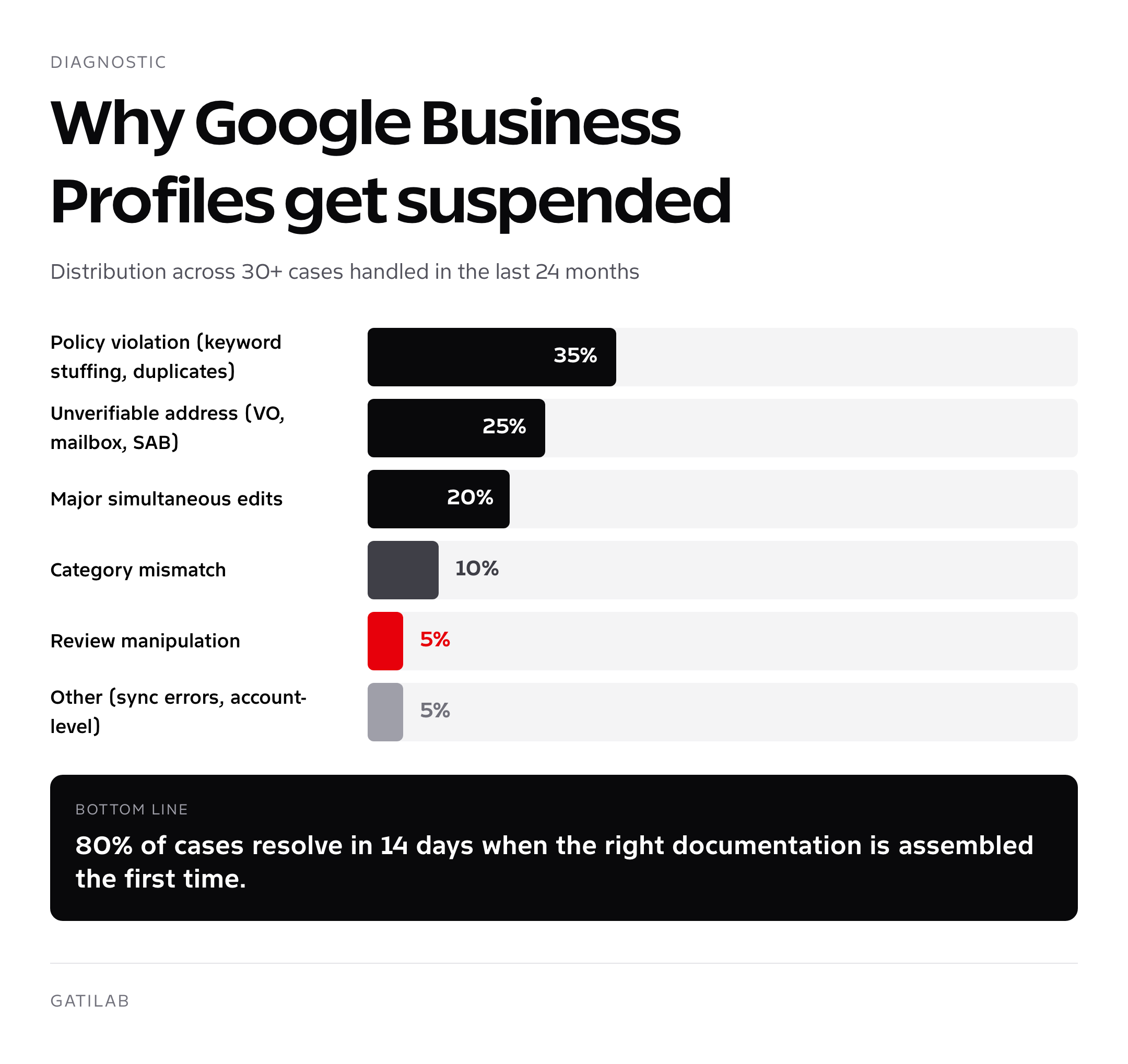
Google Business Profile suspended cases break down into roughly seven categories. In my experience, the distribution runs about 35% policy violation (keyword stuffing, multiple listings for the same location, lead-gen front), 25% unverifiable address (virtual office, coworking space, residential SAB without service-area set), 20% sudden major edit (changing name + address + phone simultaneously triggers re-verification), 10% category mismatch flagged by spam algorithm, 5% review manipulation, and 5% miscellaneous (third-party tool sync errors, duplicate detection, account-level penalties).
Knowing the cause changes the appeal. If you don’t know why you got suspended, the appeal will be generic, and generic appeals get rejected. The first 24 hours after suspension are diagnostic, not panic time. Audit your profile against each common cause below before submitting anything.
- Keyword stuffing in name: “Smith Plumbing – Best 24 Hour Emergency Plumber in Dallas” gets suspended; “Smith Plumbing” does not
- Multiple listings for one location: two GBPs at the same address (e.g., one for “Plumbing” and one for “HVAC” run by the same owner) flag as duplicates
- Service area business with visible address: if you go to customers, the address must be hidden in the editor
- Virtual office, mailbox, or coworking address: Google cross-references against known VO/CRE databases, fails verification
- Major simultaneous edits: changing name + address + phone in one session triggers automated re-verification
- Category gaming: picking a category you don’t actually serve (e.g., “Lawyer” when you’re a paralegal service)
- Review manipulation: incentivized reviews, review gating, or detected review networks
- Lead-gen front pages: profile linking to a third-party lead-gen site instead of your actual business
Soft suspension vs hard suspension, diagnosing yours
There are two suspension states, and the recovery path differs significantly. Soft suspension means your profile is still visible to you in the editor and appears (limited) in some search results, but loses verified status, photos disappear from search, and the listing is hidden from the map pack. Hard suspension means the profile is fully removed from search and Maps, your editor shows a “suspended” banner with no edit access, and the listing’s URL returns a 404 when shared publicly.
How to tell which Google Business Profile suspended state you have: open Google Search while logged in as the owner, search your business name. If the in-Search panel appears with a yellow or red warning banner, that’s a soft suspension and you can still see most fields. If you get a “no listing found” message or a “suspended” panel with no editable fields, that’s hard suspension. Soft suspensions usually resolve in 3 to 7 days post-appeal. Hard suspensions take 7 to 42 days and require more documentation.
Don’t make any edits while suspended unless explicitly required by the appeal process. Edits during suspension are sometimes interpreted as evasion attempts and extend the review window. Read first. Audit. Then appeal.
The reinstatement process, exact steps
- Audit (24 hours): screenshot your current profile state. Compare against the 8 common causes. Identify the most likely violation.
- Fix the underlying issue: remove keyword stuffing from name, hide address if SAB, delete duplicate listings, swap virtual office for real address. Do this BEFORE appealing.
- Gather documentation: business license, articles of incorporation, recent utility bill at the business address (within 90 days), lease or property tax document, signed letterhead, and photos of business signage.
- Submit the reinstatement request: at support.google.com/business/contact/profile_reinstatement (this is the canonical form in 2026; the old GMB reinstatement form was deprecated).
- Wait, don’t follow up obsessively: 3 to 14 days is normal. Don’t submit a second request, it queues you behind your own first request.
- If denied, appeal: use the appeal tool linked in the denial email. Provide additional documentation specific to the rejection reason.
- If denied again, escalate via Twitter: tag @GoogleMyBiz with case ID and a calm, factual message. This works in 2026 for clearly mishandled cases.
- If still denied, consider a fresh profile: only as a last resort, only if your previous violation is fully cured, and only at a fresh address.
Documentation Google actually accepts
The reinstatement form has a documentation upload field that takes up to 5 files at 10MB each. Google’s spam team scans these for two things: do they prove the business is real, and do they prove it operates at the address claimed. Below is the documentation hierarchy I use, ranked by appeal-strength.
| Document | Strength | Notes |
|---|---|---|
| Business license with address | Strongest | Must be current and show full address |
| Utility bill (electric, water, gas) | Very strong | Within 90 days, business name on bill |
| Articles of incorporation | Strong | Pair with proof of address |
| Property lease or deed | Strong | Must be current |
| Property tax statement | Strong | Most recent tax year |
| Bank statement at business address | Medium | Redact account numbers, leave header visible |
| Photos of storefront with signage | Medium | Include surrounding context (street, neighbors) |
| Insurance certificate | Medium | Liability or workers comp at the address |
| Vehicle registration (for SAB) | Useful for SAB | Branded vehicle helps |
| Postal mail (delivered to address) | Weak alone | Use as supplement, not primary |
Submit 3 to 5 documents, not 1, not 10. One looks thin. Ten looks like flooding. The combination I default to: business license + recent utility bill + photo of storefront. Add property lease or articles of incorporation if the suspension reason was specifically about business legitimacy.
Appeal email and form templates
Below are the exact templates I use for clients. Copy them, swap business specifics, attach documentation, submit. Tone matters: calm, professional, factual, no blaming. Google’s reviewers see thousands of appeals weekly. Make theirs easy.
Template 1: First reinstatement request (general)
Subject: Reinstatement request for [Business Name] at [Full Address]
“Hello, my Google Business Profile for [Business Name] at [Full Address] was suspended on [Date]. I have audited the profile against Google’s guidelines and made the following corrections: [list 1 to 3 specific corrections, e.g., ‘removed descriptive keywords from business name,’ ‘hidden physical address since we serve customers at their location,’ ‘consolidated two duplicate listings into one’]. The business is a legitimate operating entity at the address listed, and I have attached the following supporting documents: [list documents]. Please review the profile and reinstate it. Thank you for your time., [Owner Name], [Owner Title]”
Template 2: Appeal after denial
“Hello, my reinstatement request for [Business Name] (case ID: [ID]) was denied on [Date]. The denial cited [exact reason]. I want to provide additional context and documentation specifically addressing this concern. [2 to 4 sentences explaining specifically why the reason is incorrect or what additional steps you’ve taken]. Attached are [new documents]. I respectfully ask the team to review the profile again with this new information. Thank you., [Owner Name]”
Template 3: SAB clarification (service area business)
“Hello, [Business Name] is a service area business, we travel to customers rather than receiving them at a fixed location. The address listed in our profile is our administrative headquarters and is not customer-facing. I have updated the profile to hide the address per Google’s SAB guidelines and to list our service areas as [list cities or zip codes]. Attached: business license, vehicle registration showing branded service vehicle, and a recent utility bill confirming the headquarters address. Please reinstate. Thank you., [Owner Name]”
Why appeals get rejected (and how to fix yours)
Roughly 40 to 50% of first-pass appeals get rejected in 2026, but most of those rejections are recoverable on the second appeal if you understand what went wrong. The five patterns I see most often: documentation didn’t match the suspension reason, the appeal didn’t address the specific violation cited in the suspension notice, the documents were too old or too generic, the underlying violation wasn’t actually fixed before submitting, and the tone was defensive rather than corrective.
The fix for each: read the rejection email line by line, identify the specific reason cited, address that exact reason in your follow-up appeal with documentation that directly proves the resolution. Generic “please reinstate” emails get auto-rejected. Specific “here is the violation, here is the fix, here is the proof” appeals get human review.
If your suspension was for a service area business with a visible address, the appeal must include a screenshot of your editor with the address now hidden, a vehicle photo or registration showing branded service vehicles, and a statement of service area cities. Anything less rejects.
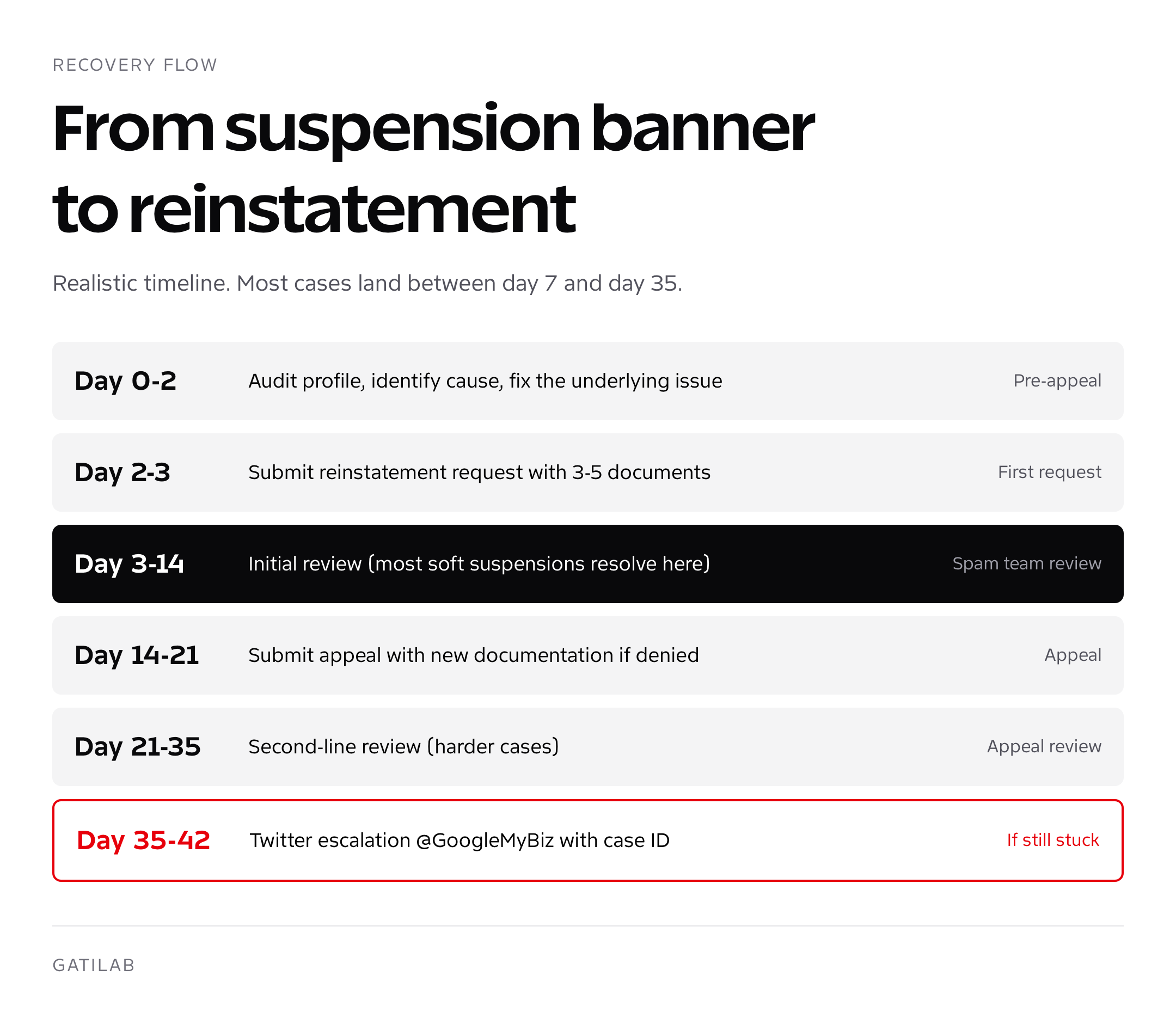
Realistic timeline, what to expect
| Phase | Day range | What happens |
|---|---|---|
| Pre-appeal audit | Day 0 to 2 | Identify cause, fix profile, gather docs |
| First request submitted | Day 2 to 3 | Submit through reinstatement form |
| Initial review | Day 3 to 14 | Google’s spam team reviews; majority of soft suspensions resolve here |
| Appeal (if denied) | Day 14 to 21 | Submit appeal with new documentation |
| Appeal review | Day 21 to 35 | Second-line review; harder cases land here |
| Twitter escalation (if needed) | Day 35 to 42 | Tag @GoogleMyBiz with case ID |
| Final resolution | Day 7 to 49 | Reinstatement or terminal denial |
Honest expectation: 3 to 14 days for clean cases (single fixable issue, strong documentation), 21 to 42 days for complex cases (multiple violations, virtual office issues, ownership disputes). Anything past 42 days is unusual and probably needs Twitter escalation or a fresh appeal. I’ve never seen a case go past 60 days when the profile was actually reinstatable.
Avoiding re-suspension
Profiles reinstated once carry a flag. The spam algorithm watches them more closely for 6 to 12 months. Major edits (name, address, phone, primary category) during this window risk re-suspension. The behaviors I have clients adopt for the post-reinstatement window:
- No name changes for 12 months
- No address changes for 12 months unless absolutely required and documented
- One edit per session, not bulk edits
- Verified phone number that doesn’t change
- Steady review velocity (no sudden spike that looks like manipulation)
- Weekly post cadence to signal active legitimate management
- Photos uploaded weekly, all original from owner’s device
- Q&A monitored daily for spam
For multi-location businesses, one suspended profile sometimes creates a chain reaction across the account. If you operate under one ownership account and one location gets suspended for guideline violations, audit every other location’s profile within 48 hours. Better to fix issues proactively than to lose a second listing while you’re still recovering the first.
What to do while suspended (revenue protection)
The 14 to 42 days you might spend in Google Business Profile suspended limbo are dangerous for revenue. The fix isn’t waiting passively, it’s redirecting demand through every other channel you control. The playbook I run for clients in active suspension:
- Crank up Google Search Ads with location extensions to reclaim map pack visibility (budget is short-term, kill it after reinstatement)
- Activate paid Apple Maps placement and double down on Bing Places (free)
- Email your existing customer list with a “we’re still here” note plus your direct phone
- Post on every social channel daily, Instagram, Facebook, LinkedIn, with location tags
- Update your website footer with prominent phone, address, and hours (in case customers find you organically)
- Add live chat to your website if you don’t have it
- Encourage existing customers to leave Yelp or industry-specific directory reviews (legitimate, no incentives)
- Run a Local Services Ads campaign if your category supports it (separate verification, often unaffected by GBP suspension)
The financial impact of GBP suspension is brutal for service businesses that rely on it. I’ve seen clients lose 30 to 65% of inbound calls during a 30-day suspension. The compensating channels above typically recover 40 to 70% of that lost demand if activated within the first 5 days. Speed matters.
When to call in a professional
If your business depends on local lead flow and you’ve been suspended for 14+ days with no resolution, hire help. Reinstatement specialists charge $300 to $1,500 per case and resolve in 7 to 21 days because they have submission patterns that work. Vetted criteria for picking the right partner are in our guide to finding the best local SEO agency. The wider context for how GBP fits into local search strategy is in our walkthrough of SEO services for local businesses.
Once you’re reinstated, lock in the optimization checklist in our GBP for local SEO guide and learn the new editor flow inside-out via our GBP editor walkthrough. If you’re scaling across territories, the playbook for SEO for multiple locations covers per-location governance and bulk profile management. And if you’re an agency taking on suspension recovery as a service line, our breakdown of what a real local SEO marketing company charges is the framework we use.
Multi-location accounts: containing the blast radius
Multi-location operators face a specific risk during suspension that single-location owners don’t: account-level penalties. If one of your locations gets suspended for a serious violation (review manipulation, lead-gen fronts, fake address), Google’s spam team sometimes flags the parent account, putting every other location under review even when those individual profiles are fully compliant. I’ve seen 12-location restaurant groups lose 3 locations to a single bad-actor branch manager who was offering review incentives unbeknownst to the corporate office.
Containment playbook for multi-location accounts: within 48 hours of any single-location suspension, audit every other location for the same violation type. If review manipulation triggered the suspension, audit reviews across the portfolio. If address authenticity triggered it, re-verify addresses. If keyword stuffing triggered it, scan every business name field. Document the audit and the corrections, then attach that documentation to the appeal for the suspended profile. This proactively addresses the “is this a pattern” question reviewers ask.
For agency teams managing 10+ client accounts, separate Google Workspace identities per client portfolio prevents cross-contamination. One bad client’s penalty doesn’t propagate into another client’s profiles when ownership lives in distinct accounts. The setup cost is administrative time during onboarding; the avoided cost is six-figures of recovery work after a contagion event.
Documenting your appeal: tone, length, and structure that wins
The appeal email itself is the deciding factor in 30 to 40% of borderline cases. Reviewers spend 90 to 120 seconds per appeal during their queue. Make it scannable. Lead with the violation cited, immediately follow with the specific fix, then anchor with documentation references. Skip backstory, skip apologies, skip generic “we’re a legitimate business” filler. Reviewers know that sentence by heart and tune it out.
Length sweet spot: 100 to 250 words. Longer than 300 words and reviewers skim past important details. Shorter than 80 and the appeal looks lazy. Tone calibration: factual, corrective, slightly deferential, never combative. Even in cases where the suspension was clearly a false positive, the appeal that wins is the one that calmly demonstrates legitimacy rather than the one that argues Google made a mistake.
Structure that consistently performs: paragraph 1 names the business and address and the suspension date in one sentence; paragraph 2 names the specific violation and the specific corrective action taken; paragraph 3 lists attached documents in bullet form (use plain dashes; the form strips formatting); paragraph 4 closes with a one-sentence reinstatement request and your full name and title. That’s the entire structure. Hold to it across first request, appeal, and re-appeal scenarios.
Re-verification (the post-reinstatement step most people skip)
Once your Google Business Profile suspended status flips back to active, Google sometimes requires re-verification before the profile fully reappears in search and Maps. This is separate from the original verification you did at profile creation. The triggers for re-verification: the suspension was related to address authenticity, the profile changed addresses during or shortly before the suspension, the spam team flagged the listing as needing manual address confirmation, or you switched ownership during the appeal.
The re-verification options Google offers in 2026, in order of speed: video verification (record a 30 to 60 second walkthrough showing your storefront, signage, equipment, and any branded materials, then upload to Google), postcard mail verification (5-day delivery to the address, then enter the code), phone verification (only available for certain categories), and instant verification (only if the same Google account already verified another property at the same address). Video verification is the most common path now; it replaces postcard for 70%+ of cases.


Tips for video verification that pass on the first try: shoot in good lighting, hold the camera steady, narrate what you’re showing as you walk the space, capture the exterior signage with the street visible behind it, capture branded equipment or vehicles, and include any business license or permit visible on a wall. Video file should be under 100MB, MP4 format, between 30 seconds and 2 minutes. Re-verification typically completes in 1 to 5 business days after upload.

Frequently asked questions
How long does Google Business Profile suspension recovery take?
Soft suspensions resolve in 3 to 14 days when documentation is correct on the first request. Hard suspensions take 7 to 42 days. Anything past 42 days is unusual and typically needs a Twitter escalation tagging @GoogleMyBiz with the case ID.
Why was my Google Business Profile suspended?
Most common reasons in 2026: keyword stuffing the business name (35% of cases), unverifiable address like a virtual office or mailbox (25%), making major edits like name + address simultaneously (20%), category mismatch (10%), and review manipulation (5%). The suspension email rarely names the exact cause; you have to audit yourself.
Can I edit my profile while it’s suspended?
Don’t, unless the appeal process specifically requires it. Edits during suspension are sometimes interpreted as evasion attempts and extend the review window. Audit, identify the violation, fix only what’s required, then submit the reinstatement request.
What documents do I need for GBP reinstatement?
Strongest options: business license, recent utility bill at the business address (within 90 days), articles of incorporation, lease or property tax statement, and photos of storefront with signage. Submit 3 to 5 documents matched to your suspension reason, not 1, not 10.
Where do I submit a GBP reinstatement request?
support.google.com/business/contact/profile_reinstatement is the canonical 2026 form. The old GMB reinstatement form was deprecated. Sign in with the owning account, fill the form, attach 3 to 5 documents, submit. Don’t submit duplicate requests, they queue you behind your own first request.
Will I lose my reviews if my GBP is suspended?
Reviews are preserved through soft and hard suspension. They reappear when the profile is reinstated. The exception is profiles that get terminated for severe policy violations, those are gone permanently along with the reviews. Standard suspensions don’t terminate.
Can I create a new Google Business Profile if mine is suspended?
Only as a last resort, only if the underlying violation is fully cured, and only at a fresh address. Creating a duplicate to evade suspension typically gets both profiles terminated. Reinstatement is almost always the right path even when it takes 30+ days.
How do I appeal if my reinstatement request was denied?
Use the appeal link in the denial email. Address the specific reason cited, provide additional documentation directly proving the resolution, keep tone calm and corrective. Generic ‘please reinstate’ emails get auto-rejected. Specific ‘here is the fix, here is the proof’ appeals get human review.
Should I hire a professional for GBP suspension recovery?
If your business depends on local lead flow and you’ve been suspended for 14+ days with no resolution, yes. Specialists charge $300 to $1,500 per case and resolve in 7 to 21 days because they have submission patterns that work. Worth it for service businesses losing $5,000+/month in calls.
Can a competitor get my GBP suspended?
Yes, through the ‘Suggest an edit’ feature or coordinated mass-flagging. Google’s spam team reviews flagged profiles, and false flags do sometimes succeed. The appeal process is the same, document your legitimacy, address the specific cited concern, submit. Most malicious flags reverse on the first appeal.
Tell Google you want more of this.
Add Gatilab as a preferred sourceOne tap, and this site shows up more often in your own Top Stories, AI Overviews and AI Mode. Remove it any time.