
Cloudflare 403 Forbidden: What It Means and How to Fix It
A Cloudflare 403 Forbidden error means a website’s security layer looked at a request and refused it, and the page rarely says why. So if your own site is showing it to visitors, or you are the one being blocked, this guide will help you find the cause and fix it without switching your security off.
Setting up and tuning Cloudflare is part of our work at Gatilab.
Every Cloudflare account is set up a little differently, so no single switch fixes every 403. But nearly every case comes down to one question, whether Cloudflare blocked the request or your own server did, and the answer tells you where to look. I will cover both sides here, along with the “Verify you are human” page that some visitors get stuck on.
I have also turned the steps into a checklist, free in PDF and Word, with a message you can send visitors to get their Ray ID. And if you would rather we looked at your Cloudflare setup, we are happy to. First, a quick word for anyone on the other side of the block.
If You Are the One Being Blocked
If a website is refusing to load for you, the block usually has nothing to do with anything you did. The site owner has a rule, and something about your connection happened to match it.
These are worth trying, roughly in this order:
- Turn off your VPN or proxy. Shared VPN addresses carry the reputation of everyone else using them.
- Pause browser extensions, especially ad blockers and privacy tools, or open the site in a private window.
- Allow JavaScript and cookies for the site, and update the browser if it is out of date.
- Try another browser, or switch from Wi-Fi to mobile data so you arrive from a different IP address.
If none of that works, the fix sits with the site owner. Take a screenshot of the error page with the Ray ID and the time showing, and send it to them, because that ID is how they find the exact rule that stopped you. Services that promise a way around the block are best avoided, since they route your traffic through someone else’s servers and the block tends to come back.
What a Cloudflare 403 Forbidden Error Means
A 403 is the web’s way of saying the server understood the request and won’t serve it. With Cloudflare in front of a site, that refusal can come from two places:
- Cloudflare: a security rule or setting blocked the request before it reached the site’s server. The page carries Cloudflare’s branding, a Ray ID and often an error code.
- The site’s own server: Cloudflare passed the request on, and the server, a security plugin or the host’s firewall refused it. The page looks like the site’s normal error page or a plain server message.
The two need different fixes, so working out which one you are looking at comes first.
When the Cloudflare 403 Forbidden page shows an error code, the code already tells you which setting to open:
| Code | What the Page Says | What Caused It |
|---|---|---|
| 1020 | Access denied | A custom rule with a Block action |
| 1010 | Access banned based on your browser’s signature | Browser Integrity Check or a rule on the browser’s signature |
| 1009 | Country or region banned | A rule that blocks the visitor’s country |
| 1005 | Autonomous System Number (ASN) banned | A rule that blocks the visitor’s network, often a hosting or VPN provider |
| 1006, 1007, 1008 | Your IP address has been banned | An IP Access Rule or a custom rule that blocks the address |
| 1015 | You are being rate limited | A rate limiting rule, which lifts once the visitor slows down |
Error 1020 covers every custom rule with a Block action, which makes it the broadest code of the set.
Find Out Where the 403 Came From
The quickest way to tell the two apart is the Ray ID, and it works even when the error page doesn’t show one.
- Find the Ray ID. A Cloudflare block page shows it at the bottom. If the page doesn’t, open your browser’s developer tools, go to the Network tab, click the blocked request and copy the value of the
cf-rayresponse header. - Search it in Security Events. The Events log in the Cloudflare dashboard lists every request a security feature acted on.
- Read the result. An event means Cloudflare blocked the request, and it names the rule. No event means Cloudflare passed the request on and your server returned the 403.
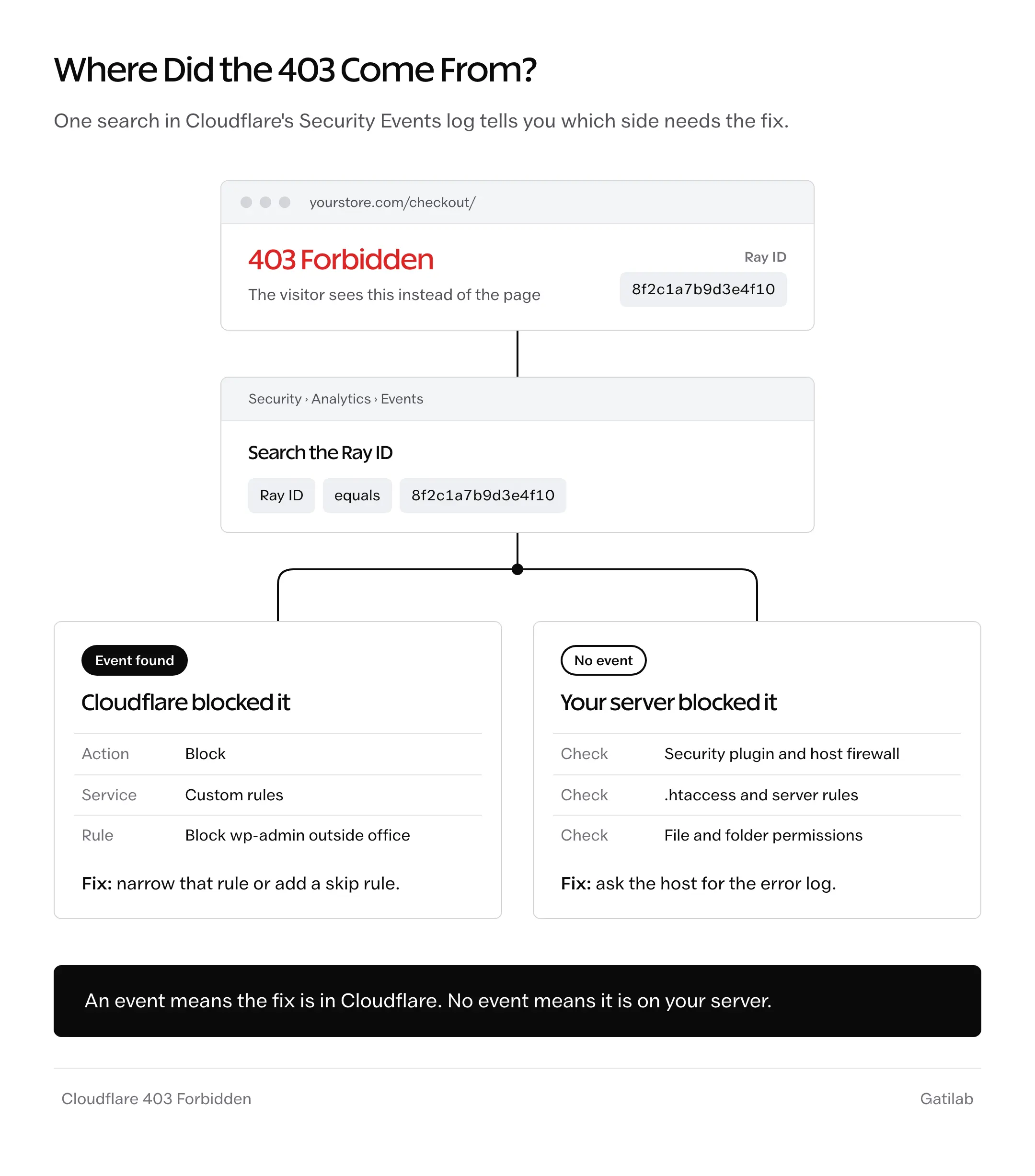
That one search replaces an afternoon of guessing, since it tells you whether to open Cloudflare or your server first.
Find the Rule That Blocked the Request
Once you know Cloudflare blocked it, the Events log tells you which feature and which rule did it:
- Get the Ray ID and the time of the block, from the visitor’s screenshot or your own test.
- In the Cloudflare dashboard, open the domain, then Security, then Analytics, and select the Events tab.
- Add a filter for the Ray ID, or for the visitor’s IP address if you don’t have the ID.
- Open the event. It shows the action taken, the service that acted, like managed rules or Bot Fight Mode, and the rule’s name or ID.
The log records times in UTC, so a block a visitor saw at 3 p.m. in New York shows up at 7 or 8 p.m. in the log, depending on the time of year. Cloudflare has also renamed these menus a few times, so if the path looks different, the dashboard search finds Events quickly.
The event almost always points to one setting or one rule, and changing that is a much smaller job than rethinking your security.
The Cloudflare Settings That Cause Most 403s
These settings sit behind most Cloudflare 403s, and each one can be narrowed instead of switched off.
Custom Rules
Custom rules are the ones you or a developer wrote, like a rule that blocks a country or a path, and they produce error 1020. A rule that is broader than intended is the usual problem, such as blocking every request to /wp-admin/ that doesn’t come from the office IP, which then blocks the owner the first day they work from home. The fix is to narrow the expression or add a condition for the traffic you trust.
Managed Rules
Managed rules are Cloudflare’s own protection against known attacks, like SQL injection. Now and then they flag a legitimate request that looks like one, such as a page builder saving a block of HTML or a form that accepts code snippets. The event names the exact rule, and a skip rule for that one path is much safer than turning the rule set off.
IP Access Rules and Country Blocks
IP Access Rules block or challenge an IP address or anything larger, up to a whole country, and they are behind errors 1005 to 1009. A country block added to stop spam is the usual reason a real customer abroad, or a client who is traveling, suddenly can’t reach the site.
Rate Limiting Rules
Rate limiting blocks a visitor who sends too many requests in a short time. It protects login pages well, but a threshold set too low catches busy APIs and shared office networks. The sign is error 1015, and the block lifts by itself once the visitor stops sending requests for a while.
Bot Fight Mode
Bot Fight Mode is the free plan’s one-switch bot protection, and it is easy to forget once it is on. It challenges traffic that looks automated, which can include API calls and mobile app traffic, and it cannot be skipped with WAF custom rules. When it blocks something you need, the choice is to turn it off or move to a paid plan, where Super Bot Fight Mode does accept skip rules.
Security Level and Browser Integrity Check
Security Level decides how readily Cloudflare challenges visitors whose IP address has a poor reputation, and the default of Medium suits most sites. Browser Integrity Check blocks requests with missing or unusual headers, which catches some scripts and older tools, and it is the usual source of error 1010. I’m Under Attack mode belongs here too. It challenges every single visitor and is meant for the hours of an attack, not for good.
Hotlink Protection
Hotlink Protection stops other sites from embedding your images by returning a 403 for those requests. When a site you trust needs your images, a skip rule for Hotlink Protection lets it through without switching the feature off.
AI Crawler Blocking
Cloudflare can block AI crawlers for you, and it asks about this when a new domain is added. If AI tools can’t read your pages, this setting is the first place to check, and our look at AI crawlers covers which ones are worth letting in.
In almost every case the right fix is to narrow a setting rather than switch it off, and a skip rule is how you do it.
Let Good Traffic Through With a Skip Rule
A skip rule is a custom rule with the Skip action. It lets one kind of request pass chosen security features while everything else stays protected.
Skip rules should be used for traffic you can describe precisely, for example:
- a payment gateway sending webhooks to one path
- an uptime monitor with a published list of IP addresses
- your own app calling a fixed endpoint
A webhook skip rule looks like this in Cloudflare’s rule language:
(starts_with(http.request.uri.path, "/wp-json/payments/webhook") and http.request.method eq "POST")Set the action to Skip and tick only the features that were blocking it, such as All managed rules or All Super Bot Fight Mode rules. Leave Log matching requests on, so the skipped requests still appear in Security Events.
When the sender publishes its IP addresses, adding them to the expression makes the rule far harder to abuse:
(starts_with(http.request.uri.path, "/wp-json/payments/webhook") and ip.src in {192.0.2.0/24})The narrower the expression, the less the rule gives away. A rule that skips managed rules for one webhook path is fine, and a rule that skips them for every POST request on the site is an open door.
What most people do:
Pause Cloudflare for the whole site until the 403 goes away.
What works better:
A skip rule for the one path that was blocked, with Log matching requests left on.
Both make the error disappear. The first also switches off the caching and the protection for every visitor, and it tends to stay off far longer than anyone planned.
When the 403 Comes From Your Own Server
If Security Events has nothing for the Ray ID, Cloudflare passed the request on and your server refused it. On WordPress sites the cause is generally one of these:
- A security plugin blocking Cloudflare itself. Without the real visitor IP restored, every request seems to come from a handful of Cloudflare addresses, and one bad visitor can get a Cloudflare address banned for everyone who shares it. Cloudflare sends the real address in the
CF-Connecting-IPheader, and the plugin or server needs to be set to read it. - The host’s firewall. Some hosts limit or block busy IP addresses at the server, and Cloudflare’s addresses are the busiest ones your server sees. The host can allowlist Cloudflare’s published IP ranges.
- .htaccess or server rules. A deny rule, an old IP restriction on
/wp-admin/or a hotlink rule written on the server returns a 403 all by itself. - ModSecurity. The host’s own web application firewall blocks requests that look like attacks, and only the host can read its logs or relax a rule.
- File permissions. WordPress generally expects 644 for files and 755 for folders, and a folder the server can’t read returns a 403.
The host’s error log usually names the rule or the file behind a server-side 403, so it is worth asking for it before changing anything.
What challenges.cloudflare.com Is
The “Just a moment…” and “Verify you are human” pages are Cloudflare challenges, not blocks. Cloudflare shows one when a rule or setting asks it to check a visitor, and the check runs on scripts served from challenges.cloudflare.com.
Most visitors pass without clicking anything. Cloudflare then sets a cookie called cf_clearance in the browser, and the visitor isn’t checked again until it expires. The Challenge Passage setting controls how long that is. It defaults to 30 minutes, and Cloudflare recommends somewhere between 15 and 45.
A challenge that loops or never finishes generally comes down to one of these:
- an extension, ad blocker or DNS filter blocking challenges.cloudflare.com, so the check can’t load
- JavaScript or cookies switched off, so the check can’t run or the cookie doesn’t stick
- a VPN or an unstable connection, which Cloudflare may treat as suspicious and check again
- an app’s built-in browser that blocks the challenge domain
On the site owner’s side, the common self-inflicted version is a challenge on something that isn’t a person, like an API endpoint or a webhook. A script can’t solve a challenge, so it hits the same page every time, and a skip rule or a narrower rule fixes it.
When Cloudflare itself has an incident, challenges can fail for everyone at once. The Cloudflare status page is the first thing to check when many visitors report the same thing at the same time.
Cloudflare 403 Forbidden Checklist (PDF and Word)
The whole process on a few pages, from the first Ray ID to a record of what you changed, so the next block takes minutes instead of an afternoon.
- A quick table to tell a Cloudflare block from a server block, with the error codes decoded
- A Ray ID log for every block you investigate
- The Cloudflare settings to check, in order, and a planner for skip rules
- Server-side checks for WordPress, from real visitor IPs to file permissions
- A message to send visitors, and a change log for your rules
Free to use on your own sites or your clients’ sites.
The Limits
Security Events only keeps recent history, and how far back it goes depends on your plan. A block from a few weeks ago may already be gone, so it is wise to ask for the Ray ID while the block is fresh.
Some settings can’t be tuned finely on the free plan. Bot Fight Mode is all or nothing there, and the host’s server firewall keeps logs that only the host can read.
And some blocks start outside the site. A company or school network that filters websites can return its own block pages, and nothing in Cloudflare will change those.
Mistakes That Make a 403 Worse
Dropping the Security Level to its lowest setting to stop one complaint. The one visitor gets in, and so does every scanner that was being challenged before.
Leaving I’m Under Attack mode on for weeks. Every visitor waits on a check, and anyone with cookies or JavaScript restricted may not get in at all.
Adding a country block for spam and forgetting it. A year later a customer abroad hits a 1009 page and quietly buys somewhere else.
Allowlisting a visitor’s IP address for good. If it was a mobile or VPN address, someone else will be using it next week.
Writing skip rules that match too much. A rule that skips managed rules for every POST request stops the false alarm and every real attack that arrives as a POST.
Changing rules without checking Security Events afterwards. A fix for one visitor can start blocking another group, and the log is the only place that shows it early.
FAQs on Cloudflare 403 Forbidden
How do I fix a 403 Forbidden error from Cloudflare?
As a visitor, try without your VPN and extensions first, and if the block stays, send the site owner a screenshot with the Ray ID. As a site owner, search that Ray ID in Security Events, find the rule or setting that blocked the request, then narrow it or add a skip rule.
Why is Cloudflare suddenly blocking me?
Usually because something about your connection changed, like a new VPN or network, or because the site owner added or tightened a rule. Shared IP addresses on VPNs and mobile networks also carry the reputation of everyone else using them.
What is a Cloudflare Ray ID?
A Ray ID is a unique ID Cloudflare gives every request it handles. It appears at the bottom of Cloudflare error pages and in the cf-ray response header, and the site owner can search it in Security Events to see what happened to that request.
Is a Cloudflare 403 error my fault?
Rarely, because a 403 means the site’s security rules refused your request. Trying another network or browser often helps, but if it doesn’t, only the site owner can change the rule.
Does Cloudflare block Googlebot?
Not with the default settings. Cloudflare recognizes verified search engine crawlers, but a custom rule, a country block or a strict AI crawler setting can still block them, and Google Search Console’s crawl reports show it when that happens.
What is challenges.cloudflare.com?
It is the Cloudflare domain that serves the scripts behind the Verify you are human and Just a moment checks. If a browser extension or a network filter blocks it, the check can’t load and the visitor stays stuck on the challenge page.
Can a 403 error hurt my SEO?
It can if it reaches search engines. Pages that keep returning a 403 to Googlebot can drop out of the index over time, so any rule change is worth checking against the crawl reports in Search Console afterwards.
Final Remarks
If you have worked through this, you know where the 403 came from and which rule or setting caused it. The idea worth keeping is that the Ray ID is the start of every fix, so ask for it first and change settings second.
The checklist above walks through the same steps in order and includes a message you can send visitors to get their Ray ID. If you would like a second pair of eyes on your rules, our Cloudflare setup and website security hardening teams can tune them for you.
I hope your next visitor gets the page they came for.
Tell Google you want more of this.
Add Gatilab as a preferred sourceOne tap, and this site shows up more often in your own Top Stories, AI Overviews and AI Mode. Remove it any time.