
Portfolio Website Builders: 11 Tools, Sorted by What You Make
You have the work. You have maybe 5 projects worth showing. What you don’t have is a site, and most lists of portfolio website builders hand you 10 logos and 10 prices without telling you which one fits the kind of work you actually make.
Designers choosing a builder land in one of two camps. The first over-builds: a full CMS for a 5-project portfolio, three weekends lost to breakpoints and collection templates, and a site that still isn’t live. The second under-builds: a grid of screenshots on a free subdomain, no case studies, no context, and no reason for anyone hiring to keep scrolling past the second thumbnail.
The builder isn’t the decision. The structure your work needs is.
Get that right and the shortlist collapses to two or three names. Get it wrong and you’ll pay for a CMS you never fill or fight a one-page tool that was never meant to hold case studies.
A portfolio gets judged before it gets read
A portfolio isn’t an information site. Nobody arrives wanting to learn something. They arrive to answer one question, fast: is this person good enough to talk to? The copy matters, but it matters second, after the visitor has already formed an impression from the layout, the typography, and how quickly the first image resolved.
That reorders what a builder has to be good at.
- Image handling by default. Portfolio pages are the heaviest pages most creatives will ever ship. A builder that doesn’t compress, resize, and serve modern formats without being asked is a builder that will make your best work load slowly.
- Case study pages, not just a gallery. Each real project needs its own page with the brief, your role, the constraints, and what shipped.
- Layouts that survive a phone. Most portfolio links get opened on mobile first, often from a message or an email, so the responsive behavior of the template decides the first impression more often than the desktop view does.
- A custom domain on the entry plan. Not the top tier. If the cheapest paid plan won’t take yourname.com, the real price is higher than the headline.
Things that matter less than the marketing suggests: template count (every builder here has more than you’ll ever audit), built-in blogging, and logo tools. A portfolio with 4 strong case studies on a plain template beats a weak portfolio on a beautiful one, every time.
Pick on structure first. Price is the second question.
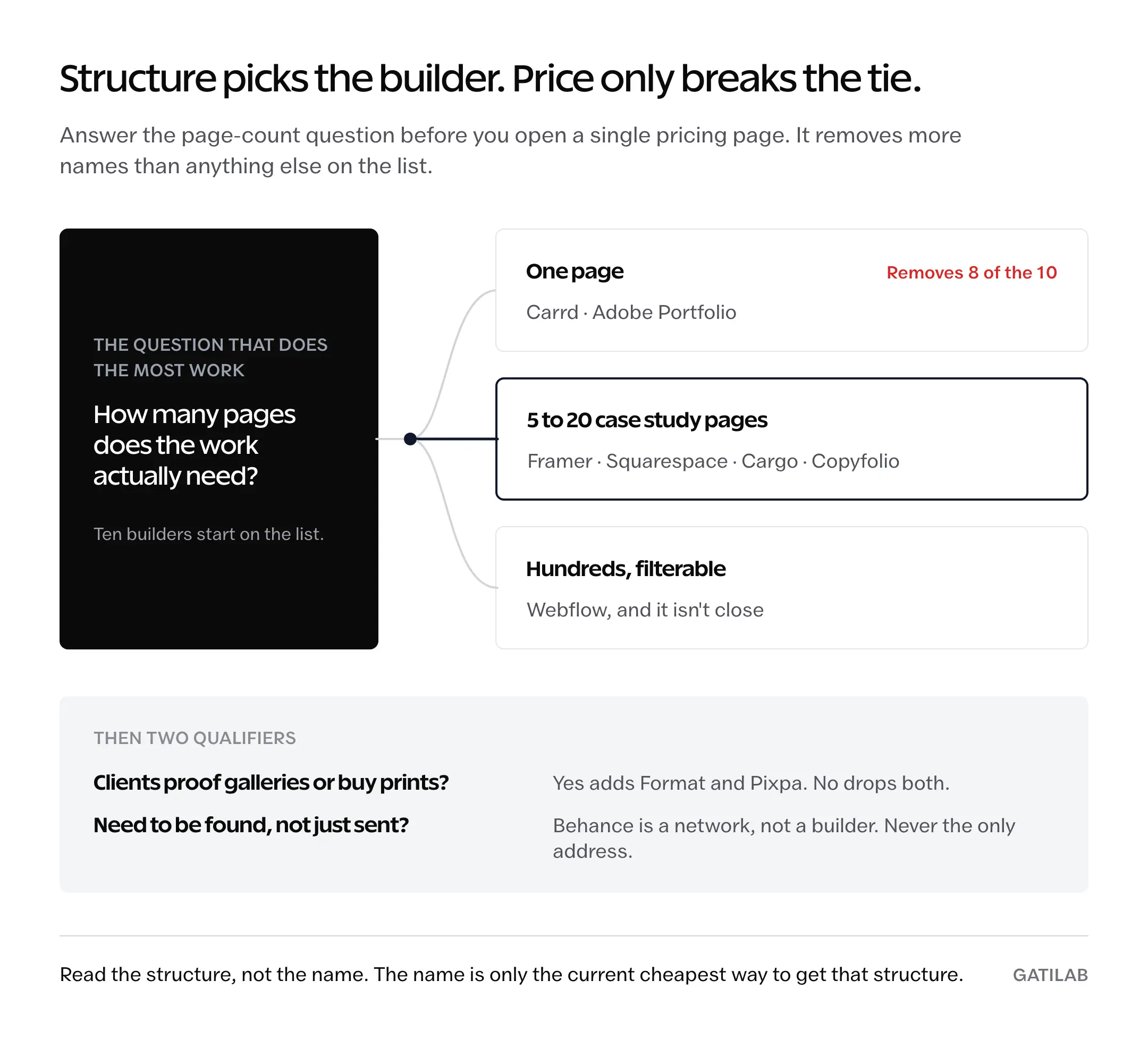
Three questions decide this, and they take about a minute. The answers point at a builder before you look at a single price.
1. Is the work visual or written? 2. Do you need one page, 5 to 20 case study pages, or hundreds of filterable entries? 3. Do you need to sell prints or proof files with clients?
Answer 3 with no and you’ve eliminated the two most expensive tools on this list.
Answer 2 with “one page” and you’ve eliminated eight of them.
| What you make | Structure you need | Start with | Second look |
|---|---|---|---|
| Product and UX design | 5 to 12 case study pages | Framer | Webflow |
| Brand and graphic design | Visual pages with strong type | Squarespace | Cargo |
| Large or filterable body of work | Real CMS collections | Webflow | Framer |
| Photography, client work | Galleries plus proofing | Format | Pixpa |
| Photography, selling prints | Galleries plus a store | Pixpa | Format |
| Development and technical work | One page, links out to code | Carrd | Framer |
| Illustration and art direction | A layout nobody else has | Cargo | Squarespace |
| Copy and content | Case studies with results | Copyfolio | Carrd |
| Anything, and you pay Adobe already | Whatever is free | Adobe Portfolio | Behance |
| Anything, and you need to be found | A network, not a site | Behance | Adobe Portfolio |
Read the middle column, not the third. The structure is what you’re actually buying; the name in the third column is just the current cheapest way to get it.
Three builders cover visual case studies. They fail differently.
This is where most designers land, and where the choice is genuinely close. All three produce a fast, modern, multi-page site. They diverge on how much of your weekend they take and how much they’ll hold as the portfolio grows.
Framer
The default pick for product and UX designers, mostly because the editor thinks the way you already do. Framer began as a prototyping tool, and the canvas still behaves like one: drag a component, resize it, set the breakpoint visually, publish.
The free plan gives you a framer.website subdomain, 1 GB of bandwidth, and a credit allowance, but no custom domain. Framer’s Basic plan is where a portfolio actually starts, at $10 a month with a custom domain, 50 GB of bandwidth, and 2 CMS collections. Pro runs $30 a month and adds staging, redirects, and 10 collections. Extra editors are $20 a month each, which matters if a studio shares the site.
Where it stops: the CMS is deliberately shallow. Two collections on Basic covers projects and maybe posts. If your portfolio needs work filtered by industry, tool, and year at the same time, you’ll hit the ceiling and start working around it.
Squarespace
The safe pick for brand and graphic designers whose work is mostly image. Typography defaults are strong, galleries and video backgrounds work without custom code, and the editor forgives mistakes in a way Webflow does not.
Note that the plan names in older comparisons no longer exist. Personal and Business were retired in the late 2025 restructure, and Squarespace’s current lineup is Basic at $16 a month, Core at $23, Plus at $39, and Advanced at $99, all on annual billing. There’s no free tier, only a 14-day trial, though annual plans include a free domain for the first year and cut 28% to 36% off the monthly rate. Basic is enough for a portfolio; the higher tiers are selling you commerce you don’t need.
Where it stops: weight. Squarespace sites carry more JavaScript than Framer or Webflow output, and on a gallery-heavy page on mobile you’ll feel it. If you’re weighing it against a self-hosted route, we’ve covered how WordPress and Squarespace compare on control and cost in more depth.
Webflow
The pick when the portfolio is large enough to be a database. Webflow’s CMS is the strongest of any no-code builder: real collections, reference and multi-reference fields, and dynamic templates that let 60 case studies filter by client type without a line of code.
Webflow restructured in May 2026, and the old advice is now wrong. CMS and Business were merged into a single Premium plan. Basic now runs $15 a month billed yearly or $25 monthly, with the static page limit raised from 150 to 300. Premium is $25 a month yearly or $39 monthly, and it includes 40 CMS collections and 20,000 items, which removes the item add-ons people used to buy separately. The free Starter plan still publishes to a webflow.io subdomain.
Where it stops: the learning curve. Webflow expects you to understand the box model, positioning, and inheritance, because it exposes all three. If you already do, it’s the most capable tool here. If you don’t, you’ll spend the time you meant to spend writing case studies learning flexbox instead.
Not a weekend.
Our WordPress vs Webflow comparison gets into where that tradeoff lands for client work.
For a portfolio under 20 projects, Framer wins on time-to-live. For anything that needs filtering, Webflow wins and it isn’t close.
Photographers need proofing and a store. Two builders include both.
Photography portfolios have a requirement no general builder handles well: the site is also the delivery mechanism. Clients need a password-protected gallery to pick from, and you need to get paid without bolting a separate store onto the site.
Format
Built for photographers and it shows in the plan structure rather than the marketing. What separates the tiers is client gallery count: 3 on Basic, 50 on Pro, 250 on Pro Plus.
That’s the number to check, because a working photographer burns through 3 galleries in a month.
Format’s annual discount is the steepest on this list. Basic is $14 a month billed monthly and $10 billed yearly. Pro drops from $24 to $12, and Pro Plus from $36 to $15. Paying yearly for Pro costs half what paying monthly does, which is unusual even in this market. The trial is 14 days with no card required, and the store is commission-free at 15 products on Pro and 1,000 on Pro Plus.
Where it stops: Basic has no store at all. If you plan to sell, Pro is the real entry point.
Budget $12.
Pixpa
The pick when the store matters more than the galleries. Where Format gates commerce behind a mid tier, Pixpa includes a zero-commission store and unlimited client gallery albums on every plan, then scales the product cap: 3 products on Basic, 10 on Creator, 100 on Professional, unlimited on Advanced. Creator runs $9 a month billed annually and Professional $12, with monthly billing roughly 40% higher. The trial is 15 days, no card.
Where it stops: the interface feels a generation behind Framer or Squarespace, and the templates show it. You’re trading polish for range.
If the portfolio is also your shop, that trade is usually worth making.
One page is enough more often than designers admit
A large share of portfolios would be better as a single page: a photo, 3 sentences, 5 links, a way to get in touch.
Especially for developers, where the actual evidence lives on GitHub and the site is a routing layer.
Carrd
The cheapest credible option on this list by a wide margin, and the only one where the price is annual rather than monthly. The free tier builds up to 3 sites on a carrd.co subdomain. Pro starts at $19 a year, which is what adds custom domains with SSL, extra sites, forms, and branding removal. There’s a 7-day trial on top.
$19 a year is less than 2 months of Squarespace Basic.
Where it stops: no CMS, no multi-page structure, no case studies. Carrd is a business card with links.
The moment you need a dedicated page per project, you’ve outgrown it.
Adobe Portfolio
The one that’s already paid for. Adobe includes Portfolio with any Creative Cloud subscription, including single-app and Photography plans, not just All Apps. Custom domains work through your DNS provider. Publishing a project in Portfolio can sync it to your Behance profile with a checkbox, though only Projects sync and Custom Pages don’t.
Where it stops: customization runs out quickly. The template set is small and the walls arrive early. Treat it as a line item you’ve already paid for rather than a tool you’d choose on merit, and put your energy into the projects instead.
Templates stay templates.
Behance
Not a website builder at all, which is the point. Behance is Adobe’s portfolio network: you publish projects, they get tagged, and the feed surfaces them to other designers and to people hiring. Free, permanently, with no custom domain. You get behance.net/yourname and that’s the trade.
Where it stops: you don’t own the distribution. An algorithm decides who sees the work, and a platform decision you have no say in can change your URL or your reach overnight. Use it as a discovery channel layered on top of a site you control.
Never the only address.
Two builders sell a look, not a feature list
Everything above competes on capability. These two compete on the impression the site leaves, which is a legitimate thing to buy when your work is judged aesthetically or read rather than clicked.
Cargo
The quiet pick for illustrators, art directors, and typographers since the mid-2000s. Cargo templates are deliberately strange: asymmetric grids, aggressive type, layouts that look nothing like a Squarespace site.
That’s the entire proposition.
The pricing model is unusual too. Building is free and sites on a cargo.site address stay free, with the subscription applying when you publish on your own terms. Cargo includes the first custom domain connection with every account, charges $2 a month billed yearly for additional domains, and prices its Commerce add-on at $5.50 a month billed yearly with no per-transaction cut. The subscription rate itself is the one number on this page worth confirming on their own rates page before you commit.
Where it stops: small ecosystem, fewer integrations, thinner support, and a template library a fraction of Squarespace’s size. The distinctive look is also the constraint.
Copyfolio
The only builder here that treats copy as the hero rather than the caption. Templates lead with the case study, and project entries have fields for client, industry, and outcome instead of a hero image slot you have to fill with something.
Premium runs $15 a month, with yearly billing saving $72, and it’s what adds custom domains, which you can buy inside the tool or connect from elsewhere. The free route is a 7-day trial rather than a permanent free tier, so plan on paying if you go this way.
Where it stops: narrow by design. If you write and design, a generalist handles both better. If you only write, this is the one tool on the list built for you.
Self-Hosted Portfolios
WordPress is an option when you want to choose the hosting and maintain the site yourself. Its themes provide the presentation, while separate tools handle a shop or a private client workflow.
WordPress
For a photography or studio portfolio, Xenon provides image-led project layouts. Indium suits artwork and illustration, with pages for prints and commissions. Both are free themes from our WordPress product portfolio.
The theme download is free, but hosting and any form, sales or proofing tools remain separate. The practical tradeoff is maintenance: you control the site and also own its updates, backups and integrations.
Almost every price on this list moved within a year
This is the part that makes most portfolio builder roundups quietly useless. Squarespace retired the Personal and Business names. Webflow merged CMS and Business into Premium in May 2026 and raised Basic. Framer’s entry tier is no longer the sub-$10 figure most comparisons still quote. Any article that lists a builder’s price without the plan name and the billing period is describing a market that has already changed.
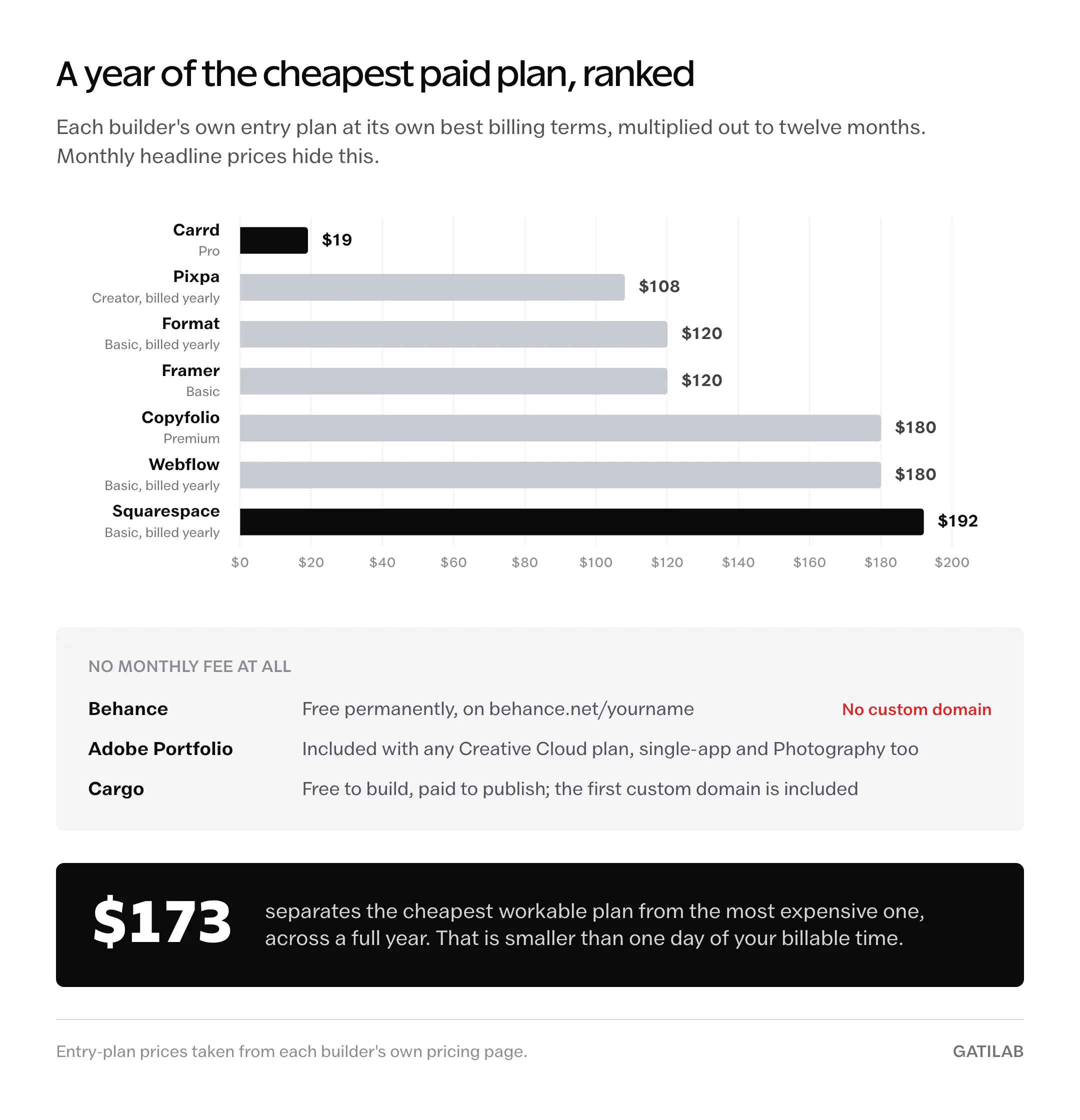
Here’s where the entry prices sit now, cheapest first.
| Builder | Cheapest paid entry | Free route | Custom domain on entry plan |
|---|---|---|---|
| Behance | None, it’s free | Free permanently | No |
| Adobe Portfolio | Included with any Creative Cloud plan | None standalone | Yes |
| Cargo | Free to build, paid to publish on your own domain | cargo.site address | First one included |
| Carrd | $19 per year (Pro) | 3 sites on a subdomain | Yes |
| Pixpa | $9 per month billed yearly (Creator) | 15-day trial | Yes |
| Format | $10 per month billed yearly (Basic) | 14-day trial | Yes |
| Framer | $10 per month (Basic) | Subdomain, 1 GB bandwidth | Yes |
| Copyfolio | $15 per month (Premium) | 7-day trial | Yes |
| Webflow | $15 per month billed yearly (Basic) | Starter on a subdomain | Yes |
| Squarespace | $16 per month billed yearly (Basic) | 14-day trial | Yes, plus a free domain for year 1 |
The spread between the cheapest workable option and the most expensive is roughly $170 a year. That’s real, but it’s smaller than one day of your billable time, which is why structure should decide this and price should only break a tie.
Structure first.
One more thing worth checking before you pay: whether the entry plan takes a custom domain. A builder advertising $10 a month that pushes domains to the second tier isn’t a $10 builder. On this list, only Behance genuinely can’t give you one, and that gap matters more than the monthly fee when you’re sending the link to someone deciding whether to hire you.
What no builder on this list will do for you
Every tool here solves the same narrow problem: turning files into pages. The parts that decide whether the portfolio works are the parts none of them touch.
- None of them chooses your 5 projects. Selection is the single highest-leverage decision in a portfolio and it’s entirely yours. A builder will happily display 22 mediocre projects at the same speed as 5 strong ones.
- None of them writes the case study. The template gives you a heading and a body field. The brief, the constraint, the decision you made, and what happened afterward have to come from you, and that’s the writing that separates a portfolio from a gallery.
- None of them brings traffic. Portfolios are sent, not found. Behance is the one exception here and it’s a network rather than a builder. If you want the site to also rank, that’s a separate discipline, and the design decisions that affect search visibility mostly happen outside the portfolio use case.
- None of them exports a portable site. A Framer site doesn’t move to Webflow, and a Squarespace site doesn’t move anywhere without a rebuild. Switching means redoing the layout, so the choice is stickier than the monthly price implies. This is the same lock-in problem that shows up in any CMS selection decision, just at a smaller scale.
- None of them makes a popular template look uncommon. Reviewers who see portfolios all week recognize the defaults. If you use a widely-used template unmodified, expect the layout to read as familiar, and put the distinctiveness in the work and the writing instead.
What quietly kills a good portfolio
These aren’t errors. Nothing breaks, nothing looks obviously wrong, and the portfolio just doesn’t convert.
Adding a project instead of removing one. Every new piece is averaged against everything already there, so a 6th project weaker than your first 5 lowers the impression of all 6. The instinct to keep adding is the instinct that makes portfolios worse over time.
Rebuilding the site instead of writing the case studies. Switching builders feels like progress because it produces visible change in an afternoon. Writing up what you actually decided on a project is harder, slower, and the only part a hiring manager reads closely.
Uploading full-resolution exports and trusting the builder. Most of these tools do resize on the way in, but a 6 MB hero from Photoshop still tends to arrive heavier than it needs to be, and a portfolio that stalls on a phone loses the visitor before the work renders.
Burying contact behind a form nobody monitors. Contact forms on portfolio sites route to an inbox the owner checks monthly, if at all. Put a real email address on the page and answer it within a day, because the opportunity cost of a missed message is the entire point of having the site.
Treating the About page as filler. It’s usually the second page visited, and for freelance work it’s often where the decision gets made. A paragraph about what you’re good at and who you work well with does more than another gallery row.
Shipping on a subdomain and calling it finished. The site works, the work is visible, and yourname.builder.com is doing quiet damage on every link you send.
The five projects outlive the platform
Most people researching portfolio website builders aren’t stuck on the tool. They’re stuck on the work, and the research is what stalling looks like when it wants to feel productive. Comparing 10 builders is genuinely easier than deciding which project was your best and writing 400 honest words about why.
The honest trade is this: any builder on this list will hold a good portfolio, and none of them will rescue a thin one. Framer if you want the shortest path to a modern multi-page site. Webflow if the work needs a real database. Carrd if one page is the truth. Format or Pixpa if clients and prints are part of the job.
Then close the comparison tabs and go write the case studies.
Tell Google you want more of this.
Add Gatilab as a preferred sourceOne tap, and this site shows up more often in your own Top Stories, AI Overviews and AI Mode. Remove it any time.