
Responsive Display Ads: Characteristics, Specs, and Examples
Responsive display ads are Google Ads creatives that automatically adjust their size, appearance, and format to fit nearly any available Display placement. If you came for the certification answer, that’s it. If you came because a Display campaign is spending without converting, the more useful answer is that the ad sitting in your report was assembled out of the assets you uploaded, and Google can only recombine what it was handed.
Most advertisers running Display land in one of two camps. The first treats the format as a banner machine, uploads 2 images and 5 rewrites of the same headline, then concludes Display doesn’t work. The second refuses to give up layout control, commissions a full library of fixed banner sizes, and pays a designer for coverage that one asset set would have produced in an afternoon.
The asset set is the campaign.
What Is a Characteristic of Responsive Display Ads?
Automatic adaptation. Google Ads Help says the system adjusts the size, appearance, and format of your ads to fit just about any available ad space, then uses Google AI to generate ad combinations for websites, apps, YouTube, and Gmail. That’s the sentence the certification exam is looking for.
The mechanism underneath is the part worth understanding. A responsive display ad separates the creative ingredients from the finished layout. Instead of designing one 300×250 banner and hoping it wins on enough placements, you supply headlines, descriptions, images, logos, an optional video, and a business name, and Google Ads builds a version sized for the slot, the device, and the context it appears in.
The characteristics that change how you run the campaign:
- Automatic size and format adaptation. One asset set covers inventory that would otherwise need dozens of fixed banner sizes.
- Asset-based creative input. You control the ingredients. Google controls the assembly.
- Combination testing by Google AI. The system favors asset mixes it predicts will meet the campaign goal on that placement.
- Reach across Google’s Display inventory. Google’s About Display campaigns page puts that at 35 million websites and apps, plus YouTube and Gmail.
- Ad Strength scoring. Google rates the relevance, quantity, and diversity of your ad content, and gives separate asset progress ratings for images, short headlines, and descriptions.
- Video and feed support. Videos are shown instead of images when Google Ads determines the video could perform better, and an attached feed personalizes the ad for dynamic remarketing.
- Automated asset sourcing. Google may apply asset enhancements, stock images, and AI-generated assets such as backgrounds, so check what’s switched on in the account.
Read that list as a division of labor. Google owns assembly and placement. You own every input that decides whether the assembled ad is worth a click.
Responsive Display Ads Specs
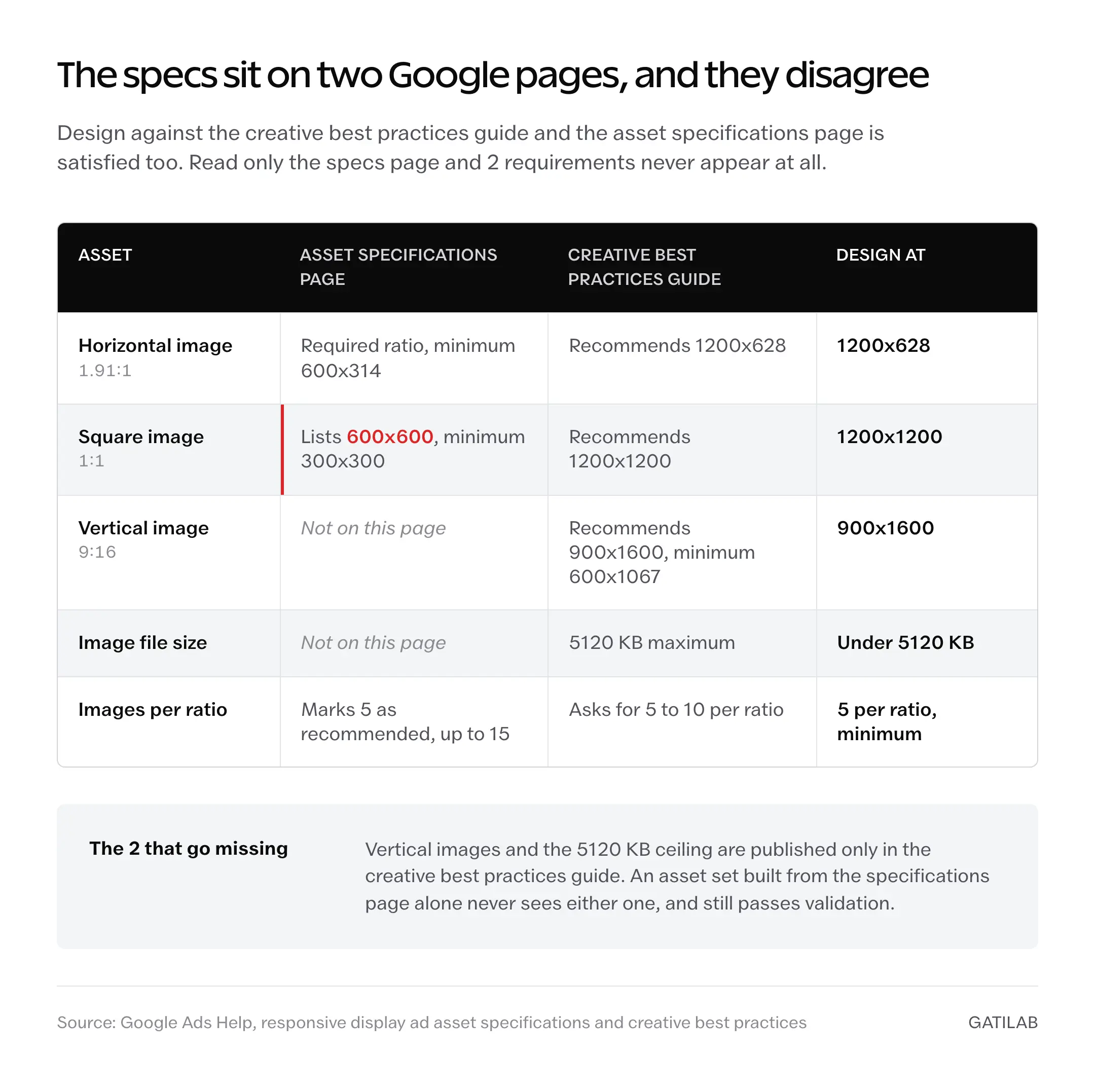
Google’s numbers sit in two different documents, and they don’t fully agree. The asset specifications page carries the text limits and the required image ratios. The creative best practices guide carries the recommended image sizes, the vertical ratio, and the file size cap. Read only the specs page and you’ll miss two things that matter.
The square image is the clearest example. The specs page lists square at 600×600 with a 300×300 minimum. The best practices guide recommends 1200×1200 for the same 1:1 ratio. Design at 1200×1200 and both pages are satisfied.
| Asset | Google’s numbers | What it means in practice |
|---|---|---|
| Short headlines | 1 to 5, 30 characters each | Five different angles, not five rewrites of one claim. |
| Long headline | 1, 90 characters | It can appear without a description, so it has to stand alone. |
| Descriptions | 1 to 5, 90 characters each | Carry the proof or detail the headline had no room for. |
| Business name | 1, 25 characters | Use the name that appears on the landing page. |
| Call to action | Automated, required | Google supplies it. Drawing your own button into an image is not a substitute. |
| Horizontal images | Up to 15, 1.91:1, recommended 1200×628, minimum 600×314 | Required ratio. Google marks 5 as the recommended count. |
| Square images | Up to 15, 1:1, recommended 1200×1200, minimum 300×300 | Required ratio. The specs page says 600×600; the creative guide says 1200×1200. |
| Vertical images | Up to 15, 9:16, recommended 900×1600, minimum 600×1067 | Optional, and listed only in the creative guide. Useful on mobile inventory. |
| Image file size | 5120 KB maximum | Stated in the creative guide, not on the asset specifications page. |
| Logos | 1 to 5, 1:1 at 1200×1200 (min 128×128) and 4:1 at 1200×300 (min 512×128) | Optional. Google recommends 1 of each shape. |
| Videos | 1 to 5, 30 seconds preferred | Optional. Google recommends 2. |
Treat the minimums as an entry ticket rather than a target. A campaign that clears validation and nothing more is asking the system to optimize with almost no material.
Launch floor for one responsive display ad: 5 horizontal images at 1200×628, 5 square images at 1200×1200, 2 vertical images at 900×1600, 1 square logo, 1 landscape logo, 5 short headlines that each do a different job, 1 long headline that reads on its own, 3 descriptions, and conversion tracking confirmed before the campaign serves.
Google’s own creative guide asks for 5 to 10 images per aspect ratio, so that floor sits below the recommendation rather than above it. Conservative, not aggressive.
The file allowance is also worth noticing next to the older format. Static uploaded GIF, JPG, and PNG image ads carry a 150 KB maximum, against 5120 KB for responsive display ad images. That’s roughly 34 times the headroom, which is one practical reason asset-based creative is easier to keep sharp. Paid social works the same way, where the platform’s published sizes and safe zones decide whether the creative survives the crop, and Gatilab’s guide to Instagram Story ads specs and safe zones covers the Meta side of that.
How to Set Up Responsive Display Ads
The builder takes a few minutes. The asset prep is the work. Run the steps in this order and the builder turns into data entry.
- Pick a conversion goal you can measure. Not a soft engagement metric, and not a goal whose tracking you haven’t opened in 6 months.
- Split remarketing from cold prospecting. Different ad groups, different messages. A person who read your pricing page yesterday and a stranger should not get the same 30 characters.
- Upload images at the recommended sizes. 1200×628 horizontal, 1200×1200 square, 900×1600 vertical for mobile slots. Google scales down cleanly and scales up badly.
- Add both logo shapes. Square and landscape, on a clean background, with sane padding. Add a video only when motion explains the offer better than a still frame does.
- Write 5 short headlines that do 5 jobs. One benefit, one proof point, one offer, one objection handler, and one urgency line if the urgency is real. 30 characters each.
- Write the long headline as a complete thought. It has 90 characters and may run without a description beside it. Then write 3 descriptions that add what the headline couldn’t.
- Match the final URL to the promise. The page should show the same offer, price, and call to action the ad used, above the fold.
- Confirm tracking, then stop touching it. Fire a test conversion before launch and leave the campaign alone long enough to produce a reading.
That last step has no published number behind it. Google ties asset performance labels to statistically significant data rather than a fixed window, and it publishes no learning period for Display. Treat 1 to 2 weeks as a working habit before editing, not as a Google specification. What is worth verifying before launch is the measurement itself, because a Display campaign with broken tracking is guesswork with a budget attached, and Gatilab’s walkthrough on tracking link clicks with UTM parameters covers where that usually breaks.
Good and Bad Asset Sets
Google’s creative best practices guide is direct about images. Avoid shots that are blurry, color-inverted, excessively filtered, outlined with a border, unclear, upside-down, or visually skewed. Don’t overlay a logo on top of an image. Avoid inserting text on top of an image. Use single images, because collages aren’t recommended. Don’t display products over digital composite backgrounds.
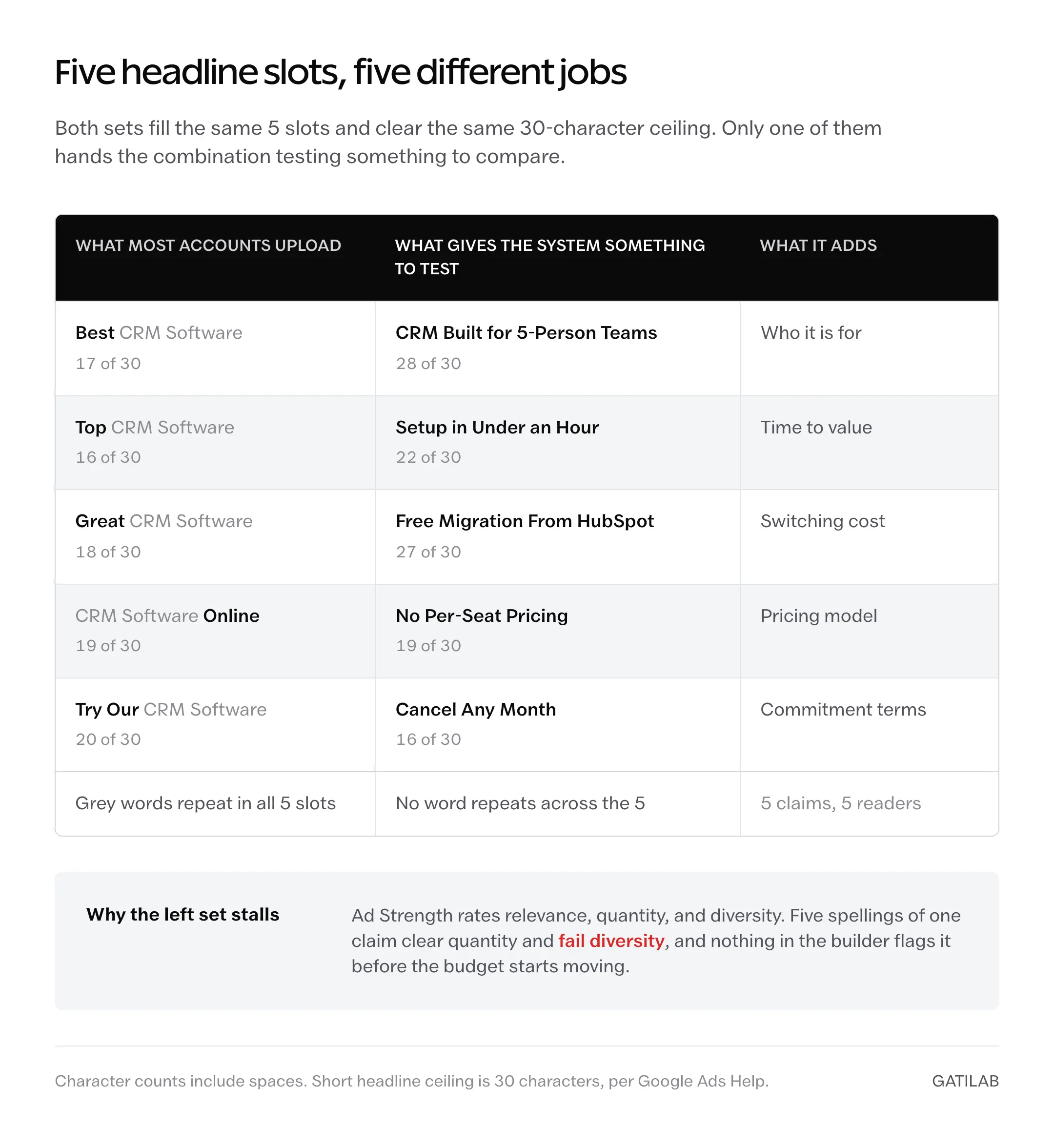
Headlines fail more quietly, because nothing in the interface flags them. The difference looks like this.
What most accounts upload:
Best CRM Software
Top CRM Software
Great CRM Software
CRM Software Online
Try Our CRM Software
What gives the system something to test:
CRM Built for 5-Person Teams
Setup in Under an Hour
Free Migration From HubSpot
No Per-Seat Pricing
Cancel Any Month
Same 5 slots, same 30-character ceiling. The second set hands Google 5 distinct claims to match against 5 different readers, so the combination testing has real variables. The first set is one claim spelled 5 ways, which is why Ad Strength reads it as low diversity.
| Element | Asset set that works | Asset set that wastes budget |
|---|---|---|
| Images | One clear subject, no baked-in copy, readable at 300×250. | Collages, product screenshots, heavy filters, text burned into the file. |
| Short headlines | Five jobs: benefit, proof, offer, objection, urgency. | One claim reworded five times. |
| Descriptions | Detail, proof, or terms the headline had no room for. | The headline restated, or generic filler like click here. |
| Logo | Crisp square and landscape crops with padding. | Missing, distorted, or pasted on top of the image. |
| Landing page | Same offer, price, and call to action as the ad. | Homepage where the offer has to be hunted for. |
| Measurement | Conversion tracking plus asset-level reporting. | Click-through rate read after 2 days. |
Every row on the right passes Google’s validation. That’s the trap: nothing in the builder stops you from launching the bad column.
One image rule carries policy weight rather than performance advice. Buttons drawn onto an image that promise functionality the ad doesn’t have, such as play, download, or close, violate Google Ads policy. They also spend trust you’ll need after the click. Display copy is constrained by design, which is the opposite of long copy ads, where more words produce more sales, and the two disciplines rarely transfer cleanly.
Responsive Display Ads vs Static Display Ads
Responsive display ads win on coverage, testing speed, and setup cost. Static uploaded ads win when someone has to approve the final pixel. Plenty of accounts run both, using responsive ads for reach and a handful of fixed banners for the placements where art direction is non-negotiable.
| Question | Responsive display ads | Static uploaded display ads |
|---|---|---|
| Creative control | Lower. Google decides the final layout. | Full. You control every pixel. |
| Placement coverage | Higher, because the ad reflows into more slots. | Limited to the sizes you built. |
| Testing speed | Faster. The system compares combinations for you. | Slower unless you produce many versions by hand. |
| Brand and legal review | Harder, because the rendered combination varies. | Easier. The approved file is what serves. |
| File constraints | Images up to 5120 KB. | GIF, JPG, and PNG image ads capped at 150 KB. |
| Best fit | Prospecting, remarketing, asset testing, small creative teams. | Regulated claims, luxury brands, fixed promotions, exact art direction. |
Pick on the review requirement first, then on budget. If every rendered combination needs a signature before it serves, no amount of reach makes the responsive format workable. Static wins there.
Google publishes two numbers alongside this comparison. Advertisers running both uploaded image ads and responsive display ads saw, on average, 50% more conversions at a similar cost per action than image ads alone. And responsive display ads carrying multiple headlines, descriptions, and images drove 10% more conversions at the same CPA as an ad with a single set of assets. Both are undated vendor observations with no published methodology behind them. Directional only.
The larger budget question sits above the format choice. Gatilab’s breakdown of when to use SEO and paid ads together is the decision that should come first, because Display buys reach and rarely buys intent.
Responsive Display Ads vs Performance Max
Performance Max isn’t responsive display ads with a wider net. Google describes it as a goal-based campaign type that reaches all of your Google Ads inventory from a single campaign, across YouTube, Display, Search, Discover, Gmail, and Maps, with Google AI applied to bidding, budget optimization, audiences, creatives, and attribution.
Different jobs.
- Remarketing to known site visitors. Responsive display ads, where audience controls stay visible.
- Broad conversion growth across Google channels. Performance Max.
- Strict placement exclusions or Display-only testing. Responsive display ads.
- Shopping feed, local goals, or full-funnel automation. Performance Max.
- Diagnosing creative by Display asset type. Responsive display ads, because the asset report is per asset type.
Moving to Performance Max because a Display campaign is messy usually relocates the mess somewhere harder to see. Fix conversion tracking, audience structure, landing page relevance, and asset quality first, then decide whether cross-channel automation is worth the reporting you give up.
Where Display Campaigns Are Moving Next
Google is moving Google Display Ads campaigns into Demand Gen. A phased rollout of the migration tool began in June 2026, and eligible advertisers can move existing Google Display Ads campaigns to Google Display Network on Demand Gen themselves. Two further milestones are published without dates: new Google Display Ads campaigns will only be creatable inside Demand Gen, and remaining eligible campaigns will be migrated automatically with no advertiser action. Google’s Demand Gen migration page carries the key dates block.
Google publishes no 2027 dates on that page. Any hard cutoff quoted on agency and PPC news blogs is somebody else’s number, so treat it as unsourced until it appears in Google’s own key dates block.
The campaign path changes. The asset discipline doesn’t.
The Limits
Responsive display ads solve assembly. They leave the expensive parts exactly where they were.
- They can’t fix a landing page mismatch. Google assembles the creative and never touches the page the click lands on, so an ad promising free migration still fails if the page buries it.
- They can’t manufacture creative variety. Five crops of one photograph is one image with four extra filenames, and Ad Strength reads diversity, not file count.
- They can’t give a readable asset report on a short flight. Performance labels appear only after assets accumulate statistically significant data, so a 10-day promo can end before any label exists.
- They can’t offer per-layout approval. If a brand or legal team must sign off on every rendered combination, static uploads are the honest answer rather than a workaround.
- They can’t be specced from one Google page. Vertical images and the 5120 KB file cap appear only in the creative best practices guide, not on the asset specifications page.
- They don’t cover every Display metric. Google scopes engaged-view conversions to Display campaigns that include video assets, so an image-only set won’t report them.
What Quietly Ruins Performance
None of these look like mistakes while they’re happening.
Uploading 2 images because the ad passed validation. Validation is a floor, not a signal, and a system with 2 images to compare spends its first week learning almost nothing about your creative.
Using product screenshots as primary images. They read fine on the desktop where they were captured and collapse into gray rectangles in a 300×250 slot, which means the highest-volume placements get the weakest asset.
Judging Display by click-through rate after 2 days. Display usually assists demand rather than capturing it at the last click, and a CTR read that early mostly measures which placements happened to serve first.
Editing the campaign every morning. Each meaningful change resets the data the system was accumulating, so the account never gets a clean read on any single version and the optimization never compounds.
Sending every click to the homepage. Display traffic arrives with no intent and less patience than search traffic, and a page that doesn’t confirm the ad’s promise on the first screen sends it straight back at full cost.
Leaving automated asset settings unreviewed. Asset enhancements, stock images, and AI-generated backgrounds can be applied on your behalf, and learning that from a client is considerably worse than learning it from the settings page.
The landing page item is the costly one on that list, because it wastes every click rather than some of them. If the page is the bottleneck rather than the ad, Gatilab’s 14-day form optimization sprint targets the step where most paid traffic actually quits.
FAQs on Responsive Display Ads
How many images should a responsive display ad have? Google’s creative guide recommends 5 to 10 images per aspect ratio and allows up to 15, while the asset specifications page marks 5 as the recommended count for both required ratios. Below 5, the combination testing has very little to compare.
Are responsive display ads better than static display ads? For reach, testing speed, and setup cost, yes. For exact art direction, regulated claims, or layouts that need approval before they run, no. Accounts with a design team often keep a small static set for those placements and run responsive ads everywhere else.
Does a responsive display ad need a video? No. Video is optional, at 1 to 5 videos with 30 seconds preferred and 2 recommended. Google serves it instead of an image only when it determines the video could perform better.
Why avoid text on responsive display ad images? The assembled layout already overlays your headline and description. An image carrying its own copy produces duplicated or unreadable text at small sizes, which is why Google’s creative guide advises against inserting text on top of an image.
Final Remarks
Display campaigns don’t usually fail because the format is weak. They fail because responsive display ads make it cheap to launch something unfinished, and an unfinished launch is hard to argue with until the invoice shows up.
The trade is honest enough. You hand over layout control and get coverage, combination testing, and speed that a fixed-banner library would have cost a designer several days to match. What you never hand over is the offer, the asset quality, the page, and the measurement, and those four still decide the number at the end of the month.
Build the asset set first. The campaign is mostly data entry after that.
Tell Google you want more of this.
Add Gatilab as a preferred sourceOne tap, and this site shows up more often in your own Top Stories, AI Overviews and AI Mode. Remove it any time.