
How to Track Link Clicks With UTM Parameters
You already know you can’t see names. Every guide says so, usually in the first line, and then stops as though that settled the matter. It doesn’t. Knowing you can’t identify a person is not the same as knowing what you actually can measure, which turns out to be quite a lot.
You can track link clicks by source, by post, by device, and by country, all the way through to whatever the visitor did next, and 3 UTM parameters are what make it possible. What you cannot do is put a name on any of it.
That distinction is the whole job, and it takes about 20 minutes to set up.
The 3 layers, and what each one knows
Click data lives in 3 separate places, and most people only ever look at the weakest one. They report different numbers, none of them is lying, and the gaps between them are predictable once you know what each layer can see.
| Layer | What it sees | What it cannot see | Best for |
|---|---|---|---|
| The social platform | Profile visits, reach, and taps on your bio link | Anything after the tap | Whether the post drove attention at all |
| Your link tool | Clicks per link, rough location, device, referrer | What happened on the destination site | Which of your links people want |
| Your own analytics | Sessions, pages, time, signups, purchases | Anything before the visitor arrived, unless you tagged it | Whether the click was worth anything |
The third layer is the one that matters and the one almost nobody sets up, because it needs the click to arrive carrying a label. That label is a UTM parameter, and UTM parameters are the entire mechanism behind everything below.
What UTM parameters actually are
A UTM parameter is a tag you staple onto the end of your own URL. When someone follows the link, that tag rides along into your analytics and tells it where the visitor came from.
It’s a plain piece of text in the address, nothing more:
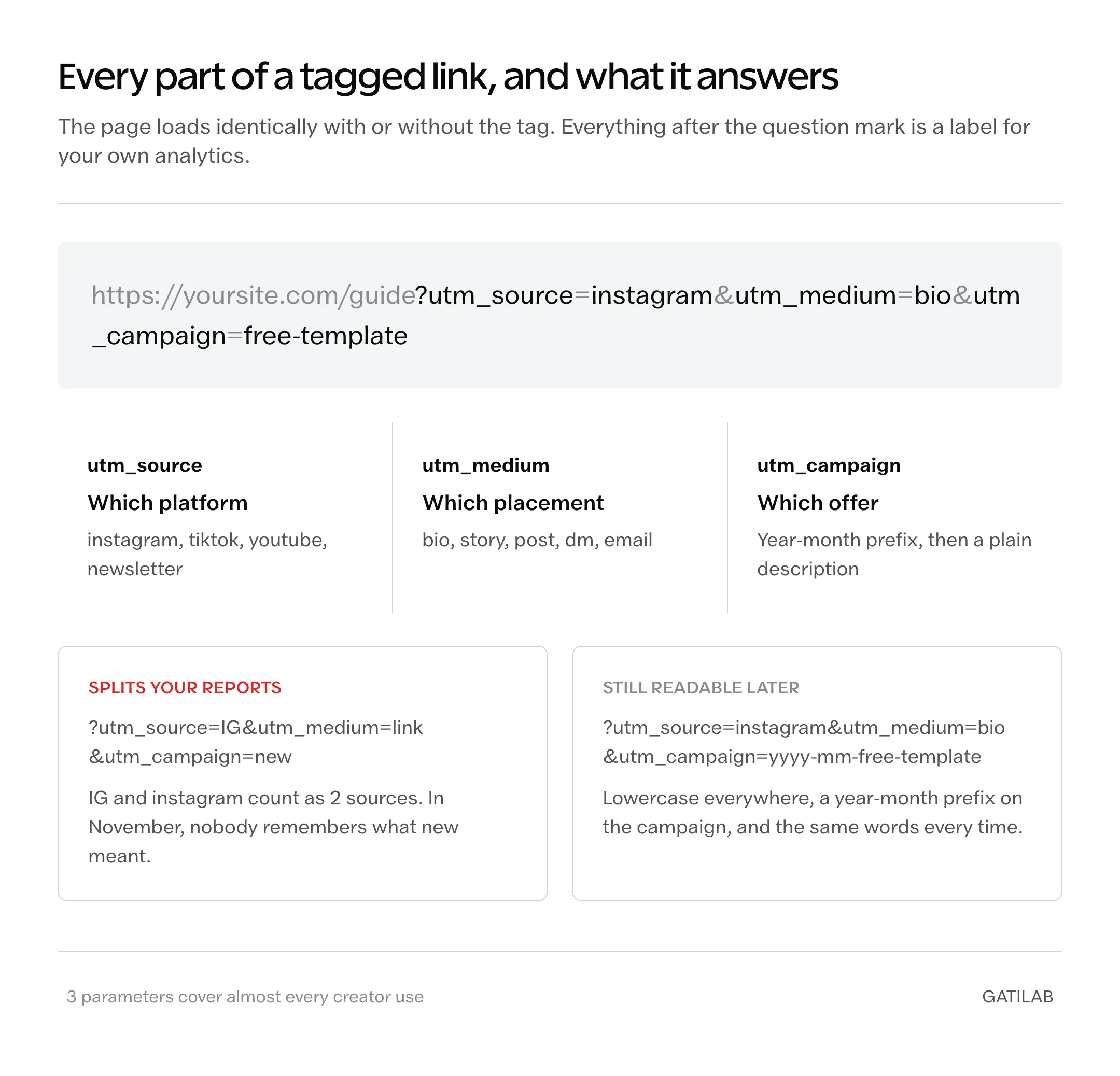
https://yoursite.com/guide?utm_source=instagram&utm_medium=bio&utm_campaign=august-launch
Everything after the question mark is the label. The page loads exactly the same way with or without it, which is why this is safe to add to anything you own.
There are 5 UTM parameters in total. You need 3 of them:
- utm_source is the platform. instagram, tiktok, youtube, newsletter.
- utm_medium is the placement. bio, story, post, dm, email.
- utm_campaign is the specific thing you were promoting. august-launch, free-template, ebook-preorder.
Skip utm_term and utm_content until you have a reason. They exist for paid search and A/B tests, and adding them early just makes the reports noisier.
One rule that saves a lot of cleanup later: pick lowercase and stick to it. Analytics treats Instagram and instagram as 2 different sources, so a single stray capital letter splits your numbers in half.
Tagging links so the results stay readable
The UTM parameters themselves are easy. Being consistent about them is the part people get wrong, and inconsistency is expensive because it cannot be fixed retroactively.
What most people do:
?utm_source=IG&utm_medium=link&utm_campaign=new
What works better:
?utm_source=instagram&utm_medium=bio&utm_campaign=2026-08-template
Same effort, and the second one is still legible in November. The first produces a report full of IG, ig, Instagram, and instagram, with campaigns called new, new2, and newest, none of which you will be able to tell apart.
Give the campaign a date prefix and a plain description. Your future self is the primary user of this system, and they will not remember what new meant.
A small thing worth doing once: keep a note listing every tag you use. When you add the 40th link you will want to check what you called the last one rather than invent a synonym.
The 20-minute setup
This assumes you have a site you control and any analytics installed on it. If you don’t have analytics yet, install something first, because the tags have nowhere to land otherwise.
- Pick the 3 to 5 destinations you actually send people to. Not every URL, just the ones you link from social.
- For each, write the tagged version using the source, medium, and campaign structure above. Keep them in a note or a spreadsheet.
- Put the tagged URLs into your link in bio page, replacing the untagged ones.
- Tag the links in your email footer, newsletter, and anywhere else you routinely send traffic from. Different source, same structure.
- Wait a week. Do not check it hourly, because low daily numbers look alarming and mean nothing.
- Open the traffic acquisition report in your analytics and group by source and medium.
At the end of that week you will be able to say which platform sends people, which specific link they wanted, and whether any of them did the thing you cared about. None of which the platform’s own dashboard will ever tell you.
Reading the numbers without fooling yourself
The reports will disagree with each other. That is normal and worth understanding before you go hunting for a bug that isn’t there.
Your link tool will report more clicks than your analytics reports sessions, often 20% to 40% more. Both numbers are correct. A click is counted when someone taps; a session is counted when a page finishes loading and the tracking script runs. People tap and change their mind, connections drop, and the gap between those 2 events is real.
Treat the link tool’s number as demand and your analytics number as arrivals. The ratio between them is itself useful, and a sudden widening usually means the page got slower rather than that anything broke.
The metrics worth actually watching are shorter than most dashboards suggest:
- Sessions by source and medium. Which platform and placement is doing the work.
- Sessions by campaign. Which specific offer people wanted.
- Engagement or time on page, split by source. Whether the traffic is curious or just passing through.
- Conversions by campaign, once you have anything worth converting to.
Everything else on the default dashboard is decoration until you have enough volume for it to mean something.
Where the tracking quietly breaks
Some honest failure modes, because a system you trust incorrectly is worse than no system.
In-app browsers distort everything. When someone taps a link inside Instagram or TikTok, the page opens in that app’s own browser rather than Safari or Chrome. Those environments handle cookies and storage differently, so the same person visiting twice can register as 2 new visitors. Returning-visitor counts from social traffic are the least reliable number you have.
UTM parameters get stripped. Some platforms and some link shorteners rewrite URLs and drop the query string on the way through. If a campaign reports zero sessions but the link tool shows clicks, test the link yourself and watch whether the parameters survive to the address bar.
Self-referral pollutes the data. Clicking your own links, especially while logged in, adds sessions that look like real traffic. Filter your own activity out early, before the habit sets in.
And none of this reaches identity. Aggregate patterns are what the system produces, by design and by law. If a tool promises to name the individual who tapped your bio link, it is either guessing from a tiny logged-in overlap or selling you something it cannot deliver.
The reports still cannot tell you why
Worth naming the ceiling plainly. This setup answers where a visitor came from and what they did. It never answers why, and the temptation to infer intention from a bounce rate is where most people start making things up.
A 15-second visit might mean the page was wrong, or it might mean someone got exactly the fact they needed. The numbers are identical. Only asking people, or watching what they do next over several weeks, separates those cases.
Small numbers also lie loudly. Under a few hundred sessions per source, a single unusual day moves every percentage enough to invent a trend that isn’t there. Look monthly, not daily, until the volume justifies otherwise.
The system is a compass, not a microscope. It reliably tells you which direction is working, and it will not tell you what any individual person was thinking.
Questions people ask next
Tags you add to the end of your own link. When someone follows it, the tags travel into your analytics and record where the visitor came from. The page loads exactly the same way, which is why they are safe to add to any URL you control.
Three. utm_source for the platform, utm_medium for the placement and utm_campaign for the specific offer. The other 2 exist for paid search and A/B tests, and adding them early just makes the reports harder to read.
They count different events. A click is recorded when someone taps, a session when the page finishes loading and the tracking script runs. A gap of 20% to 40% is normal, and widening usually means the page got slower.
Mostly, but not reliably. In-app browsers handle cookies and storage differently, so returning visitors often register as new and some parameters get stripped in transit. Test your own link from inside the app rather than assuming.
No. They label the source of a visit, not the person making it. Everything they produce is aggregate, and no combination of tags turns anonymous traffic into named individuals.
Measure the arrival, not the audience
The question people start with is who clicked. It feels like the important one, and it’s the one every platform refuses to answer, so the search usually ends in frustration and a dashboard nobody opens twice.
The more useful question was always which of the things you make people want, and that one is fully answerable with 3 tags and a week of patience. The identity question has a settled answer, and once you stop asking it, the measurable part gets a lot more interesting.
If you are still choosing where the links themselves should live, the reporting differences between the platforms are large and worth knowing before you commit, which is covered in the comparison of link in bio tools by what they actually report.
Tag 3 links today. Check them next week.
Tell Google you want more of this.
Add Gatilab as a preferred sourceOne tap, and this site shows up more often in your own Top Stories, AI Overviews and AI Mode. Remove it any time.