
GT Performance Review: Free WordPress Cache Plugin
GT Performance is a free WordPress cache plugin. It saves eligible public HTML so WordPress does not rebuild the same page for every visitor, while supported customer-specific requests bypass the shared copy. We build it at Gatilab, so this is a first-party product explanation. The plugin is GPL-2.0-or-later; the store download and protected automatic updates use an account and update entitlement separately from those usage rights.
Most people choosing a cache plugin end up in one of 2 camps. The first turns on every toggle, ships it, and finds out weeks later that a logged-in header or somebody else’s cart total went out to a stranger. The second is scared enough of that outcome to run no page cache at all and buy a bigger server instead. Both are paying for the same missing thing: a plugin that says out loud what it will never cache, then proves it on every response.
A wrong cache hit costs more than a slow page.
Where GT Performance Fits
It fits a site with something to lose from a bad cache hit, run by someone who can test on staging first. That means stores, membership sites and agency portfolios more than it means a personal blog, where almost any cache plugin does the job and the simpler interface wins on merit.
| Your situation | Verdict | Why | The catch |
|---|---|---|---|
| WooCommerce, EDD or FluentCart on a conventional stack | Good fit | Commerce paths, session cookies and AJAX routes bypass at origin and edge from 1 compiled policy | Checkout still needs a staging test before rollout |
| Agency running many single installs | Good fit | No license math at any site count, and settings move between sites as signed bundles | Fleet moves settings, not control |
| Cloudflare Free user | Good fit | Manages 1 Cache Rule and does exact-URL purging on the Free plan | A host-run Cloudflare layer can still own the copy visitors get |
| LiteSpeed server | Choose differently | LiteSpeed Cache uses the server’s own cache, which nothing in PHP can match | GT Performance would be the second owner |
| Managed host that owns page cache | Choose differently | Two page-cache owners is a bug, not redundancy | The optimization layer may still be worth it with page cache off |
| Non-technical owner of 1 site | Choose differently | Large control surface, and the risky parts expect a staging copy | A simpler paid plugin costs money and saves you decisions |
The pattern in that table is ownership. Where something else already owns the HTML cache, GT Performance turns into a second opinion nobody asked for. Pick one.
What It Costs
The plugin is free. GPL usage rights allow it to be used on your sites, while the store package has its own download and automatic-update entitlement. Follow the instructions for the package you install instead of assuming every distribution channel uses the same updater.
That matters most where per-site pricing compounds. A subscription that looks cheap on 1 site becomes a real line item across 40, and it renews whether or not that client is still with you.
Documentation and available product support can help with setup, but they are not a contractual response-time guarantee. If your business needs guaranteed incident response, arrange that separately. The caching plugin comparison explains other tools and their tradeoffs.
What GT Performance Does
WordPress rebuilds a page from scratch on almost every visit. PHP starts, the database answers a few dozen queries, plugins and the theme assemble the HTML, and only then does the visitor receive anything. A page cache saves that finished HTML the first time it is built and hands out the saved copy afterwards, so the build step never runs again.
That is where the speed comes from. It is also where the danger lives, because a cache cannot tell on its own which pages are safe to reuse. Save the wrong one and the next visitor gets somebody else's cart total, a logged-in header, or an order receipt that was never meant for them.
GT Performance is built around that second problem. Everything in its settings screen is a variation on 1 of 5 jobs.
- Serving pages from cache. A drop-in file stores the finished HTML and returns it before WordPress finishes loading. This is the part that makes a slow page fast, and it is the only part most sites need.
- Keeping Cloudflare in step. Your bypass rules compile into a single Cloudflare Cache Rule, so the copy held at the edge follows the same policy as the copy on your server. It also purges exact URLs on the Free plan, which usually needs a paid tier.
- Shrinking what the browser downloads. Unused CSS removal, JavaScript minify, defer and delay, image lazy loading and modern formats, self-hosted Google Fonts, and click-to-load YouTube embeds.
- Protecting customer state. Adapters for WooCommerce, Easy Digital Downloads and FluentCart declare which paths, cookies, query parameters and AJAX routes must never be shared between 2 people. This is what keeps a cart out of a cached page.
- Explaining itself when something looks wrong. A cache-state header on every response, a per-URL explanation, an environment doctor, a Redis object cache and a WP-CLI command set.
The product page counts 12 groups of controls, and the count is not the selling point. Turn on only the first job and you get most of the speed. The other 4 are optional, individually switchable and individually reversible, which is the entire reason the setup order below is worth following.
What It Refuses to Do
The refusals do more work here than the features, because each one is a decision not to trade correctness for a benchmark point.
- No account, no telemetry, no phone-home, and no license check in the WordPress.org build.
- No HTML minification, on the stated grounds that the saving is small and the breakage is not.
- No optimize-everything switch. The riskier transformations are individually switchable.
- No remote code path in Fleet: no file upload, no plugin installation, no PHP evaluation.
- No caching of any response that sets a cookie, is not
text/html, is not HTTP 200, or carriesno-storeorprivate.
A response that sets a cookie, declares itself private, is not HTML, or does not return 200 never becomes a shared cached page.
That is the rule the rest of the plugin is arranged around, and it is the one claim here a reader can check independently, in about 30 seconds, on any site running the plugin.
Installing It Without Breaking Things
The plugin needs WordPress 6.6, PHP 8.1 with the DOM and JSON extensions, and a writable wp-content directory. It runs on shared hosting, and nothing about it requires root access, a background worker or a paid tier of any service.
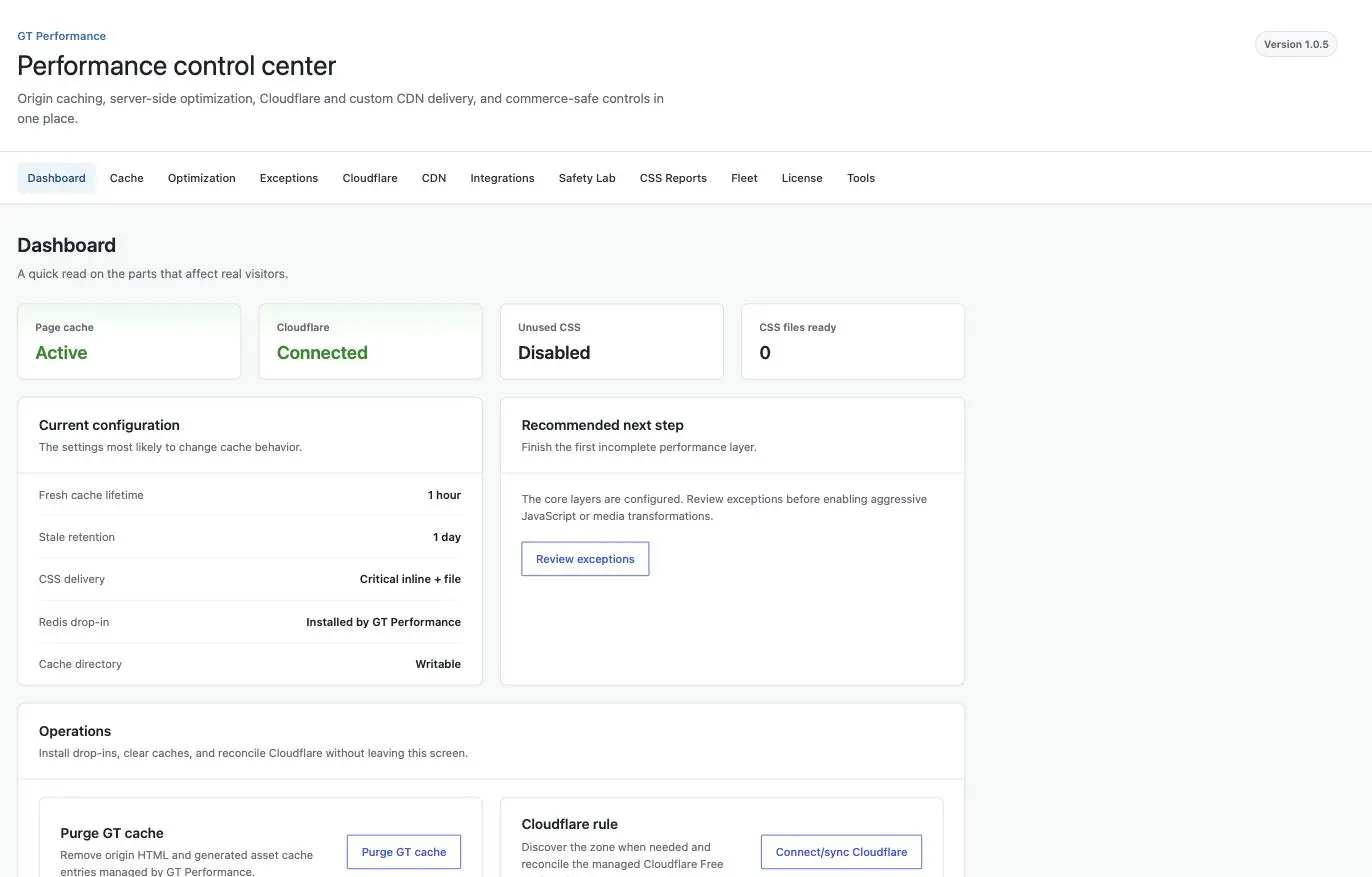
The page cache does not switch itself on when you activate the plugin. It stays configured but inactive until the plugin copies its advanced-cache.php into wp-content and adds WP_CACHE to wp-config.php. Both are 1 click from the dashboard, and both come back out when you deactivate.
After that, the documented order matters more than any individual setting:
- Page cache on its own, then leave it alone for a day.
- Media: lazy loading and image dimensions.
- Fonts: self-host the Google Fonts the site already loads.
- CSS optimization, starting at a 10 percent rollout rather than everyone.
- JavaScript, in order of risk: minify, then defer, then delay.
- CDN or the Cloudflare integration.
- Redis object cache, if the host provides Redis.
Each step is independently reversible, which is the only reason the sequence is worth respecting. Turning everything on at once means a broken checkout gives you 7 suspects instead of 1. Skipping straight to delayed JavaScript on a live store is how people end up deciding that cache plugins are dangerous.
Cache Correctness in Production
Every response carries an X-GT-Cache header naming the state it landed in, which makes the whole policy auditable from outside with nothing but curl. This site runs the plugin, so here is what gatilab.com itself returned across a set of deliberately awkward requests.
| Request condition | X-GT-Cache | Reason given |
|---|---|---|
| Unknown query parameter | BYPASS | unknown_query |
| Known tracking parameter such as utm_source | Not bypassed; the cached copy came back | none |
| Request carrying a logged-in cookie | BYPASS | cookie |
| A URL returning 404 | DYNAMIC | status404 |
The pair worth stopping on is the 2 query parameters. An unrecognized one bypasses the cache, because it could be a personalization token. A known campaign parameter does not, and the request came back as the same cached copy, because bypassing that one would hand every newsletter click an uncached page. Plenty of setups pick a single behavior and apply it to both, and either choice is wrong half the time.
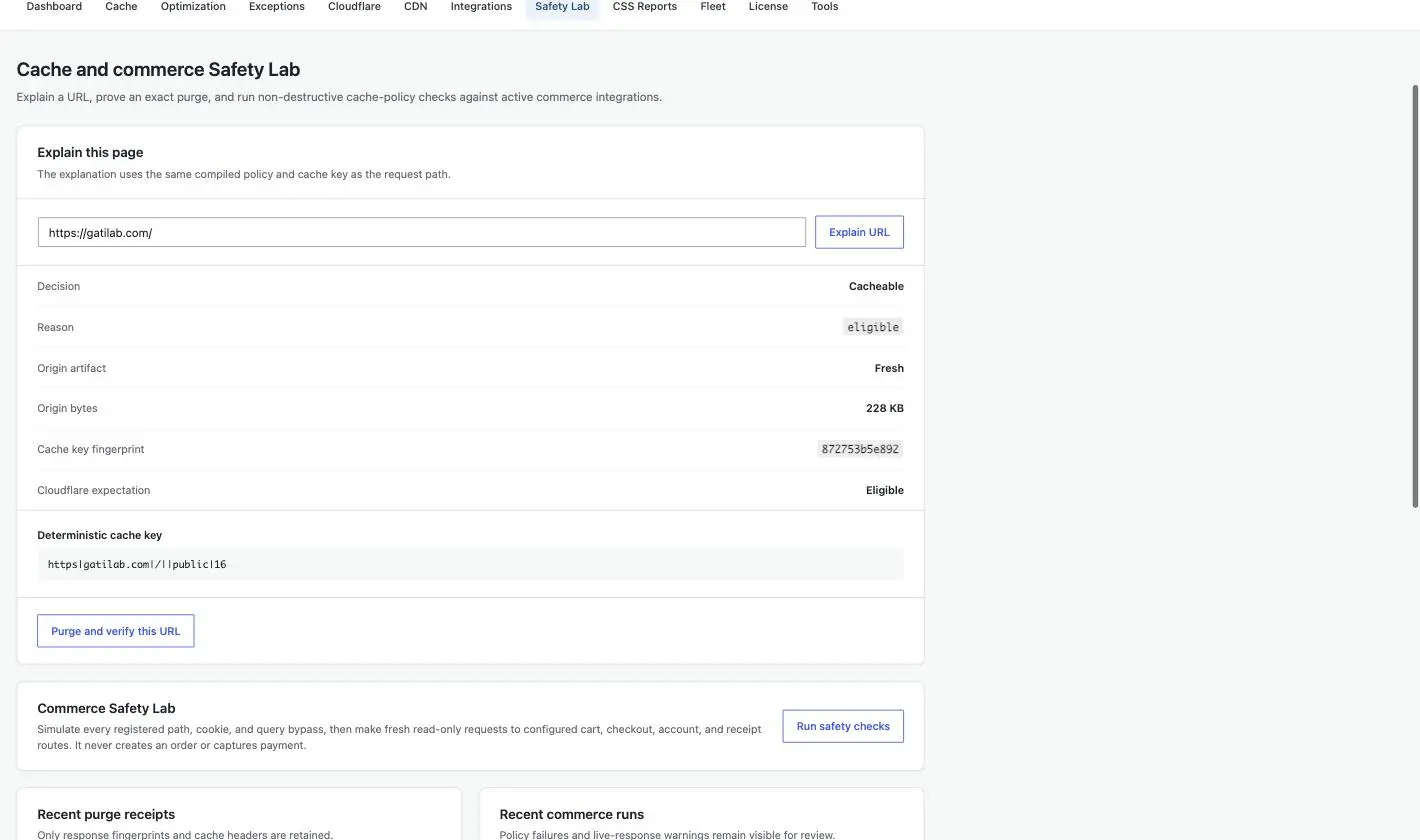
Gatilab is a services site with no storefront, so its cart and account URLs are simply 404s and prove nothing about commerce. On a FluentCart install running the same plugin, those paths return BYPASS with a path reason, which is the behavior the commerce section below is about.
The full set of states is HIT, MISS, STALE, EXPIRED, REVALIDATE, BYPASS and DYNAMIC. The distinction between the last 2 is the one that saves debugging time: BYPASS means a rule said no before anything rendered, while DYNAMIC means the page rendered and then failed response validation on the way out. The companion X-GT-Cache-Reason header, which names the deciding rule, appears when debug mode is on.
The Speed Numbers
A cache is worth whatever it saves you from doing. On the same page and from the same location, 7 cache-served responses from gatilab.com came back with a median time to first byte of 103ms. Another 7 requests, forced past the cache by attaching a parameter the policy does not recognize, made WordPress render the page and returned a median of 649ms.
Roughly 6x.
Be careful what you take from that. The fast path is a stored copy served without touching PHP, the slow path is a full render, and the gap is the value of not rendering rather than a score belonging to any one plugin. Any competent cache would show something similar on the same site. What the number does establish is that the policy is caching what it should, instead of quietly bypassing everything and leaving a plugin that looks installed while doing nothing.
Read it as 1 site, 1 location, 1 page, measured through the same edge that serves its visitors. It is evidence the cache is alive, not a benchmark against other plugins.
Cloudflare Free Integration
GT Performance manages exactly 1 Cloudflare Cache Rule, and it compiles your entire bypass policy into that rule’s expression: paths, cookies, query parameters, plus everything the active commerce adapters declare. The Cloudflare tab renders the exact expression before it syncs, which is the difference between trusting the plugin and checking it.
The behavior that earns this section is what happens at the ceiling. Cloudflare Free allows a limited number of rules and a limited expression length. When the compiled bypass policy will not fit inside them, the plugin refuses to publish it rather than sending a shortened version.
A truncated bypass rule is exactly how a checkout page ends up cached at the edge.
Refusing to sync is the worse experience and the better outcome. and it is the design decision here we would defend hardest. A partial bypass rule does not throw an error. It reports success and then leaks somebody’s cart.
Free also has no custom cache key, so query-string exclusions cannot be expressed at the edge the way they are at origin. That is a Cloudflare plan boundary rather than a plugin decision, and it is the main reason the origin policy still has to stand on its own.
The API token needs 3 scopes, and no more than 3:
- Zone → Cache Rules → Edit
- Zone → Read
- Zone → Cache Purge
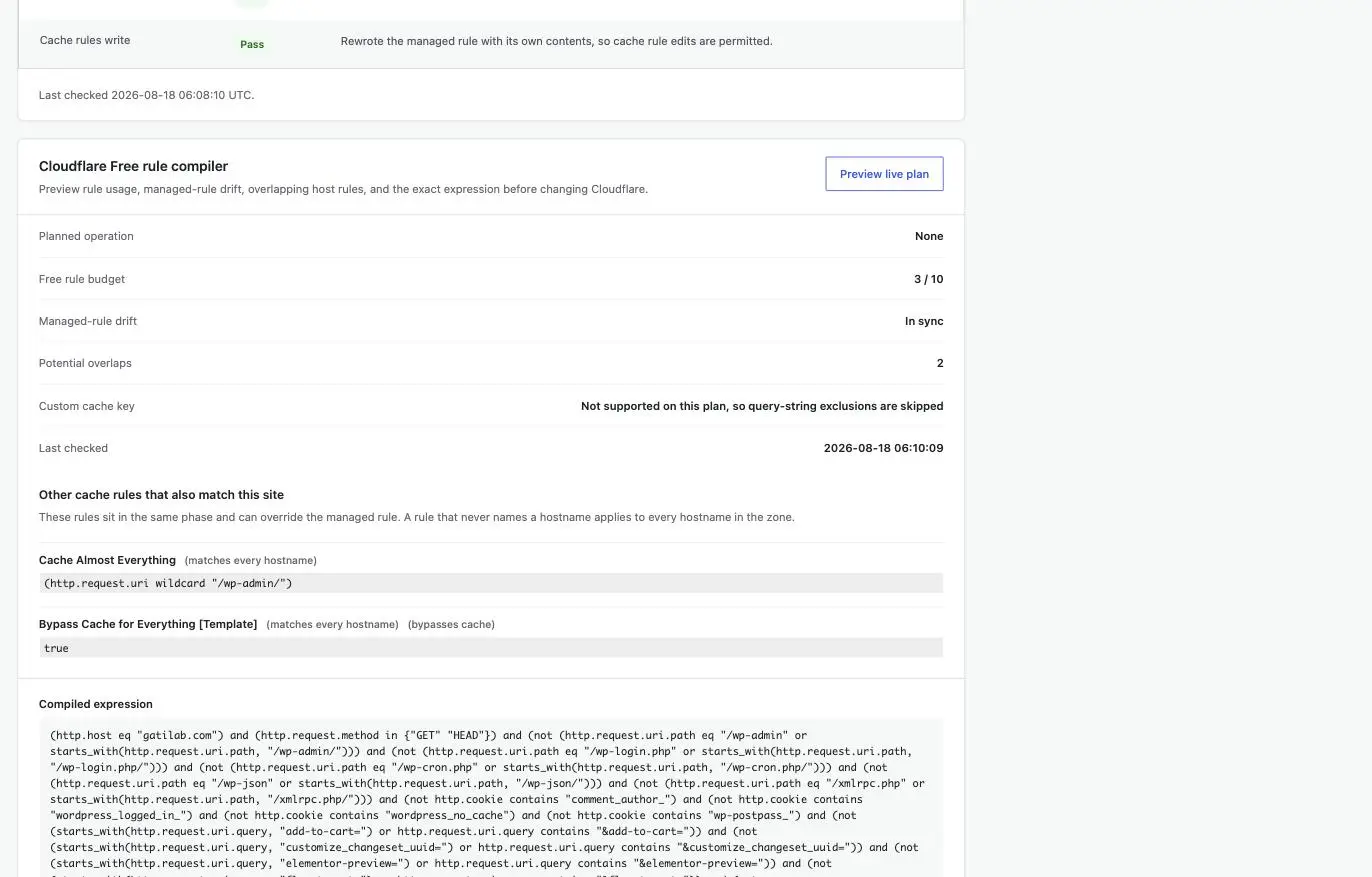
One caveat the marketing pages in this category skip: when your host runs its own Cloudflare layer, a purge can report success against your zone while the copy visitors actually receive is held by the host’s layer. GT Performance can refuse to become a duplicate owner at origin. It cannot purge a cache it has no token for, and neither can anything else you install.
Commerce Safety
Adapters for WooCommerce, Easy Digital Downloads and FluentCart switch on by themselves when those plugins are active, and each one declares the state that must never be shared between customers.
- Dynamic paths: cart, checkout, account, order-received and downloads.
- Session cookie prefixes that mark a visitor as having state.
- Commerce query parameters such as add-to-cart, wc-ajax and the FluentCart equivalents.
- AJAX endpoints that must always reach PHP.
The architectural point is that 1 compiled policy feeds both the origin bypass and the Cloudflare rule. They cannot drift apart, because there is no second list sitting somewhere waiting to be hand-edited and forgotten. Safety Lab then sends real requests at your own site to check that cart, checkout and account URLs bypass, that session cookies avoid shared entries, and that the Cloudflare expression matches the origin policy.
It never places an order, never mutates data and never writes to the cache.
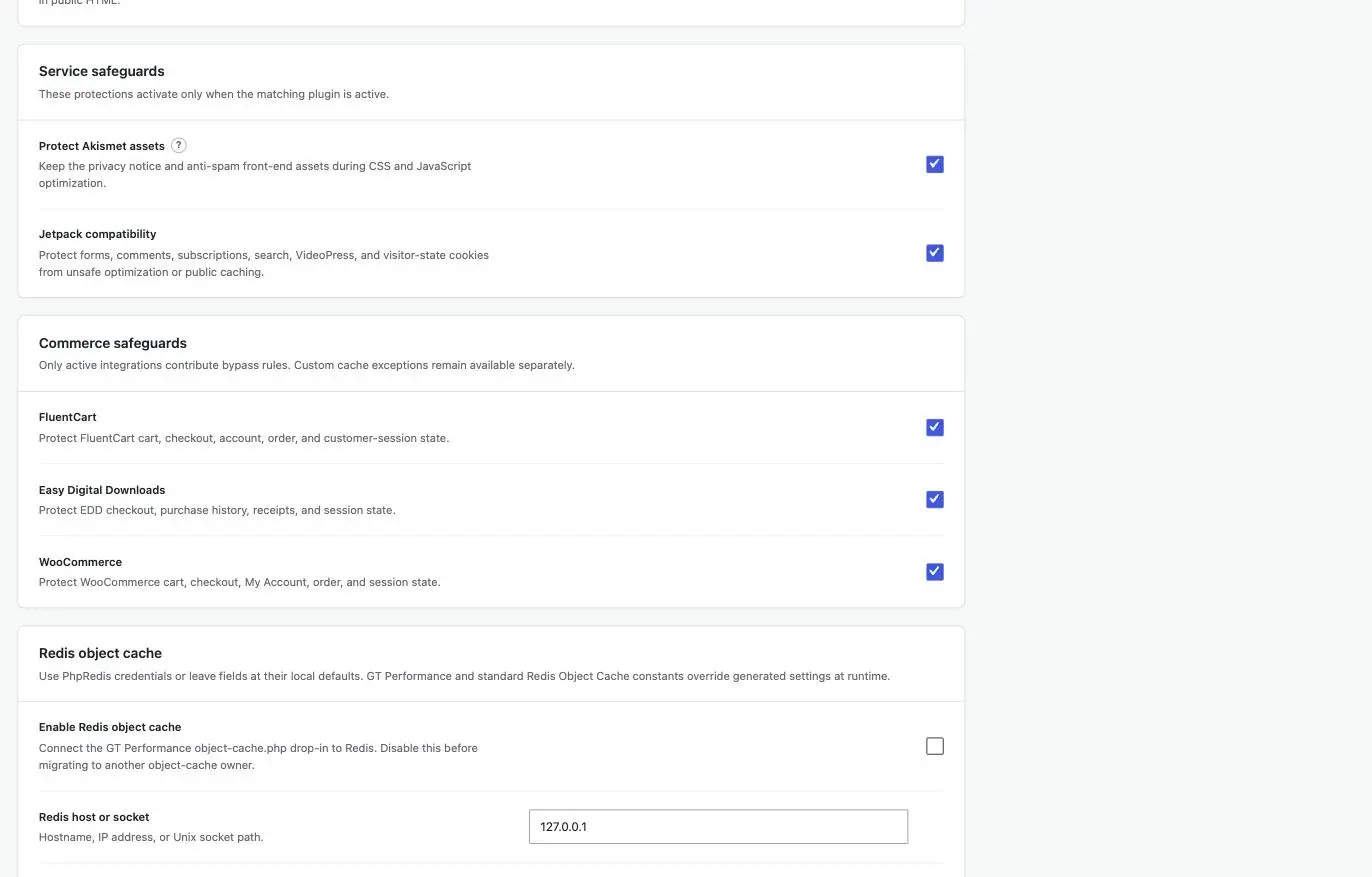
What this review can show you is the header layer, and the table above is exactly that: the commerce paths on a production site bypass, and they bypass for the reason the policy says they should. None of it substitutes for running 2 browser sessions against your own store, with your own theme and your own checkout plugins, before real orders depend on it. Test on staging.
Unused CSS and the Optimization Layer
Unused CSS is usually where a cache plugin starts sending your pages to somebody else’s server for processing. This one does not. The work runs on your own machine, and no external service ever sees your CSS. There are 3 delivery modes:
- Generated file. One fingerprinted stylesheet.
- Inline. All used CSS placed in the head.
- Hybrid. Critical CSS inline, the remainder as a file, with a 14KB critical budget that falls back to a generated file rather than shipping an oversized inline block.
Training Mode fills the gap static analysis leaves, by recording the states JavaScript creates at runtime. It stores element IDs and class names only: no text, no field values, no cookies, no customer data. Rollout runs as a percentage, and the bucketing is deterministic per cache key, so a given page is consistently optimized or consistently not.
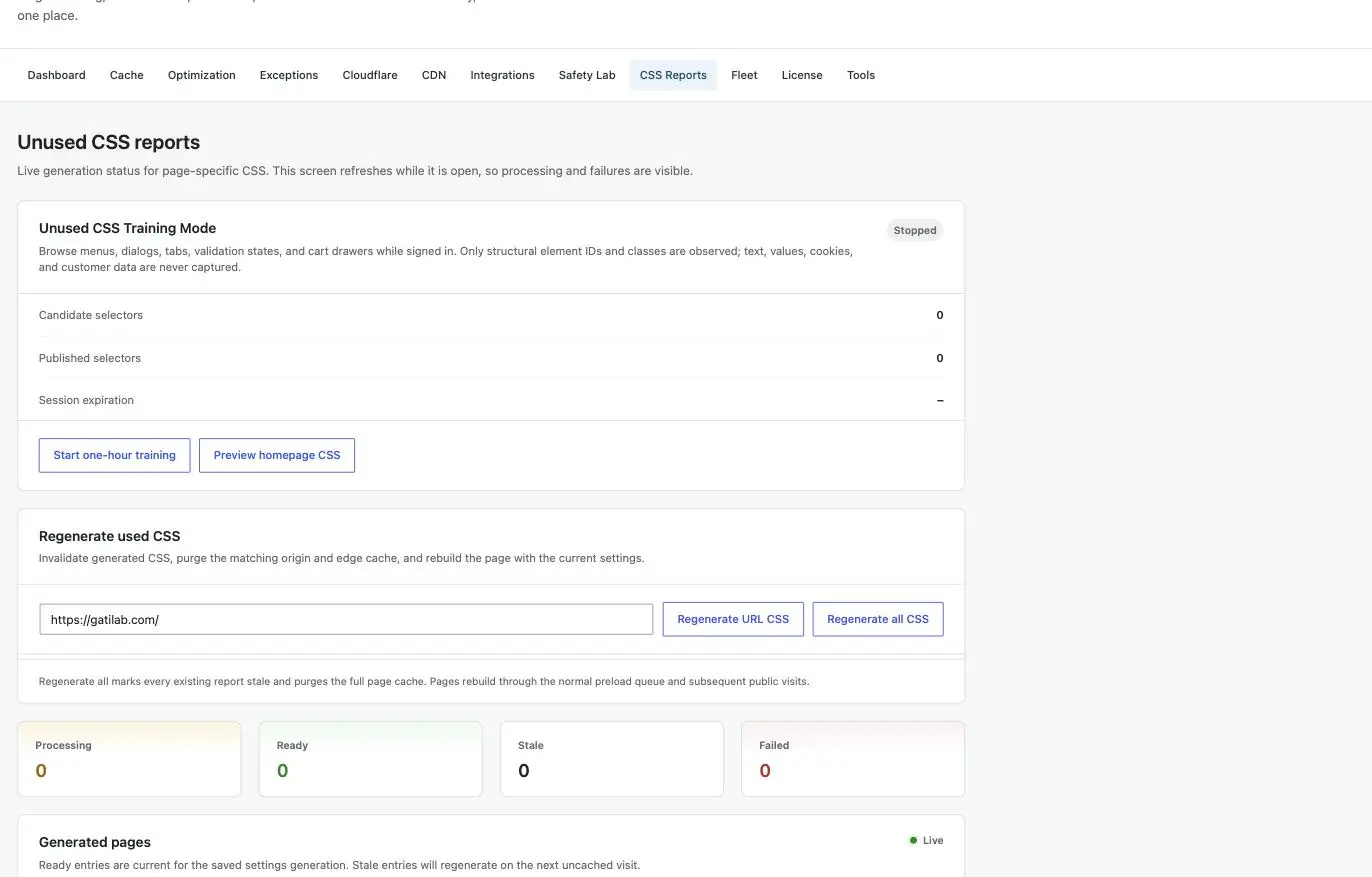
That last detail sounds like trivia and is not. Nondeterministic bucketing means a styling bug reproduces on one refresh and vanishes on the next, which is how a broken mobile menu survives a whole afternoon of testing and reaches customers anyway.
The JavaScript controls are laid out as a risk ladder rather than a single switch: minify is low risk, defer is medium, and delay is documented as capable of breaking interactive elements. Media defaults stay deliberately conservative, with the leading images excluded from lazy loading and modern-format rewriting off until you turn it on.
Fleet Is Not Remote Management
Fleet moves reviewed settings between sites. It does not connect to, monitor, update or control them, and the difference is worth stating plainly because the word fleet implies otherwise.
- Bundles are signed with a shared secret you define in
wp-config.php. - Credentials are stripped recursively before signing: Cloudflare tokens, Redis passwords, xCloud keys, and the signing secret itself.
- Exports expire after 5 minutes and are accepted once.
- The receiving site re-sanitizes against its own schema and drops unknown keys.
- Any site can refuse imports entirely.
The consequence is the part that matters: a bundle recovered from a chat log, a clipboard manager or a shell history is already useless, and it never contained a credential to leak in the first place.
The Limits
Every one of these is a reason a reasonable person would wait.
- Not in the WordPress.org directory yet. The listing is still pending, so installs come from a downloaded ZIP and updates stay manual until it lands. Across a 40-site portfolio that is 40 manual updates.
- The project is new. There is no independent benchmark history, no support-forum archive and no year of compatibility reports to read before you commit. On a site that takes money, that is a real reason to stage it rather than trust it.
- Multisite controls are incomplete. Network-wide administration is not finished, so a multisite network is not the place to try this.
- PHP 8.1 and WordPress 6.6 are hard floors. Older stacks are simply out.
- Host-owned edge caching can still hold what visitors see. The plugin refuses duplicate ownership where it can detect it, and that is all it can do.
- Support is a wiki and an issue tracker. No ticket desk, no response commitment.
And the boundary on this review, since we are the ones who wrote the plugin: the cache-state and speed evidence above comes from live response headers on 1 production site. Everything about Fleet expiry, Redis failover and cross-customer cart isolation is documented behavior we are reporting, not a third-party audit we can point you at. Verify the commerce claims on a staging copy before a store depends on them.
What Quietly Ruins a Cache Setup
None of these produce an error message. That is what makes them expensive.
Running 2 page-cache owners. It looks like belt and braces and behaves like a race condition: the host’s cache serves a copy the plugin already purged, and the bug appears for some visitors and not others, which is the hardest kind to chase.
Turning on delay-JS because a speed tool asked for it. The documentation rates it high risk for a reason, and on a store the thing it usually breaks is add-to-cart, which nobody tests while logged out.
Judging a purge by the success message. A green toast means the request was accepted, not that the next visitor receives new HTML. Check the response headers, or accept that you did not check.
Testing only while logged out. Every serious cache bug lives in the state you cannot see anonymously: the cart, the account page, the personalized notice, the session-specific banner.
Chasing the PageSpeed score. The score moves on synthetic conditions, while TTFB and the cache state on a real request tell you whether the plugin is working. A perfect score sitting on top of a bypassed cache is a screenshot, not a result.
Who Should Install It
Install it if you run WordPress on a conventional stack, you use Cloudflare Free, you can test on staging, and the ownership of your page cache is genuinely yours to decide. Agencies with a portfolio of single installs get the most from it, because the cost problem it removes is the one that scales with client count. Review the GT Performance download and setup guide before choosing the installation package.
Choose something else if you need a support contract, your host already owns page cache, you want a single optimize button, or you cannot test a checkout before rolling changes at customers. On a LiteSpeed server, LiteSpeed Cache remains the right default and nothing here changes that. If page cache is not actually your bottleneck, the WordPress speed optimization guide is the better place to start, and host response time is often the number doing the real damage.
GT Performance
Pros
- Free under GPL-2.0-or-later on unlimited sites, with no account, no license key and no feature held back for a paid tier.
- Every response carries a cache-state header, so the policy can be audited from outside with nothing but curl.
- One compiled bypass policy feeds both the origin cache and the Cloudflare rule, so the two cannot drift apart.
- Refuses to publish a Cloudflare rule that will not fit the plan limits rather than silently truncating it.
- Unused CSS is processed on your own server, and Training Mode records structural selectors only.
- No telemetry and no phone-home, and Fleet bundles are stripped of credentials before they are signed.
Cons
- Not in the WordPress.org directory yet, so installs come from a downloaded ZIP and updates stay manual until the listing lands.
- The project is new, with no independent benchmark history or support archive to check before you commit.
- Multisite network controls are incomplete, so a network install is not the place to try it.
- Support is a wiki and a GitHub issue tracker. There is no ticket desk and no response commitment.
Summary
GT Performance is a free, GPL-licensed WordPress cache plugin built around one rule: a wrong cache hit costs more than a slow page. Every response names the state that produced it, the Cloudflare rule compiles from the same bypass policy as the origin, and the commerce adapters keep cart, checkout and account paths out of shared cache. Best fit for stores, agencies and Cloudflare Free users who can test on staging. The catch is maturity rather than capability: the project is new, support is a wiki and an issue tracker, and multisite controls are unfinished.
Final Remarks
The question people ask about a free plugin is what the catch is. On this one the catch is not a hidden tier or an upsell waiting 3 screens in. It is maturity. A new plugin cannot show you the thing that actually earns trust in this category, which is a year of other people’s checkouts not breaking.
What it can show you is its reasoning. Every response names the state that decided it, the edge rule compiles from the same policy as the origin so the 2 cannot disagree, and the commerce adapters put cart and checkout paths beyond the reach of a shared copy by default. That is a different class of evidence than a benchmark chart, and for something standing between your customers and their carts, it is the more useful class.
Put it on staging first. Then decide.
FAQs on GT Performance
Is GT Performance actually free?
Yes. The license is GPL-2.0-or-later, installs are unlimited, and there is no account to create, no key to paste and no feature reserved for a paid tier.
Does GT Performance work with WooCommerce?
Yes, through an adapter that activates automatically when WooCommerce is running. It contributes the cart, checkout, account, order-received and download paths, session cookie prefixes, commerce query parameters such as add-to-cart and wc-ajax, and the AJAX routes that must reach PHP. The same compiled policy feeds the Cloudflare rule, so origin and edge bypass the same URLs. Test your own checkout on staging before rollout.
Can I run it alongside WP Rocket or FlyingPress?
Not as a second page-cache owner. GT Performance refuses to overwrite a cache drop-in owned by another plugin, and two page caches on one site produce results that change depending on which layer answers. It documents feature-level ownership with Perfmatters, so a split where one plugin owns page cache and the other owns specific optimizations is the arrangement that works.
Do I need Cloudflare to use it?
No. The origin page cache, CSS and JavaScript optimization, media handling and Redis object cache all work without it. The Cloudflare integration is optional and needs a scoped API token you create yourself.
What happens when I deactivate it?
Deactivation removes both drop-ins and the WP_CACHE constant from wp-config.php. Settings survive unless you enable data removal under Tools before deleting the plugin, and the cache directory is cleared with them.
Will it run on shared hosting?
Yes. It needs WordPress 6.6, PHP 8.1 with the DOM and JSON extensions, and a writable wp-content directory. Nothing requires root access, a background worker or a paid tier of any service. Redis is optional and used only where the host provides it.
Tell Google you want more of this.
Add Gatilab as a preferred sourceOne tap, and this site shows up more often in your own Top Stories, AI Overviews and AI Mode. Remove it any time.