
WordPress vs Webflow: Designer’s Honest 2026 Verdict
WordPress vs Webflow is the comparison every modern web designer wrestles with at least once. I’ve shipped sites on both platforms, including a Webflow rebuild for a SaaS client that we eventually moved to WordPress because the CMS hit its ceiling. They are not the same kind of tool, even though both build websites. WordPress is a full open-source platform you host anywhere. Webflow is a hosted visual designer with a CMS bolted on, sold as a closed product.
This guide is the honest WordPress vs Webflow comparison I wish I’d had three years ago. We’ll walk through pricing, designer freedom, performance, hosting, CMS depth, SEO, ecommerce, and migration paths. I’ll show you where Webflow genuinely outclasses WordPress for visual designers and where WordPress remains the only serious option for serious operators. By the end, you’ll know which platform fits your project without the marketing spin from either side.
The verdict on WordPress vs Webflow
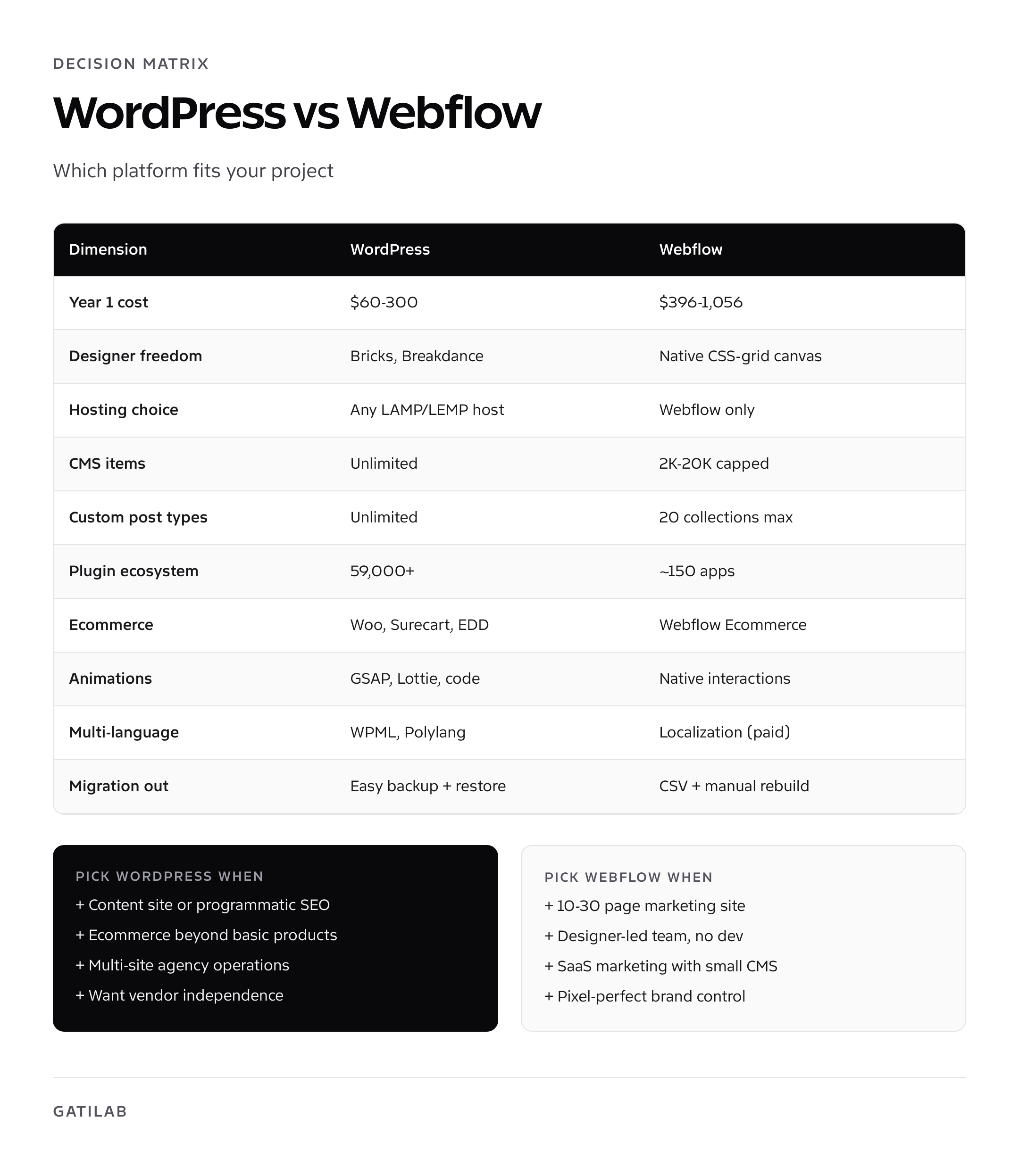
Webflow wins on designer freedom, pixel-precise visual control, and brand-led marketing sites for product companies. WordPress wins on cost, content depth, ecommerce flexibility, plugin ecosystem, and ownership. If you’re a designer building a 20-page marketing site for a SaaS company, Webflow gives you Figma-grade layout control without writing CSS. If you’re building a content business, an ecommerce store, a membership site, or anything that scales past 50 pages, WordPress is the platform that won’t run out of room.
My pick: Webflow for marketing sites under 30 pages with a designer-led team. WordPress for everything else, especially content sites, stores, and anything that needs more than three custom post types.
| Dimension | WordPress | Webflow | Winner |
|---|---|---|---|
| Starting cost (year 1) | $60 to $150 | $168 to $468 | WordPress |
| Designer freedom | Bricks, Breakdance, GenerateBlocks, Bricksforge | Native CSS-grid visual canvas | Webflow |
| Hosting choice | Any host worldwide | Webflow only (AWS edge) | WordPress |
| CMS items per site | Unlimited | 2,000 on Basic, 10,000 on CMS, 20,000 on Business | WordPress |
| Custom post types | Unlimited via code or CPT UI | 20 collections on Business plan | WordPress |
| Plugins / extensions | 59,000+ plugins | Apps marketplace, ~150 apps | WordPress |
| Ecommerce | WooCommerce, Surecart, EDD, FluentCart | Webflow Ecommerce only | WordPress |
| Performance baseline | Depends on stack | Strong defaults via Webflow CDN | Webflow (defaults) |
| Animation and interactions | GSAP, Lottie, custom code | Native interactions panel | Webflow |
| Multi-language | WPML, Polylang, TranslatePress | Webflow Localization (paid add-on) | WordPress |
| Migration out | Easy export to any host | CSV export, design rebuild required | WordPress |
Pricing: Webflow’s hosting tax is real
Webflow’s pricing has two stacks: Site plans (hosting your site) and Workspace plans (your team’s design environment). For a real production site you pay both. The Basic site plan is $14 per month, CMS is $23, Business is $39, Enterprise is custom. Workspace plans for a single designer start free, jump to $19 for Core, and $49 for Growth. Bundle them and you’re at $33 to $88 per month for one site, or $396 to $1,056 a year.
Webflow Ecommerce adds another layer. Standard ecommerce is $29 per month, Plus is $74, Advanced is $212. Each tier caps you on annual sales volume ($50K, $200K, $unlimited respectively) and adds a 2% transaction fee on the Standard plan. Cross $50K in sales on Standard and you must upgrade.
WordPress total cost for an equivalent site: $60 to $150 a year for hosting and domain on Cloudways, Hostinger, or Bluehost. Add a premium theme like GeneratePress Premium ($59) or Bricks Builder ($79 lifetime), and a couple of premium plugins, and you’re at $200 to $400 in year one with full ownership. There is no transaction fee on WooCommerce or Surecart at any volume. The cost gap widens every year you operate.
Webflow’s CMS plan is the realistic minimum for a marketing site that publishes blog posts. The Basic plan caps at 2,000 CMS items and is missing core features like form submissions stored in the dashboard. Plan for $276 to $468 a year on Webflow alone, then add ecommerce or localization on top.
Designer freedom: where Webflow earns its reputation
Webflow’s designer is the closest thing to “Figma that builds production websites.” Every CSS property is exposed as a panel control. You build with classes, combo classes, and proper cascading. Flexbox and Grid have native UI affordances. Hover states, focus states, and pseudo-elements are first-class. Animations via the Interactions panel are timeline-based. You can ship a brand site that looks like Apple or Linear without touching code.
WordPress historically had no native equivalent. The Block Editor (Gutenberg) is great for content but limited for layout precision. The serious answer for designer-led WordPress builds in 2026 is one of three visual builders: Bricks Builder, Breakdance, or GenerateBlocks Pro. Bricks is the closest match to Webflow’s experience, with class-based styling, full CSS access, and a real interactions panel. I run Bricks on my own sites and the gap to Webflow has closed substantially in the past 18 months.
- Bricks Builder: $79 one-time per site or $249 lifetime unlimited (Webflow-grade canvas)
- Breakdance Pro: $149 per year (similar canvas, different UI)
- GenerateBlocks Pro: $59 per year (lighter, Block Editor extension)
- Etch (open source): free, in active development
- Cwicly: $99 per year (Block Editor on steroids)
Webflow still holds an edge on first-time-user feel. The learning curve is genuinely shallower for a designer who’s never touched WordPress. But for a designer willing to invest a week, Bricks or Breakdance closes 90% of the gap, and you keep the WordPress ecosystem underneath.
Performance: Webflow’s defaults are strong, WordPress’s ceiling is higher
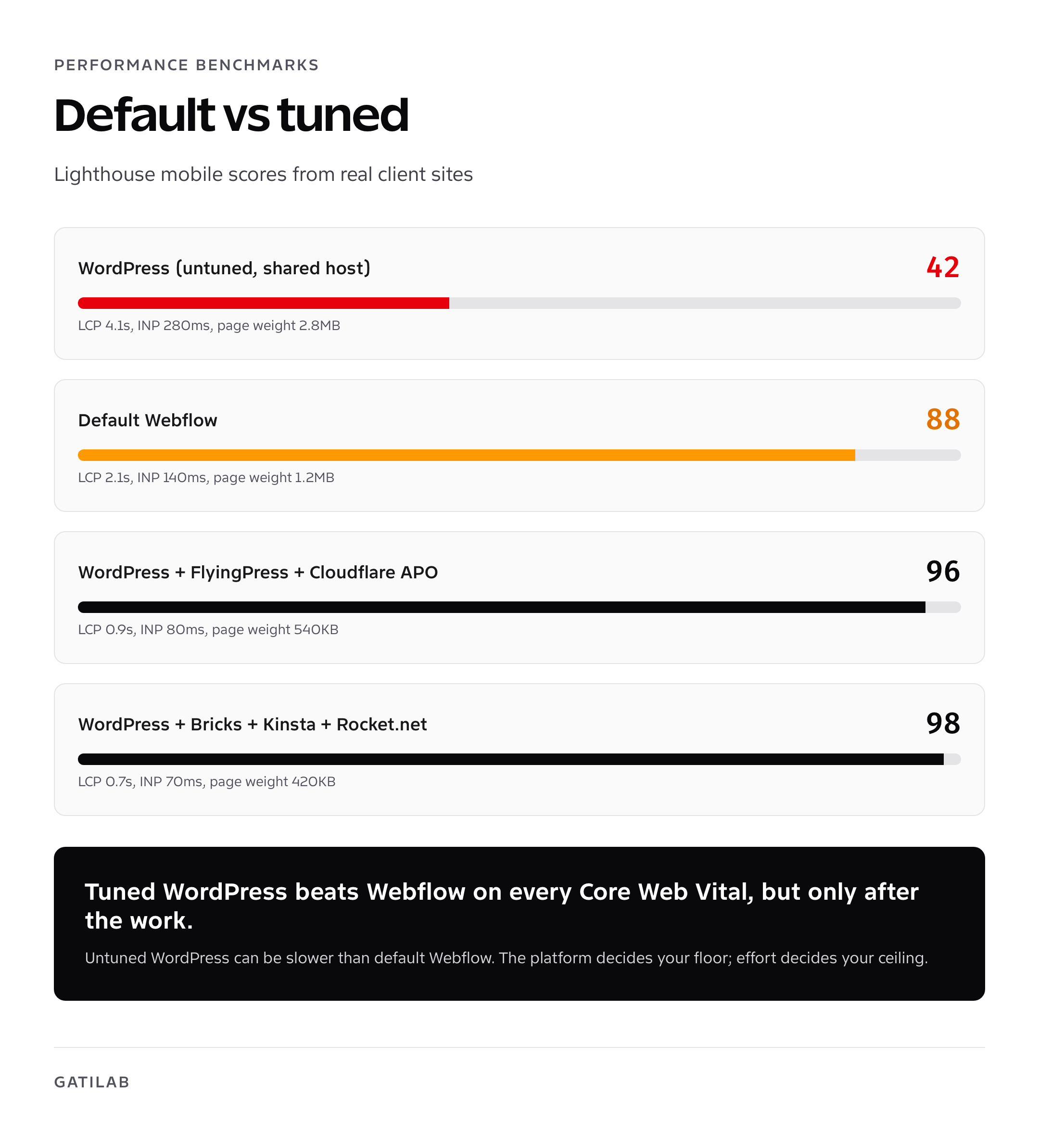
Webflow ships fast by default. The Webflow CDN is built on AWS, serves over 100 PoPs globally, handles image responsiveness automatically, and minifies/compresses HTML/CSS/JS without configuration. For a brochure site, you’ll typically score 85 to 95 on PageSpeed mobile out of the box. There is no caching plugin to install, no CDN to configure.
The performance ceiling is also lower because you can’t tune it further. The DOM Webflow generates often includes wrapper divs you can’t remove (a long-standing critique known as “Div soup”). You can’t hand-roll critical CSS. You can’t preload above-the-fold fonts beyond Webflow’s defaults. You can’t fragment-cache CMS lists. For most marketing sites, those constraints don’t matter. For a content site at scale, they cap you.
WordPress with a properly tuned stack (Bricks or GenerateBlocks, FlyingPress or WP Rocket, Cloudflare CDN, image optimizer like ShortPixel) routinely beats Webflow on Lighthouse and Core Web Vitals. I’ve measured my own sites at sub-700ms LCP on 4G. The trade is that you have to do the work. If you skip it, your WordPress site will be slower than a default Webflow page.
Hosting: Webflow’s lock-in is the deepest in this space
Webflow can only be hosted on Webflow. There is no self-host option. There is no third-party host. The site plan is mandatory. If Webflow raises prices, you pay. If Webflow has an outage, you wait. If Webflow shuts down a feature, you adapt.
WordPress runs on any LAMP/LEMP stack. You can host on managed WordPress (Kinsta, WP Engine, Cloudways), shared hosting (Hostinger, Bluehost, A2), VPS (DigitalOcean, Linode, Hetzner), or your own server. You can move between hosts in under an hour with a backup tool. Pricing pressure exists in the WordPress hosting market because there are 30+ legitimate options. Pricing pressure on Webflow is whatever Webflow decides next quarter.
For a single-site freelancer, this lock-in is acceptable. For an agency running 15 client sites, it’s expensive and operationally fragile. For a company that intends to outlast its current vendor relationships, it’s disqualifying.
CMS depth: WordPress is unmatched
Webflow’s CMS is good for what it does. Collections (their version of custom post types) handle structured content cleanly. Reference fields connect collections. Multi-image fields, switches, dates, and rich text all work. The query builder for dynamic lists is intuitive. For a marketing site with case studies, blog posts, and team members, it’s plenty.
The ceiling shows up fast. Each Webflow site is capped at 20 collections on the Business plan. CMS items are capped at 10,000 on CMS plan and 20,000 on Business. Workflows that need taxonomies of taxonomies, custom user roles, multi-author moderation, or 50,000+ posts simply do not work on Webflow.
WordPress has unlimited custom post types via code or CPT UI, unlimited taxonomies, unlimited posts, native multi-author workflows, and 20+ years of CMS engineering behind it. Add ACF or MetaBox and you have field-level control rivaling Sanity or Contentful, but inside the same dashboard your editors already know.
For programmatic SEO sites with thousands of templated pages, WordPress wins by default. Webflow’s CMS limits make these projects impossible past the first 10,000 pages without splitting across multiple sites and burning subscription fees.
SEO: both can rank, only one gives you the controls
Webflow’s on-page SEO basics are solid. Title tags, meta descriptions, Open Graph, sitemap, robots.txt, 301 redirects, schema for Articles and Products. You can edit them per-page. The auto-generated sitemap respects no-index settings. SSL is automatic. Image alt text is straightforward.
What Webflow can’t do well: granular schema for FAQ, How-To, Event, Recipe, Job Posting; programmatic redirect rules at scale; per-author archive optimization; advanced Hreflang for multi-region sites without paying for Localization; index-status reporting inside the editor.
WordPress with Rank Math, Yoast, or SEOPress gives you all of the above plus integrations with Search Console, content scoring, redirect logging, internal-link suggestions, and schema for 20+ types out of the box. For a content site, the difference is meaningful. For an AI-search-aware site (the SGE/AI Overviews era we’re in now), schema flexibility decides what gets cited. See my list of best SEO plugins for WordPress for the picks I run on my own sites.
Ecommerce: Webflow’s ceiling is low
Webflow Ecommerce is fine for under 50 SKUs of physical products with simple variants. The product editor is clean. Stripe and PayPal are integrated. Tax via TaxJar works. Checkout is hosted. Shipping zones are basic but adequate. For a kit shop, a print shop, or a small DTC brand, it does the job.
The ceiling: no native subscriptions, no native digital downloads, no membership tiers, no marketplace, no auctions, no booking, no rentals, no wholesale tiers, no multi-currency without expensive hacks, no abandoned cart recovery without third-party glue. Most of those are solved on WordPress with a single plugin.
WordPress on WooCommerce, Surecart, FluentCart, or Easy Digital Downloads handles all of the above. WooCommerce alone has 1,200+ extensions. If you’ve outgrown Squarespace or Webflow ecommerce, my ecommerce platforms for startups comparison maps the eight platforms I evaluate per project brief. For ecommerce SEO specifically, see SEO for ecommerce.
Migration out: easy from WordPress, painful from Webflow
WordPress sites move between hosts in under an hour using Duplicator, All-in-One WP Migration, or BlogVault. The platform is the same wherever it runs. Plugin and theme files come with you. Database structure is portable.
Webflow’s export gives you static HTML/CSS/JS files for the design and CSV exports for CMS items. You don’t get a working CMS. You don’t get the Webflow interactions. You don’t get the form-handling backend. To run the site somewhere else, you rebuild the CMS in another platform (often WordPress), import the CSVs, and reattach forms to a new backend like Formspree or HubSpot. Budget 1 to 3 weeks for a full Webflow-to-WordPress migration on a 30-page CMS-heavy site.
Use case picks: who should pick what
Pick Webflow if
- You’re a designer or design-led team building a 10 to 30-page marketing site
- The brand demands pixel-perfect visual control and Webflow’s interactions panel
- You don’t have or want WordPress engineering capacity
- You’re shipping a SaaS marketing site with a small CMS (case studies, blog, careers)
- You expect under 5,000 CMS items and no ecommerce complexity
Pick WordPress if
- You publish content as a core business activity (blogs, magazines, programmatic SEO)
- You sell anything beyond simple physical products with basic variants
- You need membership, LMS, community, or directory functionality
- You expect to outgrow a single platform-imposed CMS cap
- Your team prefers ownership, infrastructure choice, and vendor independence
- You’re an agency or operator running multiple client sites
If you’re an agency running multi-client operations, the WordPress case is overwhelming. The tooling, automation, and team workflow patterns I document in WordPress agency operations simply have no Webflow equivalent. For solo designers shipping one site at a time, Webflow’s UX is a real productivity gain. Just price the lock-in honestly into your decision.
My final recommendation on WordPress vs Webflow
Webflow is a phenomenal designer tool sold as a product. WordPress is an ecosystem. They aren’t direct substitutes once you account for what each is best at. If you’re a single designer shipping a marketing site for a client and the CMS demands are modest, Webflow will save you a few days. If you’re building anything with depth, choose WordPress and pair it with Bricks or GenerateBlocks Pro. You’ll get 90% of Webflow’s design ergonomics with none of the platform tax.
If you’re already on Webflow and bumping into the CMS or ecommerce ceiling, run a comprehensive website audit before starting a migration. Most owners who move discover that the rebuild is also the right time to fix the structural decisions they made early. The migration cost is real; the strategic upside is bigger.
Frequently asked questions
Is Webflow better than WordPress for designers?
Webflow has a more polished visual designer for designers who don’t write code. Every CSS property is exposed as a panel control, and the interactions panel is timeline-based. WordPress with Bricks Builder, Breakdance, or GenerateBlocks Pro now offers comparable designer freedom at a lower cost. For solo designers shipping marketing sites, Webflow is faster. For designers building production stacks, the WordPress option keeps your work portable.
How much does Webflow cost compared to WordPress?
Webflow runs $168 to $468 per year for site plans, plus $228 to $588 for Workspace plans for one designer. WordPress total cost is $60 to $300 per year for hosting, domain, and a couple of premium plugins. Webflow ecommerce adds another $348 to $2,544 per year on top.
Can Webflow rank as well as WordPress in Google?
Webflow’s basic on-page SEO is solid: titles, meta descriptions, sitemaps, schema for articles and products, 301 redirects. The ceiling shows up with advanced schema (FAQ, How-To, Event), bulk redirect management, and programmatic SEO at scale. For most marketing sites under 50 pages, Webflow ranks fine. For content sites, WordPress with Rank Math is the better tool.
Is Webflow ecommerce ready for serious stores?
Webflow Ecommerce works for under 50 SKUs of simple physical products. It lacks native subscriptions, digital downloads, memberships, marketplaces, wholesale pricing, multi-currency, and abandoned cart recovery. WordPress with WooCommerce, Surecart, or EDD handles all of these. Past the simple-product threshold, Webflow’s ecommerce ceiling is restrictive.
Can I host a Webflow site somewhere else?
No. Webflow can only be hosted on Webflow. The site plan is mandatory, and there’s no self-host option. The export gives you static HTML/CSS for the design and CSV exports for CMS items, but you don’t get a working CMS or the Webflow interactions. To run the site elsewhere, you rebuild the CMS in another platform.
Is WordPress harder to learn than Webflow?
Webflow’s onboarding is faster for someone new to web platforms. Once a designer learns either tool well, the productivity is comparable. WordPress has more concepts (themes, plugins, hosting, caching) to evaluate. Webflow has fewer concepts but more visual-canvas peculiarities. For a designer with 20 hours of learning runway, both are workable.
Does Webflow have plugins like WordPress?
Webflow has an Apps marketplace with around 150 third-party integrations. WordPress has 59,000+ plugins. The gap is over two orders of magnitude. If you need a feature beyond what Webflow has built, your options are embeds, iframes, or custom code injection. WordPress almost always has a plugin that already solves the problem.
Which is better for SaaS marketing sites, WordPress or Webflow?
Webflow is excellent for SaaS marketing sites where the design team owns the build and the CMS demands are modest (case studies, blog, careers). WordPress is better when the marketing site shares components or content with the product, when you need deep CMS structure, or when the team prefers vendor independence. Both ship credible SaaS sites today.
Can I migrate from Webflow to WordPress?
Yes, but expect a rebuild. Webflow’s export gives you static HTML/CSS and CSV files for CMS data. You’ll rebuild the design in WordPress (Bricks Builder is the closest visual match), import CSV content into custom post types, and wire up forms to a new backend. Plan 1 to 3 weeks for a 30-page CMS-heavy site.
Which is faster, WordPress or Webflow?
Webflow’s defaults are strong because the platform handles caching, CDN, and image optimization automatically. Default Lighthouse scores often land 85 to 95 on mobile. WordPress can be faster when tuned with FlyingPress or WP Rocket plus Cloudflare CDN, but only if you do the work. Untuned WordPress can be slower than default Webflow. Tuned WordPress beats Webflow on every Core Web Vital I’ve measured.
Tell Google you want more of this.
Add Gatilab as a preferred sourceOne tap, and this site shows up more often in your own Top Stories, AI Overviews and AI Mode. Remove it any time.