
WordPress vs Squarespace: Honest Comparison (2026)
WordPress vs Squarespace is the comparison I get asked about every single week, usually by founders who have already paid Squarespace for a year and now feel boxed in. I’ve built sites on both. I’ve migrated dozens of clients off Squarespace to WordPress, and a handful in the other direction. The honest answer isn’t “WordPress always wins.” It depends on what you actually need.
This guide breaks down the WordPress vs Squarespace fight across pricing, ease of use, customization, SEO, ecommerce, performance, ownership, and exit costs. I run my own WordPress sites and have watched Squarespace bills creep north of $400 a year for businesses that could have run on $80 of WordPress hosting. I’ll show you the numbers, name the trade-offs, and tell you which platform fits which kind of project.
The verdict on WordPress vs Squarespace in 2026
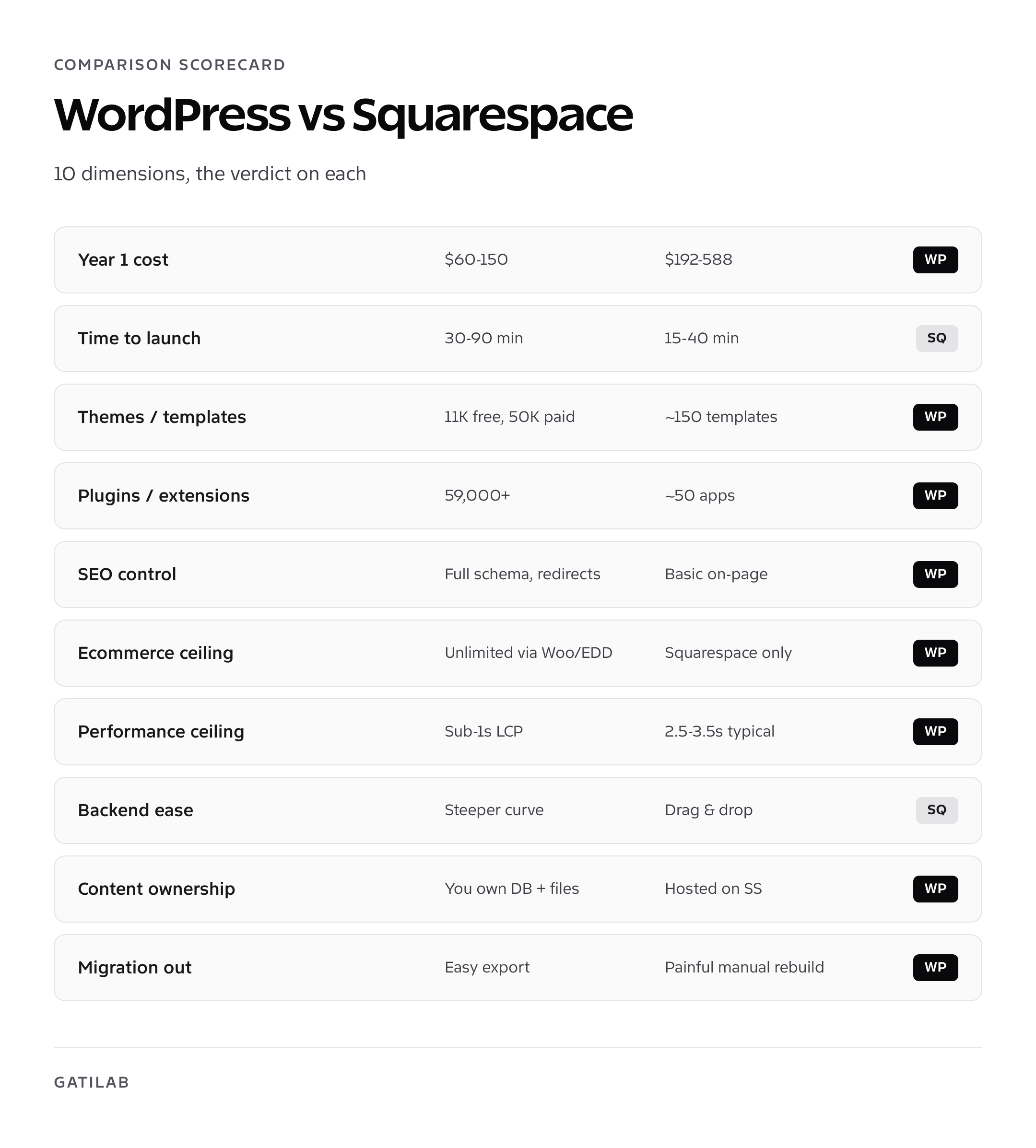
WordPress wins on ownership, customization, cost at scale, and ecommerce flexibility. Squarespace wins on speed-to-launch and design polish for non-technical owners who need a working site in a weekend. If you plan to grow past 5,000 visitors a month, sell more than a handful of products, or rank in Google for competitive keywords, WordPress is the platform that scales with you. If you need a portfolio, a small-service business site, or a one-page event page and you don’t want to think about plugins, Squarespace is fine for the first 12 to 24 months.
My pick: I’d build on WordPress nine times out of ten. The tenth time is when the client says, plainly, that they will never touch the back end and never hire a developer. That’s the only Squarespace use case that survives my stress test.
Below is a side-by-side scorecard. The deeper sections after it explain how I arrived at each verdict.
| Dimension | WordPress | Squarespace | Winner |
|---|---|---|---|
| Starting cost (year 1) | $60 to $150 | $192 to $588 | WordPress |
| Time to first live page | 30 to 90 minutes | 15 to 40 minutes | Squarespace |
| Themes and templates | 11,000+ free, 50,000+ paid | ~150 templates | WordPress |
| Plugins and add-ons | 59,000+ | Closed extension store, ~50 integrations | WordPress |
| SEO control | Full schema, sitemaps, redirects, rewrites | Basic on-page SEO, limited schema | WordPress |
| Ecommerce ceiling | WooCommerce, Surecart, EDD, FluentCart | Squarespace Commerce only | WordPress |
| Performance ceiling | Sub-1s LCP achievable | ~2.5s to 3.5s LCP typical | WordPress |
| Backend ease | Steeper learning curve | Drag and drop, no plugins to manage | Squarespace |
| Content ownership | You own the database and files | Hosted on Squarespace servers | WordPress |
| Migration out | Easy export to any host | Painful export, manual rebuild common | WordPress |
That’s seven categories to WordPress, two to Squarespace, with one that depends on your appetite for tinkering. Now let’s break each row down.
Pricing: where Squarespace gets expensive fast
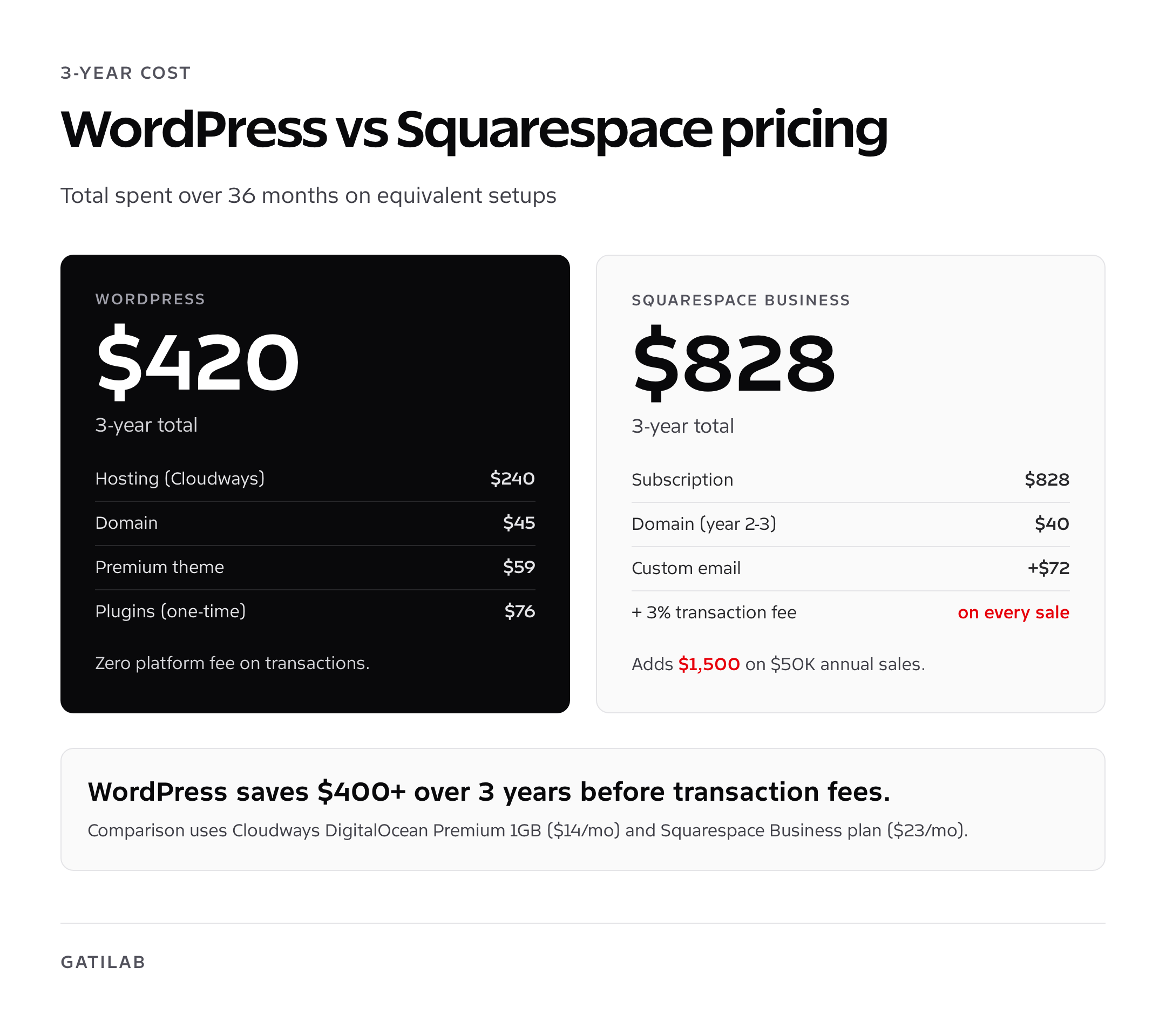
Squarespace’s cheapest plan is $16 per month billed annually, which is $192 a year for the Personal plan. That plan blocks ecommerce, member areas, and most useful integrations. The Business plan is $23 per month, or $276 annually, and adds a 3% transaction fee on every sale. Commerce Basic is $28 a month, Commerce Advanced is $52 a month. Domain is free year one, then $20 a year. Add a custom email and you’re past $400 annually before you’ve sold anything.
WordPress itself is free. Your real costs are hosting, a domain, and optional premium plugins. A solid managed WordPress host like Cloudways, Kinsta, or RunCloud runs $11 to $35 a month for the entry tier. A budget shared host like Hostinger, A2, or Bluehost runs $3 to $8 a month for year one. Domain is $10 to $15 a year. If you stop there with a free theme, your year-one cost is $50 to $150. Add a premium theme like GeneratePress Premium ($59 first year) and a couple of paid plugins and you’re at $200 to $300, still well under Squarespace at any tier.
The three-year math is where it really diverges. On Squarespace Business, you’ll spend $828 in subscription fees alone. On WordPress with managed hosting and a few premium plugins, the same period runs $400 to $700 and you can keep the site running on cheaper infrastructure if you ever need to. For more on hosting tiers and what they actually deliver, see my best web hosting services breakdown.
Hidden cost: the Squarespace transaction fee
The Business plan’s 3% transaction fee on top of Stripe’s 2.9% + 30 cents means you’re paying nearly 6% on every sale until you upgrade to Commerce. WordPress with WooCommerce or Surecart has zero platform fee. On $50,000 in annual sales, that’s $1,500 in pure platform tax that disappears the moment you switch.
Ease of use: where Squarespace genuinely earns its price
Squarespace is faster to launch for a non-technical owner. The onboarding asks four questions, picks a template, and drops you into a Fluid Engine editor that feels like Figma-lite. You can ship a homepage, About, Services, and Contact in 90 minutes without ever reading a docs page. There are no plugins to evaluate, no caching to configure, no SSL to set up. Updates happen in the background. Backups are automatic. Spam is filtered.
WordPress, even with the modern Block Editor and a builder like Bricks or GenerateBlocks, has more switches. You pick a host. You install a theme. You evaluate at least a caching plugin, an SEO plugin, an image optimizer, and a security plugin. The first time, that’s a 4 to 8 hour learning loop. The fifteenth time, it’s an hour. Most owners never get to the fifteenth time, which is why the perception of “WordPress is hard” sticks.
If you’re new to WordPress and want the Squarespace feel without the lock-in, set up on Bluehost, install Astra or GeneratePress, and add the Spectra block library. You’ll get drag-and-drop editing without a visual builder learning curve.
Customization: WordPress wins by an order of magnitude
WordPress has 11,500+ free themes in the official directory, another 50,000+ commercial themes across ThemeForest and independent shops, and 59,000+ plugins covering everything from booking systems to LMS engines to property listings. If you can describe a feature, a plugin probably exists for it. If it doesn’t, you can hire a developer to build a custom plugin and own the code.
Squarespace ships with about 150 templates and a closed Extensions marketplace of roughly 50 third-party integrations. You can inject custom code on the Business plan and above, but the moment you want to add a feature Squarespace hasn’t built, you’re stuck with embeds, iframes, or a workaround. There’s no plugin ecosystem because Squarespace doesn’t allow one. Their position is that they curate so you don’t have to. That’s true. It’s also why you’ll hit a wall the moment you outgrow the curated set.
I built a client membership site on WordPress with MemberPress and FluentCRM in three days. The same project on Squarespace was technically possible using Member Areas, but the integrations into our email tool, Zapier flows, and a custom dashboard would have taken three weeks of workarounds. WordPress’s customization story is, simply, that almost everything has been done before and you can plug it in.
SEO: Squarespace covers the basics, WordPress covers the details
Both platforms can rank. I have Squarespace clients in the top 3 for moderate-competition keywords, and I have WordPress clients beating them on the same terms. The platform isn’t the deciding factor; content, links, and search intent are. That said, if you care about SEO control, WordPress gives you levers Squarespace doesn’t.
On Squarespace, you get title tags, meta descriptions, basic Open Graph, automatic sitemaps, and SSL. You don’t get fine-grained schema control beyond Article and Product. You can’t do FAQ schema, How-To schema, or custom JSON-LD without code injection workarounds. You can’t easily set up redirect rules at scale. You can’t run a content audit with native tools.
WordPress with Rank Math or Yoast gives you per-post focus keywords, schema for 20+ content types, redirect management, breadcrumbs, robots.txt control, sitemap segmentation, and content scoring against on-page factors. Add Search Console integration and you can fix indexing issues in two clicks. For a deeper dive, see my list of the best SEO plugins for WordPress.
- Custom schema for FAQ, How-To, Recipe, Event, Job Posting, Local Business
- Granular redirect rules including regex matching
- Internal link suggestions on every post
- Index status reporting from Search Console inside the editor
- Per-author and per-category meta templates
On the GEO and AI search front, WordPress’s structured data flexibility matters more in 2026 than it did two years ago. AI Overviews and ChatGPT citations preferentially pull from pages with clean schema and answer-first paragraphs. Squarespace can’t ship the schema variety needed to compete on those surfaces.
Ecommerce: Squarespace Commerce is fine, WordPress is unlimited
Squarespace Commerce is genuinely easy. Add a product, set a price, hook up Stripe or PayPal, and you’re selling. The product editor is clean. Inventory management is sane. Tax calculation through TaxJar is built in. Checkout is hosted and PCI-compliant. For a portfolio shop, a kit business, or a service consultancy selling 5 to 30 products, it works without friction.
The ceiling shows up when you need anything custom. Subscription billing on Squarespace is limited to Member Areas and a small set of digital plans. Squarespace doesn’t natively handle wholesale pricing, B2B accounts, multi-currency complexity, or product configurators. The checkout can’t be deeply customized. There’s no native dropshipping or print-on-demand integration beyond Printful. There are no marketplace plugins, no auction add-ons, no bookable rentals.
WordPress on WooCommerce, Surecart, FluentCart, or Easy Digital Downloads handles every one of those scenarios. WooCommerce alone has 1,200+ extensions covering shipping carriers, accounting integrations, multi-vendor marketplaces, and payment methods Squarespace doesn’t support. If you’re on the fence about ecommerce specifically, my comparison of the best ecommerce platforms for startups breaks down the eight platforms I evaluate against client briefs.
Performance: WordPress is faster when you optimize
Squarespace sites usually score in the 60 to 85 range on PageSpeed mobile, with LCP averaging 2.5 to 3.5 seconds. That’s not bad, and Squarespace handles caching, CDN, and image resizing automatically so you don’t have to think about it. The ceiling is low because you can’t change much. The platform decides what loads, in what order, and at what size.
WordPress can be much faster, or much slower. A bloated WordPress site with three slider plugins, eight tracking pixels, and unoptimized images will load in 6 seconds. A well-tuned WordPress site on a host like Kinsta with FlyingPress or WP Rocket plus Cloudflare CDN routinely hits 95+ PageSpeed and sub-1 second LCP. I have client sites that load in 600ms on 4G.
| Performance metric | Typical Squarespace | Tuned WordPress |
|---|---|---|
| LCP (mobile) | 2.5s to 3.5s | 0.8s to 1.5s |
| CLS | 0.05 to 0.15 | under 0.05 |
| INP | 180ms to 280ms | under 100ms |
| Page weight (homepage) | 1.8 to 3.2 MB | 400 KB to 900 KB |
| HTTP requests | 60 to 110 | 20 to 45 |
Performance work is also where bad WordPress configurations cost you. If you’re not willing to set up caching, image compression, and a CDN, your WordPress site will not be faster than Squarespace. That’s the trade. Effort buys you a higher ceiling.
Ownership and lock-in: the deal breaker for serious operators
This is the row most owners ignore until they regret it. With WordPress, you own the database, the media library, the theme files, the plugin code, and the server. If your host fails, you take a backup and move. If a plugin author disappears, you fork the code or replace it. If you want to migrate from Cloudways to Kinsta, you push a button. Your business doesn’t depend on a single vendor’s pricing decisions or feature roadmap.
With Squarespace, you have a hosted account. Your content lives on their servers in a format only their software reads. The export is partial and famously messy. You cannot export your design, your custom code, your member data, your form submissions, or your store orders in a directly usable format. If Squarespace raises prices or shuts down a feature you depend on, your options are pay or rebuild.
I’ve migrated 14 clients off Squarespace in the past two years. Every single migration was a manual rebuild because the export format only carries posts, basic pages, and product names. Designs, member content, and form data did not transfer. Budget 2 to 4 weeks for a full Squarespace-to-WordPress move on a 30 to 60 page site.
Exit costs and migration: planning for the future
WordPress sites move easily between hosts. Tools like Duplicator, All-in-One WP Migration, or BlogVault snapshot your entire site (database, files, plugin config) and restore it on a new server in under an hour for sites under 5GB. I’ve moved 50GB sites in under three hours using ManageWP staging clones. There’s no platform lock to fight; WordPress is the same software wherever it runs.
Migrating off Squarespace is a different animal. The export gives you a WordPress-compatible XML file with your blog posts and basic pages. That’s it. Custom designs, Fluid Engine layouts, Member Areas content, ecommerce variants, form submissions, and most navigation structures don’t come along. You’ll rebuild the design from scratch. You’ll re-import products via CSV. You’ll redirect every old URL by hand because Squarespace’s URL structure rarely matches a clean WordPress permalink.
If exit flexibility matters to you (and for any business that intends to last 5 years, it should), this single factor pushes the decision firmly toward WordPress.
Use case picks: who should pick what
I’ve audited enough projects on both platforms to map use cases to recommendations cleanly.
Pick Squarespace if
- You’re a freelancer, photographer, or consultant launching your first web presence and you want a template-driven site live in a weekend
- You sell 5 to 30 simple products and don’t need subscriptions, custom checkout, or wholesale pricing
- You will never touch the back end again after launch and have no plans to hire a developer
- You expect under 10,000 monthly visits for the foreseeable future
- You’re running a one-person operation and your time is more valuable than the platform fee
Pick WordPress if
- You expect to grow past 10,000 monthly visits and care about Core Web Vitals at scale
- You sell more than 30 products, run subscriptions, sell digital products, or operate a multi-vendor marketplace
- You’re building a content site (blog, magazine, news) and need serious SEO control
- You’re running a membership, LMS, or community alongside your main content
- You want to own your code and not depend on a single vendor’s pricing
- You’re an agency-style operator who will manage multiple sites and want infrastructure consistency
If you’re running an agency or a multi-site operation, the case for WordPress hardens further. Tooling, automations, and team workflows are mature. My breakdown of WordPress agency operations goes into the staffing and stack patterns I see at scale.
My final recommendation on WordPress vs Squarespace
Most “WordPress vs Squarespace” comparisons end with a wishy-washy “it depends.” Mine doesn’t. If you’re reading this, you probably care enough about your site to research the choice. That puts you in WordPress territory by default. The owners who genuinely belong on Squarespace already signed up before Googling anything.
Pick WordPress. Spend a weekend on Bluehost, Hostinger, or Cloudways. Install GeneratePress or Astra. Add Rank Math, FlyingPress, and your block library of choice. You’ll spend $80 to $200 in year one, own everything you build, and have a platform that scales from 1,000 to 1,000,000 visitors a month with the same tooling. The two hours you’ll spend learning the dashboard pays for itself the first month you don’t pay Squarespace’s $23.
If you’re already on Squarespace and feeling the squeeze, run a comprehensive website audit first to see what’s worth migrating and what’s worth scrapping. Most owners discover the rebuild also gives them a chance to fix five years of accumulated mess.
Frequently asked questions
Is WordPress better than Squarespace for SEO?
WordPress gives you more SEO control through plugins like Rank Math and Yoast: granular schema for FAQ, How-To, and Recipe content, redirect management, sitemap segmentation, and Search Console integration. Squarespace covers the basics (titles, meta descriptions, sitemaps, SSL) but caps you on advanced schema and bulk redirects. Both can rank with good content, but WordPress wins on technical SEO ceiling.
Can I migrate my Squarespace site to WordPress?
Yes, but expect a manual rebuild. Squarespace’s export only includes blog posts and basic pages in WordPress XML format. Designs, Member Areas content, ecommerce variants, form submissions, and most navigation don’t transfer. Plan 2 to 4 weeks of work for a 30 to 60 page site, including redirects, design rebuild, and product re-import.
How much does Squarespace cost compared to WordPress?
Squarespace costs $192 to $588 per year depending on plan. WordPress total cost runs $60 to $300 per year for hosting, domain, and a couple of premium plugins. Over 3 years, Squarespace Business costs $828 in subscription alone; equivalent WordPress runs $400 to $700 with full ownership.
Which is easier to use, WordPress or Squarespace?
Squarespace is easier for non-technical owners launching their first site. The drag-and-drop editor, bundled hosting, and zero plugin management win on speed-to-launch. WordPress has a steeper learning curve but is more flexible long-term. With a starter theme like Astra or GeneratePress and the Block Editor, the gap is smaller than reputation suggests.
Is Squarespace good for ecommerce?
Squarespace Commerce is fine for selling 5 to 30 simple products with basic variants. The ceiling shows up with subscriptions, B2B pricing, multi-currency, configurators, or anything beyond standard physical products. WordPress with WooCommerce, Surecart, or FluentCart handles all of those without limits.
Can I use my own domain on both platforms?
Yes. Squarespace includes domain registration free for year one then $20 per year. WordPress lets you register a domain through any provider (Namecheap, Cloudflare, Google Domains) for $10 to $15 per year. Both support custom domains on all paid plans.
Which platform is faster, WordPress or Squarespace?
Squarespace’s defaults are decent: typical LCP runs 2.5 to 3.5 seconds on mobile. The ceiling is locked because you can’t tune the stack. WordPress can be much faster (sub-1 second LCP) when properly configured with managed hosting, a caching plugin, image optimization, and a CDN. Without that work, untuned WordPress can be slower than default Squarespace.
Does WordPress require coding skills?
No, not for basic sites. With a theme like Astra or GeneratePress and the Block Editor, you can build and maintain a site without writing code. Coding becomes useful for custom features beyond what plugins cover. The 59,000+ plugins in the WordPress directory mean most needs are met without development work.
Can I switch from WordPress to Squarespace later?
Technically yes, but the migration is painful in this direction too. Squarespace can import basic blog content via XML, but you lose plugin features, custom post types, custom designs, and most ecommerce data. Most owners moving from WordPress to Squarespace are downsizing on purpose, not preserving functionality.
Which is better for a small business, WordPress or Squarespace?
For a small business expecting under 5,000 monthly visitors and selling fewer than 30 simple products, Squarespace is acceptable. For any small business that wants to grow, run blog content for SEO, sell more than basic products, or own its data, WordPress is the better long-term call. The cost gap also widens every year you operate.
Tell Google you want more of this.
Add Gatilab as a preferred sourceOne tap, and this site shows up more often in your own Top Stories, AI Overviews and AI Mode. Remove it any time.