
Hostinger vs GoDaddy for WordPress: Compare the Right Plans
Two plan pages open in two tabs, and the rows refuse to line up. Hostinger vs GoDaddy reads like a straight price fight until you notice that most comparisons park Hostinger’s 1-site entry plan beside a GoDaddy plan that runs 10 sites on more than twice the storage. Different products in the same table row, and the cheaper one wins by construction.
Buyers of these two land in one of two camps. The first shops the intro number, prepays a 48-month term at $2.99 a month, and meets a very different invoice when that term runs out. The second already keeps a dozen domains at one registrar, never prices the alternative seriously, and pays a familiarity fee every month for a control panel they open twice a year.
The comparison only becomes useful once the two plans match.
Match the plans before you match the prices
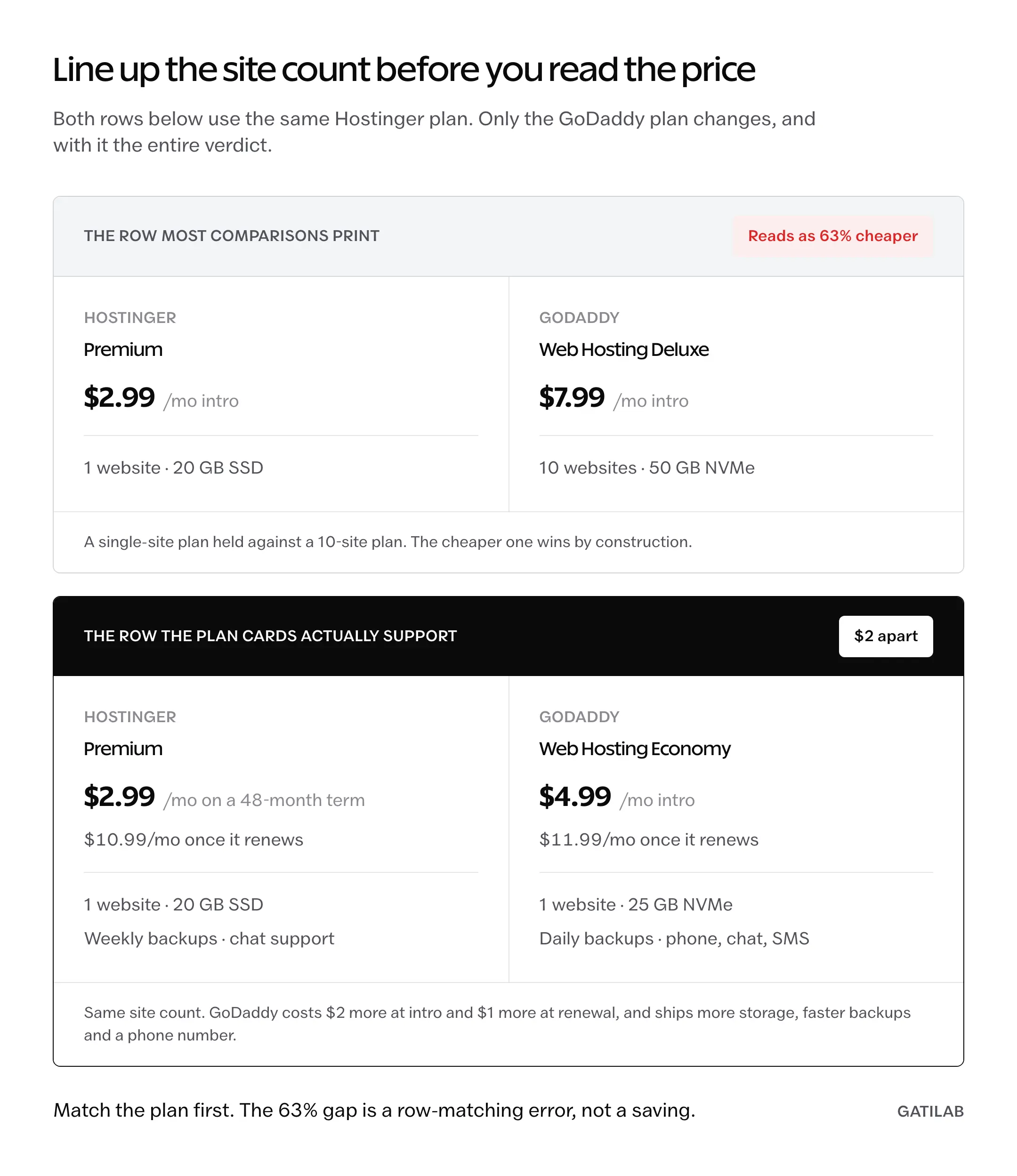
A useful Hostinger vs GoDaddy comparison starts with one pair: Hostinger Premium against GoDaddy Web Hosting Economy. Both run 1 website, both sit at the bottom of their vendor’s shared ladder, and both are the plan a first WordPress install actually lands on. GoDaddy Web Hosting Deluxe, the plan usually printed in that row instead, runs 10 sites on 50 GB of NVMe and belongs a tier up.
| Entry plan | Hostinger Premium | GoDaddy Web Hosting Economy |
|---|---|---|
| Intro price | $2.99/mo on a 48-month term | $4.99/mo |
| Regular price | $10.99/mo | $11.99/mo |
| Websites | 1 | 1 |
| Storage | 20 GB SSD | 25 GB NVMe |
| Automatic backups | Weekly | Daily |
| Free migration | Yes, all plans | Yes, DIY migration wizard |
| Control panel | hPanel | cPanel |
| Support channels | Chat, no phone line | Phone, chat, SMS |
| Advertised uptime | 99.9% | 99.9% |
Read that table twice. Once the site counts match, GoDaddy is $2 more at intro and $1 more at renewal, and it ships more storage, faster backups, and a phone number.
What most comparisons put in one row:
Hostinger Premium at $2.99/mo versus GoDaddy Web Hosting Deluxe at $7.99/mo.
What actually lines up:
Hostinger Premium, 1 site on 20 GB, versus GoDaddy Web Hosting Economy, 1 site on 25 GB.
Same two companies, same currency, same week. The first row makes Hostinger look about 63% cheaper. The second puts the difference at $2, because the first was holding a single-site plan against a 10-site plan and calling the gap a discount.
The renewal prices are almost the same number
Intro pricing on both hosts is a term commitment, not a monthly rate. Hostinger’s $2.99 is a 48-month prepayment, which is $143.52 handed over at checkout. That is the cheapest way to run a small WordPress site on either vendor, and it is genuinely cheap.
Then the term ends, and the two hosts converge:
- Hostinger Premium renews at $10.99/mo, or $527.52 across the next 4 years.
- GoDaddy Web Hosting Economy runs at $11.99/mo regular, or $575.52 across the same 4 years.
- The gap is $48 over 4 years. That is $1 a month.
- Hostinger Unlimited and GoDaddy Web Hosting Deluxe both carry a $16.99/mo regular rate.
Same number.
The mid tiers landing on an identical regular rate is the detail that ends the price argument. Hostinger’s discount is real, it is large, and it expires.
| Plan | Intro price | Regular price |
|---|---|---|
| Hostinger Premium | $2.99/mo, 48-month term | $10.99/mo |
| Hostinger Unlimited | $3.79/mo | $16.99/mo |
| Hostinger Cloud Startup | $7.99/mo, 48-month term | $25.99/mo |
| GoDaddy Web Hosting Economy | $4.99/mo | $11.99/mo |
| GoDaddy Web Hosting Deluxe | $7.99/mo, first 3-year term | $16.99/mo |
| GoDaddy Web Hosting Ultimate | $12.99/mo | $21.99/mo |
| GoDaddy Hosting for WordPress Basic | $4.99/mo on 3 years, $6.99/mo on 1 year | $14.99/mo |
| GoDaddy Hosting for WordPress Ultimate | $14.99/mo | $26.99/mo |
Two things fall out of that ladder. Hostinger’s cloud tier renews higher than any GoDaddy shared plan, and GoDaddy’s managed WordPress line renews below Hostinger Cloud Startup, at $14.99 against $25.99. Those are not equivalent products, so the number alone should not decide anything, but it does kill the idea that one vendor is cheap everywhere. For the wider budget field, the renewal pricing across cheap web hosts follows the same pattern of a low first term and a sharp second one.
One more thing worth checking yourself: GoDaddy prices by market. The figures here are the United States storefront in dollars, and the same plan card resolves to a different currency and different numbers elsewhere. A tier-by-tier walk through that ladder sits in the GoDaddy hosting review.
The object cache story runs the other way
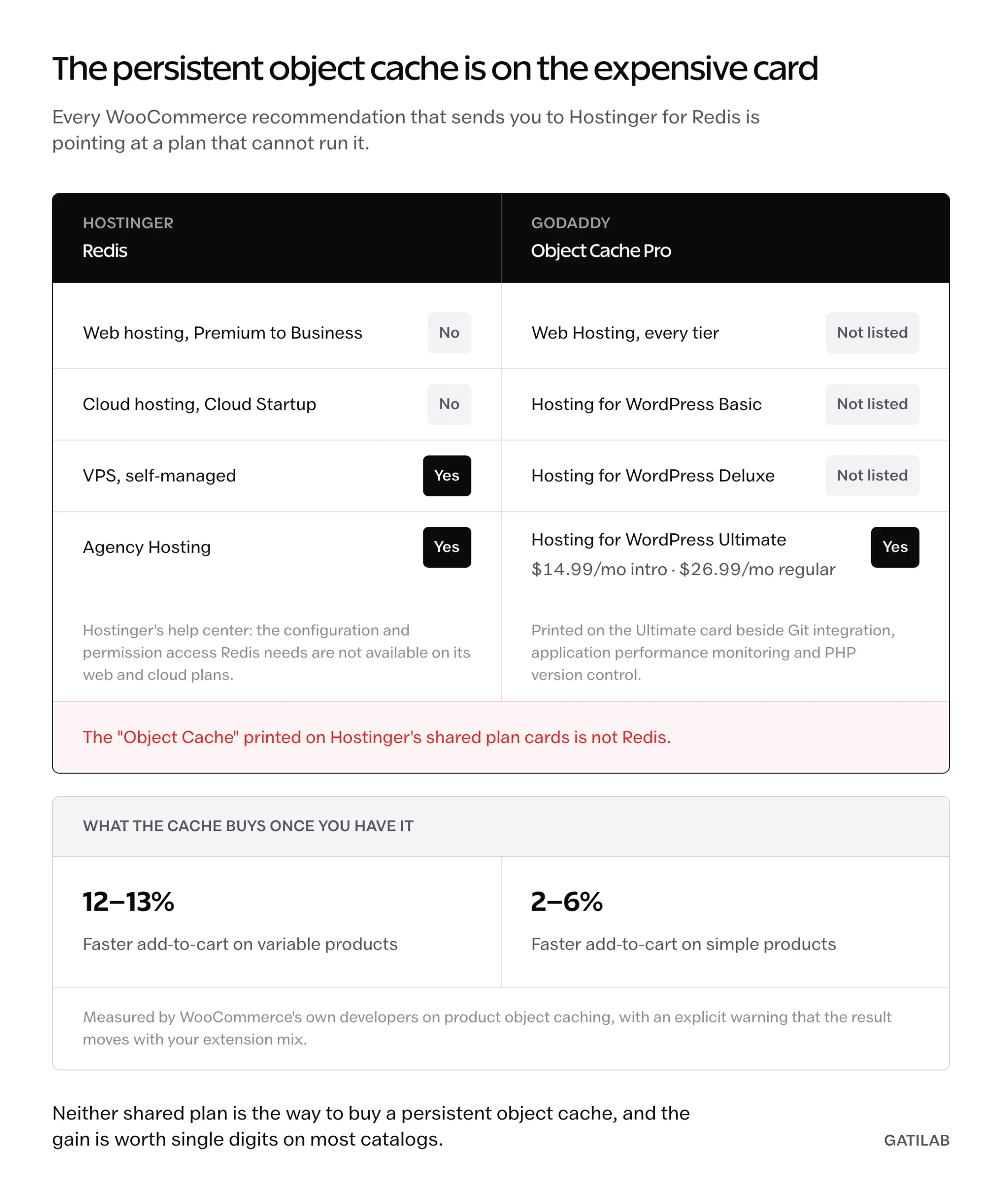
Almost every Hostinger recommendation for WooCommerce rests on Redis. Hostinger’s own help center says the configuration and permission access Redis needs are not available on its web and cloud hosting plans, and that Redis is supported only on self-managed VPS and Agency Hosting. The “Object Cache” printed on the shared plan cards is not Redis.
GoDaddy prints Object Cache Pro on the Hosting for WordPress Ultimate card, alongside Git integration, application performance monitoring, and PHP version control. That plan runs $14.99/mo intro and $26.99/mo regular.
Backwards.
Before anyone buys a plan for the cache, the gain is smaller than the marketing implies. WooCommerce’s own developers measured product object caching at roughly 12% to 13% faster add-to-cart on variable products and 2% to 6% on simple products, with an explicit warning that the result moves with your extension mix. Useful. Not decisive.
Git access gets reported with a tier cutoff that does not exist. Hostinger documents Git deployment for its web and cloud hosting plans generally, and excludes it from Agency Hosting, so there is no mid-tier gate to buy past. GoDaddy keeps Git on the single most expensive WordPress plan it sells.
Server software is the other place where the specs are softer than the claims. Hostinger publishes “LiteSpeed servers” without naming an edition, so anything you read about LiteSpeed Enterprise on a $2.99 plan is somebody’s guess. GoDaddy publishes no web server at all, and cPanel reports Apache even on machines running LiteSpeed, so its own panel cannot settle the question either.
Neither vendor publishes a per-plan CPU, memory, or IO figure you can put side by side. That absence is the single biggest reason speed claims about shared hosting age badly, and it is why provider speed comparisons are worth more than a spec sheet here.
Backups, migration, and the CDN are mislabeled too
Three rows in the standard comparison table point the wrong direction, and all three are checkable on the vendors’ own published plan cards.
- Backups. GoDaddy states automatic daily backups on every Web Hosting plan and on every Managed Hosting for WordPress plan. Hostinger Premium gets weekly backups. Daily starts at Unlimited, and Cloud Startup adds on-demand.
- Migration. GoDaddy includes a free DIY migration wizard with Web Hosting, Web Hosting Plus, and Managed Hosting for WordPress, and prints a WordPress migration tool on the WordPress Basic card. The roughly $99 charge is the optional done-for-you Website Migration service, not the price of moving a site.
- CDN. Hostinger ships its own in-house CDN and positions it as a replacement for third-party services like Cloudflare. Its documentation tells you to disable Cloudflare before switching the Hostinger CDN on.
Hostinger’s free migration on every plan is real, and it beats paying GoDaddy for the hands-off version. What it does not do is decide the question, because GoDaddy already ships a wizard. The $99 line in most comparisons is describing a different product.
Either way, the copy step is not the risky part. DNS cutover and database rewriting are, which is what a zero-downtime WordPress migration is sequenced around.
Staging splits the same way. GoDaddy lists it on Hosting for WordPress Deluxe and Ultimate, and not on Basic, so the cheapest managed plan is the one without it.
Check the card.
Phone access is the real support difference
GoDaddy advertises free 24/7 support by phone and chat, including SMS. Hostinger runs chat and does not offer a phone line at all. For a reader who wants to describe a broken site out loud at 11pm, that is the entire decision and no benchmark changes it.
Language coverage is worth checking against your own market rather than against a comparison article. Hostinger’s published support language list covers Arabic, Chinese, French, Indonesian, Lithuanian, Portuguese, Spanish, Thai, Ukrainian, and Vietnamese. Hindi is not on it, despite how often it gets claimed.
Server location is the other geography question. Hostinger lists web and cloud hosting in France, Germany, Lithuania, the Netherlands, the United Kingdom, India, Indonesia, Malaysia, Brazil, and three United States sites in Phoenix, Boston, and Asheville. Singapore appears as a CDN edge, not a hosting region, so a Singapore-heavy audience is being served cached assets from nearby and origin responses from further away.
The two companies are unrelated, which comes up often enough to answer plainly. Hostinger is privately held and headquartered in Vilnius, Lithuania, with a minority stake held by an outside investor. GoDaddy is headquartered in Tempe, Arizona and trades on the NYSE as GDDY.
Email is where the bundle gets expensive
The “GoDaddy bundles Office 365” line hides a tier ladder that costs real money in year 2. The $5.99 per mailbox per month figure quoted everywhere is the first-year intro on Microsoft 365 Email Plus with Security, which includes no Office apps and no Teams.
- Email Plus with Security: $5.99 per mailbox per month, first year, no Office apps, no Teams.
- Secure Online Essentials, the cheapest tier with Teams and the Office web apps: $10.99 per mailbox per month intro, auto-renewing at $179.88 a year, about $14.99 a month.
- The desktop-apps tier renews at $239.88 a year, about $19.99 a month.
- Hostinger Premium includes 2 mailboxes per website. Unlimited and Cloud Startup include unlimited mailboxes per website.
Priced per mailbox against the alternatives, the bundle stops looking like a saving. Google Workspace Business Starter is $7 per user per month on the annual plan and $8.40 on the flexible plan, and Zoho Mail Lite is $1 per user per month annual, $1.25 monthly. A 5-person team on Secure Online Essentials pays about $900 a year at the renewal rate against $420 on Workspace.
Buy hosting for hosting. If the mailboxes are the actual problem, the routes to a free domain email address settle it more cheaply than either hosting plan does.
One case genuinely favors GoDaddy here: it sells HIPAA-compliant email through Microsoft 365 Secure Business Professional. If a compliance requirement is driving the purchase, that is a product the other vendor does not have.
Where each one is the right buy
The verdict splits by constraint, and the constraint is usually obvious once the plan cards match. Hostinger takes the first term outright and holds a narrow edge afterward. GoDaddy holds the channels, the backup cadence, and the managed WordPress tier that actually ships a persistent object cache.
Pick Hostinger when:
- You can prepay 48 months and want the lowest possible entry cost, at $143.52 for the full term.
- Your audience sits near a Hostinger region such as India, Brazil, Indonesia, Malaysia, or Lithuania.
- You want a hands-off migration included rather than sold as an add-on.
- Chat support is enough and you never expect to want a phone line.
- You want unlimited mailboxes per website without a separate productivity subscription.
Pick GoDaddy when:
- You want a phone number and SMS, not a chat queue.
- Daily automatic backups matter on the cheapest plan you are willing to buy.
- You need a persistent object cache on managed WordPress and do not want to run a VPS for it.
- Your domains already live there and consolidating billing is worth about $1 a month.
- A compliance requirement points at HIPAA-eligible Microsoft 365 email.
Keeping domains at one vendor and hosting at the other is a normal setup, not a compromise. You point DNS at the host and manage renewals where you already have a login.
What neither plan will do for you
Both plans are shared hosting sold on entitlements rather than capacity, and the honest limits are specific.
- Neither publishes a per-plan CPU, RAM, or IO ceiling, so “unlimited websites” and “10 sites” describe permission, not headroom. You find the real ceiling by hitting it.
- Both advertise 99.9% uptime, which permits about 43 minutes of downtime a month before the guarantee is even tested.
- Redis is off the table on every Hostinger web and cloud plan, so a store that needs a persistent object cache has to move to a VPS, to Agency Hosting, or to GoDaddy’s WordPress Ultimate tier.
- GoDaddy’s included migration is a wizard you drive. The hands-off version is the separate Website Migration service at about $99.
- Domain privacy at GoDaddy is an inclusion on eligible domain registrations, not a hosting feature, and some TLDs are excluded.
None of that makes either plan a bad purchase for a blog, a brochure site, or a small store. It does mean a site with real traffic outgrows both, and the next step is either a managed platform or your own server. Rocket.net starts at $30 a month list and $25 annual, Kinsta entry pricing sits around $35 a month, and Cloudways starts nearer $11, so the jump is smaller than the usual “$30 to $60” framing suggests. Compare the managed WordPress field or the VPS and cloud providers before assuming the upgrade has to hurt.
What quietly ruins the switch
The failures below are not mistakes anyone notices on the day. They surface a month or a year later, which is exactly why they keep happening.
Prepaying 48 months on the strength of a comparison article. The term is the discount, and it is also the lock. If the fit is wrong in month 8, you are arguing about a refund on 40 months you already paid for.
Moving hosting and assuming email moved with it. Mailboxes follow MX records, not the site. Point the A record at a new host without a plan for MX, and mail stops arriving while the homepage looks perfect.
Leaving Cloudflare enabled while switching on Hostinger’s CDN. The vendor’s own documentation asks you to turn one off before the other goes on, and stacking them produces cache behavior nobody can debug from the dashboard.
Letting managed WordPress auto-update plugins on a site with custom code. Automatic updates are the reason managed hosting is worth paying for and the reason a client site breaks on a Saturday. Decide which plugins are in scope before the first update runs, not after.
Copying a database between hosts without rewriting the URLs properly. Serialized data breaks under a plain find and replace, and the damage shows up weeks later as missing widget settings. A safe WP-CLI search-replace handles it in one command and a dry run.
Budgeting for the intro price and treating the renewal as future you’s problem. It is the only price you will pay across most of the site’s life. Budget for it.
Buy the constraint, not the winner
These two hosts stopped being far apart at the price that matters. At regular rates on matching plans they are $1 a month apart at the entry tier and identical at the mid tier, which means the Hostinger vs GoDaddy question was never which one is cheaper.
It is which limitation you can live with. A chat-only support queue, or a mailbox subscription billed on its own. Weekly backups at $2.99 a month, or daily backups at $4.99. Each of those is a real constraint with a real price, and only one of them is yours.
The trade is honest in both directions. Hostinger buys you 4 cheap years and a slightly worse feature card at the bottom tier; GoDaddy buys you channels and backup cadence for about a dollar a month more, once you stop comparing a 1-site plan to a 10-site one.
Open both plan cards in your own currency, line up the site counts first, and the answer will pick itself.
Tell Google you want more of this.
Add Gatilab as a preferred sourceOne tap, and this site shows up more often in your own Top Stories, AI Overviews and AI Mode. Remove it any time.