
Stackless Theme Review: A Free Minimal WooCommerce Theme With Block Editor Support
Most free WooCommerce themes ship a web font, an icon font and a page builder’s worth of options. They still leave the Checkout block, the My Account page and every plugin’s buttons looking like they came from 3 different sites. The page you build in the block editor can look quite different once it’s live, too.
We’d start with the Stackless theme to fix that. It’s a free, minimal WooCommerce theme with full block editor support, system fonts, 1 small script and about 108 KB of CSS, and it covers Easy Digital Downloads stores too.
One thing to say before anything else. Gaurav Tiwari, who also runs Gatilab, builds this theme as the companion to his Stackless plugins. This review comes from the public demo stores, the theme’s source and measurements we took ourselves, so the limits are as plain as the praise.
Choose the Stackless theme if you run WooCommerce or Easy Digital Downloads and want a store that looks finished without buying a theme or installing a page builder. It’s the natural pick if you build pages in the block editor or run a Stackless plugin, because the editor and every module are styled already. It’s free, GPL and licensed for unlimited sites.
Skip it if you want Customizer controls for header layouts and grid columns, if your store needs RTL, or if you want to rebuild templates in the Site Editor. It is a classic theme with one considered layout, and changing that layout means CSS.
Rating: 4.7 / 5. Measured on the demo store, the theme’s own CSS and JS come to 112 KB, about 25 KB compressed, with no web font request. WooCommerce’s own Storefront theme ships 222 KB of unminified CSS plus a Google Fonts request.
Pros
- Free, GPL-2.0-or-later, unlimited sites, license key that never expires
- Full block editor support: theme.json palette, type scale, spacing and shadows, with an editor that matches the front end
- Works with the Design → Styles screen on current WordPress, so content colors and type can change without code
- System fonts, no web font, no icon font, no jQuery of its own, 1 script of 4.6 KB
- WooCommerce and Easy Digital Downloads share one design, including the Cart, Checkout and EDD blocks
- Every Stackless module styled: wishlist, sold counts, quotes, licenses, subscriptions, order bumps, currency switcher
- Full-screen live search, store toolbar, sticky product summary, live cart count, blog sidebar, author box and related posts
Cons
- One layout, with no header or grid controls in the Customizer
- Styles reach the content, while the store’s own buttons and menu colors stay in CSS tokens
- Classic theme: templates are PHP, with no template editing in the Site Editor
- No block patterns of its own and no RTL stylesheet
- Young: first release October 2026, one developer
Quick Comparisons
- vs Storefront: WooCommerce’s own free theme loads 4 stylesheets totaling 222 KB, including an 80 KB icon-font stylesheet, plus Source Sans Pro from Google Fonts. Stackless loads 108 KB of CSS, no font and inline SVG icons. Storefront has more Customizer controls and an RTL stylesheet. It has no theme.json file, and it doesn’t know about the Stackless modules or Easy Digital Downloads.
- vs Astra or Kadence (free tiers): both give you header builders, color controls and grid settings in the Customizer that Stackless doesn’t have. Both are general-purpose themes with WooCommerce support added. Stackless is a store theme first, and its blog is the add-on.
- vs a block theme such as Twenty Twenty-Five: a block theme lets you rebuild every template in the Site Editor. Stackless gives you the same block editing for content and keeps its templates in PHP, which is far less to configure and gives up that freedom.
What the Stackless Theme Is
Stackless is a classic, minimal WooCommerce theme that also covers Easy Digital Downloads stores. It’s a free download from gauravtiwari.org, and the free checkout gives you a license key that never expires.
- Requires: WordPress 6.6, PHP 7.4 and, for a WooCommerce store, WooCommerce 9.9.
- Tested up to: WordPress 7.1 and WooCommerce 11.2.
- License: GPL-2.0-or-later, with the source on GitHub, so it can go on client sites without a license question.
The design comes from Tabler, the open-source admin design system, and the theme says so in its readme:
- neutral grays with a single blue accent (#066fd1)
- near-black text (#171717), hairline borders (#e5e5e5) and a #fafafa canvas
- 4px corners on controls and cards, 2px on badges and chips
- 44px form controls, with small buttons and links at 40px or taller so they’re easy to tap
Tabler Icons 3.47.0 ship as small inline SVG files rather than an icon font. The result looks like a well-made SaaS dashboard turned into a shop, which is the point: nothing in it asks for attention, so the products get it.
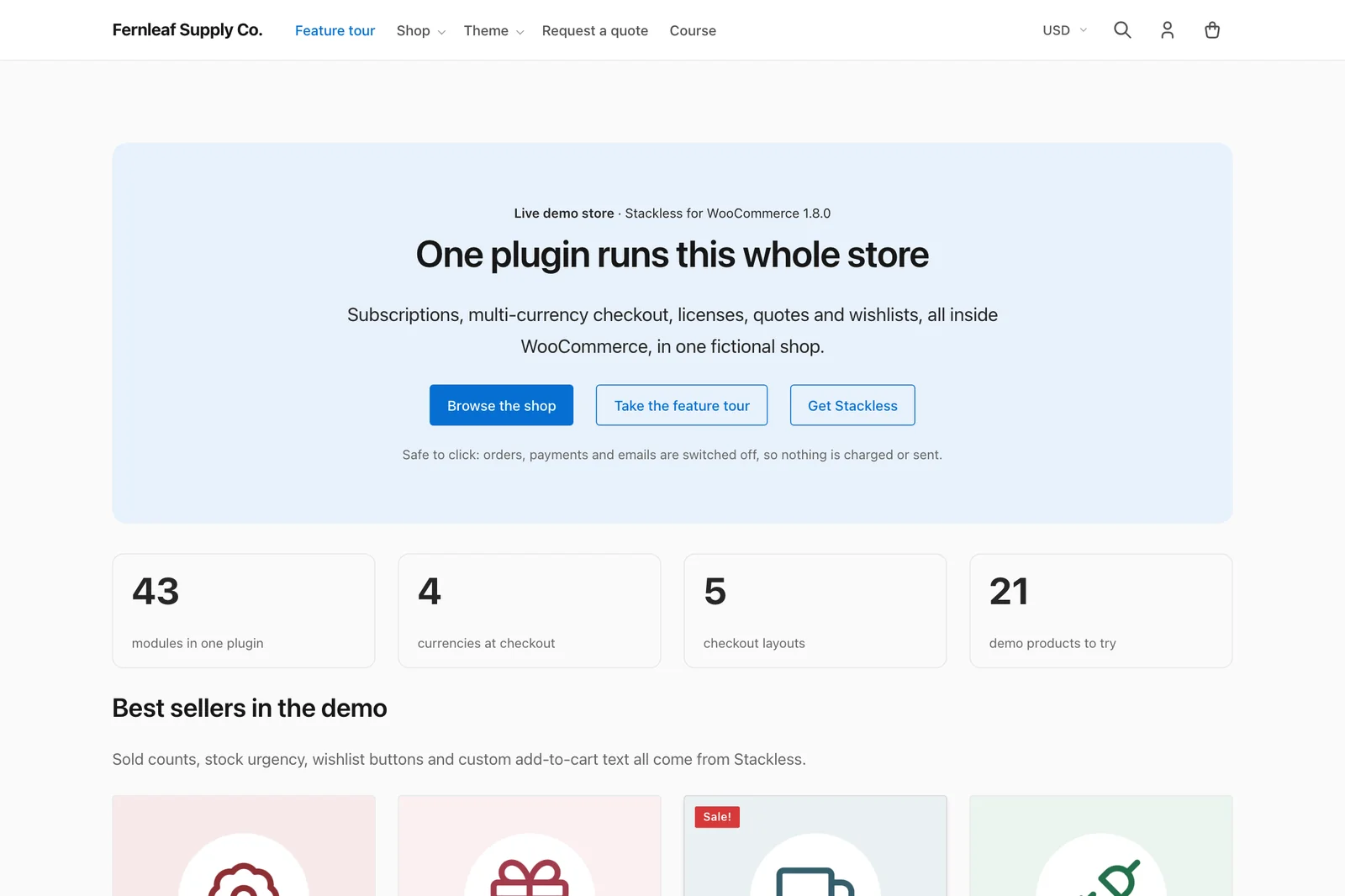
It’s built to run beside 2 plugins from the same developer:
- Stackless for WooCommerce, the 43-module plugin reviewed here already
- Stackless for EDD, the same idea for Easy Digital Downloads
Each plugin costs $39 a year or $99 lifetime for unlimited sites at the current limited-time price. The theme stays free either way, and it styles what those plugins render, for example:
- wishlist buttons, sold counts and stock urgency labels
- quote forms, license tables and subscription screens
- saved carts, order bumps and consent checkboxes
- the currency switcher
Without a plugin it’s still a complete store theme. The WooCommerce stylesheet loads only with WooCommerce, the Stackless stylesheet only with the WooCommerce plugin and the EDD stylesheet only on EDD pages.
Block Editor Support
Stackless is a classic theme with full block editor support. You write posts and build pages in the block editor with the theme’s own colors, type sizes and spacing, and the header, footer and page templates stay in PHP.
The editor loads the same base stylesheet as the front end, so headings, lists, quotes, tables, code and buttons don’t change when you press Publish. The content column is 720px in both places, which means line lengths match too.
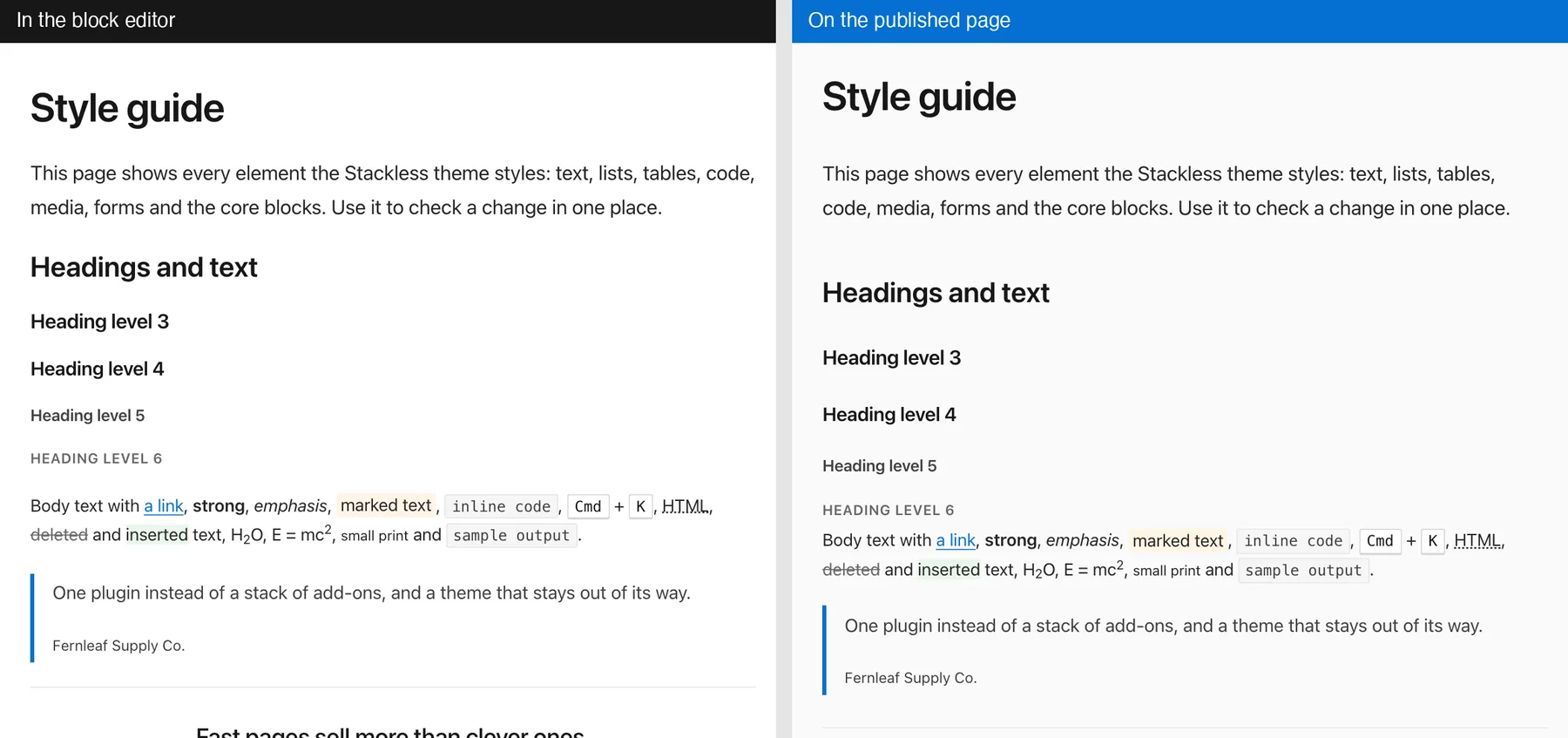
What theme.json Gives You
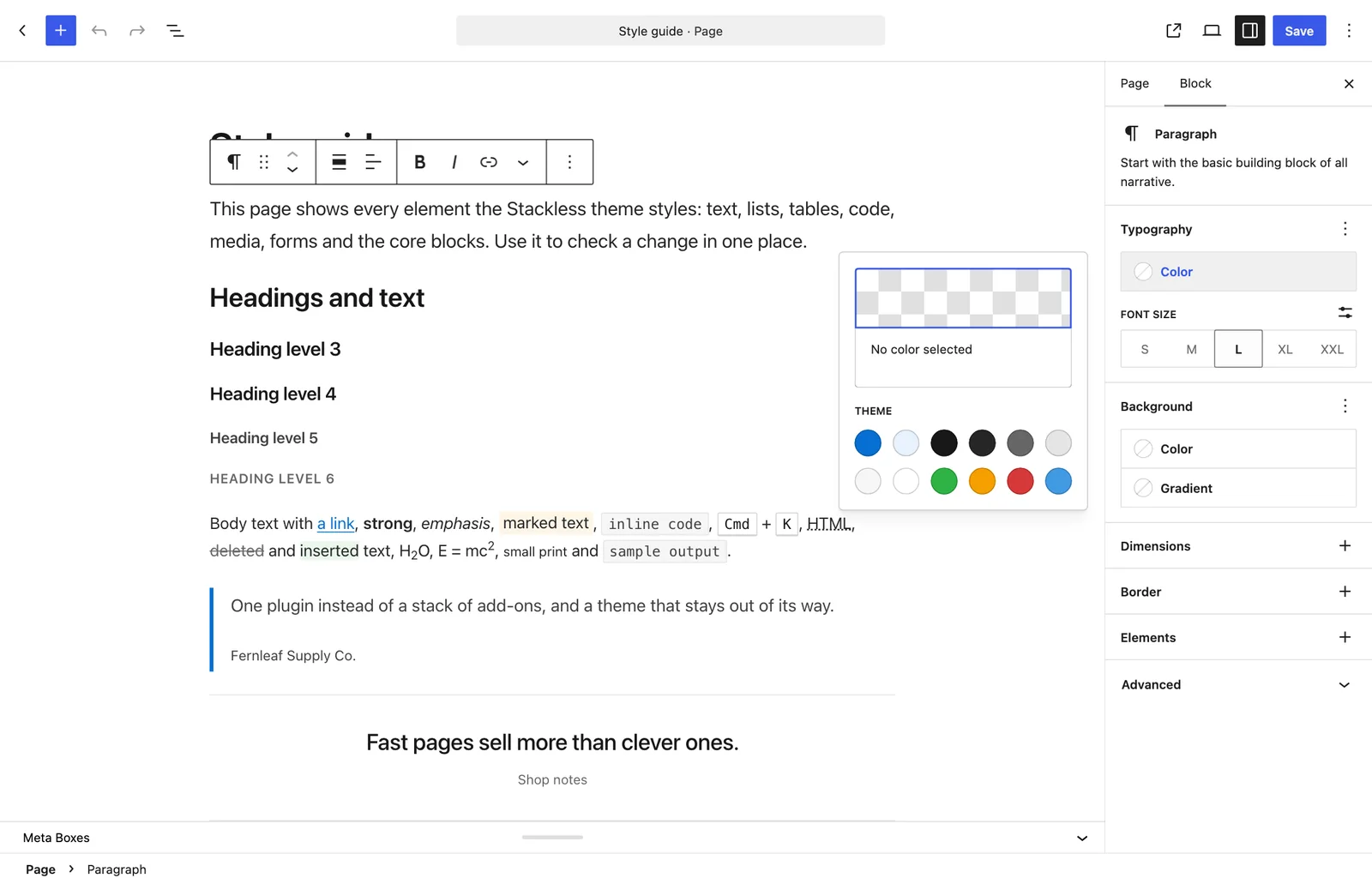
The theme’s theme.json file replaces WordPress’s generic presets with its own. This is what you see in the block sidebar:
| Setting | What you get |
|---|---|
| Colors | 12 theme colors: primary, primary light, dark, body text, muted, border, surface, white, success, warning, danger and info. WordPress’s default palette, gradients and duotones are off. |
| Font sizes | 5 sizes from S to XXL, 14px to 40px. The 3 largest are fluid, so they shrink on small screens. |
| Font families | System sans and monospace, with no font file to load. |
| Spacing | 5 presets from 8px to 64px. |
| Width | 720px content and 1200px wide, with wide and full alignment on. |
| Shadows | 3 presets, small to large. WordPress’s defaults are off. |
| Block tools | Border, padding, margin, block gap, line height and link color controls are on. |
| Buttons and links | Styled in theme.json, so a new Button block already has the theme’s color, 4px corners and focus ring. |
This is important on a site where someone else edits the content. The swatches in the sidebar are the brand’s colors, so an editor picks the right blue without knowing its hex code. The custom color picker is still there when they need it.
Core Blocks Styled
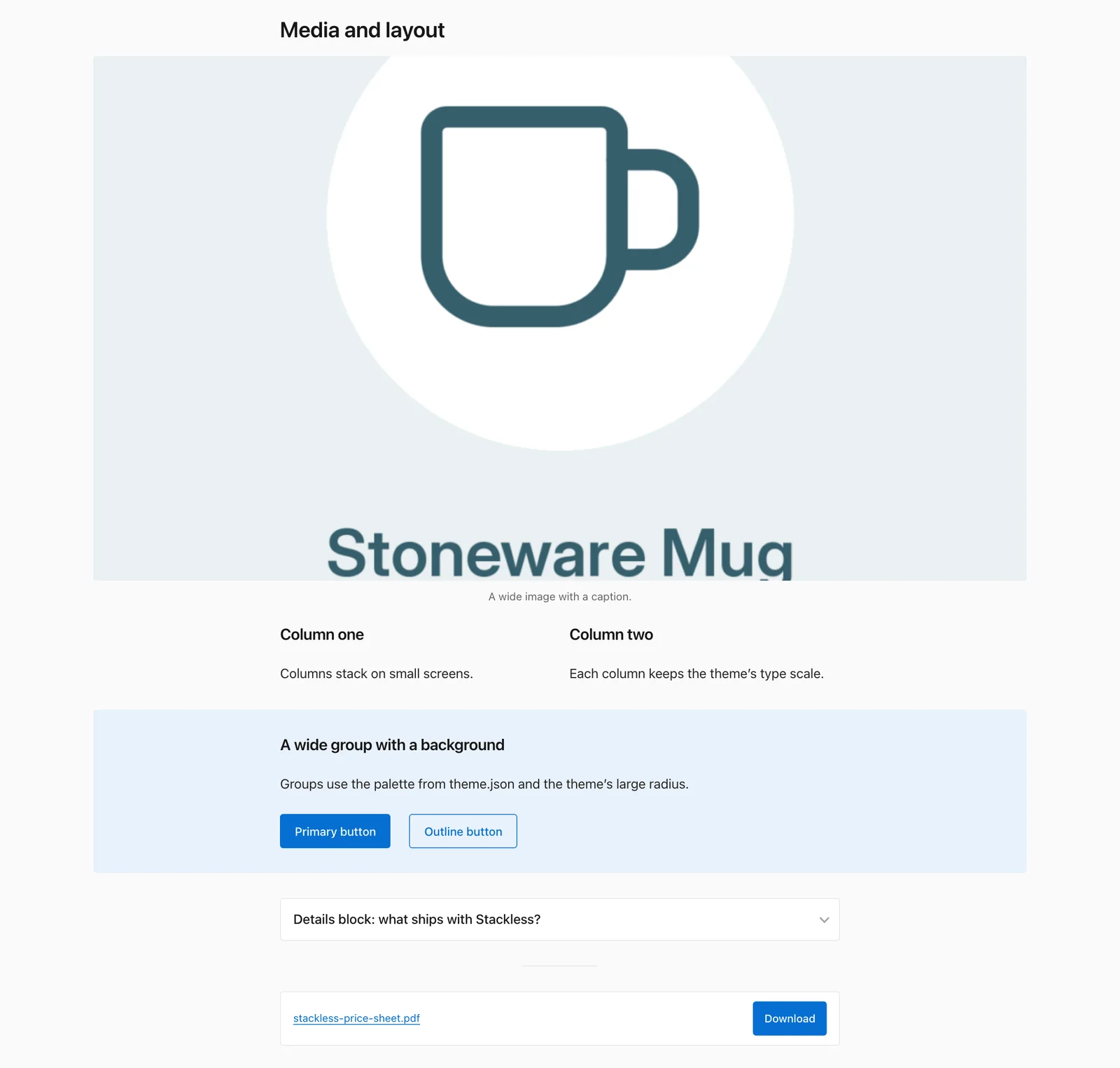
The theme styles the core blocks people use most, and the style guide page on the demo shows them in one place:
- Text: paragraph, heading, list, quote, pull quote, verse, preformatted, code and table, including the striped table style.
- Media: image, gallery, media and text, cover, file and embed.
- Layout: group, columns, separator, details and buttons, including the outline style.
- Site content: search, latest posts, latest comments, categories, archives, page list and social links.
A wide block runs to 1200px and a full block runs edge to edge. Content inside a full-width group stays in the readable column, and a group or column block with a background color gets its padding automatically.
Design Styles and Fonts
On WordPress 7.1, Stackless gets a Design screen under Appearance, even though it’s a classic theme. Design → Styles lets you change these without code:
- fonts, font size presets and text styles
- the palette, plus colors for links, captions, buttons and headings
- background, shadows and layout
- the default look of each block type across the site
Appearance → Fonts is there too, if you decide a web font is worth the extra request.
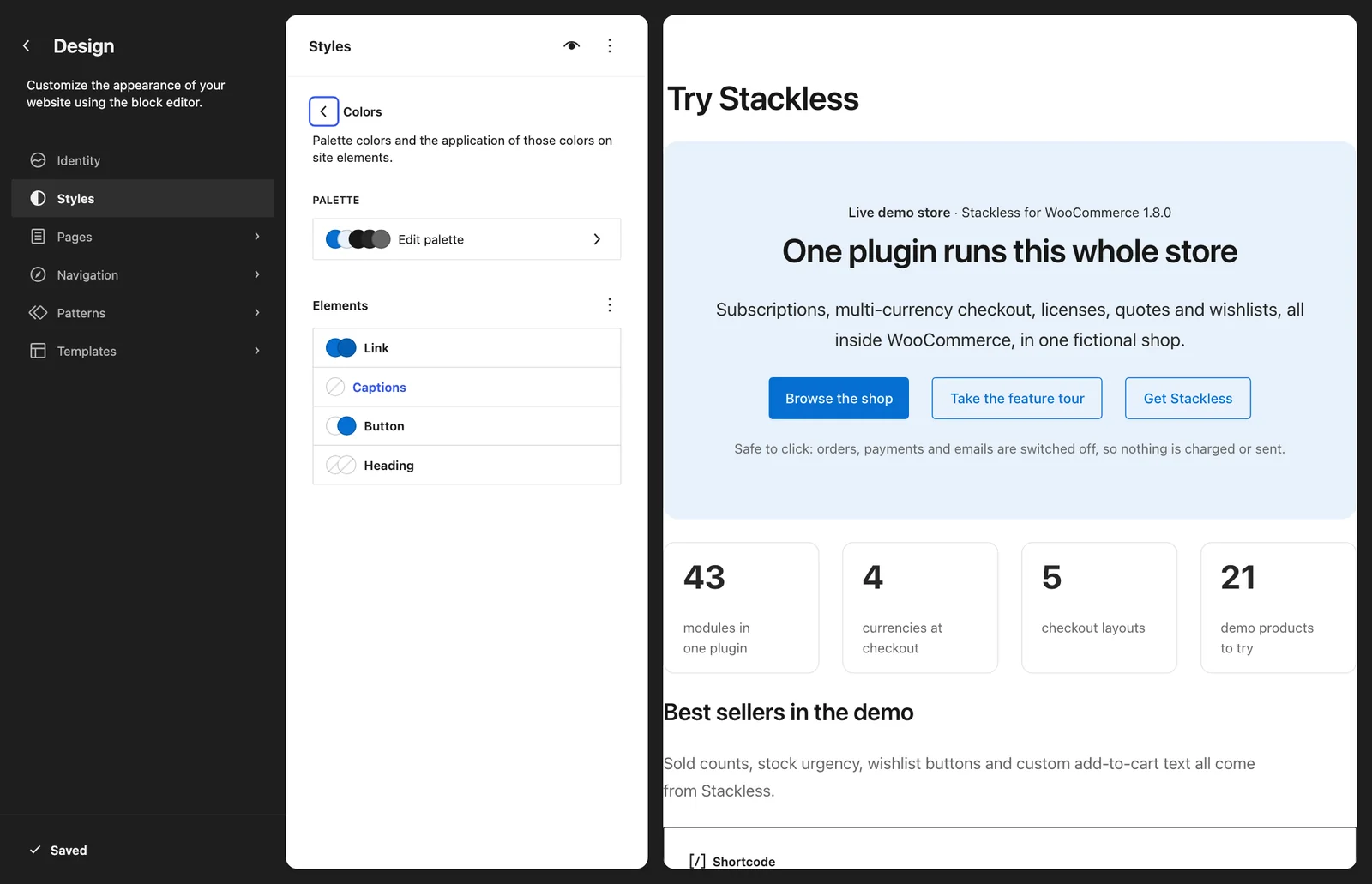
These styles reach the content more than the store’s frame. We checked this by applying the same kind of CSS rule the Styles screen writes to the demo pages:
- Changed: page background, body text and font, headings, content links and block buttons.
- Stayed: header link colors and the shop’s button colors, because those read the theme’s
--st-*CSS tokens.
So a new brand color across the whole store still takes a few lines in Additional CSS. In our check, these 3 variables moved content links, the current menu item, the search button, block buttons and the Add to cart button together:
:root {
	--st-primary: #0a7d5a;
	--st-primary-hover: #086a4c;
	--wp--preset--color--primary: #0a7d5a;
}
The preview on the Styles screen shows the content without the theme’s page layout, so it’s wise to check a real page before you save.
Patterns and Templates
This is where the classic theme shows. Stackless has no block patterns, block styles or custom blocks of its own.
- Patterns: the Patterns screen works and you can save your own. The 8 header and footer patterns listed on the demo come from WooCommerce.
- Templates: Templates, Pages and Navigation under Design report that the theme doesn’t support those screens. The header, footer and page templates are PHP files.
If you want to drag the header around as blocks, a block theme is the better fit. If you want the same header on every page and a block editor for everything below it, this is less to look after.
Store Blocks
Store blocks get the theme’s full styling on the front end:
- WooCommerce: the Cart and Checkout blocks and product blocks such as product image, price and the product grid.
- Easy Digital Downloads: the Downloads, Buy Button, Checkout, Cart, Receipt, Confirmation, Login, Register, Profile Editor and Terms blocks.
On the EDD demo, the store page is plain core groups, headings and paragraphs around 5 Downloads blocks. That’s a good sign of how far the block editor can carry a store page.
There is one limit here. The editor loads the theme’s base stylesheet and leaves its store stylesheets out, so Cart, Checkout and Downloads blocks look closer to their plugin defaults while you edit. They pick up the theme’s design on the published page, so you should preview store pages before judging them.
Who Should Not Use the Stackless Theme
- Stores that want to design in the Customizer. Appearance → Customize has site identity, menus, widgets, related-item counts and the store toolbar. There’s no header layout picker and no product grid column setting.
- Right-to-left stores. There’s no
style-rtl.cssyet. Storefront ships one. - Anyone who wants to edit templates as blocks. The block editor works fully for content and Styles works for design, but templates are files.
- Stores with a heavily customized Storefront or Astra setup. You’d be rebuilding header, footer and product grid tweaks from scratch, and the theme gives you fewer dials to do it with.
How Light the Stackless Theme Is
The claim on the product page is system fonts, no jQuery, one script. We measured what that means on both demo stores, in a fresh browser session with an empty cache at a 1366px viewport.
These are the theme’s own files, as served on the demos:
| File | What it is | Minified | Compressed |
|---|---|---|---|
| base.min.css | Tokens, elements, forms, core blocks | 20.3 KB | 5.5 KB |
| layout.min.css | Header, footer, menus, search, sidebar | 28.4 KB | 6.3 KB |
| woocommerce.min.css | Shop, product, cart, checkout, account (only with WooCommerce) | 46.5 KB | 8.2 KB |
| stackless.min.css | Stackless module styles (only with the WooCommerce plugin) | 12.7 KB | 2.5 KB |
| edd.min.css | Downloads, checkout, receipts, account (only on EDD pages) | 72.6 KB | 11.4 KB |
| theme.min.js | Mobile menu and header search | 4.6 KB | 2.0 KB |
| WooCommerce store total | Everything except edd.min.css | 112.4 KB | 24.5 KB |
| EDD store total | Base, layout, EDD and the script | 125.9 KB | 25.1 KB |
The body font on the demo resolves to system-ui, -apple-system, "Segoe UI", Roboto, "Helvetica Neue", sans-serif, so there is no font request at all. The icons are inline SVG, so there is no icon font either.
This is what each whole demo page loads, including its images and the store plugin’s own files. The cart and checkout rows have 1 item in the cart, and the EDD checkout has 2.
| Page | Requests | Transferred |
|---|---|---|
| WooCommerce homepage | 35 | 261 KB |
| WooCommerce shop | 40 | 421 KB |
| Single product | 47 | 304 KB |
| Cart (Cart block) | 88 | 987 KB |
| Checkout (Checkout block) | 96 | 952 KB |
| EDD store page | 43 | 362 KB |
| Single download | 27 | 217 KB |
| EDD checkout | 33 | 132 KB |
Two things need saying about that table. First, jQuery is on every page of both demos, and it isn’t the theme’s doing: the store plugins load it, and the theme doesn’t add to it.
Second, the WooCommerce Cart and Checkout pages are nearly 4 times heavier than the homepage because WooCommerce’s blocks ship their React bundles, and no theme can take those away. The Stackless plugin’s Optimizer module removes the cart and checkout prefetch hints WooCommerce adds to other pages, but the checkout itself is WooCommerce’s weight to carry.
For comparison, Storefront 4.6.2, WooCommerce’s own theme, enqueues 4 unminified stylesheets:
- main stylesheet: 40 KB
- icon font stylesheet: 80 KB
- block stylesheet: 43 KB
- WooCommerce stylesheet: 59 KB
That’s 222 KB of theme CSS, and it also requests Source Sans Pro from Google Fonts on every page. Those are file sizes from the theme’s zip. Storefront’s demo site is a marketing page with tracking on it, so a page measurement wouldn’t be a fair test.
Every Store Screen, Styled
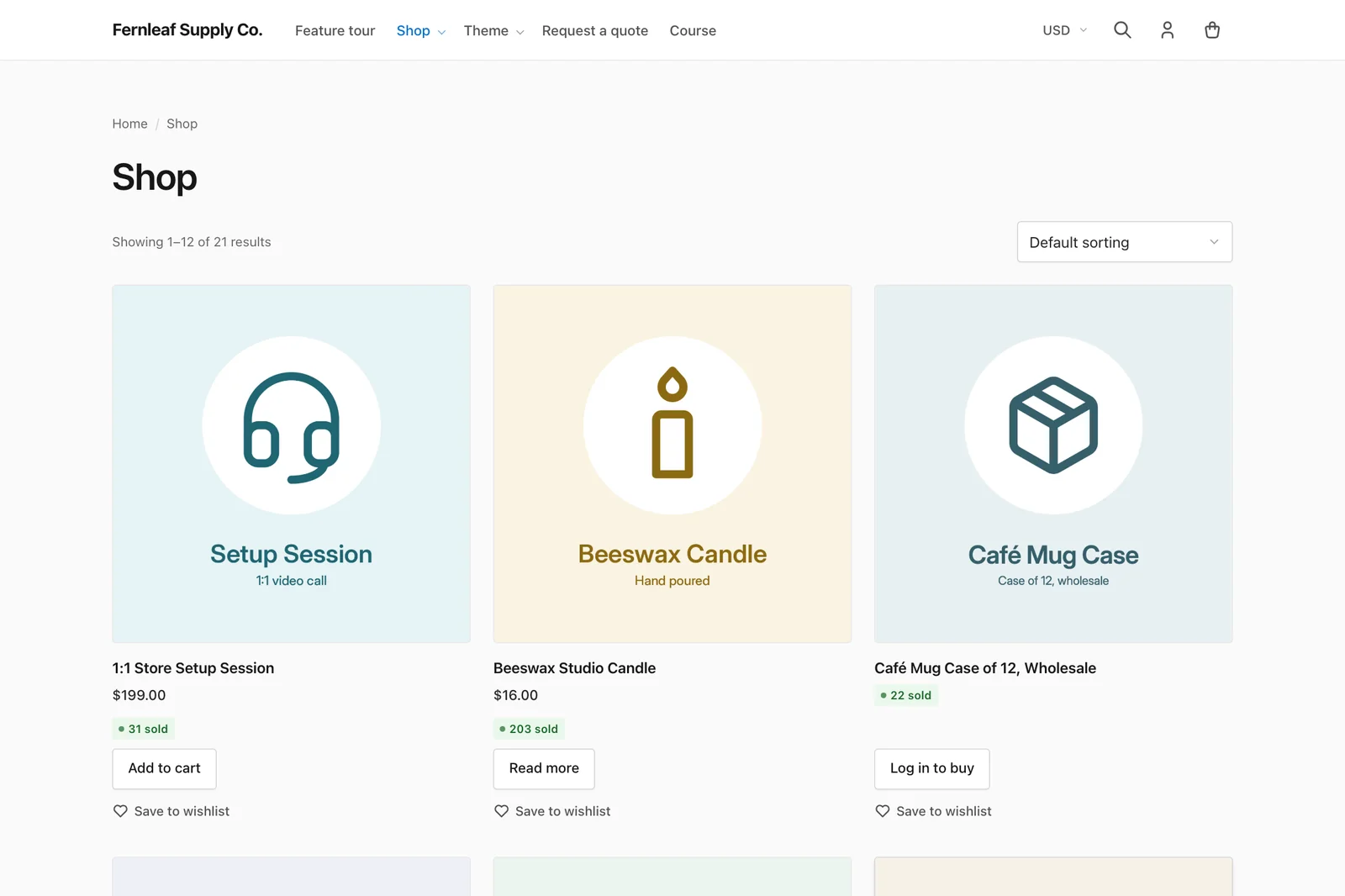
A theme earns its keep on the pages people buy from, and this is where Stackless is strongest. The shop grid is 3 columns with the product image on a tinted tile and the plugin’s sold count and stock labels in their place. Each product type gets the right button: Add to cart, Read more for a quote-only product, Log in to buy for a hidden-price product.
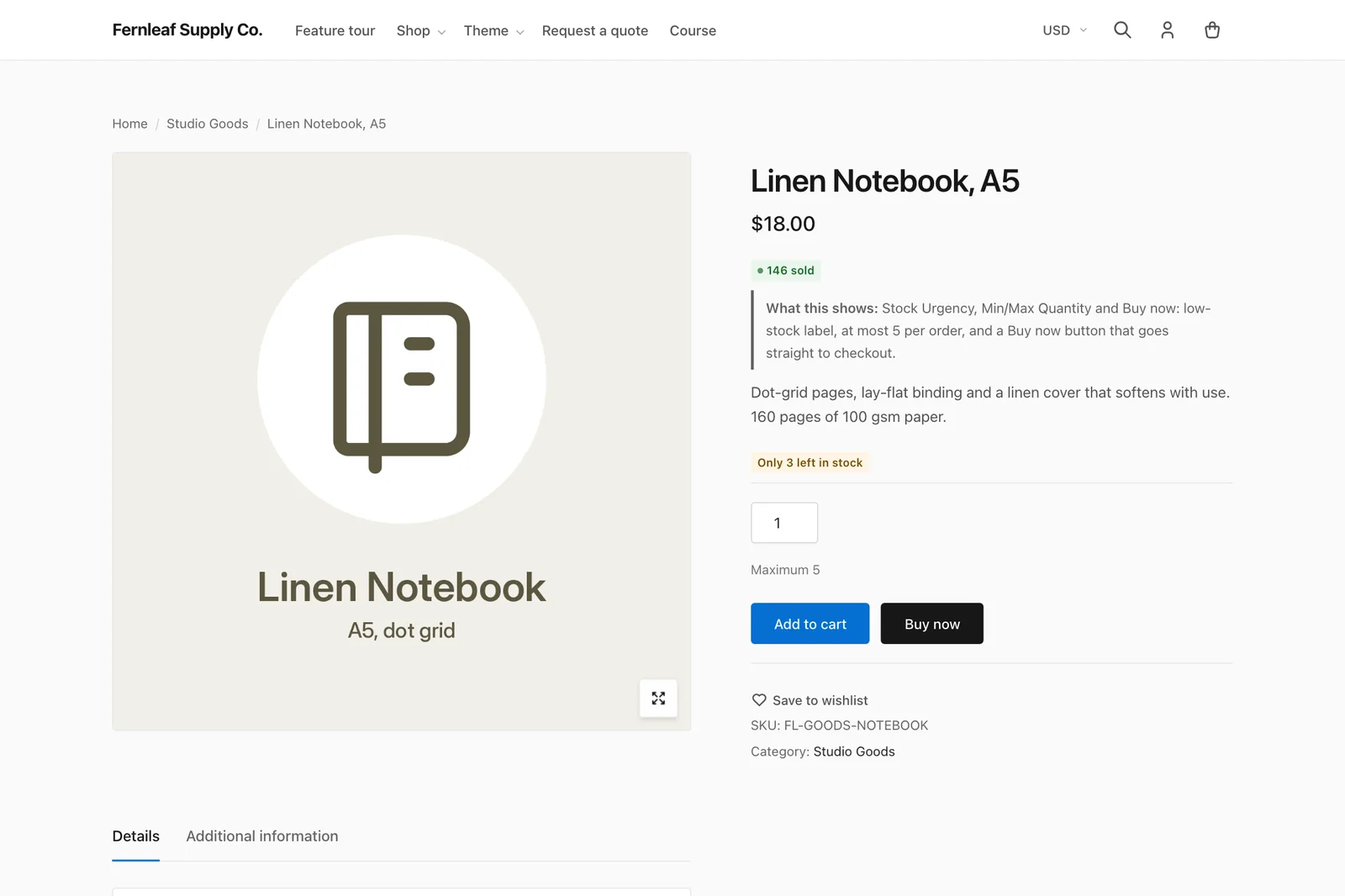
The single product page puts the gallery on the left and a sticky summary on the right. The price and the Add to cart button stay in view while the description, tabs and related products scroll past. The plugin’s wishlist link sits under the button in the same style as everything else.
Related products show 6 in 2 rows of 3, with a Customizer setting from 0 to 12.
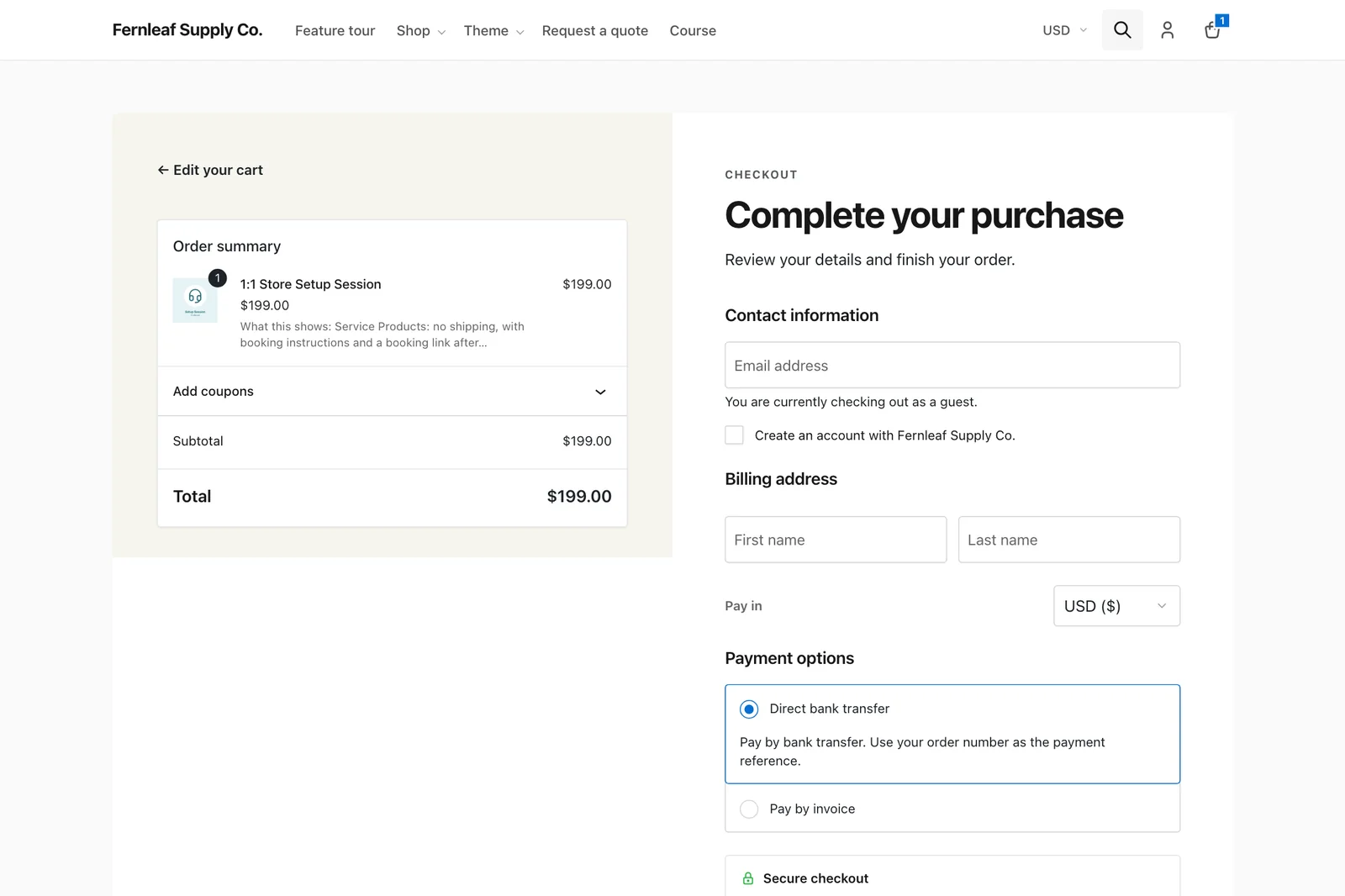
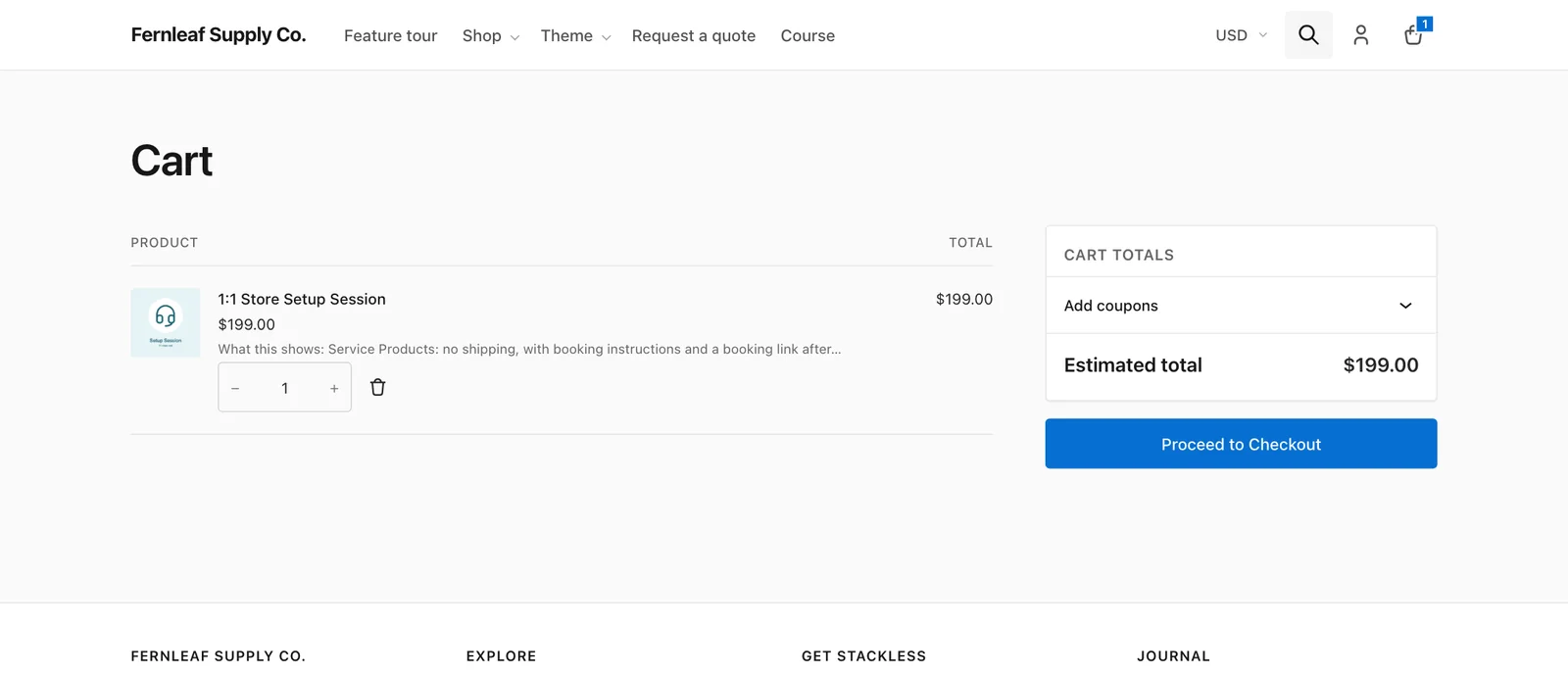
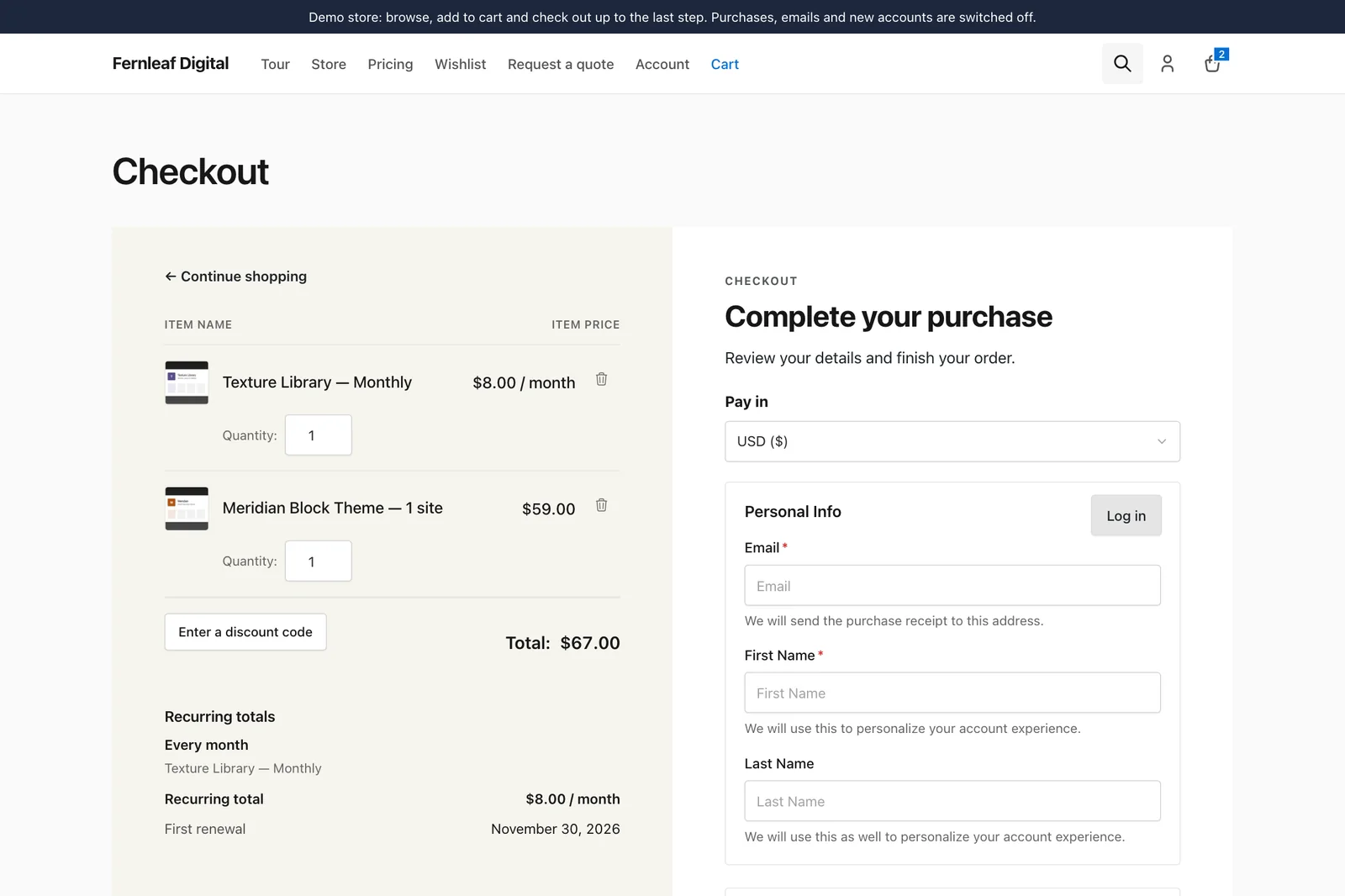
The Cart and Checkout blocks are the test most themes fail, because the blocks render from React with their own class names and most themes never touch them. Stackless styles both. The cart gets a totals card and a full-width checkout button, and the checkout gets the order summary on a tinted left panel with the form on the right.
The screens after the sale get the same care:
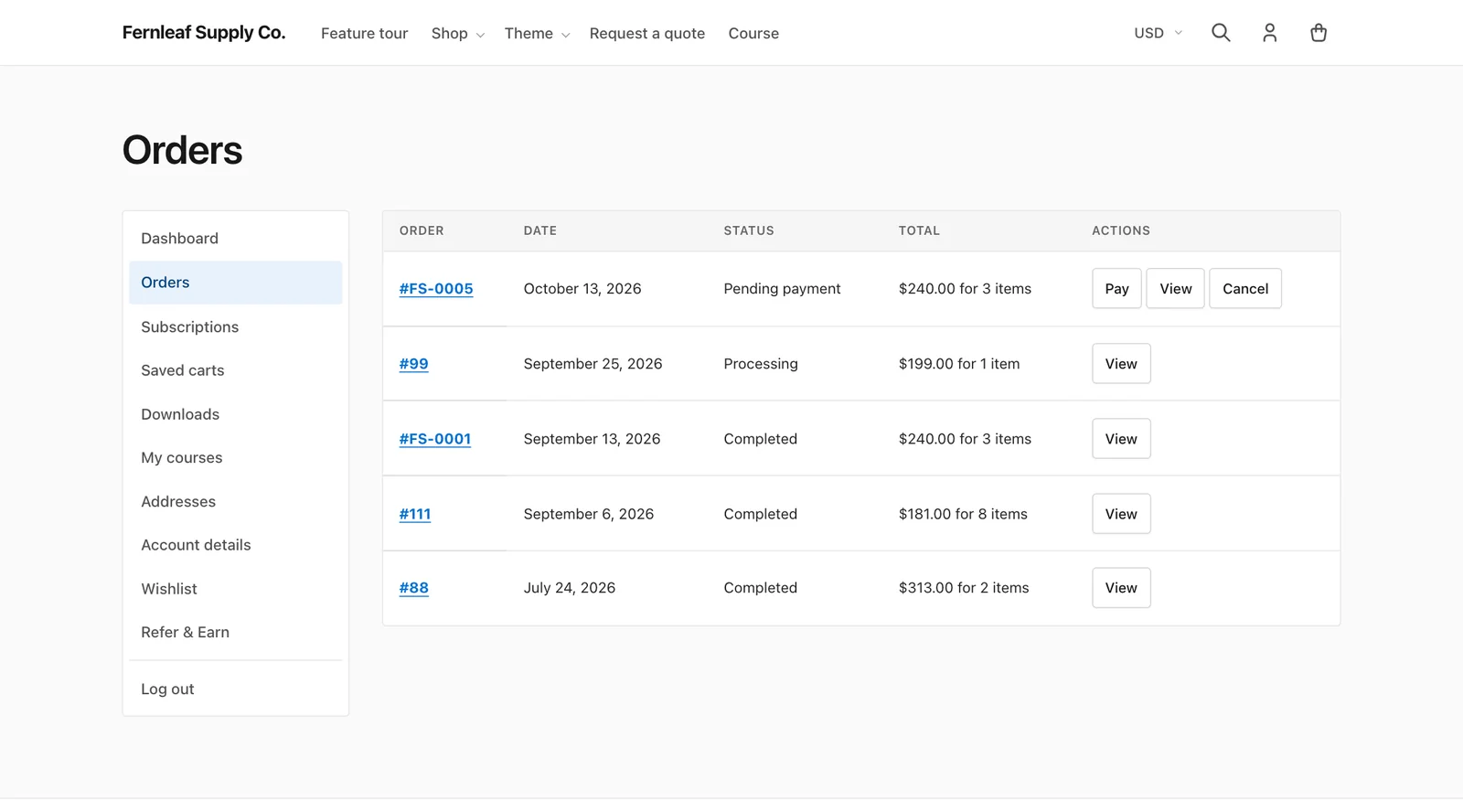
- My Account has the navigation beside the content, with order tables in the same style as the shop.
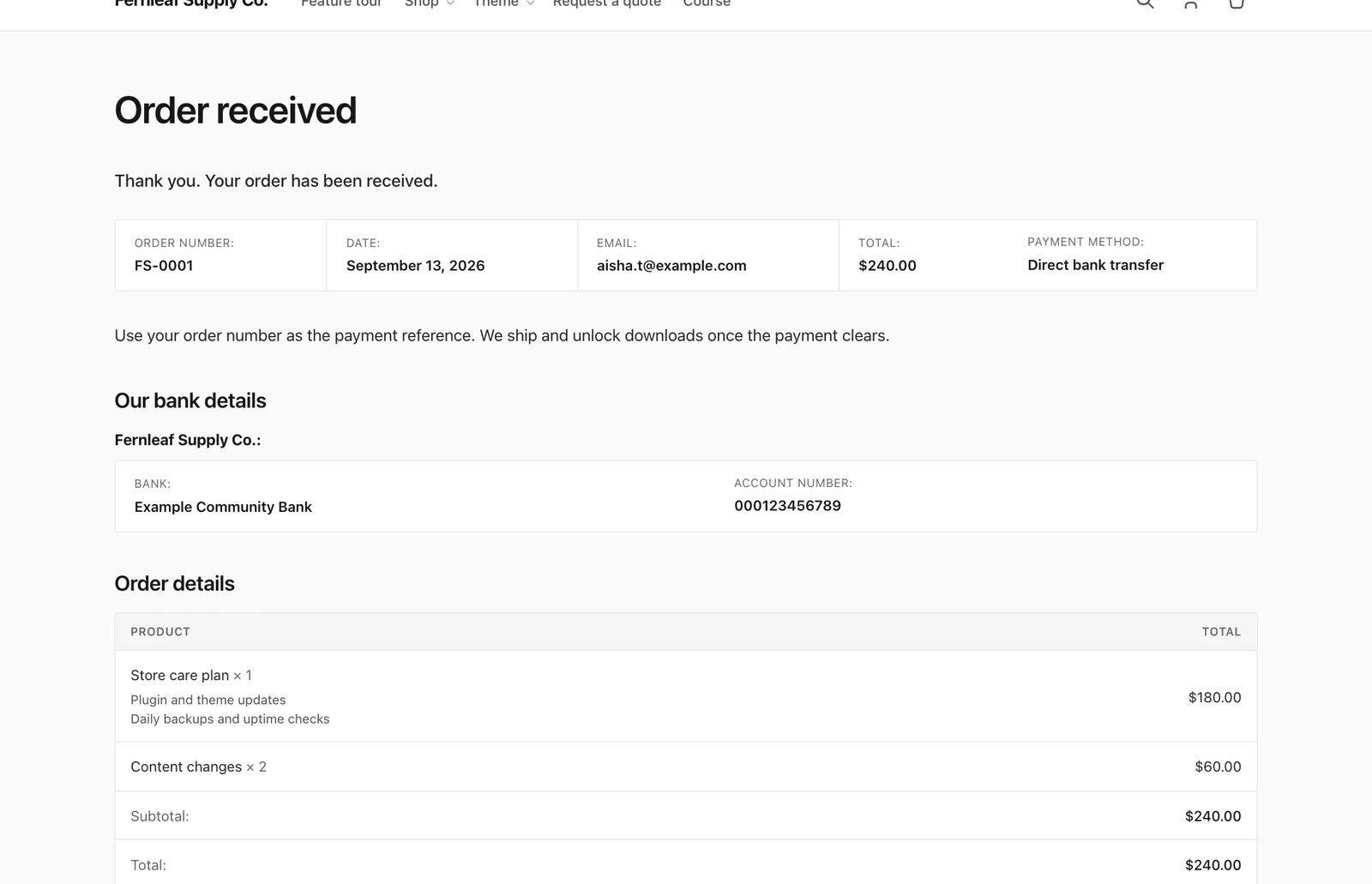
- The order received page has a summary strip, a details table with totals aligned right, and matching cards for extra information and checkout consents.
- Notices are tinted boxes with a thin border in their color: blue for information, green for success and red for errors.
- The store notice is a bar at the bottom of the screen, so it never covers the header.
Easy Digital Downloads Support
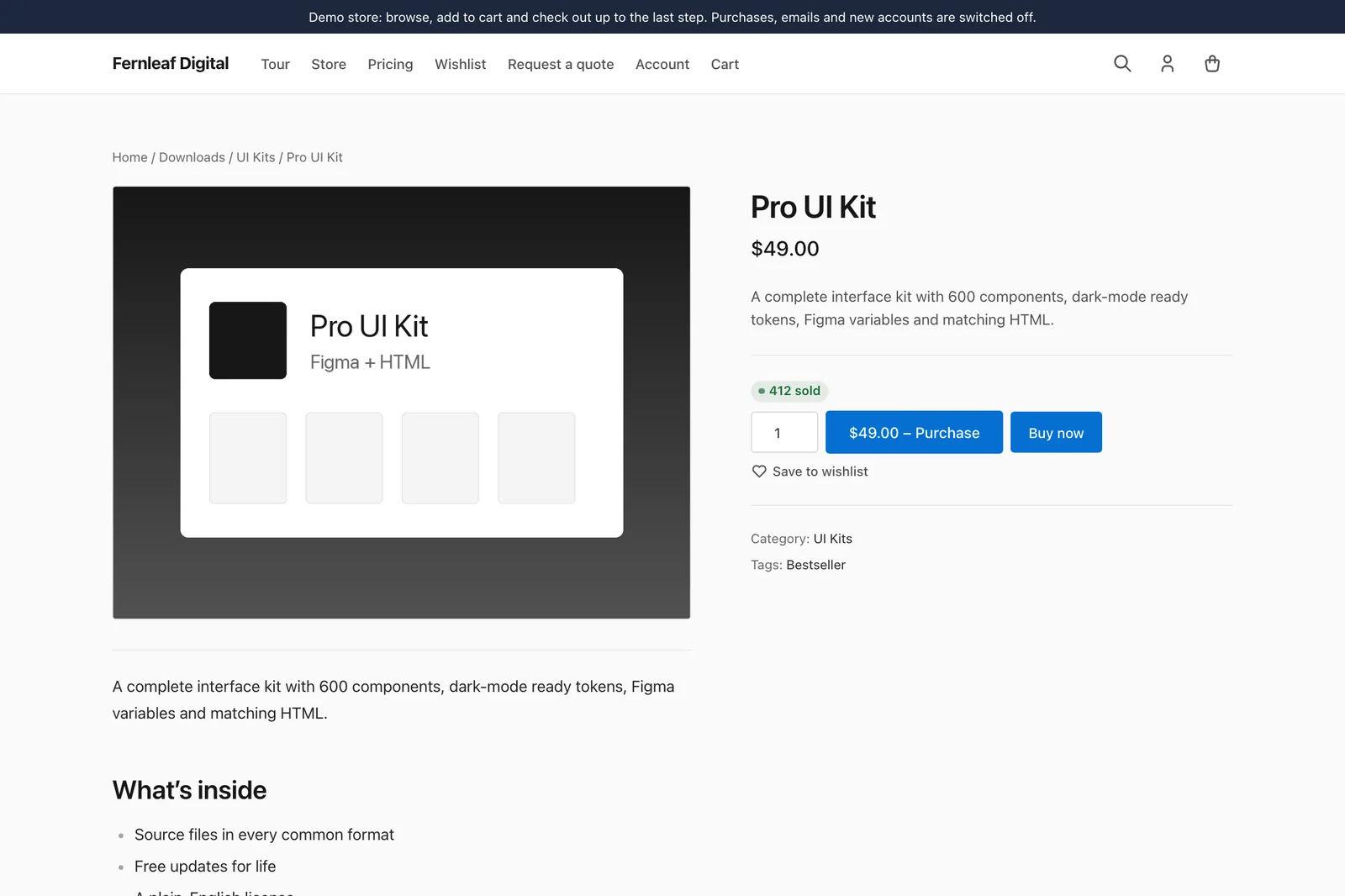
Stackless also styles Easy Digital Downloads, so a digital store gets the same design as a WooCommerce shop. You can see it on the EDD demo store, and the styles cover these screens:
- download grids and archives, with the free price label and “Choose an option” on downloads with options
- single downloads with a sticky summary
- the checkout, as a shortcode or a block
- receipts, order history and download history
- profile, login and register forms
- the account page from Stackless for EDD
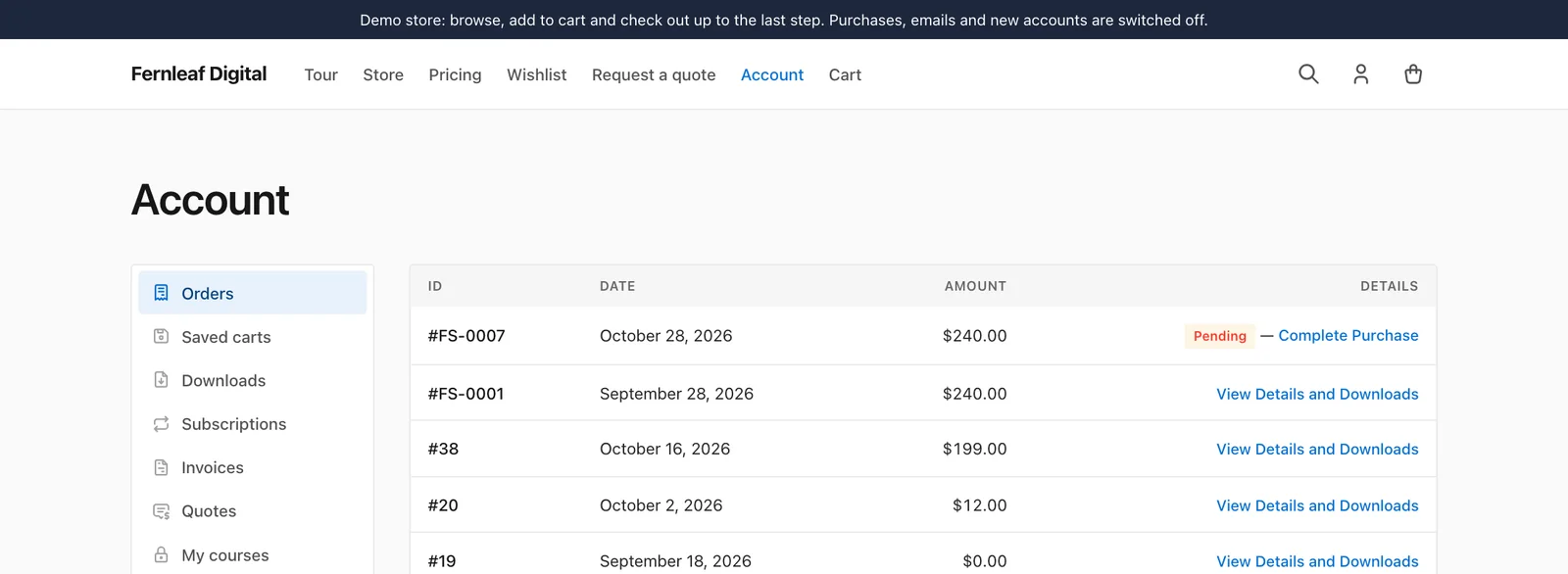
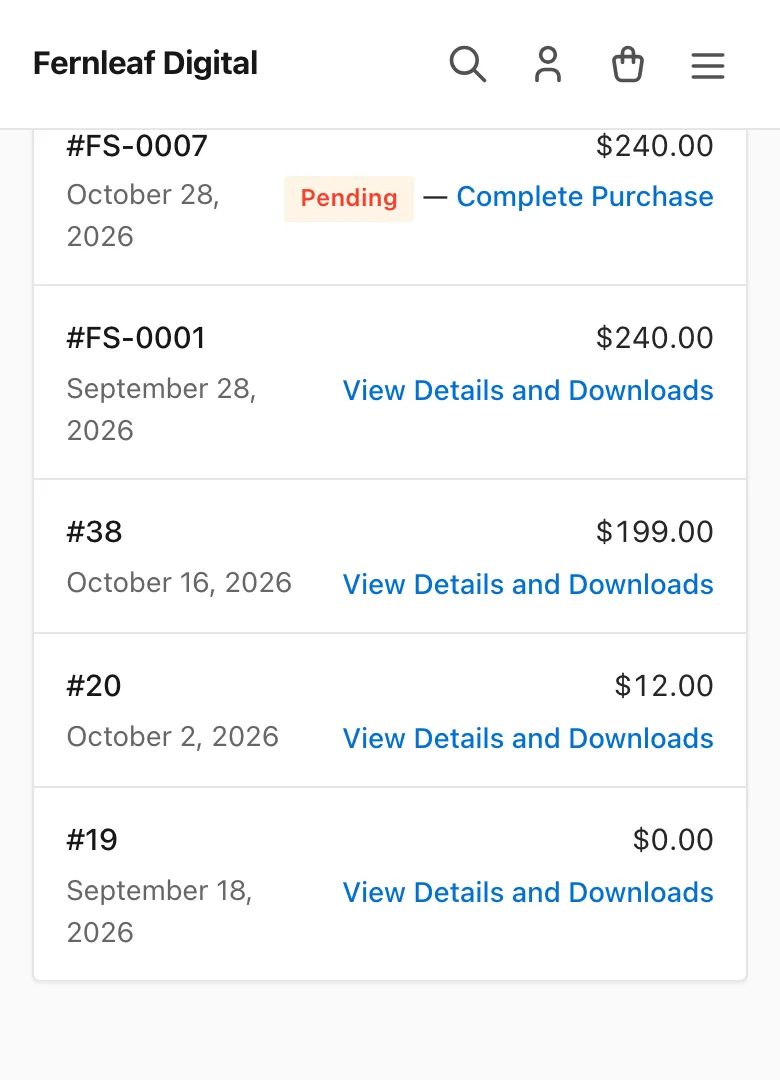
On a phone, account tables turn into cards, so nobody has to scroll a table sideways to find a download.
Store Toolbar
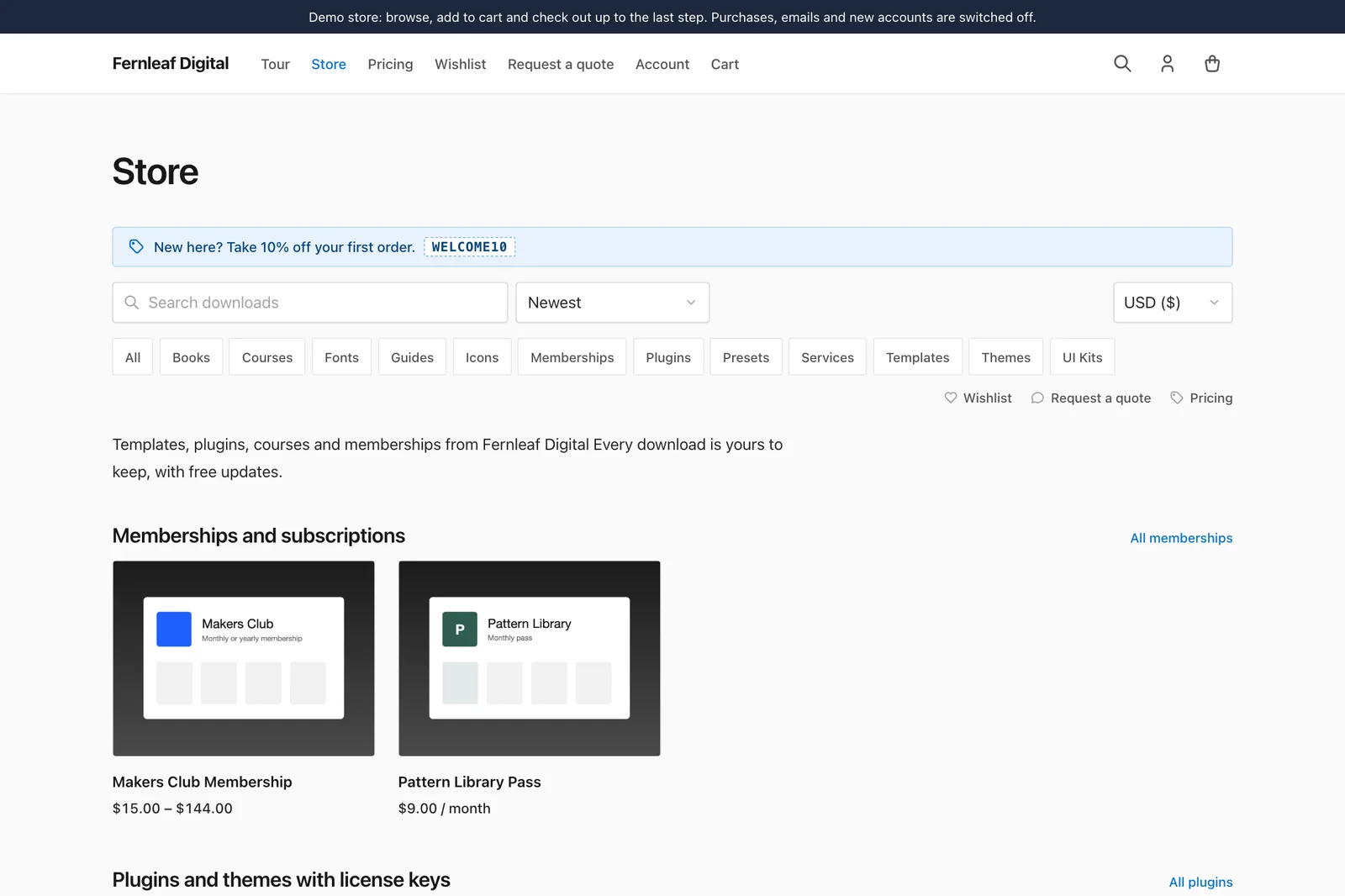
The store toolbar sits above the grid on the EDD store page and download archives. It’s on by default for EDD, and you set it under Appearance → Customize → Store (Easy Digital Downloads):
- a download search with sorting by newest, most popular or price
- category chips
- a currency switcher, beside the search or beside the chips
- quick links to wishlist, saved carts, request a quote and pricing, when those pages exist
- a promo line with a coupon code
WooCommerce stores get an optional version with chips, quick links, the currency switcher and the promo line. It’s off by default under Customize → Store (WooCommerce), and WooCommerce keeps its own sorting and result count.
Header, Search and Mobile
The header is one row with these parts:
- the logo and a two-level primary menu
- a currency code, when the plugin’s selector is on and more than 1 currency is enabled
- a search button and an account link
- a cart icon with a live count
Without a primary menu assigned, it lists the shop and a few top-level pages, so a fresh install doesn’t look broken.
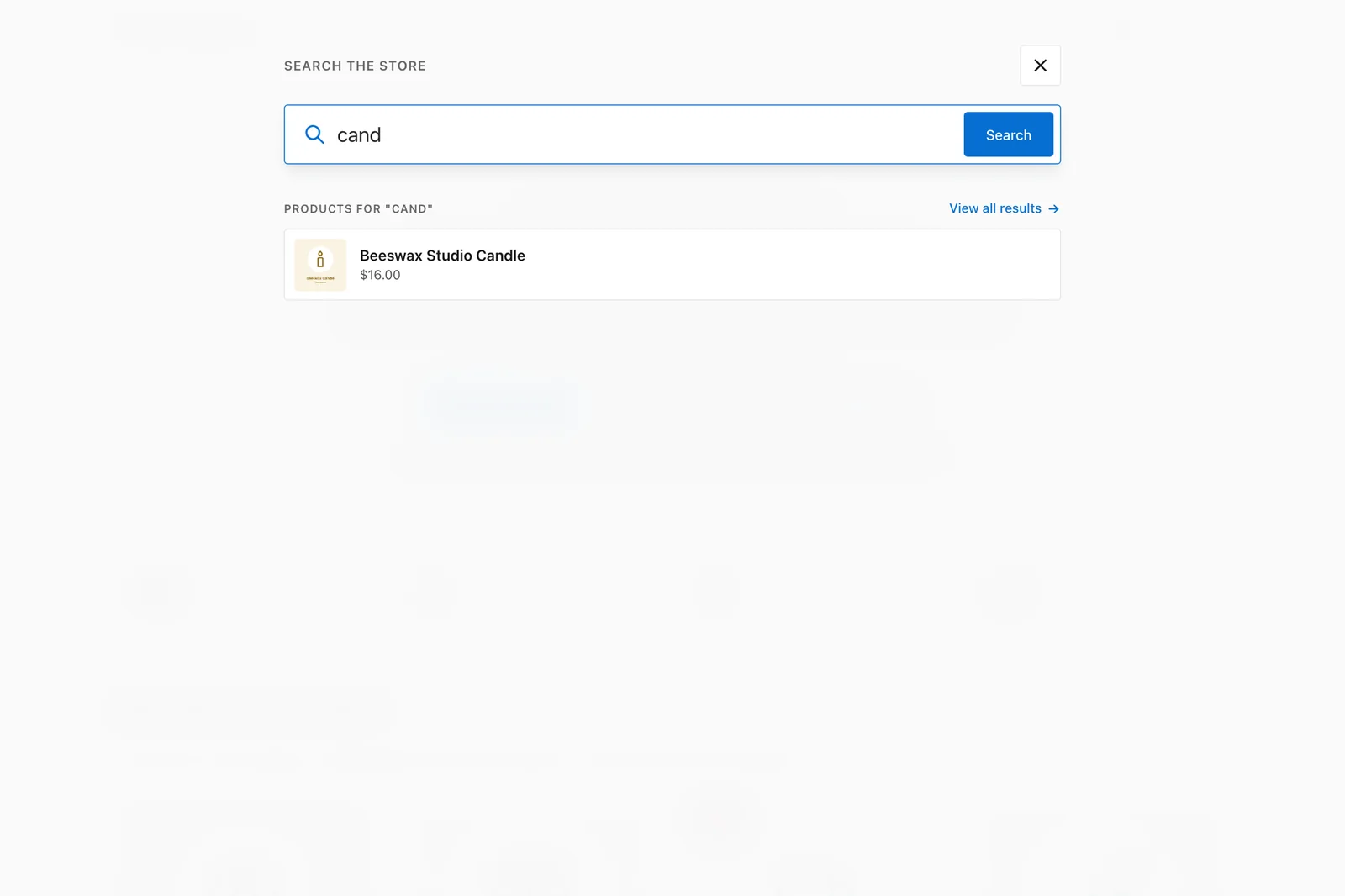
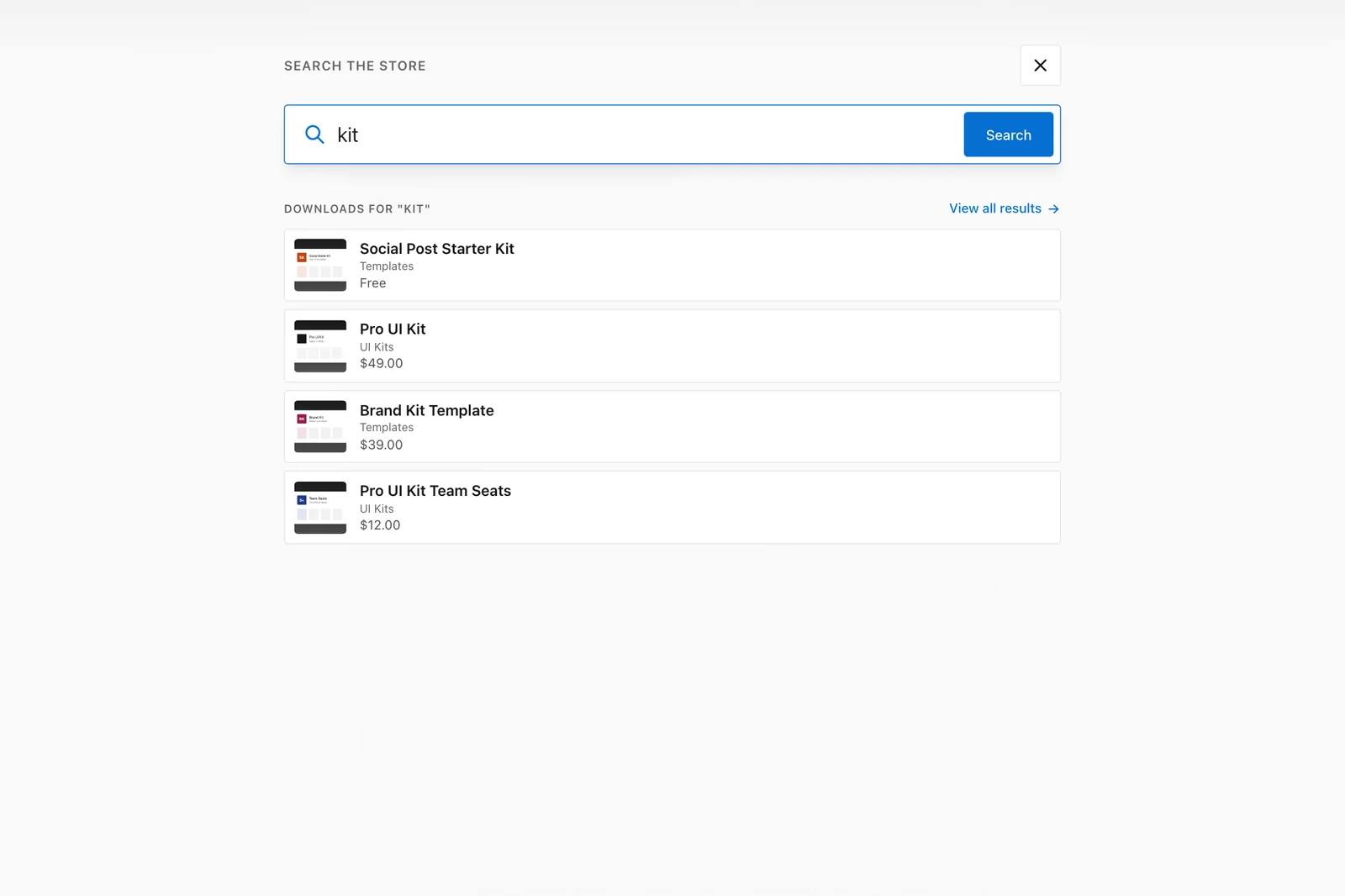
The search button opens a full-screen overlay with live product results as you type, popular categories and best sellers, and it keeps focus inside the overlay until you press Esc. On the demo, typing 4 letters returns the matching product with its price and thumbnail before you finish the word.
On an EDD store, the same overlay suggests downloads with their thumbnail, category and price.
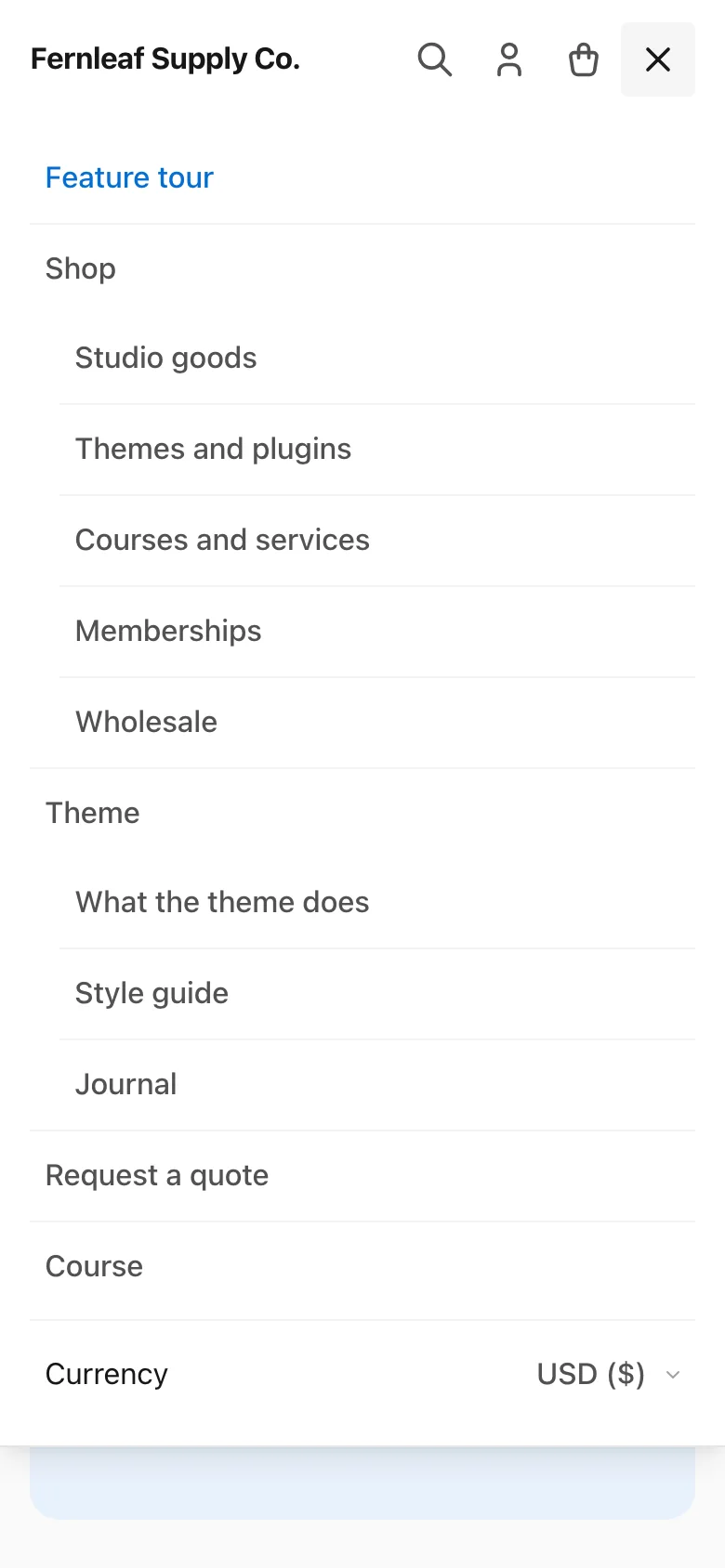
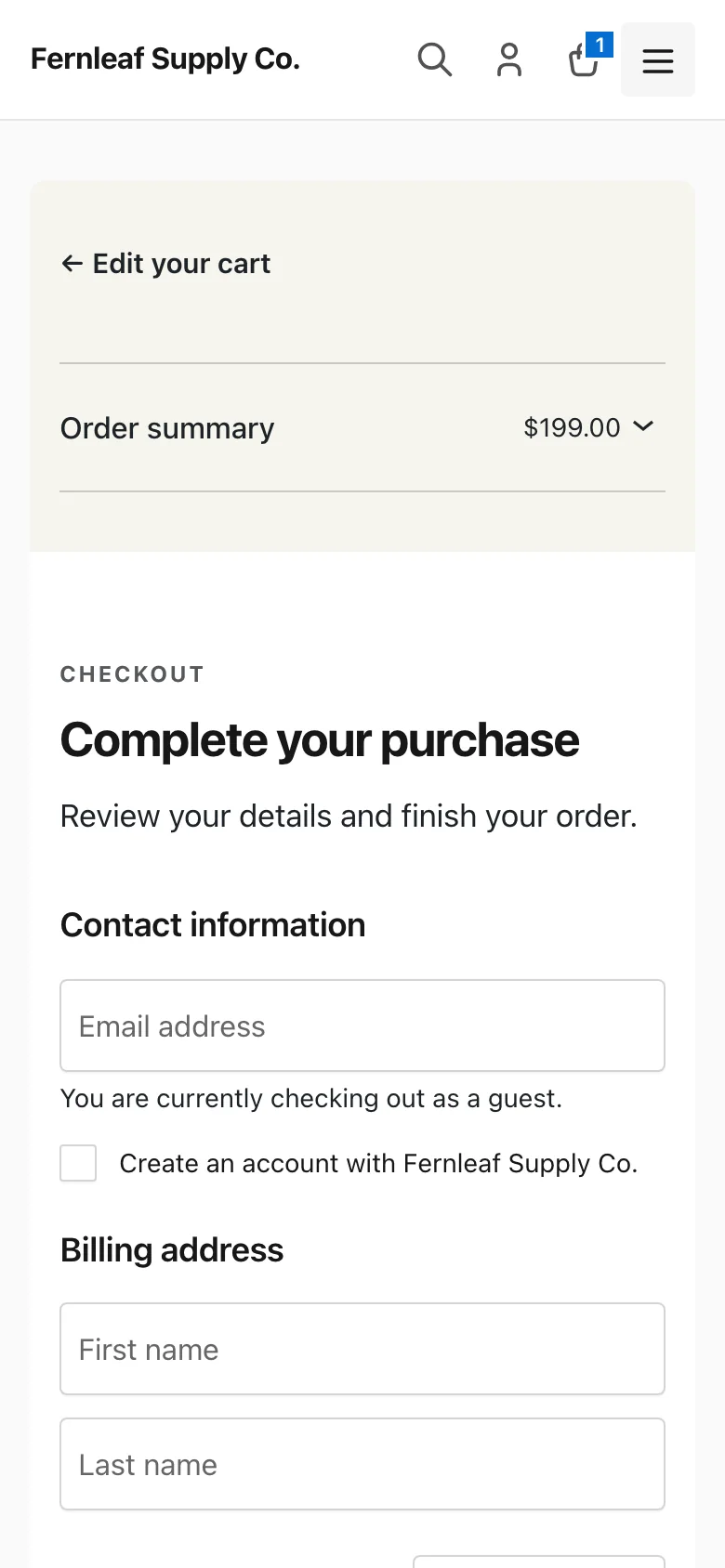
On a phone the header keeps the logo and 4 buttons in one row. The menu becomes a full-height panel with the two levels indented and the currency switcher at the bottom. The Checkout block stacks the summary above the form, collapsed so the form comes first.
Blog and Content Pages
Stores have a blog whether or not anyone planned one, so the theme treats posts as editorial pages. Single posts get a readable column, an author box and related posts: 6 by default, from the same category first and topped up with recent posts.
The blog, archives and search results get a sidebar that stacks below the posts under 960px. It shows search, recent posts and categories until you add widgets of your own.
The Limits
The limits are the price of the restraint, and they are concrete.
- One layout. Header, footer, grid and product page have one arrangement each. The theme exposes its tokens as
--st-*custom properties and filters for the blog sidebar, the currency switcher and the store toolbar. Beyond that you’re writing a child theme. - Partial reach for Styles. Design → Styles changes the content, while the header and store controls keep their token colors until you override them in CSS.
- No patterns of its own. Stackless doesn’t ship a starter homepage, hero or pricing pattern, so you build those sections from core blocks.
- Store blocks in the editor. They don’t get the theme’s store CSS until the page is published or previewed.
- No RTL stylesheet. A store in Arabic, Hebrew or Persian needs to generate one.
- Classic theme. Templates are PHP files, and the Design menu’s Templates screen isn’t available.
- Young software from 1 developer. The first release shipped in October 2026, which is a short record. The GPL license and the GitHub source limit the downside if development stops, because the theme keeps working and anyone can fork it.
- Designed around the Stackless plugins. Without one it’s a clean, fast store theme and nothing more. The styled modules and the currency switcher need a plugin.
Setting It Up
Setup is short because there is little to configure:
- Download the zip from the theme page. The free checkout gives you a license key that never expires and works on unlimited sites.
- Appearance → Themes → Add New → Upload Theme, choose the zip, activate.
- Appearance → Stackless License: activate the key. It’s only used for updates.
- Appearance → Menus: assign a Primary menu and a Footer menu. Two levels are supported in the header.
- Appearance → Customize → Site Identity: add a logo. Under Stackless, set the related posts, products or downloads counts if you want something other than 6.
- Appearance → Customize → Store: set up the toolbar. The section for each store shows only while its plugin is active.
- Appearance → Widgets: fill the footer widget area, the optional Shop area above the product grid and the Blog sidebar.
- Appearance → Design → Styles: adjust the content colors and type, if you want to.
If the store runs a Stackless plugin, nothing else is needed, because the module styles load on their own. If you’re on another theme today, switch on a staging copy first and check your product grid. Any grid-column or header tweaks you made in the old theme’s Customizer won’t carry over.
Final Remarks
The Stackless theme is the rare free theme that is better for what it leaves out. Measured on its demo, this minimal WooCommerce theme loads 112 KB of its own CSS and JS with no web font and no icon font. It also treats the block editor, the Cart and Checkout blocks and the EDD screens as carefully as the shop grid.
For a store that runs a Stackless plugin, we think it’s the obvious choice, because no other theme we know of is built around what those modules render.
For a store on plain WooCommerce or EDD, the decision is about control. If you want header and grid controls, Astra, Kadence or Storefront give you the dials. If you want a store that looks finished on day 1 and a block editor that shows you the real page, we’d install this one.
It gets 4.7 out of 5, with the missing 0.3 being the RTL stylesheet, the missing patterns and store colors that a 1.x theme can still bring into Styles.
If you still aren’t sure, we’d click through the WooCommerce demo or the EDD demo to the checkout. Nothing is charged there, and the checkout is where a store theme usually falls apart.
Stackless theme
Pros
- Free, GPL, unlimited sites, with a license key that never expires
- System font stack, no web font request, one 4.6 KB script, about 25 KB of compressed theme CSS and JS on a full store
- Every WooCommerce and Easy Digital Downloads screen, the Cart and Checkout blocks and every Stackless module styled out of the box
- Full-screen product search with live results, sticky product summary, live cart count
- Full block editor support: theme.json palette, type scale, spacing and shadows, with an editor that matches the front end and a working Styles screen
Cons
- One layout: no Customizer controls for header styles or product grid columns, and store-wide brand colors need CSS
- Classic theme, so templates stay in PHP; no template editing in the Site Editor and no block patterns of its own
- No RTL stylesheet yet
- First release was in October 2026 and it depends on one developer
Summary
A free, minimal classic theme with full block editor support. It styles every WooCommerce and Easy Digital Downloads screen, the Cart and Checkout blocks and every Stackless module, with system fonts, no jQuery of its own and 112 KB of CSS and JS. Held back by its single layout and by store colors that still live in CSS.
FAQs on the Stackless Theme
Is the Stackless theme free?
Yes. It’s free, licensed GPL-2.0-or-later, and the free checkout on gauravtiwari.org gives you a license key that never expires and activates on unlimited sites. The key is only used to deliver updates.
Does the Stackless theme need a Stackless plugin?
No. It’s a complete WooCommerce and Easy Digital Downloads theme on its own. The Stackless plugins add modules such as wishlists, quotes, subscriptions, licenses, order bumps and a currency switcher, and the theme has styles ready for them.
Is it a block theme?
No. It’s a classic theme with PHP templates and full block editor support through theme.json and editor styles. You build content with blocks, and the header, footer and page templates stay in PHP files.
Does the Stackless theme work with the block editor?
Yes. Posts and pages use the theme’s 12 colors, 5 font sizes, 5 spacing presets and 3 shadows, with wide and full alignment. The editor loads the same base stylesheet as the front end, so core blocks look the same in both places. Store blocks are the exception, because the theme’s store CSS loads only on the front end.
Does it work with Easy Digital Downloads?
Yes. Download grids, single downloads, the checkout, receipts, account pages and EDD’s blocks all match the WooCommerce design. The EDD stylesheet loads only on EDD pages, and a store toolbar adds search, sorting, category chips and a promo line.
How fast is the Stackless theme?
On the demo store the theme’s own CSS and JS total 112 KB minified and about 25 KB compressed, with system fonts and inline SVG icons, so no font requests. The homepage loads in 35 requests and 261 KB in total. The Cart and Checkout block pages are heavier because of WooCommerce’s React bundles.
Can I change the colors?
Yes. Appearance → Design → Styles changes the palette and the colors of content, links, headings and block buttons. The store’s own controls read CSS custom properties, so a store-wide brand color takes a few lines in Additional CSS or a child theme.
Does it work with the WooCommerce Cart and Checkout blocks?
Yes, and that’s one of its strengths. Both blocks are styled to match the rest of the store, including the cart totals card and the checkout’s two-panel layout.
Does it support RTL languages?
Not yet. The theme doesn’t include an RTL stylesheet.
Where do updates come from?
From the theme’s own update server through the license key, not from WordPress.org. Updates appear in the WordPress admin like any other theme update.
Tell Google you want more of this.
Add Gatilab as a preferred sourceOne tap, and this site shows up more often in your own Top Stories, AI Overviews and AI Mode. Remove it any time.