
Best WordPress Caching Plugins by Server and Site Type (2026)
The best WordPress caching plugins depend on who already owns page cache. Use LiteSpeed Cache on a LiteSpeed server, keep the host’s page cache on managed WordPress hosting, and choose FlyingPress or WP Rocket when you need a polished WordPress optimization layer on a conventional stack.
Do not run two page-cache owners and hope they cooperate. Ecommerce, membership, and logged-in sites also need explicit cart, account, session, and personalized-page exclusions. A faster public test is not a win if the cache can serve the wrong state to a customer.
Quick verdict
Match the cache to the server first, then compare optimization features, operational controls, and support.
| Environment | Best default | Why | Main catch |
|---|---|---|---|
| LiteSpeed server | LiteSpeed Cache | Uses the server’s native cache and includes a broad optimization layer | Its full advantage is host-specific |
| Managed host with page cache | Host cache plus one optimization layer | Avoids duplicate cache ownership | Plugin marketing may obscure what the host already does |
| Apache or conventional shared hosting | FlyingPress | Strong optimization controls with a manageable setup | Requires staging and exclusion testing |
| Non-technical single-site owner | WP Rocket | Sensible defaults and a lower-friction interface | Current license caps matter for portfolios |
| Simple content site | Cache Enabler or WP Super Cache | Small surface area and low cost | Few front-end optimization features |
| Agency using Cloudflare | GT Performance | Owned cache and edge orchestration for portfolio workflows | Gatilab builds it; public benchmark history is still shorter |
Check these constraints before installing anything
The server and page type decide more than a generic plugin ranking. Answer these questions before you compare feature grids.
| Question | If yes | Action |
|---|---|---|
| Does the host already cache HTML? | Managed WordPress, NGINX FastCGI, Varnish, or LiteSpeed | Keep one page-cache owner and add only missing optimization |
| Does content vary by user? | Cart, account, membership, LMS, booking | Map cookies, paths, and AJAX endpoints before launch |
| Is Cloudflare caching HTML? | APO, cache rules, or a Worker | Define which layer purges what |
| Do you need Redis? | Logged-in or database-heavy requests remain slow | Treat object cache separately from page cache |
| Can you stage and roll back? | Any production or transactional site | Test miss, hit, purge, exclusion, and logged-in behavior |
What page cache does and does not fix
Page cache stores rendered HTML so a repeat public request can avoid most of the WordPress and database bootstrap. That can reduce server response time dramatically, but the result depends on the host, cache state, page, geography, and traffic path.
Page cache does not fix heavy JavaScript, render-blocking CSS, oversized images, slow fonts, third-party tags, database work on uncached requests, or a personalized page that must bypass cache. Premium plugins often bundle some of those optimizations, which is why comparisons can accidentally credit page cache for several changes at once.
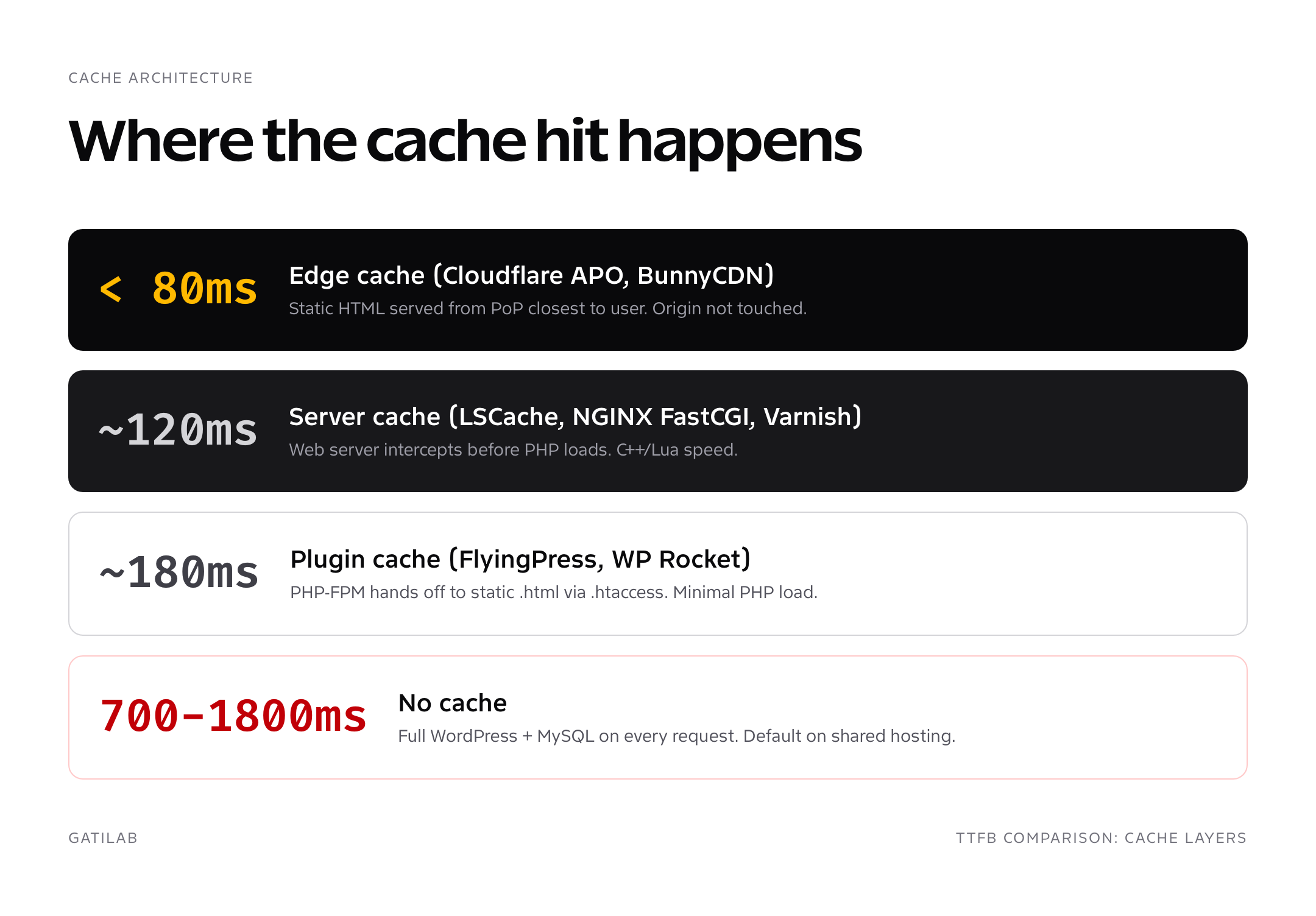
Server cache and plugin cache need one owner
Server-level cache can return HTML before WordPress loads. Plugin-level cache runs through WordPress configuration and usually writes or coordinates cached output at the application layer. A managed host or LiteSpeed server may already provide the primary page cache.
Ask the host what caches HTML, how exclusions work, and which action purges it. If the server owns page cache, choose a WordPress plugin for coordination or missing optimization features rather than enabling a second independent HTML cache.
GT Performance: the portfolio pick
GT Performance is built for agencies, freelancers, WooCommerce operators, and multi-site owners who want one cache owner across WordPress and Cloudflare. It’s free under the GPL-2.0-or-later license: unlimited installations, no account, no license key, and no feature gating. Updates ship through WordPress.org once the plugin clears review, and support runs through the wiki and GitHub issues, with the WordPress.org support forum to follow.
- Page cache with explicit logged-in and commerce bypass policy.
- Cloudflare Free Cache Rule orchestration and targeted edge purges without APO or Workers.
- Server-side unused CSS with local processing and fail-open delivery.
- Optional Redis object cache controls, diagnostics, and guarded drop-in ownership.
- Safety Lab and Fleet Console foundations for testing decisions and moving reviewed settings between sites as signed configuration transfers, not license or remote site management.
GT Performance is not our low-risk recommendation for a site that cannot stage changes. Back up first, then test cart, checkout, account, receipt, membership, LMS, and any other personalized flow before production.
Install GT Performance if owning the cache layer matters more than buying another annual single-site subscription. There’s no license key to manage and no site count to track.
FlyingPress: the strongest conventional all-rounder
FlyingPress combines page cache with JavaScript deferral, CSS optimization, image lazy-loading, font controls, database cleanup, and CDN integrations. Current annual pricing is $59 for 1 site, $109 for 3 sites, $229 for 25 sites, and $279 for unlimited sites.
Its advantage is control without the configuration surface of W3 Total Cache. The catch is that JavaScript, unused-CSS, and lazy-loading changes still need staging, representative page tests, and exclusions for anything the site renders dynamically.
Choose FlyingPress when you can test the optimization layer and want more tuning control than the easiest default.
WP Rocket: the lower-friction premium default
WP Rocket puts page cache, file optimization, lazy-loading, preload, database cleanup, and related controls behind a more approachable interface. Current annual pricing is $59 for 1 site, $119 for 3 sites, and $299 for 50 sites.
Choose it when setup clarity and support are more important than exposing every optimization control. Its defaults reduce configuration work, but they do not remove the need to test scripts, forms, search, ecommerce, memberships, and other dynamic behavior.
Get WP Rocket when the friendlier operating model is the deciding advantage.
LiteSpeed Cache: the server-specific free choice
LiteSpeed Cache is the clear starting point when the origin runs LiteSpeed Web Server or OpenLiteSpeed because the plugin coordinates the native LSCache layer. It also includes image, CSS, JavaScript, font, CDN, and database features.
The catch is portability. On another web server, the plugin does not have the same native page-cache advantage. Confirm the server rather than choosing it from a generic ranking.
W3 Total Cache: granular control with a larger failure surface
W3 Total Cache exposes page, object, browser, database, CDN, minification, and integration controls. That breadth can suit an operator who understands the server and wants to configure each layer explicitly.
It is a poor default for someone who wants safe automatic settings. More switches mean more ways to duplicate a host cache, cache personalized output, break a script, or spend hours debugging a small gain. Back up, stage, and change one layer at a time.
WP Super Cache: basic static caching for simple sites
WP Super Cache creates static HTML for public visitors and deliberately avoids becoming a full front-end optimization suite. That small surface can be useful for a straightforward blog on conventional hosting.
Choose it when you need basic page cache and will handle images, fonts, scripts, CSS, and CDN behavior elsewhere. Do not compare its feature list directly with a premium optimization bundle.
Cache Enabler: the minimal page-cache option
Cache Enabler focuses on static page caching with a small settings surface. It fits a simple site or an origin where Cloudflare, a CDN, or another layer already handles most front-end work.
Its strength is predictability. Its limitation is that you will need separate decisions for JavaScript, CSS, fonts, images, database work, and edge caching.
WordPress caching plugins compared
This comparison separates cache ownership from front-end optimization. Prices are current entry points checked for this update; verify renewal terms and site limits before purchase.
| Plugin | Current entry price | Best fit | Page-cache role | Primary catch |
|---|---|---|---|---|
| GT Performance | Free | Agency and Cloudflare portfolio workflows | WordPress and edge orchestration | Gatilab builds it; shorter public record |
| FlyingPress | $59/year for 1 site | Strong all-round optimization | Plugin page cache plus optimization | Needs staging and exclusion checks |
| WP Rocket | $59/year for 1 site | Lower-friction setup | Plugin page cache plus optimization | Portfolio tier is capped at 50 sites |
| LiteSpeed Cache | Free | LiteSpeed servers | Native server cache controller | Full value depends on the server |
| W3 Total Cache | Free core | Developers needing granular controls | Plugin cache and integrations | Easy to misconfigure |
| WP Super Cache | Free | Simple content sites | Basic static page cache | Few optimization features |
| Cache Enabler | Free | Minimal page caching | Basic static page cache | Needs other tools for front-end work |
CDN integration is a cache-ownership decision
A CDN can cache static assets and, with the right configuration, HTML at the edge. Cloudflare, Bunny, QUIC.cloud, and bundled CDN products differ in network, pricing, image services, cache rules, and purge behavior; current vendor terms should be checked directly.
Write down which layer owns HTML, static assets, query-string handling, bypass cookies, and purge events. A CDN is not automatically faster when it adds another cache the team cannot invalidate correctly.
Benchmark WordPress Caching Plugins
A caching plugin comparison is valid only when every plugin sees the same page, server, assets, cache state, test location, and browser. One PageSpeed screenshot cannot separate a cache effect from network noise.
| Test layer | Minimum useful sample | What to record |
|---|---|---|
| Cold cache | 5 runs per page and device | TTFB, LCP, total bytes, requests, response headers |
| Warm cache | 5 runs after a confirmed cache hit | Median and p75, not best result |
| Interaction | Repeated input tasks | INP, long tasks, and JavaScript errors |
| Visual stability | Same viewport and consent state | CLS and the element causing each shift |
| Field validation | Eligible 28-day CrUX window | Origin or URL-level real-user distributions. |
Rank plugins only after the raw runs and settings are stored. Until then, compare cache ownership, exclusions, compatibility, and failure recovery. That is less dramatic than a winner badge, but it is reproducible.
My pick by use case
For an agency or freelancer managing a portfolio with Cloudflare and willing to stage the change, GT Performance is the owned-product choice, and it’s free: GPL-2.0-or-later, unlimited installations, no license key. The conflict is explicit: Gatilab builds it, and its public benchmark history is still shorter.
- LiteSpeed server: LiteSpeed Cache.
- Conventional hosting with room to tune: FlyingPress.
- Single-site owner prioritizing setup clarity: WP Rocket.
- Simple content site needing only static page cache: WP Super Cache or Cache Enabler.
- Developer who needs granular cache and CDN controls: W3 Total Cache, only with staged configuration.
Caching is one layer. The larger operating context belongs in the guides to web hosting, a website audit, WordPress agency operations, and WordPress backups.
Page cache, object cache, and opcode cache solve different work
Page cache serves rendered HTML to eligible requests. Persistent object cache, usually Redis or Memcached, stores objects and query results that help uncached, logged-in, API, AJAX, and administrative requests. OPcache keeps compiled PHP bytecode in memory at the server level.
Do not install an object-cache plugin unless the server provides and supports the backing service. Verify connection, eviction, memory use, drop-in ownership, bypass behavior, and the requests that improve. Database size alone does not prove object cache is the repair.
Cache exclusions that prevent broken sites
Every cache plugin needs a hand-tuned exclusions list before you trust it on a transactional site. The standard exclusions every WordPress caching plugin should already auto-handle in 2026: /cart/, /checkout/, /my-account/, the WooCommerce cart fragments AJAX endpoint, the wp-admin path, the woocommerce_items_in_cart cookie, and the wordpress_logged_in cookie. Verify these are excluded in your plugin’s settings before you flip cache to public.
The exclusions you’ll add manually depend on the site. Membership sites need /account/, /dashboard/, /profile/. Booking sites need the booking flow paths. Forums need the threaded view URLs that include user-specific edit links. LMS sites need course progress endpoints. Any URL that returns different content per logged-in user is a cache exclusion candidate; cache it and you’ll serve User A’s dashboard to User B at some point in the next 30 days.
The other category: query strings. Cache plugins typically cache /?ref=newsletter and /?ref=twitter as separate entries, multiplying your cache size for analytics tracking that doesn’t change content. Configure the plugin to ignore tracking params (utm_source, utm_medium, fbclid, gclid, ref) so all analytics-tagged traffic hits the same cached entry. FlyingPress, WP Rocket, and LiteSpeed Cache each expose this in their settings UI.
Frequently asked questions
What’s the best WordPress caching plugin in 2026?
There is no universal winner. LiteSpeed Cache is the default on LiteSpeed servers, FlyingPress suits a tunable conventional stack, WP Rocket prioritizes setup clarity, and a managed host may already own page cache.
Is WP Rocket worth it over the free options?
WP Rocket can be worth paying for when its interface, bundled optimization features, support, and saved configuration time matter. A free cache is enough when the host and the rest of the stack already cover those jobs.
Do I need a cache plugin if I use Cloudflare?
Often yes. Cloudflare may cache assets or HTML at the edge, while WordPress still needs origin-aware exclusions, purges, and optimization. Define which layer owns HTML before adding another cache.
LiteSpeed Cache vs WP Rocket: which is faster?
LiteSpeed Cache has a native advantage on LiteSpeed servers. WP Rocket is more portable across conventional hosting. Speed depends on the whole stack, so a generic benchmark cannot decide for your site.
Can I use multiple WordPress caching plugins together?
Do not run multiple independent page-cache owners. One plugin can coexist with a host or edge layer only when ownership, bypass rules, and purge behavior are explicit.
Is W3 Total Cache still relevant in 2026?
Yes for operators who need its granular controls and understand the larger configuration surface. It is not the lowest-risk default for a simple site.
Does WordPress caching slow down my admin?
Public page cache normally bypasses wp-admin and logged-in sessions. Persistent object cache can affect administrative requests, so verify the exact workload and backing service rather than assuming it will help.
How much does Cloudflare APO cost and is it worth it?
APO pricing and terms can change. Check Cloudflare directly, then compare the current cost with the latency and cache-hit improvement on the audience and pages that matter.
What’s the difference between page cache and object cache?
Page cache stores rendered HTML for eligible requests. Object cache stores reusable application objects and query results for requests that still execute WordPress.
Will a cache plugin break my WooCommerce checkout?
It can if cart, checkout, account, session cookies, AJAX endpoints, or personalized pages are cached incorrectly. Use a plugin with commerce exclusions, test every state on staging, and keep a rollback path.
Tell Google you want more of this.
Add Gatilab as a preferred sourceOne tap, and this site shows up more often in your own Top Stories, AI Overviews and AI Mode. Remove it any time.