
WordPress.com Plans and Pricing: Which One to Pick
WordPress.com pricing runs from $0 to $45 a month on yearly billing, and the hardest part is working out which feature you’re actually paying for. A lot of guides still say you need the $25 Business plan just to install a plugin. That stopped being true on April 2, 2026, when WordPress.com opened plugins and theme uploads to every paid plan, so the real gap between the WordPress.com plans now sits somewhere else.
For most blogs and small business sites, I’d start on Personal at $4 a month billed yearly. Premium earns its extra $4 when you want WordAds, payments, Google Analytics or the premium themes. Business makes sense only when someone needs SFTP or SSH, staging or automatic backups with one-click restores, and Commerce is for a store that wants the WooCommerce extensions installed and managed for it.
WordPress.com is Automattic’s hosted WordPress service. It runs the same open-source WordPress software you can install on any host, and the plan you buy decides how much of that software and the server underneath you get to touch. What you pay for is the hosting, the support and the features layered on top of that free software.
WordPress.com Pricing and Plans
WordPress.com sells 5 plans and 4 billing terms: monthly, yearly, 2 years and 3 years. The advertised “per month” figure is always the yearly rate, and you pay the whole term upfront. These are the USD prices on the official pricing page, before tax.
| Plan | Billed monthly | Billed yearly | Billed every 3 years | Storage | What it adds |
|---|---|---|---|---|---|
| Free | $0 | $0 | $0 | 1 GB | A .wordpress.com site with WordPress.com ads |
| Personal | $9/mo | $4/mo ($48) | $2.75/mo ($99) | 6 GB | No ads, custom domain, plugins, theme uploads |
| Premium | $18/mo | $8/mo ($96) | $5.50/mo ($198) | 13 GB | Premium themes, WordAds, payments, Google Analytics |
| Business | $40/mo | $25/mo ($300) | $17.50/mo ($630) | 50 GB | SFTP/SSH, WP-CLI, staging, backups, VideoPress |
| Commerce | $70/mo | $45/mo ($540) | $31.50/mo ($1,134) | 50 GB | Managed WooCommerce extensions, 0% transaction fee |
The 2-year term sits in between at $3.25, $6.50, $20 and $36 a month, which works out to $78, $156, $480 and $864 for the 2 years. Every plan above Free keeps everything from the plan below it, so you can read the ladder one step at a time.
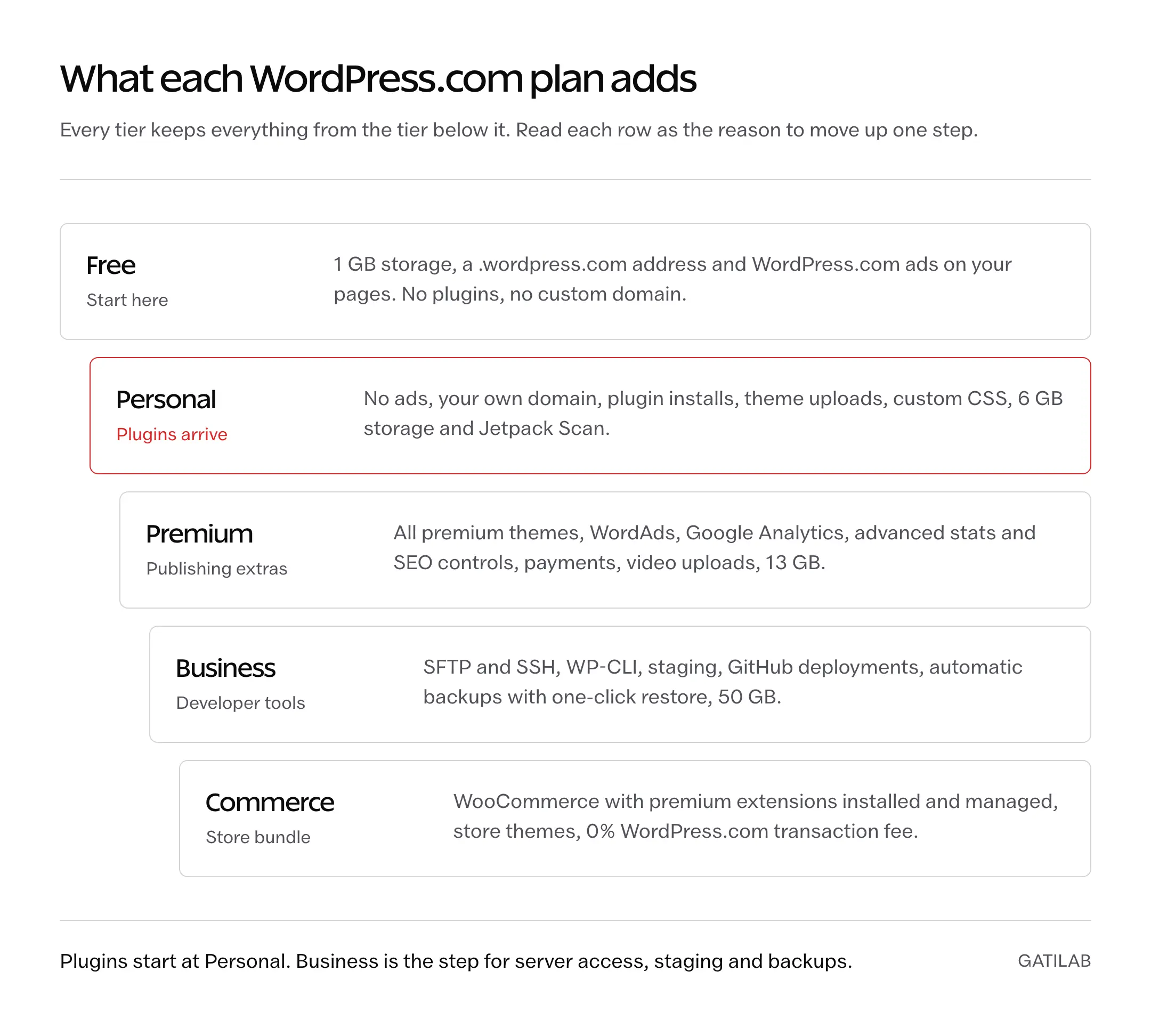
The jump that surprises people is monthly billing. Personal on monthly billing costs $108 over a year against $48 on the yearly plan, and Business costs $480 against $300. Monthly billing also drops the free domain, so the yearly plan is the cheaper way in even if you only want to try the service for a few months.
Plugin and Theme Access
On April 2, 2026, WordPress.com extended plugins and customization to every paid plan. Existing Personal and Premium customers got the features without doing anything. This one change rewrites the whole plan decision, because plugins used to be the reason to jump to Business.
Here is what every paid plan, Personal included, now gets:
- Plugin installs from the WordPress.org directory, plus plugin uploads from anywhere else.
- Third-party theme uploads, including a theme you build yourself.
- Global Styles for site-wide fonts, colors and spacing.
- Custom CSS and font uploads.
What stayed on Business and Commerce is the developer and recovery layer:
- SFTP and SSH access, WP-CLI and phpMyAdmin.
- A staging site, GitHub deployments and PHP version switching.
- Jetpack VaultPress Backup with one-click restores. Personal and Premium can’t add it; WordPress.com asks you to upgrade instead.
- VideoPress with 250 GB of dedicated video storage, and videos that don’t count against your 50 GB.
The question to ask before paying for Business is whether you or your developer need to reach the server, test changes on a copy of the site and roll back a bad update in one click.
Why Your Address Changes to wpcomstaging.com
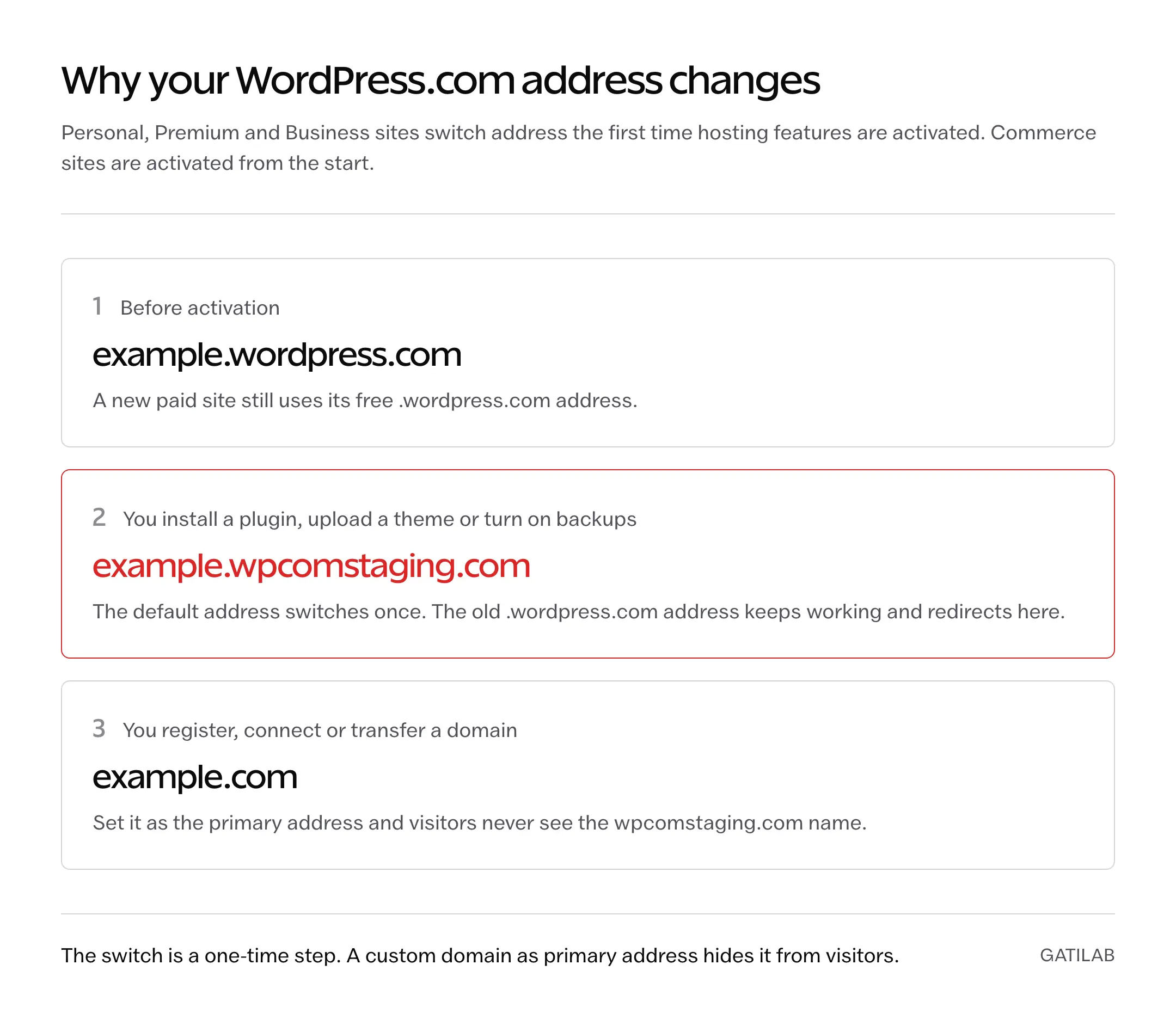
It’s one of the most common questions in the WordPress.com forums after someone buys a plan. You install your first plugin and the site address suddenly reads example.wpcomstaging.com instead of example.wordpress.com. Nothing is broken. WordPress.com calls it activating your plan, and it happens once.
- Installing a plugin, uploading a third-party theme or turning on backups activates the plan’s hosting features on Personal, Premium and Business.
- On activation, the default address moves from example.wordpress.com to example.wpcomstaging.com.
- The old .wordpress.com address keeps working and redirects to the new one.
- Commerce sites are activated automatically from the start.
- Once you register, connect or transfer a domain and set it as the primary address, visitors see your domain and never the wpcomstaging.com name.
If you planned to run a paid plan on the free subdomain, this is the moment to claim the free domain that comes with a yearly plan. A wpcomstaging.com address works, but it isn’t a name you want on a business card.
Plugins WordPress.com Blocks
Plugin access comes with a short list of exceptions, and paying for Business doesn’t lift it. WordPress.com keeps an incompatible-plugin list because these plugins either duplicate what the platform already runs or put too much load on shared infrastructure. A blocked plugin shows “Not supported” in the plugin browser, and if you upload its zip file it installs but can’t be activated.
- Caching: W3 Total Cache, WP Super Cache, WP Fastest Cache, Redis Object Cache and SiteGround’s Speed Optimizer. WordPress.com runs its own caching and edge CDN.
- Backups: BackWPup and WP BackItUp, among others. Backups come from the platform on Business and Commerce.
- SQL-heavy: Post Views Counter, WP-PostViews, Slimstat Analytics and Top 10.
- File and database tools: WP File Manager, File Manager and the various WP Reset plugins.
- Security: Shield Security, iThemes Security, WPS Hide Login and Really Simple Security.
- Automated content and bulk email: RSS-to-post scrapers like WP RSS Aggregator and WPeMatico, and mass-mail plugins like Mailit.
Check the one plugin your site can’t live without against that list before you pay. If it’s there, no WordPress.com plan will run it and a regular host is the better home.
Which WordPress.com Plan Should You Choose?
Each plan below is described by what it adds over the one before it, since that’s the only thing you pay extra for.
Free
The Free plan is fine for a hobby blog, a class project or a test before you buy. A business site outgrows it on the first day, because of the ads and the subdomain.
- 1 GB of storage and a yoursite.wordpress.com address.
- WordPress.com shows its own ads to your visitors.
- No plugins and no custom domain as the primary address.
- Dozens of free themes, 7 days of basic stats and community forum support.
If free is a hard requirement, it’s worth comparing WordPress.com with the other free blogging platforms before you commit, because some of them let you use your own domain or keep ads off without paying.
Personal
The Personal plan at $48 a year is the cheapest real WordPress.com site and the one I’d start most people on.
- Removes WordPress.com ads and lets your own domain be the site address.
- Free domain registration for the first year on 1-, 2- and 3-year terms.
- Plugins, theme uploads, Styles and custom CSS.
- Custom code in the header, enough to verify Google AdSense, Mailchimp and similar services.
- 6 GB of storage, full stats history and a 30-day activity log.
- Jetpack Scan for malware and vulnerabilities, unlimited subscriber imports and a free migration by the WordPress.com team.
The limit you’ll hit first is storage. 6 GB is plenty for text and optimized images and tight for a photo-heavy portfolio or audio files.
Premium
The Premium plan is $96 a year and adds publishing and money tools on top of Personal.
- All premium themes from the WordPress.com marketplace.
- WordAds, the WordPress.com ad network that pays you for views.
- Payment, donation and paid-subscription blocks, with a 4% WordPress.com fee per transaction.
- Google Analytics integration, advanced stats with UTM and device data, and extra SEO controls for titles and meta descriptions.
- MP4 video uploads, Calendly, OpenTable and WhatsApp blocks, and 13 GB of storage.
Business
The Business plan at $300 a year is where WordPress.com starts to behave like a managed host for developers.
- SFTP and SSH credentials, WP-CLI, phpMyAdmin, PHP version switching and control of server-side caching.
- A staging site that syncs to and from production, plus GitHub deployments.
- Jetpack VaultPress Backup with one-click restores, and uptime monitoring.
- 50 GB of storage, with uploaded videos kept outside that limit once hosting features are active.
- A 2% transaction fee on payments, MailPoet for up to 500 subscribers and $200 in Blaze ad credits that expire after 12 months.
- A business email account free for the first year, according to the pricing page. WordPress.com’s email guide describes a 3-month Professional Email trial instead, so check which term your checkout shows.
If you’re weighing Business against other managed WordPress hosts, compare it on staging, backups and support. Business can’t run the plugins on the blocked list, which is the trade you make for the managed caching and security around it. If staging, server access and one-click restores are on your list, buy WordPress.com Business on yearly billing, which costs $180 less over a year than paying monthly.
Commerce
The Commerce plan costs $540 a year and includes everything in Business plus a store kit WordPress.com installs and updates for you.
- WooCommerce with premium extensions such as Product Add-Ons, Product Bundles, Gift Cards, Back In Stock Notifications and AutomateWoo.
- Store themes, shipping-label printing and tax automation through TaxJar or Avalara.
- 0% WordPress.com transaction fee on standard payments. Stripe’s own processing fee still applies.
- A 14-day free trial that keeps the store in “Coming Soon” mode and doesn’t allow extra plugins until you pay.
Since WooCommerce now installs on Personal too, Commerce is worth its price when you’d otherwise buy several of those extensions separately. Product Bundles, Product Add-Ons and Gift Cards cost $79 a year each on WooCommerce.com, $237 together, which is almost exactly the $240 a year Commerce adds over Business. If your store needs those 3 or more, WordPress.com Commerce covers its premium and keeps the extensions updated for you. A shop with a handful of simple products can start smaller. If you’re weighing Commerce against running WooCommerce on a separate host, our WordPress.com Commerce vs self-hosted WooCommerce comparison covers who looks after what and what the extensions cost. If you’re still deciding on the platform itself, our WooCommerce vs Shopify comparison covers that choice.
WordPress.com Personal vs Premium
Since both plans now install plugins, the $48 a year between them buys a specific set of features. Premium is the right pick if you need at least one of these:
- Ad income through WordAds.
- Built-in payment, donation or paid-newsletter blocks without adding a plugin.
- A premium theme from the WordPress.com marketplace.
- More than 6 GB of storage, or MP4 uploads to your own site.
If none of those apply, Personal does the job and the difference stays in your pocket. Several Premium features, like Google Analytics and SEO titles, can also come from free plugins on Personal now. That’s a good idea only if you’re comfortable maintaining the plugin yourself.
Extra Costs and Billing Conditions
The plan price is most of the bill. The rest comes from the domain after its free year, email and payment fees. These are WordPress.com’s own USD list prices:
- Domain renewals: .com $13 a year, .org $12, .net $14, .blog $22, .online $32, .co $35 and .store $48. The free first year needs a yearly or longer plan and can’t be used to renew a domain you already have.
- Professional Email: $3.50 a month or $35 a year per mailbox, free for the first 3 months on a domain that hasn’t had it before. The pricing page lists a free first year on Business and Commerce.
- Google Workspace Business Starter: $8.40 a month or $84 a year per user when bought through WordPress.com.
- Transaction fees: WordPress.com’s payment tools take 4% on Premium, 2% on Business and 0% on Commerce, and Stripe adds 2.9% + $0.30 per US card payment. The fee table also lists 10% for Free and 8% for Personal, although the Payments block itself starts at Premium.
- Premium plugins: plugin access doesn’t include paid licenses. A premium SEO, forms or membership plugin bills separately, usually per site per year.
- Extra storage: Business and Commerce can add storage in 50 GB steps, up to 350 GB on top of the included 50 GB.
Bandwidth isn’t one of the costs. The pricing page lists unrestricted bandwidth on every plan, with no extra fee for traffic.
Here are two worked budgets. A Personal site bought on the 3-year term costs $99, and its .com renews at $13 in years 2 and 3, so the site costs $125 over 3 years, about $3.50 a month. A Business site with one mailbox costs $300 in year 1 when the free domain and the pricing page’s free email year both apply, and then $348 a year once the $13 domain and $35 mailbox start billing. If your checkout offers only the 3-month email trial, budget up to $35 more for the mailbox in year 1. If you want a second opinion on where to register the domain instead, our guide to choosing a domain registrar goes through that.
WordPress.com or Self-Hosted WordPress?
Self-hosted WordPress means you buy hosting elsewhere and install WordPress yourself. Shared hosts look far cheaper on their pricing pages, but those prices need a long prepayment and renew much higher. Here is Personal against the two entry plans on Hostinger, using each company’s own pricing page.
| Option | Intro price | Paid upfront | Afterward | Storage | Backups |
|---|---|---|---|---|---|
| WordPress.com Personal | $2.75/mo on 3 years | $99 | $48/yr on yearly billing | 6 GB | Not included |
| WordPress.com Business | $17.50/mo on 3 years | $630 | $300/yr on yearly billing | 50 GB | Included, one-click restore |
| Hostinger Premium | $2.99/mo on 48 months | $143.52 | Renews at $10.99/mo ($131.88/yr) | 20 GB SSD | Weekly |
| Hostinger Unlimited | $3.99/mo on 48 months | $191.52 | Renews at $16.99/mo ($203.88/yr) | 50 GB NVMe | Daily |
The surprise is the renewal year. Hostinger’s renewal rate on Premium is almost 3 times Personal’s $48 yearly price, while WordPress.com’s USD prices carry no intro offer that later expires. Rupee prices work differently, with a 20% first-year discount covered in the FAQ below. Where Hostinger wins is room and control: more storage, more than one site on a plan and any caching or security plugin you like.
WordPress.com is the better fit when you want:
- One site where updates, caching, security and SSL are handled for you.
- 24/7 support that, by WordPress.com’s own description, also helps with building the site and not only with hosting problems.
- A low, predictable yearly bill on Personal or Premium.
Self-hosting is the better fit when you need:
- A plugin from the blocked list, such as your own caching or security setup.
- Several sites on one bill, since every WordPress.com site needs its own plan, or server access without paying $300 a year for it.
- Full control over the server, PHP settings and file system.
For the full self-hosted budget, our breakdown of what a self-hosted WordPress site costs adds themes, plugins and maintenance, and our list of cheap hosting with renewal prices compares more hosts than Hostinger.
Moving Away Later
You can leave WordPress.com on any plan, and the content export is free. The Tools > Export file is a standard WordPress XML file, and it’s important to know what it holds:
- Included: posts, pages, comments, categories, tags and links to your media.
- Not included: the media files themselves, your theme, design customizations and plugins.
- Exports from sites with more than about 1,000 posts arrive by email as a zip of several XML files, each imported separately.
Your new site copies images from the old one during import, so the WordPress.com site has to stay public and live until the media library counts match on both sides. A full-site migration plugin can move the design and plugins too, as long as it isn’t one of the blocked ones. Our guide to migrating a WordPress site without downtime covers redirects, DNS and the checks after the move.
FAQs on WordPress.com Plans
Can I Pay for WordPress.com Monthly?
Yes. Monthly billing costs $9 for Personal, $18 for Premium, $40 for Business and $70 for Commerce. Over a year that is more than double the yearly price on Personal and Premium, and monthly plans don’t include the free first-year domain.
Does the WordPress.com Personal Plan Allow Plugins?
Yes. Since April 2, 2026, every paid plan, Personal included, can install plugins and upload third-party themes. Only the Free plan can’t. A short list of caching, backup, security and SQL-heavy plugins stays blocked on every plan.
Why Did My Site Address Change to wpcomstaging.com?
Installing a plugin, uploading a theme or turning on backups activates your plan’s hosting features, and that moves the default address from example.wordpress.com to example.wpcomstaging.com. The old address redirects to the new one. Set a custom domain as the primary address and visitors see that instead.
Is WordPress.com Free if I Already Own a Domain?
No. Using your own domain as the site address needs a paid plan, starting with Personal. On a yearly plan you can transfer the domain to WordPress.com for free or keep it at your registrar and connect it.
Does WordPress.com Include Email?
Not by default. The pricing page lists a business email account free for the first year on Business and Commerce, while WordPress.com’s email guide describes a 3-month Professional Email trial for a domain’s first mailbox. After that, Professional Email costs $3.50 a month per mailbox, and Google Workspace Business Starter costs $8.40 a month per user through WordPress.com.
What Is the Difference Between Business and Commerce?
Business gives you developer tools, backups, staging and 50 GB of storage. Commerce adds a set of premium WooCommerce extensions that WordPress.com installs and keeps updated, store themes and a 0% WordPress.com transaction fee, for $540 a year instead of $300.
How Much Does WordPress.com Cost in India?
WordPress.com shows rupee prices to visitors from India. The first year on yearly billing costs ₹1,920 for Personal, ₹3,360 for Premium, ₹7,680 for Business and ₹13,824 for Commerce, before taxes. Those are introductory prices, and the plans renew at ₹2,400, ₹4,200, ₹9,600 and ₹17,280 a year. Monthly billing is ₹420, ₹790, ₹1,260 and ₹2,240.
Is WordPress.com the Same as WordPress.org?
Both run the same open-source WordPress software. WordPress.org is where you download it to install on a host you choose, while WordPress.com is Automattic’s hosted service that sells it as a plan with hosting and support included.
Can I Move From WordPress.com to Self-Hosted WordPress Later?
Yes, on any plan. The export file carries posts, pages, comments, categories and tags, and the importer copies media from your old site, so keep it public until the import finishes. Themes, design customizations and plugins need to be set up again on the new host.
Tell Google you want more of this.
Add Gatilab as a preferred sourceOne tap, and this site shows up more often in your own Top Stories, AI Overviews and AI Mode. Remove it any time.