
Free Domain Email: 5 Routes and the 2 That Are Actually Free
You bought the domain, the site is live, and you’re still sending proposals from a Gmail address with a number stuck on the end of your name. Free domain email is the fix everyone reaches for next, and every result on the first page makes it sound like a solved problem.
Two ways people get this wrong. The first signs up for whatever is labeled free, discovers 3 months in that it cannot send from the custom address, and quietly goes back to Gmail. The second assumes free is a trap, pays per user for a suite they use 1 feature of, and files it under professionalism.
The useful question isn’t whether it’s free. It’s which part is free.
Only 2 of these routes are actually free
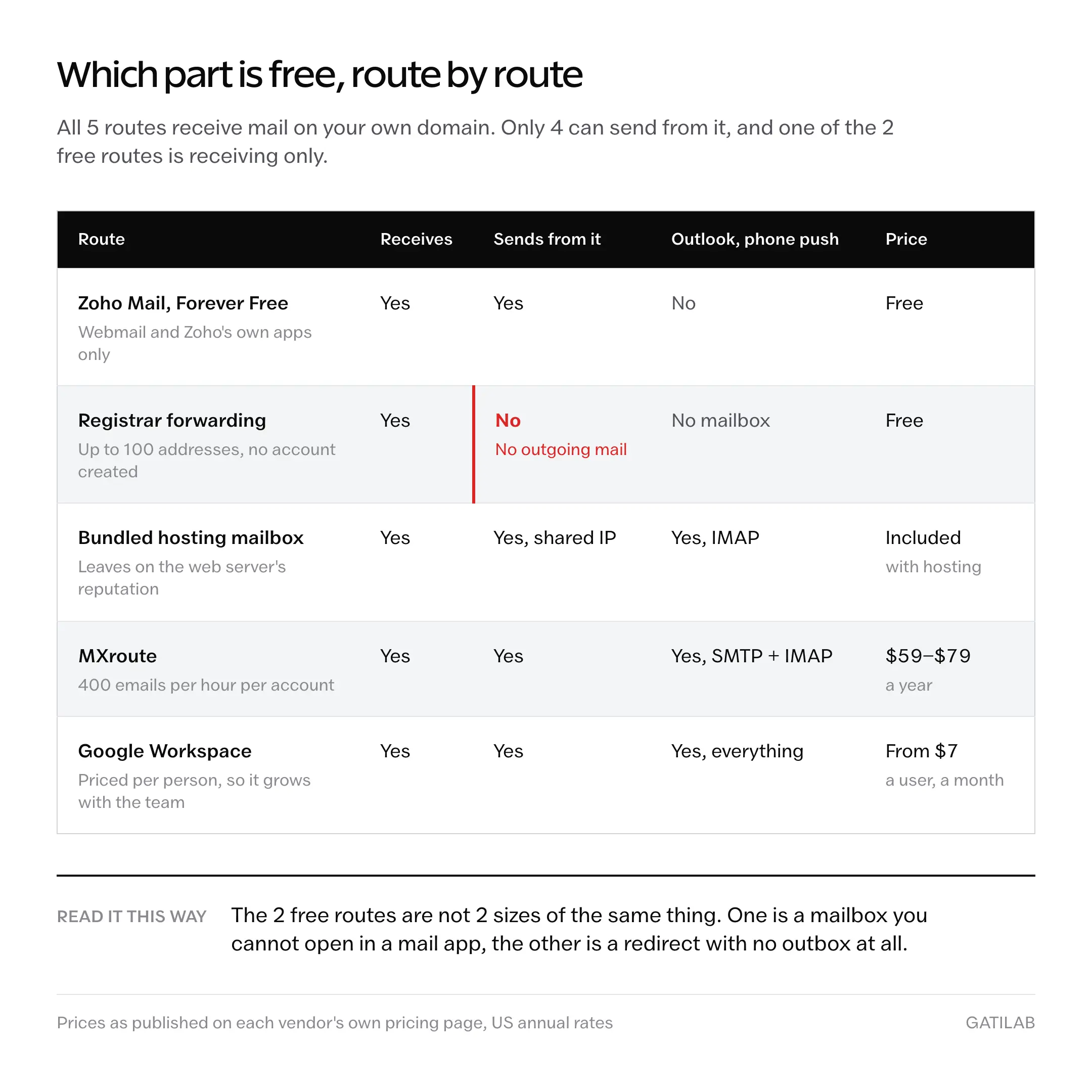
Of the 5 common ways to get an address on your own domain, 2 cost nothing: Zoho Mail’s free plan, and the mail forwarding most registrars hand you with the domain. The other 3 are paid. And 1 of the 2 free options cannot send mail from your custom address at all.
That last detail is where most free domain email advice quietly falls apart.
| Route | Cost | What you get | The catch |
|---|---|---|---|
| Zoho Mail free plan | Free, region-dependent | A real mailbox, 1 domain, up to 5 users, 5 GB each | Zoho’s own apps only. No IMAP, POP or ActiveSync. |
| Registrar forwarding | Free with most domains | Incoming mail redirected to an inbox you already read | Receiving only. You cannot send from the address. |
| Bundled hosting mailboxes | Included with many shared plans | Standard IMAP mailboxes on your domain | You inherit the web server’s sending reputation. |
| MXroute | $59 to $79 per year | Unlimited domains and accounts, SMTP, IMAP, POP3 | 400 emails per hour per account, and no hand-holding. |
| Google Workspace | From $7 per user per month, US annual | Gmail, Drive, Calendar, Meet, admin controls | Priced per person, so it grows with headcount. |
Read the last column first. Every route here works, they just fail in different places, and the failure is the thing that decides.
Where each route breaks
The order below runs from cheapest to most capable, which is roughly the order a growing site moves through them.
Zoho Mail
Zoho’s Forever Free plan is the only entry on this list that hands you a genuine mailbox on your own domain for nothing. As of August 2026, Zoho Mail’s pricing page lists it at up to 5 users, 5 GB of mail storage per user, and 1 domain, alongside a line worth reading twice: “Available only in select data centers.”
Check the region.
The other line on that card decides whether the free tier fits how you already work:
IMAP/ POP/ Active Sync not included
That is the free plan in 6 words. You get webmail and Zoho’s own apps, which means no Outlook, no Apple Mail, no Thunderbird. The missing ActiveSync matters more day to day than the missing POP, because ActiveSync is what gives a phone push mail.
Setup is DNS work: MX records, then the authentication records covered further down. It’s an afternoon, not a project. If the domain itself is still unsettled, the 5 checks worth running before you buy a domain will save you a migration later.
Bundled hosting mailboxes
Plenty of shared hosting plans include IMAP mailboxes on your domain at no extra charge, which makes this the cheapest real mailbox if you’re already paying for hosting. It’s also the most variable in quality, because email is a side feature on a product sold on page speed and disk space.
The structural problem is shared reputation. Your mail leaves the same machine as every other site on that box, so a neighbor’s compromised install becomes your spam-folder problem, and you’ll never be told that’s what happened. Hosts are good at serving pages. Deliverability is a separate discipline staffed by different people.
Fine for a contact address. Risky for invoices. If you’re weighing this against a standalone mailbox, the renewal pricing on cheap web hosting is the number that decides it, not the signup price.
Registrar forwarding
This is the route most people mean when they say free domain email, and it’s the one described wrong most often. Namecheap’s own documentation is blunt about the boundary: free forwarding covers up to 100 addresses on their DNS, and it does not allow creating fully-featured email accounts or sending outgoing mail from the custom address.
What forwarding does:
Mail sent to hello@yourdomain.com lands in the inbox you already read every day.
What it does not do:
Let you reply as hello@yourdomain.com without an authenticated SMTP relay configured somewhere else.
Same address on the envelope, 2 different products. Forwarding solves receiving and stops there, which is precisely why it costs nothing to give away.
Receive-only.
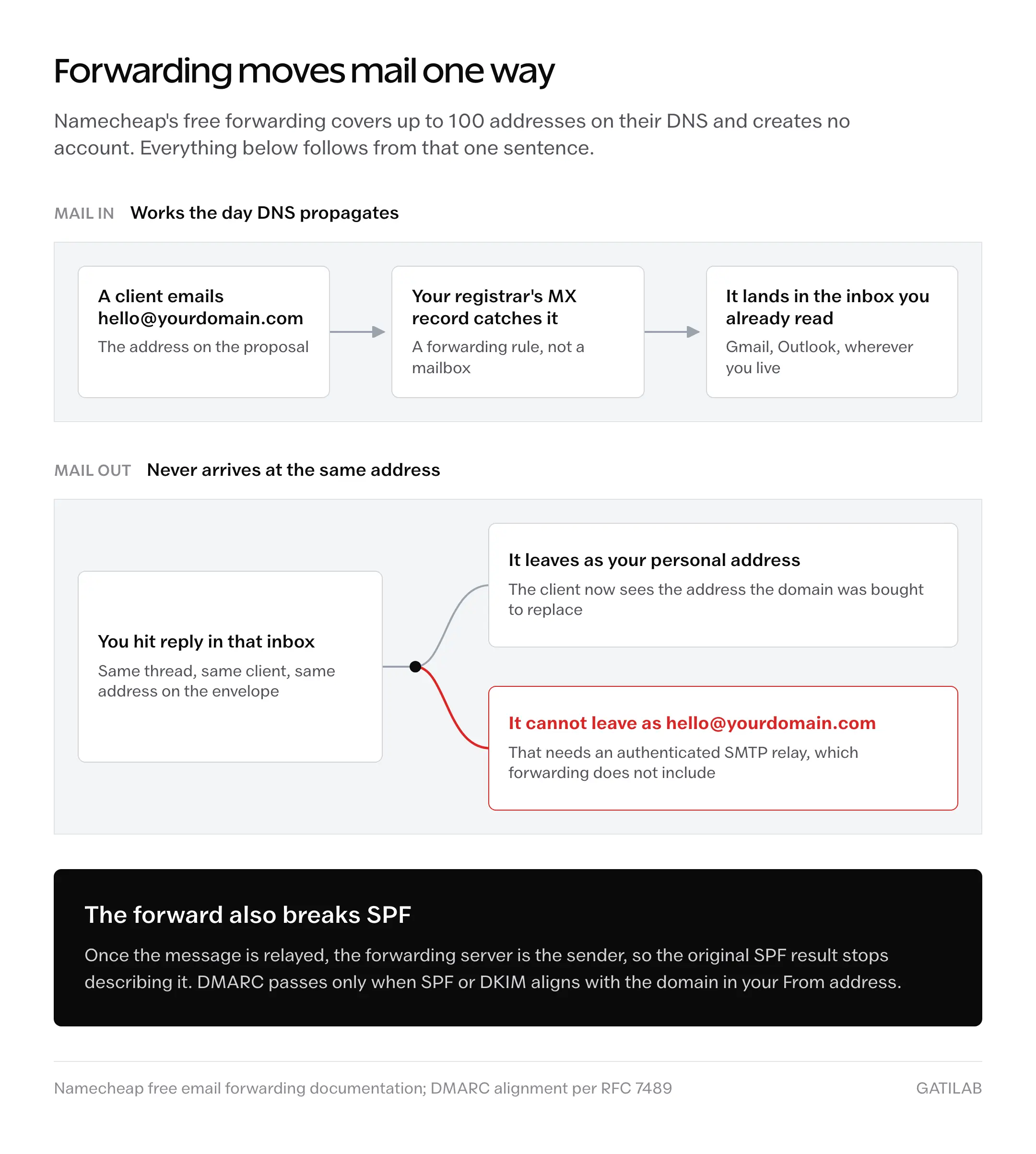
Actual mailboxes at that registrar are a paid product, or they arrive bundled with shared hosting. So the free tier and the paid tier are not 2 sizes of the same thing. They’re different things wearing the same address on the front.
MXroute
MXroute isn’t free, and it’s the cheapest exit from free that doesn’t charge per person. As of August 2026, MXroute lists 3 annual plans:
- SMALL, 10 GB, $59 per year.
- MEDIUM, 25 GB, $69 per year.
- LARGE, 50 GB, $79 per year.
- All 3 carry unlimited domains and unlimited accounts, with SMTP, IMAP and POP3.
- Sending is capped at 400 emails per hour per account.
Put that against per-user pricing. 3 people on Google Workspace Business Starter runs about $252 a year at US annual rates. MEDIUM covers those same 3 people, plus every other domain you own, for $69.
Not close.
The trade is support. MXroute expects you to know what an MX record is and to repair your own DNS when something breaks. That’s a reasonable deal for a developer or an agency running several domains, and a poor one for a client who expects an onboarding wizard and a phone number.
Google Workspace
Google Workspace is what you buy when email is load-bearing. Its pricing page is served by region, so the number on your screen depends on where you’re standing: as of August 2026 the US page lists Business Starter at $7 per user per month on an annual commitment, while the India page prices the same edition at ₹270.
There’s now a cheaper edition below Starter, and it’s easy to miss because it doesn’t appear everywhere. Google’s own pricing footnote spells out the ladder: “Business Base includes 20 GB pooled storage per user, Business Starter includes 30 GB, Business Standard includes 2 TB, Enterprise Plus include 5 TB.” Base is capped at 20 users and sits well under Starter where it shows up, at ₹99 per user per month against Starter’s ₹270 on the India page.
Treat Base as region-gated rather than global. Google’s Admin Help edition comparison still lists only Starter, Standard and Plus, so load your own country’s pricing page and check whether the Base card is there before you budget around it.
If Base appears for you, it’s the cheapest legitimate Gmail on your own domain that exists. If it doesn’t, Starter is the floor and there is nothing under it.
Region decides.
SPF and DKIM stopped being optional
Every route above shares one requirement, and skipping it is the most common way a brand new custom address ends up in spam on its first send. Gmail’s sender guidelines now state the floor as a rule rather than a suggestion.
- Every sender needs SPF or DKIM published on the sending domain.
- Senders of 5,000 or more messages a day to Gmail accounts need SPF and DKIM, plus a DMARC record. The policy may be
p=none. - Those senders also need a Postmaster Tools spam rate under 0.3%.
- The From: domain has to align with either the SPF domain or the DKIM domain.
Sit with the 0.3% for a second. That’s 3 complaints in 1,000 messages, which one stale contact list can spend in a single afternoon. Google publishes the full set in its email sender guidelines, and the thresholds apply to your domain whether or not you ever read them.
The 3 records get explained wrong constantly, and DMARC is where it happens. DMARC does not act when SPF or DKIM fails. Under RFC 7489, a message passes when at least 1 of those mechanisms produces a pass on an identifier that aligns with the domain in your From address. The policy applies only when neither one does.
Neither, not either.
Alignment is the word carrying the weight. A message can hold a perfectly valid SPF pass for a domain that isn’t yours, and DMARC still counts that as a failure, which is why forwarded mail and third-party senders are the two things that break first.
Which lands directly on registrar forwarding. Forward mail into Gmail and the original SPF result stops meaning anything, because the forwarding server is now the sender. For the wider picture of why a message can be accepted and still never arrive, delivered does not mean received covers the failure modes in order.
What free domain email will not do
The ceilings on these plans are specific, not vague, and each one has a job it simply cannot take.
- No desktop or phone client on Zoho’s free tier. IMAP, POP and ActiveSync are all paid, so Outlook, Apple Mail and push notifications wait for the upgrade.
- No storage headroom. 5 GB per user holds up until somebody attaches a year of design files, and there is no free step above it.
- No archive behind forwarding. If the destination inbox is closed or the rule breaks, nothing is stored on your domain to recover from.
- No bulk sending on any of them. Newsletters and sequences need a dedicated sending service, and pushing them through a mailbox is a fast way to get a domain blocked.
That last one catches people most often, because a mailbox and a sending platform feel like the same tool until a list gets involved. If a newsletter is anywhere in the plan, choose the email marketing software separately and keep it off the mailbox.
And free plans carry no support obligation. When mail stops on a Friday evening, you’re reading a community forum, not opening a ticket.
What quietly ruins a custom domain setup
None of these look like mistakes while you’re making them. That’s what makes them expensive.
Setting up the address and never testing an outgoing message. Mail arrives, the inbox looks healthy, and nobody notices that every send has been failing DMARC since day 1. Receiving proves half the setup and the cheaper half.
Pointing MX records at a new provider while leaving the old records in place. Mail splits across 2 systems, most of it still arrives, and the missing messages look random for weeks before anyone connects them to a DNS change.
Putting a forwarded address on invoices and proposals. Replies route to the personal inbox behind it, the client sees that address in the thread, and the credibility you bought the domain for is gone in 1 exchange.
Adding a second SPF record rather than merging into the existing one. The specification treats a domain with 2 SPF records as having none, so a working setup breaks without a single error message anywhere you’d think to look.
Treating the free plan as a trial of the paid one. Free plans are not the paid product with a timer on it, and Zoho’s free tier is missing protocols the paid tier has, so the upgrade you keep deferring is a real migration with real downtime.
And leaving DMARC at p=none permanently. Reports without a policy tell you in detail who is abusing your domain, then let it carry on happening.
The price was never the decision
Free domain email isn’t really a pricing question. Across all 5 routes, 1 person pays somewhere between $0 and $84 a year, and that entire spread is smaller than a single lost client.
What separates them is permission. Forwarding may only receive. Zoho’s free tier may only use Zoho’s apps. A hosting mailbox sends on someone else’s reputation. Only the paid options let you send whatever you want, from wherever you want, with your own name on the result. Price follows from that, and it never leads.
Work out which permission the address actually needs, then look at the number.
Then send yourself a test from it before you put it on anything.
Tell Google you want more of this.
Add Gatilab as a preferred sourceOne tap, and this site shows up more often in your own Top Stories, AI Overviews and AI Mode. Remove it any time.