
How to Use the Facebook Ads Library for Competitor Research
You open the Facebook Ads Library, type a competitor’s name, and get a wall of cards. Some started 3 months ago. Some show 14 variations of the same offer. None of them tell you whether any of it made money. Meta is straightforward about that boundary, and most guides built on top of the library quietly pretend it isn’t there.
Marketers usually split into 2 camps. The first treats a long-running ad as proof of profit, rebuilds it line for line, and then wonders why the same hook costs 3 times more to convert on their own account. The second decided the library shows nothing useful and pays a monthly subscription to a tool that reads the same public cards through a nicer interface.
Both are reading the wrong column.
Quick answer: the library gives you creative, copy, start date, platforms, visible variations, and destination for free. It gives you no budget, no delivery volume, no conversions, and no margin. Treat every card as an observation log, pick the country where you actually sell, search by advertiser Page rather than keyword, and let your own ad account settle every performance question.
What the Facebook Ads Library Shows
Meta describes the Ad Library as a searchable collection of the ads running across its products. For ordinary commercial research, a card carries the ad content plus basic information about who is running it and when it started. That is enough to study messaging and execution. It is nowhere near enough to reconstruct a media plan.
| Visible field | Question it can answer | What it does not prove |
|---|---|---|
| Active status and start date | Has this ad stayed available long enough to deserve a closer look? | Continuous delivery, spend, conversions, or profit |
| Creative and copy | Which problems, hooks, proof types, and offers does this brand reach for? | That the creative is a winner |
| Platform icons | Which Meta surfaces can carry this version? | Spend split or performance by placement |
| Multiple versions | Is the advertiser running several combinations or catalog variants? | A controlled test or a winning combination |
| Destination and call to action | Does the promise continue on the landing page? | Conversion rate, lead quality, or revenue |
The left column is what you saw. The right column is what a competitor-research deck usually writes anyway, and it is the reason so many of those decks age badly.
Save the Library ID while you are there. Every card renders one, and it gives you a stable reference for the exact ad you reviewed even when an advertiser is running 40 near-identical variations. Record the country and the date beside it, because the visible inventory changes underneath you.
What the Library Cannot Prove
The expensive mistake is turning an absence of data into a confident story. A polished 30-second video can be an expensive failure. An old active ad can be running at almost no delivery. 10 visible versions can come from a product catalog or automated asset assembly rather than 10 deliberate creative tests.
- No campaign budget, bid strategy, cost per result, conversion volume, or contribution margin.
- No retargeting windows and no lookalike sources, anywhere in the world, for any advertiser.
- No way to tell which visible variation received most of the delivery.
- No way to separate an evergreen control from a near-dormant ad, because both read as active.
- No incrementality. A campaign can collect attributed sales that would have happened without it.
Audience definitions and exclusions belong on that list too, with one regional exception large enough to change the answer for millions of readers. It depends on where the ad was delivered, not on who paid for it, and it gets its own section below.
If the gap between an attributed sale and an incremental one is fuzzy, the breakdown of attribution models and what each one actually credits is the piece to read before you argue about a competitor’s ROAS.
How to Search the Meta Ad Library
Start from an advertiser Page whenever you need attributable evidence. Keyword searches are good for discovering a market, but they blend unrelated advertisers, products, and contexts into one feed. A Page search lets you compare one brand against itself before you compare it with anyone else.
- Open the official library. Go to facebook.com/ads/library. Anyone can view and search it. 2 things do carry a condition: Meta hides age-restricted ad creative (its stated examples are alcohol and gambling) from people who are underage or not logged in, and downloading a set of Ad Library search results requires being logged in and agreeing to the Terms of Service.
- Choose the market. Set the country where you actually sell. The same advertiser often runs different offers, products, and formats elsewhere.
- Select All ads. The social issues, elections or politics category runs on different disclosure and archive rules, so keep it out of ordinary commercial research.
- Pick the advertiser Page. Select it from the suggested advertisers instead of trusting a broad keyword match to find the right brand.
- Narrow the inventory. Use the keyword field, the filter panel, and the sort menu to answer one question at a time.
- Open ad details. Record the card, creative, message, destination, and variation count before you allow yourself an inference.
Meta’s search tips panel is worth reading once, because one of its patterns is routinely misdescribed. Quotation marks give you an exact phrase in that specific order. The pipe pattern does something else:
| shoes | sale | christmas |
That finds ads containing all 3 of those words in any order. It is not an OR search, and describing it as one will hand you a result set you cannot reproduce.
Filters That Answer One Question at a Time
Filters only reduce noise when you already know what you want to learn. The commercial advertiser view offers language, advertiser, platform, media type, active status, and impressions-by-date controls. The sort menu offers impressions high to low, or most recent. There is no sort by ad age, whatever a listicle told you.
- Language separates localized messaging from the advertiser’s default creative.
- Advertiser narrows a shared keyword result down to the specific Page you care about.
- Platform compares how the same offer is dressed for different Meta surfaces.
- Media type isolates images, memes, images and memes, videos, or executions with no image or video at all.
- Active status splits currently running inventory from archived inventory, where the category or region allows an archive.
- Impressions by date scopes a period without claiming the date range reveals spend or results.
The platform filter is the one people misread most often, because a vertical video card in Stories is a different creative problem from the same offer in Feed. If you are studying that specific surface, the Instagram Story ad specs and safe zones explain why a competitor’s text keeps sitting where it does.
The difference between a useful session and a wasted one is usually the question, not the filter.
What most people search:
What ads are working in my niche?
What works better:
Which proof type appears in this brand’s currently active video ads in India?
Same tool, same filters. The second question produces evidence you can compare against another brand next Tuesday. The first produces whatever card happened to catch your eye, which is cherry-picking with extra steps.
A Repeatable Competitor Research Workflow
The library gets useful the moment you collect the same fields for several genuine rivals. Skip the biggest brands in the category unless they compete for the same customer, price point, and purchase decision. A national brand’s production budget teaches you less than a smaller competitor working under your constraints.
Getting that shortlist wrong is the most common failure, and it usually starts with the belief that nobody else sells what you sell.
| Field | What to record | Why it earns a column |
|---|---|---|
| Hook | The first claim, question, visual beat, or problem | Shows how the ad buys attention |
| Offer | Discount, bundle, trial, consultation, lead magnet, or no explicit offer | Shows what action the brand asks the market to take |
| Proof | Demo, review, result, comparison, credential, or guarantee | Shows how the ad answers doubt |
| Format | Image, video, carousel, catalog, story, reel, or text-led | Shows how the message is packaged |
| Start date and variants | Visible start date plus any multiple-version note | Sets research priority, nothing more |
| Destination | Landing page, product page, app store, form, or message thread | Reveals whether the promise survives the click |
6 columns, filled identically for every advertiser, is what turns a screenshot folder into something you can sort.
- Pick 3 to 5 competitors selling to the same buyer in the same country.
- Record visible facts for each active ad with no performance judgment attached.
- Group the recurring hooks, offers, proof types, formats, and landing-page patterns.
- Mark the gaps: a problem everyone ignores, proof nobody shows, friction between ad and destination.
- Convert one pattern or gap into a single campaign hypothesis for your own brand.
- Run it against a control and judge it on your own conversion and margin data.
The output of a research session should be one testable brief, not an archive. 5 lines is enough:
Observation: what showed up repeatedly across the shortlist?
Hypothesis: why might that pattern matter to your buyer specifically?
Change: which single element will your variation alter?
Control: which existing ad is it measured against?
Decision: which conversion and margin number ends the argument?
The last line is the one people leave blank, and it is the only line that stops a research habit from turning into a permanent hobby.
Fill it in.
How to Read a Long-Running Ad
An older start date raises an ad’s value as a research candidate. It says nothing about profit. Active status reveals no delivery volume, no spend continuity, no attribution quality, and no clue about whether somebody simply left an evergreen campaign switched on and moved to another job.
- Visible fact: the card says the ad started on a given date and is still active.
- Defensible inference: nobody has removed this version, so the hook, offer, or format deserves comparison against the brand’s newer work.
- Unsupported leap: the ad is a proven winner, the brand is scaling it, it has been profitable for months.
- Proof you would actually need: delivery, spend, conversions, cost per acquisition, ROAS, margin, and a matched comparison period from an authorized account.
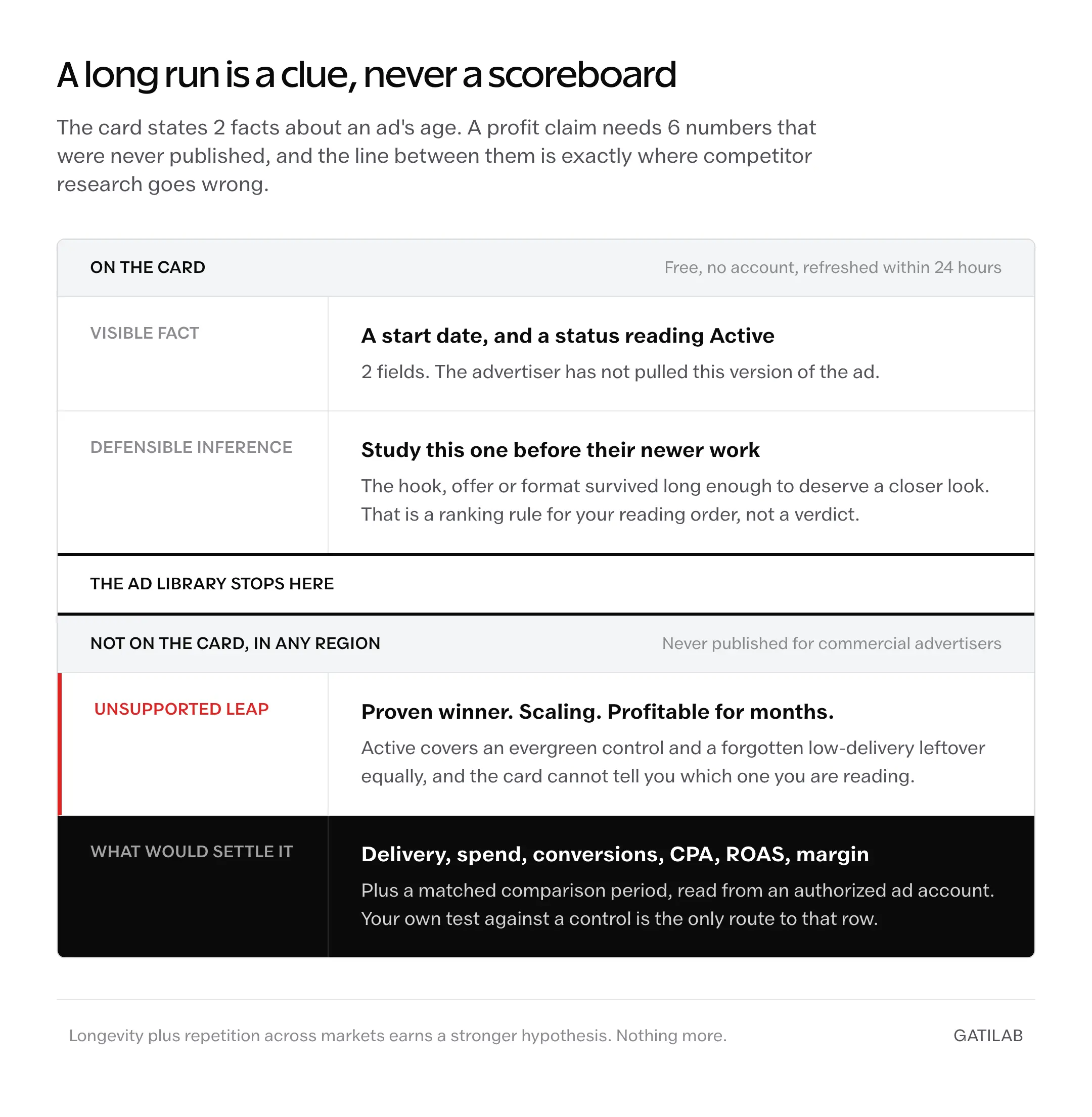
Longevity gets more informative when it shows up alongside repetition across markets, fresh variants built on the same core message, and a landing page that still supports the offer. Even stacked like that, it is a stronger hypothesis.
Not a result.
Borrow the Pattern, Not the Ad
Competitor research should sharpen your questions, not replace your thinking. Copying the headline, image, or script hands you a weaker version of somebody else’s positioning, plus a brand problem and occasionally a legal one. The unit worth borrowing is the mechanism underneath.
- Borrow the problem category, then say it in the language your own customers use.
- Borrow the proof type, then supply proof your business can stand behind.
- Borrow the format logic, then rebuild it for your product, platform, and production budget.
- Borrow the offer structure, then check whether your unit economics can carry it.
- Borrow the landing-page continuity, never the design or the copy.
Format logic is where most teams stop too early. A competitor running 600 words of body copy is not being indulgent; they have decided the purchase needs that much argument, and the evidence on when long copy ads outperform short ones explains the conditions under which that call is right.
Archive and Transparency Rules by Region
The old shorthand that paused commercial ads always vanish is no longer true everywhere. Meta’s landing page and Business Help Center now describe distinct buckets, and which one an ad falls into depends on its category and the countries it was delivered in.
| Ad group | How long it stays available | Extra disclosure |
|---|---|---|
| Ordinary commercial ads with no EU or UK archive basis | Currently active ads only | Ad content plus basic advertiser and start-date information |
| Social issues, elections or politics | Active and inactive ads, stored for 7 years | Spend, reach, and funding entities |
| Ads that ran anywhere in the EU | Archived for 1 year after the last impression | Basic information plus EU-specific transparency |
| Ads that ran in the UK after July 1, 2025 | Archived for 1 year after the last impression | Basic information plus UK-specific transparency |
Which row an ad lands in decides whether a paused campaign is still researchable at all, and the advertiser does not get to pick the row.
The 1-year EU archive is not a Meta courtesy. It follows from Article 39 of the Digital Services Act, which requires very large platforms to keep an ad repository until 1 year after the ad was last presented. The UK archive matches the same window, but Meta frames it as a voluntary transparency commitment rather than a statutory obligation, which means it could change on Meta’s own timetable.
Meta also says an ad appears in the library within 24 hours of its first impression, and that any change or update to an ad is reflected within 24 hours as well. So the library is a slightly stale mirror, not a live campaign dashboard. For the full set of research entry points, Meta’s Transparency Center lists the Ad Library tools alongside the report and API routes.
Targeting Disclosure for UK and EU Ads
Most competitor-research guides get this next part flatly wrong. For ads that delivered to the United Kingdom, the EU, and associated territories, Meta publishes ad-level targeting information for every advertiser, not only for political ones. Cards covered by it carry an EU transparency label, and they show up in ordinary commercial searches.
- Targeting choices made at the ad level, including age, gender, and location criteria.
- Whether each of those criteria was included or excluded.
- Total reach, plus reach by targeted location broken down by age and gender.
That is a real window into a competitor’s audience shape, and it exists because the Digital Services Act requires the main targeting parameters and the total number of recipients reached to be published. It still stops well short of a media plan. Retargeting windows, custom audience sources, and lookalike seeds stay hidden in every market.
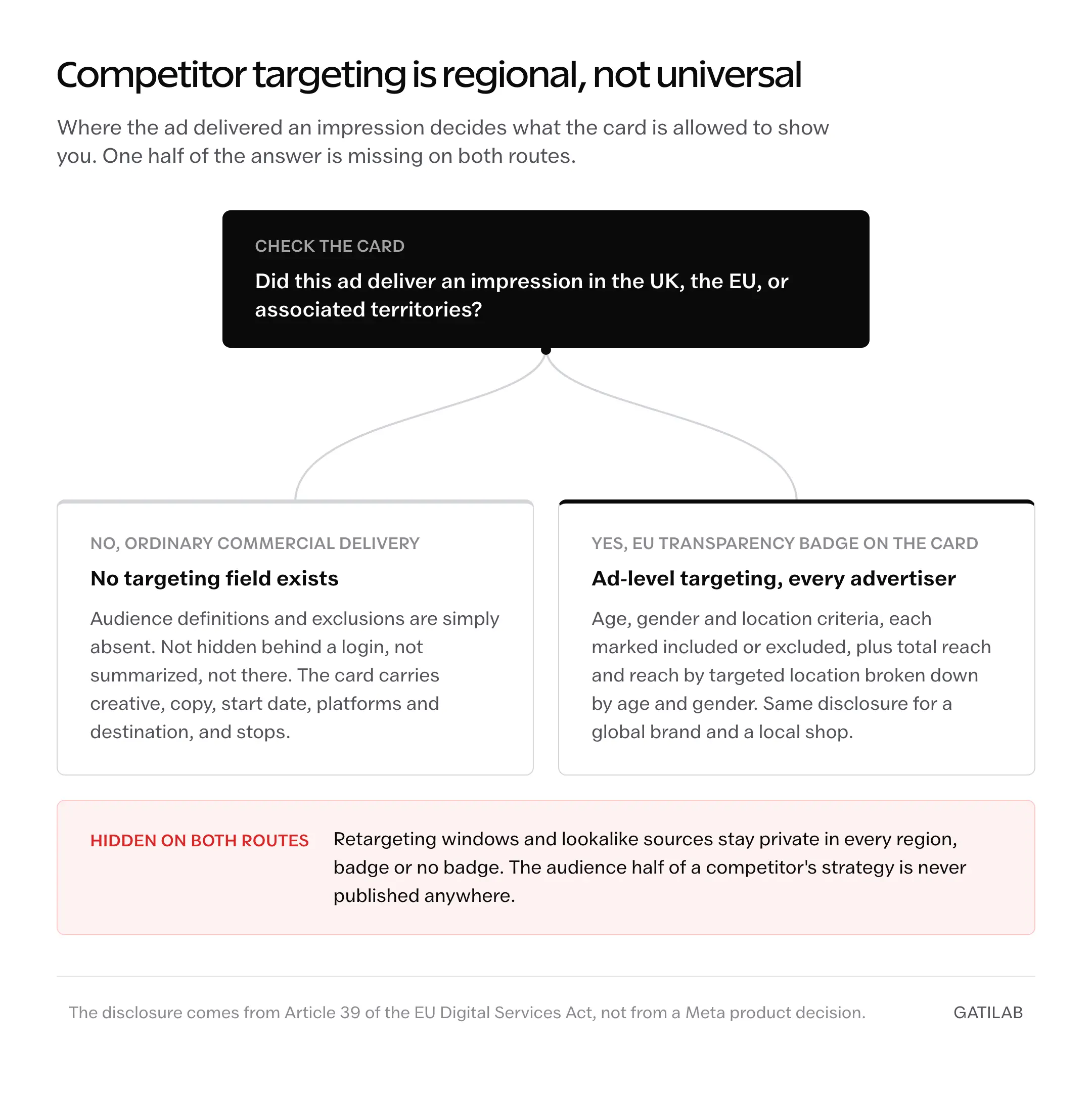
So check where the ad ran before you conclude the audience data is missing.
When a Paid Ad Spy Tool Is Worth Paying For
Start free. A paid tool earns its subscription when organizing and monitoring costs you more time than the thinking does. What you are buying is convenience, retained history, alerts, tagging, and cross-network coverage. What you are not buying is access to a competitor’s private performance data, because no vendor has it.
- Stay on the free library when you track a handful of competitors and review them on a schedule.
- Move to a paid tool when you need history outside Meta’s own archive rules, launch alerts, saved boards, team tagging, or several ad networks in one workspace.
- Treat every third-party engagement, spend, or performance figure as modeled output until the vendor publishes a verifiable source and method.
That third point matters more than the price. Modeled numbers behave like measurements right up until you make a budget decision on one, which is the same trap described in the breakdown of what website traffic checker estimates actually mean.
Modeled, not measured.
The Limits
The library cannot rank creative, because it publishes no delivery or outcome data for commercial ads, so you still have to run your own test to learn which hook wins for your buyer. It cannot tell you a competitor stopped spending, because outside the political, EU, and UK buckets an inactive ordinary ad simply disappears rather than moving to an archive you can audit.
It cannot confirm a competitor is even trying to be profitable. Venture-funded brands buy market share, retailers buy shelf presence before a season, and both will keep an unprofitable ad live for reasons your spreadsheet will never model.
And it cannot decide whether Meta is the right channel at all. That question sits upstream of any creative research, and the comparison of where paid ads and SEO each pay off is the more useful place to settle it before you spend a week cataloging hooks.
What Quietly Ruins Ad Library Research
Researching in the wrong country. It feels like a detail, and it silently swaps the entire dataset, because the same advertiser runs different offers, prices, and creative formats per market. Your notes end up describing a campaign your customers will never see.
Counting variations as tests. A catalog ad or an automated asset combination can produce 20 cards from 1 upload. Treating that as 20 deliberate experiments inflates your sense of how sophisticated the competitor is, and you start budgeting to match a testing program that does not exist.
Collecting instead of deciding. Screenshot folders grow forever and cost nothing to add to, so the research keeps feeling productive while no hypothesis ever reaches a live test. The tell is a shared drive with 300 images and an ad account that has not changed in a quarter.
Studying the category leader only. Their production budget, brand recognition, and retargeting pool break every assumption behind their creative choices. Copy their format logic and you inherit costs their brand equity was quietly paying for.
Reviewing once and calling it done. Creative rotates, seasonal offers expire, and a card you saved in March may already be gone. A single snapshot with no re-check date turns into a stale document that people still quote 6 months later.
FAQs on the Facebook Ads Library
Is the Facebook Ads Library free?
Yes. Anyone can view and search it, with or without a Facebook account. 2 things carry a condition: Meta does not show age-restricted ad creative, its stated examples being alcohol and gambling, to people who are underage or not logged in, and downloading a set of Ad Library search results requires being logged in and agreeing to the Terms of Service.
Can you see competitor targeting in the Facebook Ads Library?
It depends on where the ad was delivered. For ads that delivered to the UK, the EU, and associated territories, Meta publishes ad-level targeting choices, including age, gender, and location criteria and whether each was included or excluded, plus total reach and reach by targeted location broken down by age and gender. That applies to all advertisers, not just political ones. Outside those markets, ordinary commercial ads expose none of it. Retargeting windows and lookalike sources stay hidden everywhere.
Does a long-running Facebook ad mean it is profitable?
No. Start date and active status are visible facts that say nothing about delivery volume, spend, conversions, cost per acquisition, ROAS, or margin. Use longevity to decide what deserves a closer look, then settle the question with your own authorized campaign data.
How long do ads stay in the Facebook Ads Library?
Ordinary commercial research covers currently active ads. Ads about social issues, elections or politics are stored for 7 years whether active or inactive. Ads that ran anywhere in the EU are archived for 1 year after their last impression, and the same 1-year window applies to UK ads that ran after July 1, 2025.
Final Remarks
The complaint that the Facebook Ads Library hides the useful data has it backwards. Meta publishes exactly the layer that regulation or its own policy makes public, and the layer underneath is not a gap in the tool. It is the part your competitor earned by spending money and watching what happened.
The honest trade is this: the library will make your creative questions much better and your performance claims no stronger. Anyone selling you the second half is selling a model, not a measurement.
Pick 3 real competitors, fill 6 columns, and go test the one idea that survives.
Tell Google you want more of this.
Add Gatilab as a preferred sourceOne tap, and this site shows up more often in your own Top Stories, AI Overviews and AI Mode. Remove it any time.