
Instagram Ads Targeting: What You Control and How to Set It Up
If you run Instagram ads, the targeting settings decide who sees them, and Meta has changed how much those settings actually control. This guide to Instagram ads targeting explains which settings Meta always sticks to and how to set up an audience that suits your budget.
We run Facebook and Instagram ad campaigns for businesses at Gatilab, so these settings are part of our everyday work.
No guide can tell you which interests will work for your business, because that depends on your customers and your offer. What this one can do is show you where each setting belongs and how to test your way to an audience that works.
There’s a free targeting worksheet in Word and PDF further down, and if you’d rather have us run the campaigns, we can help with that too. Let’s begin with how Meta reads your settings.
How Instagram Ads Targeting Works
Instagram ads are set up in Meta Ads Manager, the same place as Facebook ads, and every targeting setting in an ad set falls into one of two groups. Audience controls are hard limits, and Meta won’t show your ad to anyone outside them. Audience suggestions are a starting point, and Meta looks beyond them whenever it expects better results elsewhere.
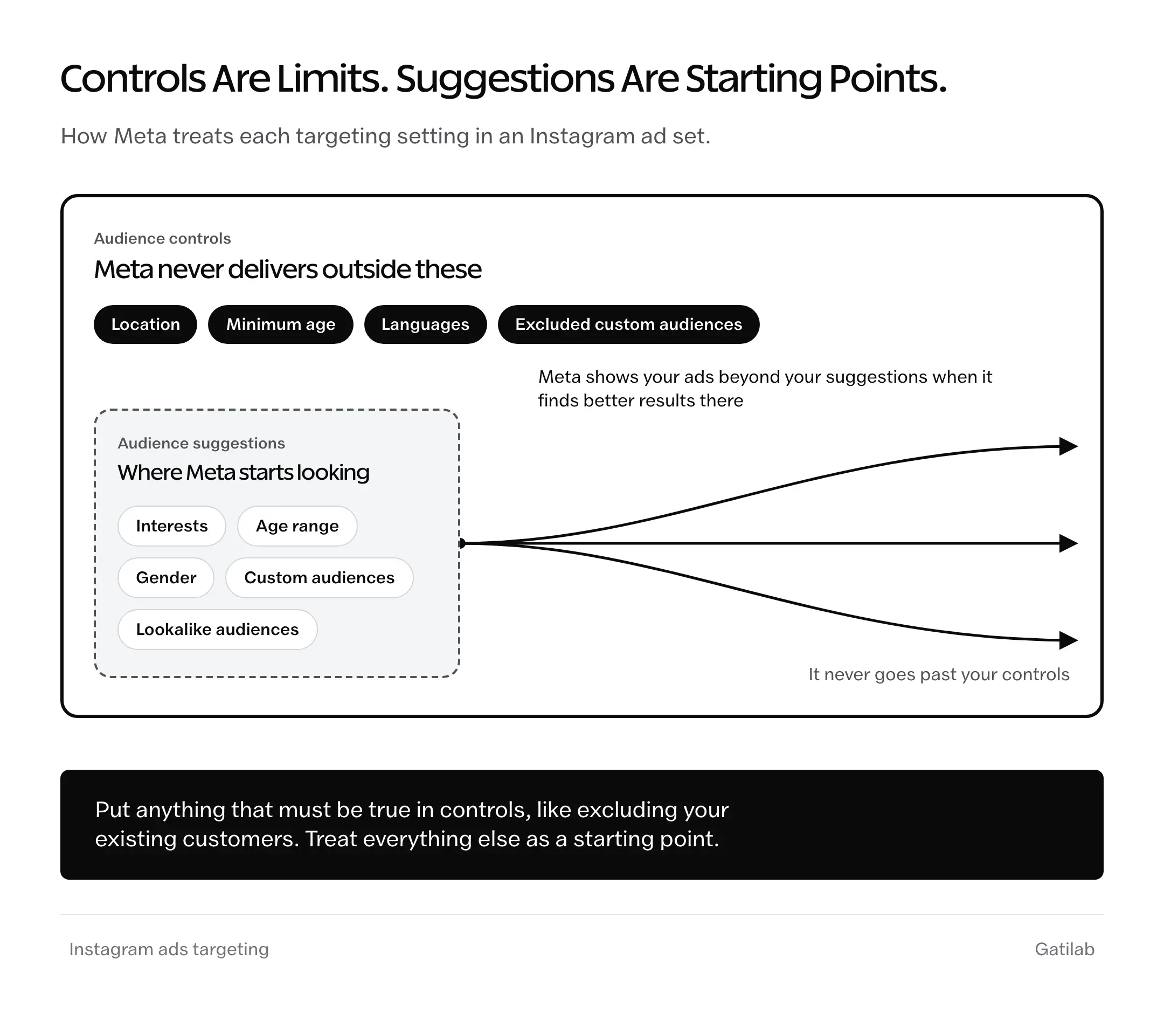
Here’s where each setting sits:
| Setting | Type | What Meta Does With It |
|---|---|---|
| Location | Control | Shows the ad only in the places you choose, down to a radius around an address |
| Minimum age | Control | Keeps the ad away from anyone younger than the age you set |
| Languages | Control | Shows the ad only to people who use Facebook or Instagram in those languages |
| Excluded custom audiences | Control | Keeps the ad away from people on those lists, like existing customers |
| Age range and gender | Suggestion | Tells Meta who to try first |
| Interests and behaviors | Suggestion | Detailed targeting, used as a starting point |
| Custom audiences | Suggestion | Starts with people who already know you, like site visitors |
| Lookalike audiences | Suggestion | Starts with people similar to an audience you choose |
So the question to ask about any setting is whether it must be true. If it must, like your delivery area or keeping existing customers out, it belongs in controls. If it’s only your best guess about who will buy, it’s a suggestion, and Meta will treat it as one.
Ads Manager still offers original audience options for anyone who wants the older style of targeting. But for most campaign goals, Meta treats interests as suggestions there too, so the split above holds either way.
What Changed in Meta’s Ad Targeting
Most Instagram ad targeting advice was written when interests worked as filters. A few changes since then explain why the older tactics stop working:
- Detailed targeting, which covers interests and behaviors, now works as a suggestion in most campaigns.
- Excluding people by interest or behavior is no longer possible. Exclusions happen through custom audiences instead.
- Meta merged a lot of narrow interests into broader ones and retired others, so interest lists from older guides often point to options that no longer exist.
- Advantage+ audience, where Meta builds the audience from your suggestions, is the default setup for new ad sets.
- People under 18 can only be reached by age and location.
None of this means targeting stopped mattering. It means the work moved to your controls and to the ad itself.
How to Choose Interests for Instagram Ads
Interests still matter as suggestions, because they tell Meta where to start while your account has little data about who buys from you. The useful ones come from your customer’s world, not from lists of popular interests.
- Start with the customer. A sentence or two on who buys from you and why is enough. If that part is fuzzy, our guide to finding your target audience helps.
- List what they already follow. The brands they buy and the publications or creators they read are good places to look, along with the hobbies that go with your product.
- Check each idea in Ads Manager. The detailed targeting box shows whether Meta offers an interest. If it doesn’t, the closest broader interest it suggests will do.
- Group interests into themes. A theme is a few related interests, like home baking or trail running, that describe one kind of customer.
- Test themes, not single interests. With one theme per ad set, the results show which kind of customer responds.
A bakery supply store, for example, might build one theme around home baking and another around cake decorating. Whichever theme wins tells the store which kind of customer to write its next ads for.
Competitor research helps here too. The Facebook Ads Library shows which ads other businesses in your space keep running, which hints at the customers they’re after.
How to Set Up Targeting in Ads Manager
The order matters, because the objective and the controls shape everything after them.
- Pick the objective that matches the result you want. The objective tells Meta what kind of person to look for, so a sales campaign looks for likely buyers and an awareness campaign looks for people likely to remember the ad.
- Set the controls. For most businesses, that’s the location plus an exclusion for existing customers, with a minimum age if the product needs one.
- Add one suggestion. An interest theme or a custom audience gives Meta a place to start.
- Choose placements. Meta’s default runs the ad everywhere it can, including Facebook. To run on Instagram alone, switch to manual placements and keep only the Instagram ones. Our guide to Instagram Story ads covers the specs for that placement.
- Check the estimated audience size. Ads Manager shows an estimate as you build, and a warning when the audience is too narrow. Widening the location or dropping a suggestion fixes that.
Saving the finished audience lets you reuse it in the next campaign without rebuilding it.
Custom and Lookalike Audiences
Custom audiences are usually the strongest suggestion you can give Meta, because they’re made of people who already know your business. They’re also the only way left to exclude people.
The common ones are:
- Website visitors: people who visited your site, recorded by the Meta pixel or the Conversions API
- Instagram engagers: people who interacted with your Instagram account or your ads
- Video viewers: people who watched a set share of your videos
- Customer lists: emails or phone numbers you upload, which Meta hashes before matching
- Lookalike audiences: people similar to a source audience, sized between 1% and 10% of a country’s population
A customer list does two jobs. As an exclusion in controls, it keeps buyers out of a campaign meant for new customers. As a lookalike source, it helps Meta find people who resemble them.
Exclusions only work in the controls section. A customer list added as a suggestion does the opposite, pointing Meta toward the people who already bought.
Boosting From the Instagram App
Boosting a post from the Instagram app is the quickest way to run an ad, and it comes with two audience choices:
- Automatic: Instagram shows the post to people similar to your followers.
- Create your own: you pick the locations and interests yourself, and can narrow by age and gender.
Boosting works well for giving a post that’s already doing well more reach. For sales or leads, Ads Manager is the better place, since it has the full set of controls and audience types.
When to Go Broad and When to Narrow
Broad targeting means firm controls with few or no suggestions, so Meta does the finding. It suits accounts that already record plenty of conversions. Narrower suggestions help when the account is new or the product has a clear niche.
| Situation | What to Set Up |
|---|---|
| New ad account with little conversion data | Firm controls, plus one interest theme or custom audience as a suggestion |
| Account with steady conversions | Controls only, with the ad itself guiding delivery |
| Local business | A location control around the area you serve |
| Product with a legal age limit | A minimum age control, or the original audience options for a limit above 25 |
| Campaign for new customers only | Your customer list excluded in controls |
| Ad about housing, jobs, financial products or social issues | A Special Ad Category, which limits the targeting options |
Most accounts do best somewhere in the middle, with firm controls and one clear suggestion. The ad itself carries the rest, since the people who stop for it show Meta who it’s for.
How to Test Your Targeting
Testing targeting only works when one thing changes at a time. If several things change together, there’s no way to tell which one made the difference.
- One change per test: the same ad and budget against two audiences, like an interest theme against broad targeting
- Enough results: about 50 results per ad set in a week, which is roughly what Meta needs to leave the learning phase
- No edits mid-test: big edits send the ad set back into learning
- The right measure: cost per result, not clicks or reach
- Clean splits: the A/B test option in Ads Manager keeps the two audiences from overlapping
If your budget can’t reach 50 results a week, run fewer tests and let each one run longer. A result that happens more often, like landing page views, can also stand in for purchases while the account builds data.
Our breakdown of Facebook advertising costs helps with setting a sensible test budget.
Free Instagram Ads Targeting Worksheet (PDF and Word)
Plan the audience on paper before you open Ads Manager, with space for your controls, interest themes and first test.
- A customer snapshot page
- A controls and suggestions planner covering every targeting setting
- An interest brainstorm grid and an interest themes table
- A custom audience plan
- A test plan and a pre-launch checklist
- A Word file that also opens in Google Docs
Free to use for your own ads or your clients’.
The Limits
Suggestions mean Meta makes the final call, so some of your budget will reach people outside the interests you picked. That’s by design, and most campaign goals have no setting that switches it off.
The minimum age control only goes up to 25 in the default setup. A product for older buyers has to rely on the original audience options, or on an ad that speaks to the right age group.
Ads in a Special Ad Category, like housing or job ads, get fewer targeting options, and that applies no matter how the ad set is built.
And website audiences are smaller than they used to be, since browser and phone privacy settings stop some visits from being recorded.
Mistakes That Waste Instagram Ad Budgets
Stacking dozens of interests into one ad set. It blurs the suggestion, and the results can’t tell you which interests worked.
Adding a customer list as a suggestion when the plan was to exclude it. The ads end up chasing people who already bought.
Copying interest lists from old guides. Many of those interests have been merged or removed, and the ones left are only suggestions anyway.
Splitting a small budget across many ad sets. Each one gets too few results to learn from.
Changing the targeting every few days. Every significant edit sends the ad set back into learning.
Judging an audience by clicks alone. An audience that clicks a lot and never buys is the expensive one.
FAQs on Instagram Ads Targeting
Can you target interests with Instagram ads?
Yes. Interests are part of detailed targeting in Meta Ads Manager and in the boost option in the Instagram app. In most campaigns, Meta treats them as a suggestion and may show your ad to people outside them when it expects better results.
Can I target the followers of a specific Instagram account?
No. Meta doesn’t let advertisers target the followers of another account. Some large brands and public figures exist as interests, which is the closest option available.
Can I exclude interests from Instagram ads?
No. Meta removed detailed targeting exclusions, so you can’t exclude people by interest or behavior. You can still exclude custom audiences, like a customer list or recent website visitors, in the audience controls.
How big should an Instagram ad audience be?
There is no fixed number. A larger audience gives Meta more room to find results within your budget, so it is better to keep suggestions broad and let the controls do the narrowing. If Ads Manager warns that the audience is too narrow, widen the location or remove a suggestion.
Can I run ads only on Instagram?
Yes. Switch to manual placements in the ad set and keep only the Instagram placements. Meta recommends its default placements, saying they usually lower the cost per result, so it is worth testing both.
Is Advantage+ audience better than manual targeting?
For accounts with steady conversions, it is a sensible default, and Meta’s own testing favors it. Manual control still exists through the audience controls, which Meta always respects, and through the original audience options.
Can Instagram ads target people under 18?
Only by age and location. Meta doesn’t allow interests or other activity to be used for reaching teens, and gender isn’t available for them either.
Final Remarks
If you’ve set your controls and picked one interest theme to test, your Instagram ads targeting is already in good shape. The one idea to keep is that controls are the only settings Meta always respects, so anything that must be true goes there.
The targeting worksheet above lets you plan the audience and the first test on paper before you open Ads Manager. If you’d rather hand the campaigns over, our Facebook ads management team runs Instagram ads as well.
I hope your first test gives you a clear winner.
Tell Google you want more of this.
Add Gatilab as a preferred sourceOne tap, and this site shows up more often in your own Top Stories, AI Overviews and AI Mode. Remove it any time.