
Best Web Hosting Services in 2026: Complete Buyer’s Guide
Most “best web hosting” lists rank affiliates by commission. This one ranks them by what actually breaks your site at 3 a.m. The filter is brutally simple: a fast TTFB under 200ms, real uptime above 99.95%, support that knows what an OPcache flush is, and pricing that doesn’t quintuple at renewal. Hit those four, and you’ve got a host worth paying for. Miss any one, and you’re inside a future support ticket.
The five providers below are matched against those four tests using what each host publishes today: plans, limits, guarantees, and renewal prices. Each entry covers the stack they run and the type of project they’re genuinely good for. After the picks comes a single decision framework: the type of hosting you need (shared, VPS, dedicated, cloud, managed), the seven criteria worth scoring every provider on, and the red flags that should make you walk away from a sales page.
What actually matters in web hosting (and what doesn’t)
The four numbers that decide whether your host is good or terrible are TTFB, real-world uptime, support response time, and renewal price. Everything else, including unmetered bandwidth, “unlimited” storage, free site builders, and 1-click installers, is either a commodity or a distraction. A host charging $3 a month with a slow TTFB is not cheaper than one charging $5 with a fast one; it’s just slower for the same money.
Speed translates to ranking and revenue, and much of a slow page’s delay starts at the server, before the browser has a single byte to render. Uptime matters in a less obvious way: 99.9% uptime sounds great until you do the math, which is 8 hours and 45 minutes of downtime per year. 99.95% drops that to 4 hours 22 minutes, and 99.99% to 52 minutes. The two-decimal difference is a whole working day of “site is down” emails per year.
Support is the variable nobody benchmarks. Every host claims 24/7 chat. Few host engineers who can actually read a debug.log, run a MySQL slow query check, or tell you why your PHP worker count is wrong. The cheapest hosts farm support to scripted reps. The good ones answer with stack traces.
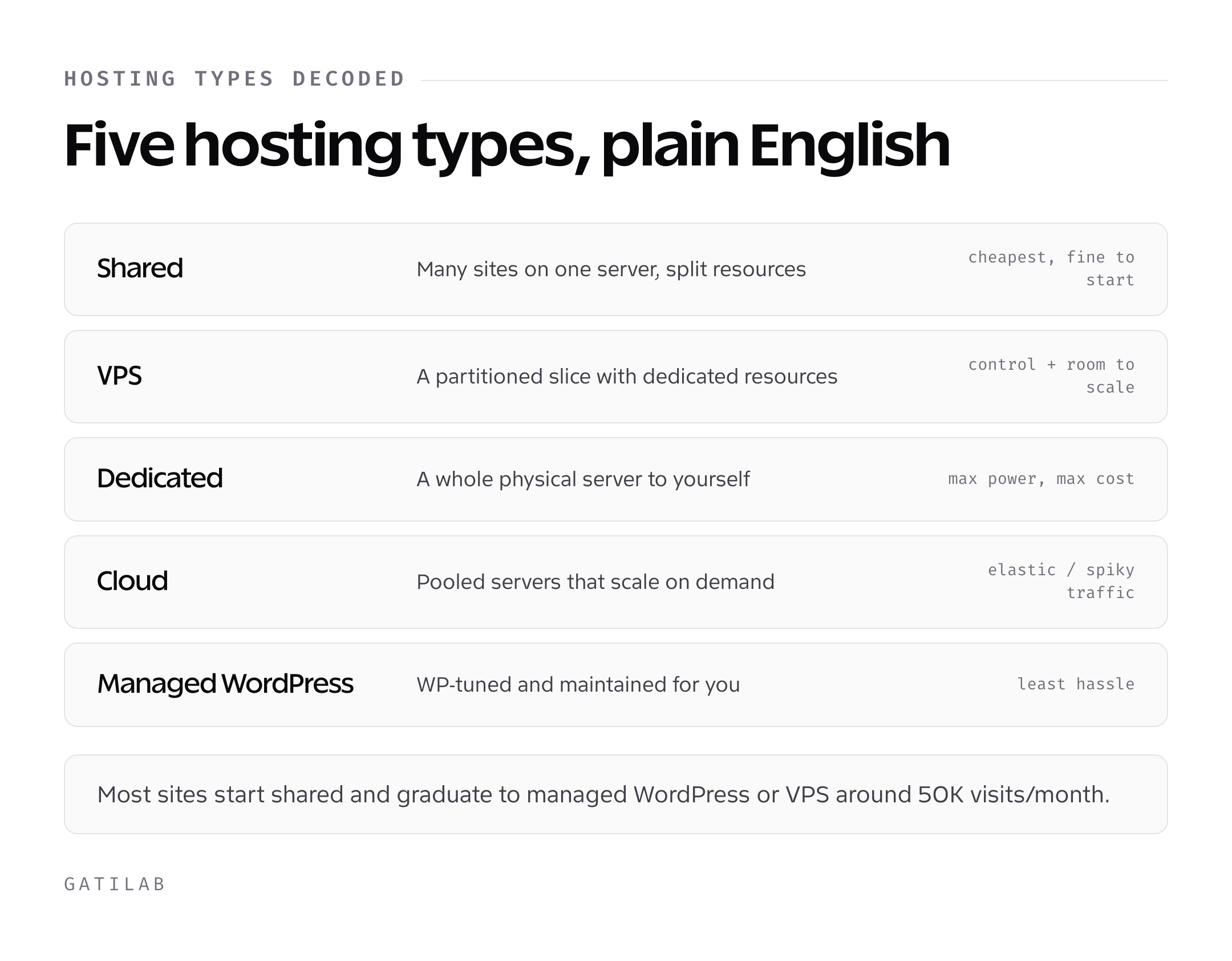
Hosting types decoded: shared, VPS, dedicated, cloud, managed WordPress
Five hosting architectures cover almost every site on the internet. Picking the right one before you compare brands saves you from buying a Ferrari engine for a moped, or a moped engine for a freight train.
Shared hosting
One physical server, hundreds of websites, one shared CPU, RAM, and disk pool. Cheapest option. On the shared plans compared below, entry prices run about $3 to $5 per month introductory and $10 to $15 at renewal. Best for personal sites, low-traffic blogs, and brand-new businesses doing under 30,000 monthly visits. The hidden cost is the “noisy neighbor” problem. If a site on the same server runs a misbehaving plugin or gets hit with traffic, your site’s response time drops with theirs.
VPS (virtual private server) hosting
One physical server is sliced into isolated virtual partitions, each with guaranteed CPU cores, RAM, and disk allocation. You’re not competing with neighbors for resources. Typical price: $20 to $80 per month for a usable spec. Best for sites past 50,000 monthly visits, ecommerce stores doing real revenue, and any site running custom code, background jobs, or a non-WordPress stack. You get root access on most plans, which is a feature only if you can use it; if you can’t, get managed VPS or stay on shared.
Dedicated hosting
One entire physical machine, just for you. Maximum performance, full hardware control, and the price tag to match: $80 to $400 per month minimum, often more. Useful only when you need specific hardware (NVMe arrays, GPU compute, exotic kernel modules), have compliance requirements that disallow shared infrastructure, or run a site so large that virtualisation overhead actually hurts. For most businesses, dedicated is overkill, and a well-spec’d VPS or cloud cluster is faster and cheaper.
Cloud hosting
Resources pulled from a distributed pool of servers, scaling up or down on demand. Pricing is usually pay-as-you-go or hybrid plans starting around $10 to $50 per month. Best for traffic-spikey businesses (product launches, viral content, ecommerce sales), apps that need geographic redundancy, or anyone running headless WordPress, Next.js front-ends, or microservices. The catch: you pay for what you use, and what you use can grow surprisingly fast under poor caching.
Managed WordPress hosting
A specialised flavour of shared, VPS, or cloud, with WordPress-specific server tuning, automatic core updates, server-level caching, staging environments, and security hardening. Price: $20 to $200 per month. Worth it if WordPress is core to your business and you don’t want to manage server-level performance yourself. The trade-off is restriction. Most managed hosts ban specific plugins (caching, backup, related-posts plugins are common) because they conflict with the platform-level systems already in place.
Quick selector: Personal/portfolio site → shared. Small-business site under 50K visits → shared or managed WordPress. Growing ecommerce or content site → managed WordPress or VPS. Custom application or scale ops → cloud. Niche performance or compliance need → dedicated.
The 7 criteria to score every host on
Grade every host on these seven factors, weighted by how often they actually predict the experience six months in. Score 1 to 5 on each, and cut any host that drops below 3 on performance, support, or pricing transparency, regardless of brand recognition.
- Performance: TTFB under 200ms from a relevant geographic test point, consistent loading speed under load, and PHP version current within 12 months. Anything serving PHP 7.4 in 2026 is a hard fail.
- Uptime SLA and history: 99.95% minimum, with a real refund policy when missed. Cross-check uptime claims against third-party monitors like UptimeRobot, not the host’s own dashboard.
- Support quality: Test it with three real questions: a database query optimization, a malware cleanup, and a server-level cache flush. If the first response is a copy-paste from their docs, the host scores 1. If a tier-1 rep escalates correctly, they score 4 or 5.
- Server stack: LiteSpeed or NGINX, MySQL 8 or MariaDB current, PHP 8.2 or 8.3, HTTP/3, OPcache enabled. The current stack matters more than CPU cores on shared plans.
- Backups: Daily automated backups, off-site storage, and one-click restore. If “backup” is a $20-per-month upsell, they’re a no.
- Security: Free SSL via Let’s Encrypt, brute-force protection, malware scanning, and 2FA on the hosting control panel. WAF and DDoS mitigation count as bonuses.
- Pricing transparency: The renewal price visible on the same page as the introductory price. Renewal under 3x the intro. No “domain privacy” or “site security” hidden into the cart at checkout.
Red flags that should make you close the tab
Cheap hosting is fine. Cheap hosting that hides how it’s actually priced isn’t. These are the patterns that consistently signal a bad provider, regardless of how good the marketing copy reads.
- Renewal price is buried. If you can’t find the renewal price within ten seconds of landing on the pricing page, the renewal is bad. Hosts proud of their pricing show both rates side by side.
- “Unlimited” everything. Unlimited bandwidth, unlimited storage, unlimited domains. This is shared infrastructure with hidden CPU and inode caps in the terms of service. Read the fair-use clause; the limit is real, just opaque.
- Uptime claims that round to “100%.” Nobody runs 100% uptime. 99.99% is the realistic ceiling. If a host advertises five 9s without a published SLA refund process, they’re claiming something they can’t deliver.
- Lock-in via custom control panel. A custom panel that doesn’t generate cPanel-format backups makes migration painful. Standard cPanel or DirectAdmin is portable; bespoke panels mean you’ll rebuild from scratch when you leave.
- Outsourced tier-1 support. Quick test: ask a moderately technical question. If the answer arrives in 11 seconds and reads like a paraphrase of the documentation, you’re chatting with a script.
- EIG-style ownership. A handful of conglomerates own dozens of “competing” hosting brands and run them on shared infrastructure. The brand on the marketing page often matters less than the parent company’s operations playbook. Search “[host name] parent company” before buying.
- Free hosting with mandatory ads. If you’re not paying, you’re the product. Free hosts inject ads into your pages, share visitor data, and throttle bandwidth. Acceptable for a school project; terrible for any business that wants to be taken seriously.
Best web hosting services compared
These are the five picks, matched against the criteria above. Prices are the introductory and renewal rates on each host’s official pricing page. Hosts change them often, and most intro rates more than double at renewal, so budget on the renewal price and confirm it on the linked page before you buy.
1. Bluehost: best entry-level WordPress host

Bluehost is the pick for people who don’t want to think about hosting. It’s WordPress.org’s longest-running recommended host, and its intro pricing makes year one cheap. Plans start with Starter at $3.99/month on a 36-month term, renewing at $9.99/month; Business is $6.99/month, renewing at $13.99/month.
Starter covers 10 websites with 10GB of NVMe storage, free SSL, a free domain for the first year, a free CDN, and weekly backups, with a 30-day money-back guarantee and a 99.99% uptime SLA. What you don’t get on Starter is phone support, which starts on Business. Where Bluehost wins is the on-ramp: guided setup and AI site-creation tools take beginners from a domain idea to a live WordPress site without touching a server.
Pick Bluehost if: it’s your first WordPress site, you want guided setup, and you don’t yet know what your traffic curve looks like. Skip if: you’ve already managed a site and want raw performance per dollar.
2. Hostinger: best low entry price

Hostinger has the lowest entry price on this list, and it’s one of the hosts WordPress.org recommends. Its web hosting plans now start with Premium at $2.99/month on a 48-month term, renewing at $10.99/month. The next tier, Unlimited, is $3.99/month and renews at $16.99/month. The old sub-$1 single-site plan no longer appears on the pricing page.
Their hPanel is custom (a flag against the portability point in the criteria above), but it’s well-designed. The servers run LiteSpeed with NVMe storage and a built-in CDN. Premium covers 3 websites, 20GB of storage, a free domain for the first year, free SSL, email for the first year, and weekly backups. Unlimited adds unlimited websites, 50GB of NVMe storage, and daily backups. Every plan carries a 30-day money-back guarantee.
Pick Hostinger if: you want a low entry price with a modern stack and you’re comfortable in a non-cPanel interface. Skip if: you need cPanel for migration purposes or expect heavy support tickets.
3. Hosting.com (formerly A2 Hosting): speed-focused shared hosting

A2 Hosting rebranded as Hosting.com in May 2025, and its shared plans now sit under the new name. It is still the speed pick on paper: the shared platform runs LiteSpeed caching on AMD EPYC servers with NVMe storage, and every plan includes daily off-server backups with 30 days of restore points, free SSL, and free managed migration. The lineup is Starter (5 websites, 15GB NVMe), Pro (10 websites, 50GB NVMe, staging sites), and a top tier for 50 websites. Confirm the intro and renewal price at checkout, because the old A2 Startup and Turbo prices no longer apply.
Support is in-house and available 24/7/365, and you can move up to your own cloud server on the same platform without a migration. If you are reading older A2 reviews, the Turbo and Turbo Boost names belong to the previous lineup, so compare the current plans by site count, storage, and CPU and RAM allocation instead.
Pick Hosting.com if: raw speed matters more than the lowest possible price, especially for content-heavy sites or stores where SEO depends on Core Web Vitals. Skip if: you’re committed to the cheapest possible monthly fee.
4. GreenGeeks: best green/eco-friendly hosting
GreenGeeks is the eco-conscious pick. It matches 300% of the energy it uses, servers and staff workstations included, through the Bonneville Environmental Foundation, which is a verifiable commitment rather than vague greenwashing. Plans start with Lite at $2.95/month prepaid for 12 months, renewing at $13.95/month; Pro is $4.95/month (renews at $18.95) and Premium $8.95/month (renews at $30.95).
Every plan includes a free domain for the first year, free SSL, a free CDN, and daily backups, with a 30-day money-back guarantee. Lite covers 1 website with 25GB of web space. Renewal pricing is the criticism: Lite renews at nearly five times its intro rate, the steepest jump on this list. If your sustainability story matters for brand reasons, the intro price is competitive; just budget for the renewal.
Pick GreenGeeks if: sustainability is a real value, not just a checkbox, and you want a standard shared-hosting feature set. Skip if: you’ll forget to switch hosts at the renewal cliff.
5. InMotion Hosting: best 90-day refund and support
InMotion is the established pick: founder-led since 2001, and it owns and operates its servers in data centers in California, Virginia, and the Netherlands. Shared plans start with Launch at $4.79/month, renewing at $14.99/month; Power is $5.79/month (renews at $18.99) and Pro $10.59/month (renews at $25.99).
What makes InMotion stand out is the 90-day money-back guarantee, which is three times longer than the industry-standard 30 days. That alone is worth running a real production site on it for a quarter before committing. Every plan includes free SSL, a free domain, free website migration, unmetered bandwidth, cPanel, and NVMe storage (Launch: 2 websites, 100GB).
Pick InMotion if: you want a long try-before-you-commit window, cPanel, or phone support (Power and Pro plans). Skip if: you want the lowest renewal price.
Best web host by use case
If you don’t want to read each review, here’s the one-line answer for the eight scenarios that cover most decisions.
- First WordPress site: Bluehost. Guided setup wins.
- Lowest entry price: Hostinger Premium. $2.99/month on a 48-month term.
- Speed-focused shared hosting: Hosting.com (formerly A2 Hosting). LiteSpeed caching plus NVMe.
- Eco-friendly brand fit: GreenGeeks. A 300% energy match through a named partner.
- Long try-before-buy window: InMotion. 90-day guarantee.
- Small-business ecommerce: Hosting.com Pro or Hostinger Unlimited. WooCommerce needs the speed.
- Growing content site (50K+ visits/month): Move to managed WordPress or VPS. Shared starts to throttle.
- Developer/agency multi-site: Hosting.com’s 50-site tier, InMotion Pro, or a VPS with cPanel and WHM to keep client accounts separate.
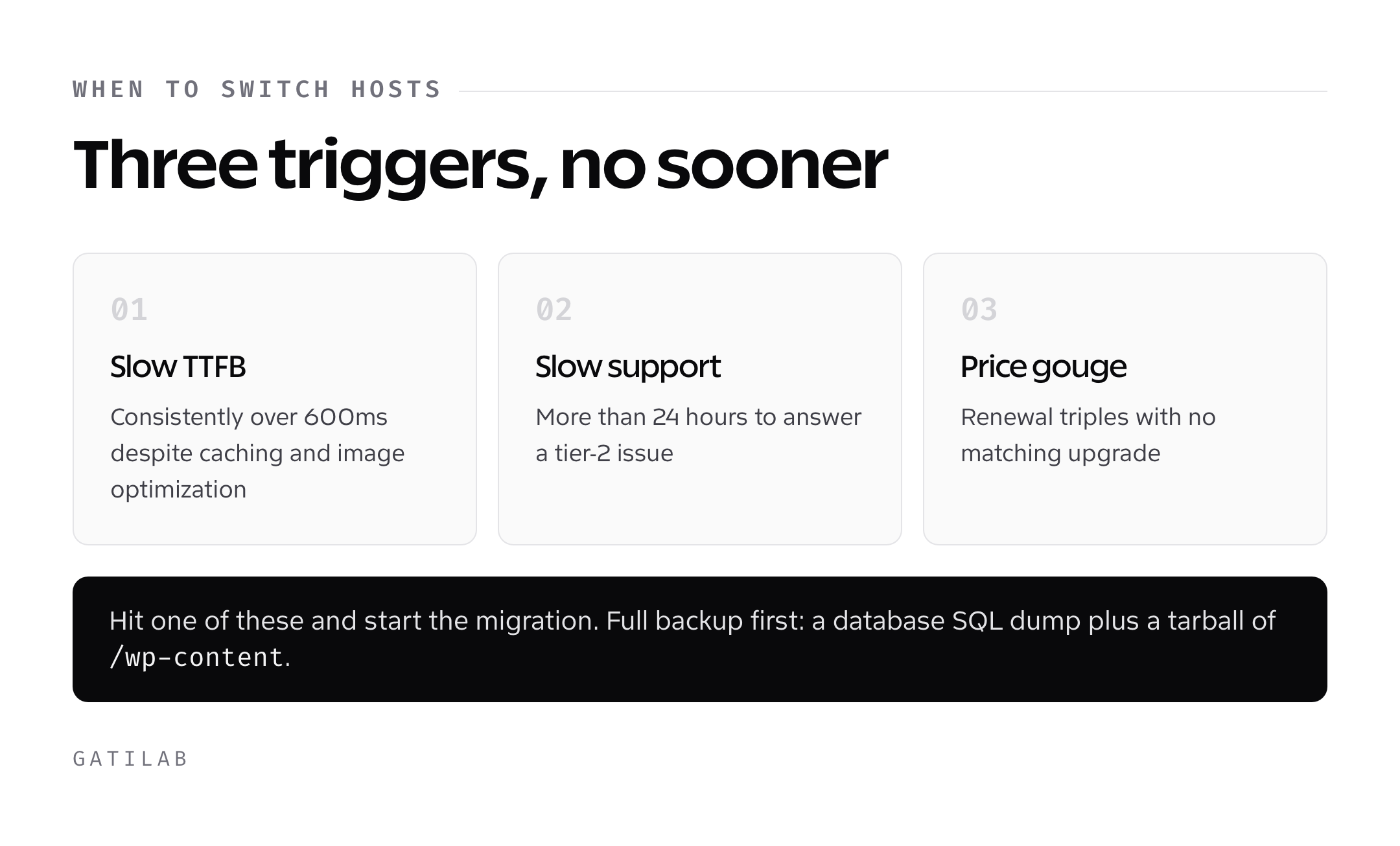
When to switch hosts and how to do it without breaking anything
Switch hosts when one of three things happens: TTFB consistently exceeds 600ms despite caching and image optimisation, support takes more than 24 hours to respond to a tier-2 issue, or your renewal price triples without a corresponding upgrade. Here’s a migration checklist that covers every move.
- Take a full backup at the source. Database SQL dump and a tarball of /wp-content. If your host runs cPanel, the “Full Backup” tool produces a portable archive.
- Provision the destination host with the same PHP and MySQL versions. Mismatch here is the single most common cause of a “white screen after migration.”
- Restore files and database to the new host. Confirm the home and siteurl options match the temporary or permanent domain you’re using.
- Smoke-test on a temporary URL or hosts-file override. Test login, a representative page from each post type, the checkout flow if it’s an ecommerce store, and admin-ajax.
- Update DNS A records and lower the TTL the day before. A 300-second TTL means propagation is effectively instant.
- Reissue SSL on the new host. Let’s Encrypt automated tools usually work; if not, your new host’s support team will issue manually.
- Verify with a Sitebulb or Screaming Frog crawl post-migration. 200 status codes everywhere, no broken links, no mixed-content warnings.
For the post-migration health check, run a comprehensive website audit within the first week to catch any indexation or performance regressions. If you’re using a content-heavy site to drive organic, follow the same Core Web Vitals discipline outlined in SEO for startups.
Frequently asked questions about web hosting
Bottom line
The right host depends on what you’re hosting and what you can spend. For most readers, the answer is one of these three: Bluehost if you’re brand-new, Hostinger Premium if you want the lowest entry price, Hosting.com if speed itself is the criterion. The remaining two on the list (GreenGeeks for sustainability, InMotion for the 90-day window) are situational picks that win for specific reasons.
What separates this decision from a bad one is whether you treat hosting as infrastructure or as a line item. Underspending on hosting saves a few dollars a month and can cost you conversions through slower load times. Overspending on dedicated when a modest VPS is enough costs you hundreds a month for capacity you never use. Match the architecture to the workload, score the provider on the seven criteria, and don’t fall for “unlimited” anything. That’s the whole framework.
On a tight budget? See the best cheap web hosting picks with honest renewal pricing.
Tell Google you want more of this.
Add Gatilab as a preferred sourceOne tap, and this site shows up more often in your own Top Stories, AI Overviews and AI Mode. Remove it any time.