
WordPress Backup Plugins: 7 Tools Compared (2026)
Your hosting account got compromised at 2:14 a.m. on a Tuesday. The malware scanner flagged 847 infected files. Your “managed host” backup is six days old, before the new product launch, before 412 customer accounts, before $11,200 in pending orders. You restore it anyway, and lose the week. This is the WordPress backup plugins story I keep watching unfold across agency client sites in 2026, and the only people who walk away unbothered are the ones running a real off-site backup tool with verified restore tests.
Hosting backups are not backups. They sit on the same disk, the same datacenter, often the same compromised account. WordPress backup plugins solve that by pushing encrypted snapshots to S3, Backblaze B2, Wasabi, Google Drive, or your own SFTP target on a schedule you control, with restore tests you can actually run. I’ve shipped 2,000+ client projects at Gatilab, and I’ve used or stress-tested every tool in this list. Here is what works, what’s overpriced, and what’s quietly broken in 2026.
Why hosting backups are not real backups
A real backup is off-site, encrypted, versioned, and restore-tested. Most hosting “daily backups” are a single rolling snapshot stored on the same node as your live site. SiteGround keeps 30 days for shared customers but locks you to their restore tool. Hostinger keeps weekly. Cloudways gives you 1-7 days based on plan. WP Engine keeps 60 days. None of these protect you from a credential leak that wipes both production and the snapshot store, which is exactly what happened to a client of mine in March 2025.
Real WordPress backup plugins push encrypted archives to a remote target you own: AWS S3, Backblaze B2 ($0.005/GB/month), Wasabi (flat $6.99/TB/month, no egress), Google Drive, Dropbox, OneDrive, or a separate SFTP server. They keep at least 7 versioned restore points, ideally 30. They run automated restore-verification on a separate staging server. And they let you push files only, database only, or both, on independent schedules.
If your only backup lives at the same hosting provider as your live site, you do not have a backup. You have a convenience copy. Treat it like one.
How I picked the WordPress backup plugins on this list
Selection criteria for any WordPress backup plugins I’ll recommend in 2026: incremental backups (not full nightly dumps), at least three off-site storage targets out of the box, file-level restore (not just full restore), real-time or near-real-time database hooks for ecommerce and membership sites, encrypted archives at rest and in transit, and a verified restore process I can run in under 15 minutes.
- Off-site storage support. Minimum: S3 plus one of B2/Wasabi/Google Drive. Ideally also SFTP and Dropbox.
- Incremental backups. Full backup once, then changes only. Cuts storage cost 80% for sites over 5 GB.
- Independent file and DB schedules. Database hourly, files weekly is the right pattern for most sites.
- Real-time DB for ecommerce. WooCommerce and membership sites lose money in minutes, not hours.
- One-click restore. If restore takes 90 minutes of CLI work, the plugin failed the only test that matters.
- Migration support. A backup plugin that can clone to a new host saves $99-199 in migration fees.
- Encryption keys you control. The vendor should never be able to decrypt your archives.
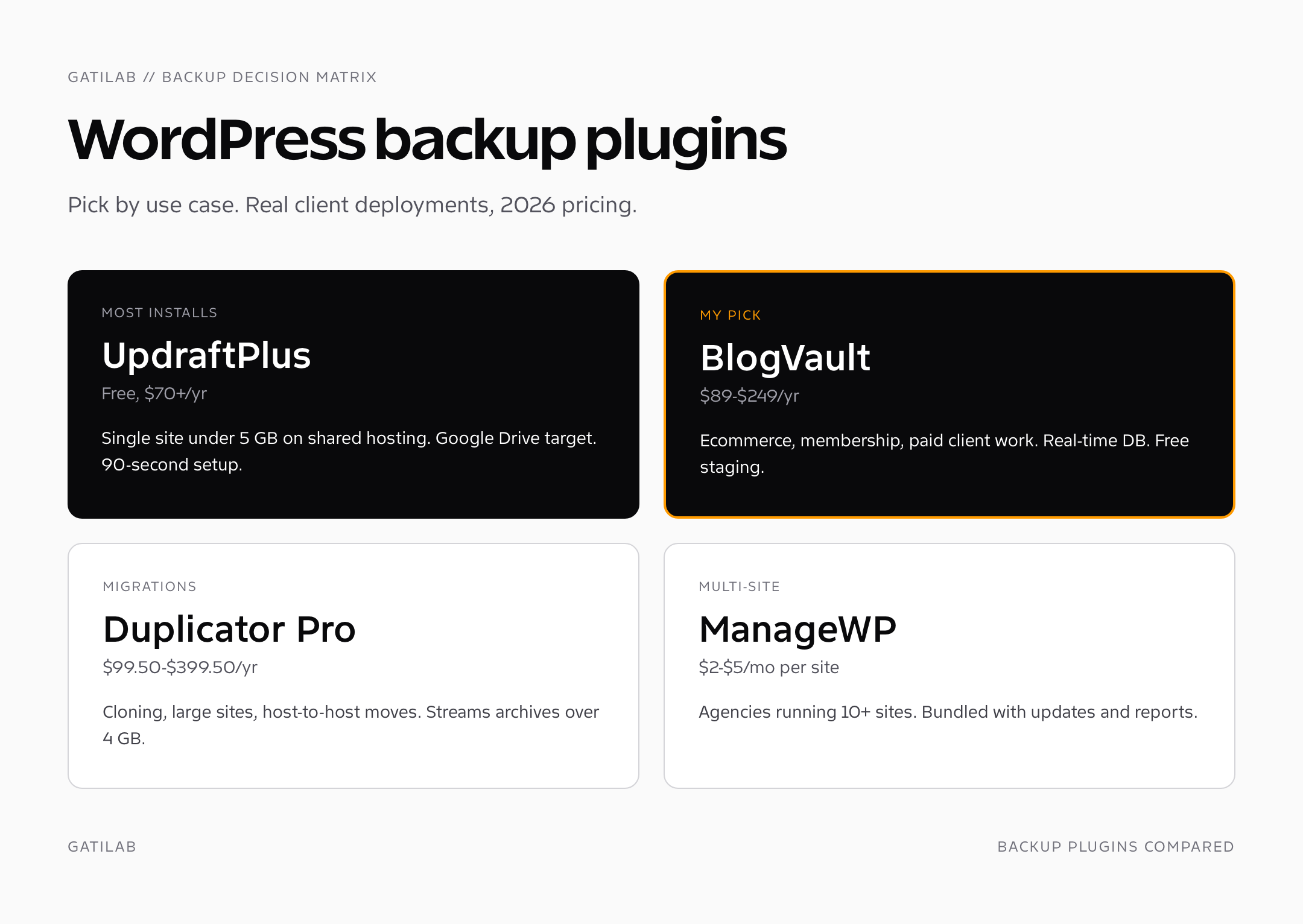
UpdraftPlus: the default that still works for most small sites
UpdraftPlus runs on more than three million sites and that number isn’t a vanity metric, it’s the reason it works. The free version pushes to Google Drive, Dropbox, S3, Rackspace, FTP, email, and your own server. Premium adds incremental backups, encryption, multisite support, more cloud destinations, and Migrator for full site clones. Premium pricing in 2026: $70/year for the Personal license (2 sites), $115/year for Business (10 sites), $145/year for Agency (35 sites), $195/year for Enterprise (unlimited). Lifetime licenses are $399-995 depending on tier.
What I like: it ships with a working default after a 90-second setup. The restore tool reads the backup directly off whichever cloud you used, no manual download required. The free tier is genuinely usable for sites under 1 GB. What I don’t like: the UI hasn’t changed materially since 2018, the encryption is paid-only (which is silly for a backup tool), and incremental backups are slower than they should be on shared hosting because of single-threaded ZIP creation.
If you run a single WordPress site under 5 GB on shared hosting, UpdraftPlus free plus a Google Drive destination is the lowest-friction setup that actually counts as a backup. Schedule daily DB, weekly files, retain 30 versions.
BlogVault: the one I use on every client site I touch
BlogVault is what I install on every paid client engagement at Gatilab, full stop. It’s a managed backup service rather than a self-hosted plugin: backups run from BlogVault’s servers, never on your hosting CPU, which means a 40 GB WooCommerce store with 200 GB media doesn’t slow down at 2 a.m. when the cron fires. Real-time backup is included on Plus and above, which is non-negotiable for ecommerce. Pricing in 2026: $89/year for Basic (1 site), $149/year for Plus (real-time, 1 site), $249/year for Pro (developer features), or $249-2,499/year for agency packs covering 5-100 sites.
What it does that nothing else does well: 90-day restore points by default, restore to staging (free, included), one-click migration between hosts, and an actual customer support team that picks up the phone when restore fails. I have personally tested the staging-restore path on 14 different client sites in the last year and it worked every single time. Their incremental engine reads only changed files via byte-level diffing, so a 35 GB site backs up in under three minutes after the initial sync.
The downside: it’s a managed service, so your archives live in BlogVault’s S3 buckets unless you pay extra for “BYO storage” on agency plans. For most clients that’s fine. For one healthcare client with HIPAA exposure, we paid the upgrade and pointed it at their own AWS account.
Solid Backups (formerly BackupBuddy): the legacy pick for self-hosted control
BackupBuddy was the original premium WordPress backup tool, launched in 2010 by iThemes. It got rebranded as Solid Backups in 2023 after iThemes joined StellarWP. The plugin still works the way it always has: scheduled full or database-only backups, push to Stash (their managed S3-backed storage), Amazon S3, Google Drive, Dropbox, Rackspace Cloud Files, or local server. The ImportBuddy script handles full-site restores and migrations. Pricing in 2026: $99/year for one site (Solid Backups standalone), or bundled in Solid Suite at $199/year for unlimited sites with Solid Security and Solid Central included.
What still works: Stash Live continuous backup is solid for sites under 20 GB, the encryption is AES-256, and the migration workflow has been refined over 14 years of edge cases. What doesn’t: the scheduling UI feels dated, incremental backups are weaker than UpdraftPlus or BlogVault, and the restore process still requires uploading ImportBuddy to the destination server manually. For agencies already on the StellarWP suite (Solid Security, Kadence, GiveWP), it’s a sensible bundle. As a standalone, it’s overpriced compared to UpdraftPlus.
Duplicator Pro: the migration-first backup plugin
Duplicator started as a site-cloning tool and grew backup features later. That heritage shows: nothing migrates a WordPress site faster, and the archive format (a single ZIP plus an installer.php) is dead simple to restore on any host that can run PHP. Free version handles manual full-site backups and local installer-based restore. Pro pricing in 2026: $99.50/year Personal (3 sites), $149.50/year Freelancer (15 sites), $249.50/year Business (40 sites), $399.50/year Gold (unlimited).
Pro adds scheduled backups, S3, B2, Dropbox, Google Drive, OneDrive, Wasabi, and SFTP destinations, plus large-site streaming for archives over 4 GB. The streaming engine is genuinely useful: I cloned a 47 GB membership site from Cloudways to Kinsta in 38 minutes flat with Duplicator Pro Gold last September, no SQL hand-editing required. The downside is no real-time or hourly database backup, so it’s not the right choice for ecommerce. Buy this if your primary use case is migrations and your backup needs are weekly or daily, not hourly.
ManageWP: backups bundled into multi-site management
ManageWP is a dashboard for managing 5-100+ WordPress sites from one screen, with backup as one of its add-ons. The free tier includes monthly backups, which is useless for anything live. The Premium Backup add-on costs $2/month per site for daily backups with 30-day retention, or $1/month for weekly. Hourly real-time backups are $5/month per site. Storage is included; backups go to ManageWP’s Amazon S3 buckets in the EU, US, or Australia.
The dashboard is the reason you’d buy ManageWP, not the backups specifically. If you maintain 30+ client sites, the per-site $1-2/month for backups is cheaper than running BlogVault Agency and you get Safe Updates, security checks, performance scans, client reports, and a white-label client portal in the same subscription. As a standalone backup tool it’s middling. As a Gatilab-style agency backbone it’s hard to beat.
Jetpack VaultPress Backup: the Automattic option
Jetpack VaultPress Backup is the standalone backup product Automattic spun out of the old VaultPress service in 2022. It runs entirely off your server (backups initiated from Automattic’s infrastructure), supports real-time database backups for ecommerce, keeps 30 days of restore points by default (or 1 year with the higher tier), and includes one-click restore through the Jetpack mobile app. Pricing in 2026: $5/month for the basic tier (10 GB storage, 30-day retention), $25/month for the 1 TB plan with 1-year retention.
What makes it worth considering: the restore-from-mobile-app feature is genuinely useful when your laptop is dead and the site is down. The integration with WooCommerce hooks gives true real-time backups for orders. What doesn’t: Jetpack itself is a heavy plugin that loads dozens of features you don’t need, the price escalates faster than competitors, and the only off-site storage target is Automattic. If you’re already running Jetpack for stats or CDN, adding VaultPress Backup makes sense. If not, BlogVault delivers more for less.
WordPress backup plugins comparison: pricing, storage, and restore
Here’s the comparison view of the seven WordPress backup plugins covered above. Pricing reflects current 2026 rates from each vendor’s site as of this update. “Real-time” means hooked into WordPress action hooks, not just hourly scheduled.
| Plugin | Entry price | Real-time DB | Off-site targets | Restore UX | Best for |
|---|---|---|---|---|---|
| UpdraftPlus | Free / $70 yr | Premium only | 14+ (S3, GDrive, Dropbox, B2, SFTP) | One-click in admin | Single site under 5 GB |
| BlogVault | $89/yr | Yes (Plus) | Managed (BlogVault S3) + BYO | One-click + staging | Client sites, ecommerce |
| Solid Backups | $99/yr | Stash Live | Stash, S3, GDrive, Dropbox, FTP | ImportBuddy script | StellarWP suite users |
| Duplicator Pro | $99.50/yr | No | S3, B2, Wasabi, GDrive, Dropbox, SFTP | Installer-based | Migrations, large sites |
| ManageWP | $2/mo/site | $5/mo tier | Managed S3 (US/EU/AU) | Dashboard restore | Agencies, 5+ sites |
| Jetpack Backup | $5/mo | Yes | Automattic only | Mobile app restore | Existing Jetpack users |
| BackWPup (free) | Free / $69 yr | No | S3, Dropbox, Rackspace, FTP | Manual restore | Tinkerers, dev sites |
Off-site storage: where to actually keep your backups
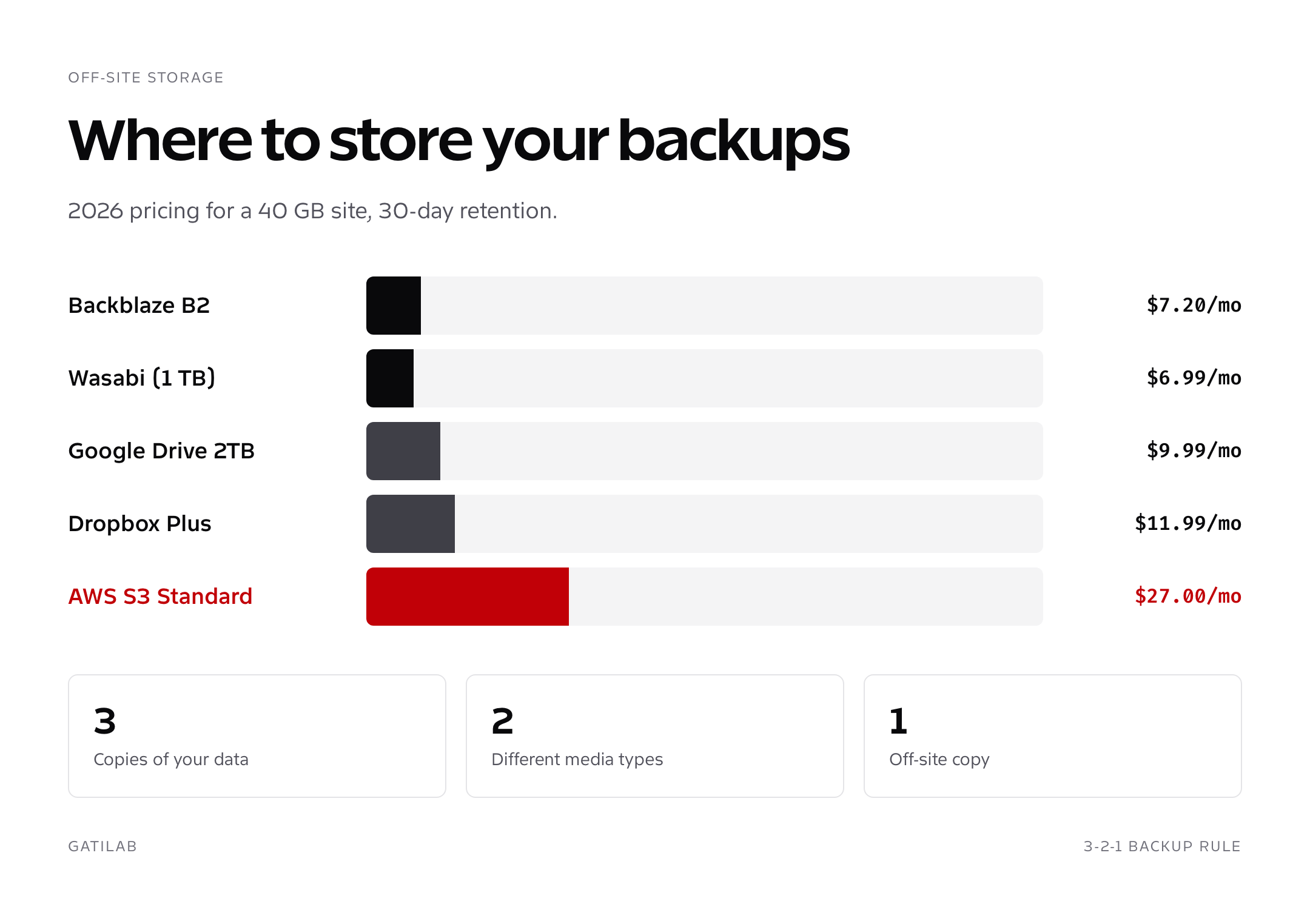
The cheapest backup destination in 2026 is Backblaze B2 at $0.006/GB/month for storage and $0.01/GB egress (with 3x your storage in free egress per month). For a 40 GB site retained 30 days, that’s $7.20/month with zero realistic restore cost. Wasabi charges a flat $6.99/TB/month with no egress fees, which beats B2 if your archive set ever crosses 1 TB. AWS S3 Standard runs $0.023/GB/month plus $0.09/GB egress, so the same 40 GB site costs $27/month with S3 Glacier Deep Archive at $0.00099/GB/month for old retention windows.
- B2: cheapest for sites under 500 GB, S3-compatible API, works with every plugin in this list
- Wasabi: flat-rate, predictable, no egress fees, best for sites over 500 GB
- S3: most reliable, most plugin support, most expensive
- Google Drive: convenient if you already pay for Workspace, 2 TB plan is $9.99/month
- Dropbox: the simplest setup, 2 TB Plus plan is $11.99/month, works for solo bloggers
- SFTP to a separate VPS: $4-6/month on Hetzner or DigitalOcean for a backup-only box
Whatever destination you pick, never use the same provider as your hosting. If your site lives on AWS, your backup goes to B2. If it’s on Cloudways (DigitalOcean), it goes to Wasabi. The 3-2-1 rule still holds in 2026: three copies, two media types, one off-site. Your live site counts as copy one, the hosting backup as copy two, and the off-site plugin destination as copy three.
Backup schedule and retention that actually works
For a typical content site (blog, portfolio, brochure), I run database backups every 12 hours, file backups weekly, retain 30 versions. For ecommerce, the database goes real-time or hourly at minimum, files daily, retain 90 days. For membership sites with daily user activity, treat them like ecommerce. For dev/staging sites, weekly full is fine because you can rebuild from production.
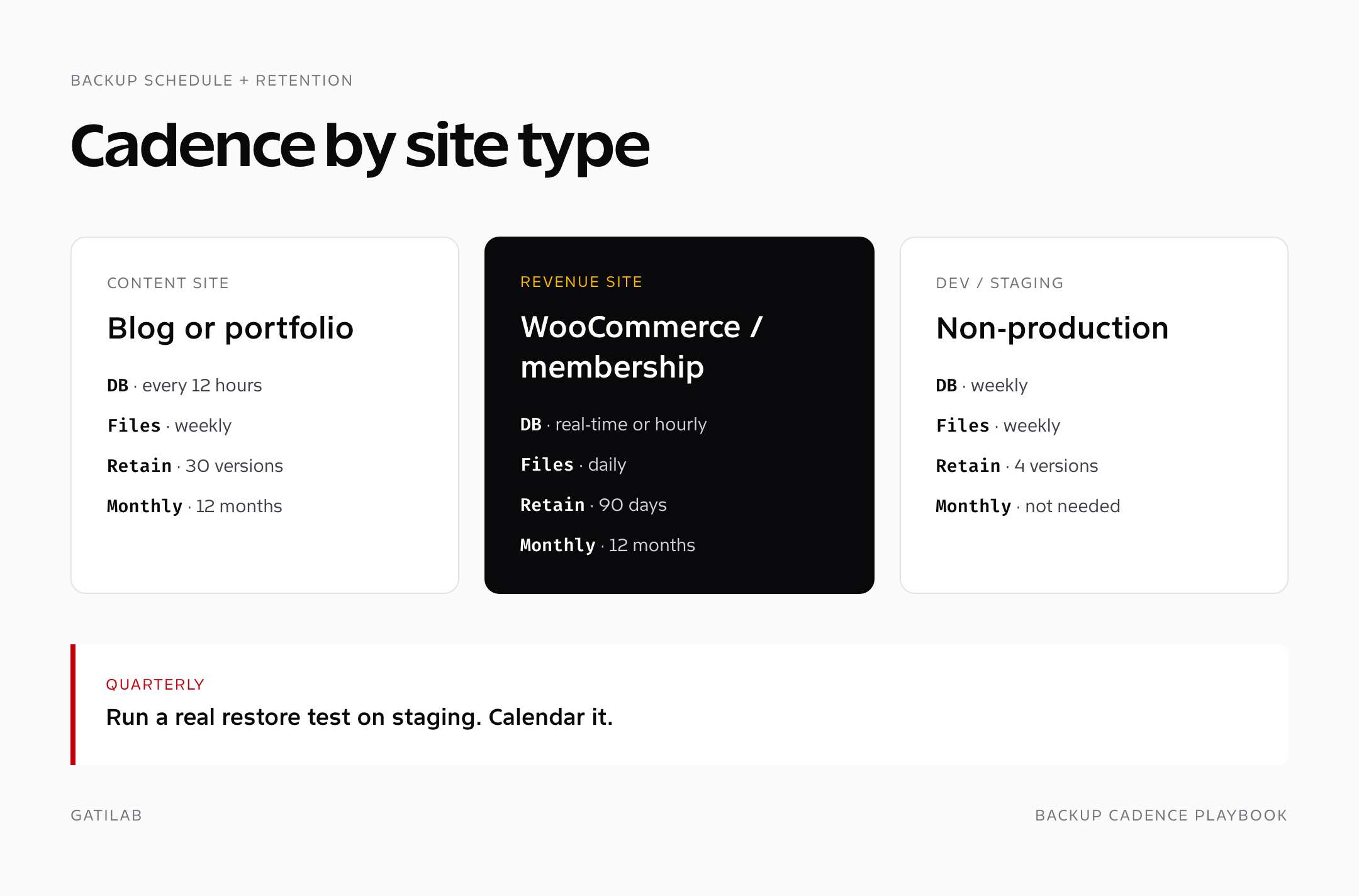
The retention rule that gets ignored: keep at least one monthly snapshot for 12 months. Most malware and most accidental deletions get noticed in the first 30 days. Some don’t. I had a client discover in February 2025 that a former contractor had been quietly deleting old podcast episodes for nine months. Without the 12-month archive, those audio files were gone. With the archive, we restored 84 missing posts in 22 minutes. The extra storage costs about $2/month at B2 prices.
Restore testing: the part everyone skips
A backup you’ve never restored is a guess. The first time you find out your archive is corrupt or your encryption key is wrong should not be the day production is down. Run a real restore at least once a quarter on a separate staging site. BlogVault has staging built in, free, takes about 90 seconds to restore a 5 GB site. UpdraftPlus Migrator does the same job manually in 5-10 minutes. Duplicator’s installer.php takes 3-5 minutes on a fresh staging server.
- Spin up a staging subdomain (most hosts do this in one click)
- Pull the latest backup archive from your off-site storage
- Run the plugin’s restore tool against the staging site
- Log in, click around, hit the cart/checkout flow if it’s ecommerce
- Compare a known database row count (orders, posts, users) against production
- Document the time it took. If it’s under 15 minutes, you’re golden. If it’s over 30, switch tools
Treat restore tests like fire drills. Schedule them. Calendar them. The first one will surface something broken; the second one validates that you fixed it. The third one is muscle memory.
My pick by use case
For a single WordPress blog or portfolio under 5 GB on shared hosting, install UpdraftPlus free, point it at Google Drive, schedule daily DB and weekly files, retain 30 versions. Done in 90 seconds, costs nothing.
For a WooCommerce store, membership site, or any site that earns revenue: BlogVault Plus at $149/year. Real-time backups, free staging, 90-day retention, the support team actually helps when something breaks. I’ve recommended it to every paid client at Gatilab since 2021 and have not regretted it once. For a multi-site agency managing 10+ client sites, BlogVault Agency or ManageWP Premium pays for itself in saved restore time the first month a site gets compromised.
For migrations specifically, Duplicator Pro at $99.50/year is the cleanest tool. For an existing Solid Suite or BackupBuddy license tied to other StellarWP products, keep it. For Jetpack-heavy sites already paying for Jetpack stats and CDN, Jetpack VaultPress Backup at $5/month is the path of least friction.
Beyond the WordPress backup plugins themselves, your hosting choice matters because it sets the floor on how often catastrophic failures happen. I cover that in detail in our guide to the best web hosting services, and once you’ve got hosting and backups locked, the next layer is page caching, which I cover in my WordPress caching plugins comparison. Run a comprehensive website audit before and after any backup migration to catch broken redirects or missing media before they bite. Agency owners running this for clients should also read my breakdown of WordPress agency operations for billing and SLA structure around recovery work.
Encryption, GDPR, and storage compliance
Backups are personal data when they include user records, order data, or comments. That makes encryption non-negotiable in 2026 for any site touching EU, UK, or California users. The two layers that matter: encryption at rest (the archive on disk is unreadable without a key) and encryption in transit (the upload to the cloud target uses TLS 1.2 or higher). Every WordPress backup plugin worth using supports TLS uploads. Encryption at rest is where they differ.
UpdraftPlus Premium uses AES-256 with a key you set in the plugin. Solid Backups uses AES-256 with the key derived from your wp-config.php. BlogVault encrypts archives with vendor-managed keys (their staff cannot read your data, but the key custody is theirs). Duplicator Pro encrypts the package archive with a password you set per backup. For sites under HIPAA or PCI scope, BYO storage with vendor-key-encrypted archives in your own AWS or Google Cloud account is the cleanest answer. For everyone else, vendor-managed encryption with a reputable provider clears 95% of regulatory exposure.
The GDPR-specific requirement: any backup that crosses borders (EU site backed up to US-region S3, for example) needs Standard Contractual Clauses or an equivalent transfer mechanism documented. Wasabi and BlogVault both offer EU-only regions. Backblaze B2 has EU regions in Amsterdam. AWS S3 has Frankfurt and Dublin. Pick the region matching your data subjects and document the choice.
Frequently asked questions
Are WordPress backup plugins necessary if my host has backups?
Yes. Hosting backups live on the same datacenter and the same compromised account as your live site. A real backup plugin pushes encrypted snapshots to off-site storage you control (S3, Backblaze B2, Wasabi, Google Drive), giving you a recovery option even when the host goes down or your account is breached.
Which WordPress backup plugin is best for WooCommerce?
BlogVault Plus at $149/year. It includes real-time database backups hooked into WooCommerce action hooks, free staging, 90-day retention, and one-click migration. UpdraftPlus Premium is a budget alternative but lacks the real-time engine.
Is the free version of UpdraftPlus enough for a small blog?
For most personal blogs and portfolios under 5 GB, yes. The free version pushes to Google Drive, Dropbox, S3, and FTP, supports daily DB and weekly file schedules, and has a working restore tool. Premium adds incremental backups, encryption, and migrator.
How often should I run WordPress backups?
Database every 12 hours and files weekly for content sites. Database real-time or hourly and files daily for ecommerce or membership sites. Retain at least 30 versions and one monthly snapshot for 12 months.
Can I store WordPress backups on Google Drive or Dropbox?
Yes. UpdraftPlus, Solid Backups, Duplicator Pro, and BackWPup all support Google Drive and Dropbox as backup destinations. Both work fine for sites under 1 TB. For cheaper storage at scale, Backblaze B2 ($0.005/GB/mo) or Wasabi (flat $6.99/TB/mo) win.
What’s the difference between BlogVault and UpdraftPlus?
BlogVault is a managed service: backups run from BlogVault’s servers, never on your hosting CPU, with real-time DB hooks and free staging. UpdraftPlus is a self-hosted plugin: backups run on your server’s PHP/cron, which slows large sites down during the backup window.
How long should I keep WordPress backups?
Minimum 30 days for daily snapshots. Plus one monthly snapshot retained for 12 months. Most malware and accidental deletions get noticed in the first 30 days, but slow-moving issues (deleted media, gradual data loss) only surface months later.
Do I need a separate backup plugin if I use Jetpack?
If you already pay for Jetpack and want one-screen ops, Jetpack VaultPress Backup at $5/month is the path of least friction. If you don’t run Jetpack, BlogVault or UpdraftPlus deliver more backup features per dollar without the rest of the Jetpack feature stack.
Can WordPress backup plugins migrate my site to a new host?
Yes. Duplicator Pro is the cleanest migration tool (single ZIP plus installer.php). BlogVault includes one-click migration on every plan. UpdraftPlus Migrator is bundled in Premium. All three work between any two hosts that run PHP.
Is WP-Optimize Backup as good as UpdraftPlus?
WP-Optimize is the same company as UpdraftPlus (Updraft) but focused on database optimization with backup as an add-on. For pure backup work, UpdraftPlus standalone is the better-developed product. WP-Optimize is worth running for DB cleanup but not as your primary backup tool.
Tell Google you want more of this.
Add Gatilab as a preferred sourceOne tap, and this site shows up more often in your own Top Stories, AI Overviews and AI Mode. Remove it any time.