
WordPress Agency Operations: A Practical Delivery System (2026)
WordPress agency operations break when ownership, handoffs, and approvals live in people’s heads. The repair is a visible delivery system: one project record, one owner for each next action, a staging gate, a written approval trail, and a launch checklist nobody can quietly skip.
The project-management app matters less than the operating rules around it. ClickUp suits mixed delivery teams, Linear suits development-heavy work, and Notion is useful for durable documentation. None of them can rescue vague scope or a client approval process built around scattered messages.
Quick verdict
Use one primary system for work and define where every other conversation belongs. The table below is the default operating model, not a shopping list.
| Operational job | Default | Use an alternative when | Failure to prevent |
|---|---|---|---|
| Project ownership | ClickUp or another structured PM tool | Linear fits a code-first team | Tasks split across chat, email, and memory |
| Documentation | Notion or a versioned knowledge base | The PM tool already handles durable docs well | Decisions disappear in comment threads |
| Credentials | 1Password or Bitwarden vaults | The client has an approved enterprise vault | Passwords sent through email or chat |
| Development | Local to staging to production | The host provides an equivalent isolated workflow | Editing production as the default |
| Client communication | Email for decisions, PM tool for tasks | A client portal consolidates both | Approvals buried in Slack |
| Quality assurance | A named pre-launch gate | Never | The builder also self-approves every check |
| Profitability | Estimated versus actual effort by project | Retainers use capacity tracking instead | Revenue mistaken for margin |
Run every project through the same delivery gates
A small agency becomes easier to scale when each phase produces a concrete artifact and has a named release condition.
| Phase | Owner | Required output | Release gate |
|---|---|---|---|
| Sales to delivery | Account lead | Signed scope, payment, constraints | No work before scope and access are clear |
| Onboarding | Project lead | Brief, assets, credentials, decision-makers | Missing inputs are visible and assigned |
| Build | Delivery owner | Versioned work on staging | Internal review before client review |
| Approval | Client decision-maker | Written acceptance or scoped changes | No implied approval |
| Launch | Technical owner | Backup, QA record, rollback path | One person can stop the release |
| Closeout | Account lead | Handoff, invoice, maintenance decision | Project is not left half-open |

Why agency operations fail before the code does
Most delivery failures begin as an invisible handoff: nobody owns the next action, the client does not know what approval means, or production changes before staging has passed review. Technical skill cannot compensate for work that has no explicit state.
The capacity problem appears when simultaneous decisions exceed what the team can remember. The answer is not more meetings. It is a smaller number of visible queues, clear owners, written acceptance criteria, and a release path with a rollback owner.
Good operations become a commercial advantage because clients can see progress and the team can predict delivery. The agency spends less time reconstructing context and more time solving the actual website problem.
Project management for WordPress agencies
A WordPress agency needs per-client ownership, milestones, review states, time or capacity evidence, and a client view that does not expose internal chatter. Choose the app whose operating model matches the team.
| Tool | Best fit | Strength | Main catch |
|---|---|---|---|
| ClickUp | Mixed delivery teams | Flexible states, templates, time, and client views | Flexibility needs governance |
| Linear | Development-heavy teams | Fast issue workflow and Git integration | Weak client-facing experience |
| Notion | Documentation-first teams | Durable briefs, decisions, and knowledge | Needs discipline or another tool for delivery states |
| Asana | Teams wanting conventional project plans | Accessible ownership and timeline views | Can become another generic task list |
| Trello | Solo or very small visual workflows | Low setup cost | Limited once dependencies and reporting grow |
My default is ClickUp for mixed agency delivery, because one template can express discovery, build, internal review, client approval, and launch without losing the relationship between them.
Linear for a development-heavy team
Use Linear when issues, cycles, pull requests, and engineering speed dominate. Keep client decisions and durable briefs in a separate approved surface rather than forcing clients into the development queue.
Notion for durable documentation
Use Notion for briefs, standards, meeting decisions, handoffs, and a knowledge base. It can run a small project, but do not mistake a flexible database for an enforced delivery workflow.
Template the stable parts of delivery: phases, owners, milestones, checklists, approvals, and closeout. Keep scope and acceptance criteria specific to the client while preserving the same project states.
Client Onboarding That Scales
A structured onboarding process should move from signed contract to project kickoff on a documented timetable with explicit owners. The useful constraint is momentum without beginning work before the required inputs are complete. Faster than that, and you skip steps that come back to bite you. Slower, and the client’s excitement fades.
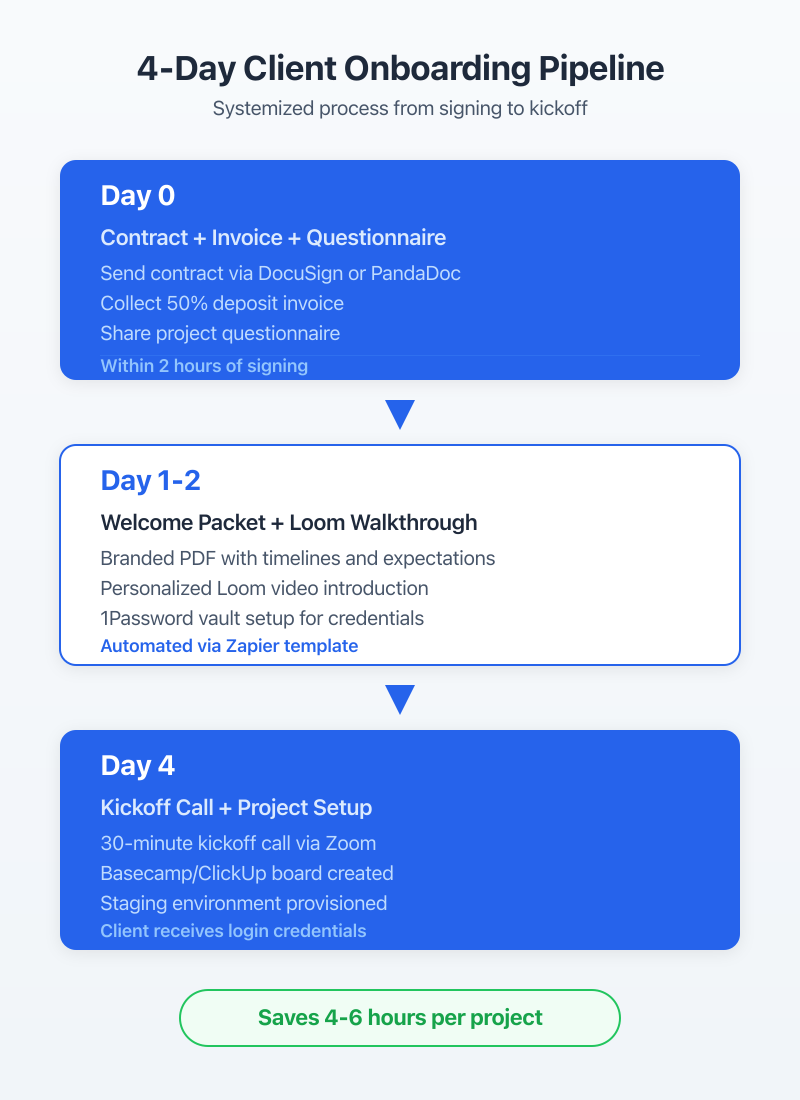
Most agencies wing onboarding. They send a contract, collect a deposit, and jump straight into development. Then three weeks later, they’re chasing the client for brand assets, hosting credentials, and content. All of that should be collected before a single line of code is written.
The Onboarding Questionnaire
Day one: the client gets an automated Google Forms questionnaire within two hours of signing the contract. Not a week later. Not “when we get around to it.” Two hours, triggered by the contract signing notification.
The questionnaire covers four categories:
Business context. What does the business do? Who’s the target customer? What’s the primary goal for this website (leads, sales, information)? What do you like and dislike about your current site?
Technical details. Current hosting provider and plan. Domain registrar. Existing email setup. Any third-party integrations (CRM, email marketing, payment processors)?
Brand assets. Logo files (vector preferred). Brand colors (hex codes). Font preferences. Photography or stock photo direction.
Content readiness. Who’s providing the copy? Is the content written or does it need to be created? How many pages? Any existing content to migrate?
A complete questionnaire prevents the project lead from rediscovering the same missing inputs during delivery. Do not release work into the build queue while required access or decisions remain unassigned.
Welcome Packet and Access Collection
Next, send a welcome packet that explains the project timeline, communication rules, decision points, and required client inputs. A short Loom walkthrough can add context, but keep the durable rules in writing.
The same message should link to the approved shared vault for hosting, domain, and service credentials. 1Password and Bitwarden can support this workflow; never collect production passwords in a questionnaire or ordinary email.
Never accept credentials via email. Ever. Not even once. One breach and you’re liable for every client whose password was in that inbox.
Kickoff Call Framework (30 Minutes, Not 90)
Day four: the kickoff call. Thirty minutes. Not sixty. Not ninety. Thirty.
Why thirty? Because the questionnaire already collected the information most agencies spend the first hour gathering. The kickoff call is for three things only:
- Confirm priorities. “Based on your questionnaire, here’s what I understand as the top three goals. Am I right?”
- Set communication expectations. “Updates go out every Friday. Questions go to ClickUp or email, not text messages. Turnaround on feedback is 48 hours.”
- Align on timeline. Walk through the project milestones with specific dates.
If you need more than thirty minutes, your questionnaire isn’t collecting enough information.
| Step | Timing | Owner | Tool | Template |
|---|---|---|---|---|
| Send contract + invoice | Day 0 | Account manager | HelloSign + FreshBooks | Contract template |
| Onboarding questionnaire | Day 0 (within 2 hrs) | Automated | Google Forms | Questionnaire template |
| Welcome packet + Loom | Day 1-2 | Account manager | Loom + Google Docs | Welcome packet PDF |
| Credential collection | Day 2-3 | Client | 1Password shared vault | Access checklist |
| Kickoff call | Day 4 | Project lead | Google Meet/Zoom | 30-min agenda template |
| Project setup in PM tool | Day 4 (post-call) | Project lead | ClickUp | Project template |
Template the stable parts of delivery: phases, owners, milestones, checklists, approvals, and closeout. Keep scope and acceptance criteria specific to the client while preserving the same project states.
Staging and Development Workflow
The default Gatilab pipeline is local development, version control, staging, approval, and production release. An emergency exception needs an owner, backup, review, and written record. The pipeline exists because I learned the hard way what happens when you edit production directly.
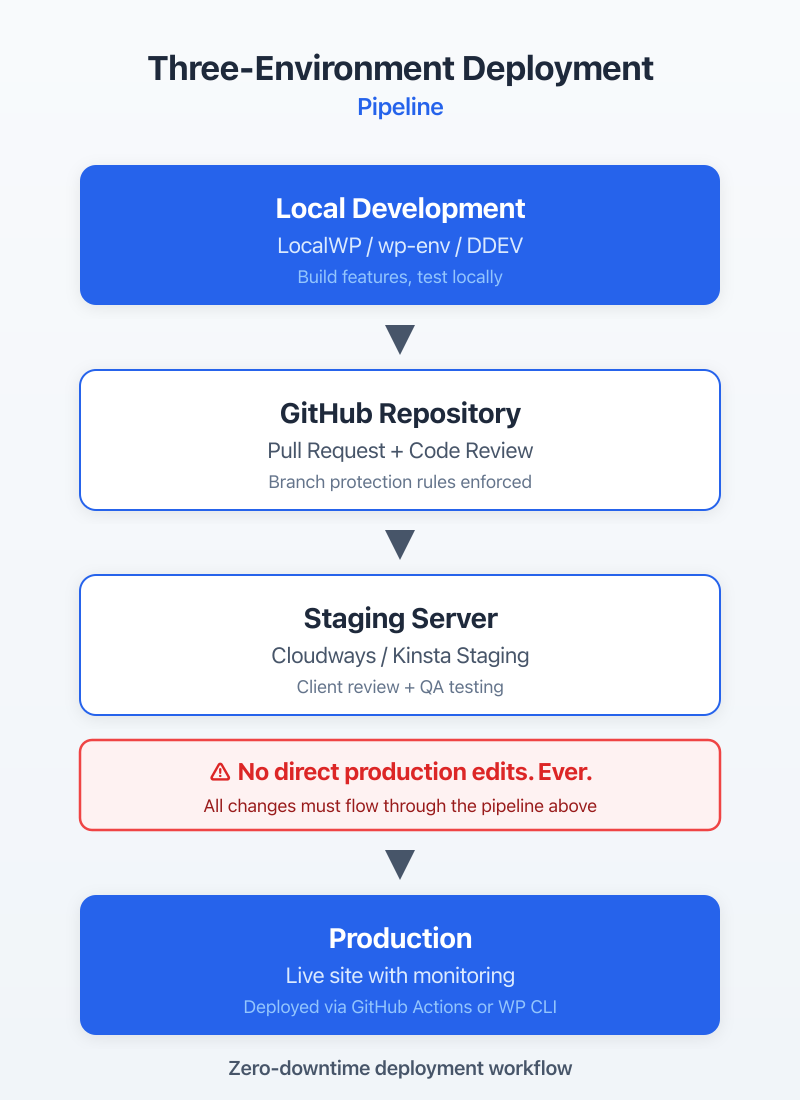
The workflow adds release work, but it creates an approval record, a known artifact, and a rollback path. Those are worth more than the minutes saved by editing production directly.
Local to Staging to Production Pipeline
LocalWP is the local development environment I recommend for WordPress agencies. It’s free, it handles multiple sites cleanly, and it runs on Mac, Windows, and Linux. Each developer on the team gets their own local environment. They build and test locally before anything touches a shared server.
From local, code gets pushed to a Git repository (I use GitHub, but GitLab and Bitbucket work the same way). The staging environment on Cloudways pulls from the staging branch. Production deploys from the main branch.
The key rule: nobody pushes directly to main. All changes go through a pull request, get reviewed, merge to staging, get client approval, then merge to main for production deployment.
Client Approval on Staging Sites
Staging sites need to be client-accessible but not public. On Cloudways, I password-protect staging environments and give clients a single login. WP Engine has built-in staging with a similar setup.
For staging feedback, pair short walkthrough context with one page-level issue queue. A dedicated feedback tool is useful when volume justifies it; a structured sheet can work while the review load is still small.
The approval workflow: client reviews staging, logs feedback in the sheet, we make changes, client reviews again. Maximum two revision rounds are included in the project scope. Anything beyond that is a change order. Setting that boundary in the contract prevents scope creep from eating your margins.
Version Control for WordPress (Git + Deployment)
Git for WordPress isn’t optional in 2026. Even if you’re a solo developer. Here’s why: without version control, you can’t roll back a broken update. You can’t track who changed what. You can’t run code review before changes go live.
My setup: Git tracks the wp-content directory (themes, plugins, and mu-plugins). Core WordPress files and uploads are excluded via .gitignore. Database changes sync through WP Migrate or WP CLI exports.
For deployment, DeployBot connects to your Git repo and pushes changes to your server automatically when code merges to the target branch. GitHub Actions is a free alternative if you’re comfortable writing YAML workflows. Both work. DeployBot is simpler to set up. GitHub Actions is more flexible and free.
Client Communication Protocols
A predictable weekly update is one of the simplest ways to keep progress, decisions, and blockers visible. Use the same weekly day so clients know when to expect progress, decisions, and blockers. Use chat for low-stakes coordination, the project system for work, and email or the approved client record for decisions.
A technically sound build can still fail commercially when the client cannot see progress, decisions, or blockers. Send a predictable written update before the client has to reconstruct the project from scattered messages.
Weekly Updates (Template)
On the same day each week, send every active client a structured update using four short sections:
Subject: [Client Name] Weekly Update, [Date]
Completed this week: 2-3 bullet points of what got done. Specific pages, features, or fixes.
In progress: What’s being worked on now and expected completion.
Needs your input: Any blockers waiting on the client. Be direct about what you need and by when.
Next week’s plan: What’s coming next.
Keep the update short enough to sustain, then schedule it as recurring owned work so communication does not depend on memory.
Slack vs Email: Where Each Works
Chat works for quick coordination. Use email or the approved client record for formal decisions, approvals, and anything that needs a durable trail.
The rule I give every client at kickoff: “Use Slack for anything that doesn’t need a formal record. Use email for approvals, scope changes, and anything involving money.” This prevents the nightmare scenario where an important scope change gets buried in a Slack thread that nobody can find three weeks later.
One more thing: don’t put clients in your internal Slack workspace. Create a separate workspace or use Slack Connect channels. Your team needs a space to talk freely without clients seeing every internal discussion.
Scope Change Communication
Scope changes kill agency profitability. Not because clients are unreasonable, but because agencies don’t have a clear process for handling them.
My scope change process at Gatilab:
- Client requests something outside the original scope
- I acknowledge the request within 24 hours (“Got it, let me scope this out”)
- Within 48 hours, I send a formal change order: description of the change, estimated hours, cost, and impact on timeline
- Client approves in writing (email reply is fine) before work begins
- The change order gets added as a new task group in ClickUp
The key: never say “sure, we can add that” in a Slack message and start working. Always run it through the formal process. It protects both sides.
Subcontractor Management
Codeable and trusted WordPress referrals reduce some discovery work, but the channel does not replace a paid trial, code review, secure access, and explicit acceptance criteria.
Subcontractors should expand a known delivery system, not become a parallel one. Managing them well is the difference between scaling your agency and just adding more chaos. The systems here took me years to refine. Don’t skip them.
Finding and Vetting WordPress Subcontractors
Codeable pre-vets WordPress developers, which can shorten the screening step. Price the current rate against the scope and risk. Referrals from trusted WordPress operators can also produce durable subcontractor relationships, but they still need the same trial and review process.
Use a small paid trial with clear deliverables and an agreed rate. Evaluate code quality, communication, security practice, and deadline behavior before adding anyone to the regular roster.
I keep a spreadsheet of vetted subcontractors with their specialties (WooCommerce, custom plugins, performance optimization, design implementation), rates, availability, and reliability rating. When a project needs extra hands, I check the spreadsheet before posting anywhere public.
Task Assignment and Code Review
Every subcontractor task gets a brief in ClickUp with five elements:
- What to build (specific deliverable, not vague direction)
- Acceptance criteria (how I’ll know it’s done correctly)
- Reference links (design files, similar examples, documentation)
- Deadline (specific date and time, accounting for review time)
- Budget cap (maximum hours or flat fee)
Code review happens on GitHub before anything touches staging. Every pull request gets reviewed for code quality, WordPress coding standards, security basics (no direct database queries without prepared statements, no unescaped output), and performance (no unnecessary database calls in loops).
Payment and Invoicing
I pay subcontractors within 7 days of approved work. No net-30. No net-60. Seven days. This is non-negotiable.
Why? Because reliable payment builds loyalty. The best subcontractors have options. If you pay late, they’ll prioritize clients who pay on time. I’ve had subcontractors tell me they reserve their best availability windows for Gatilab specifically because they know payment is fast and reliable.
For larger projects, I use milestone-based payments. 30% at project start, 40% at staging delivery, 30% at launch. Never pay 100% upfront. Never withhold everything until the end. Both extremes create bad incentives.
FreshBooks handles subcontractor invoicing on my end. Each subcontractor submits their invoice, I match it against the ClickUp task, and payment goes out via Wise (for international contractors) or direct deposit (for domestic).
Quality Assurance Workflow
Every WordPress site gets a documented QA check before launch, covering critical journeys, forms, browser and device evidence, performance, security, accessibility, analytics, SEO controls, backups, and rollback. A named reviewer must be able to stop the release.
QA isn’t a phase you bolt on at the end. It’s woven into the entire development process. But the pre-launch checklist is the final safety net, and it catches something on almost every project.
Pre-Launch Checklist
| Category | Check Item | Tool | Pass/Fail Criteria |
|---|---|---|---|
| Functionality | All forms submit correctly | Manual testing | Submissions received in email/CRM |
| Functionality | All links work (no 404s) | Screaming Frog / Broken Link Checker | Zero broken internal links |
| Functionality | E-commerce checkout flow | Manual testing | Complete test purchase successful |
| SEO | Meta titles and descriptions set | Rank Math | All pages have unique meta |
| SEO | XML sitemap generated and submitted | Rank Math + Google Search Console | Sitemap accessible, no errors |
| SEO | Redirects from old URLs configured | Rank Math / .htaccess | All old URLs redirect properly |
| Content | No placeholder/lorem ipsum text | Manual review | Zero placeholder content |
| Content | Images optimized and alt text added | ShortPixel + manual review | All images under 200KB, alt text present |
| Performance | PageSpeed score above 85 | Google PageSpeed Insights | Mobile and desktop above 85 |
| Performance | TTFB under 600ms | GTmetrix | Consistent across 3 tests |
| Security | SSL certificate active | Browser check | Padlock icon, no mixed content |
| Security | Default admin username changed | Manual check | No “admin” username exists |
| Security | File permissions correct | WP CLI | 644 for files, 755 for directories |
| Accessibility | Heading hierarchy correct | WAVE tool | No skipped heading levels |
| Accessibility | Color contrast passes WCAG AA | WebAIM Contrast Checker | 4.5:1 ratio minimum for text |
| Legal | Privacy policy page exists and linked | Manual check | Accessible from footer |
| Legal | Cookie consent configured | CookieYes or equivalent | Banner displays, preferences work |
Cross-Browser and Device Testing
BrowserStack provides remote browser and device coverage without maintaining the entire lab. Check current plans, then choose the matrix from the client’s analytics, supported environments, and critical journeys.
The specific things that break across browsers: CSS Grid and Flexbox edge cases in Safari, custom font rendering differences, and form styling inconsistencies. I keep a running list of browser-specific bugs I’ve encountered, and my developers check those first.
Test representative narrow, medium, and wide layouts, then drag through the ranges between them. Fixed breakpoints do not prove the layout works at every width, text size, orientation, zoom level, or content length.
Performance and Security Audit
Performance acceptance criteria should name representative pages, devices, cache states, and the metrics that matter to the project. I use GTmetrix for waterfall analysis and Google PageSpeed Insights for the Core Web Vitals check.
Security review before launch should cover supported core, plugins, and themes; unused code; least-privilege access; secrets; file permissions; logs; backups; recovery; exposed services; and custom-code review. A public malware scanner such as Sucuri SiteCheck is one signal, not a security assessment. Sensitive systems need requirements and testing proportionate to their data and threat model.
Build your QA checklist into a ClickUp template. When you create a launch task, the checklist auto-populates. Each item gets checked off by the developer, then verified by a second person. That two-person verification catches things a single reviewer always misses.
Financial operations that expose weak projects early
Invoice timing, scope changes, and delivery effort belong in the operating system, not in a quarterly surprise. Record payment terms in the contract, invoice from a predictable milestone, and stop work when the agreed payment condition is not met.
Track estimated and actual effort by project and by work type. Revenue alone hides rework, waiting, and unpriced communication. A project can look busy and still consume the capacity needed for healthier work.
Treat recurring WordPress maintenance plans as their own delivery model. They need defined capacity, response boundaries, renewal terms, and an escalation path rather than leftover project time.
- Review work in progress: what is blocked, who owns the unblock, and whether the delay changes the delivery date.
- Review scope: approved changes, unapproved requests, and the effort already spent outside the signed boundary.
- Review margin: delivery effort, subcontractor cost, software allocation, and support time after launch.
- Review cash: issued invoices, due dates, deposits, and any work that should pause under the contract.
The complete WordPress agency toolstack
Build the toolstack by function. Current seat prices change, and an impressive subscription list does not repair unclear ownership.
| Function | Default | Alternative | Buying rule |
|---|---|---|---|
| Project ownership | ClickUp | Linear or Asana | One source for task state and owner |
| Invoices and expenses | FreshBooks | QuickBooks | Match accounting and payment workflow |
| Hosting operations | A managed or documented platform | Client-approved host | Staging, backups, logs, rollback, support |
| Credentials | 1Password | Bitwarden | Never send passwords in chat or email |
| Version control | GitHub | GitLab | Review before staging or production |
| Local development | LocalWP | DevKinsta or containers | Reproducible environment and ownership |
| Walkthroughs | Loom | Recorded meeting or client portal | Use only when async context saves a meeting |
| Browser QA | BrowserStack | LambdaTest plus real devices | Buy when required coverage exceeds the device lab |
| Design handoff | Figma | Approved design system | One source for accepted screens and states |
| Deployment | GitHub Actions or a deployment service | Documented manual release | Rollback and approval matter more than automation |
Required coverage includes project ownership, invoices, credentials, version control, isolated development, backups, release approval, and QA. Add recorded walkthroughs, paid browser testing, design seats, and deployment automation when a repeated workflow justifies them.
The return comes from fewer missed handoffs, faster approvals, safer releases, and a clearer margin. If a tool cannot be tied to one of those outcomes, it is overhead.
Frequently asked questions
What project management tool is best for WordPress agencies?
ClickUp is the default for mixed delivery teams, Linear for development-heavy work, and Notion for durable documentation. The best choice is the one that gives every task an owner, state, acceptance condition, and client-appropriate view.
How do you onboard WordPress clients efficiently?
Collect scope, decision-makers, assets, credentials, constraints, payment, and approval rules before kickoff. Assign every missing input and do not release the project into delivery while required access is still implicit.
What staging workflow should WordPress agencies use?
Use isolated local development, version control, a production-like staging environment, internal review, written client acceptance, a backup, and a documented production rollback path.
How do you manage WordPress subcontractors?
Use paid trial work, explicit acceptance criteria, version control, code review, secure access, milestone or capped payment terms, and one agency owner for the final result.
What is the average toolstack cost for a WordPress agency?
There is no durable average because seat counts and vendor plans change. Budget by required operational function, current seats, client pass-through rules, and the cost of overlapping tools nobody owns.
How do you track WordPress project profitability?
Track estimated and actual effort, direct costs, unpriced rework, scope changes, and waiting time by project. Review the result by work type so pricing and capacity decisions use evidence rather than revenue alone.
Start with one visible delivery system and fix the handoff that causes the most rework. That is the dividing line between a scalable agency and a freelance practice that depends on one person’s memory.
Tell Google you want more of this.
Add Gatilab as a preferred sourceOne tap, and this site shows up more often in your own Top Stories, AI Overviews and AI Mode. Remove it any time.