
Stackless for WooCommerce Review: Pros, Cons, Pricing
We get why a WooCommerce store ends up with a long list of paid extensions. Core WooCommerce can’t charge a saved card or sell a license key, so every gap gets its own plugin, with its own renewal and its own update schedule. Stackless for WooCommerce is one plugin with 43 modules that covers most of that list for $39 a year or $99 once.
Our advice is simple. If you pay for 3 or more of the extensions it replaces, you should try it on staging. If you have live subscribers on WooCommerce Subscriptions, you should wait for an importer.
One thing to say before anything else. Stackless is built by Gaurav Tiwari, who also runs Gatilab, so this is a first-party review and we list the limits right beside the praise. We wrote it from the plugin’s current code and documentation and from a copy of its demo store.
Stackless for WooCommerce adds subscriptions, 5 payment gateways, software licensing, multi-currency pricing, invoices and checkout tools to a plain WooCommerce install. You switch on the modules you need and the rest load no code. It first shipped in October 2026, so it is a young product and you should weigh that for anything that touches billing.
Choose Stackless if you run WooCommerce and pay for 3 or more extensions in this list: subscriptions, a gateway with saved cards, software licensing, multi-currency, invoices, order bumps, a checkout customizer, wishlists, add-ons or delivery slots. One $39 license covers all of them on unlimited sites, and modules you leave off load nothing.
Skip it if you already have a WooCommerce Subscriptions install with live subscribers (there’s no importer yet), if your renewals must charge automatically on a gateway other than Stripe, PayPal, Polar, Paddle or Dodo Payments, or if you need a product with years of public history before you trust it with billing.
The evidence that decides it: on a copy of the demo store with an item in the cart, WooCommerce printed 52 checkout prefetch hints per page with the Optimizer off and 0 with it on. The subscriptions module runs a full lifecycle (signup, trial, renewal, failed-payment retry, cancel) on core WooCommerce with no other plugin installed.
Pros
- 43 modules on one license: $39 a year or $99 lifetime, both for unlimited sites
- Subscriptions with automatic renewals on Stripe, PayPal, Polar, Paddle and Dodo Payments, plus trials, signup fees, plan switching and dunning
- 3 merchant-of-record gateways that handle sales tax and VAT for you
- Software licensing with an update server, so you can sell your own plugins and themes from WooCommerce
- Price books per currency with a currency selector and currency-aware gateways
- Checkout in a modal or on any page, with a separate cart for each plan
- Modules that are off load no code, and the Optimizer removes WooCommerce’s own checkout prefetching
- Works with HPOS and the Cart and Checkout blocks, and pauses a module when another plugin already does its job
Cons
- First released in October 2026, so there’s no long public track record yet
- No importer from WooCommerce Subscriptions, YITH or SUMO yet
- Every other gateway renews through an emailed pay link
- Polar and Dodo Payments take one subscription per checkout with nothing else in the cart; Paddle takes one billing schedule
- Add-on fields and the Buy now button need the classic add-to-cart form, not the block version
- One developer, which is fast for support and a risk for continuity
Quick Comparisons
These are the three products a WooCommerce store owner is most likely to be weighing against Stackless. Each gets a fuller treatment later in the piece.
- vs WooCommerce Subscriptions: the official extension costs $279 a year and does one job. Stackless does that job plus licensing, currency and checkout tools for $39, but WooCommerce Subscriptions has a decade of edge cases behind it and works with far more gateways. If you’re already on it with paying subscribers, stay.
- vs SureCart: SureCart is its own cart, not a WooCommerce extension, so it swaps your whole store. Stackless keeps WooCommerce, your theme, your orders and your shipping. SureCart wins if you want a hosted checkout with less plugin maintenance; Stackless wins if you have anything WooCommerce-specific to keep.
- vs CartFlows: CartFlows is a funnel builder with order bumps and upsells. Stackless has order bumps, checkout layouts, a modal checkout and on-page checkout, but no multi-step funnels or post-purchase upsells. You should buy CartFlows for funnels and Stackless when bumps are enough and you also need billing features.
What Stackless for WooCommerce Is
Stackless is a modular plugin. Install it and only its License & Updates module is on, so nothing changes on your store until you flip a switch. A module that’s off registers nothing, so a store that only wants the wishlist and the order bumps carries exactly those 2 modules’ worth of code.
It runs on core WooCommerce alone. It needs WordPress 6.7, WooCommerce 9.9 and PHP 7.4, and it works with HPOS (the order storage that keeps orders in their own tables) or the older posts storage.
The Cart and Checkout blocks and the classic shortcode checkout both work. That combination matters because a plugin that breaks on one of them forces you to choose your checkout around the plugin.
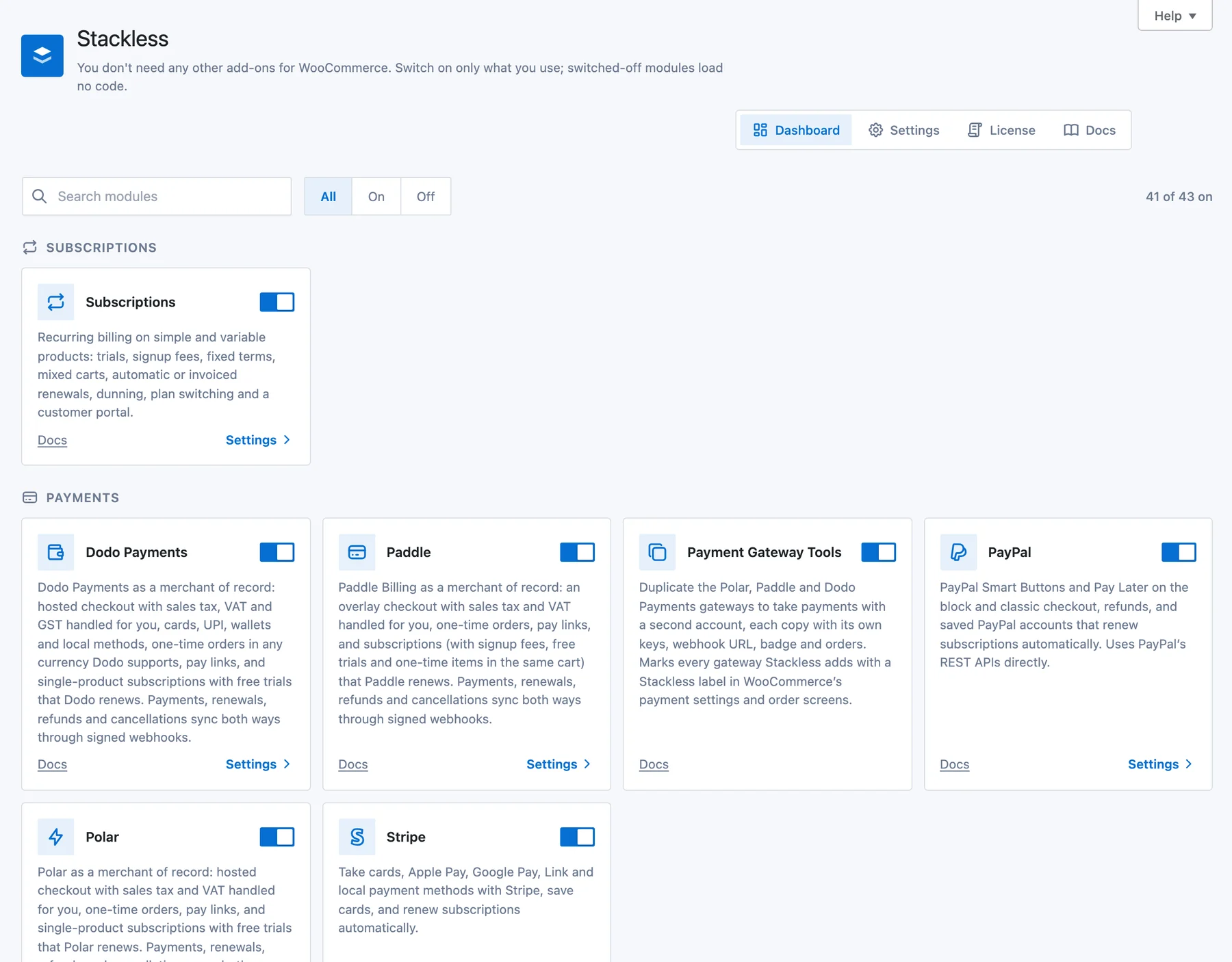
The 43 modules sit in 9 groups, and each group replaces a kind of plugin you’d otherwise buy:
| Group | Modules | What it replaces |
|---|---|---|
| Subscriptions | 1 | WooCommerce Subscriptions, YITH or SUMO |
| Payments | 6 | Separate Stripe and PayPal plugins, WooPayments or a merchant-of-record plugin |
| Checkout | 5 | A checkout field editor, a layout plugin and a popup checkout plugin |
| Sales & invoices | 6 | Order bump, invoicing, quote, name-your-price and coupon affiliate plugins |
| Currency | 3 | A multi-currency or currency switcher plugin |
| Access & licensing | 2 | A licensing plugin and a light membership plugin |
| Catalog | 8 | Snippets for price text, sold counts, stock labels and quantity limits |
| Store tools | 7 | Wishlist, back-in-stock, add-on, delivery slot and speed plugins |
| Admin | 5 | An admin restyle plugin, a CRM connector and a webhook or API add-on |
The public demo store has most of these modules on, and you can click through it with no account. A few newer modules, such as On-page Checkout and Pay What You Like, are off there. Those screens in this review come from a private copy of the same store.
The Stackless theme on that store is a separate free download, and we cover it in our Stackless theme review. The plugin works with any theme.
There is also a free edition. Stackless Lite has 23 of the modules, including all 5 gateways, the wishlist, saved carts and the Optimizer, with no subscriptions, licensing, multi-currency or invoices. Moving up to the paid plugin later keeps your settings and customer data.
Who Should Not Use Stackless
This section comes early because the disqualifiers are concrete.
- Stores with live subscriptions on WooCommerce Subscriptions, YITH or SUMO. Stackless has no importer yet. Its subscriptions module also pauses itself while one of those plugins is active, so there’s no way to run both and migrate gradually. You should wait for an importer or stay where you are.
- Stores whose renewals must charge automatically through another gateway. Razorpay, Mollie, Square, Authorize.net and every other gateway can still sell subscriptions through Stackless, but renewals arrive as an emailed pay link the customer clicks.
- Anyone who needs multi-step funnels or post-purchase upsells. Order bumps are there; one-click upsells after payment are not. CartFlows or FunnelKit cover that.
- Teams that want a vendor with a support desk. Support is one-on-one email and chat with the developer, with no published response-time promise.
- Buyers who won’t run software this young. A billing plugin first released in October 2026 is a reasonable thing to be cautious about. It is wise to test it on staging before real customers depend on it.
Subscriptions Without WooCommerce Subscriptions
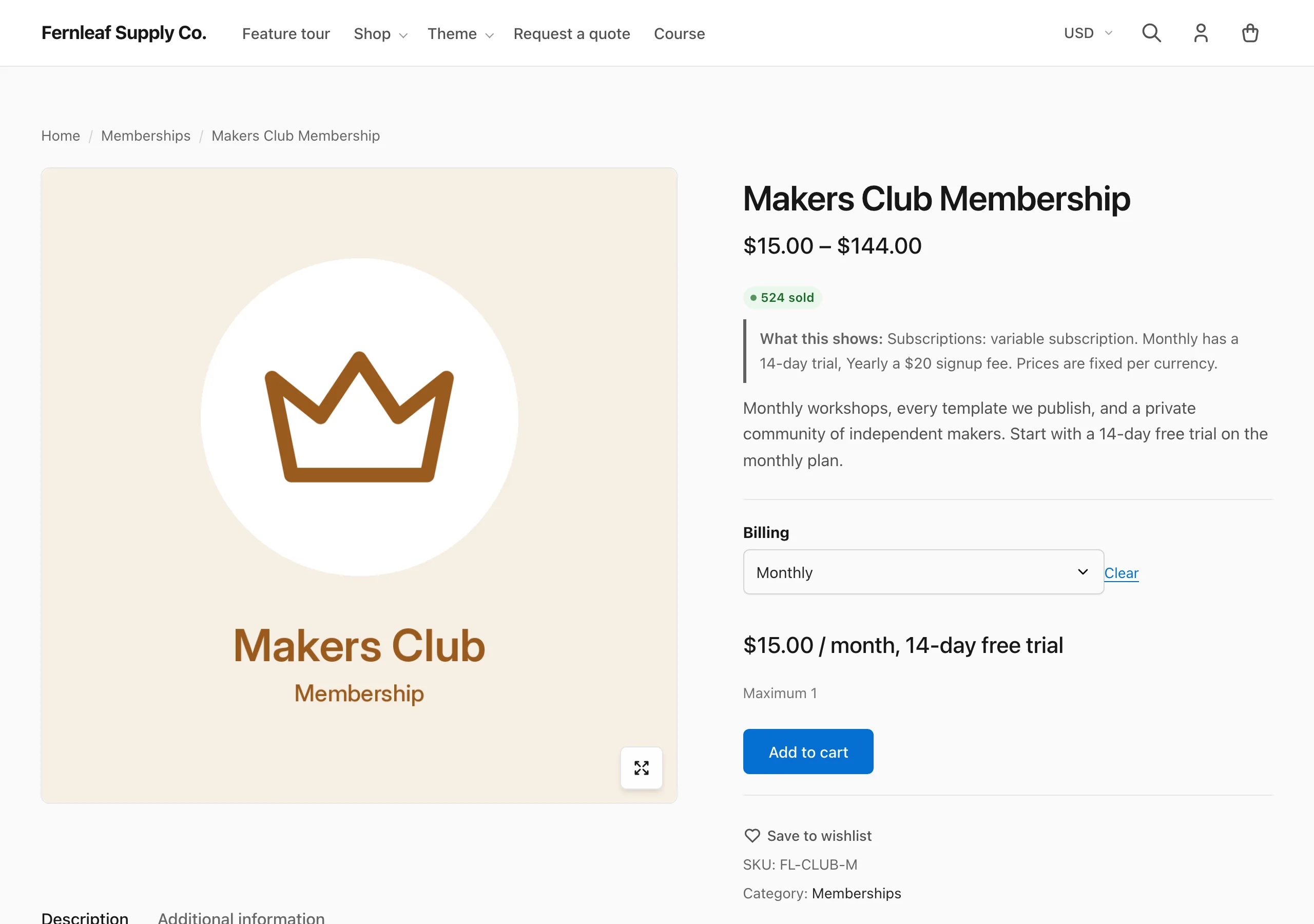
The subscriptions module is the reason most people will look at Stackless, so it’s the right place to start. The design choice that shapes everything else is that a subscription is a pricing toggle on an existing product, not a new product type. A simple or variable product gets a billing interval (day, week, month or year, times a count).
A free trial, a signup fee and a fixed number of cycles are all optional. Variations can mix one-time and recurring prices on the same product.
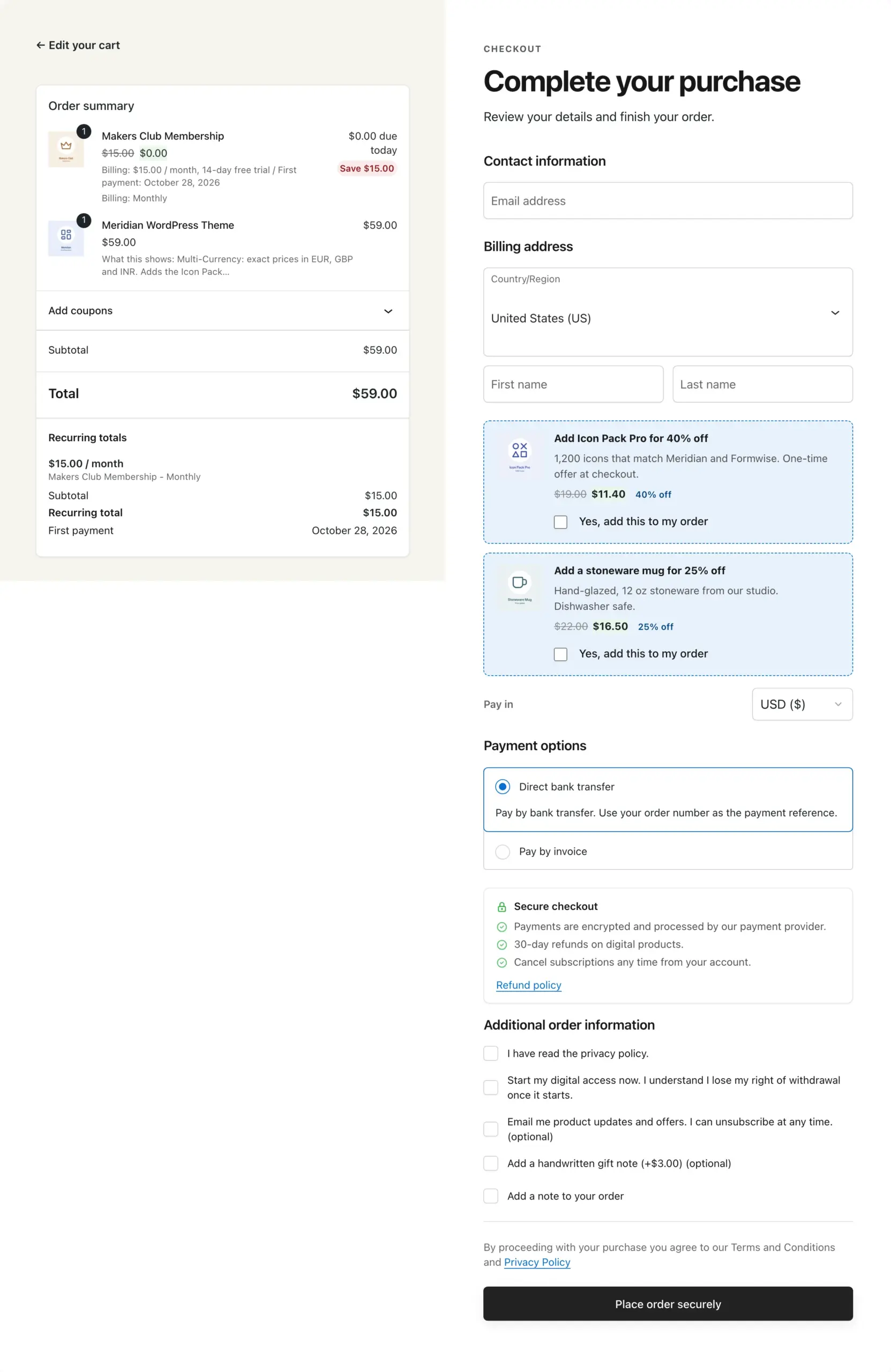
Carts can mix. Two subscriptions on different schedules plus a one-time item check out together: one parent order for today’s payment, and one subscription record per distinct billing schedule. The checkout shows a recurring totals group for each schedule, so the customer sees the monthly amount and first payment date under the order summary before paying.
Renewals work in 2 modes, and the difference decides whether Stackless fits your gateway:
- Automatic renewal with the built-in gateways. Stripe and PayPal save the card or account at checkout and Stackless charges it on the due date. Polar, Paddle and Dodo Payments run the renewal themselves and send the result back to WooCommerce.
- Pay-link renewal with every other gateway. On the due date a pending renewal order is created and the customer gets an email with a link to pay it. This is how bank transfer and invoice customers renew, and it’s the fallback for any third-party gateway.
Failed payments go into a retry schedule you set, with a grace period before the subscription goes on hold. There are 10 subscription emails, from upcoming renewal and failed payment to trial ending and cancelled. Each is a normal WooCommerce email class, so your existing email template and any customizer plugin apply to them.
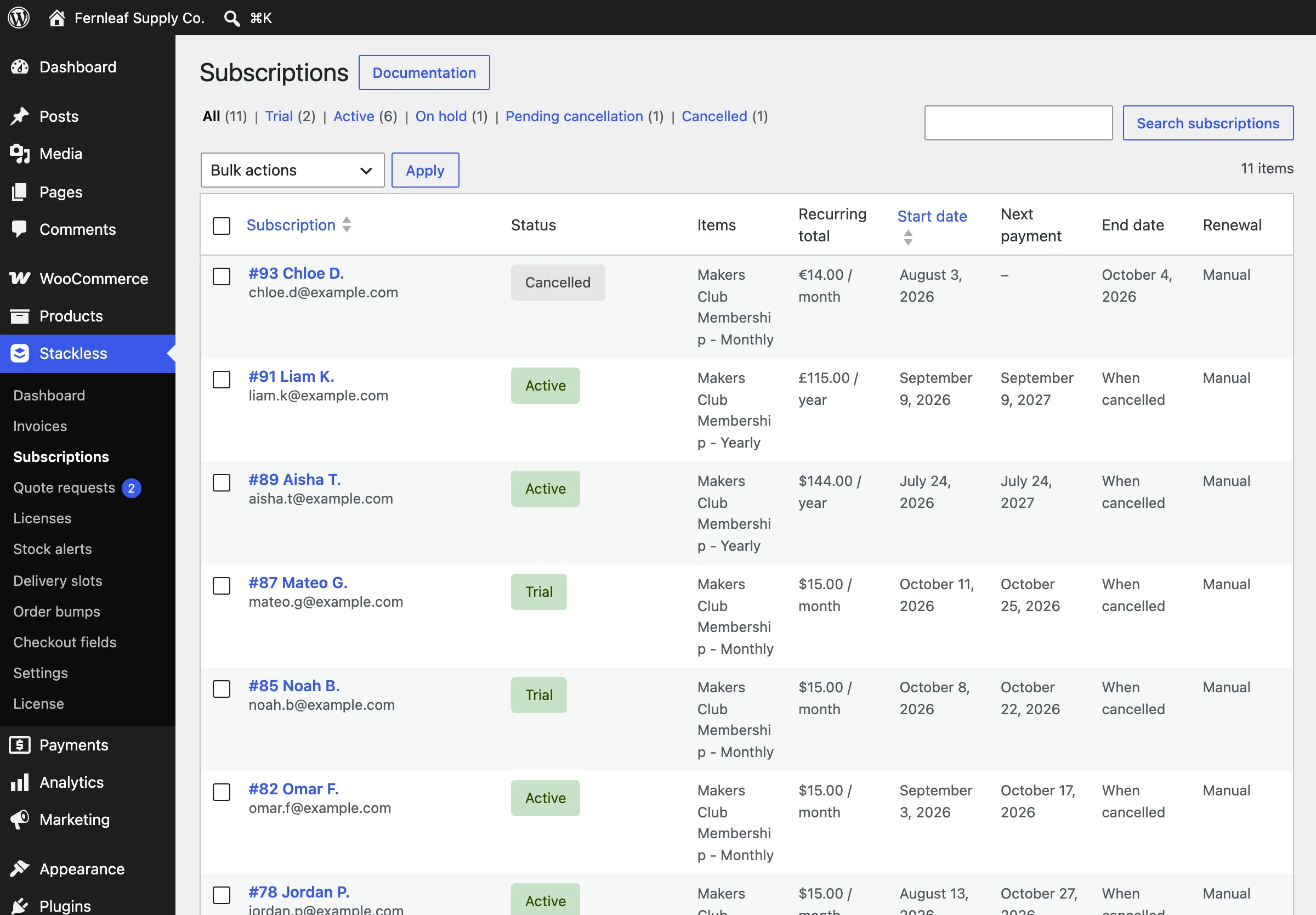
Plan switching is in, with proration: a customer moving from monthly to yearly gets credit for unused time, and the admin can set a switch fee. Switching works on Stripe, PayPal and pay-link subscriptions; the merchant-of-record gateways don’t offer it, because the provider wouldn’t bill the change.
Recurring coupons can apply to every cycle, to the first payment only or to a fixed number of cycles. Customers manage all of this from a Subscriptions tab in My Account.
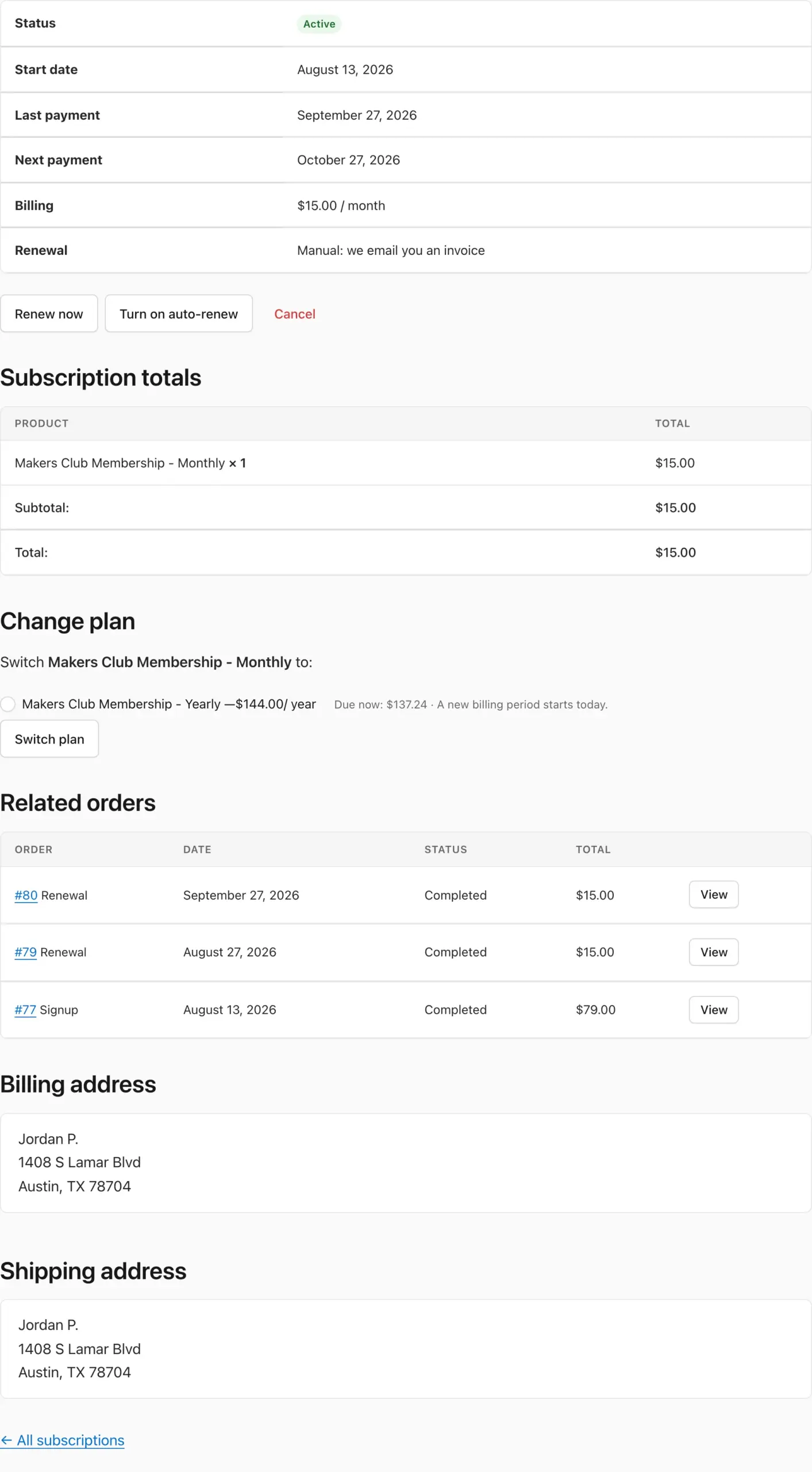
One safety detail deserves a mention. Stackless records your live store’s address.
A staging or migrated copy at another address doesn’t charge saved cards, retry payments or email customers until you confirm it is the live store. Anyone who has seen a staging copy bill real customers will understand why this matters.
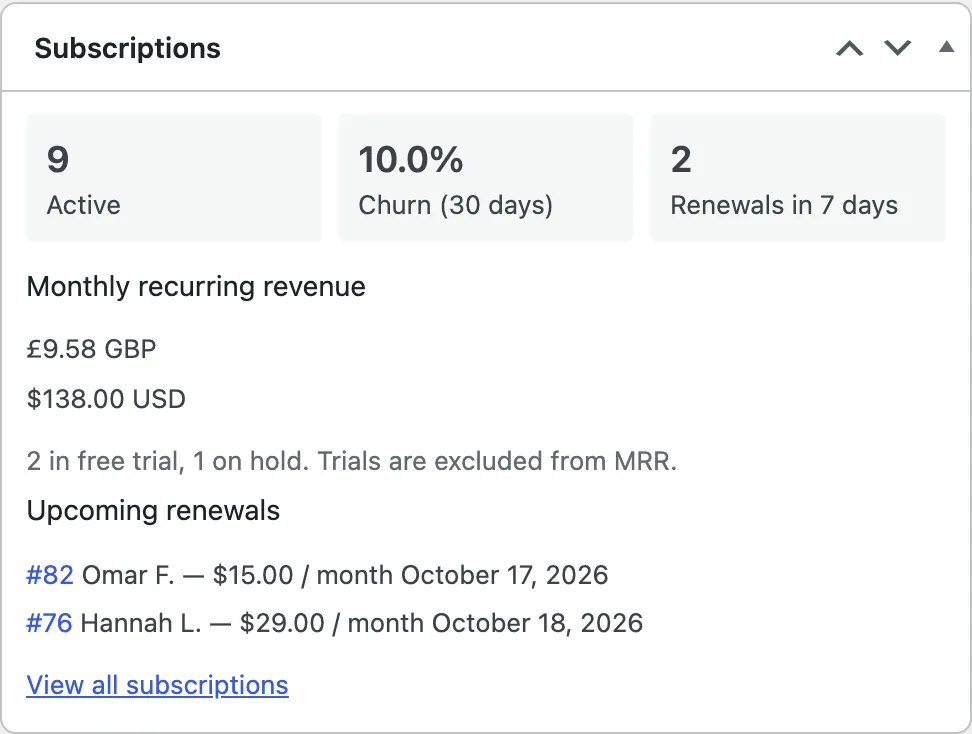
A dashboard widget shows active count, 30-day churn, monthly recurring revenue per currency and the next renewals. It’s a summary, and subscriptions don’t have their own reports inside WooCommerce Analytics.
Payment Gateways
Core WooCommerce ships only bank transfer, cheque and cash on delivery. None of those can charge a saved card, which is why subscription stores end up with a gateway plugin. Stackless ships 5 gateways of its own, and they fall into 2 kinds.
Stripe and PayPal keep you as the seller, so tax stays your job:
- Stripe: the Payment Element, so cards, Apple Pay, Google Pay, Link and local methods appear in one form, with 3D Secure, saved cards and off-session renewals. Card data never touches your server.
- PayPal: Smart Buttons and Pay Later on both checkouts, refunds from the order screen, and saved PayPal accounts that renew subscriptions automatically.
Polar, Paddle and Dodo Payments are merchants of record. The provider is the legal seller and handles sales tax and VAT for you, which is the main reason a small digital seller picks one. The guide to selling without handling sales tax walks through the setup.
- Polar: a hosted checkout with one-time orders, pay links and single-product subscriptions that Polar renews.
- Paddle: an overlay checkout on your own site. Paddle takes signup fees, free trials and one-time items in the same cart, with one billing schedule per checkout.
- Dodo Payments: a hosted checkout with cards, UPI and local methods, GST handling and single-product subscriptions that Dodo renews.
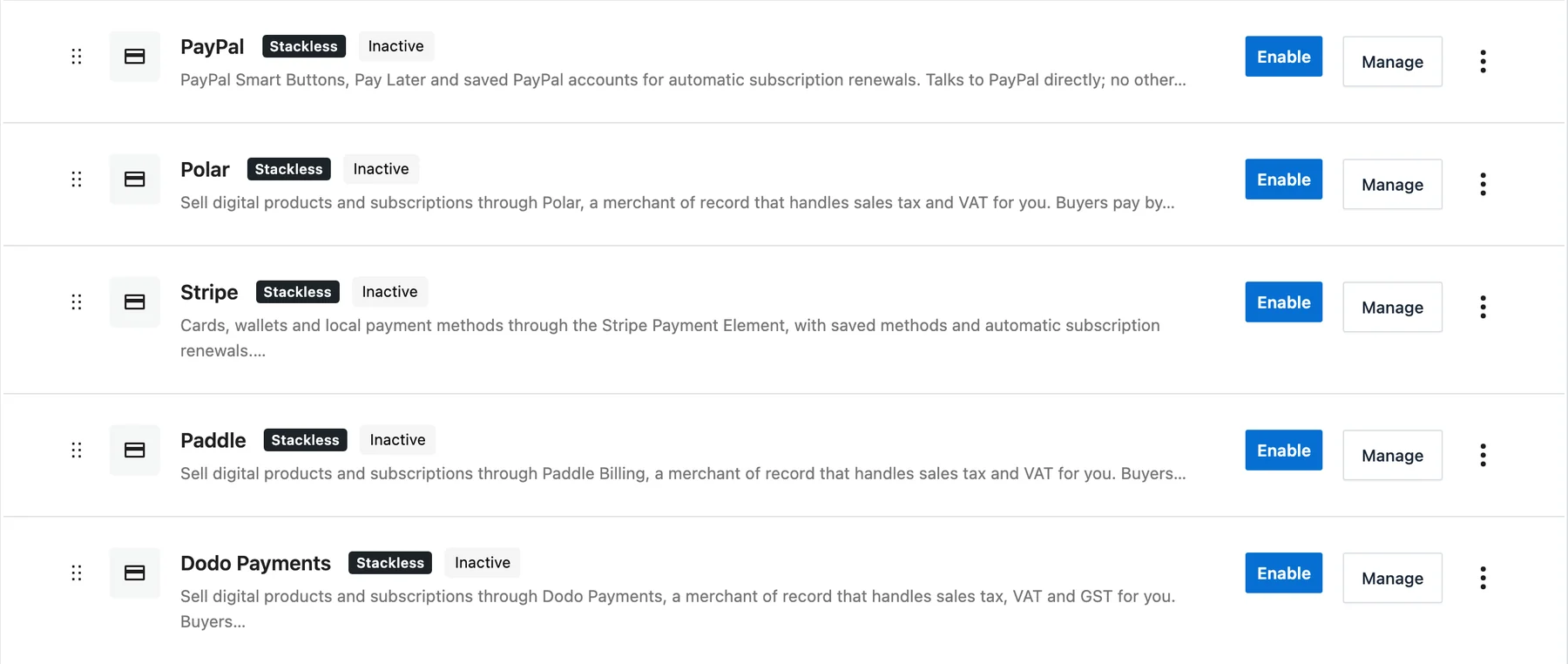
You still need your own account with each provider. Stackless isn’t a payment processor and takes no cut of sales.
Each gateway’s settings have buttons that open the provider’s API key page. Saving Stripe, PayPal or Paddle keys on a live HTTPS site also creates the webhook for you, so that setup step goes away.
Payment Gateway Tools adds one more option. You can duplicate Polar, Paddle or Dodo Payments to take payments with a second account, and each copy keeps its own keys, webhook URL and orders. Stripe and PayPal can’t be copied, because saved cards belong to one account.
Software Licensing and Updates
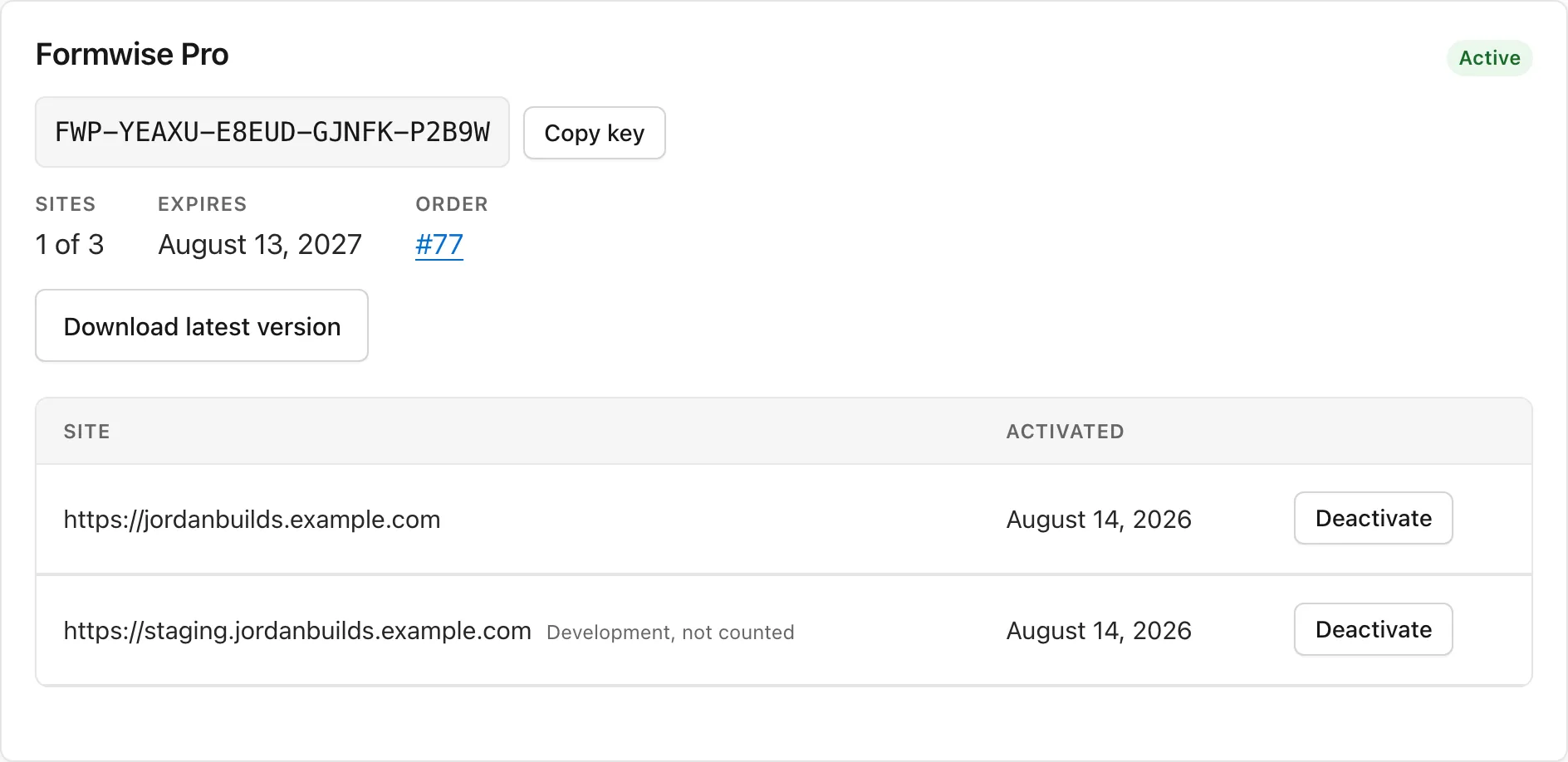
If you sell WordPress plugins or themes, the usual routes are Freemius, Easy Digital Downloads or a licensing add-on. Stackless does it inside WooCommerce: each order item or subscription issues a license key, keys have activation limits per site, and a REST API validates, activates and deactivates them.
Development and staging domains don’t count against the limit. We covered the business side of this in our guide to selling WordPress plugins as a revenue stream; Stackless is one way to run the store end of it.
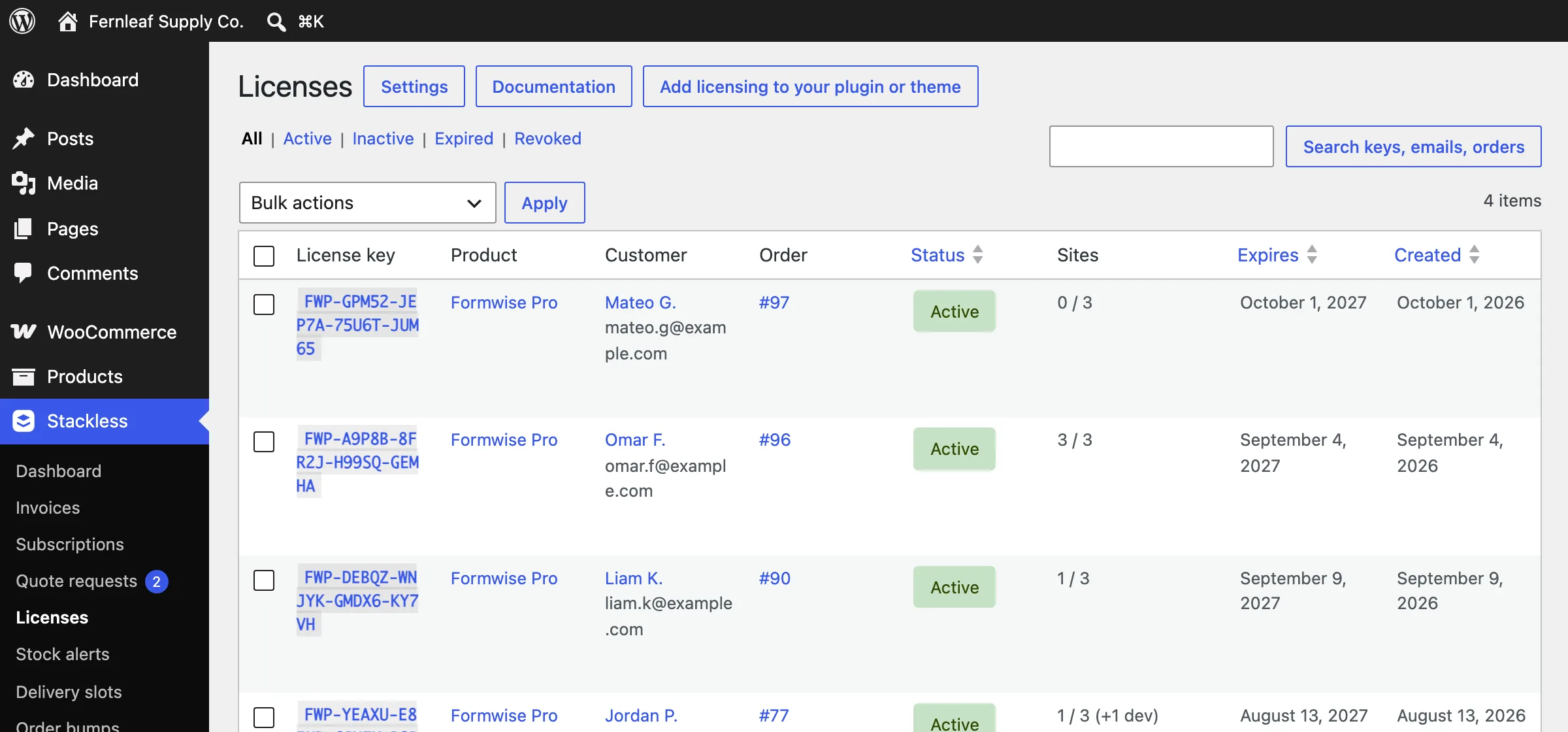
The part that saves real work is the update server. Stackless serves the update_plugins JSON that WordPress expects, with signed download links, and ships a small license client you drop into your own plugin or theme. Your customers then see updates in their WordPress admin like any other product, with your icon, banner, changelog and “View details” tabs.
Three more settings matter once you have real customers:
- Previous versions: customers with a valid license can roll back from My Account, through links signed per version.
- Downloads tied to the license: files can leave My Account and their links stop working once a license is revoked, refunded or expired.
- New releases for past buyers: a version you upload later reaches everyone whose license may download it, without you touching old orders.
Page Access sits in the same group. It unlocks chosen pages for customers who bought a product, keeps them unlocked while a subscription is active, and shows a notice on published pages while hiding private ones. It’s a light membership feature, enough for a course page or a downloads area, and a store that needs MemberPress-style content rules should keep a membership plugin.
Multi-Currency Checkout
Many WooCommerce currency plugins convert prices on the fly and let the customer pay in whatever the switcher shows. Stackless uses price books: an exact price per product and per variation in each currency.
Products with no fixed price fall back on manual or Frankfurter exchange rates, with markup and rounding rules. A cart settles in one currency, the order records it, and a subscription keeps its signup currency for every renewal.
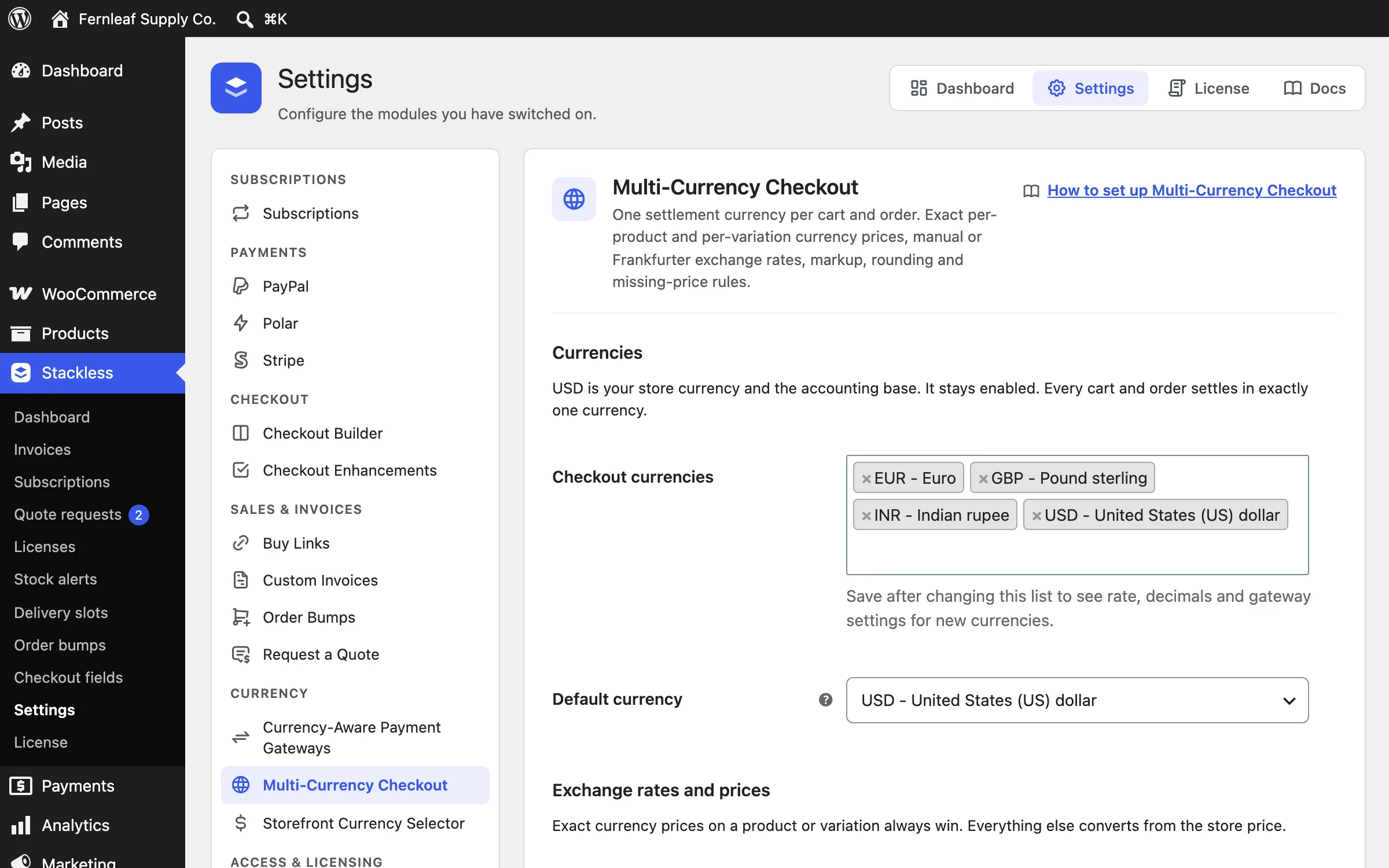
Two companion modules make it usable. Currency-Aware Payment Gateways lets you say which gateways may handle each currency and which is shown first; a gateway that can’t take INR is removed from the checkout and rejected on the server if someone forces it.
The Storefront Currency Selector is a shortcode, a block or a selector above the payment methods, and switching reprices the cart on the server. The regional pricing guide goes into why fixed per-currency prices beat live conversion for digital products.
Invoices and Quote Requests
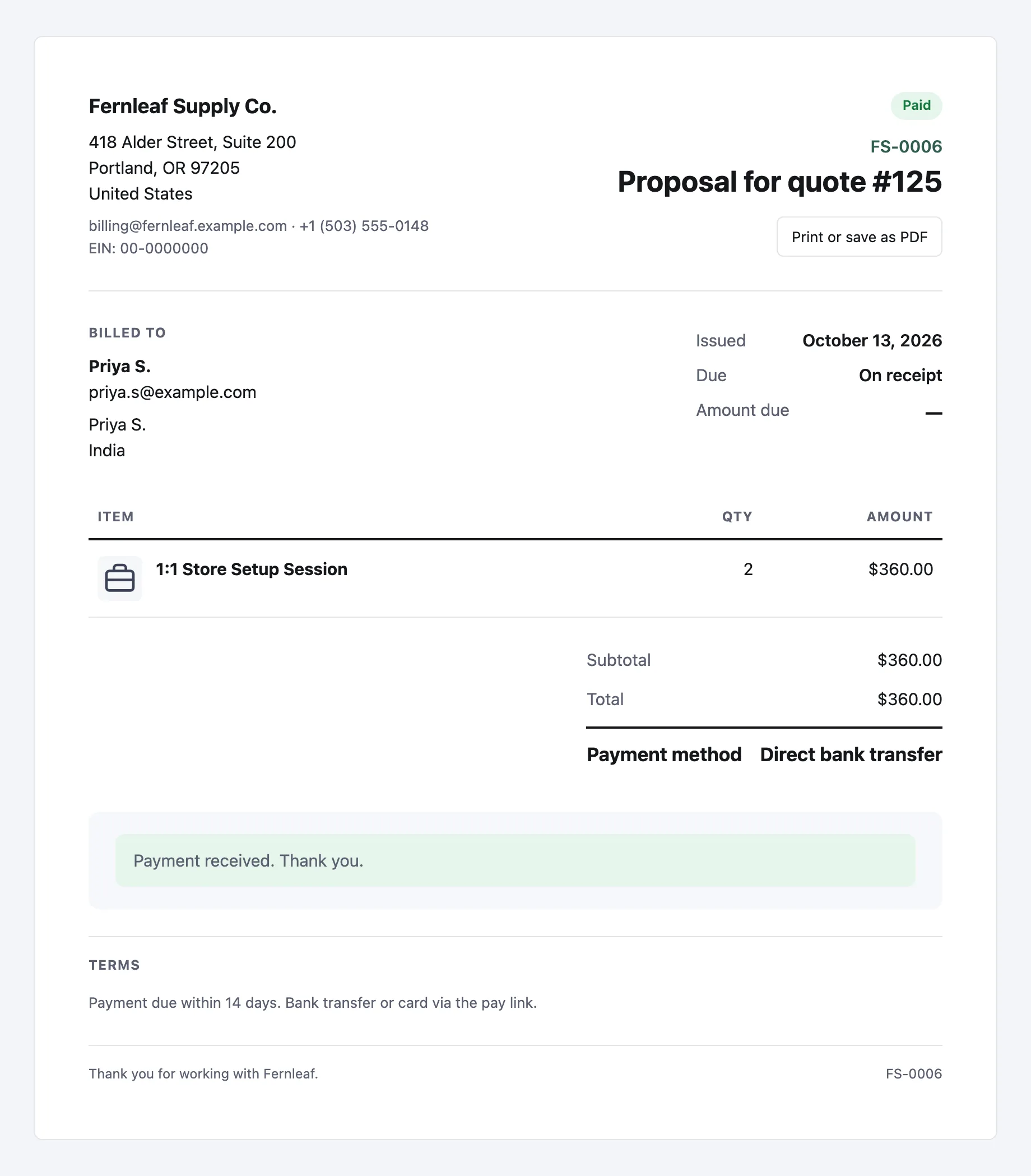
The invoicing module builds on pending orders and WooCommerce’s own order-pay links, so an invoice is a real order from the start. Invoices are numbered, can recur on a schedule, can be split into a deposit with an automatic balance invoice, and send due-date reminders. The customer gets a branded page they can print or pay in one click.
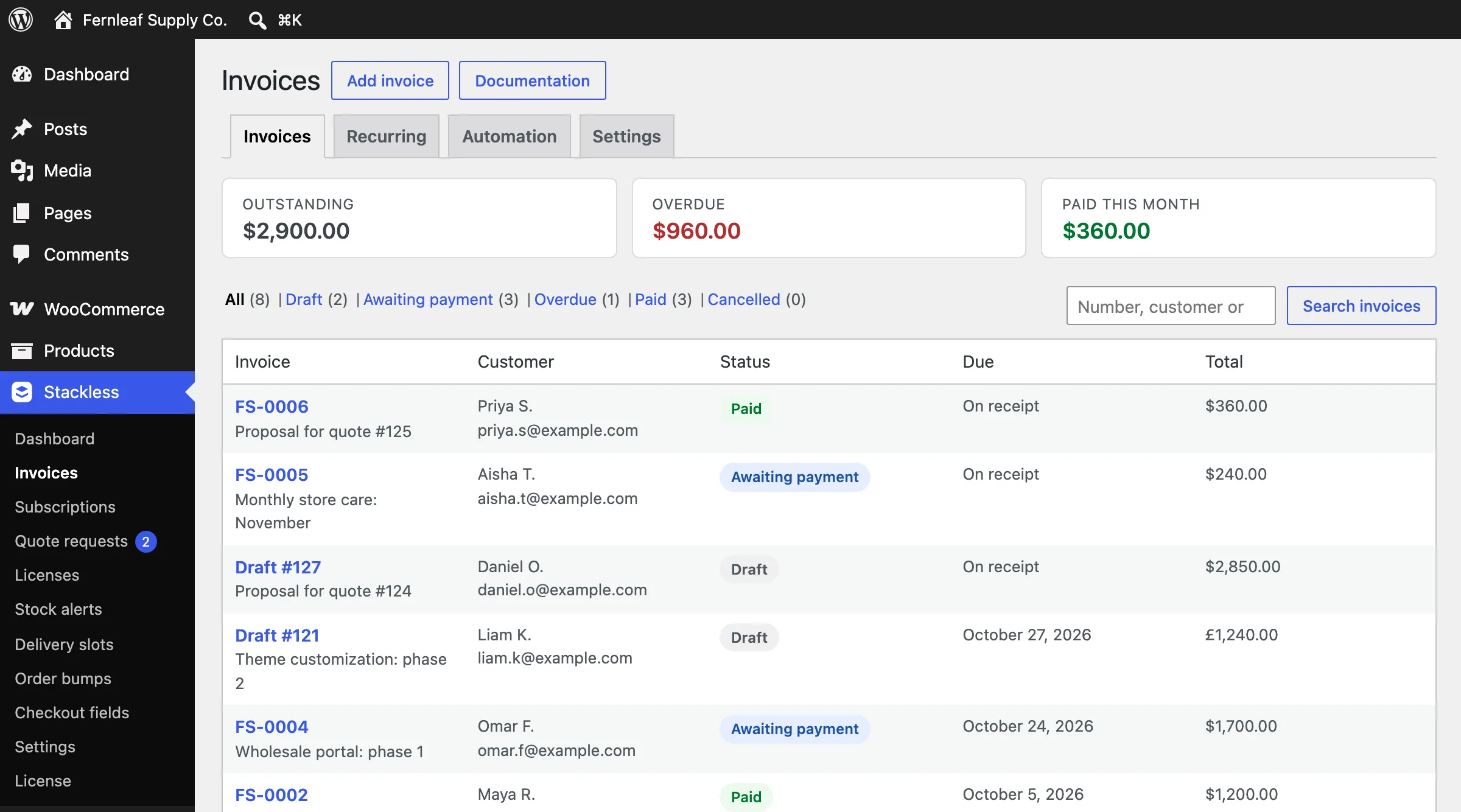
Four details save time once you send invoices every week:
- 6 invoice layouts, with a default you can override per invoice
- A library of saved items for lines you bill often
- Customer details remembered for the next invoice, including guests
- A VAT ID and company registration number on the invoice, and with Multi-Currency Checkout, the option to let a customer pay in another enabled currency
Request a Quote adds a form on any page or product. A request becomes a proposal the customer accepts online, accepting issues the invoice, and the invoice takes them to payment. That’s the whole quote-to-cash path in one module, which we described in platform-neutral terms in how to collect payment for an accepted quote.
Checkout Tools
These modules touch the checkout, and they work on both the Checkout block and the classic shortcode. The first 2 change where the checkout appears, which is the bigger idea here.
A buyer who clicks Buy on a sales page usually lands on a checkout wrapped in your theme’s header and menu. Every link on that page is a way out.
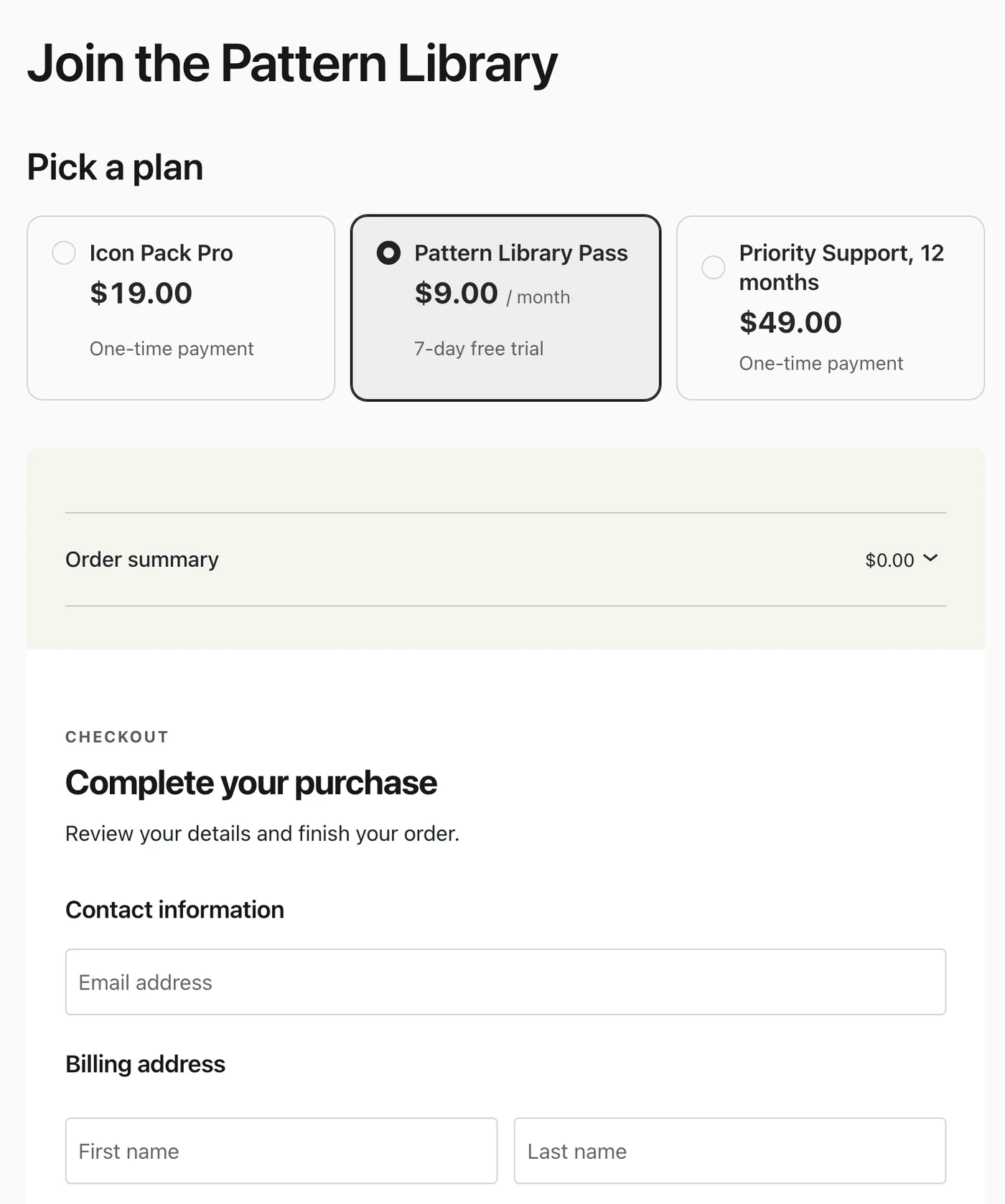
- On-page Checkout: plan cards and your checkout on any page, through a block, a shortcode or a Bricks element. Each plan gets its own cart, so the store cart is left alone, and in a product template it uses the current product.
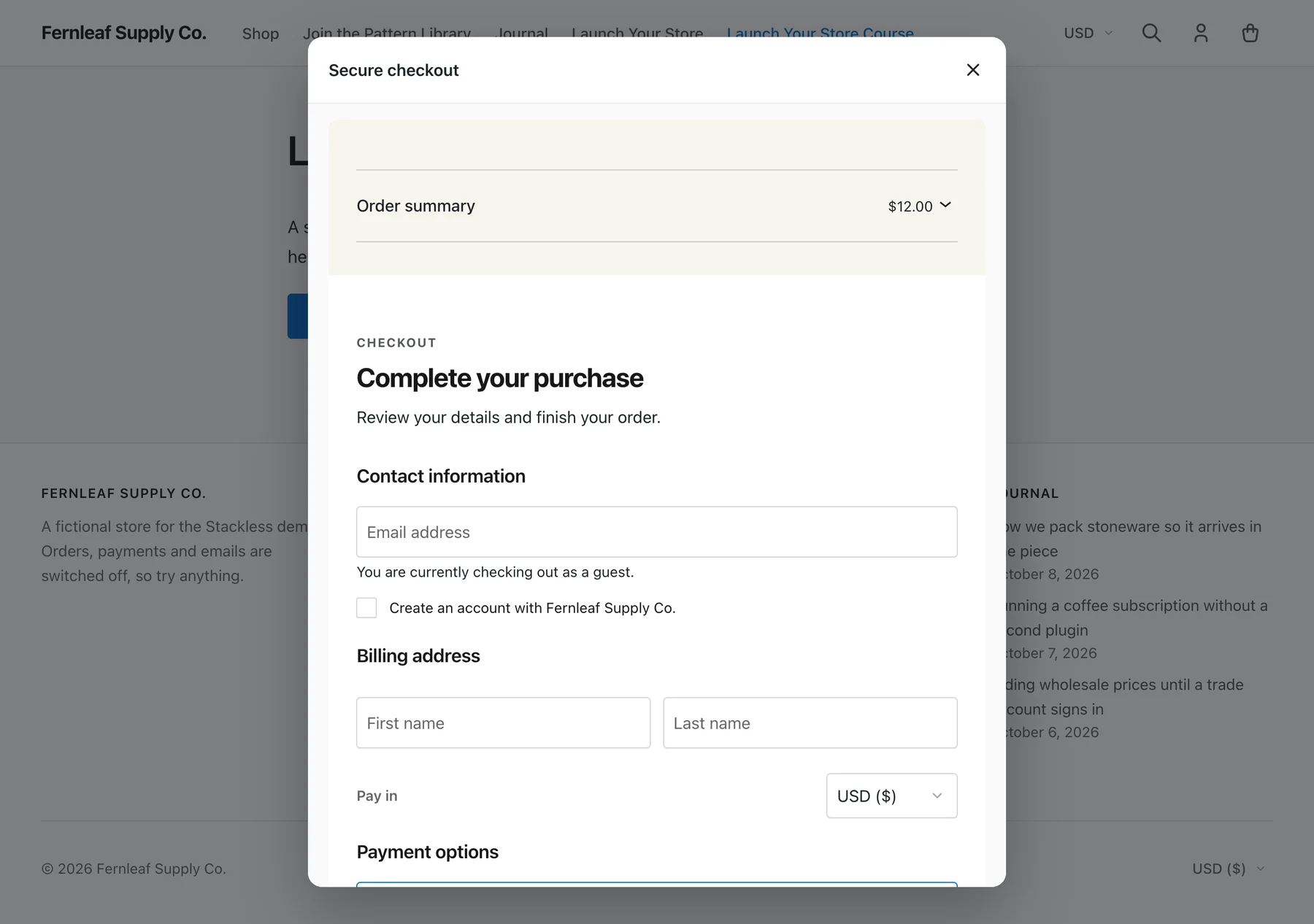
- Modal Checkout: any button or link opens the checkout in a window over the current page. Classes on the button can limit which payment methods it offers, and the server enforces that.
The rest work on the checkout you already have:
- Order Bumps: one-click offers shown by cart rules (cart contains, total over, category), priced on the server, with a take rate per bump in the admin. Headlines accept
{price},{regular_price}and{discount}tokens, shown in the shopper’s currency. - Checkout Enhancements: consent checkboxes whose acceptance is stored on the order and a shorter checkout for free and digital orders. It also adds a “Get it for free” button when there’s nothing to pay, your own wording and a trust block.
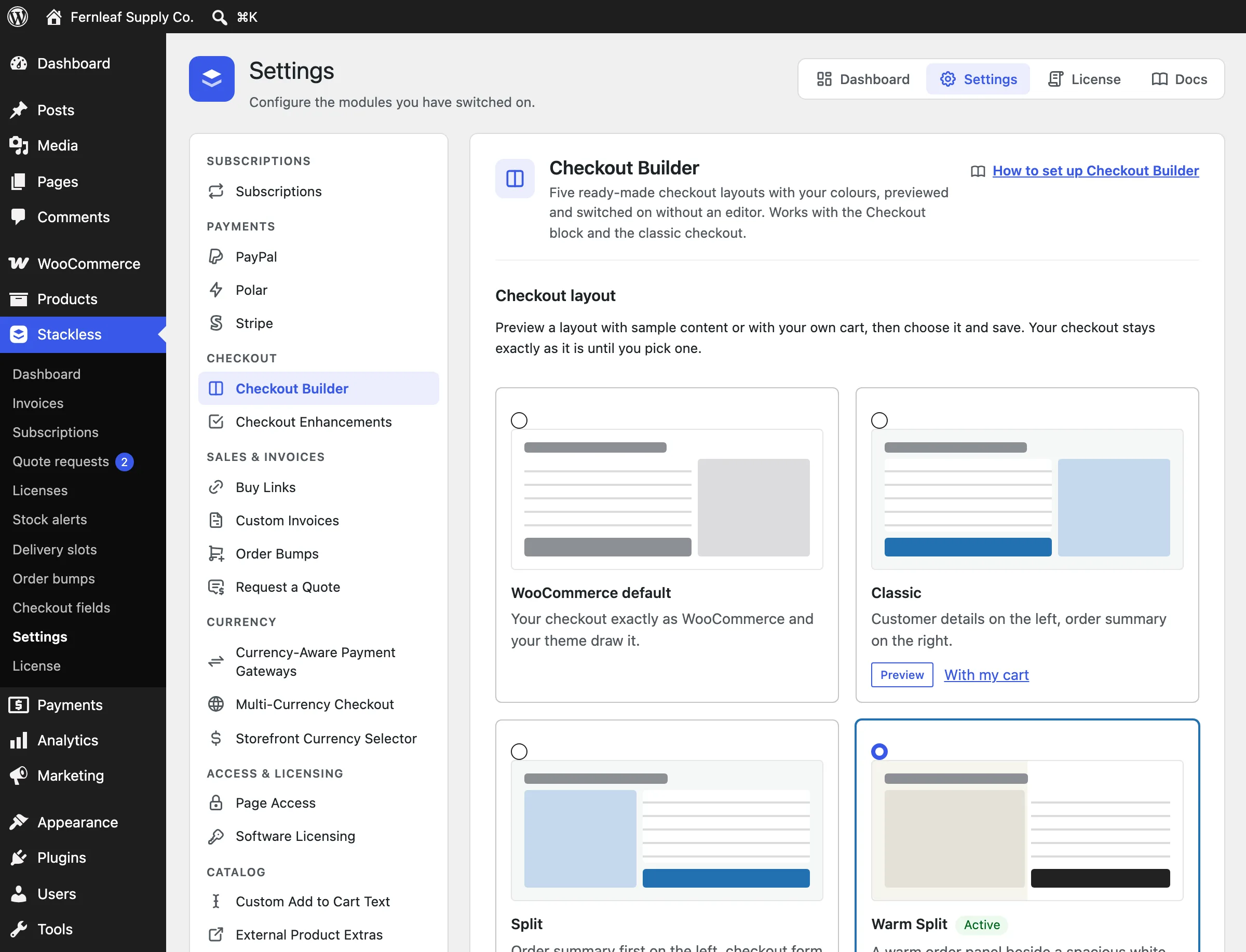
- Checkout Builder: 5 ready-made layouts with your colors, previewed and switched on from settings. No page builder involved.
- Buy Links: signed URLs that fill the cart with a product, variation and coupon and land on checkout, plus an optional Buy now button on products.
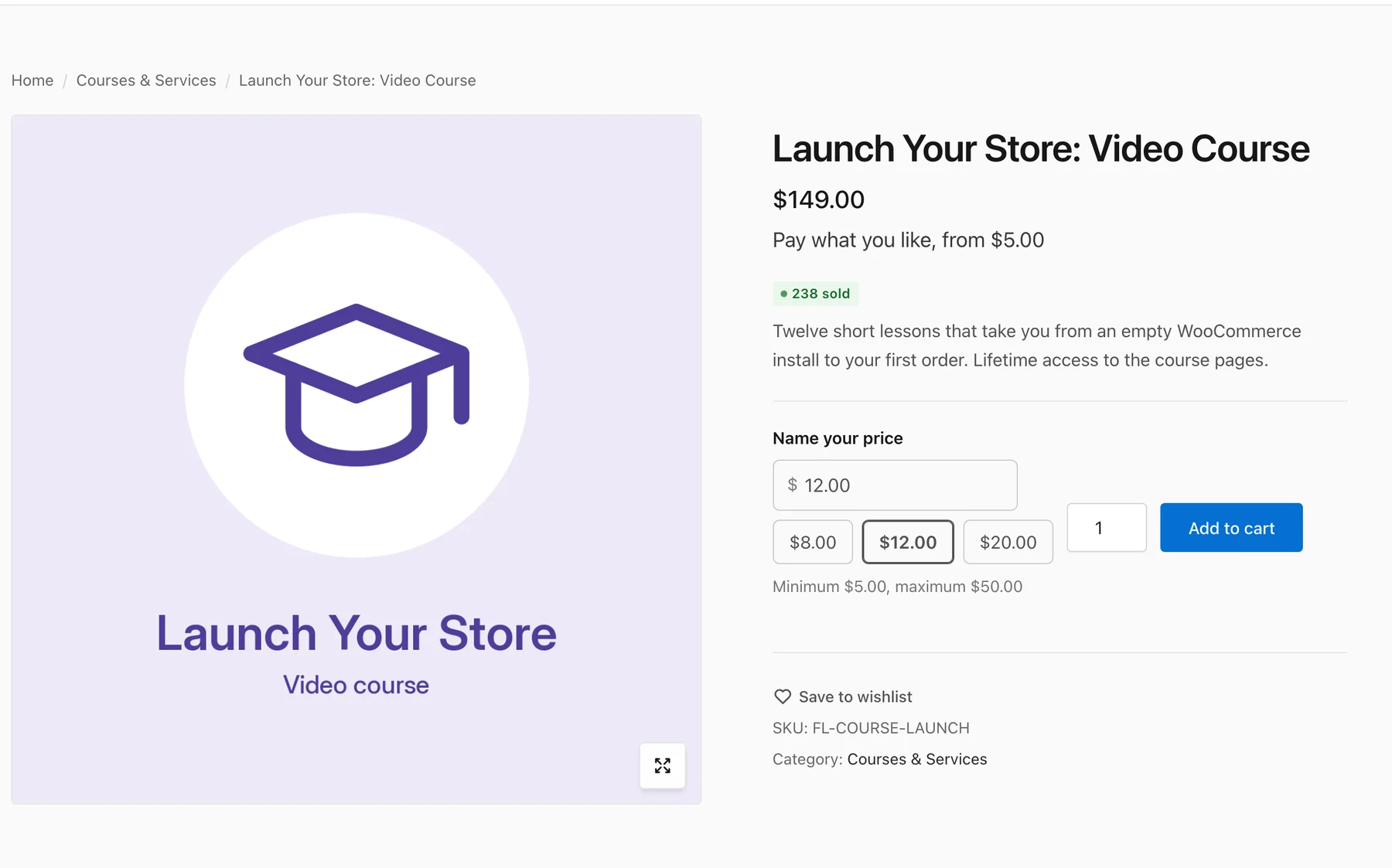
- Pay What You Like: buyers choose their price within your limits, including free. The amount is checked on the server and becomes the line’s real price, so coupons, tax and reports all see it.
- Extra Enhancements: email alerts for failed live payments, payment methods and an after-purchase link per product,
?coupon=links and a guard against throwaway emails and card testing.
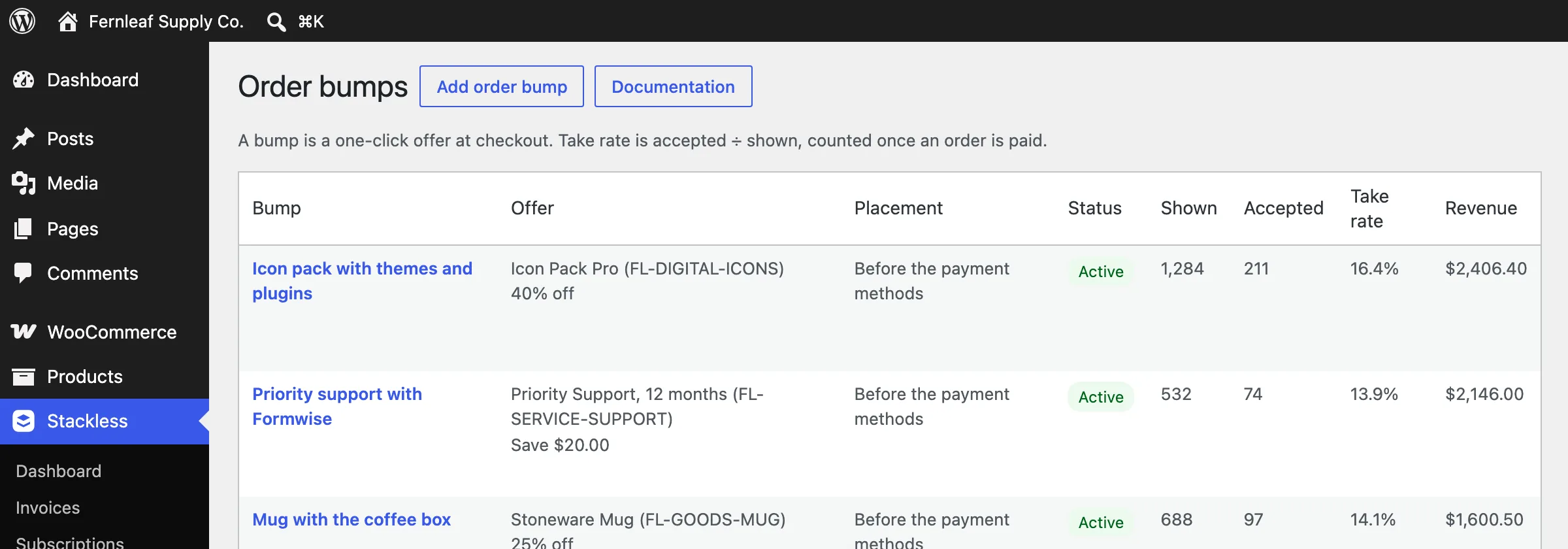
The take-rate column is the useful part. It tells you the icon pack converts at 16% and the mug at 14%, which is the data you need to decide what stays on the checkout. Our checkout optimization piece lists bumps among the fixes that recover lost orders, with the caveat that a bump nobody takes is pure friction.
Coupon Affiliates
Coupon Affiliates turns customers and partners into a referral channel without another plugin. Customers with a paid order join from My Account and get a personal coupon, or you assign any coupon to an account. Paid orders earn a percentage of product sales after discounts, before tax, shipping and fees.
- Commissions wait through a refund window, then you approve and pay them, with payout batches and CSV exports.
- Refunds and cancellations reduce or reverse a commission automatically, and a refund after payout comes off the next one.
- Affiliates can’t use their own code, and renewals and plan switches earn nothing.
Payouts are manual, so you still send the money yourself. That is fine for a small partner list and more work than a dedicated affiliate platform once you have many affiliates.
Store Tools and Catalog Modules
14 of the modules are small on purpose. Each replaces a plugin you’d otherwise install for one feature:
- Wishlist: guest and account lists that merge on sign-in, a share link, a My Account tab and move-to-cart.
- Back-in-stock Alerts: a confirmed notify-me form on out-of-stock products and variations, one email when stock returns.
- Fields & Paid Add-ons: checkbox, dropdown, text and number add-ons with per-item or one-off prices, plus checkout fields with optional fees. Text add-ons take a character limit.
- Delivery & Pickup Slots: weekly time windows with capacity per slot, lead time, closed dates and per-shipping-method availability.
- Saved Carts & Order Again: named saved carts and reorder from any past order, not only completed ones.
- Service Products: no shipping, after-payment instructions and a booking or intake link on the thank-you page.
- Catalog: free price text, sold count badges, stock urgency labels, min/max quantities and hide price until login. It also covers custom add-to-cart text, external product links and a details table that feeds product schema.
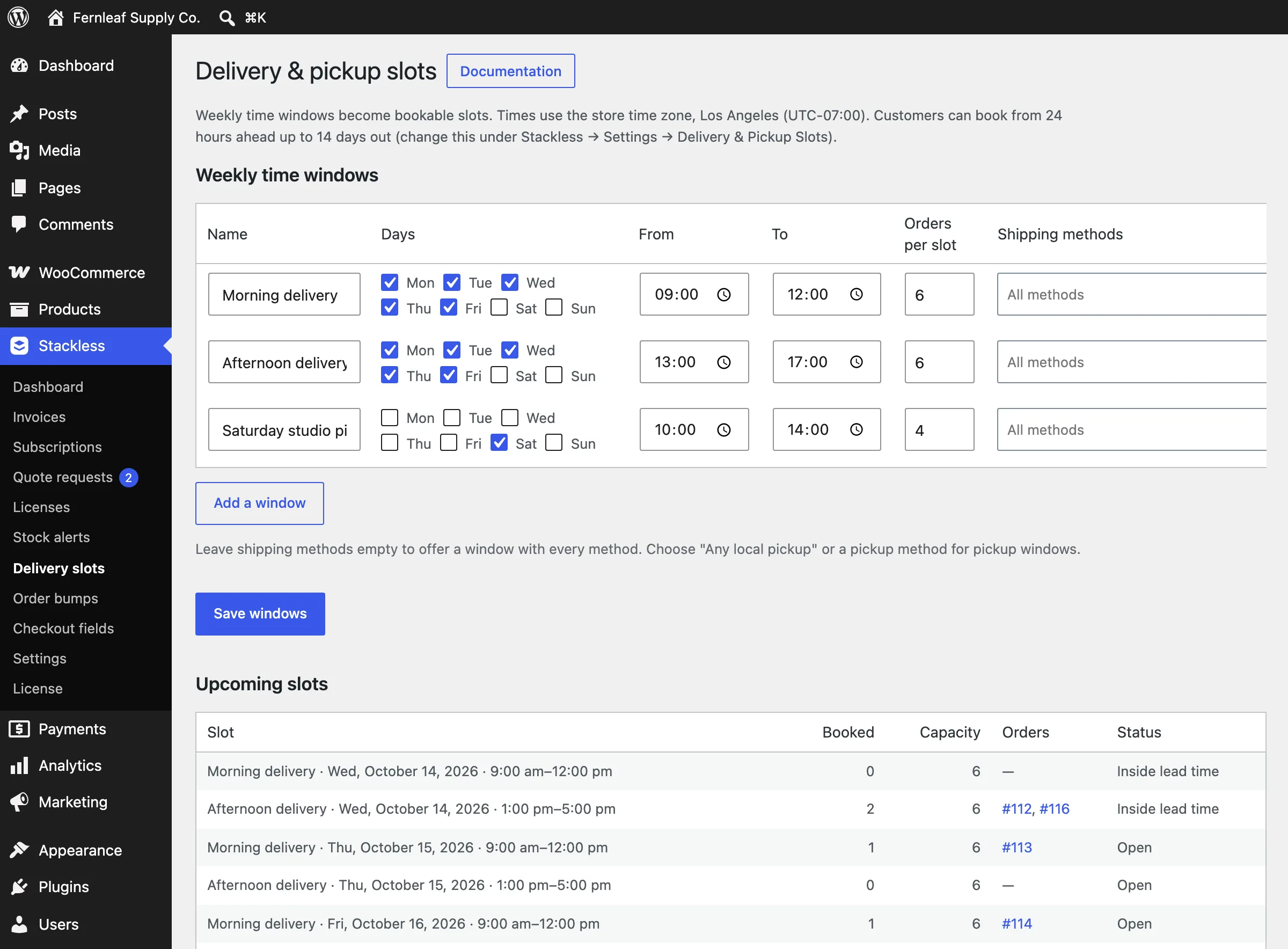
None of these will beat a dedicated plugin on depth. The delivery module doesn’t do route planning, and the add-ons module has no conditional logic between fields. The case for them is that they’re enough for most stores and they cost nothing extra, in money or in page weight.
The WooCommerce Optimizer
This module has nothing to do with selling and everything to do with why stores end up slow. Once a shopper has anything in the cart, WooCommerce adds about 50 prefetch hints to every page so the Checkout block opens faster.
That shopper’s browser downloads those scripts whether or not they check out. The Optimizer removes them, defers WooCommerce’s storefront scripts outside cart and checkout, and strips the generator tag.
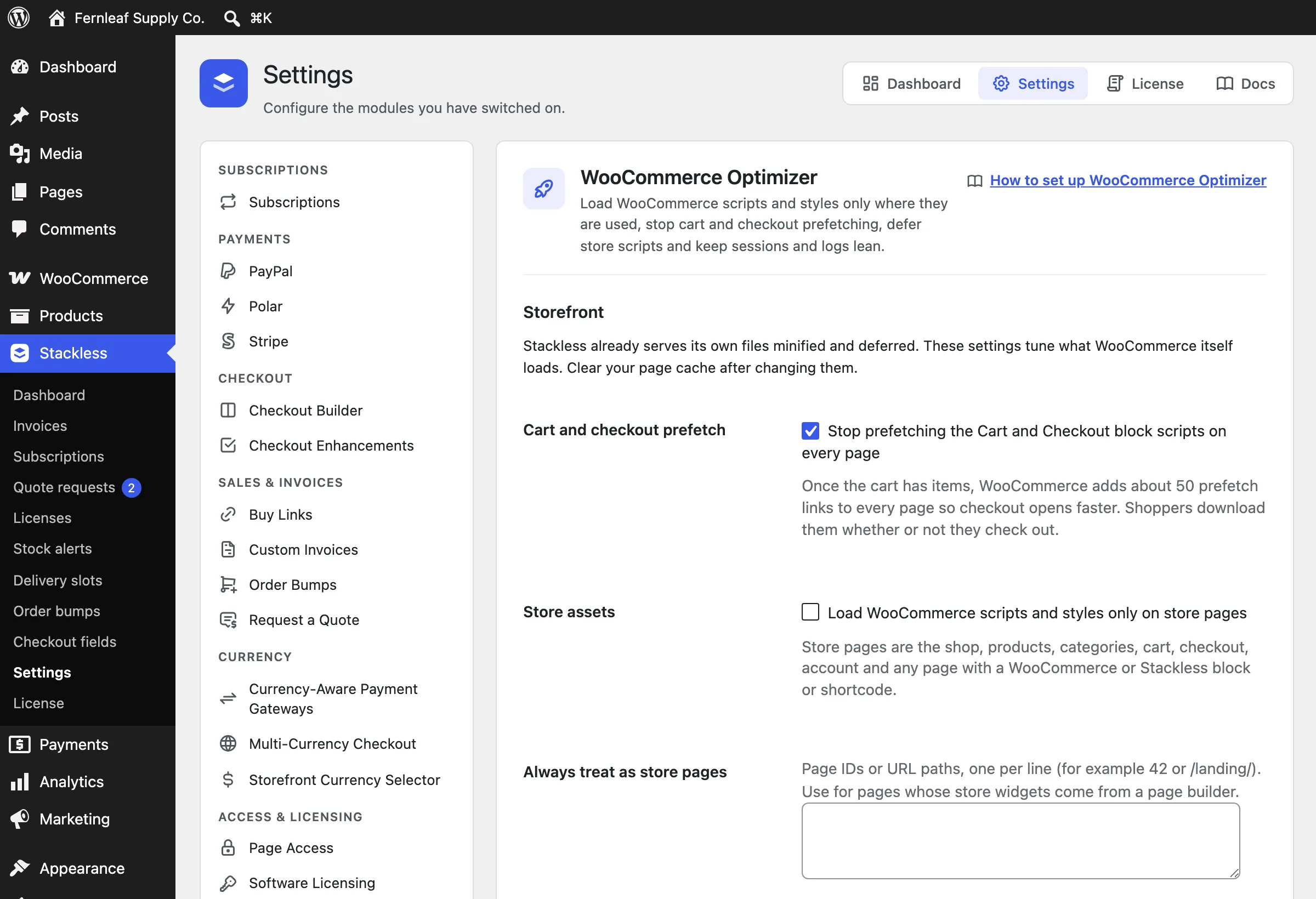
We measured this on a copy of the demo store running WooCommerce 11.2, with one item in the cart and the shop page open:
- Optimizer off: 52 prefetch links on the page
- Optimizer on with its defaults: 0 prefetch links
The optional settings go further. You can load WooCommerce scripts and styles only on store pages, control cart fragments and drop the password strength meter. You can also turn off order attribution tracking and shorten scheduled-action logs and guest cart sessions.
These overlap with what a tuning plugin like Perfmatters does for WooCommerce, and if you run one of those you’d keep that and leave this module off. For the caching layer underneath, our caching plugin comparison still applies, because the Optimizer doesn’t cache anything.
Admin and Automation
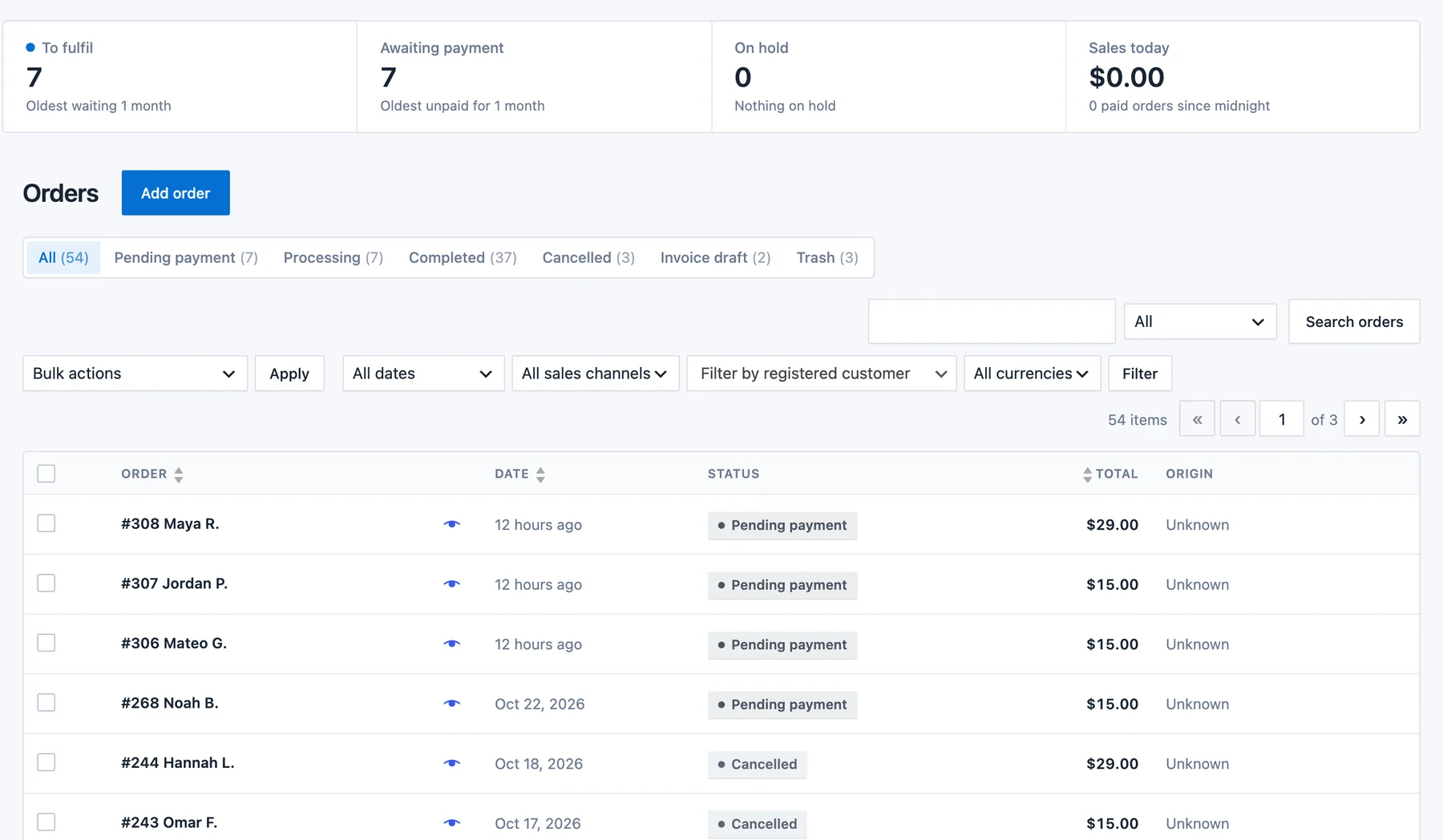
The Admin group changes how the store feels to run, and none of it reaches your customers. Woo Redesign is the one you’ll see first: it restyles the WooCommerce admin with card-style tables, soft status badges and a strip of numbers above the orders and products lists.
It also adds a “Ready to sell?” checklist to the product editor and shows field help as text instead of behind “?” icons. You choose which areas it changes.
The rest connect the store to the tools around it:
- Webhooks and REST API: subscription and license events appear as WooCommerce webhook topics, and a subscriptions API works with your WooCommerce REST API keys, for Zapier, Make, n8n or your own code.
- FluentCRM: automation triggers for subscriptions, renewals, licenses, invoices and quotes, plus tags and lists that follow subscription status.
- AI Agents: Claude, ChatGPT and Cursor can run store tasks such as invoices, quotes, sales reports and subscriptions through the free Site Agent plugin. Agents work as a WordPress user you choose and ask before anything reaches a customer.
- Core Support: with that help desk plugin installed, agents see each customer’s subscriptions, licenses, open invoices and quotes beside their tickets.
The Limits
Most of these are product gaps that a future release could close. The merchant-of-record ones come from how those providers bill, so Stackless can’t change them.
- No importer from WooCommerce Subscriptions. The biggest gap. Subscriptions, saved tokens and renewal dates from the official extension can’t be brought across, and the module pauses while the official extension is active. A store with existing subscribers has no safe migration path today.
- 5 automatic gateways. Everything else renews by pay link. There’s a published supports flag and renewal hook so third-party gateways can opt in.
- Single-subscription checkouts on some gateways. Polar and Dodo Payments take one subscription with nothing else in the cart and bill the same amount every cycle, so a signup fee needs another gateway. Paddle takes one billing schedule per checkout. Mixed carts go to Stripe, PayPal or a pay-link gateway.
- Classic add-to-cart form required for add-ons and Buy now. On block themes, the Add to Cart with Options block doesn’t carry the add-on fields.
- Consent label links on the block checkout show as plain text. The block’s checkbox labels don’t render markup. The classic checkout is fine.
- Reporting is light. Subscription numbers live in a dashboard widget, with no reports inside WooCommerce Analytics. There are no product bundles either.
- It’s new. A payment product earns trust over years, and this one first shipped in October 2026. There’s no independent benchmark history or long support archive to check yet.
- One developer. That’s an advantage for support speed and a risk for continuity. The license is GPL and the plugin keeps working without a key, which limits the downside but doesn’t remove it.
Stackless for WooCommerce Pricing
There are 2 licenses, both with every module and unlimited site activations. The license only adds updates and support, so every feature keeps working if it lapses. There’s a 14-day unconditional refund.
| License | Launch price | Later | Includes |
|---|---|---|---|
| Annual | $39 / year | $69 / year | All 43 modules, unlimited sites, updates while active, email and chat support |
| Lifetime | $99 once | $399 once | All 43 modules, unlimited sites, updates for life, email and chat support |
The comparison below uses list prices for a single site from each vendor’s own page in October 2026. WooCommerce.com shows local-currency pricing, so the dollar figure is the US one.
| Need | Usual extension | Yearly cost | Stackless |
|---|---|---|---|
| Subscriptions | WooCommerce Subscriptions | $279 | Included |
| Order bumps and checkout layouts | CartFlows Pro | $199 first year, renews at $299 | Included (bumps and layouts, no funnels) |
| Licensing and update server | Freemius, or EDD Professional | 6.1% + 50¢ per sale plus gateway fees, or $299.50 on sale ($599 normally) | Included |
| Multi-currency | WPML Multilingual CMS with WooCommerce Multilingual | €99 | Included |
| Wishlist, add-ons, slots, invoices, quotes | Separate plugins | Varies by vendor | Included |
| The priced rows above, with EDD | More than $850 a year | $39 a year or $99 once |
Freemius also handles sales tax as a merchant of record, so its percentage buys something the licensing module alone doesn’t. In Stackless, you’d get that from Polar, Paddle or Dodo Payments, at their fees.
Even a store that only wants 2 of those rows is ahead on the annual license. The $99 lifetime license pays for itself against WooCommerce Subscriptions alone in 5 months.
Stackless vs the Alternatives
These are the products that could change the decision, and each one wins somewhere.
Stackless vs WooCommerce Subscriptions
WooCommerce Subscriptions is the reference implementation. It has a decade of handled edge cases, works with almost every gateway that supports tokenization, and every migration tool targets it. It also costs $279 a year and does nothing but subscriptions.
Stackless matches the core lifecycle, adds mixed carts with per-schedule recurring totals, and bundles the gateways. It can’t import from WooCommerce Subscriptions and supports automatic renewal on 5 gateways rather than dozens. For a new store we’d pick Stackless, and for existing subscribers we’d stay on WooCommerce Subscriptions until an importer exists.
Stackless vs SureCart
SureCart replaces WooCommerce rather than extending it. You get a hosted checkout, subscriptions, licensing and a free plan with a 2.9% fee on each sale, with Pro at $199 a year on one store or $699 once. What you give up is everything WooCommerce-specific: your theme’s shop templates, shipping plugins, order management, the Store API and the extension ecosystem.
Our ecommerce plugin comparison by product type puts SureCart ahead for a store that’s only selling digital products and hasn’t built on WooCommerce yet. Stackless is for the store that has.
Stackless vs CartFlows
CartFlows is a funnel builder: landing page, checkout, order bump, one-click upsell, thank-you page, with A/B testing on the higher plans. Stackless covers the checkout, the bump and the layout, and puts that checkout on any page, but it has no funnels or post-purchase upsells.
If post-purchase upsells are part of your model, CartFlows or FunnelKit is the right tool and Stackless can sit beside it with the checkout modules off. If bumps are enough, CartFlows Pro is $199 for the first year and $299 after that for a feature Stackless includes.
Who Should Use Stackless
Stackless fits 4 kinds of store best, and the reason is different for each.
Stores paying for 3 or more extensions
A store like this renews a subscriptions extension, a gateway add-on, a wishlist plugin, an invoicing plugin and a checkout tweak every year, from different vendors with different update schedules. If that describes your plugins page, Stackless turns 5 renewals into 1 and removes the compatibility worry between them.
Developers selling their own plugins or themes
If you sell WordPress products and want to own the store, the licensing module plus the update server plus the subscriptions module is the full stack: sell a yearly license, issue keys, serve updates, expire access when the subscription ends. Add Paddle or Polar and the provider handles the tax too. The alternatives are Freemius taking a percentage or building the update server yourself.
Stores selling in more than one currency
Price books with a settlement currency per order and currency-aware gateways solve the problem that live-conversion switchers create: a customer paying in a currency the gateway can’t settle. That failure loses international orders without telling you why.
New stores that want to start lean
A new WooCommerce store with Stackless, a caching plugin and a theme is a complete store with subscriptions and modern payments in 3 plugins. The free Stackless theme is built for exactly this setup, and the WooCommerce vs Shopify cost comparison changes shape when the extension line drops to $39. A store that only needs wishlists and a gateway can start on Stackless Lite for free.
A Practical Way to Try It
The refund window is 14 days and the demo is public, so the evaluation path is short:
- Spend 20 minutes on the demo store. Add a subscription and a one-time product to the cart, open the checkout and read the recurring totals.
- List your current paid extensions and mark which Stackless module covers each. Anything not covered (funnels, bookings, route planning) stays as a separate plugin.
- Install on staging with only the modules you marked switched on. Confirm your gateway situation: Stripe, PayPal, Polar, Paddle or Dodo Payments means automatic renewals, and anything else means pay-link renewals.
- Read the documentation for the 2 or 3 modules that carry your revenue, starting with the guide on replacing your WooCommerce add-ons. The changelog shows how often issues get fixed.
- If a module pauses itself, you have an existing plugin doing the same job. You should decide which one stays before going live.
Final Remarks
If you’re still unsure, we’d let your plugins page decide. Count the paid WooCommerce extensions you renew each year and match them to the table near the top of this review. If 3 or more match and your subscriptions can start fresh, we’d run Stackless on staging this week, because the refund window makes that test cheap.
If you have a few hundred live subscribers on WooCommerce Subscriptions, we’d stay put and watch the changelog for the importer. A plugin from one developer, this early in its life, has to earn trust through time, and billing is the wrong place to rush. If you only want the small tools, you should start with Stackless Lite, since moving up later keeps your settings.
Stackless for WooCommerce
Pros
- 43 modules on one $39 a year or $99 lifetime license, unlimited sites
- Subscriptions and 5 built-in gateways, with automatic renewals and retries
- Switched-off modules load no code; the Optimizer removes WooCommerce's own checkout prefetching
- HPOS and the Cart and Checkout blocks supported
- Pauses itself instead of fighting an installed subscriptions or currency plugin
Cons
- First released in October 2026, so there's no long-term track record yet
- No importer from WooCommerce Subscriptions yet
- Only the 5 built-in gateways renew automatically; other gateways renew by pay link
- Polar and Dodo Payments take one subscription per checkout
Summary
One plugin that puts subscriptions, 5 payment gateways, software licensing, multi-currency, invoices, quotes and checkout tools on core WooCommerce. Strong value and a lean footprint; held back today by its age and a WooCommerce Subscriptions importer that hasn’t shipped yet.
Price: USD 39 /year
See Stackless pricingFAQs on Stackless for WooCommerce
Is Stackless for WooCommerce worth it?
For a WooCommerce store that pays for 3 or more extensions among subscriptions, gateways, licensing, multi-currency, invoices, order bumps and store tools, yes: one $39 a year license replaces all of them on unlimited sites. For a store that only needs a few small tools, the free Stackless Lite may be enough.
Does Stackless work without any other plugins?
Yes. It runs on core WooCommerce alone, including its 5 payment gateways, and needs WordPress 6.7, WooCommerce 9.9 and PHP 7.4 or newer. It supports HPOS and both the block and classic checkouts.
Can I migrate from WooCommerce Subscriptions?
Not yet. There’s no importer, and the Stackless subscriptions module pauses itself while WooCommerce Subscriptions is active. Stores with existing subscribers should wait for an importer before switching.
Which gateways renew subscriptions automatically?
Stripe, PayPal, Polar, Paddle and Dodo Payments, all built into the plugin. Any other gateway can sell subscriptions, but renewals are sent as an emailed pay link that the customer clicks.
Can Stackless handle sales tax for me?
Yes, through its merchant-of-record gateways. Polar, Paddle and Dodo Payments are the legal seller and handle sales tax and VAT. With Stripe or PayPal you stay the seller, so tax stays your job.
Does Stackless take a cut of sales?
No. You use your own payment accounts and pay only their fees. The Stackless license is a flat $39 a year or $99 once at the launch price.
What happens if the license expires?
Every module keeps working. The license only controls updates and support, so an expired annual license means you stop receiving new versions until you renew.
Does Stackless slow down my store?
Modules that are switched off load no code. The WooCommerce Optimizer module goes the other way: on a copy of the demo store with an item in the cart, it took WooCommerce’s checkout prefetch hints from 52 per page to 0, and it defers storefront scripts outside the checkout.
Can I sell my own WordPress plugins and themes with it?
Yes. The Software Licensing module issues license keys with site activation limits, exposes a REST API for activation, and runs an update server with signed downloads. A small license client ships for you to include in your plugin or theme.
Is there a free version or a demo?
Yes to both. Stackless Lite is a free plugin with 23 modules, including all 5 gateways, and upgrading later keeps your data. There’s also a 14-day unconditional refund on the paid plugin and a public demo store at demo.gatilab.com/stackless.
Where is the documentation?
On a searchable docs site at gauravtiwari.org/docs/stackless-for-woocommerce, with a page per module and step-by-step guides for jobs such as selling a plugin with license keys. Every module card in the admin links to its page.
Tell Google you want more of this.
Add Gatilab as a preferred sourceOne tap, and this site shows up more often in your own Top Stories, AI Overviews and AI Mode. Remove it any time.