
WordPress.com Commerce vs Self-Hosted WooCommerce
WordPress.com Commerce vs self-hosted WooCommerce is a decision about who runs the store’s hosting and which tools come bundled, and it gets expensive to reverse once orders and customer accounts start building up. Both routes run the same store software. The difference is where it runs, what you pay for up front and who you call when checkout breaks.
So if you’re choosing how to host a new WooCommerce store, or wondering whether to move one you already run, it helps to settle 2 things first: who will look after the store once it’s live, and whether the bundled extensions are tools the store will actually use.
WordPress.com Commerce is Automattic’s managed WooCommerce plan, with hosting and a set of store extensions included for $45 a month on annual billing. Self-hosted WooCommerce is the free plugin on a host you choose, from shared hosting to a managed WooCommerce host or your own server. We build WooCommerce stores at Gatilab, and here’s the short answer first.
WordPress.com Commerce is the better pick when:
- the store will use the bundled extensions, such as product bundles, product add-ons or gift cards
- the merchant wants one provider for hosting, security and backups
- the payment gateway the business needs works on the platform in its country
Self-hosted WooCommerce is the better pick when:
- the store needs a specific integration, server setup or plugin the managed platform doesn’t allow
- you run several stores, where one hosting plan or server can hold them all
- the store needs little beyond WooCommerce itself, so a bundle would be paying for unused tools
- you want to choose the host and change it later without moving off a platform
WordPress.com Commerce vs Self-Hosted WooCommerce at a Glance
Here’s how the 2 routes compare on the points that usually decide it. Commerce prices are in USD on annual billing.
| Factor | WordPress.com Commerce | Self-hosted WooCommerce |
|---|---|---|
| Who hosts it | WordPress.com | A host you choose |
| Hosting cost | $45 a month on annual billing ($540 a year) | Set by your host, from a few dollars to hundreds a month |
| Store extensions | A set of paid extensions included | Bought separately as needed |
| Server access | SFTP, SSH and WP-CLI in a managed environment | Whatever your hosting plan allows |
| Plugins | Most plugins, except an incompatible list | Anything your host supports |
| Stores per plan | 1 site per plan | Several stores per server, depending on the host |
| Platform transaction fee | 0% from WordPress.com | None from WooCommerce itself |
| Payment processing fees | Set by your gateway | Set by your gateway |
| Who maintains the store | You, inside a managed platform | You, your host or an agency |
The table doesn’t settle it on its own. The cost line in particular depends on what the self-hosted store would need to buy, which is where most comparisons go wrong.
Who Looks After the Store
A store needs more than a server and a checkout button. Someone has to own the product data, the payment setup, order emails, shipping rules, tax settings and customer support, and that’s true on both routes.
I’d assign those jobs before comparing prices. A missing owner usually costs more than the difference between 2 hosting plans.
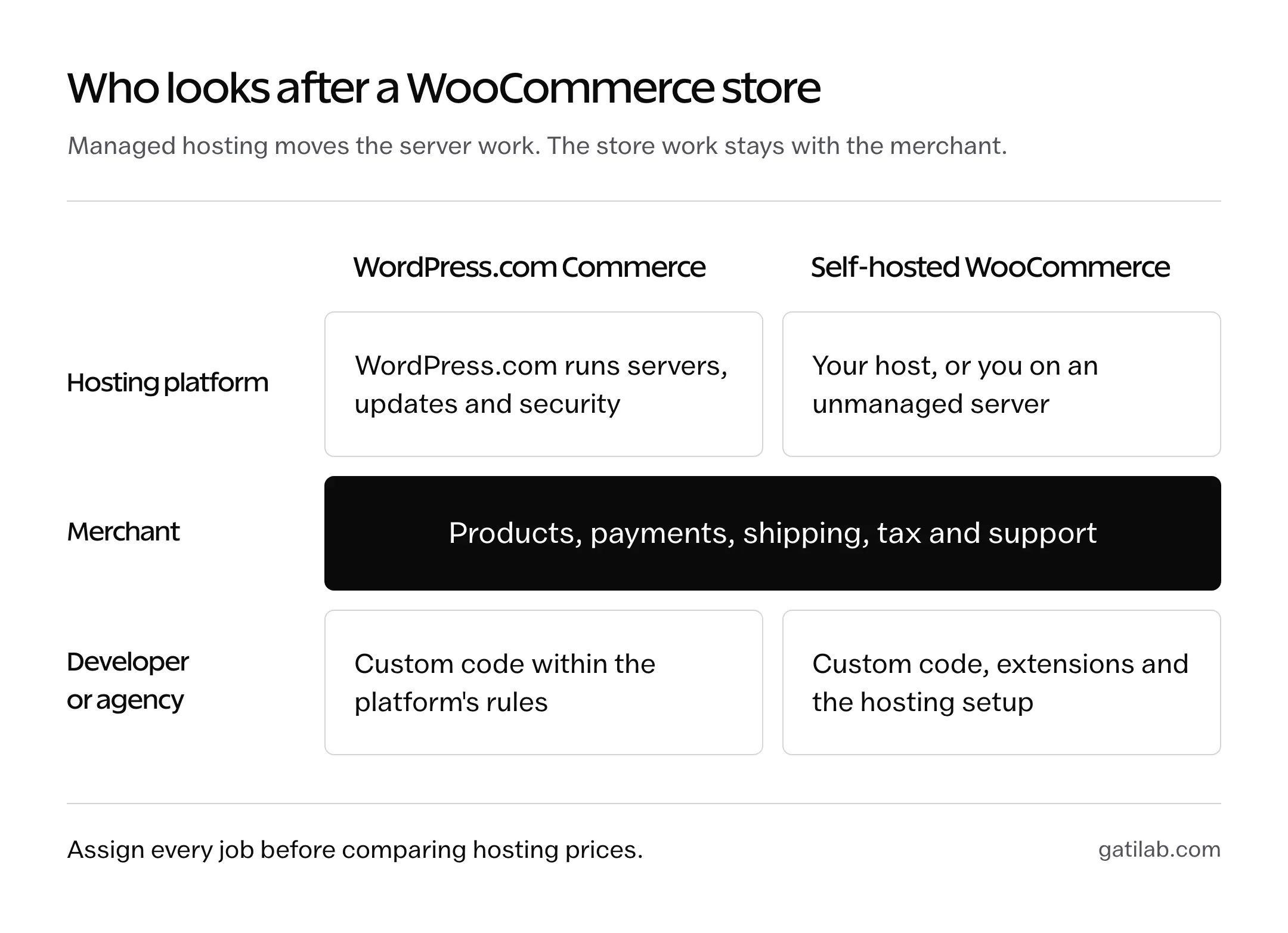
| Responsibility | Commerce route | Self-hosted route |
|---|---|---|
| Servers, uptime and core updates | WordPress.com | Your host, or you on an unmanaged server |
| Store extensions | Check the bundle covers what you need | Choose, buy and update each one |
| Products, payments and fulfillment | The merchant and its team | The merchant and its team |
| Custom code and integrations | Must fit the platform’s rules | Must fit the chosen hosting environment |
| Backups and recovery | Included tools; agree who restores and when | Depends on the host; agree who restores and when |
Self-hosted doesn’t have to mean unmanaged. A business can pick a managed WooCommerce host and an agency maintenance plan, and a fair comparison describes the service you’re actually buying on each side. Our WooCommerce vs Shopify comparison works through the same question for a fully hosted store builder.
What Commerce Includes
Commerce is the Business plan’s hosting plus WooCommerce and a suite of preinstalled extensions. The Commerce plan documentation lists them by area:
- Products: Product Add-Ons, Product Bundles, Gift Cards, Min/Max Quantities, Back In Stock Notifications and Product Recommendations
- Payments: WooPayments, In-Person Payments in the US and Canada, and EU VAT Number
- Marketing: AutomateWoo, MailPoet, Google for WooCommerce and social channel integrations
- Shipping and tax: carrier integrations such as UPS, USPS, FedEx and Royal Mail, label printing, Shipment Tracking, TaxJar and Avalara AvaTax
The hosting side includes SFTP, SSH, WP-CLI, a staging site, GitHub deployments, 50 GB of storage and automatic backups with one-click restores. WooCommerce Subscriptions and Bookings aren’t in the suite, so a store that depends on them buys those separately on either route.
On the self-hosted side, several of those jobs also come in one plugin. Stackless for WooCommerce, a plugin I built, covers product add-ons, minimum and maximum quantities, back-in-stock alerts and wishlists, plus the subscriptions the Commerce suite leaves out, for $39 a year on unlimited sites and on any WooCommerce host. Product bundles and gift cards still need their own extensions, so price the store’s actual list on both routes.
Compare Cost With the Same Requirements
The cost comparison only means something when both routes cover the same store. I’d collect a current quote for each route against one requirements list, then add up the first year like this:
First-year cost =
  hosting or platform plan
  + paid extensions the store needs
  + domain and email not included
  + implementation or migration work
  + ongoing maintenance
  + payment processing fees
Keep one-time work separate from recurring charges, and don’t count a bundled tool the store will never use.
Here’s a worked example with real prices. Take a physical-product store that needs product bundles, product add-ons and gift cards. WooCommerce.com sells those 3 extensions for $79 a year each in USD, so a self-hosted store pays $237 a year for them before hosting. On WordPress.com, Commerce costs $240 a year more than Business on annual billing and includes all 3. For that store, the extensions alone roughly cancel out the Commerce premium, and the decision comes down to hosting and support.
Now take a store that needs none of those extensions. Commerce still costs $540 a year, while the same store on Business costs $300, and on a separately chosen host it costs whatever that host charges. Here the bundle is the expensive option.
For a multi-year view, use the real contract terms. Multiplying an introductory rate by 3 isn’t a 3-year cost if the renewal price is different, so record the renewal amount from checkout or mark it as unknown.
Payments Come First
A checkout is only useful when the gateway supports the business, and this is where many store plans fall apart late. I’d confirm the gateway before anyone designs a product page.
Commerce includes WooPayments, but WooPayments covers 38 countries, and India isn’t one of them. An India-based store needs Razorpay, PayU India or PayPal, and Stripe is invite-only for Indian businesses. The same gateway extensions work on a self-hosted WooCommerce store, so the gateway rarely decides between the 2 routes. It decides whether the store can launch at all.
For each route, confirm:
- the gateway supports the merchant’s country, settlement currency and product types
- the payment methods customers expect are available, such as UPI and cards in India
- the processing fees, which apply on both routes regardless of any platform fee
- who handles refunds, disputes and failed payments day to day
WordPress.com adds no transaction fee of its own on Commerce. A self-hosted WooCommerce store has no platform fee either, so the real payment cost is the gateway’s on both sides.
Use the Trial for the Right Questions
Commerce has a 14-day free trial, and it helps if you go in knowing what it can’t show you. The trial creates a new site in Coming Soon mode, and it doesn’t allow extra plugins, third-party themes or SFTP, SSH and phpMyAdmin access. Site admins can test the purchase flow, but real customer payments need the paid plan.
So the trial answers the product questions well: can the store set up its products, options and bundles, and does a test order show the packer what they need? It can’t validate an integration you aren’t allowed to install, a gateway account that hasn’t been approved or how the store behaves under real traffic.
That distinction belongs in the final recommendation. “Product setup checked in the trial; gateway approval still pending” is a status a business can act on.
Moving an Existing Store
Before moving a live store in either direction, I’d list everything that has to move: products, customers, orders, extension licenses, redirects, email and any scheduled integrations. Then agree on the migration steps and how to roll back if something fails.
A live store keeps taking orders while the migration happens. Copying an older database over a newer one loses those orders, so plan a short freeze or an order sync for the switchover.
Also check what happens to the bundled extensions if the store later leaves WordPress.com. Don’t assume an extension included with the plan becomes a separate license you can carry to another host. Confirm the terms for the extensions you depend on.
The Limits
Both routes have limits that matter for a store, and they’re worth naming before anyone signs up:
- Commerce is one plan per store. 3 stores mean 3 plans, while one server can hold several self-hosted stores.
- Commerce runs inside a managed platform. Core files are read-only, PHP is 8.3 or 8.4, custom PHP modules aren’t allowed and some plugins are on an incompatible list.
- Staging on Commerce doesn’t protect orders. A database push can overwrite orders placed since the staging copy was made, so the process has to cover it.
- Self-hosted quality depends on the host. A cheap shared plan and a managed WooCommerce host are very different products, and the comparison has to name which one you mean. Our managed WordPress hosting comparison is a starting point for the second kind.
- Self-hosted maintenance needs an owner. Updates, backups, security and extension renewals land on you, your host or an agency.
FAQs on WordPress.com Commerce vs Self-Hosted WooCommerce
Is WooCommerce itself a hosting service?
No. WooCommerce is a free store plugin for WordPress. In this comparison, WordPress.com supplies the hosting through its Commerce plan, while a self-hosted WooCommerce store runs on a host the business chooses.
Is WordPress.com Commerce cheaper than self-hosted WooCommerce?
It depends on the extensions the store needs. Commerce costs $540 a year on annual billing and includes extensions such as Product Bundles, Product Add-Ons and Gift Cards, which cost $79 a year each on WooCommerce.com. A store that needs several of them gets good value; a store that needs none pays for unused tools.
Can a managed WooCommerce host count as self-hosted?
Yes. Self-hosted here means WooCommerce on a host you choose, and that host can be fully managed. Define what the host and any agency agreement include before comparing.
Does WordPress.com Commerce work for an Indian store?
It can, with a third-party gateway. WooPayments doesn’t support India, so an Indian store uses Razorpay, PayU India or PayPal instead. Confirm the gateway before building the store.
Should a working store move for a lower hosting price?
Only with a stronger reason than price. Include migration work, renewal prices, integration risk and order handling during the move before deciding.
Final Remarks
Choose WordPress.com Commerce when the bundled extensions match what the store needs, the payment gateway works for the business and the merchant wants a managed setup. Choose a separately hosted WooCommerce store when it needs a specific integration, more control over the server or several stores under one plan.
Whichever route you pick, ask for the same 4 things: a named owner for each critical job, proof that the important workflow works, a cost comparison built on the same requirements and a plan for leaving later. If your store depends on custom integrations or a migration, talk to us at Gatilab before choosing the setup.
Tell Google you want more of this.
Add Gatilab as a preferred sourceOne tap, and this site shows up more often in your own Top Stories, AI Overviews and AI Mode. Remove it any time.