
Best Free Blogging Platforms
You want to start a blog without paying for it, and every free blogging platform will let you, so the choice comes down to which limit you can live with. Each free plan withholds something different: WordPress.com shows its own ads on your pages, Blogger gives you unlimited space but a dated editor, Medium takes your readers and keeps them, Substack is free until you charge and then takes 10%, and the newer developer and minimalist platforms have quietly moved custom domains behind a paid tier. The ten platforms below are compared on exactly those limits, with each one’s current terms checked against its own pricing page.
If you want the short answer: a personal journal goes on Bear Blog or Blogger, a writer who wants readers today goes on Medium, a newsletter goes on Substack or beehiiv, a developer goes on Hashnode, and anyone who expects the blog to become a business starts on WordPress.com and moves to its $4 a month plan or to self-hosted WordPress once there’s something worth paying for. I started blogging in 2008, and the one risk no comparison table shows is the platform itself disappearing, so the section on platforms that changed or shut down is worth reading before you pick.
What Free Blogging Platforms Limit
Free plans are free because the platform keeps something back, and the five things it keeps back are the same across all of them. Knowing which one matters to you is most of the decision.
- Your address. Most free plans put you on a subdomain such as yourname.wordpress.com. Connecting your own domain is free on Blogger, needs a paid plan on WordPress.com and Wix, a $50 one-time fee on Substack, a $5 a month plan on Hashnode and a paid membership on Medium.
- Ads you don’t control. WordPress.com and Wix show their own ads on free sites, and you earn nothing from them. Blogger lets you run your own AdSense instead.
- Storage. 1 GB on WordPress.com, 500 MB and 1 GB of monthly bandwidth on Wix, and no stated limit on Blogger, Medium, Substack or Tumblr.
- Earning. Some free plans forbid your own ads and affiliate links, some take a cut of subscriptions, and some let you earn only through their own program. The money section below goes platform by platform.
- Leaving. WordPress.com, Blogger, Medium and Substack export your posts. Wix doesn’t export a site, and Typepad shut down on September 30, 2025 with no export after that date, which is the clearest recent case of a platform taking its writers’ work with it.
Free Blogging Platforms Compared
The table shows what each free plan gives you at the time of writing. Prices for the paid step up are on each platform’s own pricing page, linked in the entries that follow.
| Platform | Free storage | Own domain on the free plan | Platform ads on your pages | Can you earn | Export |
|---|---|---|---|---|---|
| WordPress.com | 1 GB | No; Personal plan from $4 a month includes one | Yes | Not on the free plan | Yes |
| Blogger | No stated limit | Yes, free to connect | No | Your own AdSense | Yes |
| Medium | No stated limit | Needs a paid membership | No | Partner Program, members only | Yes |
| Substack | No stated limit | $50 one-time fee | No | Paid subscriptions, 10% plus Stripe fees | Yes |
| beehiiv | Up to 2,500 subscribers | Not stated on the plan table; check before you count on it | beehiiv branding | Paid subscriptions need the $49 a month plan | Yes |
| Ghost (self-hosted) | Your server | Yes | No | Anything, including paid members | Yes |
| Wix | 500 MB, 1 GB bandwidth a month | No; needs a paid plan | Yes | Not on the free plan | No site export |
| Tumblr | No stated limit | Through Tumblr Domains or a paid connection | Yes, unless you pay to remove them | Limited | Yes |
| Hashnode | No stated limit | No; Pro at $5 a month | No | No built-in route | Yes, Markdown |
| Bear Blog | Text only on free | No; upgrade about $49 a year | No | No built-in route | Yes |
The 10 Best Free Blogging Platforms
Each entry covers what the free plan gives you, what it holds back, and who should pick it or pass.
WordPress.com
WordPress.com is the hosted version of the software that runs 40% of all websites, and its free plan is the best place to learn an editor that you’ll never outgrow. You get a yourname.wordpress.com address, 1 GB of storage and the block editor; you don’t get plugins, your own domain or an ad-free site, because free sites display WordPress.com ads to visitors and you keep none of that revenue.
What changed in April 2026 matters more than the free plan itself: plugins are now available on every paid plan, and the Personal plan at $4 a month on yearly billing (or $9 month to month) adds a free domain for a year and removes the ads. For years the advice was “skip WordPress.com, go self-hosted”, because plugins needed the expensive Business plan. That advice is out of date. Start free, and when you need a domain or a plugin, the $4 plan is the obvious first step; the WordPress.com plans comparison covers what each tier adds.
Blogger
Blogger is Google’s platform, running since 1999, and it is the most generous free plan on this list by a distance: a blogspot.com address, images that don’t count against your Google storage, your own domain connected for free (you buy the domain, Blogger hosts it with a free SSL certificate), and your own Google AdSense ads through the Earnings tab once the blog meets AdSense’s policies. No other free platform lets you keep the ad money.
The price is the product itself. The editor and templates look like 2012, the theme options are thin, and Google has a long record of retiring products it stops caring about, though Blogger has outlived most predictions. For someone in India who wants to test blogging and earn a little from AdSense without spending anything, it’s still the right starting point; for anything you’d call a brand, the design ceiling arrives fast. Connecting a domain early is the one upgrade worth making on Blogger, and the case for buying a domain for a free blog explains why.
Medium
Medium is the one platform here where you publish into an existing audience rather than building one, and the writing surface is the cleanest of the ten. Publishing is free with no storage limit. What you give up is ownership: no design control, no analytics code, no ads of your own, and readers who follow Medium’s feed rather than you. Affiliate links are allowed with a disclosure; display ads are not.
Earning on Medium has changed. The Partner Program now requires an active paid Medium membership (about $5 a month), at least 1 published story, a complete profile and a bank account in an eligible country, and India is on that list. Payouts come from member engagement with your stories, not just reading time. A custom domain also requires the membership. So the free version of Medium is a distribution channel, and the moment you want to earn or use your own domain, it costs about the same as WordPress.com’s paid plan. Publish your best work on your own site first and republish on Medium to reach its readers; a blog that lives only on Medium is a blog on someone else’s terms.
Substack
Substack is a newsletter that doubles as a blog: every post has a web page and lands in subscribers’ inboxes, and the platform is free no matter how many subscribers you collect. If you turn on paid subscriptions, Substack keeps 10% of each payment and Stripe takes its processing fee on top, about 2.9% plus 30 cents per US card payment. A custom domain is a one-time $50 fee, with no sales tax on it, and you still buy the domain elsewhere.
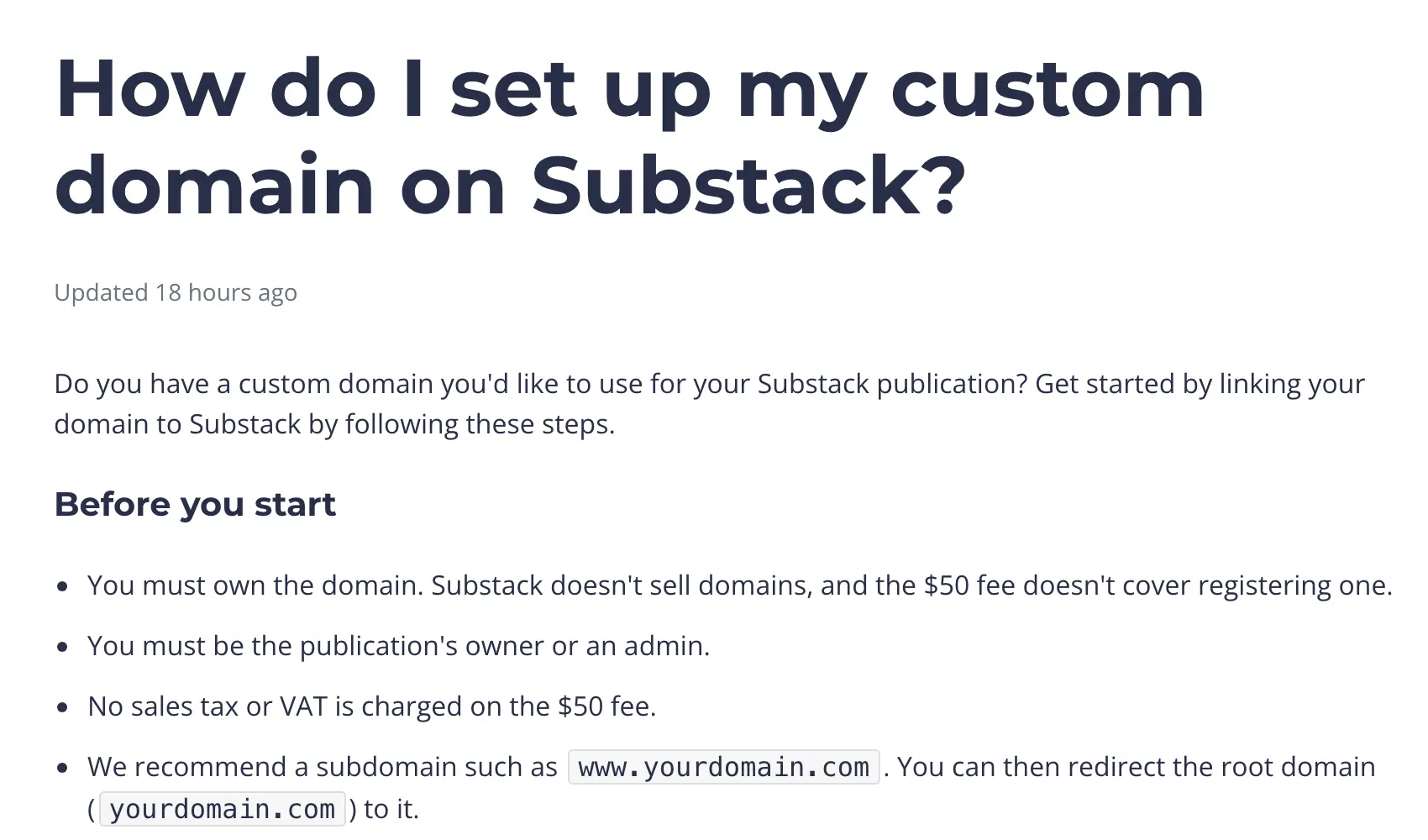
Two limits are worth knowing before you build on it. The design is fixed, with no themes to speak of, and the posts are written for email first, so a Substack rarely does well in search. And payouts run through Stripe, which Indian writers have reported as the sticking point: payments only in rupees unless you register as a business, and a registration that Substack doesn’t always enable. If your readers pay in dollars and you’re in India, check the current Stripe terms before you promise anyone a paid tier. The Substack vs beehiiv comparison goes deeper on the two newsletter platforms.
beehiiv
beehiiv is the other newsletter-first platform, and its free plan is generous on the number that matters: up to 2,500 subscribers, unlimited sends, email templates, landing pages and a place in beehiiv’s recommendation network, with beehiiv branding on what you send. Paid subscriptions and ad monetization start on the Lite plan at $49 a month on yearly billing, where beehiiv takes 0% of subscription revenue, which is the trade against Substack’s 10%: nothing to pay until you earn on Substack, a fixed fee before you earn on beehiiv. One gap in beehiiv’s own plan table is whether the free plan includes a custom domain, so confirm that in the signup flow before you build on it.
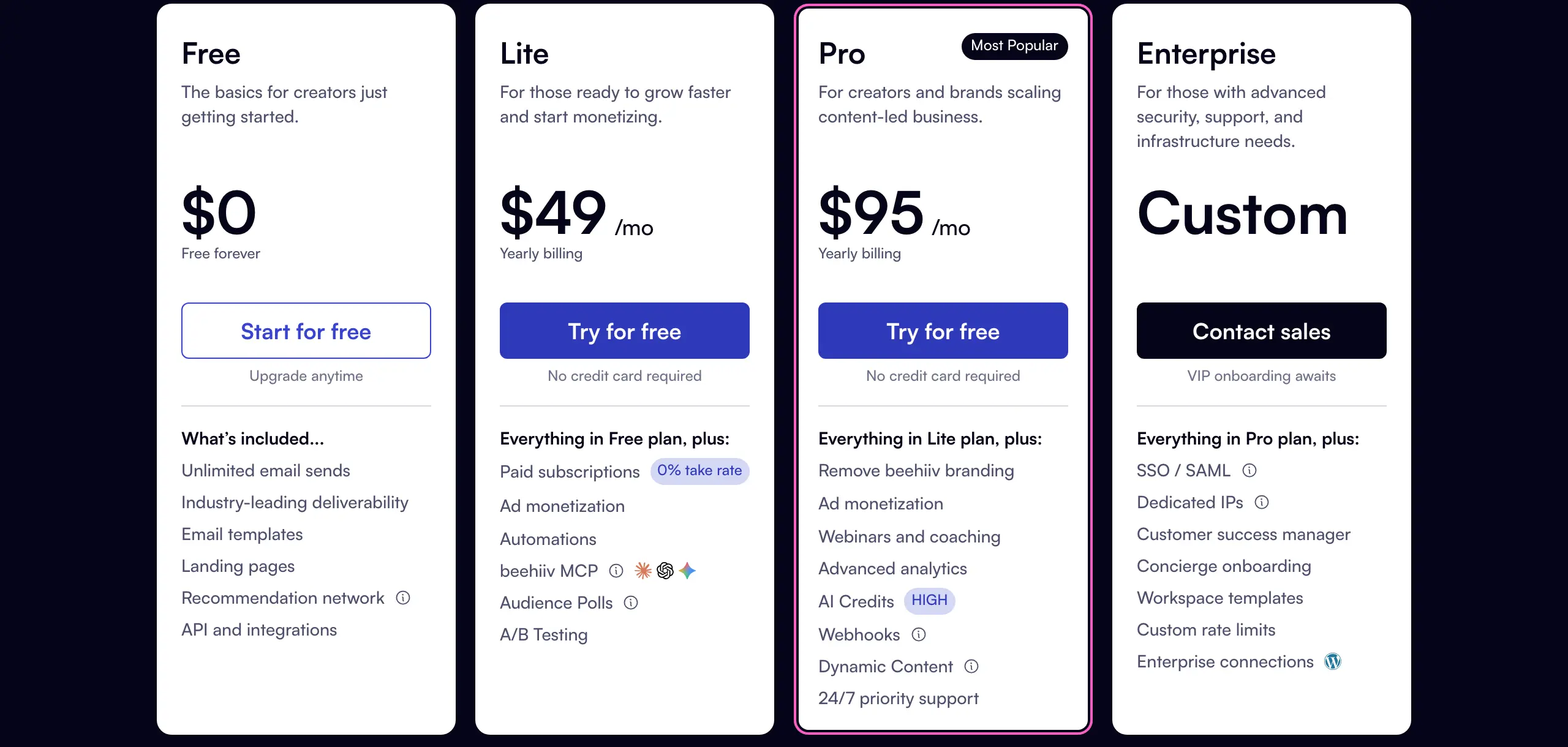
Pick beehiiv over Substack when you expect to pass a few hundred paying subscribers, because 10% of a real subscription business costs more than $49 a month quickly. Pick Substack when you’re starting from zero and may never charge. For a blog that isn’t a newsletter at all, neither is the right tool; the newsletter platforms roundup compares them by business model.
Ghost
Ghost is open-source publishing software with the best writing and membership features of any platform here, and it belongs on a free list only with an honest asterisk: there is no free hosted plan. Ghost(Pro) starts at $15 a month on yearly billing for the Starter plan, which now includes a free custom domain and 1,000 members but not paid subscriptions; those start on Publisher at $29. The free route is self-hosting, which means your own server, and the smallest server Ghost will run on costs about $6 a month at DigitalOcean plus a domain.
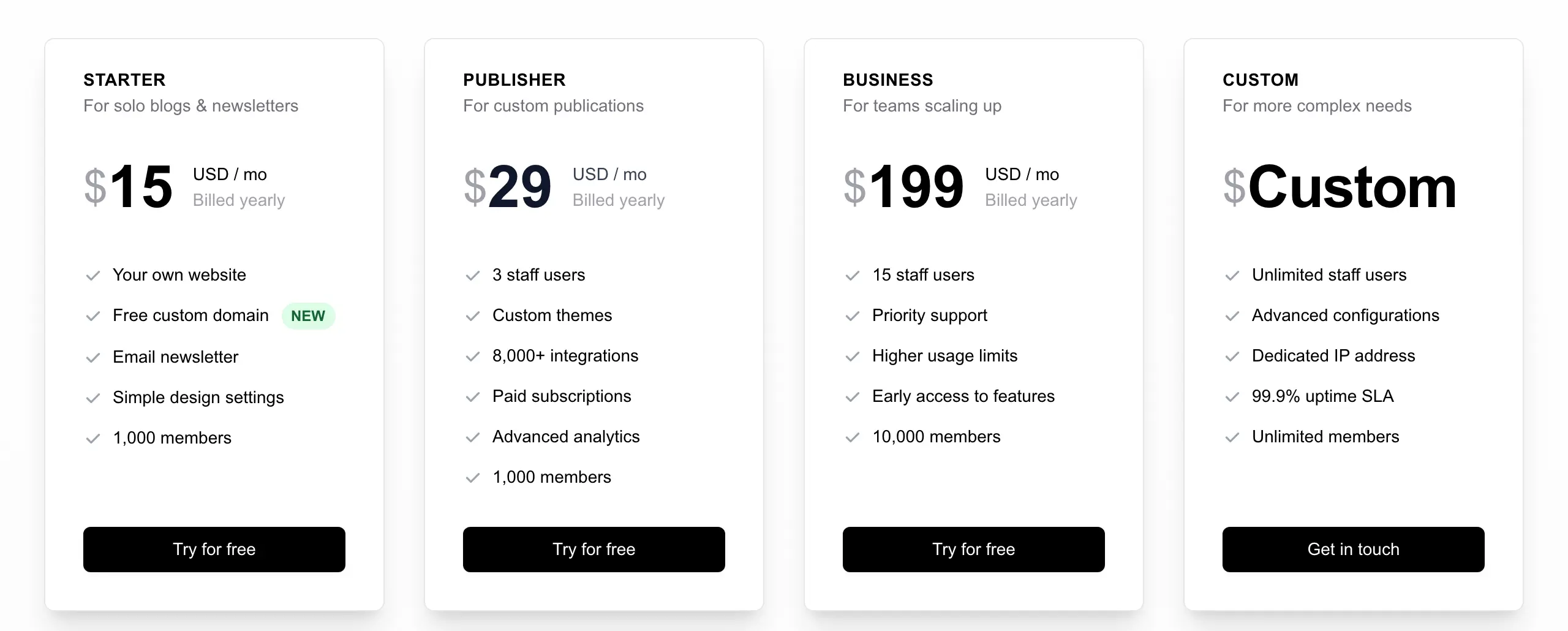
So Ghost is free only in the sense that the software is; everything around it costs money. It earns its place because a self-hosted Ghost gives you the whole product, including paid memberships with no platform cut, for less than most hosted plans, if you can install Node, MySQL and NGINX on an Ubuntu server and keep them updated. If that sentence read as a foreign language, Ghost is not your free platform.
Wix
Wix’s free plan is a drag-and-drop site builder with a blog attached, and for a photographer or designer who cares how the page looks more than what it says, the templates are the best on this list. You get 500 MB of storage and 1 GB of bandwidth a month, a Wix-branded address and Wix ads on every page; a custom domain and the removal of the ads both need a paid plan.
The 1 GB bandwidth cap is the quiet limit. A few image-heavy posts that get shared can hit it, and the fix is a paid plan. The bigger issue is the exit: Wix has no site export, so a blog that outgrows it has to be rebuilt elsewhere by hand. Use Wix free for a portfolio with a blog on the side; for a blog that is the point, pick something you can leave.
Tumblr
Tumblr is still running, still free and still the best home for short visual posts that spread by reblog rather than by search. Automattic, which also owns WordPress.com, paused its plan to move Tumblr onto WordPress in July 2025, so the platform stays as it is for now. Custom domains have changed: Tumblr sells domains through Tumblr Domains and charges to connect one registered elsewhere, while connections set up before the change keep working.
Tumblr suits art, fan communities and a running visual diary, where the reblog network does the distribution. For long articles that need to be found on Google, the search visibility is poor and the design control is modest, and the ad-free experience costs money.
Hashnode
Hashnode is the developer blogging platform: Markdown, syntax highlighting, a built-in developer audience and a hashnode.dev address, all free. Until June 2026 it also gave every blog a free custom domain, which was the reason most people chose it. Since Hashnode Pro launched on June 11, 2026, custom domains, the API, headless mode, GitHub backup and scheduled publishing sit on the Pro plan at $5 a month or $50 a year; domains set up before the change were kept.
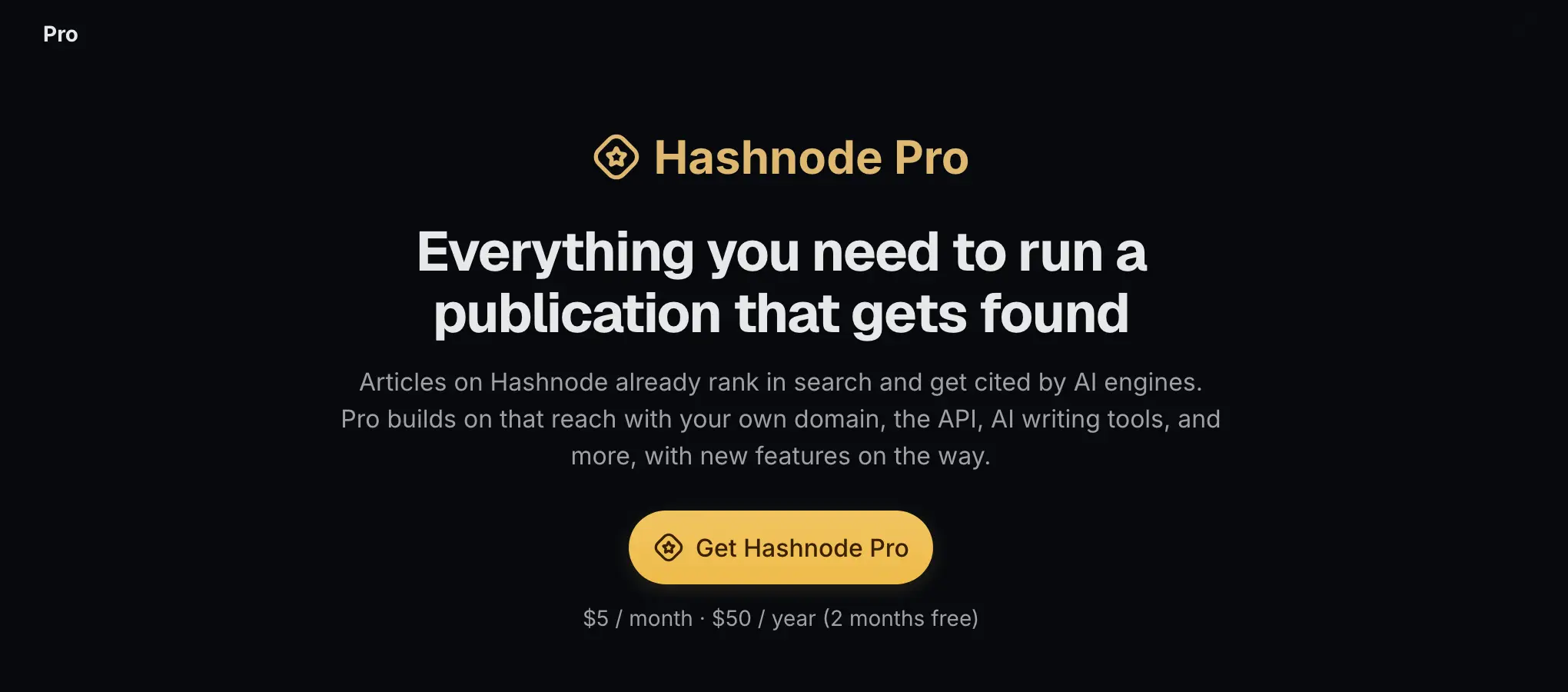
For a developer who wants to write without running a site, it’s still the easiest free start, and the articles do rank. If you want the posts on your own domain from day 1, budget the $50 a year or write in Markdown somewhere you can move the files from later; Hashnode’s export is Markdown, so leaving is painless either way.
Bear Blog
Bear Blog is the platform the Reddit threads keep recommending for a reason: it’s a free, text-first blog with no trackers, no ads and no JavaScript, pages that load in a fraction of a second, and a writing screen that is just a box for Markdown. The free plan gives you a bearblog.dev address and a discover feed of other Bear blogs. Custom domains, image hosting, analytics and email subscribers come with the upgrade, which Bear’s own users report at about $5 a month or $49 a year, with a lifetime option.
It’s the right pick for a journal, an essays blog or anyone who found WordPress.com’s free plan heavier than their writing needed. It’s the wrong pick for anything with galleries, a shop or a business behind it, and it is run by one person, which is both why it’s good and the risk to weigh before you pour years of writing into it.
Platforms That Changed or Shut Down
A free platform is a promise the platform can withdraw, and the last 18 months have seen more withdrawals than usual. If you read an older comparison, these are the facts that have moved:
- Typepad shut down on September 30, 2025. Blogs that weren’t exported before that date are gone.
- Hashnode moved custom domains and its API behind Hashnode Pro on June 11, 2026.
- Ghost has no free hosted tier; the Starter plan is $15 a month on yearly billing, and it was $9 in older guides.
- Tumblr now charges to connect an outside domain and sells its own.
- WordPress.com opened plugins to every paid plan on April 2, 2026, which turned the $4 Personal plan into a real upgrade path.
- Medium now requires a paid membership to join the Partner Program.
- Weebly, which used to appear on every list like this, still exists under Square, but Square has moved its effort to Square Online and Weebly hasn’t changed in years, which is why it isn’t on this one.
Can You Make Money on a Free Blog?
Yes on 3 of the 10, in limited ways, and the rules differ enough that the platform choice decides the route. The India-specific answers are here too, because that is where most of the questions come from.
- Blogger is the only free plan that lets you run your own ads and keep the money. Apply for AdSense from the Earnings tab once the blog has enough original content to pass AdSense’s review; a custom domain isn’t required, and it’s free to connect if you want one.
- Medium pays through the Partner Program, which now needs a paid membership, and pays on member engagement with your stories. Writers in India can enroll. Treat it as a bonus on writing you’d publish anyway, not a plan.
- Substack lets you charge subscribers from day 1 at a 10% platform cut plus Stripe’s fees, with the India payout caveat above.
- beehiiv needs the $49 a month Lite plan before you can charge, and then takes 0%.
- WordPress.com, Wix and Tumblr free plans show the platform’s ads, not yours. Affiliate links are allowed on WordPress.com within its guidelines, but the audience is small until you have your own domain and no platform ads, which is the paid plan again.
- Hashnode and Bear Blog have no earning route of their own. A sponsor link or a consulting enquiry is the model, and it works better than it sounds for a developer with a following.
Earnings-per-thousand-views figures for AdSense in India vary so much by topic and audience that any single number would mislead you; the guide to monetizing a blog covers the routes that scale once the free platform stops being enough.
When to Stop Being Free
The free plan has done its job when one of three things is true: you have readers coming back, you want your own domain on the address bar, or you want to earn from the site in a way the free plan blocks. At that point there are two sensible moves and both are cheap.
The first is to pay the platform you’re on. WordPress.com Personal at $4 a month on yearly billing now includes plugins, a domain for the first year and no ads, which covers most blogs for years. The second is self-hosted WordPress, where you rent hosting from a company such as Hostinger or Bluehost, install WordPress yourself and own everything. Introductory prices run $2 to $4 a month and the renewals run $10 or more, so judge it on the renewal price; the real cost of a WordPress site works through the full bill. Either way, buy the domain yourself, at your own registrar, so it moves with you when the platform changes its mind.
FAQs on Free Blogging Platforms
Is Blogger 100% free?
Yes. Blogger costs nothing to use, has no stated storage limit for the images you upload, shows no platform ads on your blog, and lets you connect a domain you own at no charge. The only things you might pay for are the domain itself from a registrar and nothing else; it is also the one free platform that lets you keep the money from your own AdSense ads.
What is the best platform to start a blog for free?
It depends on what the blog is for. WordPress.com’s free plan is the best place to learn the editor you will keep using as the blog grows. Blogger is the best free plan if you want to earn from ads. Medium is the best way to reach readers without building an audience. Bear Blog is the best free home for plain writing. Substack and beehiiv are the free picks for a newsletter.
Which free blogging platform lets you run ads or affiliate links?
Blogger is the only free plan that lets you run your own display ads, through Google AdSense. Affiliate links are allowed on Blogger, on Medium with a disclosure, and on WordPress.com within its guidelines, but WordPress.com and Wix show their own ads on free sites and you earn nothing from those. Substack and beehiiv earn through subscriptions, not ads.
Can I use my own domain on a free blog?
On Blogger, yes, free. On every other platform here it costs something: a paid plan on WordPress.com (from $4 a month) and Wix, a one-time $50 fee on Substack, Hashnode Pro at $5 a month, a paid membership on Medium, Bear Blog’s upgrade at about $49 a year, and a paid connection or a Tumblr-sold domain on Tumblr. You always buy the domain itself separately.
Can I make money from a free blog in India?
Yes, within limits. Blogger with AdSense is the simplest route and pays into an Indian bank account. Medium’s Partner Program accepts writers in India but now requires a paid Medium membership. Substack paid subscriptions run through Stripe, which Indian writers report as restrictive: rupee payments only unless you register as a business. Earnings per thousand views vary too much by topic to give one number.
What has replaced blogging?
Nothing has replaced it, but newsletters have absorbed a lot of it. Substack and beehiiv publish every post as a web page and an email, so the blog and the mailing list are the same thing. Short-form platforms took the casual posting, and a blog on your own domain is still where search traffic and long-term readers come from.
What happens to my posts if the platform shuts down?
You lose what you did not export. Typepad closed on September 30, 2025 and content that was not exported before that date was deleted. WordPress.com, Blogger, Medium, Substack, Hashnode and Bear Blog all offer an export; Wix does not export a site. Export every few months and keep your domain at your own registrar so the address moves with you.
WordPress.com or Blogger for a beginner?
WordPress.com if you expect the blog to grow, because the editor and the structure carry over to the paid plan and to self-hosted WordPress, and its $4 a month plan now includes plugins and a domain. Blogger if you want a free custom domain and your own AdSense ads from day one and can live with a dated editor and themes.
Final Remarks
Pick the platform whose limit you can ignore. If ads on your page don’t bother you yet, WordPress.com’s free plan teaches you the editor you’ll keep; if you want to earn from the first month, Blogger is the only free plan that lets you; if the writing is the whole point, Bear Blog or Medium gets out of your way. Whatever you choose, export your posts every few months and own the domain, because the platform list above will look different again in 18 months, and the writers who lost their work on Typepad were not careless, just trusting.
Tell Google you want more of this.
Add Gatilab as a preferred sourceOne tap, and this site shows up more often in your own Top Stories, AI Overviews and AI Mode. Remove it any time.