
WooCommerce vs Shopify: Costs, Trade-offs and Which to Pick
WooCommerce vs Shopify is usually the first big decision behind an online store, and it is an expensive one to reverse once orders and customer accounts start piling up. So if you are choosing a platform for a new store, or wondering whether to move the one you already run, this comparison should make the call a lot easier.
We build stores on both platforms at Gatilab.
Every store has its own products and margins, so one comparison cannot settle it for everyone. But most of the time the choice comes down to two things: who will look after the store once it is live, and how much control you need over your products and checkout. I will go through both properly here, with the monthly costs worked out, including the one Shopify fee that changes the answer for stores in countries where Shopify Payments isn’t available.
To make it practical, I have also put together a decision scorecard with a 3-year cost worksheet, free in PDF and Word, so you can run the same numbers for your own store. And if you would like us to look at your catalog with you, that is always an option. Here is the short answer first.
WooCommerce or Shopify?
Shopify is the better pick for most new stores, and it should be your default when:
- you want to launch in days, without a server or a developer to manage
- your business is registered in a country where Shopify Payments works, so card orders carry no extra Shopify fee
- you sell in person as well, since Shopify POS runs on the same inventory
- your products fit Shopify’s limit of 3 options each, like size and color
WooCommerce is the better pick when:
- you already run a WordPress site whose content brings in customers
- your products or checkout need rules Shopify only handles on Plus or through a stack of apps, like a fourth product option or a price built from the buyer’s choices
- Shopify Payments isn’t available where your business is registered, India included, so every Shopify order paid by card would carry an extra fee
- someone will own the updates and backups every month, whether that is you or a developer you trust
Most people who regret their choice made it in one of two ways. Some picked Shopify because it looked easy, then found the plan was the smallest line on the bill once apps and fees stacked up. Others picked WooCommerce because the plugin is free, then spent their weekends fixing a checkout that stopped working after a plugin update.
The sensible middle is plain enough. It is wise to price both platforms over 3 years with your own numbers and to decide by name who will do the upkeep. Whichever platform still looks right after those two answers is the one to pick, even if it wasn’t the one you liked on day one.
Both platforms cost money every month. They just send the bill to different places.
WooCommerce vs Shopify at a Glance
This is how the two compare on the things that change the decision. The prices are US list prices, which move from time to time, so it is worth checking them on the day you commit.
| Factor | Shopify | WooCommerce |
|---|---|---|
| What it is | A hosted store builder on a monthly plan | A free plugin that turns a WordPress site into a store |
| Starting cost | $29 a month billed yearly, or $39 monthly | $0 for the plugin, plus hosting and a domain |
| Transaction fees | None with Shopify Payments; 2%, 1% or 0.6% on other gateways | None from WooCommerce, only your gateway’s rate |
| Hosting, security and updates | Handled by Shopify | Handled by you, your host or your developer |
| Checkout | Shopify’s checkout, with deep changes only on Plus | Fully editable |
| Product options | Up to 3 options and 2,048 variants per product | No fixed limit on attributes or variations |
| Extra features | Apps, mostly billed monthly | Plugins and extensions, often billed yearly |
| URLs and content | Fixed URL prefixes and a basic blog | Full control, with WordPress for content |
| Selling in person | Shopify POS on the same inventory | Needs a POS plugin or a separate system |
| Leaving later | CSV exports for products, customers and orders; the theme and apps stay behind | Everything sits in your own database |
| Best for | Launching fast without technical help | Content-led stores and custom product rules |
Almost every row is a trade rather than a win. Shopify takes the upkeep off your hands and some control along with it, while WooCommerce gives you the control and the upkeep together.
WooCommerce vs Shopify Cost
The plan price is the number everyone compares, and it tells you the least. This is what each platform charges once a store is selling.
What You Pay on Shopify
- Plan: Basic costs $29 a month billed yearly or $39 billed monthly, Grow costs $79 or $105, and Advanced costs $299 or $399. Shopify Plus starts at $2,300 a month on a 3-year term.
- Card processing: Shopify Payments in the US charges online card rates from 2.9% + 30¢ on Basic, 2.7% + 30¢ on Grow and 2.5% + 30¢ on Advanced.
- Third-party fee: if cards go through another provider, Shopify adds 2% on Basic, 1% on Grow, 0.6% on Advanced and 0.2% on Plus, on top of that provider’s own fee.
- Apps: most are monthly subscriptions, and a working store usually runs several of them.
- Theme: free themes are available, and paid ones cost a few hundred dollars, once.
The Shopify store setup guide goes through which plan to start on and when moving up pays off.
What You Pay on WooCommerce
- Plugin: free, with no monthly fee and no cut of your sales.
- Hosting: the biggest fixed cost. Hosting that copes with carts and checkouts generally runs between $25 and $80 a month for a small store, and more as traffic grows.
- Domain: about $10 to $20 a year, and most hosts include the SSL certificate.
- Extensions: plenty are free, and paid ones are usually yearly licenses. One that adds subscriptions or bookings can cost a couple of hundred dollars a year.
- Card processing: WooPayments charges 2.9% + 30¢ on US cards, Stripe’s standard rate is the same, and WooCommerce itself takes nothing on top.
- Upkeep: your own hours, or a developer or maintenance plan for updates, backups and fixes.
The extensions line is the one that creeps. Bought one license at a time, the 13 WooCommerce.com extensions a growing store tends to add come to about $1,507 a year for 1 site, as this breakdown of WooCommerce extension costs shows. Stackless for WooCommerce, a plugin I built, caps most of that line: subscriptions, multi-currency, invoices, order bumps and store tools in one plugin for $39 a year on unlimited sites. Shopify’s app bill has no equivalent shortcut, because each app is billed by its own developer.
A Worked Example
Say your store sells $20,000 a month through 400 card orders and you start on Shopify Basic. This is the platform side of the bill, leaving out apps and your own time:
| Monthly Cost | Shopify Basic With Shopify Payments | Shopify Basic With Another Gateway | WooCommerce With Stripe |
|---|---|---|---|
| Plan or hosting | $29 | $29 | $40 |
| Card processing at 2.9% + 30¢ on 400 orders | $700 | $700 | $700 |
| Shopify’s third-party fee at 2% | $0 | $400 | $0 |
| Total before apps, extensions and upkeep | $729 | $1,129 | $740 |
The middle column assumes the other gateway charges the same 2.9% + 30¢. Gateways outside the US price differently, but Shopify’s 2% sits on top either way.
Where Shopify Payments works, the two platforms cost about the same at this size, and the difference moves to the apps and the upkeep. Where it doesn’t, Shopify’s fee adds $400 a month, or $4,800 a year, which is enough to pay for good managed hosting and a maintenance plan on WooCommerce.
Moving up to Grow halves that fee to 1% but adds $50 a month to the plan, so it pays for itself once card sales pass $5,000 a month. Advanced overtakes Grow at about $55,000 a month, for the same reason. On a store that can’t use Shopify Payments, the fee decides the right Shopify plan long before any feature does.
Who Looks After the Store
This is the difference store owners feel most after launch, and pricing pages talk about it the least.
Shopify runs everything under the storefront and keeps the platform certified to PCI DSS Level 1, the highest level of the card industry’s security standard. On WooCommerce, those same layers are yours to arrange, and the picture below shows where the line sits on each platform.
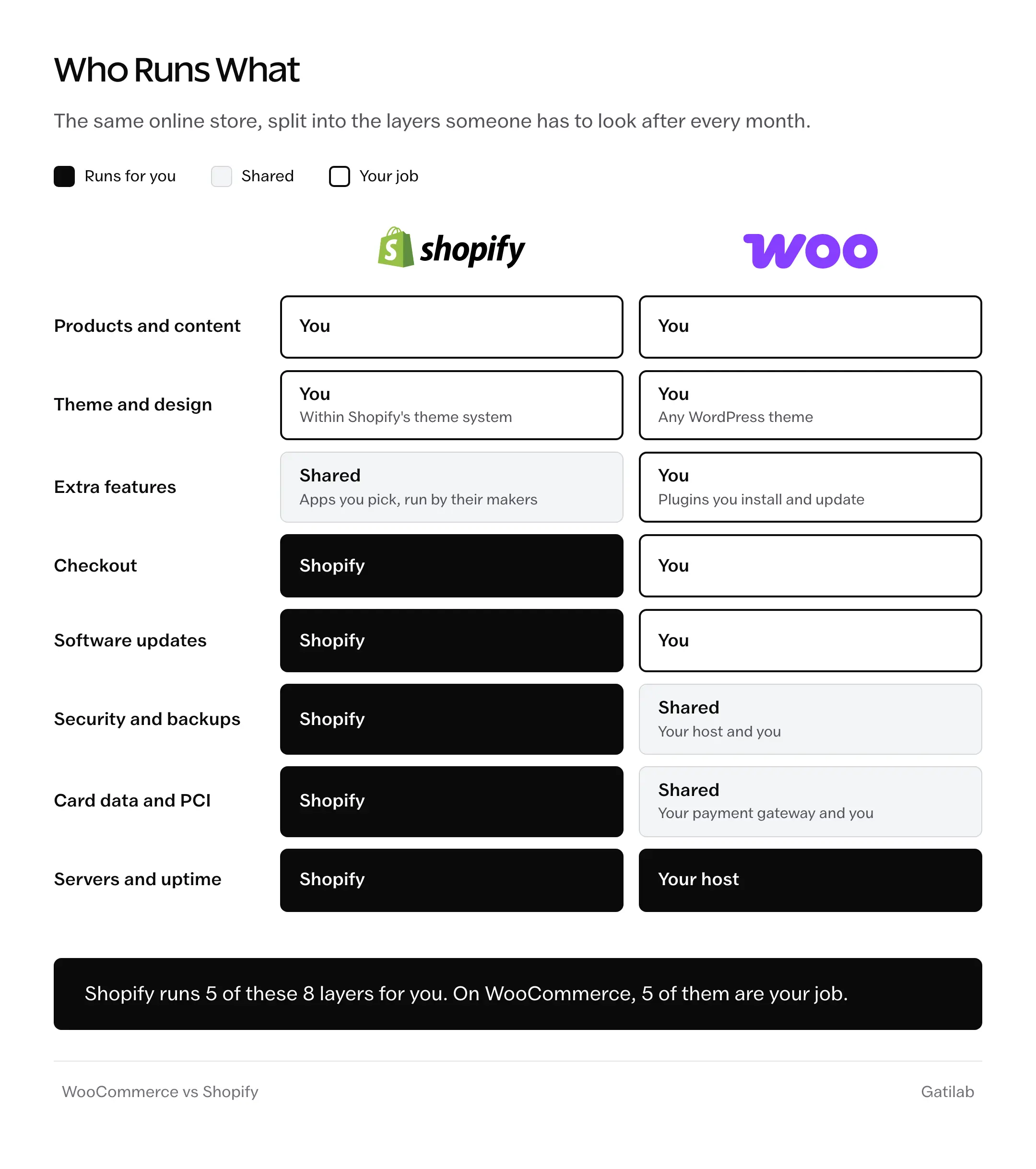
On a WooCommerce store, the jobs split like this:
- Your host runs the server and, on most managed plans, the daily backups.
- You, or whoever you hire, update WordPress, WooCommerce, the theme and every plugin, and test the checkout after each round of updates.
- A hosted payment form from Stripe or WooPayments keeps card numbers off your server, which shrinks your part of PCI compliance without removing it.
- Security for the rest of the site, like login protection and firewall rules, is shared between you and your host.
None of this is hard, but all of it is regular, and a store where nobody owns it slowly falls behind.
There are broadly three ways to handle that upkeep on WooCommerce.
You can do it all yourself. It costs nothing but a few hours a month and works well if you are comfortable testing updates on a staging copy before they touch the live store. Those who update plugins straight on a live checkout on a Friday evening must be having very peaceful weekends.
Or, you can put the store on a managed WordPress host that looks after the server and the backups, and keep only the plugin updates and checkout tests for yourself.
Or, you can pay a developer or a maintenance plan to own all of it. That costs the most each month, and it is the closest WooCommerce gets to Shopify’s hands-off feel.
For most small stores the middle option makes the most sense. Doing everything yourself works until the busy week when you skip it, and a full maintenance plan can cost more than the Shopify plan you were trying to avoid.
Products and Checkout
Shopify keeps its product model simple on purpose. Each product can have up to 3 options and up to 2,048 variants across them, and anything beyond that, like a fourth option or a price calculated from what the buyer enters, needs an app or a workaround.
The checkout is locked down in the same way. Every Shopify store gets the same fast, well-tested checkout, which is a real advantage, but changing the checkout steps themselves is limited to Shopify Plus, and the other plans can customize only the thank-you and order status pages.
WooCommerce has no fixed limit on attributes or variations, and the product page and checkout are both code you can change. That is why stores with unusual products, like bookings or made-to-order goods, so often end up on it.
Say you sell T-shirts with 4 options per shirt. On Shopify, the fourth option goes into an app or into separate products, and both make the catalog harder to manage. On WooCommerce, it is just a fourth attribute.
If your hardest product fits in 3 options and a standard checkout, Shopify’s limits will not bother you at all. If it doesn’t, that one product is worth setting up on both platforms before you decide anything else.
For the WordPress side, our guide to WordPress ecommerce plugins covers when WooCommerce is the right plugin and when a lighter one fits better. And on either platform, the biggest checkout gains usually come from the fixes in the checkout optimization guide.
WooCommerce vs Shopify SEO
Both platforms can rank well. The difference is how much of the SEO you control and how much content you plan to publish.
On Shopify:
- URLs carry fixed prefixes, like
/products/and/collections/, and they cannot be removed. - Titles, meta descriptions, alt text, sitemaps and canonical tags are built in, and robots.txt can be edited through a theme template.
- The blog is basic, with limited layouts and tags in place of categories.
On WooCommerce:
- Every URL, including the product and category bases, can be changed.
- WordPress is built for publishing, and SEO plugins handle schema, redirects and sitemaps.
- Speed depends on your hosting and plugins, and a slow store gives back whatever the extra control won.
A store that grows through paid ads and social media will not feel Shopify’s limits much. A store that plans to win customers with guides and other useful content is better off on WordPress, where the store and the content share one site. The Shopify SEO guide covers what is worth doing on Shopify either way.
Payment Gateways and Transaction Fees
Shopify Payments is available in about 40 countries, and whether yours is one of them changes the math more than anything else in this comparison.
- Supported: the US, Canada, the UK, most of the EU, Australia, New Zealand, Japan, Singapore, Hong Kong and the UAE, among others.
- Not supported: India, Brazil, South Africa, Nigeria, Indonesia and Pakistan, among many others.
Outside the supported countries, a Shopify store takes cards through a third-party provider, like Razorpay or PayU in India, and Shopify adds its own fee on every one of those orders, at the same rates as above, from 2% on Basic down to 0.2% on Plus. Manual methods such as cash on delivery and bank transfers don’t carry the fee, which helps stores where a lot of orders are COD.
For an Indian store doing ₹10 lakh a month in online payments on Shopify Basic, that fee comes to ₹20,000 a month on top of what the gateway charges.
WooCommerce has no platform fee in any country. You install the gateway your customers already trust, and you pay that gateway’s rate and nothing else.
The fee is the one line in this comparison that can decide it on its own, so it is worth checking before anything else. If you need the gateways set up on either platform, our payment gateway setup team handles that.
Owning Your Data and Leaving Later
Nobody picks a platform planning to leave it, but it is worth knowing what moves before you commit.
On Shopify:
- Products, customers and orders export as CSV files from the admin.
- Blog posts and pages have no CSV export, so moving them takes an app or the API.
- The theme is written in Shopify’s own template language and the apps run on their makers’ servers, so neither comes with you.
On WooCommerce:
- The whole store sits in your own database and files, and you can move it to another host whenever you like.
- Products export to CSV out of the box, and exporting WooCommerce orders takes a report download or a plugin.
Lock-in is no reason to avoid Shopify, but it is a good reason to keep your product data clean and plan your URLs from the first day.
Switching Between WooCommerce and Shopify
Stores move in both directions, and the same few things decide whether a move goes smoothly:
- Products, customers and order history move with import tools or migration apps.
- Customer passwords can’t move, because each platform stores them in its own format, so customers need to set a new one, and the store should email them before launch to say so.
- Every old URL needs a redirect to its new address, or the rankings and backlinks built on those URLs are lost.
- Active subscriptions are the hardest part, because saved cards live with the payment gateway and don’t always transfer.
Most migration problems come from missing redirects and customers who can’t log in, not from the product import. Our website migration team handles both when a store moves.
WooCommerce vs Shopify Decision Scorecard (PDF and Word)
Your numbers, your products and your team, on a few pages you can fill in on screen or print. Most stores have a clear answer by the last page.
- A 3-year cost worksheet for Shopify and WooCommerce, with the card fee formulas written out
- Deciding questions that each lean toward one platform, with space to score your answers
- A product and checkout fit check for your hardest product
- An upkeep plan that names who handles updates, backups and fixes
- A checklist for switching platforms later, covering redirects and customer passwords
Free to use for your own store or a client’s.
The Limits
This comparison works from US list prices and standard card rates. Your own numbers will differ with your country and the tools you choose, so the worksheet matters more than the example above.
No platform makes a store fast or good at selling on its own. A heavy Shopify theme running a dozen apps can be as slow as a neglected WooCommerce store, and a well-built store on either can be quick.
Some businesses fit neither – large catalogs with complex wholesale needs often look at BigCommerce or a custom build, which is beyond what this comparison covers. The roundup of ecommerce platforms for startups looks at the wider field.
Mistakes That Make Either Choice Expensive
Comparing Shopify’s $29 plan with WooCommerce’s free plugin. Neither number is what a store costs to run, and the comparison quietly favors whichever platform you already liked.
Putting a WooCommerce store on the cheapest shared hosting. It works fine for the demo and then slows down right when a sale or an ad campaign brings the traffic you paid for.
Adding a Shopify app for every small need. Each one adds a monthly bill and often a script on every page, and a year later the store is paying for apps nobody remembers installing.
Choosing Shopify outside the Shopify Payments countries without pricing the third-party fee. The 2% looks small on the pricing page and large on the monthly statement.
Letting nobody own WooCommerce updates. Plugins fall behind and a security hole stays open, and when the big update finally happens it breaks more at once than small regular ones would have.
Judging a platform by its demo store instead of your hardest product. Simple products work everywhere, and the one with 4 options or a custom price is the one that decides.
FAQs on WooCommerce vs Shopify
Is WooCommerce cheaper than Shopify?
Not automatically, because the plugin is free but the hosting and upkeep usually bring a small store’s running cost close to a Shopify plan with a few apps. WooCommerce becomes clearly cheaper when Shopify would charge its third-party transaction fee, which happens whenever cards go through a provider other than Shopify Payments.
How much does Shopify take from a $20 sale?
With Shopify Payments on the Basic plan in the US, the online card rate is 2.9% plus 30 cents, which comes to 88 cents on a $20 sale, and Shopify adds nothing on top. With a third-party gateway you pay that gateway’s fee plus Shopify’s 2% on Basic, which is another 40 cents.
Is Shopify better for SEO than WooCommerce?
Neither is better out of the box. Shopify covers the basics well but locks parts of the URL structure, while WooCommerce gives full control and runs on WordPress, which is stronger for content. Stores that grow through content usually do better on WooCommerce, and stores that grow through ads rarely notice a difference.
Which is better for dropshipping, WooCommerce or Shopify?
Shopify suits most people here. Its app store has mature dropshipping and print-on-demand integrations, and a dropshipping store rarely needs the custom product logic WooCommerce is good at. WooCommerce works too, through plugins, but it asks for more setup.
What are the disadvantages of WooCommerce?
You are responsible for the hosting and the upkeep, and the store’s speed depends on how well it is built and hosted. Many useful features come from paid extensions with yearly renewals, and a store with too many plugins gets harder to update safely.
Is Shopify or WooCommerce better in India?
For most Indian stores WooCommerce works out cheaper, because Shopify Payments isn’t available in India and Shopify adds 2% on the Basic plan, and less on the higher plans, to every order paid through a gateway like Razorpay. Shopify still suits Indian stores that want a hands-off setup, and cash on delivery orders don’t carry that fee.
What is the difference between WordPress and Shopify?
WordPress is a publishing system and doesn’t sell anything on its own. Adding the WooCommerce plugin turns it into a store, so for selling online, WordPress vs Shopify is really WooCommerce vs Shopify.
Final Remarks
By now you should know which way your store leans and roughly what it will cost on each platform. The one idea I want you to keep is to price the next 3 years and name the person who will look after the store before you pick, because those two answers settle it more often than any feature list.
The scorecard above covers both, and it is worth filling in again whenever your sales or your team change a lot. If you would like help with the build or the move, Gatilab works on both platforms through WooCommerce development and Shopify store design, and we are happy to look at your numbers with you.
I hope this makes the choice a little easier, and that your store does well on whichever platform it ends up on.
Tell Google you want more of this.
Add Gatilab as a preferred sourceOne tap, and this site shows up more often in your own Top Stories, AI Overviews and AI Mode. Remove it any time.