
Best Cheap Web Hosting: 8 Honest Picks With Renewal Pricing (2026)
Best cheap web hosting in 2026 is hosting that costs under $5 per month at the intro price and stays under $11 per month on renewal. Eight providers fit that bracket. Three are worth your money. Five aren’t, once you factor in the renewal hike, the support quality, and the actual performance you get when traffic shows up.
This guide compares cheap web hosting by introductory terms captured in October 2026, renewal, required prepayment, included services, workload, and support boundary. The renewal price belongs beside the first payment because both determine the ownership cost.
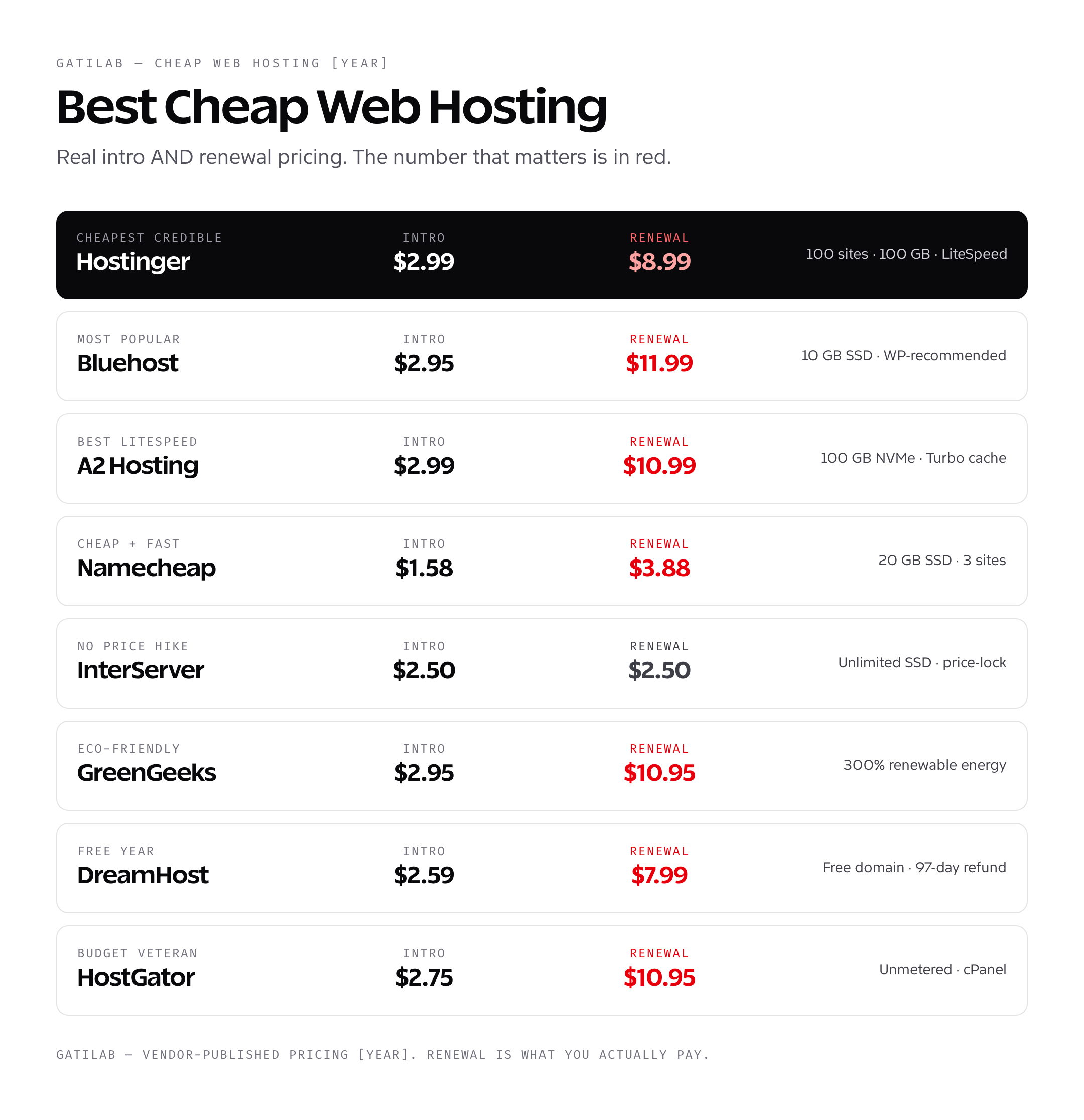
The cheap web hosting trap (and how to avoid it)
Almost every cheap web hosting provider runs the same playbook. Big intro discount on a long prepay, then a much higher rate on renewal. Bluehost’s Starter plan is $3.99/month on a 36-month term and renews at $9.99/month, two and a half times the intro rate. HostGator says its shared hosting pricing reflects a discount on the first invoice only, so the Hatchling plan renews at the regular rate too. The math behind the marketing: lock you in for three years at a low price, and recover the discount every year after that at full retail.
The gap is smaller at some hosts. InterServer Standard Web Hosting costs $2.50 for the first month, or $2.50/month on a 12 or 24-month prepay, and renews at $7/month. That is still a hike, so budget with the renewal figure, not the $2.50. Do the same math for every host on your shortlist before you call one cheap.
Read the renewal pricing on every host’s pricing page. It is in tiny grey text below the headline price, never in the marketing graphic. If you can’t find it, that’s the answer: the renewal is bad enough that the host doesn’t want you seeing it before checkout.
Cheap Web Hosting Candidates
Cheap hosting in October 2026 is a billing-term comparison before it is a performance comparison. Capture the first payment, renewal, term, currency, tax, domain, email, backups, migration, storage, bandwidth, file limits, and refund terms.
| Candidate | Use in the comparison |
|---|---|
| Try Hostinger | Record the current introductory term and renewal separately |
| Try InterServer | Verify current price-lock language and resource policy |
| Try DreamHost | Verify term, renewal, refund, email, and migration conditions |
| Bluehost review | Match its plan and date to the current checkout |
| Try Bluehost | Capture checkout add-ons and renewal |
| Try HostGator | Capture add-ons, renewal, and fair-use terms |
A plan is not cheapest when competing rows use different contract lengths or exclude a required domain, email account, backup, migration, or security service.
Cheap Web Hosting Price Comparison 2026
The only honest cheap-hosting price is a term-normalized total. Introductory rates, renewal rates, required prepayment, domain renewal, email, backups, and migration belong in the same calculation.
| Example input | Value | 36-month effect |
|---|---|---|
| Introductory rate | $2.99/month for 12 months | $35.88 |
| Renewal rate | $11.99/month for 24 months | $287.76 |
| Base hosting total | $35.88 + $287.76 | $323.64 |
| Effective monthly price | $323.64 / 36 | $8.99/month |
That worked example is a cost model, not a quote from one provider. Run the same formula with the current checkout terms for every host. Add required extras separately, and do not call a plan cheapest until currency, tax, billing term, and renewal conditions match.
- Record whether the domain is free only for year 1 and what it renews at.
- Price mailbox hosting if the plan does not include email.
- Check backup retention, restore fees, migration limits, storage, and inode limits.
- Separate shared hosting from managed WordPress and server-control products.
What you give up with cheap web hosting
Cheap web hosting is shared hosting. You’re sharing a physical server with hundreds of other sites, all competing for the same CPU, RAM, and disk I/O. Performance under load is unpredictable. Support escalates slowly. Server-level customizations are limited.
- No SSH on the cheapest plan tiers (Hostinger Premium is the exception)
- No root access; you can’t install custom software at the OS level
- Resource limits enforced server-side; busy neighbors will throttle your site
- Slower TTFB than managed WordPress hosting (typically 300-800 ms vs 100-200 ms)
- Limited automated backup retention; usually 1 to 7 days max
- Email-based ticket support before chat for non-emergency issues
If your site does serious traffic, runs WooCommerce, or generates real revenue, you outgrow cheap web hosting. The upgrade path is VPS hosting for full control or managed WordPress hosting for hands-off WordPress at scale. Either is a 5x to 10x price jump from cheap shared, but the performance and reliability difference is similarly large.
When cheap web hosting is the right choice
Cheap web hosting is the right choice in three specific cases.
- You’re starting your first website. A personal blog, portfolio, or small business site doing under 1,000 visits/month works fine on any provider in this list. Hostinger Premium is the easiest entry point.
- You’re testing a project before investing. Buy a $2.50/month InterServer plan, run the site for six months, and upgrade if it grows. The cost of testing an idea is now under $30.
- You need to host many small sites cheaply. A freelancer with 10 client sites that each do 200 visits/month can run them all on a single Hostinger Premium ($2.99/month) plan with the 100-website allowance.
Outside those cases, you’re saving $5/month on hosting and losing $50/month in conversion or productivity. The upgrade math usually wins.
How to Benchmark Cheap Web Hosting
The previous host-by-host latency table did not have a preserved raw test archive. Use a controlled 2026 protocol before publishing a performance ranking.
- Deploy the same WordPress fixture, theme, plugins, database, and media.
- Match data-center region and test location.
- Run cold and warm cache tests with at least 5 repetitions.
- Record median and tail TTFB, LCP, requests, bytes, status codes, and cache headers.
- Test concurrency and resource throttling for the intended traffic pattern.
A fastest web hosting result is meaningful only when workload and raw evidence travel with the number.
How to Compare Cheap Hosting Support
Use the same 2026 pre-sale, migration, backup, performance, and outage questions, and preserve the transcripts. Record time to diagnosis and resolution, not only the first automated response.
Check whether support includes WordPress configuration, malware cleanup, email delivery, DNS, SSL, backups, and restores. Cheap plans often narrow that boundary before they reduce the monthly price.
How to switch from cheap web hosting to something better
The migration path matters because most readers will eventually outgrow cheap web hosting. The good news is that every modern host supports two migration paths: a free team-handled migration or a free migration plugin you run yourself.
- Pick the new host. Test it on a staging URL for at least a week before flipping DNS.
- Take a fresh backup on the cheap host (most include daily backups; trigger a manual one).
- Use the new host’s free migration service or All-in-One WP Migration plugin to move the site.
- Verify the migrated copy renders correctly on the new host’s staging URL.
- Update DNS A/AAAA records (or nameservers) to point to the new host. TTL propagation takes 1 to 48 hours.
- Keep the cheap host active for at least 14 days after DNS propagation as a fallback.
- Cancel the cheap host once you’ve verified everything works on the new infrastructure.
I’ve documented the full process step-by-step in my WordPress migration tutorial. The total downtime for a properly-staged migration should be zero. The only thing that breaks is your cheap-hosting bill, which is the point.
What to look for when buying cheap web hosting
Before you sign up for a cheap web hosting plan, run through this checklist. Skipping it is how people end up locked into 36 months of a host they regret.
- Renewal price is published clearly on the pricing page, not buried in footnotes
- Money-back guarantee window is at least 30 days (DreamHost wins with 97 days)
- Free SSL via Let’s Encrypt is included with auto-renewal
- Daily automated backups are included; check retention period
- Free site migration is available, either team-handled or via plugin
- SSH access available on at least one paid tier above the absolute basic plan
- Server location matches your audience geography within 1,500 km
- Storage is SSD or NVMe, not legacy HDD; bandwidth is unmetered or generous
- WordPress is officially supported with one-click install and managed updates
- Support hours are 24/7 with live chat, not just ticket-based
Every provider in this guide ticks at least eight of those ten boxes. The two that consistently get cut are SSH access (rarely on the cheapest tier) and free migration (usually plugin-only at the cheap tier, team-handled on the next tier up).
Cheap web hosting myths worth ignoring
Three myths about cheap web hosting refuse to die. They drive bad purchase decisions every day.
Myth: monthly price determines speed. Reality: server capacity, workload, region, cache state, application code, and traffic pattern all affect performance. Compare hosts with the same fixture and preserved raw runs instead of one unsupported TTFB number.
Myth: unlimited means unlimited. Reality: unmetered bandwidth and unlimited storage have soft caps written into the Terms of Service. If you push past them, the host throttles or migrates you to a higher tier. Hostinger’s “unlimited” Business plan caps at around 200 GB of inode usage and 100 GB of effective storage. HostGator’s “unlimited” plans have similar fair-use clauses. For most sites, you will never hit these caps. For media-heavy sites, you will.
Myth: WordPress.org-recommended means best. Reality: WordPress.org’s hosting recommendations (Bluehost, DreamHost, SiteGround) are partly based on long-standing partnerships, not on annual performance audits. The recommendations are not wrong, but they are not the latest objective ranking either. Hostinger and Kinsta are not on the list and outperform some of the recommended hosts on most metrics.
Frequently asked questions about cheap web hosting
What is the cheapest web hosting that’s actually good?
The answer changes with billing term and requirements. Normalize the first payment, renewal, domain, email, backups, migration, storage, file limits, and support before choosing.
Why does cheap web hosting cost more at renewal?
Introductory discounts and renewal prices are separate contract terms. Compare the effective monthly cost over the same 1-year or 3-year period.
Is cheap web hosting good for WordPress?
It can be suitable for a simple, low-risk site when resource, backup, security, and support limits are acceptable. Traffic count alone does not define the workload.
How should cheap hosting performance be tested?
Use the same WordPress fixture, region, cache state, and at least 5 runs per condition. Record median and tail TTFB, LCP, errors, cache headers, and throttling.
Does cheap hosting include a domain and email?
Sometimes, and often only for a limited term. Price renewal and mailbox hosting separately at the current checkout.
When is cheap hosting the wrong choice?
It is the wrong tier when downtime, slow recovery, weak support, resource contention, or a failed migration can cost more than the hosting savings.
Choose Cheap Web Hosting by Total Cost
Choose the lowest 2026 total cost that meets workload, recovery, support, and migration requirements. Calculate the first payment, 1-year total, renewal year, and 3-year total in one currency.
If the workload is revenue-critical or stateful, compare the broader best web hosting options before treating a low introductory price as savings.
Tell Google you want more of this.
Add Gatilab as a preferred sourceOne tap, and this site shows up more often in your own Top Stories, AI Overviews and AI Mode. Remove it any time.