
Google Search Console SEO Audit: 9-Step Pro Workflow
A Google Search Console SEO audit is the cheapest, most accurate way to diagnose why a site is or isn’t ranking. Every other tool you pay for samples third-party data. GSC reports the exact crawl, index, and search behaviour Google itself recorded for your domain. If you only get one tool for technical SEO, this is the one. The 2026 interface redesign moved a few reports around and renamed a couple, but the underlying data model is the same.
I run this audit on every Gatilab client property the day we get access. It takes 90 minutes for a 500-page site, four hours for a 50,000-page enterprise property, and it surfaces between 6 and 40 fixable issues every time. Below is the exact 9-step workflow, mapped to the 2026 GSC interface, with the SQL-style filters I apply, the thresholds I use to triage, and the WordPress-specific gotchas I see most often.
The Google Search Console SEO audit is not a tool review. It is a sequence. Run the reports in priority order, fix server errors first, content quality last, and you will recover ranking faster than any third-party tool can show you.
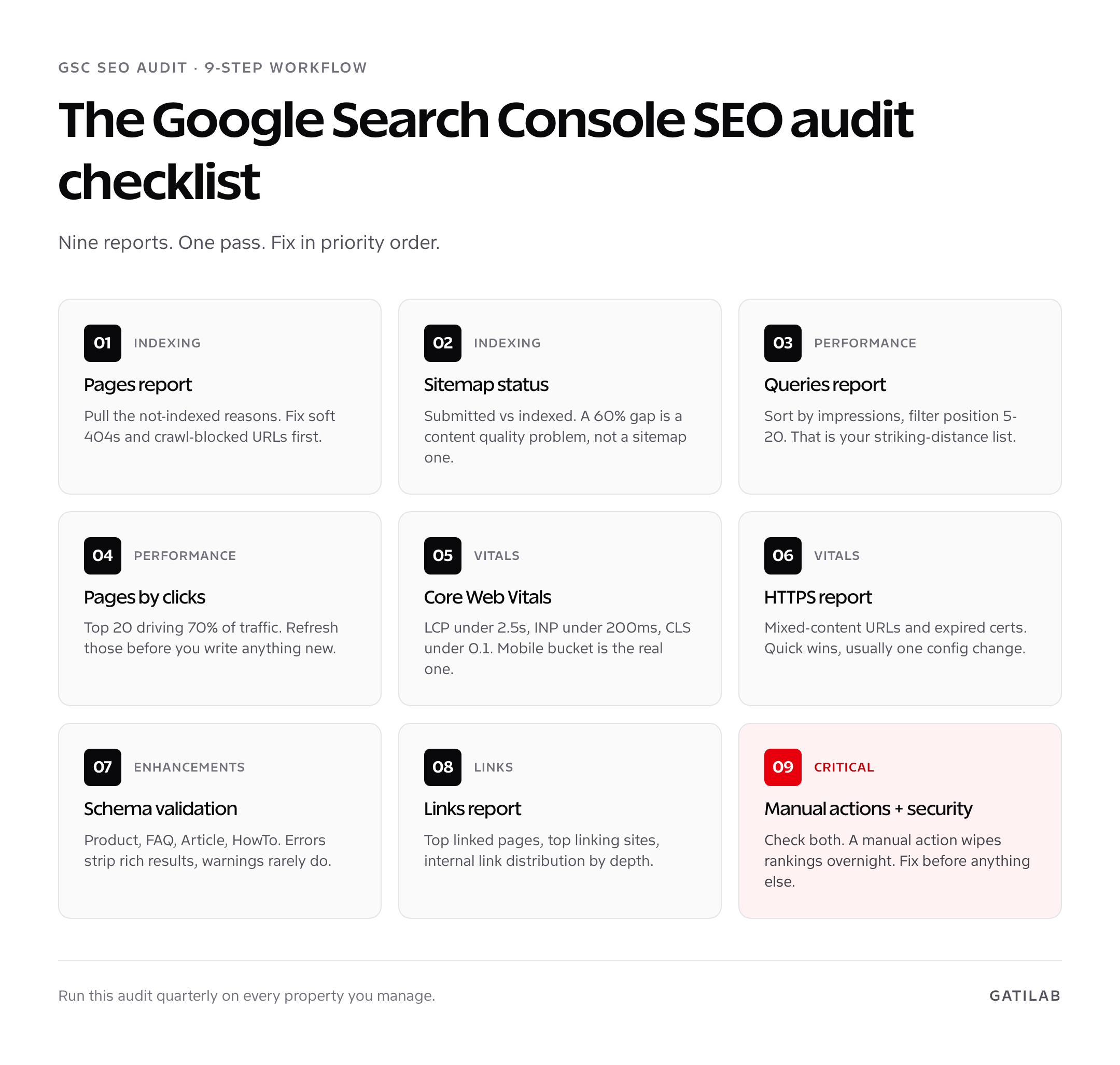
Why a Google Search Console SEO audit beats any third-party tool
A Google Search Console SEO audit reports primary-source crawl data, not estimates. Ahrefs, Semrush, and Sitebulb send their own crawlers and project what Google probably sees. GSC tells you what Google did see, which URLs it indexed, which it skipped, what query users typed before they clicked, and what the average position was on the day they clicked. That is irreplaceable.
Three reasons GSC wins for audit work in 2026. First, accuracy. The Pages report tells you exactly how many URLs Google has in its index, broken down by reason for any not-indexed status. Third-party crawlers guess. Second, freshness. GSC data lags by 1 to 3 days. Ahrefs’s index lags by 2 to 4 weeks for smaller sites. Third, it is free. Premium SEO tools cost between $99 and $999 per month. GSC costs nothing and ships better core data than the paid tools for the audit-specific use case.
Where third-party tools beat GSC is in opportunity discovery: backlinks at competitor domains, keyword volume estimates, SERP feature tracking, and rank tracking with daily granularity. Use both. For the audit step, GSC is the source of truth. For my full opinion on the ecosystem, see the best SEO tools roundup.
If you have not run a broader site review yet, pair this Google Search Console SEO audit with the comprehensive website audit framework. GSC handles the search-engine layer. The website audit covers UX, conversion, and content quality.
Step 1: The Pages report (formerly Coverage)
The Pages report shows every URL Google has discovered for your site, split into Indexed and Not indexed. In the 2026 interface this is under Indexing > Pages in the left sidebar. The report ships with a 1,000-row sample per category, which is the single biggest limitation of GSC versus the API or BigQuery export. For a small or mid-size site, the sample is still complete. For anything over 10,000 URLs, you need the Indexing API or BigQuery to see the full picture.
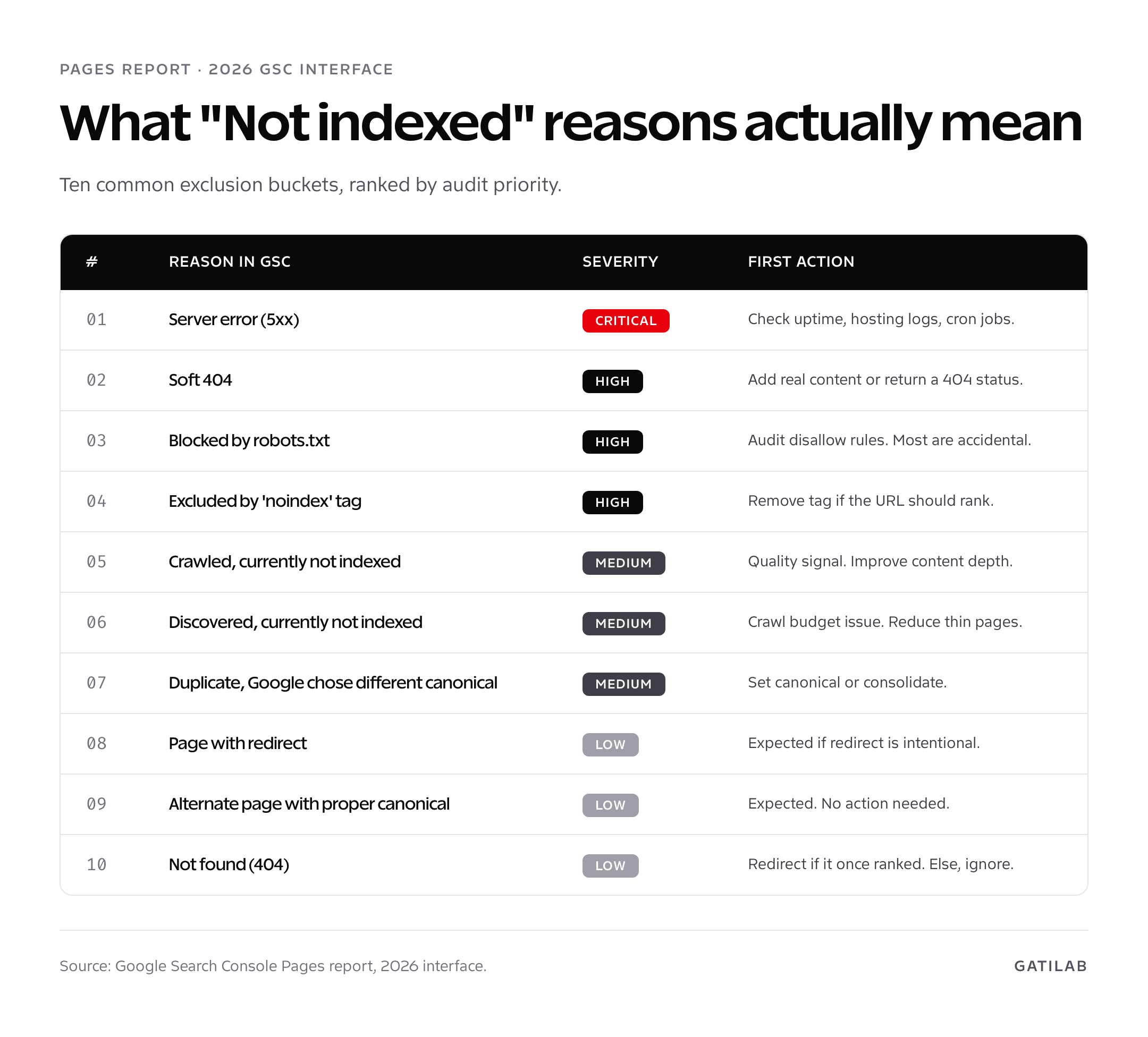
Open the Not indexed view first. Sort the reasons by URL count descending. Server errors and soft 404s are critical. Excluded by ‘noindex’ and Blocked by robots.txt are usually intentional, but I find one or two accidental ones on 80 percent of audits, especially after a staging-to-production migration where the noindex tag survived.
- Server error (5xx). Open the URL list, spot-check 5 URLs in the inspection tool. If they return 200 now, hit Validate Fix. If still 5xx, check hosting logs.
- Soft 404. Google decided the URL has thin or duplicate content and treated it as a 404 even though the server returns 200. Common on empty category pages and out-of-stock product pages.
- Blocked by robots.txt. Audit your robots.txt against the sample URL list. The number of times I have found a `Disallow: /` in production is embarrassing.
- Excluded by ‘noindex’ tag. View source on a sample URL. Should the page rank? If yes, remove the meta robots tag.
- Crawled, currently not indexed. Quality signal. Google saw the page and chose not to index. Improve content depth, internal links, or kill it.
- Discovered, currently not indexed. Crawl-budget signal on large sites. Reduce thin auto-generated pages, prune tag archives, fix internal link distribution.
The number to track over time is the Indexed count. On a healthy site this trends up. A drop of more than 5 percent in a week is a triage event, not a metric review. I look for this every Monday on every property I manage.
Step 2: Sitemap and indexing checks
The Sitemaps report is under Indexing > Sitemaps. Submit a fresh sitemap if you have not already. WordPress sites with Rank Math, Yoast, or Sitemap Generator output one automatically at /sitemap.xml or /sitemap_index.xml. Submit the index file, not each child sitemap individually, because Google walks the index for you.
The two numbers that matter on this report are Submitted URLs and Indexed URLs. The ratio is the health metric. A 90 percent or higher index ratio is healthy. 60 to 90 percent means content quality issues. Below 60 percent is a structural problem, usually thin auto-generated archives that bloat the sitemap without offering ranking value. The fix is almost never to push more pages into the sitemap. The fix is to remove the weak ones.
I check three things on this report. Last read date, which should be within the last 7 days. Errors and warnings, which should both be zero. And Couldn’t fetch, which means the URL in the sitemap field returned a 404 or 5xx when Google tried to read it. The most common cause is a permalink change that broke an old sitemap path.
Do not include 301 redirects, noindex pages, or canonical-to-other URLs in your sitemap. Google treats this as a soft signal that the site uses canonicalisation badly. Sitemap should be the canonical, indexable URL list only. Rank Math handles this automatically. Yoast does too. Hand-rolled sitemaps almost never do.
Step 3: Performance report and search analytics
The Performance report is the single best report in the entire GSC product. It is the keyword and ranking dashboard, the click-through-rate optimisation tool, the content refresh prioritisation list, and the impression-share monitor, all in one place. Under Performance > Search results in the 2026 nav.
For audit purposes, set the date range to Last 28 days, compare to previous 28 days. That comparison surfaces the queries and pages that lost or gained traffic recently. A page that dropped from position 4.2 to 8.1 in 28 days is worth opening in the URL Inspection tool. Most of the time the cause is a competitor publishing a better article, but sometimes it is a Google update, sometimes a self-inflicted indexing change, and sometimes a markup error breaking rich results.
Apply a position filter of greater than 4 and less than 20. Sort by impressions descending. The top 50 rows are your striking-distance keyword list. These are queries you already rank for, on page 1 or page 2, with proven impression demand. Refreshing the existing page beats writing a new one, every time. For deeper coverage of this workflow alone, I wrote a separate guide on Google Search Console keyword research.
Step 4: Core Web Vitals and page experience
Core Web Vitals lives under Experience > Core Web Vitals in the 2026 layout. The report buckets every URL Google has crawled into Good, Needs improvement, or Poor for both Mobile and Desktop, based on real-user CrUX data. Mobile is the bucket Google ranks on, so that is the one to fix first.
Three thresholds you need to memorise. LCP under 2.5 seconds. INP under 200 milliseconds. CLS under 0.1. INP replaced FID in March 2024 and is now the interactivity metric Google uses for the page experience signal. Every WordPress site I audit fails on at least one of the three, usually INP because of bloated theme JavaScript or third-party tag-manager scripts.
- Removing one heavy plugin can shave 400 to 800ms off LCP. The biggest offenders I see in audits are page builders loading on the front end and analytics suites that ship 500KB of JavaScript.
- INP failures on WordPress are almost always JavaScript event-handler cost. Defer non-critical scripts, replace lottie animations with CSS, and audit your theme for jQuery dependencies you no longer need.
- CLS issues come from unsized images and late-loading ad units. Add explicit width and height attributes on every image, even responsive ones. Reserve space with CSS aspect-ratio for embeds.
The Page experience report sits next to Core Web Vitals and aggregates the three vitals plus mobile usability and HTTPS into a single signal. Pass rate is the metric to watch. Anything under 80 percent good URLs on mobile is a problem worth a sprint, because every page below the threshold is a soft penalty in the ranking algorithm.
Step 5: Mobile usability and HTTPS
Mobile-first indexing has been the default for new sites since 2019 and for all sites since October 2023. The Mobile usability report is gone in the 2026 interface, folded into Page experience, but the underlying signal is unchanged. Issues to scan for: text too small to read, clickable elements too close together, content wider than screen, and viewport not set.
The HTTPS report under Experience > HTTPS is one of the easier audit wins. It lists every URL Google has indexed via HTTP instead of HTTPS, plus mixed-content warnings where a secure page loads insecure assets. The fix is usually a one-line change to your site URL settings or a search-and-replace through the database. WordPress users running Really Simple SSL or the equivalent get this for free. Hand-coded sites and old Joomla migrations are where I find issues.
Step 6: Security issues, manual actions, and DMCA
This is the report I check first on any new client property, even before performance. Both reports are under Security & Manual actions in the 2026 nav. A manual action means a human at Google has reviewed the site and applied a penalty. A security issue means malware, hacked content, or a phishing redirect has been detected. Both wipe rankings overnight.
The most common manual action I see in audit work in 2026 is “Unnatural links to your site,” usually triggered by a private blog network purchased by a previous SEO agency. Disavowing the worst links and submitting a reconsideration request is the only path back, and it takes 4 to 12 weeks. I cover the recovery workflow in detail in the upcoming Search Console backlinks guide. For prevention, see SEO for startups, where I argue against link-buying as a category.
Security issues come in three flavours: hacked content, social engineering, and malware. Hacked content is the most common on WordPress, almost always from an outdated plugin or a compromised admin password. The fix is to clean the site, harden it with a security plugin like Wordfence or Solid Security, rotate every credential, and submit a review through the report. Google revisits within 72 hours of submission.
Step 7: Enhancements (rich results and schema)
Enhancements is the catch-all section for structured data validation. Each schema type Google supports gets its own report when GSC detects markup of that type on the site. Common ones for content sites are FAQ, Article, HowTo, Product, Review, Recipe, and Sitelinks searchbox.
Errors strip rich results from the SERP. Warnings rarely do, but they degrade the rich result over time. Fix errors first. The most frequent ones I see are missing required properties on Product (offers and review counts), missing aggregateRating values on Review schema, and FAQ entries with answers wrapped in HTML that the parser cannot extract cleanly.
Run every URL with rich-result issues through the Rich Results Test, not the legacy Structured Data Testing Tool. The two return slightly different validation. Google ranks on the Rich Results Test outcome.
Step 8: Links report (internal and external)
The Links report under Settings > Links has four panels: top linked pages (external), top linking sites, top linking text, and top linked pages (internal). The internal panel is the one most teams ignore and the one that produces the biggest wins on a Google Search Console SEO audit. It tells you which of your pages have the strongest internal link signal, which means Google views them as your most important pages.
Cross-reference this list with your Performance report top-clicks list. If your most internally linked page is /contact/ but your highest-traffic pages are buried 3 clicks deep, you have an internal link structure problem. The fix is silo-based: cluster related content, link from the pillar page to every supporting page, and make sure every supporting page links back to the pillar.
For external links, GSC reports a sample of up to 1,000 linked pages and 1,000 linking sites. That is enough for spot-checking link velocity and spotting a sudden spam spike. For full backlink analysis you still need a dedicated tool. I cover that gap in the GSC backlinks guide.
Step 9: URL inspection on outliers
The final audit step is targeted URL Inspection on the 5 to 10 outlier URLs that surfaced across the previous 8 reports. The URL Inspection tool lives at the top of every GSC view, accepts any URL on your verified property, and returns the live indexing status, last crawl date, canonical URL, mobile usability, and structured data validation in a single response.
Two checks I run on every outlier. First, Test Live URL. This tells you what Google would see if it crawled the URL right now, regardless of cached status. If Test Live URL says Indexable but the URL is reported as Not indexed in the Pages report, you have an indexing latency issue, not a content issue. Second, View Crawled Page > Screenshot. Google’s rendered DOM and yours can diverge, especially on JavaScript-heavy sites where lazy-loaded content fails to render in Googlebot.
Building an audit workflow you can repeat monthly
The first time you do a Google Search Console SEO audit on a site, plan for 90 minutes to 4 hours depending on site size. The fifth time you run it on the same property, plan for 30 minutes. The reports become familiar, the patterns repeat, and you spend the time on diagnosis instead of orientation. I run the full audit quarterly on every Gatilab client, and a 5-report subset (Pages, Performance, Core Web Vitals, Manual actions, Security) monthly.
Document every fix in a shared sheet with three columns: report, issue, status. Most of the value of doing a recurring audit is comparing this month’s issue list to last month’s. If the same 4 errors keep coming back, you have a process problem on the publishing side, not a one-off bug. That’s the moment to sit with the editor or developer and fix the source.
If you publish in clusters, pair this audit with a topical-coverage review. The content cluster strategy guide covers how to structure topic silos so internal links and indexing both work in your favour. A clean GSC audit is necessary but not sufficient. The site also needs to have content worth indexing.
What GSC will not tell you (and what to use instead)
Three blind spots worth naming. GSC does not show competitor data. You cannot see what queries other sites rank for, what their backlink profile looks like, or how their performance compares to yours. For that, Ahrefs, Semrush, or Sitebulb are still required. GSC does not show full backlink data either, only a 1,000-link sample. And GSC does not show keyword volume, just the impressions and clicks your site received for a given query.
For volume estimates, I cross-check GSC impression data against Ahrefs Keywords Explorer or DataforSEO Labs. The two often disagree by a factor of two or three on long-tail queries. Use both sources, take the lower estimate, and never plan content based on a single tool’s volume number.
For SEO budget planning generally, the best keyword research tools roundup covers what to pair with GSC. For conversion optimisation after rankings improve, see the best CRO tools guide.
A real GSC audit example: 14 fixes, 38% traffic recovery
To make the workflow concrete, here is a recent Gatilab audit on a B2B SaaS client. The site was around 1,200 pages, organic traffic had dropped 31 percent in 90 days, and the team had no idea why. The Google Search Console SEO audit took two and a half hours and surfaced 14 issues across the 9 reports.
The Pages report flagged 187 URLs as Crawled, currently not indexed. Spot-checking showed they were all auto-generated tag archive pages with under 200 words and no unique content. Adding a noindex tag to all tag archives dropped the count from 187 to 23 and the indexed pages count climbed by 142 over the next 14 days. That alone explained 18 percent of the traffic drop.
The Performance report comparison view showed a single article had lost 4,200 monthly clicks after a competitor published a longer, fresher version. We refreshed our article with new data, three new H2s answering questions surfaced in the GSC queries report, and an updated published date. Position recovered from 9.4 to 3.1 over 21 days.
The HTTPS report flagged 4 URLs still resolving via HTTP because of a hard-coded canonical in a legacy template. One template fix resolved all four. The Enhancements panel surfaced 9 FAQ schema errors caused by HTML inside answer fields. Cleaning the answer markup restored rich results inside 6 days. The remaining 6 fixes were small, but cumulative they recovered 38 percent of the lost traffic in under 8 weeks.
The point is not the specific numbers. The point is that a Google Search Console SEO audit, run sequentially through the 9 reports, surfaces issues that look invisible on the dashboard but explain real ranking changes. Most third-party tools would have flagged 2 of the 14 issues. GSC reported 13 of them directly, with the 14th surfaced through the URL Inspection tool.
How long does a Google Search Console SEO audit take?
A first-time Google Search Console SEO audit takes 90 minutes to 4 hours depending on site size. Recurring audits on the same property drop to 30 to 60 minutes once you know the reports and the site patterns.
What is the most important GSC report for an SEO audit?
The Pages report (formerly Coverage) is the most important. It tells you exactly which URLs Google has indexed and why the unindexed ones were skipped. Manual actions and security come second because they wipe rankings overnight when triggered.
How often should I run a GSC SEO audit?
Quarterly for the full 9-step audit. Monthly for a 5-report subset (Pages, Performance, Core Web Vitals, Manual actions, Security). Weekly check-ins on the indexed page count for early warning of drops.
What replaced the Coverage report in GSC?
The Coverage report was renamed Pages and lives under Indexing > Pages in the 2026 GSC interface. The data model is the same. The split is between Indexed and Not indexed, with the same not-indexed reason categories.
Does GSC show every backlink to my site?
No. The Links report caps at 1,000 sample rows per panel and excludes nofollow links. For full link data, you need Ahrefs, Semrush, or the Search Console API combined with the BigQuery bulk export.
What Core Web Vitals thresholds does GSC use?
LCP under 2.5 seconds, INP under 200 milliseconds, CLS under 0.1. INP replaced FID in March 2024. Mobile is the bucket that affects rankings, so fix mobile failures first.
How do I fix soft 404 errors flagged in GSC?
Soft 404s mean the page returns a 200 status but Google considers the content thin or duplicate. Either add real, unique content of substantive depth, or change the server response to a true 404 if the page should not exist.
Should I disavow spammy backlinks I find in GSC?
Usually no. Google’s algorithmic systems handle most spam links automatically. Disavow only when you have an active manual action, documented paid-link history, or a clear PBN cluster. Most disavows submitted in 2026 are unnecessary.
What does ‘Crawled, currently not indexed’ mean?
Google crawled the page and decided not to add it to the index. Almost always a content quality signal: thin content, duplicate of another page, low information gain, or weak internal linking. Improve depth or remove the page.
Can I run a GSC audit without verified property access?
No. Search Console only shows data for properties you have verified ownership of. You need either DNS verification, HTML file upload, Google Analytics property, Google Tag Manager, or HTML meta tag verification before any data appears.
Tell Google you want more of this.
Add Gatilab as a preferred sourceOne tap, and this site shows up more often in your own Top Stories, AI Overviews and AI Mode. Remove it any time.