
Lead Nurturing Email Examples for Service Businesses
A prospect asks for a guide, and your next email says “Just checking in.” That gives them almost no reason to reply. It gets worse when the reminders keep coming after the person has already booked a call or told you they aren’t interested.
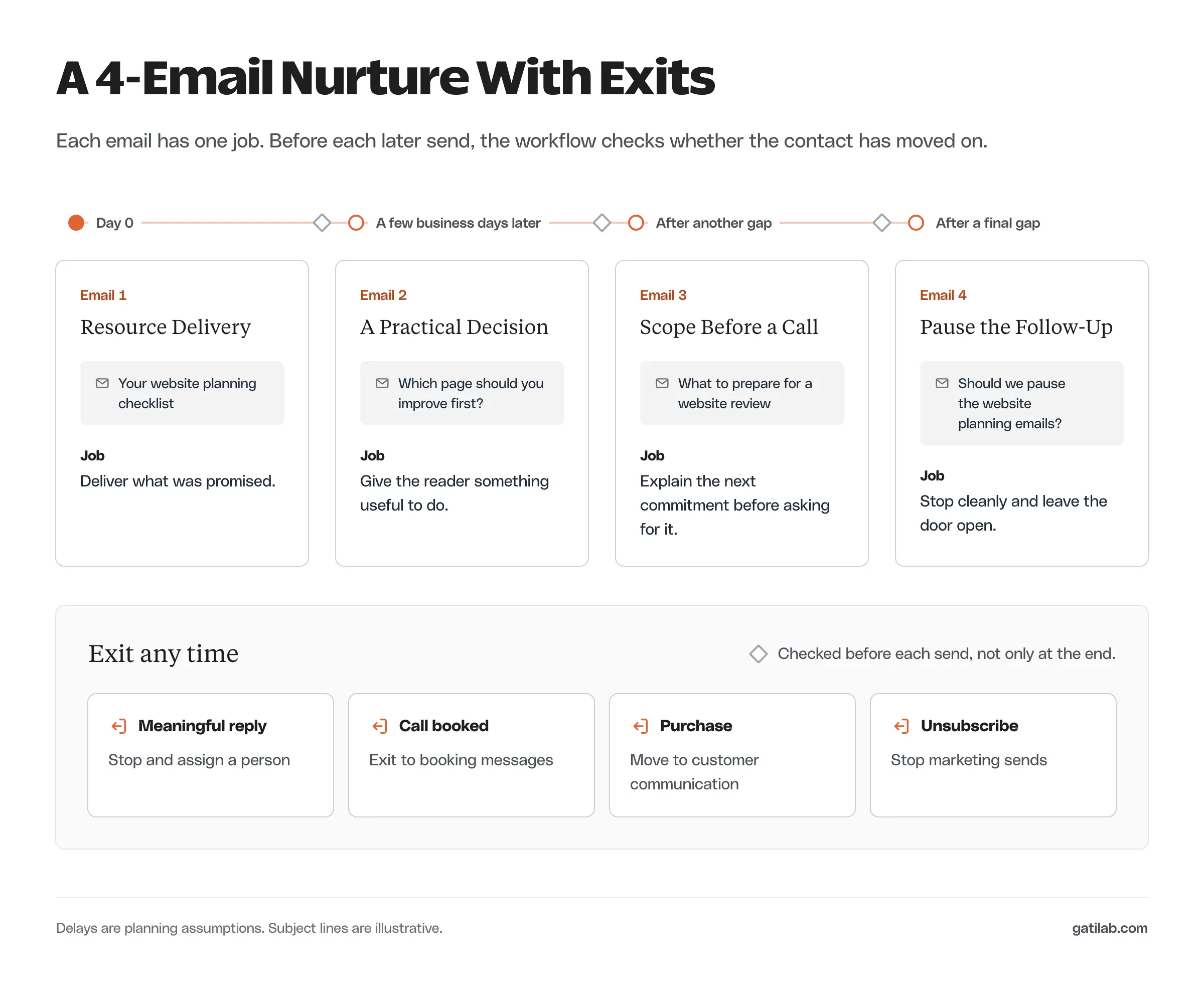
Good lead nurturing email examples answer a useful question at the right point in the conversation. I recommend starting from what the prospect actually requested, deciding what each message adds, and writing the stop rules before the copy. The 4 emails below use a fictional website-services business, so you can adapt them without mistaking them for a tested campaign.
Choose the Right Nurture Sequence
A resource request and a service inquiry need different follow-ups. The person who downloaded a checklist may still be learning. The person who described a project needs a specific answer from someone who can assess it.
The examples start with a subscriber who asked for a website planning checklist and agreed to relevant follow-up. The fictional business helps small companies plan website redesigns. The delays between emails are starting assumptions, not a claim about ideal sending frequency.
A contact enters the sequence only when all of these hold:
- They requested the checklist.
- Their subscription status allows the follow-up.
- They aren’t already a customer or in an active sales conversation.
- They aren’t unsubscribed or otherwise suppressed.
An inquiry that needs a human answer should go to that human. Automation can acknowledge receipt, but it shouldn’t pretend someone reviewed a project when nobody has.
Lead Nurturing Email Examples
Each of the 4 messages has a different job, and each comes with complete copy. The footer in your version must carry your real business details and a working unsubscribe link.
Resource Delivery
This email delivers exactly what was promised, plus one specific invitation to reply.
Subject: Your website planning checklist
Hi [First name],
Here’s the checklist you requested: [Checklist link].
I’d start with the question about what your website needs to do for the business. A redesign is easier to plan when you can describe the action that is failing.
You can reply with the page that’s giving you trouble. We’ll tell you whether it looks like a design problem or something that needs a closer technical review.
[Sender name]
The reply invitation is optional and specific, so the person knows what kind of answer would actually help.
Personalization needs a fallback. If you didn’t collect a reliable first name, a plain “Hi” beats a broken merge field or a wrong guess.
A Practical Decision
The second email gives the reader something to do without buying anything.
Subject: Which page should you improve first?
Hi [First name],
If you’re planning a redesign, you can begin with the page closest to the action you want visitors to take.
For a service business, that may be the service page or inquiry form. For a store, it may be the product page or checkout. Pick the place where you can describe the problem clearly, then check the full journey on a phone.
If you’d like help choosing, reply with your website and the action you want more visitors to complete.
[Sender name]
It also collects a more useful signal than an open: a reply that describes a concrete need.
Leon Bekteshi, who helps business owners win clients, explains why “just following up” emails get ignored:
Most follow-ups fail because they’re asking the prospect to do something (reply, decide, commit) without giving them anything new.
Leon Bekteshi on X, November 15, 2025
The page-priority email gives the reader that something new before it asks for anything. I would send it only after the person has had reasonable time to use the checklist. A gap of a few business days is a planning choice to review against the promise you made at signup.
Scope Before a Sales Call
The third email explains the next commitment before anyone books it.
Subject: What to prepare for a website review
Hi [First name],
A website review is more useful when the conversation starts with one specific problem.
You can prepare the page URL and the action visitors should complete. If you have evidence of the problem, include that too. It might be a missed inquiry or a report showing where people leave.
If you want us to review the scope, reply with those details. We’ll explain what we can assess and what would require access or a separate investigation.
[Sender name]
It doesn’t promise an audit or a performance result before the business knows what the work involves.
If you link to a booking page, its description should match what the call provides. A “free review” label suggests a full deliverable when the call may only cover scope.
Pause the Follow-Up
The last email ends the sequence politely and leaves the door open.
Subject: Should we pause the website planning emails?
Hi [First name],
I hope the checklist was useful. We haven’t heard whether a website change is still on your list, so we’ll pause this short planning sequence here.
If the project becomes relevant later, you can reply to this email and tell us what you need. You can also unsubscribe from marketing emails using the link below.
[Sender name]
The automation has to actually pause when the email says it will. A promise to stop must match what the system does.
This email doesn’t unsubscribe anyone automatically or change your data retention policy. Those are separate decisions.
Set Entry and Stop Rules
Plan the rules alongside the copy. Otherwise a perfectly reasonable email arrives at an unreasonable time, like a “still thinking about it?” message the day after someone signs a proposal.
| Event | Sequence action | Why |
|---|---|---|
| Eligible checklist request | Deliver the resource and enter once | The contact asked for this material |
| Meaningful reply | Stop the nurture and assign a person | A conversation now needs an answer |
| Call booked or proposal underway | Exit this sequence | The prospect has moved to a different task |
| Purchase or customer status | Exit and use customer communication | Prospecting emails no longer fit |
| Unsubscribe or suppression | Stop marketing sends | The contact is no longer eligible |
| Same resource requested again | Deliver it without restarting the nurture | Repeat access isn’t renewed nurture intent |
Your platform may detect a booking automatically but need a different method for replies. In ActiveCampaign, for example, a Goal step can move a contact past the remaining emails once a condition is met, and on WordPress sites FluentCRM uses goal steps the same way. Reply detection often needs a connected inbox or a manual status change, so verify what your account can see before relying on any rule. A delay followed by a send is incomplete if the system never checks what changed during the delay.
Chase Dimond, a partner at an ecommerce email agency, suggests a simple test for automated sequences, and it works just as well for a service business:
If a customer read every automated email they got from you in order, would it sound like a relationship or random messages from a stranger?
Chase Dimond on X, August 4, 2026
Read your 4 emails in order alongside the stop rules. If a reply or a booking would make the next email sound out of place, the rules need another exit.
The orchestration side of this, with eligibility checks and owners for every exception, is covered in more depth in email automation workflows.
Keep the Messages Compliant
These examples assume relevant follow-up to an eligible subscriber. They aren’t a universal permission policy, and a resource request alone doesn’t make every promotional message suitable in every country.
For US commercial email, the FTC’s CAN-SPAM compliance guide requires accurate sender information, a valid physical postal address and a clear way to opt out. Opt-out requests must be honored within 10 business days. Other laws and your email platform’s policies may add conditions.
Each email you adapt needs your real business identity and a working unsubscribe control. Never copy the example footer into a sender identity that doesn’t exist.
Measure Useful Responses
Track the actions that matter to this sequence:
- Replies that describe a relevant need.
- Completed bookings.
- Qualified inquiries.
- Unsubscribes and spam complaints.
- Failures to deliver the requested resource.
Open and click reports need care. Mailchimp’s bot activity guidance explains that automated systems, including privacy and security scanners, can open messages and click links. A recorded open doesn’t prove someone read the email, and a click doesn’t always prove buying intent.
A reply or booking still needs context. Someone asking for support shouldn’t be counted as a new sales opportunity just because the email produced a response.
Adapt the Sequence to Your Service
Start from the recipient’s actual request. Replace the fictional checklist with your resource, then make sure each following email answers a question the recipient is likely to face after using it.
Check that every promise has an owner. If the copy offers a review, someone has to do the review. If it invites replies, someone has to watch that inbox. The automation shouldn’t create work nobody agreed to handle.
For messages after a project starts, the client communication templates cover a different part of the relationship. If the emails aren’t arriving at all, the email deliverability guide helps diagnose that first.
FAQs on Lead Nurturing Emails
As many as you have useful things to say before the next commitment. The example uses 4 because each one has a distinct job: deliver, help decide, explain the next step and pause. Adding emails without a new job usually adds unsubscribes, not replies.
Leave enough time for the person to use what you sent. A few business days between the first 2 emails is a reasonable starting assumption for a checklist, but review it against what you promised at signup and how people actually respond.
Lead nurturing goes to people who asked for something and agreed to relevant follow-up. Cold email goes to people who haven’t. The copy, permission rules and expectations are different, so these examples shouldn’t be reused as a cold sequence.
Stop it when the contact replies with a real need, books a call, becomes a customer, unsubscribes or reaches the last email. Each of those events needs an exit rule in your platform as well as a mention in the copy.
A named person usually reads more naturally for a service business, as long as that person or their team actually reads the replies. A personal sender with an unmonitored inbox is worse than a company name.
Final Remarks
Adapt the resource-delivery email first and decide what happens after a reply. That one rule does more for the sequence than polishing the third email ever will.
Tell Google you want more of this.
Add Gatilab as a preferred sourceOne tap, and this site shows up more often in your own Top Stories, AI Overviews and AI Mode. Remove it any time.