
Lead Scoring Model for Small B2B Teams
A prospect can click a lot while needing a service you don’t offer. If every click adds to one combined score, that activity can eventually push a poor-fit contact straight to sales, where someone wastes a call finding out.
A lead scoring model should keep fit and engagement as separate scores and say exactly what happens for each combination. For a small team, I recommend a transparent manual model with thresholds you review against real outcomes. The free workbook below keeps those decisions visible instead of pretending the score predicts a purchase.
What Is Lead Scoring?
Lead scoring is a way to rank contacts so your team knows who to talk to first. A score adds points for signals that suggest a contact could become a good customer, then routes them to sales, nurture or review based on the total.
The trouble starts when one number tries to mean 2 things. “Could we help this person?” and “Is this person interested right now?” are different questions, and adding them together hides the answer to both.
Separate Fit and Engagement
Fit is about whether your business can help the prospect. Engagement is about what the prospect has done that suggests a current, relevant interest.
Fit usually depends on:
- A need your service addresses.
- A scope your team can deliver.
- A buyer or organization you can serve.
- Practical delivery constraints, such as location or timeline.
Engagement comes from actions. A detailed inquiry or a substantive reply is strong evidence, while a repeated page view is weak evidence that needs context before it earns many points.
HubSpot’s lead scoring tool draws the same line, with fit scores based on contact properties and engagement scores based on actions, plus a combined score that keeps both visible. It needs a Marketing Hub or Sales Hub Professional or Enterprise subscription. If your team already runs the HubSpot CRM, the same split carries over; if not, a spreadsheet handles it fine at small volumes.
Permission and customer status are separate checks from both scores. A high score never makes an ineligible contact suitable for a marketing email.
Set the Proposed Rules
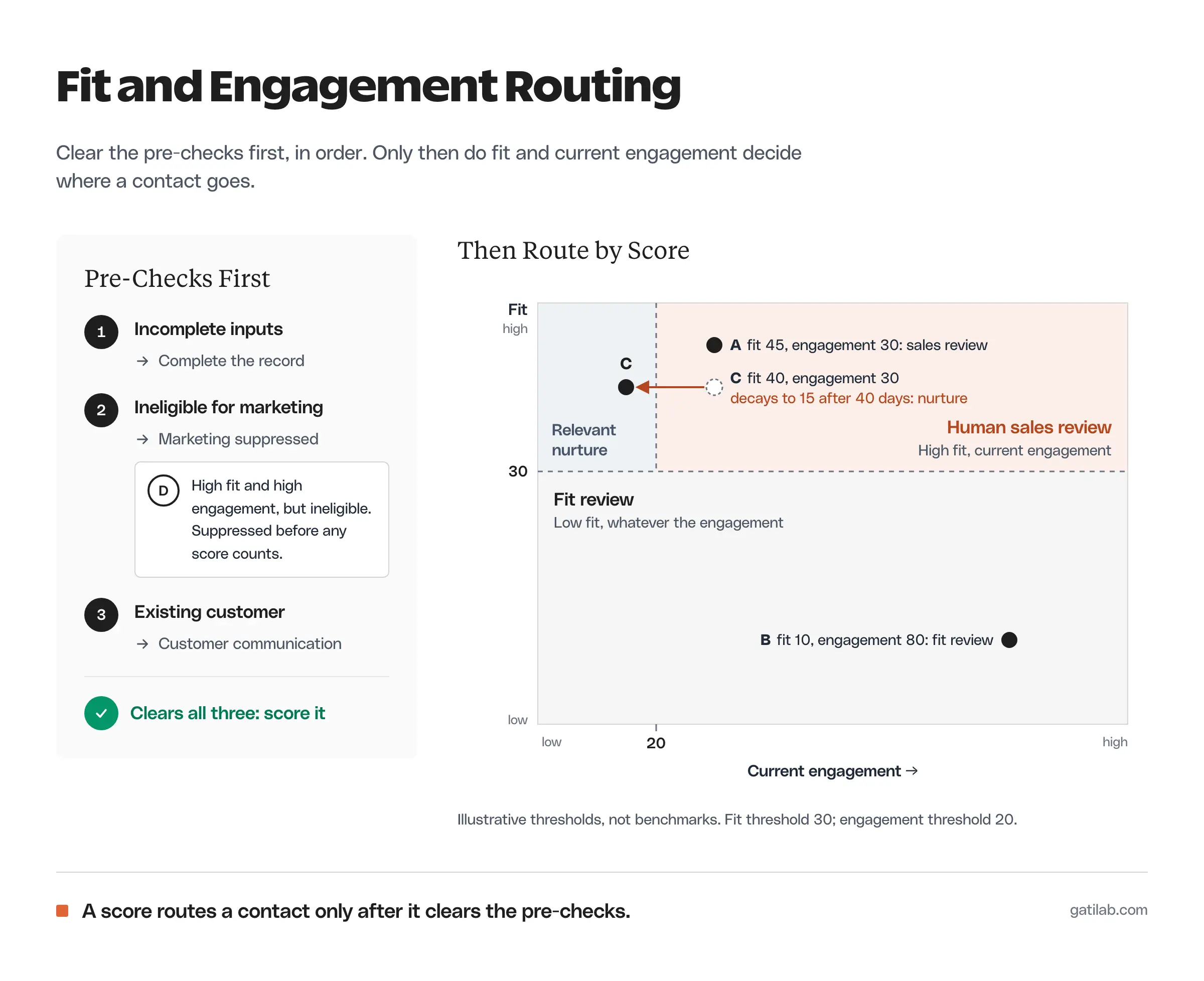
The workbook’s Rules sheet holds editable thresholds. Its starting values are only illustrative:
- Fit threshold: 30 points.
- Engagement threshold: 20 points.
- Decay starts: after more than 30 days without a relevant action.
- Remaining engagement after decay: 50%.
These values demonstrate the model. They aren’t B2B benchmarks or validated probabilities, and you should change them as soon as real outcomes show the routing is wrong.
Assign Fit Points Consistently
A team needs a shared rubric before different people can enter comparable scores. One possible rubric for a service business:
- Relevant need: 20 points.
- Deliverable scope: 15 points.
- Decision-making role: 10 points.
- Compatible delivery constraints: 10 points.
That rubric tops out at 55. A score of 45 might mean the need, scope and role all fit while one delivery condition still needs checking.
Unknown information shouldn’t quietly earn points. Leave the field incomplete and ask the question that resolves it. That’s more useful than forcing every contact into a category on the first visit.
Assign Engagement Points
Engagement points should reward meaningful actions. A starting rubric might give a relevant service inquiry 20 points and a substantive reply 10. A pricing-page visit could earn a small weight, but only when you can tie it reliably to the contact.
Cap repeated low-value events or count them once. Otherwise one person refreshing a page can outrank someone who described a real project.
Cody Schneider, a GTM and marketing engineer, lists the over-built version among the things teams do instead of selling a clear offer:
Lead scoring model, 30 rules, +5 for a pricing page visit, −10 for a Gmail address
Cody Schneider on X, September 3, 2026
A small team’s rubric should stay short enough that the person reviewing a contact can explain every point.
The workbook takes raw engagement points as a manual input. It doesn’t collect web events or classify replies, so your team or your connected system supplies those numbers under the rubric you choose.
Apply the Routing Rules
The model should produce an action someone can explain. A person reviewing the contact should see exactly why that action appeared.
The workbook checks the rules in this order:
- Incomplete inputs: complete the record first.
- Ineligible for marketing: mark as marketing suppressed.
- Existing customer: send to customer communication.
- Fit below the threshold: review fit.
- Enough fit and current engagement: human sales review.
- Enough fit, lower current engagement: relevant nurture.
“Human sales review” is a suggestion, and someone still reads the inquiry and decides whether a conversation makes sense.
Customer communication can include operational messages under the relevant rules, so the marketing-suppressed label doesn’t mean every type of message stops.
Lead Scoring Examples
The Example sheet has 5 fictional contacts, each built to test a different boundary. None of them are campaign results.
| Contact | Fit | Engagement | Status | Suggested action |
|---|---|---|---|---|
| Example A | 45 | 30 (5 days ago) | Eligible prospect | Human sales review |
| Example B | 10 | 80 (3 days ago) | Eligible prospect | Review fit |
| Example C | 40 | 30, decayed to 15 (40 days ago) | Eligible prospect | Relevant nurture |
| Example D | 45 | 30 (5 days ago) | Not eligible for marketing | Marketing suppressed |
| Example E | 45 | 30 (5 days ago) | Existing customer | Customer communication |
Strong Fit and Relevant Activity
Example A has 45 fit points and 30 engagement points, with its last relevant action 5 days ago. Under the starting thresholds it goes to human sales review.
The useful next step is to read the actual inquiry. The points decide the order of attention; they don’t replace reading what the prospect wrote.
High Activity and Poor Fit
Example B has only 10 fit points but 80 engagement points. The model still returns “review fit,” because the contact doesn’t meet the fit threshold.
That separation stops a busy contact from becoming a good buyer through arithmetic alone. You might offer another resource or refer them elsewhere, but sales should understand why the service may not fit before anyone books a call.
Old Activity
Example C has 40 fit points and 30 raw engagement points, but the last relevant action was 40 days ago. The decay rule halves engagement to 15, below the threshold, so the contact goes to relevant nurture.
A longer buying cycle may need a longer decay window. Because the rule sits on the Rules sheet, you can review it in the open instead of burying it inside a score.
Ineligible Contact
Example D has the same strong scores as Example A but isn’t eligible for marketing. The model returns “marketing suppressed,” and Example E, an existing customer with the same scores, goes to customer communication.
The score never overrides status. If the suppressed contact asks a new question, handle that request on its own terms; it isn’t a reason to resume a promotional sequence.
Review the Model Against Outcomes
A scoring model becomes useful through review. Look at what happened after each suggested action instead of assuming a neat threshold is right.
Compare these regularly:
- Contacts sent to sales who had no relevant need.
- Good opportunities that stayed below the threshold.
- Customers mistakenly treated as prospects.
- Repeated events that inflated engagement.
- Missing information that led to a wrong fit judgment.
Record the reasons before changing any weight. A weak outcome can come from missing data or an unsuitable offer rather than from the threshold itself.
The opposite failure is a model nobody looks at. Sushil Krishna, who builds HubSpot systems for B2B teams, lists it among the problems he finds in client portals:
Lead scoring untouched for months while ICP evolved
Sushil Krishna on X, January 14, 2026
A small team may not have enough closed deals to validate a predictive model at all. Alex Vacca, who built the outbound agency ColdIQ, says this about companies under $10M in revenue:
you don’t have enough closed-won deals yet for a scoring model to be right more often than it’s wrong, so you buy speed instead of precision.
Alex Vacca on X, August 13, 2026
A manual rubric still gives the team a shared decision process, as long as everyone treats it as a rubric and reviews it, rather than mistaking it for a forecast.
Use the Workbook
Enter a record ID and fill every input on the Leads sheet. Keep the Example sheet out of your real contact list. The Rules sheet holds the thresholds that both sheets use.
The days-since-action column is a manual input. Update it from a consistent review date, because the file doesn’t connect to your CRM or advance those ages on its own. The formulas are plain IF and COUNT logic, so the workbook also imports into Google Sheets.
Fit depends on knowing what the contact needs, which is often the field your forms leave blank. Progressive profiling is one way to collect that information over later visits instead of asking for everything up front. The B2B lead generation guide helps define the qualification task itself, and wider tooling is covered in the sales automation guide.
FAQs on Lead Scoring
A lead scoring model is a set of rules that gives contacts points for fit and for engagement, then turns those points into an action such as sales review, nurture or fit review. A good model shows why each contact got its score.
A fit score measures whether your business can help the contact, using details like need, scope and role. An engagement score measures recent, relevant actions like inquiries and replies. Keeping them separate stops heavy activity from hiding a poor fit.
There is no universal threshold. Start with a reasonable guess, such as the 30 fit and 20 engagement points in the workbook, then adjust it based on which contacts actually turned into good conversations.
Yes, in most cases. Interest from 6 weeks ago is weaker evidence than interest from last week. The workbook halves engagement after 30 days without a relevant action, and you can change both numbers on the Rules sheet.
Not at first. With a modest number of inquiries a week, a shared rubric in a spreadsheet does the job and keeps the logic visible. Scoring tools inside a CRM become worth it when volume makes manual review slow.
Final Remarks
Score a handful of real inquiries with the same rubric and write down every time the suggested action disagrees with your judgment. Those disagreements tell you more about the right thresholds than any benchmark will.
Tell Google you want more of this.
Add Gatilab as a preferred sourceOne tap, and this site shows up more often in your own Top Stories, AI Overviews and AI Mode. Remove it any time.