
Email Automation Workflows for Service Businesses
An automated follow-up can land after the prospect has already replied or booked a call. The email might be well written, but the system is acting on an old version of the relationship, and the prospect notices.
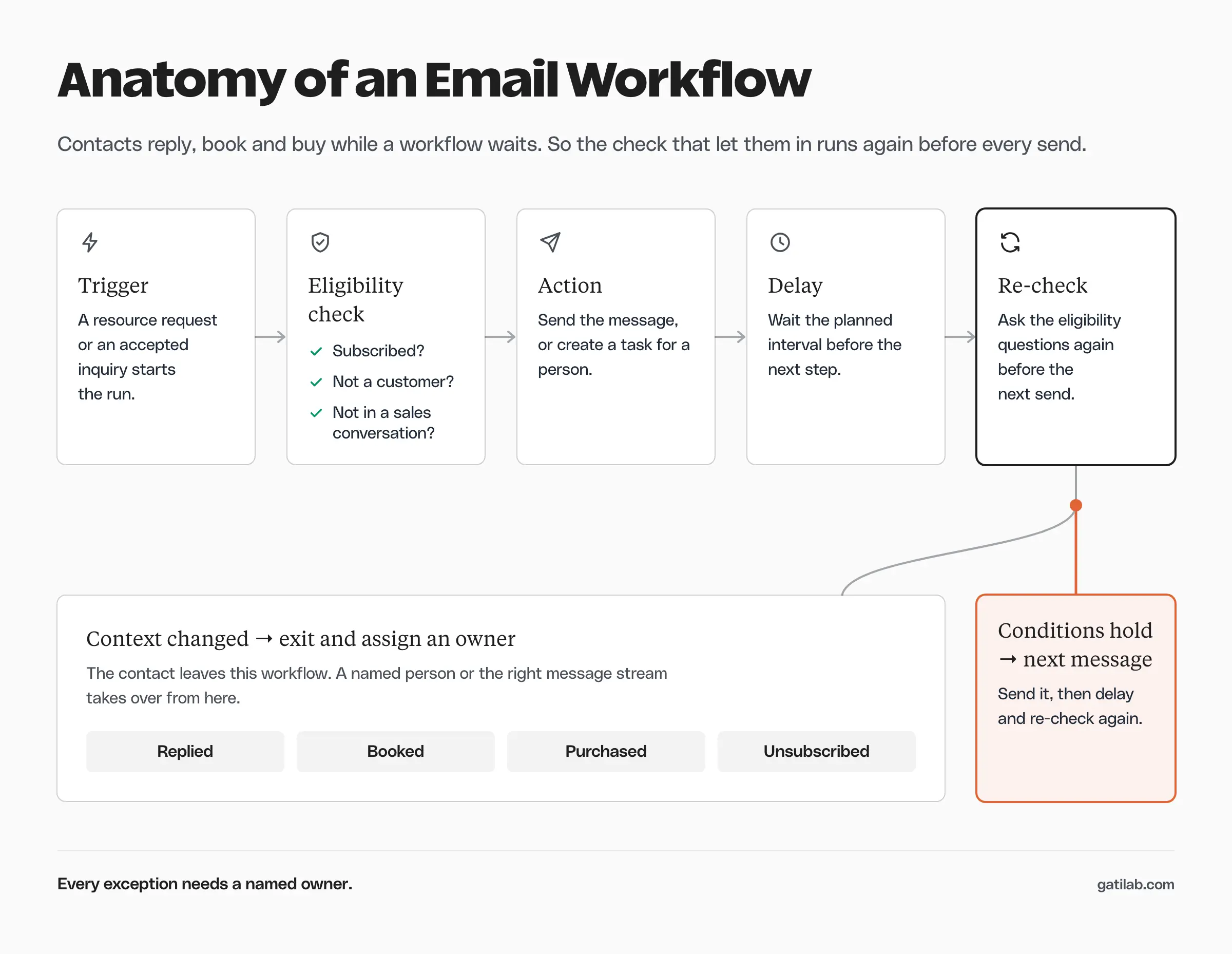
An email automation workflow should check eligibility before every send and stop when the contact moves on. I would build one complete workflow, including its failure and exit rules, before adding more sequences. The patterns below separate resource delivery, inquiry follow-up, nurture and re-engagement, because each one has a different job.
What an Email Automation Workflow Contains
A workflow connects an event to actions under specific conditions. For a service business, the event is usually a resource request or an inquiry.
A complete workflow spec names:
- The event that starts it.
- Who is eligible to enter.
- The action that happens next.
- Any delay and the reason for it.
- The conditions checked before the next send.
- The event that ends or changes the workflow.
- The person responsible for exceptions.
An email sequence is the messages and their order. The workflow also manages the state around those messages, which is why the same copy can be right for an eligible prospect and wrong for an existing customer.
Chase Dimond, a partner at an ecommerce email agency, found exactly this in a welcome flow that offered repeat customers a discount on their “first” order:
The flow was triggered by subscription. It did not check whether the subscriber had already purchased.
Better copy cannot fix the wrong person receiving the wrong message.
Chase Dimond on X, August 12, 2026
Resource Delivery Workflow
Resource delivery should fulfill the request reliably. Whether marketing follow-up happens afterward is a separate decision that depends on subscription status and what the person agreed to receive.
A simple pattern looks like this:
- Receive a valid resource request.
- Store the requested resource and the subscription choice.
- Show the resource on the confirmation page where that’s appropriate.
- Send the delivery email as the right message type.
- Enter a marketing sequence only if the contact is eligible.
The resource shouldn’t disappear just because the person isn’t eligible for promotional email. Your system needs a way to deliver what was asked for without quietly treating the request as permission for every future campaign. The thank you page examples cover the confirmation step in detail.
Repeat requests need a rule too. You can deliver the resource again while preventing the nurture from restarting, because someone who lost a document isn’t asking for another month of follow-up.
Inquiry Follow-Up Workflow
A service inquiry deserves a person who can read the details. Automation can acknowledge it, assign it and make sure it isn’t forgotten.
The pattern I’d use:
- Confirm receipt with an honest response window.
- Assign an owner.
- Create a review task.
- Check whether the owner replied before sending any reminder.
- Escalate an overdue inquiry under an agreed rule.
The acknowledgment must describe what actually happened. “We’ve reviewed your project” is false if the system only received a form. “We received your inquiry and will review it” matches the event.
I would keep the internal reminder separate from the customer-facing follow-up. One tells the owner to act. The other goes to the prospect and needs a reason that serves them.
The client onboarding process begins once the relationship moves into delivery, and the inquiry workflow should hand the contact over at that point.
Nurture Workflow
A nurture workflow sends relevant material while the prospect is still thinking about the problem. It needs explicit exits, or the emails keep going after the context has changed.
Here is an illustrative resource-download workflow:
| Point in the workflow | Required check | Action |
|---|---|---|
| Entry | Requested resource and eligible subscription | Deliver the resource and enter once |
| Before the next message | No meaningful reply, booking or customer change | Send a relevant practical example |
| After a reply | The reply needs a person | Exit the nurture and assign an owner |
| After a booking | The booking is valid | Exit and switch to booking emails |
| After an unsubscribe | Marketing eligibility has ended | Stop marketing sends |
These are proposed rules, not the default behavior of any email platform. Reply detection may need a connected inbox or a manual status change, and booking detection may need an integration. Check the actual setup before writing copy that depends on either. The copy for a 4-email version of this workflow is in lead nurturing email examples.
Re-Engagement Workflow
Re-engagement should start from a real reason to think the subscriber might still want the material. A single missed open is weak evidence of anything.
An illustrative pattern:
- Select eligible subscribers with a documented inactivity rule.
- Exclude anyone with a recent relevant reply or purchase.
- Send a clear message asking whether the topic is still useful.
- Record the response or the preference change.
- Pause or suppress future marketing under the agreed policy.
Opens and clicks can include automated activity, as Mailchimp explains in its bot filtering guidance. Base the inactivity rule on signals your system can actually interpret.
A re-engagement workflow must never revive an unsubscribed contact. An old subscriber record is no reason to ignore the current suppression status. The guide to cleaning up email lists covers that review in detail.
Map the Workflow to Your Platform
Choose a platform by the rules you need it to enforce. The email marketing software comparison helps with the wider choice, but the immediate question is whether your account can represent the contact’s changing status.
Here is how 3 common platforms handle the important parts, from their own documentation:
- HubSpot: workflows need a Professional or Enterprise subscription. By default a record enrolls only the first time it meets the triggers, and re-enrollment and unenrollment are set in the workflow’s Settings tab. HubSpot’s automated email documentation also notes that non-marketing contacts and contacts unsubscribed from all email won’t receive those sends.
- ActiveCampaign: automation settings can limit how often a contact enters, and a Goal step lets a contact skip ahead once a condition is met. Exiting on something that happens outside the automation, such as a conversion, often needs an if/else check before each email.
- FluentCRM: a WordPress-native option whose goal steps can pause a funnel until a condition is met or jump a contact forward when it happens. It suits sites that keep forms and contacts inside WordPress.
HubSpot’s workflow guide is worth reading on re-enrollment. Automatically re-entering a person every time a field changes can repeat messages that were meant to run once.
Plans and editor controls change, so confirm every capability in the account you’ll actually use.
Test the State Changes
A successful first email only proves that the workflow starts. You also need to test the moments when a contact becomes ineligible or needs a different action.
Run these test cases:
- A valid new contact.
- A repeat resource request.
- An existing customer.
- An unsubscribed contact.
- A reply during a delay.
- A booking during a delay.
- A failed or missing integration event.
- A contact whose owner is unavailable.
Mark test contacts clearly and keep them away from real recipients. Write the expected action for each case before testing, or an unexpected send will get dismissed as normal because nobody wrote down what should have happened.
Chase Dimond recommends checking flows from the customer’s side as well:
An easy way to find the leaks is to shop your own store like a customer. Pull out your phone, sign up for the list, add something to the cart, and leave. Then watch your inbox.
Chase Dimond on X, October 7, 2026
For a service business, the same check means requesting your own resource, replying during a delay and booking a call, then watching which emails still arrive.
Test the recovery path after a failed action too. A retry shouldn’t send a duplicate, and an internal task needs a visible owner. A workflow that logs an error without giving anyone responsibility leaves the prospect waiting.
Sushil Krishna, who builds HubSpot systems for growth teams, lists this among the problems he finds in client portals:
Workflows firing, but no one owns the outcomes
None of this shows up in dashboards.
Sushil Krishna on X, January 14, 2026
If a workflow can fail, someone must own the failure. Put that person’s name in the spec next to the step. A shared inbox nobody watches doesn’t count as an owner.
Measure the Workflow’s Job
The right measure depends on the workflow. Resource delivery is judged by successful access. Inquiry follow-up is judged by a meaningful response within the promised window. Nurture is judged by qualified replies or completed bookings.
Your reporting should separate:
- Entry events.
- Successfully completed actions.
- Exits and their reasons.
- Failures that need attention.
- Relevant next actions by the contact.
You don’t need a universal engagement score to start. A few measures tied to the workflow’s actual job are easier to read and harder to fool yourself with.
FAQs on Email Automation Workflows
It is a set of rules that sends emails or creates tasks when a contact does something, such as requesting a resource or submitting an inquiry. A good workflow also checks whether the contact is still eligible before each send and exits when the situation changes.
A sequence is the emails and their order. A workflow is the logic around them: who enters, what is checked before each send, when the contact exits and who handles exceptions. The same sequence can sit inside quite different workflows.
Start with resource delivery or inquiry follow-up, because both respond to something the contact just did. Nurture and re-engagement depend on those 2 working correctly, so they can wait.
Your platform needs to know about the reply, either through a connected inbox, an integration or a manual status change. Then add a check before each email that exits the contact if a reply was recorded. Test it by replying to your own sequence.
Not for simple resource delivery. Once you need owners, inquiry status or customer status to control what gets sent, a CRM or a WordPress plugin that stores those fields makes the rules much easier to enforce.
Final Remarks
Pick one workflow and write its entry and exit conditions before you write a single email. The exit rules are where the real thinking happens, and once they’re clear the copy is the easier part.
Tell Google you want more of this.
Add Gatilab as a preferred sourceOne tap, and this site shows up more often in your own Top Stories, AI Overviews and AI Mode. Remove it any time.