
Email Deliverability: Why Delivered Does Not Mean Received
The worst email failure is the quiet one. A bounce tells you something went wrong and gives you a reason. A message that vanishes tells you nothing at all: your sending log says delivered, the recipient says they never got it, and both are telling the truth.
Email deliverability is the gap between those 2 statements. It is not about whether your server sent the message. It is about whether the receiving system decided to put it anywhere the human would look.
That decision is made in milliseconds, by software, using signals you control more of than you probably think.
Delivered does not mean received
Most sending tools report on the wrong event. Their dashboard confirms the receiving server accepted the message, which is the SMTP transaction succeeding. What happens in the 200 milliseconds afterwards is invisible to them.
A message can be accepted and then filed as spam, filed under a promotions tab, quarantined for an administrator to review, or silently discarded. All 4 look identical in a sending log.
- Accepted means the receiving server took the message. Nothing more.
- Delivered to inbox means it reached the primary folder, which almost no sending tool can actually confirm.
- Filtered means it arrived and was routed somewhere the recipient will not check.
- Dropped after acceptance means it was accepted and then discarded, which large providers do to avoid confirming addresses to spammers.
So the first move in any email deliverability problem is to stop trusting the send log and start testing with real accounts on the providers your recipients actually use.
The 3 records email deliverability rests on
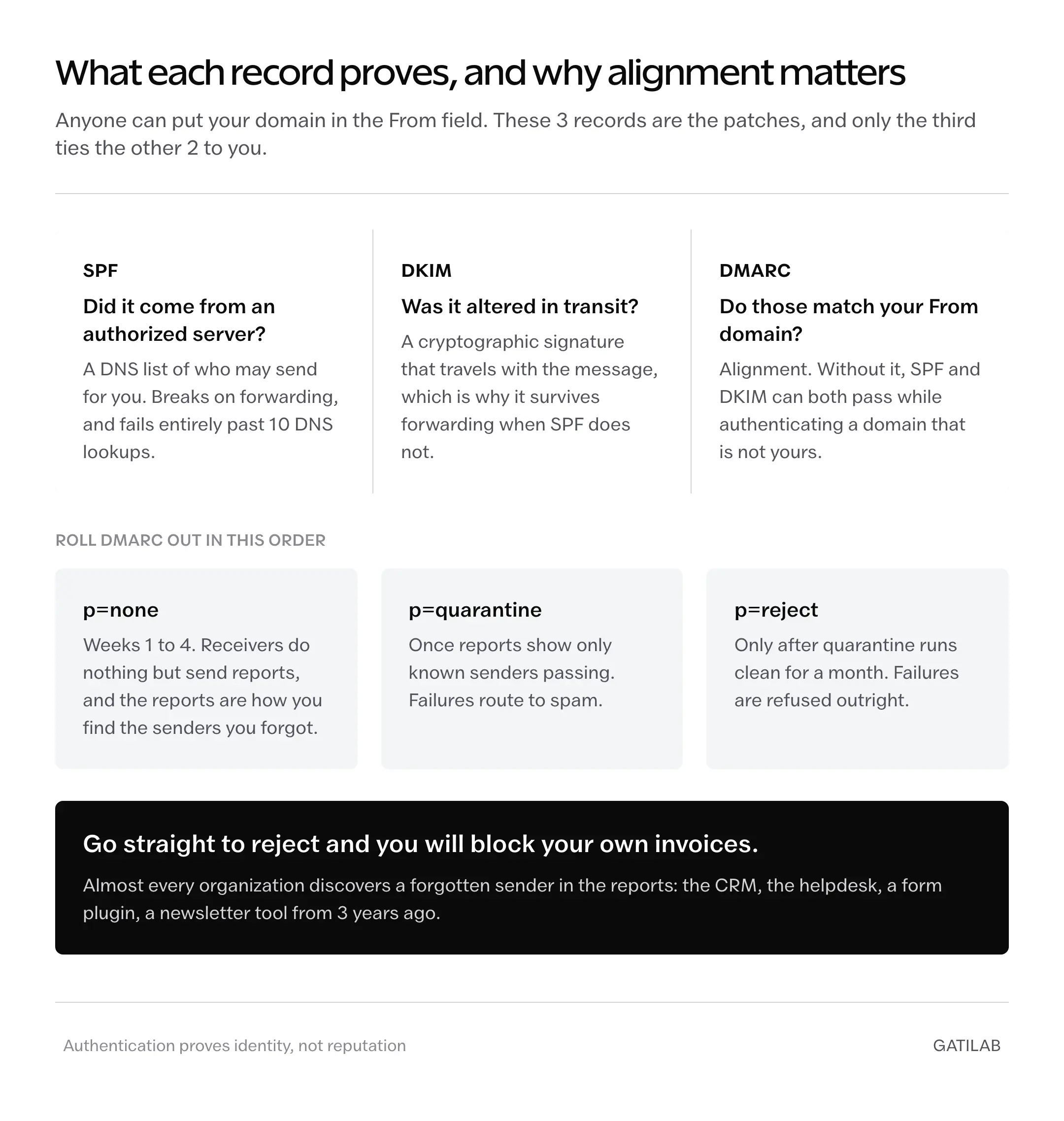
Anyone can put your domain in the From field. That is a design flaw in email from 1982, and the 3 records below are the accumulated patches. Together they let a receiving server check whether a message claiming to be from you actually is.
SPF lists which servers may send for your domain. It is a DNS text record, and it answers one question: did this message come from an address you authorized?
v=spf1 include:_spf.yourprovider.com ~allThe trap is the 10-lookup limit. Every include costs a DNS lookup, and a record chaining 4 services usually exceeds it, at which point the whole record fails and takes your authentication with it.
DKIM signs the message cryptographically. Your sending server signs with a private key, the matching public key sits in your DNS, and the receiver verifies the signature. It answers: was this message altered, and does the sender hold the key?
DKIM matters more than SPF because it survives forwarding. When someone forwards your message, the sending server changes and SPF breaks, but the signature travels with the message.
DMARC ties the other 2 to your actual domain and tells receivers what to do when they fail.
v=DMARC1; p=none; rua=mailto:reports@yourdomain.comThe critical concept is alignment. SPF and DKIM can both pass while authenticating a domain that is not yours, which is exactly what a well-built phishing message does. DMARC requires the authenticated domain to match the one in the From field, and that requirement is what makes the other 2 records meaningful.
Setting DMARC without blocking your own mail
DMARC has 3 enforcement levels, and going straight to the strictest one is the most common self-inflicted outage in this whole area.
| Policy | What receivers do | When to use it |
|---|---|---|
| p=none | Nothing, but send reports | Weeks 1 to 4, while you find every legitimate sender |
| p=quarantine | Route failures to spam | Once reports show only known senders passing |
| p=reject | Refuse failures outright | Once quarantine has run clean for a month |
Start at none and read the reports before touching anything. Almost every organization discovers senders it forgot: the invoicing tool, the CRM, the helpdesk, a form plugin, a newsletter service someone set up 3 years ago.
Move to reject before finding those and you will block your own invoices. The reports exist precisely so that does not happen, and the month of waiting is the cheapest insurance available here.
Reputation is the part records cannot fix
Authentication proves identity. It does not prove you are worth reading, and email deliverability is scored on both. A perfectly authenticated message from a domain with bad sending habits still lands in spam.
Receiving systems score behavior, mostly your recipients’ behavior. Opens and replies help. Deletions without opening hurt. A spam-button click hurts a lot, and a single complaint carries roughly the weight of a thousand quiet deliveries.
The habits that damage reputation are ordinary and mostly well-intentioned:
- Mailing addresses that never asked. Purchased lists, scraped contacts, and conference badge scans generate complaints immediately.
- Letting old lists rot. Abandoned mailboxes get recycled into spam traps, and hitting one is a direct reputation penalty.
- Sending a large batch from a cold domain. A new domain sending 10,000 messages on day 1 looks exactly like a compromised one.
- Hiding the unsubscribe link. People who cannot leave press the spam button instead, which costs far more than the subscriber.
- Mixing transactional and marketing mail on one domain. A promotional complaint then damages delivery of your password resets.
That last one is worth acting on before there is a problem. Send transactional mail from a subdomain kept separate from marketing, so a bad campaign cannot take your receipts down with it.
Diagnosing email deliverability in the right order
When mail stops arriving, the order matters, because each step rules out a whole class of cause and the expensive investigations are near the end.
- Send a test to accounts on at least 2 major providers you do not control, and check spam and promotions folders, not just the inbox.
- Check the authentication headers on a message that did arrive. Every major client can show them, and they report SPF, DKIM and DMARC results in plain text.
- Confirm your SPF record resolves inside the 10-lookup limit and has not silently broken when a service was added.
- Read the last week of DMARC reports for senders you do not recognize.
- Check whether your sending IP or domain appears on a public blocklist, and read the delisting reason rather than just requesting removal.
- Only then look at content: link shorteners, mismatched display names, a single large image with no text, or an attachment nobody expected.
Most problems resolve by step 3. Content is last on the list because it is where people instinctively start, and it is rarely the cause when mail was working last week.
What you cannot control
Some honest limits, because email deliverability advice often implies a level of control that does not exist.
No configuration guarantees inbox placement. The 3 records get you evaluated fairly. They do not get you delivered, and any service promising guaranteed inbox placement is selling something it cannot deliver.
Provider rules are not published, change without notice, and differ between providers. What works for one large mailbox provider may not for another, and neither will explain the difference.
The promotions tab is not a failure. Mail there was delivered and is findable. Trying to escape it with tricks tends to look evasive to the filter, which is worse than the tab.
And shared sending infrastructure means other people’s behavior affects you. On a shared IP, a neighbor’s bad campaign becomes your problem, which is the real argument for a dedicated IP once volume justifies it.
Questions people ask next
Because delivered usually means the receiving server accepted the message, not that anyone saw it. After acceptance a message can be filed as spam, routed to a promotions tab, quarantined or discarded, and all 4 look identical in a sending log.
Yes, and DMARC is what makes the other 2 meaningful. SPF and DKIM can both pass while authenticating a domain that is not yours, which is exactly what a well-built phishing message does. DMARC requires alignment with your From domain.
p=none, for at least 4 weeks. It changes nothing for receivers but sends you reports, and those reports are how you find the senders you forgot. Moving straight to p=reject is how organizations block their own invoices.
Authentication proves identity, not reputation. Receiving systems also score recipient behaviour, so complaints, deletions without opening and old rotting lists still push mail to spam on a perfectly authenticated domain.
No. Keep transactional mail on a separate subdomain, so a complaint about a campaign cannot damage delivery of your password resets and receipts.
Check the headers, not the dashboard
Email is the last widely used system where the sender has almost no visibility into the outcome. Every other channel confirms receipt. This one confirms handoff and then goes quiet, which is why the sending dashboard is a comfort rather than evidence.
The 3 records are worth the afternoon they take, and they are the floor of email deliverability rather than the whole of it. Not because they guarantee anything, but because without them a receiving system has no way to distinguish you from someone pretending to be you, and it will resolve that doubt against you every time.
Send yourself a test. Open the headers. That is where the answer actually lives.
Tell Google you want more of this.
Add Gatilab as a preferred sourceOne tap, and this site shows up more often in your own Top Stories, AI Overviews and AI Mode. Remove it any time.