
How to Clean Up Email Lists
An email list collects addresses that no longer work and subscribers whose relationship with the business has changed. But removing everyone with a low open rate can also throw away good contacts, because open reporting often can’t tell you whether anyone actually read the email.
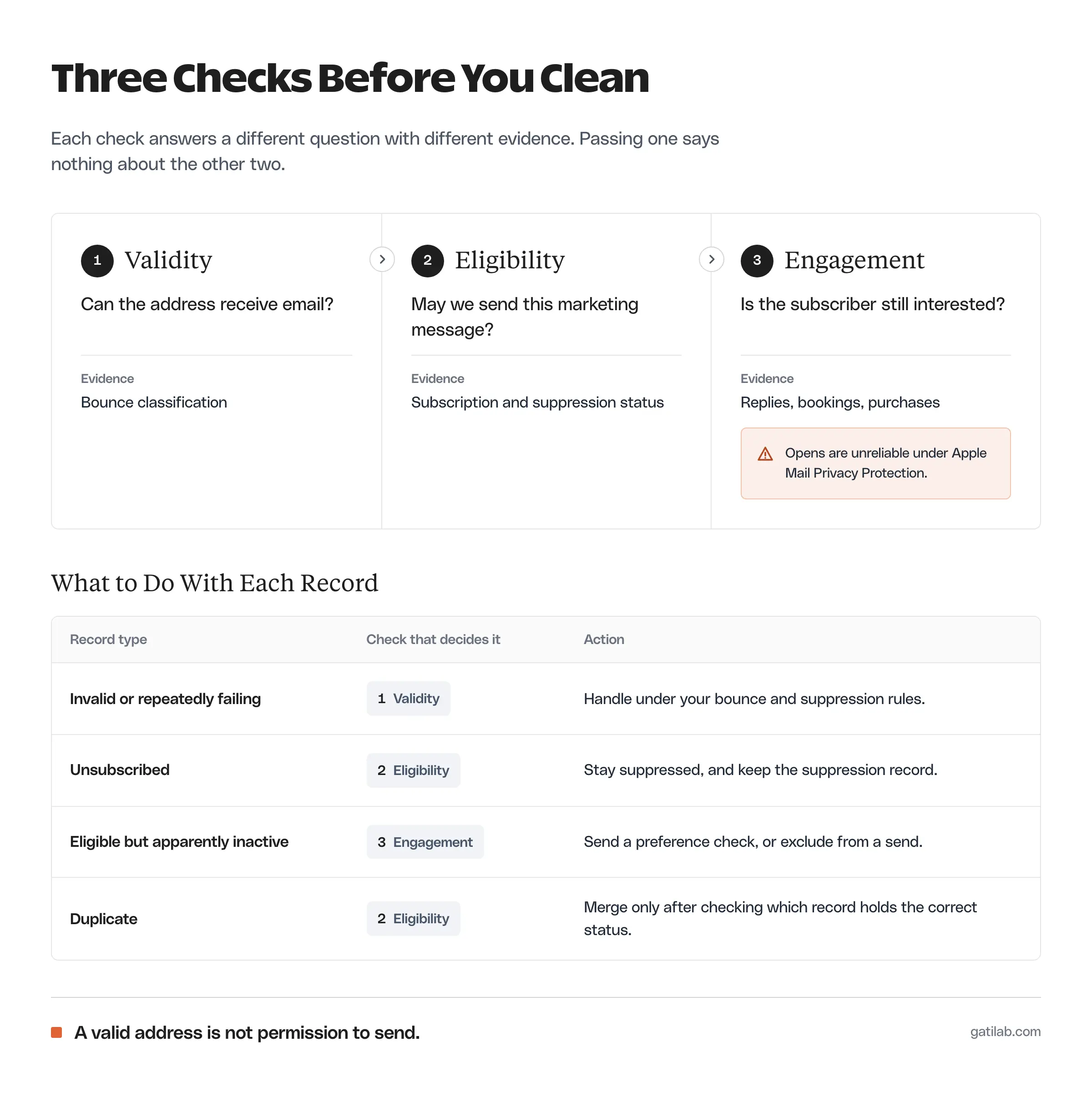
To clean up email lists properly, you should check address validity, marketing eligibility and engagement as 3 separate questions. I recommend reviewing one defined group at a time, keeping the records needed for suppression and choosing an action for each kind of contact. The goal is a list you can use responsibly and read accurately.
What Email List Cleaning Means
Email list cleaning is the review of contact records and their eligibility for future sends. An address-verification tool can help spot an invalid address, but it can’t tell you whether the person wants your email.
A cleanup has to answer several different questions:
- Can the address receive email?
- Is this contact eligible for the marketing message you plan to send?
- Does the subscriber still have a relevant relationship with the business?
- Is the record duplicated or wrongly categorized?
- What data should be kept under your retention policy?
Don’t collapse these into a single “active” label. A customer can look inactive in newsletter reports and still need order or account emails. An unsubscribed address can be perfectly valid while being off-limits for marketing.
Start With Eligibility
Check subscription and suppression status before you look at engagement. A person who opted out shouldn’t land back in a promotional sequence because their address passed a verification check.
The eligibility review should cover:
- Unsubscribes.
- Spam complaints and suppression flags.
- Where the contact came from.
- What the person actually agreed to receive.
- Any retention or deletion requirement that applies.
For US commercial email, the FTC’s CAN-SPAM compliance guide sets the baseline, including honoring opt-outs within 10 business days. Check the laws and platform policies for every audience you email; a cleaning tool doesn’t settle those obligations for you.
Keep whatever your system needs to avoid sending to the wrong people again, within your retention rules. Exporting an audience and re-importing it later must never wipe out suppression status.
Separate the Contact Groups
Each group needs an action that matches its actual problem. Sort contacts into these groups before you choose a tool.
Invalid or Repeatedly Failing Addresses
An address flagged as invalid should be handled under your platform’s bounce and suppression rules. Check how the platform classified it instead of sending again to see whether it starts working.
A temporary delivery problem and a permanently invalid address are different conditions, so the response should follow the bounce evidence your sending system actually reports.
Unsubscribed Contacts
Unsubscribed contacts stay excluded from marketing. They aren’t an audience to win back with another promotional campaign.
Making the exit easy protects the rest of your list too. Andreas Janeš, who runs a retention agency, puts it plainly:
Hiding unsubscribe links doesn’t “save subscribers.”
It creates spam complaints, and that’s what kills your deliverability.
Andreas Janeš on X, October 31, 2025
You may have a legitimate reason to keep a suppression record, but that doesn’t justify keeping every unrelated detail forever. Keep data-retention decisions separate from the wish to lower a subscriber bill.
Eligible but Apparently Inactive Subscribers
“Inactive” needs a definition before it means anything. Consider what the person receives and which signals you can actually trust.
Apple’s Mail Privacy Protection limits a sender’s ability to see whether a message was opened, which makes an open-only inactivity rule unreliable for many subscribers.
Chris Cunningham, a founding member at ClickUp, describes what that looks like in the reports:
Apple Mail Privacy Protection auto-opens EVERY email through proxy servers. The tracking pixel fires even if the subscriber never reads it.
Chris Cunningham on X, March 11, 2026
That applies to people reading in Apple Mail with the feature turned on. For them, a recorded open says little about whether the email was read, and a missing open says nothing either.
Better evidence of interest includes:
- Relevant replies.
- Completed bookings or purchases.
- Meaningful website actions, measured properly.
- Preference changes.
- Click reports with bot activity filtered out.
None of these signals grants permission. They help you judge relevance; eligibility still gets its own check.
Duplicate Records
A duplicate review should identify which record holds the correct subscription status and history. Merging or deleting without checking those fields can change what the business believes it’s allowed to send.
A shared address doesn’t always mean 2 records are interchangeable either. Let the source system’s identity rules decide the merge, especially when the records belong to different organizations or roles.
A Practical Email List Cleaning Workflow
Before you clean up email lists at any scale, define the group and the expected action. Only then change records.
- Securely export or snapshot the current state of the audience you’re reviewing.
- Define the group and the period you’ll use for engagement.
- Separate ineligible contacts from engagement candidates.
- Check delivery problems and duplicates.
- Decide which eligible contacts get a preference check.
- Apply the documented archive or suppression action.
- Confirm that the next campaign excludes the right records.
The snapshot should hold the fields you need to understand each decision. It shouldn’t turn into a permanent, uncontrolled copy of personal data, so give it the same access and retention rules as the list itself.
Test the action on a small group before touching the whole audience, then check the next campaign’s recipients. A stored label is only useful if the sending system honors it.
For eligible subscribers who look inactive, a short email asking whether the topic is still useful often sorts the list better than any rule. People who answer stay, people who opt out are handled properly and the rest can be excluded from routine sends.
Archive and Delete Carefully
Archive, unsubscribe, suppress and delete are different operations, and what each one does depends on your platform.
Mailchimp’s archive documentation explains that archived contacts keep their data, can’t receive marketing while archived and don’t count toward the billing tier. It also describes ways a contact can become unarchived, including an import or a new signup.
That matters when you restore or move an audience. Archiving isn’t a substitute for a required deletion, and unarchiving isn’t renewed marketing permission.
Before changing records, you should know:
- Which operation stops the relevant sends.
- Which information remains afterward.
- Whether a later import can reverse the change.
- Whether the same contact sits in another audience.
- How deletion and retention requirements are handled.
I would avoid any cleanup whose only written goal is “delete everyone who hasn’t opened in 90 days.” That window may suit one audience, but the action still needs evidence and a way to recover from mistakes.
Retention specialists often use a window like that for exclusion rather than deletion. Andreas Janeš recommends leaving these contacts out of a major sale:
Don’t send to cold subs or inactive users just because it’s BFCM.
Inactives (no open/click in 90+ days)
Andreas Janeš on X, October 31, 2025
Excluding a group from one promotional send is easy to reverse. Deleting it isn’t, which is why the evidence and recovery plan matter so much more for deletion.
Choose a Cleaning Tool by the Actual Need
An address checker is useful when validity is the question. A CRM or email platform is what you need when the question is about the relationship and subscription status.
When you evaluate a verification tool, check what it classifies and how it reports uncertainty. A “risky” or “unknown” address isn’t the same as a confirmed invalid one. Treat the tool’s output as one input to your decision, and never let it rewrite the whole audience silently.
The email marketing software comparison helps with the wider platform choice. If the real issue is authentication or sending reputation, the email deliverability guide covers that diagnosis separately. And if contacts keep entering sequences they shouldn’t, the email automation workflows guide shows where to put the eligibility checks.
Review the Result
A cleaning pass should produce a change you can explain. Record how many contacts moved under each decision and why, using the same eligibility definition before and after.
Check that:
- Suppressed contacts stay excluded.
- Eligible contacts weren’t removed only because tracking was incomplete.
- Restored imports keep the intended status.
- Customer emails still reach the right people.
- The next report separates audience size from useful responses.
FAQs on Email List Cleaning
Review it on a regular schedule that fits your sending volume, such as every quarter, and before any large campaign. Bounces and unsubscribes should be handled automatically all the time; the periodic review is for inactivity, duplicates and data retention.
Not as a first step. Define what inactive means for that audience, send a short re-engagement or preference email and exclude non-responders from routine sends. Delete only when your retention policy calls for it, and keep the suppression records you need.
Removing invalid addresses and people who no longer want your email reduces bounces and complaints, which mailbox providers watch. It won’t fix authentication problems such as SPF, DKIM or DMARC, which need their own diagnosis.
Not on their own. Apple Mail Privacy Protection and security scanners can register opens that never happened, and real readers can show no open at all. Use replies, clicks with bots filtered, purchases and bookings as stronger signals.
Unsubscribing records that the person no longer wants marketing email. Archiving, in platforms such as Mailchimp, removes a contact from the active audience and billing while keeping its data. An archived contact can come back through an import or signup, so it is not the same as permission.
Final Remarks
When you clean up email lists, a smaller list is only a good result if the records left on it and the exclusions around it are correct. Start with one clearly defined group, verify how the next send behaves and only then widen the cleanup.
Tell Google you want more of this.
Add Gatilab as a preferred sourceOne tap, and this site shows up more often in your own Top Stories, AI Overviews and AI Mode. Remove it any time.