
Thank You Page Examples for Lead Generation
A form submission leaves the visitor with one question: did that work, and what happens now? A vague “Thanks!” page leaves them checking their inbox, submitting the form again or wondering whether anyone will ever reply.
The best thank you page examples confirm the action the person just took and give them one useful next step. I would write the page in that order: what you received, what happens next and when, and what to do if something doesn’t arrive. The 4 patterns below come with copy you can adapt to your own business.
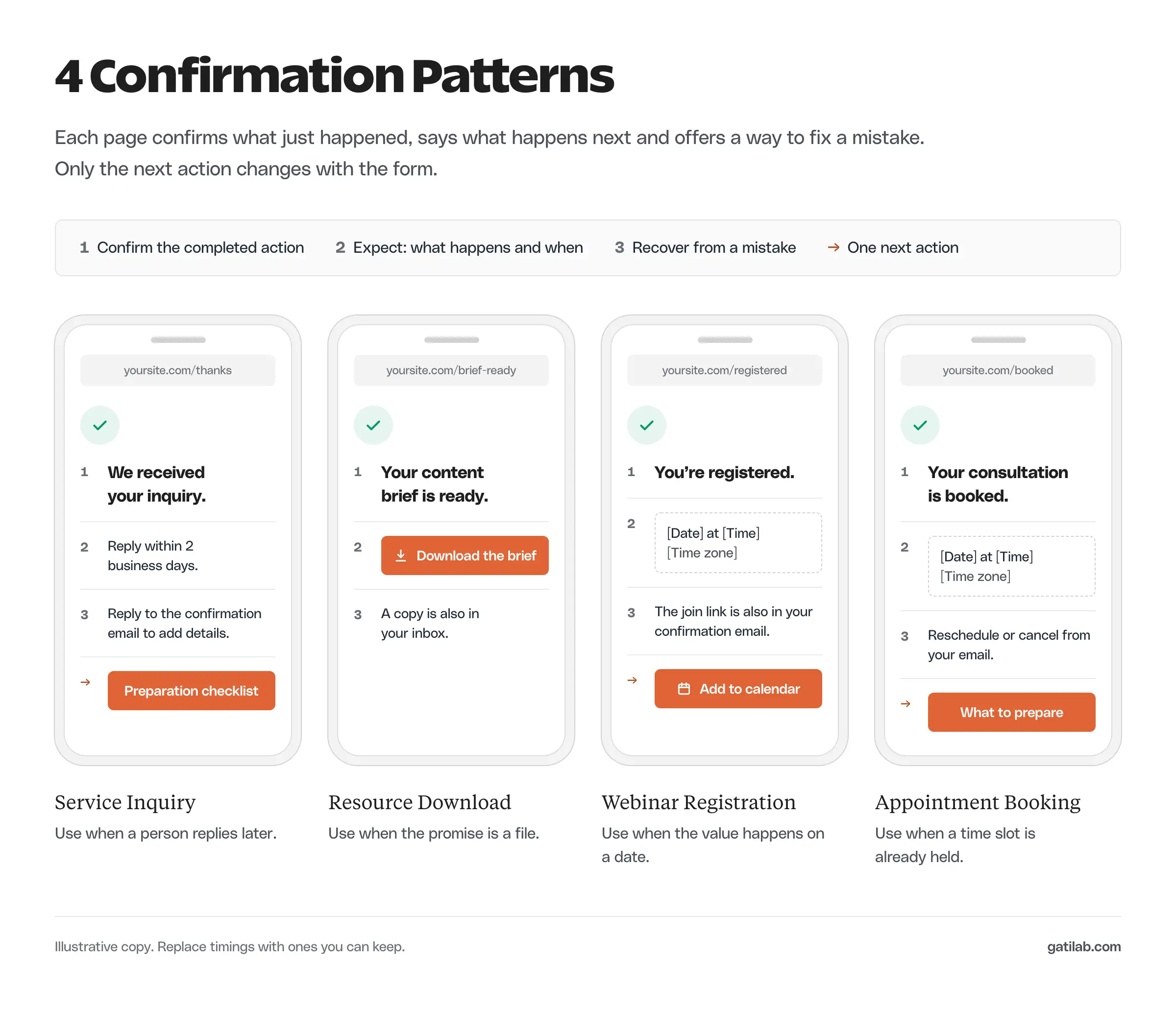
What a Thank You Page Needs
A thank-you page has to match the promise the form made. Someone who requested a PDF needs the PDF. Someone who booked an appointment needs the appointment details. An unrelated sales pitch at that moment interrupts the task they came to finish.
Every confirmation page should carry these parts:
- A clear confirmation of what was received or completed.
- The next step and its timing, when the timing is known.
- Access to the promised resource or the booking details.
- A recovery route if an email or download doesn’t arrive.
- One optional next step that fits the person’s current interest.
Keep private details off a publicly reachable confirmation page. A personalized booking confirmation belongs behind an appropriate protected link, and a generic page should never display someone’s appointment just because another person has its URL.
On a WordPress site, most form plugins let you choose between an inline message and a redirect to a dedicated page. Fluent Forms, for example, can show a message on the same page or send the visitor to a page or custom URL after submission. A dedicated page is usually the better choice, because it gives you room for the expectation and recovery copy.
Thank You Page Examples
Each pattern starts from a different completed action. The timings and company details are illustrative, so replace them with commitments your business can actually keep.
Service Inquiry
An inquiry confirmation should acknowledge the request and set a realistic response window. There’s no need to ask the visitor to repeat what they just typed.
We received your website inquiry.
Our team will review the details and reply within 2 business days.
If you need to add something, reply to the confirmation email and include the project reference from it.
The optional next step can be a short preparation guide. It should help the person gather material for the conversation. A second qualification form at this point only adds work.
When the sale depends on an in-person estimate, the next step can be the appointment itself. Alex Lathery, who runs a home-service agency and a painting business, puts the booking link right on this page:
Lead fills out the form → lands on the thank you page → books the estimate immediately.
You capture the lead, lock the appointment, and can do qualifying in the follow-up and before the estimate
Alex Lathery on X, March 5, 2026
That works when booking is the natural next step for the inquiry. Keep the response promise above the calendar either way. If your site runs on WordPress, a booking plugin such as FluentBooking can embed that calendar directly on the confirmation page.
The response window has to fit your staffing and time zone. “We’ll reply shortly” avoids a measurable promise, but it also leaves the visitor with nothing useful. A clear business-day window is more helpful, provided you can honor it.
Resource Download
A download confirmation should hand over the resource immediately when the promise allows it, with the email copy as a backup.
Your content brief is ready.
Download the document below and save a copy before editing it.
We also sent the link to the address you entered. If that message hasn’t arrived, you can still use this download.
The resource is the main action. A link to a relevant walkthrough can follow it, but the visitor shouldn’t have to accept a second offer to get the first one.
If the document must stay private, design the access for that. An unprotected public link only suits a resource you’re happy to see shared.
Webinar Registration
A webinar confirmation should settle every practical question someone needs answered to attend.
You’re registered for the workshop.
Tuesday, October 20, at 11:00 a.m. Eastern Time.
Your joining link is in the confirmation email. Add the event to your calendar so the time converts correctly for your location.
The date is illustrative, so swap in your real event details. The page should state:
- The event name.
- The date, time and time zone.
- How the participant receives the joining link.
- Whether a recording will be available, if that’s confirmed.
- A contact route for a missing confirmation.
Test the calendar link against the actual event time. A page can look perfectly clear while its calendar file sends people to the wrong hour.
Appointment Booking
A booking confirmation should make clear whether the booking is final or still waiting for approval.
Your consultation is booked.
Your confirmation email has the date, time and joining instructions.
Use the reschedule or cancel link in that email if your availability changes.
If the booking still needs approval, the headline should say the request was received. The person should know whether they can rely on the slot before rearranging their day.
George Clements, who starts and scales client-based businesses, makes the same point about booked sales calls. His thank-you page asks the person to confirm the event and prepare for the call:
Set expectations or lose the call.
Most agencies treat the booking like the finish line.
It’s the starting line.
George Clements on X, March 21, 2026
The next step can be a short preparation task, such as finding the page they want reviewed. Keep it small; a long questionnaire after booking just creates another unfinished task.
Choose a Relevant Next Action
A thank-you page doesn’t need a second conversion goal to justify itself. Confirmation and recovery can be enough. An optional next action earns its place when it helps someone move forward from what they just did.
Direct-response marketers see this page differently. Andrew Gould, who has written direct response copy since 2009, lists it among the first places to sell after an opt-in:
Ideally when someone opts in:
• Your thank you page sells a low ticket offer.
That’s already a lot of selling.
Andrew Gould on X, May 29, 2026
That model suits a funnel built around a paid product. For a service inquiry or a booking, the visitor has already taken the commercial step, so I would keep any offer secondary to the confirmation.
Good pairings look like this:
- A guide download leads to the guide’s worked example.
- A service inquiry leads to a preparation checklist.
- A webinar signup leads to a calendar entry.
- A confirmed booking leads to joining instructions.
I would avoid stacking several offers on one confirmation page. The visitor just made a decision, so make the next useful action easy to spot and leave it at that.
Track Successful Submissions
A visit to the confirmation URL is an unreliable lead count. People open the address directly, refresh it or come back from a bookmark. Your tracking should fire on the completed form action as closely as your setup allows.
Google Analytics has a recommended generate_lead event for exactly this. The event still needs the right trigger, because naming a page-view rule “generate_lead” doesn’t make it accurate.
Before you treat the event as a business number, check that:
- A successful submission produces the event.
- A validation error doesn’t produce it.
- A direct visit to the confirmation page isn’t counted as a new lead.
- A reload doesn’t fire a duplicate event for the same submission.
- The event carries no personal information.
Google’s Analytics privacy guidance prohibits sending personally identifiable information such as email addresses. That applies to page URLs and event parameters too, so never put the visitor’s email in a thank-you page query string to make tracking easier.
For campaign context, the UTM tracking guide explains how tagged arrivals differ from completed actions. Keep the 2 as separate measurements.
Submit each form once on your phone, then try a validation error and a page refresh. Most confirmation-page problems show up in those 3 tests.
FAQs on Thank You Pages
Usually not. A confirmation page serves people who just completed a specific action, and a visitor arriving from search can’t use it. A public resource library is different, so check the page’s role before changing its index setting.
Yes, when the visitor needs a lasting copy of the resource or the next steps. The page should still confirm enough on its own in case the email is delayed. Sending a requested resource doesn’t mean the person agreed to a promotional sequence.
Only when the forms make the same promise. A download request and an appointment request need different expectations, and a generic message usually explains neither.
It should confirm what was received, say what happens next and when, give access to anything promised and offer a recovery route if an email or file doesn’t arrive. One optional next step is enough.
Fire a lead event, such as the Google Analytics generate_lead event, on the successful submission rather than on every page view. Then test that refreshes, direct visits and validation errors don’t create extra events.
Final Remarks
Pick one form and follow its full journey on a phone. Make sure the visitor can confirm success and recover if the next step fails. If the form itself is the weak link, the form optimization guide covers field friction, and the B2B landing page examples show how the page before the form sets up the promise this page has to keep.
Tell Google you want more of this.
Add Gatilab as a preferred sourceOne tap, and this site shows up more often in your own Top Stories, AI Overviews and AI Mode. Remove it any time.