
Halloween Email Templates
Halloween email templates should give you a message worth sending, not just a pumpkin border and “scary savings” in the subject line. If you sell software, courses or services, the difficult part is connecting the season to something your reader already wants.
Start with the small nightmare your offer resolves: a subscription that keeps charging, a project stuck halfway through or a shopping cart abandoned when life got busy. Tell that story briefly, put the useful offer in front of the reader and give them a clear next step. The Halloween theme then has a job beyond decorating the email.
For a small business building its first campaign, MailerLite is my starting recommendation because it combines an email editor, signup forms, landing pages and automation. A WordPress business that wants to manage contacts and campaigns inside its site should also consider FluentCRM. Choose the platform that fits your customer follow-up before choosing the prettiest template.
Download the Halloween Email Templates
Download the Halloween email kit for 8 editable text files and 8 matching HTML layouts. The messages below cover a useful giveaway, a product offer, an affiliate shortlist, a prize giveaway, a bundle, cart recovery, a deadline and a Black Friday interest list.
The bracketed fields identify details only you can supply, such as a product URL or closing time. Replace them before sending. The HTML files use simple layouts you can adapt in your email platform; merge tags, unsubscribe links and sender details must match that platform’s requirements.
Choose the template that matches your offer. Don’t send all 8 as a sequence. A newsletter subscriber hasn’t necessarily entered your giveaway, and an existing buyer shouldn’t keep receiving the same checkout reminder.
The Software Cleanup Email
A useful download makes a strong first email when your audience isn’t ready for a sale. This example introduces a subscription cleanup exercise and points to the purchase planner. It suits a blogger, software publisher or consultant whose readers are preparing for November deals.
Subject: Which subscriptions are still haunting your card?
Preview: A quick cleanup before the November deals arrive.

Hi,

Some projects end. Their software subscriptions keep going.

Before you add another tool this autumn, open your latest card statement and look for the ones you no longer recognize. The abandoned course project. The design app you opened twice. The second email platform still waiting for its first campaign.

I've got a simple task for you: give every subscription a current job and a next renewal date.

The software purchase planner gives you a place to compare those details. Start with the tools you pay for every month, then add the annual renewals that are easier to forget.

Get the software purchase planner:
https://gatilab.com/wp-content/uploads/2026/10/halloween-20261002-software-purchase-planner.zip

You may find a tool worth keeping, a duplicate worth cancelling or a gap worth fixing. All 3 are useful things to know before buying anything else.

[Sender name]
The download is the main action. If you later recommend a replacement product, connect it to the work the reader needs done. Our Halloween marketing ideas explain how to build a full Software Graveyard campaign around this exercise.
The Halloween Offer Email
A sale email needs to make the product useful before making the discount exciting. This version suits a digital product that helps the buyer finish a task. Replace the benefit field with a concrete outcome, such as “build and send your first welcome-email sequence.”
Subject: Give your unfinished project a useful Halloween ending
Preview: A seasonal offer on [Product name].

Hi,

There's a project sitting in a folder somewhere, waiting for you to come back to it.

You had the idea. You started the work. Then the next step took longer than expected, and the folder became part of the scenery.

If the missing step is [specific task], [Product name] can help you finish it. It gives you [concrete deliverable] so you can [useful outcome] without starting from a blank page.

The Halloween offer is [actual price or offer terms], available until October 22, 2026. The product page shows what you get and how access works.

See the offer:
[Offer URL]

Pick a time to use it when you buy. A useful product deserves a better home than another unopened folder.

[Sender name]
If you’re selling your own resource from WordPress, FluentCart provides a store and checkout route. The email button should lead to the advertised product, with matching prices and terms. Only use the deadline line when the offer has that deadline.
The Affiliate Tool Shortlist
An affiliate email earns its space by making the choice easier. This example recommends a form builder, a newsletter platform and an image optimization tool against different WordPress problems. It includes Gatilab’s affiliate routes and an in-email disclosure.
Subject: Give your WordPress site a Halloween repair kit
Preview: A tool for missing inquiries, quiet newsletters and heavy images.

Hi,

A visitor fills out your form. Another joins your newsletter. A third waits for an enormous image to load and leaves before it does.

Those are 3 different problems, so they deserve different fixes.

Fluent Forms is worth a look when you need to build or improve the form visitors use to contact you:
https://gatilab.com/go/fluent-forms

MailerLite gives a small business a place to build newsletters, collect subscribers and set up email follow-up:
https://gatilab.com/go/mailerlite

ShortPixel is relevant when oversized images are adding unnecessary weight to your pages:
https://gatilab.com/go/shortpixel

Choose the problem costing you the most attention or business, then look at the matching tool. You can inspect the current plans through the links above; this email doesn't assume a Halloween discount is running.

I may earn a commission if you buy through these links, at no extra cost to you.

[Sender name]
If you’re sending this from your own business, replace the affiliate destinations and disclosure with your approved links and applicable wording. Gatilab’s links are included so you can inspect the recommended products, not so you accidentally send someone else’s tracking links as your own.
For creator newsletters, Kit is another useful option. Its tags and visual automations let you organize follow-up around interests such as WordPress, learning resources or design tools. That makes a focused shortlist easier to repeat in November.
The Prize Giveaway Email
A Halloween giveaway invitation should make the prize and entry action clear. Choose a prize connected to the paid offer you eventually want to sell, such as a course with a feedback session or a product with a useful accessory.
Subject: What would help you finish your next project?
Preview: Enter our Halloween giveaway for [Prize name].

Hi,

For Halloween, we're giving one unfinished project a nudge toward the finish line.

The prize is [prize contents]. It's designed for [specific audience], especially if you've been putting off [relevant task].

To enter, visit the giveaway page and follow the entry steps. You'll find the eligibility rules, closing time and winner-selection details there too.

Enter the Halloween giveaway:
[Giveaway URL]

Entries close on October 22, 2026.

While you're there, think about the first thing you'd do with the prize. That's a better starting point than adding another project to the someday list.

[Sender name]
RafflePress can provide the WordPress giveaway page and entry actions. The email creates interest; the entry page carries the complete terms. Keep permission for future marketing clear rather than assuming every entrant wants every newsletter.
The Halloween Bundle Email
A bundle email should show how the items work together. This template uses an outcome-first structure so you can adapt it for a learning package, a creator kit or a small collection of digital products you sell.
Subject: A Halloween bundle with a job to do
Preview: Everything in the kit helps you [specific outcome].

Hi,

Starting is often the easy part. The project slows down when you discover the next thing you need isn't in the box.

The [Bundle name] brings together the pieces for [specific outcome]:

- [Core product]: the main resource for doing the work.
- [Supporting item]: the part that helps you put it into practice.
- [Bonus item]: the checklist, template or reference you can keep using.

Start with [first item], then use [second item] while you work. You can see a sample and the full contents on the bundle page.

Explore the bundle:
[Bundle URL]

The price is [actual price]. [Accurate access and support terms.]

If you've been collecting separate resources without getting the project finished, this gives you a more deliberate place to start.

[Sender name]
For students and self-learners, explain the learning level and likely study commitment beside the contents. For course creators, explain the deliverable: a lesson plan, a sales page or a working course outline. A bundle becomes easier to buy when the buyer can picture using it.
SeedProd can help create a dedicated WordPress page for the package. Keep the sample close to the buy button so the reader can evaluate the work instead of relying on a long list of bonus names.
The Abandoned-Cart Email
A cart reminder should help the shopper return to the product or get an answer. It shouldn’t claim that stock is reserved, the order is confirmed or a discount is expiring unless your store actually supports those statements.
Subject: Still thinking about [Product name]?
Preview: Here's the link, plus a way to ask before you buy.

Hi,

You left [Product name] in your cart. If your Halloween shopping got interrupted, you can return using the link below.

Return to your cart:
[Cart recovery URL]

If a question stopped you, reply to this email. Whether it's about [common purchase question] or [another relevant question], we'd rather help you decide than leave you guessing.

The product page shows the current price and availability. Your order is complete only after checkout succeeds.

[Sender name]
Omnisend is the platform I’d consider first from this shortlist for a supported ecommerce store that needs cart-recovery workflows. The store must supply the cart event and recovery URL, and the automation must exclude shoppers who have completed their purchase. Use this only for contacts eligible to receive the reminder.
The Last-Call Email
The last-call email can be brief because the earlier messages have already explained the offer. State what ends, when it ends and where the reader can act. Send it to the relevant non-buyers rather than repeating the same sales request to everyone.
Subject: The [Offer name] closes at [time and time zone]
Preview: A final reminder before the Halloween offer ends.

Hi,

A quick reminder: [Offer name] ends on October 22, 2026 at [time and time zone].

The offer includes [specific product, bonus or discount]. After the deadline, [what actually changes].

If you've decided it fits [specific task], you can get it here:
[Offer URL]

The page has the full contents and terms if you need one last look before deciding.

Thanks for spending part of your Halloween with us.

[Sender name]
For campaigns with several purchase paths, ActiveCampaign provides conditional automation and behavior-based routing. It is a stronger fit when the follow-up needs to change after specific actions. A simple broadcast needs much less setup; complexity should follow the customer journey, not lead it.
The Black Friday Interest Email
The best bridge from Halloween to Black Friday is a preference question. Readers can tell you which offers matter before November fills their inbox. This example works for a publisher covering WordPress, education and creator tools.
Subject: What should go on your November shortlist?
Preview: Choose the deals you want to hear about.

Hi,

Halloween is over, and the November sale announcements are coming next.

Before I send you a list of tools you don't need, I'd like to know what you're planning.

Which shortlist would be most useful?

- WordPress tools for building and improving a website.
- Courses and learning resources for your next subject or skill.
- Creator software for design, email and digital products.

Choose your interests:
[Preference form URL]

I'll use your choices to send the relevant roundups. Each offer will include the details that affect the decision, such as the plan, renewal price and any stated deadline.

If nothing is on your shopping list, that's fine too. You can update your preferences using the link in the footer.

[Sender name]
Build the preference form and connect the choices to your audience groups before sending this message. Kit’s tags or FluentCRM’s contact organization can support that work. The message promises relevant follow-up, so the next campaign should honor those choices.
Email Platforms for Halloween Campaigns
MailerLite is the most straightforward starting point here for a small business that needs forms, a landing page and a newsletter. The alternatives become more interesting when the campaign has a specific requirement: a creator audience, WordPress contact management or a store sending purchase events.
| Product | Best Fit in This Campaign | Why I’d Choose It |
|---|---|---|
| MailerLite | Small business newsletter and lead magnet | Email, signup and landing-page work in one hosted service |
| FluentCRM | WordPress contact follow-up | Campaigns and contact management inside WordPress; arrange mail delivery separately |
| Kit | Creator newsletter and interest-based follow-up | Forms, tags and visual automation for reader relationships |
| Omnisend | Ecommerce campaigns on a supported store | Store-focused email and SMS workflows, including cart recovery |
| ActiveCampaign | Follow-up with multiple behavior-based paths | Conditional automation and customer-action triggers |
| Moosend | A business that wants a visual newsletter starting point | A template library and drag-and-drop campaign editor |
These are product recommendations, not a claim that every vendor has announced a Halloween sale. Follow the product links for current plans, then compare the contact allowance, sending limits, automation features and renewal cost that apply to your audience.
Design the Email Around the Message
A short Halloween email usually needs a readable heading, body copy and an obvious button. An elaborate image can support the idea, but the offer must still make sense when that image doesn’t load.
Canva helps with the header and matching social artwork. OpenArt is useful for an original seasonal illustration, such as a desk covered in unfinished project folders. Put the actual price, deadline and button in the email’s text rather than inside the illustration.
Keep the reader’s attention on the action:
- Use a single-column layout that reads comfortably on a phone.
- Give the button a descriptive label: “Get the planner,” “See the bundle” or “Return to your cart.”
- Use the preview text to add information instead of repeating the subject.
- Give meaningful images alt text and leave decorative images out when they add clutter.
- Make reply, sender and unsubscribe details easy to find.
The plain-text templates are useful on their own. A thoughtful message from a recognizable sender doesn’t need an elaborate border to feel personal.
Build Your Halloween Email Sequence
For a live offer, I would start with a launch email, follow with an answer to a buying question and finish with a deadline message only if the offer ends. A giveaway or an evergreen download needs its own follow-up instead of being forced into the same sequence.
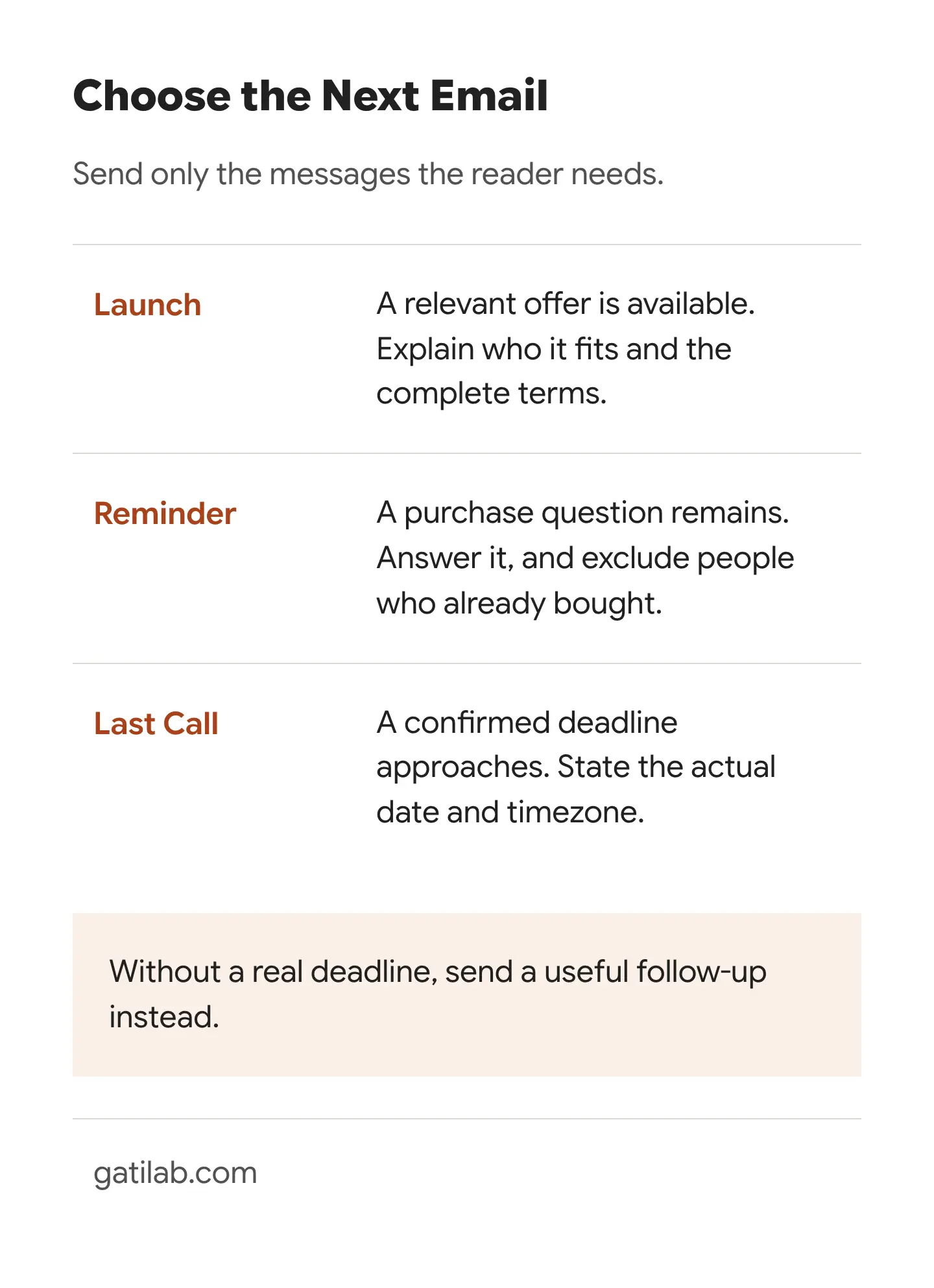
The second message should add something. A bundle email can show a sample worksheet. A software recommendation can explain who the entry plan suits. A course offer can show the first lesson’s task. Repeating the same button under a new pumpkin image gives the reader little reason to reconsider.
Before scheduling, complete the practical checks:
- Replace every bracketed field, including subject and preview text.
- Ensure the landing page, email and checkout agree on the offer.
- Set the correct audience and exclude people who already completed the action.
- Configure the sending domain and mail delivery in your chosen platform.
- Open a test email on a phone and click every intended destination.
- Confirm personalization, unsubscribe and automation behavior with the platform’s supported testing method.
MailerLite’s test-email documentation makes an important distinction: a test message doesn’t exercise every dynamic feature or unsubscribe behavior. For a full check, use a normal campaign addressed only to a controlled test group containing your own addresses, following its guidance. Don’t use the customer list as the test group.
Choose the template closest to your offer, fill in the actual details and send yourself the finished message. If you can explain what the reader gets and why they’d want it before reaching the first button, you’ve got something worth sending.
Tell Google you want more of this.
Add Gatilab as a preferred sourceOne tap, and this site shows up more often in your own Top Stories, AI Overviews and AI Mode. Remove it any time.