
Most release notes get skipped because they describe what the team did instead of what changed for the customer. “Refactored the invoice module” means nothing to the person whose invoices now print properly, so they never find out that the fix they asked for has arrived.
A release notes template solves this by putting every line on the customer’s side of the change. We recommend 3 formats: one note per release, a monthly digest for customers who don’t read every update, and a separate notice for breaking changes. The free template below has all 3, each with a filled example.
What Makes Release Notes Worth Reading
Good release notes answer the customer’s 3 questions in order: what changed, does it affect me, and do I need to do anything. Every part of the template follows from those questions:
- A one-sentence summary first. It leads with the change most customers will notice.
- Changes grouped by type. New, Improved and Fixed let a reader jump to what they care about.
- Fixes described as symptoms. “A discount added after tax showed the wrong total” lets a customer recognize their own bug.
- Action needed only when it is real. If the customer must change a setting or update PHP, the note says so with the deadline. Otherwise the section stays out.
- One link to more detail. The docs or the full changelog are enough.
Release Notes Template Formats
Each format below matches a section of the download. The examples use a fictional invoicing plugin called Acme Invoices, so the structure is easy to see.
Single Release Note
This is the format for every version you ship. It goes on your changelog page and, shortened, into the update email. It has these parts:
- the product name, version and release date
- a one-sentence summary of what changed for the customer
- New, Improved and Fixed, each as a short list
- Action needed, only when the customer must do something
- one link to the docs or the full changelog
Acme Invoices 2.4.0 – March 12, 2026
You can now send recurring invoices, and long invoices print cleanly across pages.
New: Recurring invoices. Set an invoice to repeat monthly or yearly, and it sends itself on the date you choose.
Improved: PDF invoices repeat their headers and totals on every page, so a 3-page invoice keeps its column names.
Fixed: A discount added after tax showed the wrong total on the PDF. The PDF now matches what the customer paid.
Monthly Digest
A digest suits products that ship often. Customers read one email a month more readily than one for every patch, and the digest is also where your product roadmap gets a mention. Its parts are a 2-sentence lead on the biggest change, 3 highlights with their versions, one line on smaller fixes and 1 or 2 items coming next.
What’s new in Acme Invoices: March 2026
Recurring invoices arrived this month, so a retainer client now gets the same invoice on the same date without anyone remembering to send it.
Highlights: recurring invoices (2.4.0), cleaner multi-page PDFs (2.4.0) and a faster settings page for stores with 5,000+ invoices (2.4.1).
Smaller fixes: 7 fixes across 2.4.0 and 2.4.1, all listed on the changelog.
Coming next: deposits and partial payments are planned. Follow along on our public roadmap.
Breaking Change Notice
A breaking change gets its own notice, sent before the release and repeated in the release note. It covers anything that removes a feature, changes a default or needs the customer to act. The parts that matter most are who is affected, who isn’t, and what happens if the customer does nothing.
Acme Invoices 3.0: PHP 7.4 support ends on June 1, 2026
Who is affected: sites running PHP 7.4 or 8.0. Your PHP version is under Tools > Site Health > Info > Server. Sites on PHP 8.1 or newer need to do nothing.
What to do: ask your host to move the site to PHP 8.1 or newer, then update Acme Invoices.
If you do nothing: WordPress won’t offer the 3.0 update. Version 2.x keeps working and gets security fixes until December 1, 2026.
Why: the PDF library we use dropped PHP 7.4, and staying on its old version would leave a known security issue open.
Weak Release Notes, Rewritten
Most weak release notes come from copying the commit log. The fix is to rewrite each line as the result a customer sees:
| Weak line | Customer-side rewrite |
|---|---|
| Refactored PDF generation | Long invoices now print with headers on every page. |
| Fixed bug #4812 | A discount added after tax no longer shows the wrong total on the PDF. |
| Improved performance | The settings page loads faster on stores with 5,000+ invoices. |
| Updated dependencies | Security update: the PDF library is updated to close a known issue. We recommend updating today. |
| Various bug fixes | 7 smaller fixes, listed on the full changelog. |
A dependency update with no visible effect can stay off the customer-facing note entirely. The full changelog is the place for it.
Release Notes Examples From Our Changelogs
We publish release notes for our plugins and themes on gauravtiwari.org/changelogs, and a few entries show the template’s rules on a real product:
- Core Support 1.5.0 opens with 2 sentences that cover what changed and what stays the same: “Visitors can talk to a person in the chat while someone on your team is online, over WordPress or your own Cloudflare Worker. When nobody is, they get a ticket by email, as before.”
- Core Support 1.5.1 starts with one line on its scope, then gives each fix a bold lead that states the result, such as “Live chat replies are emailed when the visitor didn’t see them.”
- Stackless for EDD 2.0.1 explains a fix with its cause. Subscriptions billed by some providers “no longer offer a plan switch. The provider keeps billing its own price, so the switch order waited for a payment that never came.” The second sentence tells a store owner why the option disappeared.
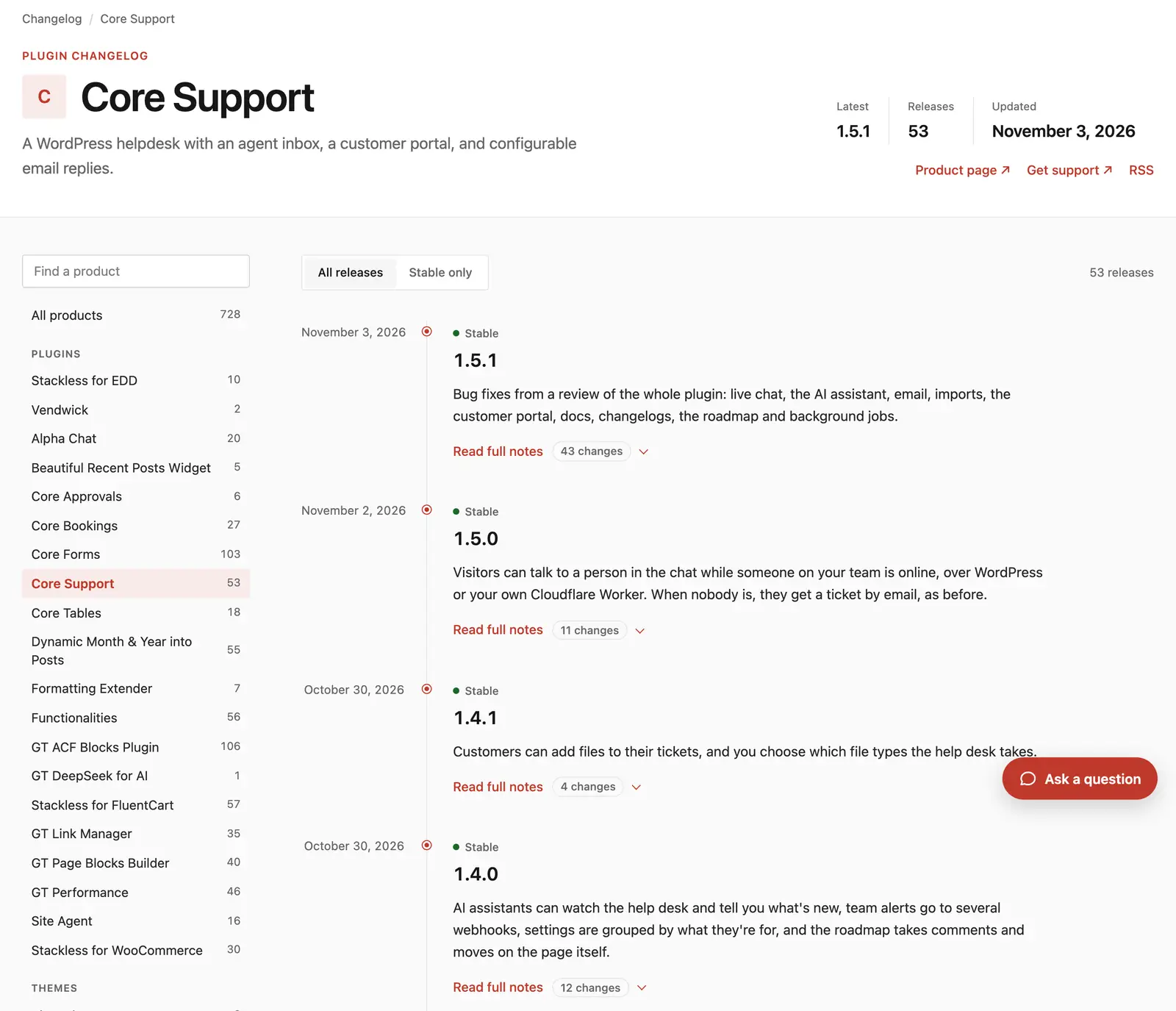
The page also does what a document can’t: it shows the release count, filters stable releases from prereleases and offers an RSS feed customers can follow.
Publishing Release Notes in WordPress
A document is fine for drafting. Customers, though, look for release notes on your website, usually right after an update email or a plugin update notice.
Core Support is the WordPress helpdesk plugin we built, and its Changelogs module publishes the pages shown above. It takes care of the single release format:
- one changelog per product at /changelogs/{product}/, plus every release across products at /changelogs/
- releases written in wp-admin, with a Visual tab of release cards and a plain Text tab that stay in step
- labels such as New, Improved and Fixed that show as colored badges
- automatic sync from GitHub, GitLab, Bitbucket, Gitea, Forgejo, a wordpress.org plugin or any public changelog file, checked on a schedule from every hour to once a week
- the 3 formats plugin developers already write: readme.txt, CHANGELOG.md and a WooCommerce-style changelog.txt
- a link between each changelog and its docs collection
The sync matters most for plugin and app developers. Notes keep living in the readme.txt or CHANGELOG.md that ships with the code, and the public page follows on its own. The guide to automating changelogs from GitHub covers private repositories and failed syncs.
The monthly digest and the breaking change notice still go out by email. The changelog page is where both of them should link.
FAQs on Release Notes
Release notes describe one release for the people who use the product. A changelog is the running record of every release, newest first. In practice, a good changelog page is a collection of release notes.
As short as the change allows. A patch can be 1 or 2 lines. A major release needs the summary and a grouped list, and long technical detail belongs in the docs with one link to it.
Yes, written as the symptom the customer saw. Small fixes can be grouped into one line, such as 7 smaller fixes, with a link to the full changelog.
The developer who made the change usually writes the first draft, because they know exactly what changed. Someone who talks to customers, such as support or product marketing, should then edit it for the customer’s side.
On a changelog page on your own site, in the update email and, for big changes, inside the product. The changelog page is the source the other places link to.
Where to Start
If your notes live only in a readme or a commit log today, we would start with the single release format for your next version. It belongs on a page customers can find. Once that habit holds, the monthly digest is the next format worth adding.
For the emails that go out around a release, our client communication templates have ready-made scripts you can adapt.
Tell Google you want more of this.
Add Gatilab as a preferred sourceOne tap, and this site shows up more often in your own Top Stories, AI Overviews and AI Mode. Remove it any time.