
Vendor Payment Software: What Growing Teams Need
Vendor payments become a software problem when the business can no longer answer three questions quickly: What do we owe, who approved it, and did the money reach the right account? A bank transfer can move funds. It doesn’t create a safe accounts-payable workflow around the transfer.
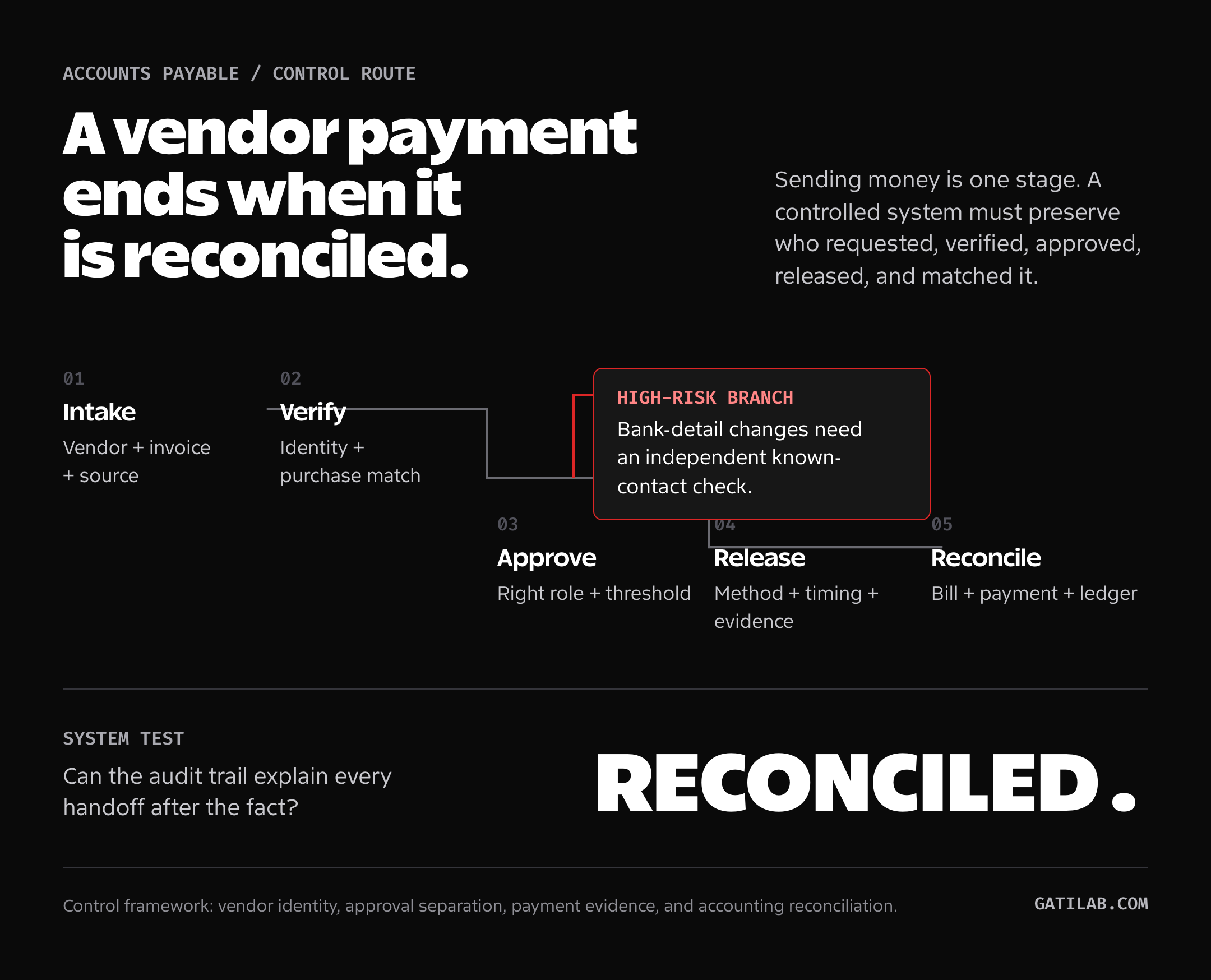
The right vendor payment software connects invoice intake, verification, approval, payment, reconciliation, and an audit trail. If one stage still depends on a private inbox or a spreadsheet only one person understands, the process is not automated. It is hidden.
- Scope: This is a control-based selection framework, not a hands-on ranking of payment platforms.
- Control test: A polished payment screen cannot compensate for weak invoice intake, approval, bank-change verification, or reconciliation.
- Recommendation: Select the system that closes your highest-risk control gap, then compare convenience and interface polish.
What does a controlled vendor payment software workflow include?
Vendor payments stay controlled when each one is traceable from the original invoice to approval, release, and ledger entry.
| Stage | Basic need | Failure to prevent |
|---|---|---|
| Invoice intake | One controlled entry point | Lost invoices and duplicate submissions |
| Verification | Match vendor, amount, terms, and order | Fake or incorrect invoices |
| Approval | Rules by amount, department, and entity | Unauthorized spending |
| Payment | Supported rails, currencies, and schedules | Late, duplicate, or misdirected payments |
| Reconciliation | Match payment to bill and ledger | Manual cleanup and bad cash visibility |
| Audit trail | Immutable history of actions | No evidence of who changed or approved what |
Before comparing products, map this workflow. Otherwise, the demo will persuade you with a polished dashboard while the hard parts remain outside the system.
The IRS recordkeeping guidance gives this a useful minimum: supporting documents should identify the payee, amount, proof of payment, date, and what was purchased. Tax rules vary by country, but that evidence standard is a sensible software test.
When do spreadsheets and bank transfers stop being enough?
Spreadsheets are flexible. Bank transfers are familiar. Neither is automatically wrong.
The system starts failing when:
- More than one person approves spend
- Invoices arrive through several channels
- Vendor bank details change regularly
- The company pays in multiple currencies
- Payments are scheduled across entities
- Month-end reconciliation consumes days
- Duplicate invoices appear
- The owner becomes the approval bottleneck
- Nobody can see committed cash in one place
This is an operations threshold, not a company-size threshold. A five-person agency paying 60 contractors may need stronger controls than a 30-person software company with ten predictable vendors.
The warning signs also show up in your small-business financial KPIs: worsening payables days, unreliable cash forecasts, late fees, unexplained variances, and growing administrative cost.
How should vendor invoice intake work?
Every invoice needs one controlled route.
Useful intake methods include:
- A dedicated accounts-payable address
- A vendor portal
- An upload form
- Structured electronic invoices
- A documented exception path
The software should extract the vendor, invoice number, date, amount, tax, currency, purchase order, and due date. Extraction is not verification. A human or rule still needs to confirm the data against the vendor record and underlying purchase.
Reject a system that makes email forwarding the permanent source of truth. Email can be an input. It should not be the approval database.
Which invoice-approval rules matter?
A single approval button isn’t enough. Look for:
- Amount thresholds
- Department or project ownership
- Entity-specific rules
- Budget checks
- Purchase-order matching
- Sequential and parallel approvals
- Delegation during leave
- Separation between creator and approver
- Escalation for overdue decisions
The goal is not more approval. It is the right approval.
A ₹5,000 recurring software bill and a ₹500,000 first payment to a new international vendor should not follow the same path.
How should vendor bank-detail changes be verified?
Changing bank details is one of the highest-risk moments in the workflow. An attacker doesn’t need to compromise the payment system if they can convince someone to replace the destination account.
The FBI’s business email compromise guidance uses a fake vendor invoice with updated payment details as a core example. Its practical advice is to verify the request through a company number you find independently, not a number supplied in the message.
Require:
- Role-based permission to edit vendor records
- A second approval for bank-detail changes
- A visible change history
- Out-of-band verification using known contact details
- A cooling-off or review period for high-risk changes
- Alerts to finance owners
Do not verify a change by replying to the same email that requested it. Use a known phone number, secure portal, or previously established contact.
What should you check for domestic and international payments?
The right payment rail depends on country, currency, speed, fee, and traceability.
Check whether the platform supports:
- Local bank transfers
- Scheduled transfers
- Batch payments
- International wires
- Currency conversion
- Vendor-paid or sender-paid fees
- Payment-status tracking
- Remittance advice
- Failed-payment handling
- Refunds and reversals
Don’t accept “international payments supported” as a complete answer. Ask which countries, currencies, entities, and vendor types are supported, then verify the total fee and settlement path.
Keeping a second payment processor can also reduce operational dependence. Our guide to PayPal alternatives for business explains why one processor is a fragile system, even when it works well today.
What should an accounting integration preserve?
The platform should send clean, traceable records to the ledger.
Verify:
- Vendor mapping
- Chart-of-accounts mapping
- Tax treatment
- Department, project, and class fields
- Multi-entity support
- Currency and exchange-rate handling
- Payment fees
- Credit notes
- Partial payments
- Sync conflict handling
Ask what happens when someone changes a bill after approval. A silent overwrite creates a control gap.
Which finance permissions should vendor-payment software support?
Shared finance logins are a shortcut that becomes expensive.
Look for distinct roles:
- Invoice submitter
- Reviewer
- Approver
- Payment preparer
- Payment releaser
- Administrator
- Auditor or read-only reviewer
Small teams can combine some roles, but the software should not force them into one identity. Good agency operations depend on clear ownership and repeatable handoffs, not memory.
How is vendor-payment software priced?
Common models include:
- Monthly platform fee
- Per-user fee
- Per-transaction fee
- Percentage of payment value
- Foreign-exchange spread
- Add-on fees for approvals, entities, or integrations
- Premium support
Compare total annual cost using your real payment mix.
| Cost input | Your number |
|---|---|
| Active finance users | |
| Monthly invoices | |
| Monthly domestic payments | |
| Monthly international payments | |
| Average international value | |
| Required entities | |
| Required integrations | |
| Estimated admin hours saved |
Avoid claiming time savings before you map the current process. Automation can remove data entry while adding exception handling and review work.
How do you score vendor-payment software?
Score each requirement from 0 to 3:
- 0: not supported
- 1: manual workaround
- 2: supported with limitations
- 3: supported cleanly
Evaluate:
- Invoice intake
- Duplicate detection
- Purchase-order or contract matching
- Approval flexibility
- Bank-detail change controls
- Domestic payment coverage
- International payment coverage
- Accounting integration
- Role permissions
- Audit trail
- Reconciliation
- Export and data portability
- Support and incident response
- Total cost
Weight fraud controls, accounting fit, and payment coverage more heavily than interface polish.
How do you implement vendor-payment software safely?
Before switching:
- Clean the vendor master record.
- Remove duplicate and inactive vendors.
- Verify tax and banking information.
- Define approval thresholds.
- Assign roles.
- Document bank-change verification.
- Connect the accounting test environment.
- Run a small payment batch.
- Reconcile the batch.
- Test a failed payment and a changed invoice.
- Train vendors on the new intake route.
- Keep a rollback path for the first cycle.
This is the same principle I use for any operational system: the happy path is only half the work. Test the exceptions before the month-end deadline finds them for you.
FAQs
These answers cover the boundary between a payment tool and a controlled payables process.
What is vendor payment software?
Vendor payment software manages the process around paying suppliers: invoice capture, verification, approval, payment, reconciliation, permissions, and audit history.
Is vendor payment software the same as accounting software?
No. Accounting software records financial transactions. Vendor-payment or accounts-payable software manages the operational workflow and then syncs approved bills and payments to the ledger.
When does a small business need it?
Consider it when invoices arrive through several channels, multiple people approve spend, payment errors grow, international vendors add complexity, or reconciliation consumes too much time.
What is the most important security feature?
No single feature is enough. Prioritize role-based access, separation of duties, second approval for bank-detail changes, out-of-band verification, and a complete audit trail.
Should payment approval happen inside email?
Email notifications are useful, but the approval decision should be recorded in a controlled system with the invoice, policy, approver identity, timestamp, and change history.
Tell Google you want more of this.
Add Gatilab as a preferred sourceOne tap, and this site shows up more often in your own Top Stories, AI Overviews and AI Mode. Remove it any time.