
Newsletter Templates: 5 Free Formats to Copy and Send
Newsletter templates save you from staring at a blank email every month, but most of them are designs, and a good-looking layout doesn’t tell you what to put in it. So if you send a newsletter, or you’re about to start one, this guide gives you five formats you can copy, each laid out section by section with a subject line to start from.
Setting up newsletters for businesses is part of our work at Gatilab.
Every audience is different, so no single template fits every newsletter. But most newsletters do one of five jobs, and each job has a format that suits it, which is how this guide is laid out.
All five formats are also in a free template pack, in Word and PDF, and the Word file opens in Google Docs too. If you’d rather have us set the whole newsletter up, we are happy to help. First, the parts every newsletter needs.
The Parts of a Good Newsletter
Whatever the format, a newsletter that gets opened and read has the same seven parts:
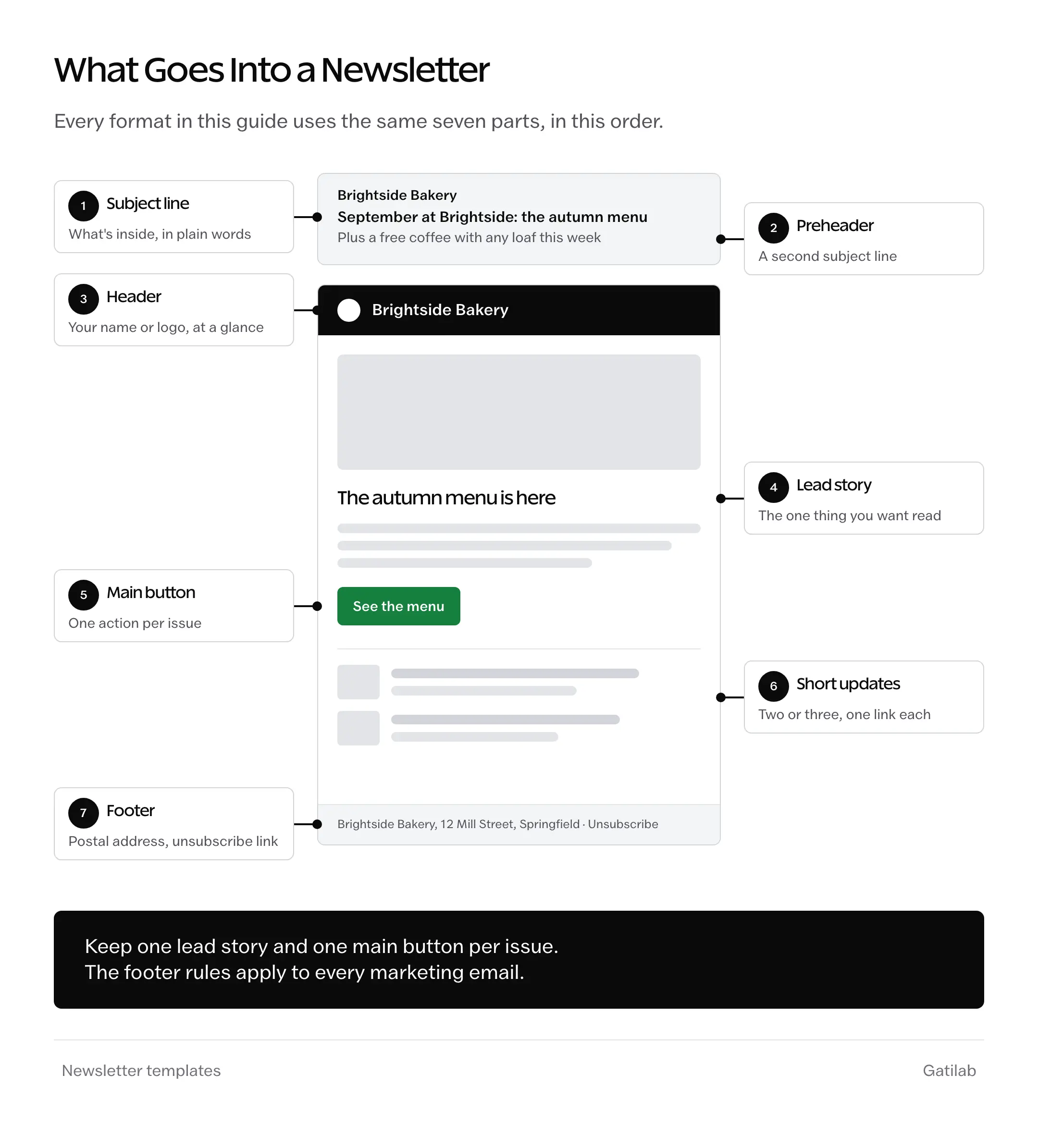
- Subject line: says what’s inside, in plain words. For marketing email, US law also requires it to match the content.
- Preheader: the short preview line after the subject line in the inbox, which works as a second subject line.
- Header: your name or logo, so readers recognize the sender at a glance.
- Lead story: the one thing you most want read, near the top.
- Main button: a single call to action for the one thing you want readers to do.
- Short updates: two or three smaller items, each with one link.
- Footer: your postal address and a clear way to unsubscribe, both required for marketing email under the US CAN-SPAM Act.
In this order, the whole issue can be read in a couple of minutes on a phone, which is where plenty of your readers will open it.
Five Newsletter Templates to Copy
Each template below is a structure, not a design. Copy it into your email tool or the Word file and replace the brackets. Anything you don’t need can go.
Monthly Customer Newsletter
This is the format for a small business that wants past customers to come back and remember the name. It works best once a month, with one clear offer or piece of news.
Subject: [Month] at [Business]: [the one thing worth opening for]
Preheader: [One line that adds to the subject, not repeats it]

Hi [First name],

[One or two sentences on what is new this month.]

LEAD STORY
[Headline]
[Three to five sentences on the main news, offer or tip.]
[Button: the one action you want]

QUICK UPDATES
- [Update one, with a link]
- [Update two, with a link]

TIP OF THE MONTH
[One practical tip your customers can use today.]

[Sign-off from a named person]

[Business name, postal address]
[Unsubscribe link]
The tip is what keeps people opening next month, since it gives them something useful even when there’s nothing to buy.
Company Newsletter
This one keeps a team informed across departments or offices, which is why it’s also called an employee or internal newsletter. It works best when it’s short and goes out on the same day every time.
Subject: [Company] update, October 25, 2026: [the headline in a few words]
Preheader: [What people need to know or do this week]

[A short note from a leader: what happened and why it matters.]

WINS
- [A team result, with the people who made it happen]
- [A customer win or milestone]

PEOPLE
- [New joiners, with their roles]
- [Work anniversaries and promotions]

COMING UP
- [Dates, deadlines and events]

ONE ASK
[The single thing you need people to do, with a deadline.]

[Who to contact with questions]
The one ask is the part people act on, so it is worth keeping to one per issue.
Product Update Newsletter
This format suits software companies and online stores announcing what’s new. It works when every item answers the reader’s real question, which is what the change lets them do.
Subject: New in [Product]: [the biggest change in plain words]
Preheader: [One more change, or who it helps most]

[One sentence on what this release is about.]

MAIN UPDATE
[Headline that names the benefit]
[What it does, who it is for and how to use it.]
[Screenshot or short GIF]
[Button: Try it now]

ALSO NEW
- [Smaller change, one line]
- [Smaller change, one line]

FROM A CUSTOMER
[One line on how a customer uses a recent feature.]

[Link to the full changelog]
[Company name, postal address, unsubscribe link]
Naming the benefit instead of the feature is what gets the click, because readers scan for what changes for them.
Curated Newsletter
This is for creators and agencies who share the best of what they read. The value is in the commentary, so each link needs a line on why it matters.
Subject: [Issue number]: [the most interesting thing in this issue]
Preheader: [A second item, or the question this issue answers]

[A short opening: one opinion or observation from this week.]

THE MAIN READ
[Link title]
[Two or three sentences on why it matters and what you think.]

WORTH A LOOK
- [Link, with a one-line take]
- [Link, with a one-line take]
- [Link, with a one-line take]

ONE QUESTION
[Ask readers something they can answer by replying.]

[Your name, postal address, unsubscribe link]
The reply question turns a broadcast into a conversation, and the answers are often the best ideas for the next issue.
Event and Local Newsletter
This one is for local businesses and organizations with a calendar to fill. Readers open it to find out what’s on, so the dates come first.
Subject: What's on at [Place] this October
Preheader: [The biggest date, and how to book]

COMING UP
- [Date]: [Event], [one line], [booking or RSVP link]
- [Date]: [Event], [one line], [booking or RSVP link]
- [Date]: [Event], [one line], [booking or RSVP link]

THIS MONTH'S OFFER
[One seasonal offer, with its end date.]

FROM THE COMMUNITY
[A photo or short story from a recent event.]

[Opening hours, address and a map link]
[Unsubscribe link]
Putting the dates first matches why people open it, and a booking link beside each date turns reading into signing up.
Which Newsletter Format to Use
The format follows the job the newsletter does, and so does the schedule:
| Format | Best For | How Often | What to Watch |
|---|---|---|---|
| Monthly customer newsletter | Small businesses with repeat customers | Monthly | Clicks on the offer or the tip |
| Company newsletter | Teams and internal updates | Weekly or monthly | Whether people act on the one ask |
| Product update newsletter | Software companies and online stores | With each release, or monthly | Clicks through to the new feature |
| Curated newsletter | Creators, consultants and agencies | Weekly | Opens and replies |
| Event and local newsletter | Local businesses and organizations | Monthly or each season | Bookings and RSVPs |
How often you send matters less than keeping to it. A monthly newsletter that arrives every month builds more trust than a weekly one that keeps skipping weeks.
Where to Build Your Newsletter
The template is the content, and the tool is where you design and send it:
- Email marketing tools. MailerLite and Kit come with drag-and-drop email newsletter templates, and they add the unsubscribe link and footer for you.
- Newsletter platforms. Beehiiv and Substack suit newsletters that are the product, with a web archive and paid subscriptions. Ghost does the same on open-source software you can also host yourself.
- Design tools. Canva and Microsoft Word work well for printed or PDF newsletters, like a community newsletter handed out in person.
- Google Docs. It works for internal newsletters shared as a document, and the Word file in the template pack opens in it directly.
Our comparison of the best newsletter platforms goes through the options by business model.
Before You Hit Send
A few minutes of checking saves an embarrassing correction email:
- the subject line matches what’s inside
- the preheader is written, not left to show the first line of the email
- every link works, including the main button
- images have alt text, since some inboxes block images by default
- a plain-text version exists, which most email tools generate for you
- the footer has your postal address and an unsubscribe link
- a test email went to yourself on a phone and on a computer
In the US, the CAN-SPAM Act also requires marketing email to honor unsubscribe requests within 10 business days. Sending to large lists adds more rules, since Gmail asks anyone sending 5,000 or more messages a day to personal Gmail accounts to:
- set up SPF and DKIM for their sending domain, and publish a DMARC record
- offer one-click unsubscribe in marketing email
- keep the spam rate reported in Postmaster Tools below 0.1%, and never let it reach 0.3%
Our guide to email deliverability covers the setup behind those rules.
Newsletter Ideas for When You’re Stuck
A newsletter runs out of steam when the lead story is hard to find. These ideas work in almost any of the formats above:
- a question a customer asked this month, answered properly
- how you make or deliver something, from behind the scenes
- a mistake customers often make, and how to avoid it
- a short story of one customer’s result
- a seasonal checklist
- three tools or resources you found useful this month
- a straight answer to a common myth in your industry
- a preview of what’s coming next
The best ideas generally come from your inbox and your support queue, because those are the questions readers already have.
Free Newsletter Templates Pack (PDF and Word)
All five formats with subject lines and preheaders, plus the planning pages that keep a newsletter going.
- Monthly customer, company, product update, curated and event newsletter templates
- A subject line and preheader worksheet
- A 12-issue planning calendar
- A pre-send checklist covering links, alt text and the footer rules
- A Word file that also opens in Google Docs
Free to use for your own newsletter or your clients’.
The Limits
A template gives you structure, not a reason to subscribe. If the content isn’t useful, no format will hold readers for long.
These are content templates rather than finished designs, so the look still comes from your email tool or design software.
And nothing here is legal advice. Email rules differ by country, and the EU and the UK, for example, generally require consent before you send someone marketing email.
Mistakes That Get Newsletters Ignored
Putting five calls to action in one email. Readers can only do one thing at a time, and too many choices usually means they do none of them.
Leaving the preheader blank. The inbox fills it with the first text in the email, which is often something like View in browser.
Sending whenever there’s time. Readers forget a newsletter that arrives at random, and unsubscribes tend to rise when it finally shows up.
Writing every issue like an ad. A newsletter that only sells teaches readers to skip it.
Buying or borrowing an email list. It breaks consent rules in many countries and damages your sender reputation quickly.
Sending from a no-reply address. It tells readers you don’t want to hear from them, and replies are where the best feedback comes from.
FAQs on Newsletter Templates
Is there a newsletter template in Word?
Yes. Word includes newsletter designs you can find by searching for newsletter under File, then New, and the free template pack in this guide has all five formats as a Word file you can edit.
Can I make a newsletter in Google Docs?
Yes. Google Docs has newsletter designs in its template gallery, and the Word file in this guide opens in Google Docs directly, so you can edit it there.
What is the best format for a newsletter?
A single-column email about 600 pixels wide, built around one lead story and one main button. That layout reads well on a phone and in almost any inbox.
How long should a newsletter be?
Long enough to deliver the one thing readers opened it for. Most business newsletters work well at a few hundred words, while curated newsletters can run longer because readers scan the links.
How often should I send a newsletter?
As often as you can keep it useful. Monthly suits most small businesses and weekly suits curated newsletters, but keeping to the schedule matters more than the frequency itself.
Are newsletters still worth sending?
Yes, because email reaches people directly without depending on a social platform or a search ranking, and the list belongs to you.
What should a newsletter footer include?
A valid postal address and a clear way to unsubscribe, both of which US law requires for marketing email. It is also the place for your business name and a line on why the reader is getting the email.
Final Remarks
If you’ve picked a format, you have everything the next issue needs, down to a subject line to start from. The one idea to keep is that the structure matters less than sending something useful on the same schedule, issue after issue.
The template pack above has all five formats, along with the planning pages that keep a newsletter going. If you’d rather have us set up the platform and the sign-up forms for you, our newsletter setup team can do it.
I hope your next issue is the one people forward to a friend.
Tell Google you want more of this.
Add Gatilab as a preferred sourceOne tap, and this site shows up more often in your own Top Stories, AI Overviews and AI Mode. Remove it any time.